Page 469 of 496
Do Not Disturb
With Do Not Disturb, you can disable notifications from
incoming calls and texts, allowing you to keep your eyes
on the road and hands on the wheel. For your convenience,
there is a counter display to keep track of your missed calls
and text messages while you were using Do Not Disturb.
Do Not Disturb can automatically reply with a text mes-
sage, a call or both, when declining an incoming call and
send it to voicemail.
Automatic reply messages can be:
•“I am driving right now, I will get back to you shortly.”
• Create a custom auto reply message up to 160 characters.
NOTE: Only the first 25 characters can be seen on the
touchscreen while typing a custom message.
While in Do Not Disturb, Conference Call can be selected
so you can still place a second call without being inter-
rupted by incoming calls.
NOTE:
• Reply with text message is not compatible with iPhones.
• Auto reply with text message is only available on
phones that support Bluetooth MAP.
Android Auto — If Equipped
NOTE: Feature availability depends on your carrier and
mobile phone manufacturer. Some Android Auto features
may or may not be available in every region and/or
language.
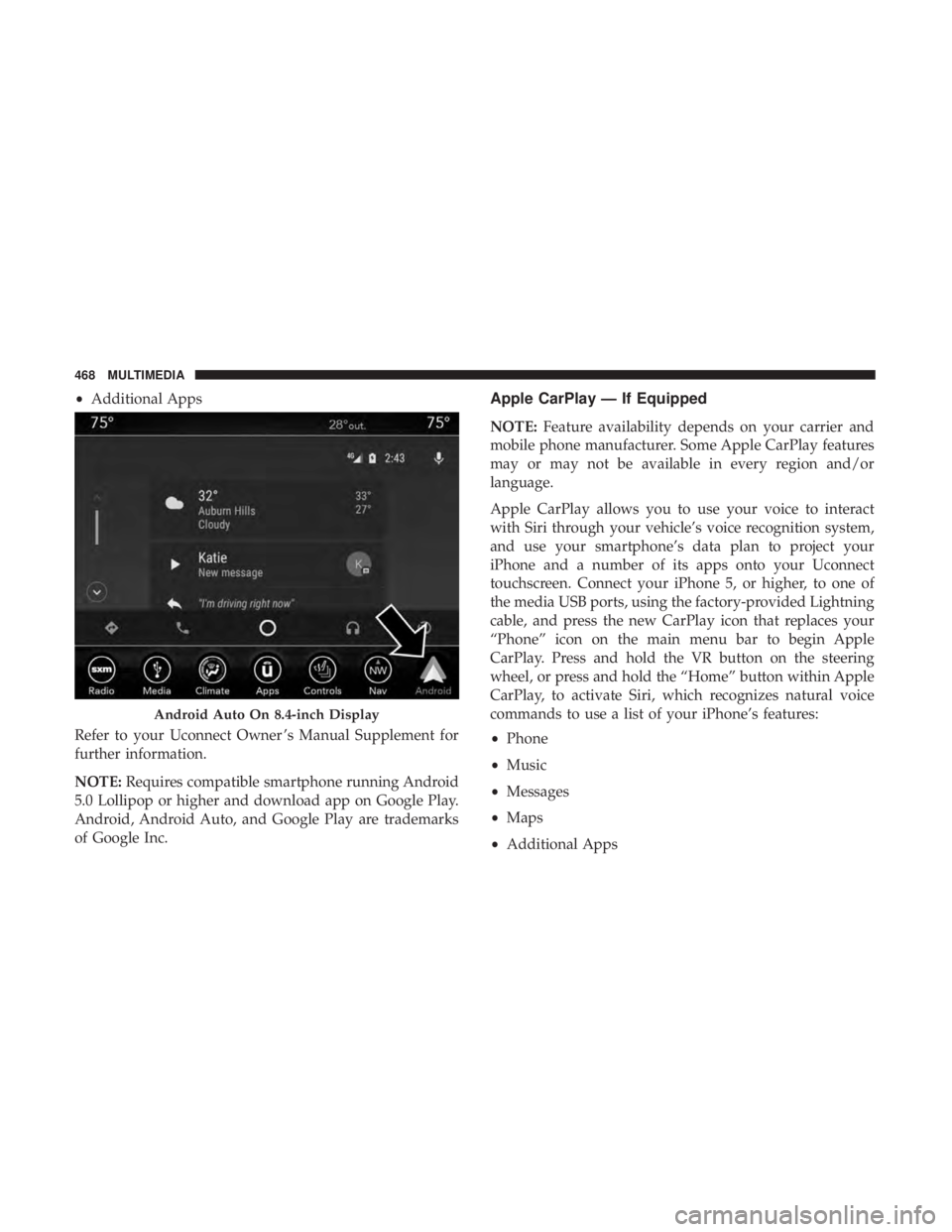
Android Auto allows you to use your voice to interact with
Android’s best-in-class speech technology through your
vehicle’s voice recognition system, and use your smart-
phone’s data plan to project your Android powered smart-
phone and a number of its apps onto your Uconnect
touchscreen. Connect your Android 5.0 (Lollipop), or
higher, to one of the media USB ports, using the factory-
provided USB cable, and press the new Android Auto icon
that replaces your “Phone” icon on the main menu bar to
begin Android Auto. Push and hold the VR button on the
steering wheel, or press and hold the “Microphone” icon
within Android Auto, to activate Android’s VR, which
recognizes natural voice commands, to use a list of your
smartphone’s features:
• Maps
• Music
• Phone
• Text Messages
10
MULTIMEDIA 467
Page 470 of 496
•Additional Apps
Refer to your Uconnect Owner ’s Manual Supplement for
further information.
NOTE: Requires compatible smartphone running Android
5.0 Lollipop or higher and download app on Google Play.
Android, Android Auto, and Google Play are trademarks
of Google Inc.Apple CarPlay — If Equipped
NOTE: Feature availability depends on your carrier and
mobile phone manufacturer. Some Apple CarPlay features
may or may not be available in every region and/or
language.
Apple CarPlay allows you to use your voice to interact
with Siri through your vehicle’s voice recognition system,
and use your smartphone’s data plan to project your
iPhone and a number of its apps onto your Uconnect
touchscreen. Connect your iPhone 5, or higher, to one of
the media USB ports, using the factory-provided Lightning
cable, and press the new CarPlay icon that replaces your
“Phone” icon on the main menu bar to begin Apple
CarPlay. Press and hold the VR button on the steering
wheel, or press and hold the “Home” button within Apple
CarPlay, to activate Siri, which recognizes natural voice
commands to use a list of your iPhone’s features:
• Phone
• Music
• Messages
• Maps
• Additional Apps
Android Auto On 8.4-inch Display
468 MULTIMEDIA
Page 482 of 496
Caps, FillerOil (Engine) ........................ .333, 337
Power Steering ......................... .235
Radiator (Coolant Pressure) .................351
Carbon Monoxide Warning ................204, 392
Cargo Vehicle Loading ......................... .275
Cargo Area Cover ...........................91
Cargo Compartment .........................91
Car Washes .............................. .380
Cellular Phone ........................... .454
Certification Label ......................... .276
Chains, Tire ............................. .376
Changing A Flat Tire ....................... .356
Charging Wireless .............................. .105
Chart, Tire Sizing .......................... .357
Check Engine Light (Malfunction Indicator Light). . . .135
Checking Your Vehicle For Safety ...............204
Checks, Safety ............................ .204
Child Restraint ........................... .189
Child Restraints Booster Seats ........................... .192
Child Seat Installation .....................200
How To Stow An unused ALR Seat Belt ........198Infant And Child Restraints
.................191
Lower Anchors And Tethers For Children .......194
Older Children And Child Restraints ...........191
Seating Positions ........................ .193
Child Safety Locks ..........................42
Clean Air Gasoline ........................ .389
Cleaning Wheels ............................... .375
Climate Control ............................73
Automatic ..............................74
Coin Holder ...............................99
Cold Weather Operation ..................... .216
Compact Spare Tire ........................ .373
Console Floor ..................................99
Contract, Service .......................... .474
Cooling
Pressure Cap (Radiator Cap) ............351
Cooling System ........................... .348
Adding Coolant (Antifreeze) .................349
Coolant Level ....................... .348, 351
Cooling Capacity ........................ .392
Disposal Of Used Coolant ..................351
Drain, Flush, And Refill ....................348
Inspection ............................. .351
Points To Remember ..................... .352
480 INDEX
Page 492 of 496
Button.................................27
Cold Weather .......................... .216
Engine Fails To Start ..................... .216
Starting And Operating ...................212, 213
Starting Procedures ..................... .212, 213
Steering ..................................57
Power ............................... .235
Tilt Column .............................57
Wheel, Heated ...........................58
Wheel, Tilt ..............................57
Steering Wheel Audio Controls .................453
Steering Wheel Mounted Sound System Controls . . . .453
Storage .............................. .99, 378
Storage, Vehicle ........................ .81, 378
Storing Your Vehicle ....................... .378
Stuck, Freeing ............................ .323
Sunglasses Storage ......................... .106
Sun Roof .............................. .85, 87
Supplemental Restraint System – Air Bag ..........178
Telescoping Steering Column ...................57
Temperature Control, Automatic (ATC) ............79
Tilt Steering Column .........................57
Time Delay Headlight ...............................66 Tire And Loading Information Placard
............361
Tire Markings ............................ .356
Tires......................... .207, 365, 372, 377
Aging (Life Of Tires) ..................... .369
Air Pressure ........................... .365
Chains ............................... .376
Changing ............................. .356
Compact Spare ......................... .373
General Information ...................365, 372
High Speed ............................ .367
Inflation Pressure ....................... .366
Jacking ............................... .356
Life Of Tires ........................... .369
Load Capacity ...................... .361, 362
Pressure Monitoring System (TPMS) ........128,
158
Quality Grading ........................ .377
Radial ............................... .367
Replacement ........................... .370
Rotation .............................. .376
Safety ............................ .356, 365
Sizes ................................ .357
Snow Tires ............................ .372
Spare Tires ......................... .372, 374
Spinning .............................. .368
Tread Wear Indicators .....................368
490 INDEX