Page 339 of 500
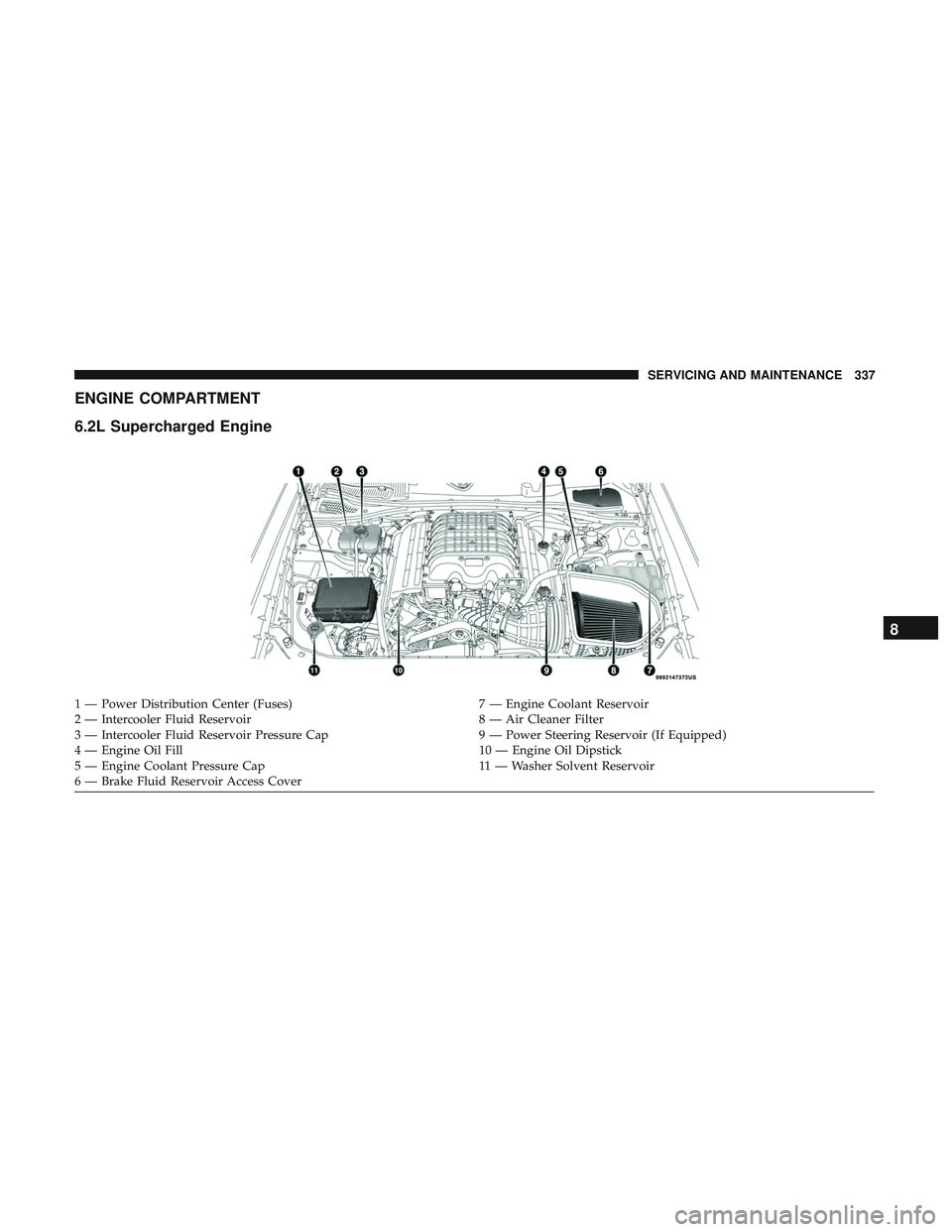
ENGINE COMPARTMENT
6.2L Supercharged Engine
1 — Power Distribution Center (Fuses)7 — Engine Coolant Reservoir
2 — Intercooler Fluid Reservoir 8 — Air Cleaner Filter
3 — Intercooler Fluid Reservoir Pressure Cap 9 — Power Steering Reservoir (If Equipped)
4 — Engine Oil Fill 10 — Engine Oil Dipstick
5 — Engine Coolant Pressure Cap 11 — Washer Solvent Reservoir
6 — Brake Fluid Reservoir Access Cover
8
SERVICING AND MAINTENANCE 337
Page 402 of 500
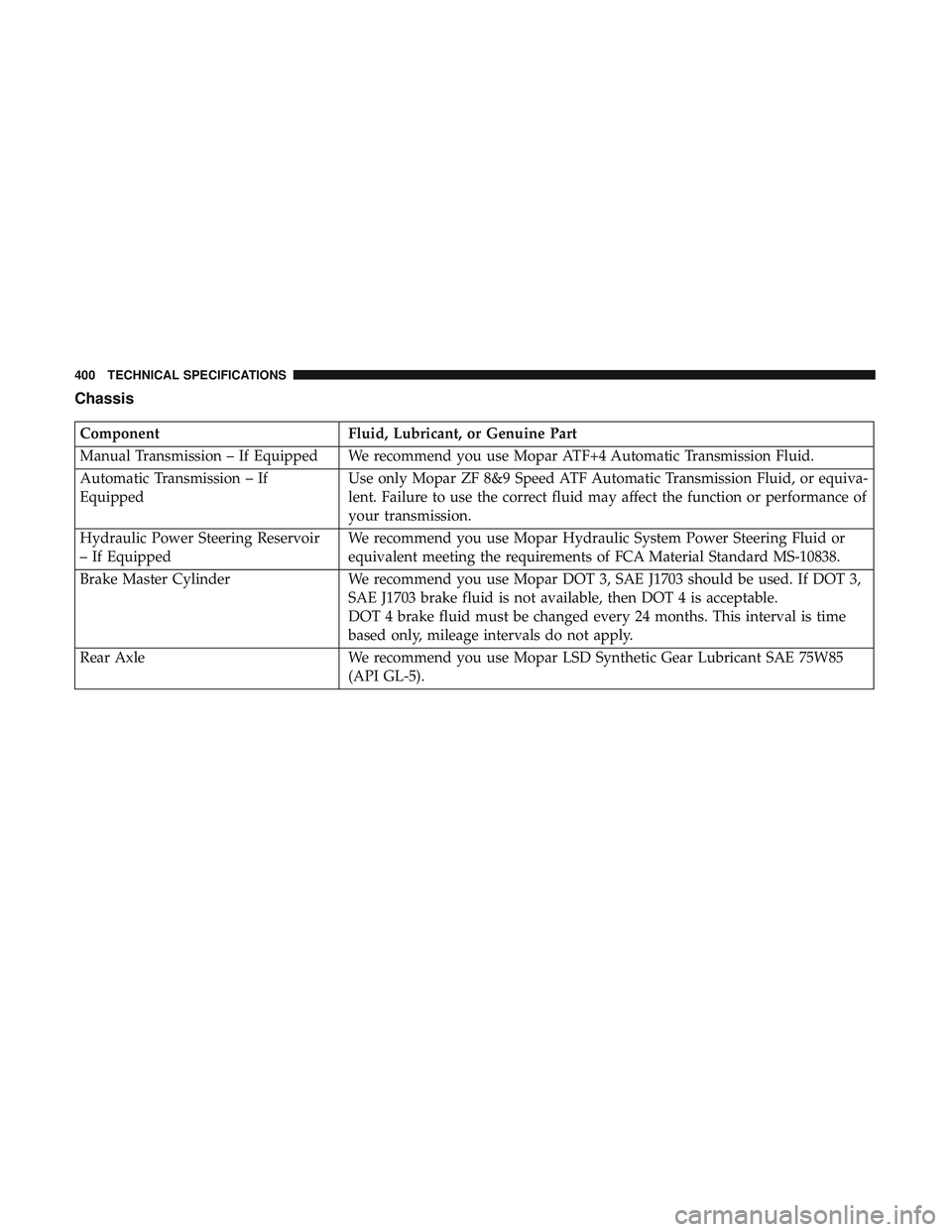
Chassis
ComponentFluid, Lubricant, or Genuine Part
Manual Transmission – If Equipped We recommend you use Mopar ATF+4 Automatic Transmission Fluid.
Automatic Transmission – If
Equipped Use only Mopar ZF 8&9 Speed ATF Automatic Transmission Fluid, or equiva-
lent. Failure to use the correct fluid may affect the function or performance of
your transmission.
Hydraulic Power Steering Reservoir
– If Equipped We recommend you use Mopar Hydraulic System Power Steering Fluid or
equivalent meeting the requirements of FCA Material Standard MS-10838.
Brake Master Cylinder We recommend you use Mopar DOT 3, SAE J1703 should be used. If DOT 3,
SAE J1703 brake fluid is not available, then DOT 4 is acceptable.
DOT 4 brake fluid must be changed every 24 months. This interval is time
based only, mileage intervals do not apply.
Rear Axle We recommend you use Mopar LSD Synthetic Gear Lubricant SAE 75W85
(API GL-5).
400 TECHNICAL SPECIFICATIONS
Page 415 of 500
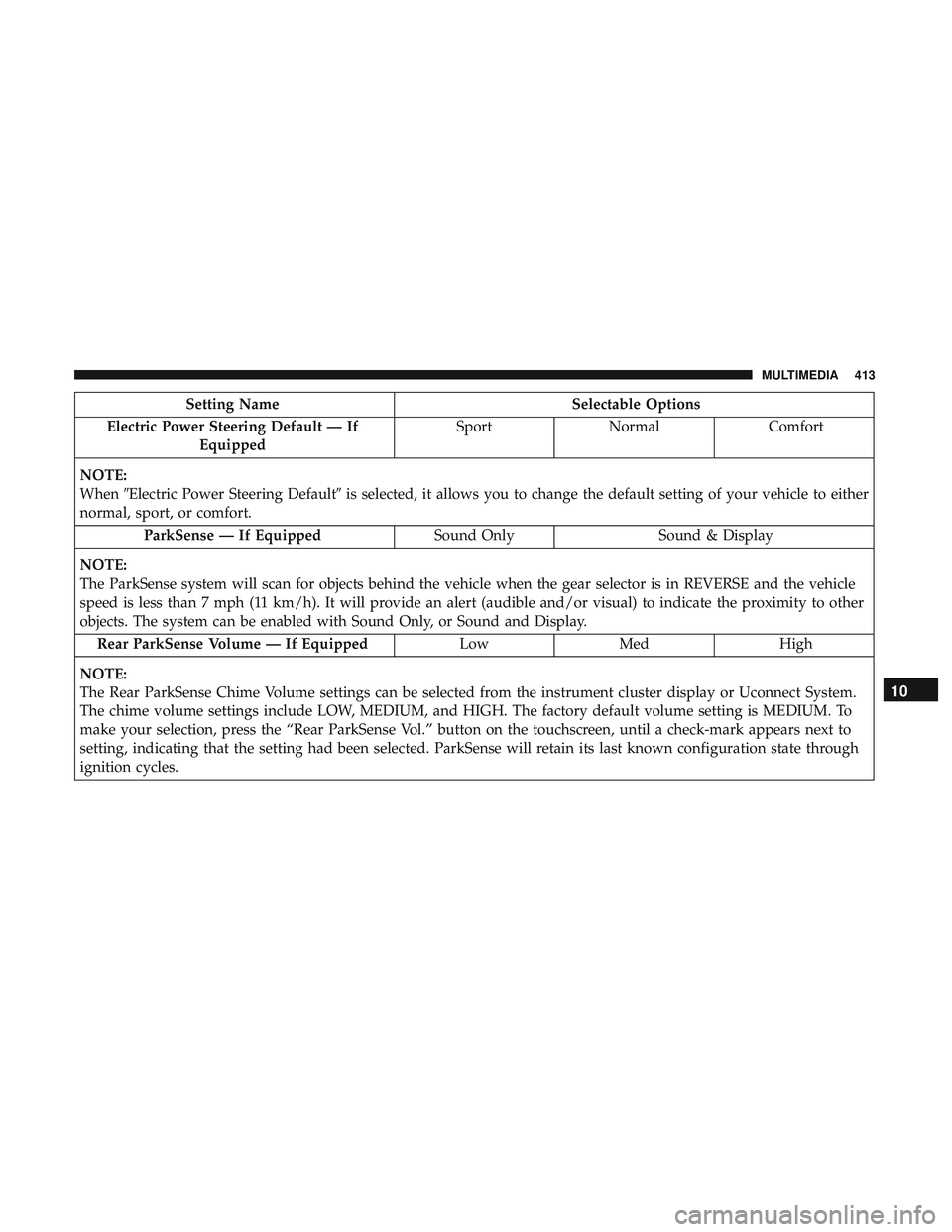
Setting NameSelectable Options
Electric Power Steering Default — If Equipped Sport
Normal Comfort
NOTE:
When �Electric Power Steering Default� is selected, it allows you to change the default setting of your vehicle to either
normal, sport, or comfort.
ParkSense — If Equipped Sound OnlySound & Display
NOTE:
The ParkSense system will scan for objects behind the vehicle when the gear selector is in REVERSE and the vehicle
speed is less than 7 mph (11 km/h). It will provide an alert (audible and/or visual) to indicate the proximity to other
objects. The system can be enabled with Sound Only, or Sound and Display. Rear ParkSense Volume — If Equipped LowMed High
NOTE:
The Rear ParkSense Chime Volume settings can be selected from the instrument cluster display or Uconnect System.
The chime volume settings include LOW, MEDIUM, and HIGH. The factory default volume setting is MEDIUM. To
make your selection, press the “Rear ParkSense Vol.” button on the touchscreen, until a check-mark appears next to
setting, indicating that the setting had been selected. ParkSense will retain its last known configuration state through
ignition cycles.
10
MULTIMEDIA 413
Page 420 of 500

Setting NameSelectable Options
Personal Settings Linked To Key Fob — If Equipped On
Off
NOTE:
•This feature provides automatic recall of all settings stored to a memory location (driver ’s seat, exterior mirrors,
power steering column position and radio station pre-sets) to enhance driver mobility when entering and exiting
the vehicle.
•The seat returns to the memorized seat location (if Personal Settings Linked to Key Fob is set to on) when the key
fob is used to unlock the door.
Auto Comfort Systems — If Equipped
After pressing the “Auto-On Comfort” button on the touchscreen, the following settings will be available:
Setting Name Selectable Options
Auto-On Driver Heated/ Vented Seat & Steering Wheel Off
Remote Start All Starts
NOTE:
When this feature is selected the driver’s heated seat and heated steering wheel will automatically turn on when tem-
peratures are below 40° F (4.4° C). When temperatures are above 80° F (26.7° C) the driver vented seat will turn on.
418 MULTIMEDIA
Page 429 of 500
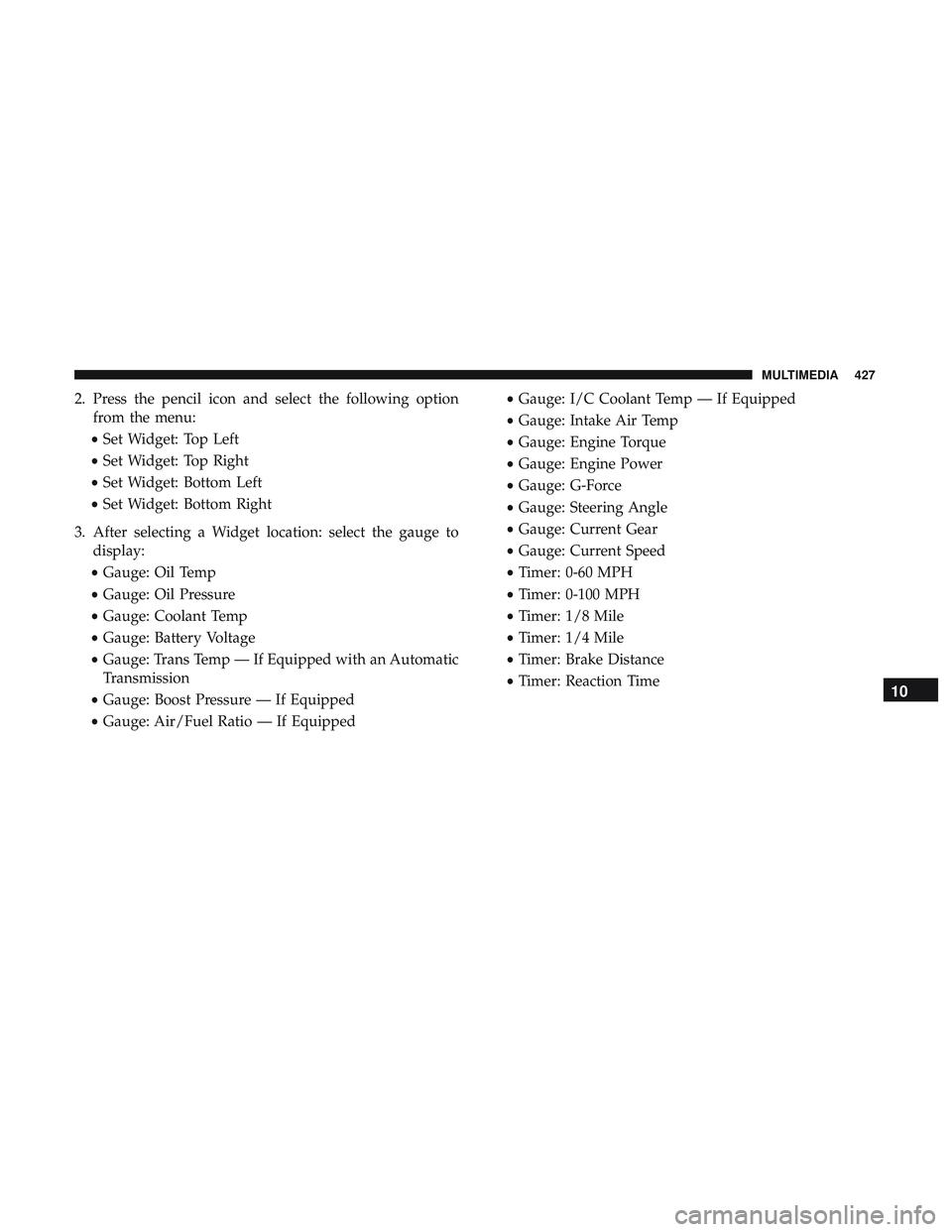
2. Press the pencil icon and select the following optionfrom the menu:
• Set Widget: Top Left
• Set Widget: Top Right
• Set Widget: Bottom Left
• Set Widget: Bottom Right
3. After selecting a Widget location: select the gauge to display:
• Gauge: Oil Temp
• Gauge: Oil Pressure
• Gauge: Coolant Temp
• Gauge: Battery Voltage
• Gauge: Trans Temp — If Equipped with an Automatic
Transmission
• Gauge: Boost Pressure — If Equipped
• Gauge: Air/Fuel Ratio — If Equipped •
Gauge: I/C Coolant Temp — If Equipped
• Gauge: Intake Air Temp
• Gauge: Engine Torque
• Gauge: Engine Power
• Gauge: G-Force
• Gauge: Steering Angle
• Gauge: Current Gear
• Gauge: Current Speed
• Timer: 0-60 MPH
• Timer: 0-100 MPH
• Timer: 1/8 Mile
• Timer: 1/4 Mile
• Timer: Brake Distance
• Timer: Reaction Time
10
MULTIMEDIA 427
Page 443 of 500
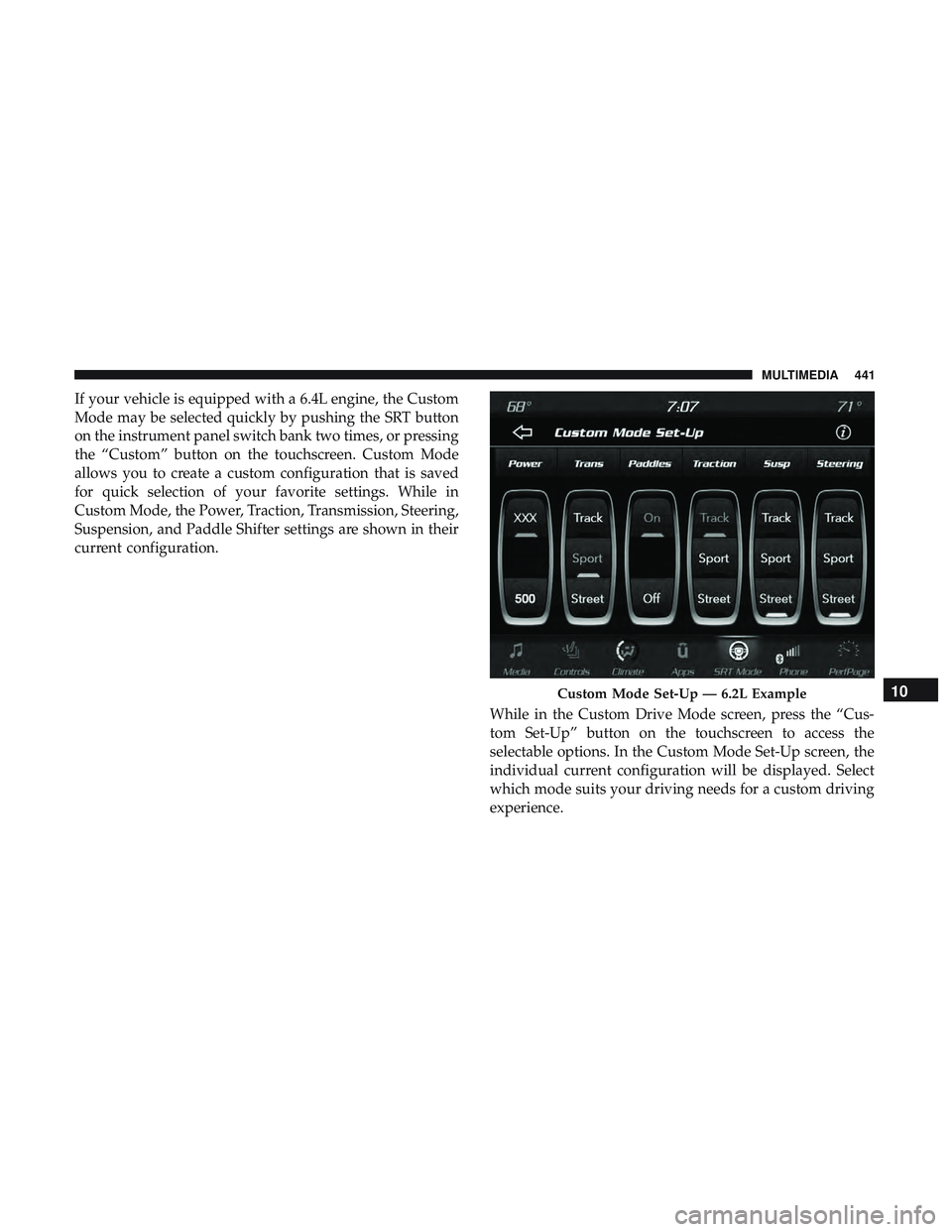
If your vehicle is equipped with a 6.4L engine, the Custom
Mode may be selected quickly by pushing the SRT button
on the instrument panel switch bank two times, or pressing
the “Custom” button on the touchscreen. Custom Mode
allows you to create a custom configuration that is saved
for quick selection of your favorite settings. While in
Custom Mode, the Power, Traction, Transmission, Steering,
Suspension, and Paddle Shifter settings are shown in their
current configuration.While in the Custom Drive Mode screen, press the “Cus-
tom Set-Up” button on the touchscreen to access the
selectable options. In the Custom Mode Set-Up screen, the
individual current configuration will be displayed. Select
which mode suits your driving needs for a custom driving
experience.
Custom Mode Set-Up — 6.2L Example10
MULTIMEDIA 441
Page 455 of 500
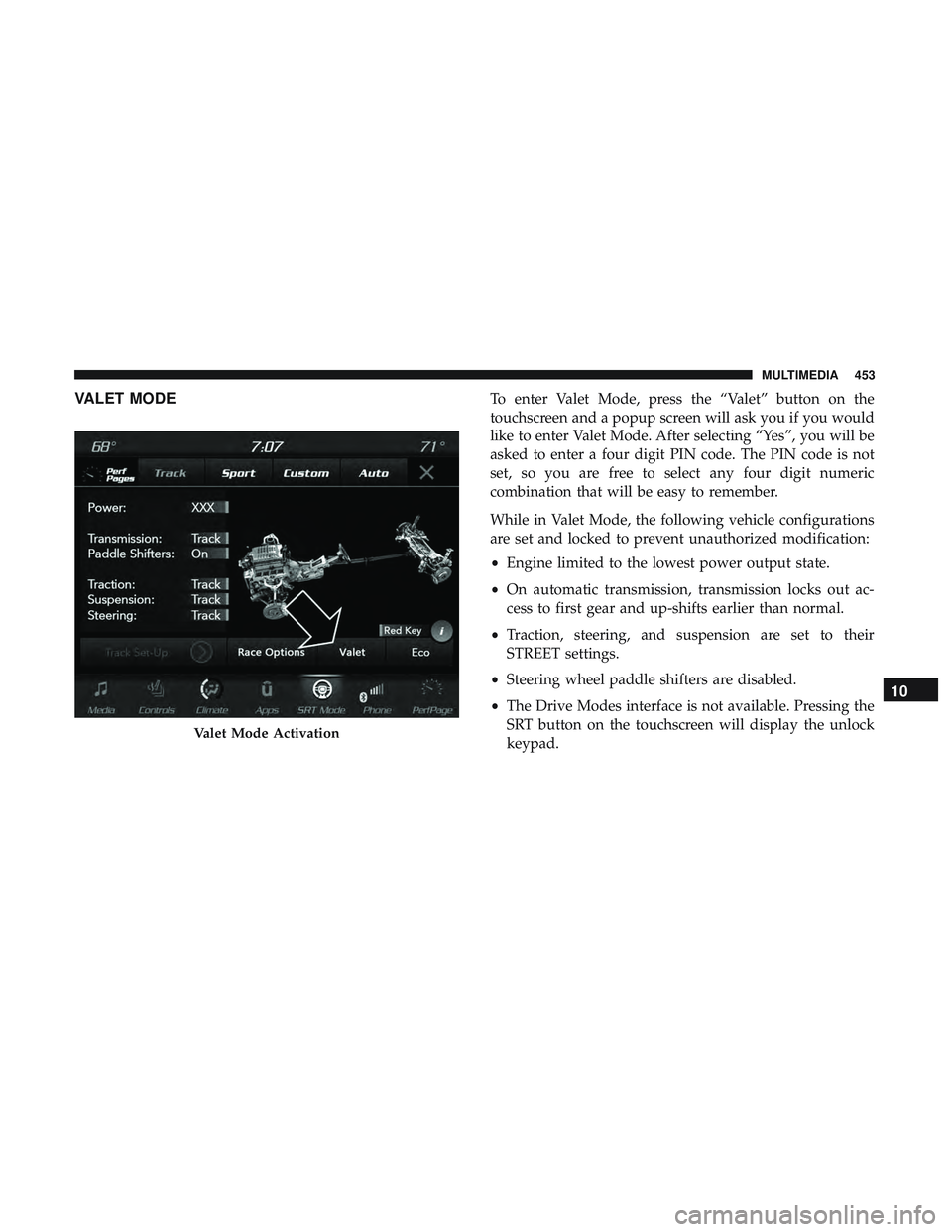
VALET MODETo enter Valet Mode, press the “Valet” button on the
touchscreen and a popup screen will ask you if you would
like to enter Valet Mode. After selecting “Yes”, you will be
asked to enter a four digit PIN code. The PIN code is not
set, so you are free to select any four digit numeric
combination that will be easy to remember.
While in Valet Mode, the following vehicle configurations
are set and locked to prevent unauthorized modification:
•Engine limited to the lowest power output state.
• On automatic transmission, transmission locks out ac-
cess to first gear and up-shifts earlier than normal.
• Traction, steering, and suspension are set to their
STREET settings.
• Steering wheel paddle shifters are disabled.
• The Drive Modes interface is not available. Pressing the
SRT button on the touchscreen will display the unlock
keypad.
Valet Mode Activation
10
MULTIMEDIA 453
Page 473 of 500
NOTE:
•Reply with text message is not compatible with iPhones.
• Auto reply with text message is only available on
phones that support Bluetooth MAP.
Android Auto — If Equipped
NOTE: Feature availability depends on your carrier and
mobile phone manufacturer. Some Android Auto features
may or may not be available in every region and/or
language.
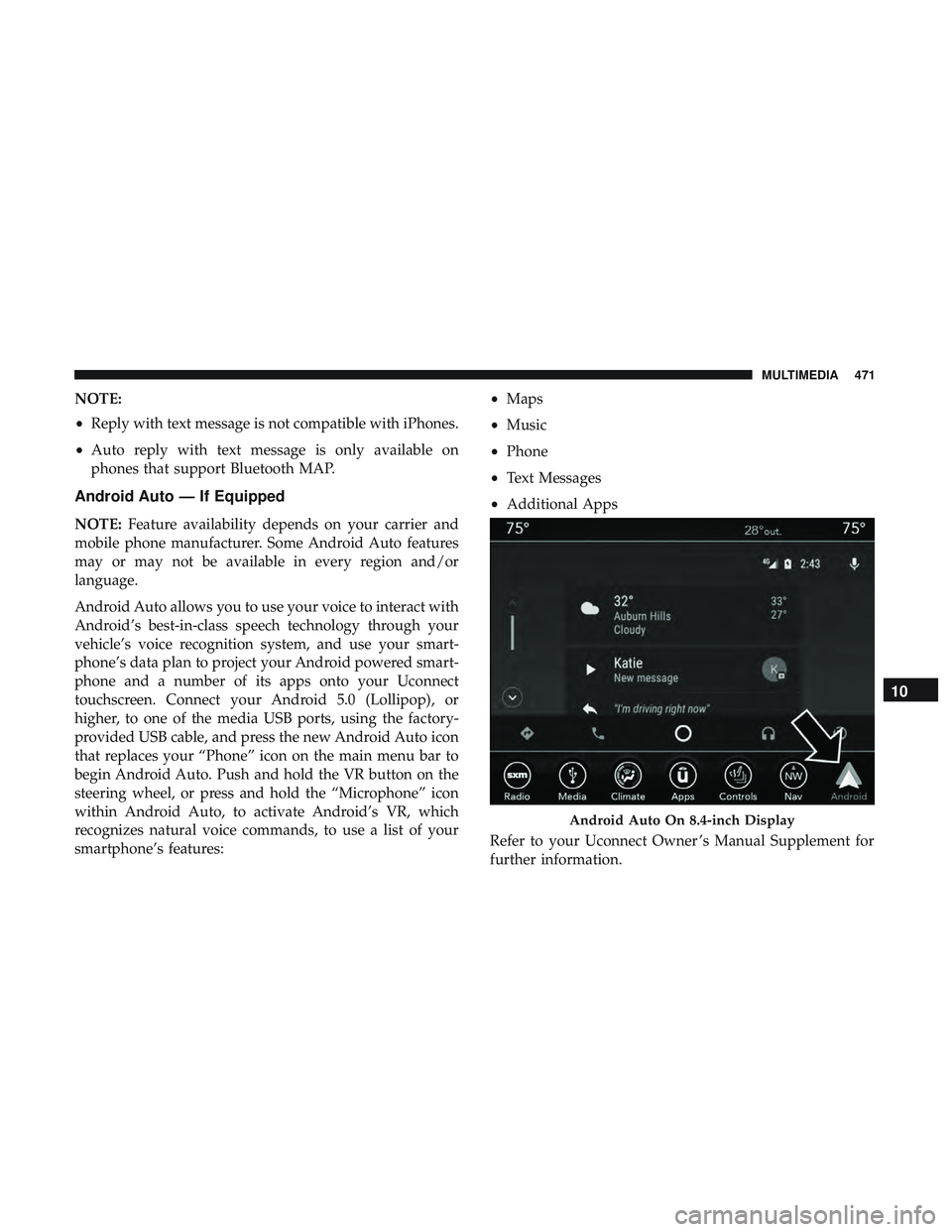
Android Auto allows you to use your voice to interact with
Android’s best-in-class speech technology through your
vehicle’s voice recognition system, and use your smart-
phone’s data plan to project your Android powered smart-
phone and a number of its apps onto your Uconnect
touchscreen. Connect your Android 5.0 (Lollipop), or
higher, to one of the media USB ports, using the factory-
provided USB cable, and press the new Android Auto icon
that replaces your “Phone” icon on the main menu bar to
begin Android Auto. Push and hold the VR button on the
steering wheel, or press and hold the “Microphone” icon
within Android Auto, to activate Android’s VR, which
recognizes natural voice commands, to use a list of your
smartphone’s features: •
Maps
• Music
• Phone
• Text Messages
• Additional Apps
Refer to your Uconnect Owner ’s Manual Supplement for
further information.
Android Auto On 8.4-inch Display
10
MULTIMEDIA 471