Page 96 of 620

WARNING!
Do not adjust the steering column while driving.
Adjusting the steering column while driving or driv-
ing with the steering column unlocked, could cause the
driver to lose control of the vehicle. Failure to follow
this warning may result in serious injury or death.
Heated Steering Wheel — If Equipped
The steering wheel contains a heating element that helps
warm your hands in cold weather. The heated steering
wheel has only one temperature setting. Once the heated
steering wheel has been turned on, it will operate for an
average of 80 minutes or more before automatically shut-
ting off. This time may vary depending on the temperature
of the environment. The heated steering wheel can shut off
early or may not turn on when the steering wheel is
already warm.
The heated steering wheel control button is located within
the Uconnect system. You can gain access to the control
button through the climate screen or the controls screen.
•Press the heated steering wheel button
once to turn
the heating element on.
• Press the heated steering wheel buttona second time
to turn the heating element off.
NOTE: The vehicle must be running for the heated steering
wheel to operate.
Vehicles Equipped With Remote Start
On models that are equipped with remote start, the heated
steering wheel can be programmed to come on during a
remote start through the Uconnect system. Refer to
“Uconnect Settings” in “Multimedia” for further informa-
tion.
WARNING!
• Persons who are unable to feel pain to the skin
because of advanced age, chronic illness, diabetes,
spinal cord injury, medication, alcohol use, exhaus-
tion, or other physical conditions must exercise care
when using the steering wheel heater. It may cause
burns even at low temperatures, especially if used
for long periods.
• Do not place anything on the steering wheel that
insulates against heat, such as a blanket or steering
wheel covers of any type and material. This may
cause the steering wheel heater to overheat.
94 GETTING TO KNOW YOUR VEHICLE
Page 98 of 620

CAUTION!
To avoid damage to the mirror during cleaning, never
spray any cleaning solution directly onto the mirror.
Apply the solution onto a clean cloth and wipe the
mirror clean.
Outside Mirrors
To receive maximum benefit, adjust the outside mirror(s) to
center on the adjacent lane of traffic with a slight overlap of
the view obtained on the inside mirror.
WARNING!
Vehicles and other objects seen in an outside convex
mirror will look smaller and farther away than they
really are. Relying too much on side convex mirrors
could cause you to collide with another vehicle or other
object. Use your inside mirror when judging the size or
distance of a vehicle seen in a side convex mirror.
Driver’s Outside Automatic Dimming Mirror —
If Equipped
The driver ’s outside mirror will automatically adjust for
glare from vehicles behind you. This feature is controlledby the inside automatic dimming mirror and will automati-
cally adjust for headlight glare when the inside mirror
adjusts.
Conversation Mirror
Located in the overhead console there is a conversation
mirror to view all the passengers in the vehicle. Push the
panel to release the drop down mirror. Raise the mirror and
push to latch it back in the stowed position.
Conversation Mirror
96 GETTING TO KNOW YOUR VEHICLE
Page 105 of 620

Turn Signal Warning
If the vehicle electronics sense that the vehicle has traveled
for about 1 mile (1.6 km) with the turn signals on, a chime
will sound and a message will display in the cluster to alert
the driver.
Lane Change Assist — If Equipped
Tap the multifunction lever up or down once, without
moving beyond the detent, and the turn signal (right or
left) will flash three times then automatically turn off.
Battery Protection
This feature provides battery protection to avoid wearing
down the battery if the headlights or parking lights are left
on for extended periods of time when the ignition is in the
OFF position. After eight minutes of the ignition being in
the OFF position and the headlight switch in any position
other than OFF or AUTO, the lights will turn off automati-
cally until the next cycle of the ignition or headlight switch.
The battery protection feature will be disabled if the
ignition is placed in any position other than OFF during the
eight minute delay.
INTERIOR LIGHTS
Courtesy/Interior Lighting
The courtesy light switches are used to turn the courtesy
lights on/off.
To operate the courtesy lights, push either the driver or
passenger light switch.
Courtesy Light Switches
3
GETTING TO KNOW YOUR VEHICLE 103
Page 108 of 620

WINDSHIELD WIPER AND WASHERS
Windshield Wiper Operation
The wipers and washers are operated by a switch within
the wiper lever. Rotate the end of the lever upward, to the
first detent past the intermittent settings for low-speed
wiper operation. Rotate the end of the lever upward to the
second detent past the intermittent settings for high-speed
wiper operation.NOTE:
Always remove any buildup of snow that prevents
the windshield wiper blades from returning to the off
position. If the windshield wiper switch is turned off and
the blades cannot return to the off position, damage to the
wiper motor may occur.
WARNING!
Sudden loss of visibility through the windshield could
lead to a collision. You might not see other vehicles or
other obstacles. To avoid sudden icing of the wind-
shield during freezing weather, warm the windshield
with the defroster before and during windshield
washer use.
Intermittent Wiper System
Use the intermittent wiper when weather conditions make
a single wiping cycle with a variable pause between cycles
desirable. Rotate the end of the wiper lever to the first
detent position, and then turn the end of the lever to select
the desired delay interval. There are four delay settings,
which allow you to regulate the wipe interval from a
minimum of one cycle every second to a maximum of
approximately 36 seconds between cycles. The delay inter-
vals will double in duration when the vehicle speed is
10 mph (16 km/h) or less.
Washer And Wiper Controls
106 GETTING TO KNOW YOUR VEHICLE
Page 128 of 620

WARNING!
There is no anti-pinch protection when the window is
almost closed. To avoid personal injury be sure to clear
your arms, hands, fingers and all objects from the
window path before closing.
Auto Up Reset — If Equipped
To reactivate the Auto Up feature, perform the following
steps after vehicle power is restored:
1. Pull the window control up to close the window com- pletely and continue to hold the control up for an
additional two seconds after the window is closed.
2. Push the window control down firmly to the second detent to open the window completely and continue to
hold the control down for an additional two seconds
after the window is fully open.
Sliding Side Door Power Window Control —
If Equipped
Second row passengers may open and close the sliding
door window by a single control on the door handle
assembly. The controls will operate only when the ignition switch is
in the ON/RUN or ACC position and during power
accessory delay.
NOTE:
The controls will not operate if the driver has
activated the Power Window Lockout.
NOTE: The sliding door windows do not fully open,
stopping several inches above the window sill.
Sliding Door Power Window Control
126 GETTING TO KNOW YOUR VEHICLE
Page 129 of 620

Wind Buffeting
Wind buffeting can be described as the perception of
pressure on the ears or a helicopter-type sound in the ears.
Your vehicle may exhibit wind buffeting with the windows
down, or the sunroof (if equipped) in certain open or
partially open positions. This is a normal occurrence and
can be minimized. If the rear windows are open and
buffeting occurs, open the front and rear windows together
to minimize the buffeting. If the buffeting occurs with the
sunroof open, adjust the sunroof opening to minimize the
buffeting.
PANORAMIC SUNROOF — IF EQUIPPED
The Panoramic Sunroof switch is located to the left be-
tween the sun visors on the overhead console.
The Power Shade switch is located to the right between the
sun visors on the overhead console.
WARNING!
•Never leave children unattended in a vehicle, or with
access to an unlocked vehicle. Never leave the key
fob in or near the vehicle, or in a location accessible
to children. Do not leave the ignition of a vehicle
equipped with Keyless Enter-N-Go in the ACC or
(Continued)
Panoramic Sunroof And Power Shade Switches
1 — Sunroof Switch
2 — Power Shade Switch
3
GETTING TO KNOW YOUR VEHICLE 127
Page 130 of 620

WARNING!(Continued)
ON/RUN mode. Occupants, particularly unattended
children, can become entrapped by the power sun-
roof while operating the power sunroof switch. Such
entrapment may result in serious injury or death.
• In a collision, there is a greater risk of being thrown
from a vehicle with an open sunroof. You could also
be seriously injured or killed. Always fasten your
seat belt properly and make sure all passengers are
also properly secured.
• Do not allow small children to operate the sunroof.
Never allow your fingers, other body parts, or any
object, to project through the sunroof opening. In-
jury may result.
Opening Sunroof
Express Mode
Push the switch rearward and release it within one second.
The sunroof will open automatically from any position and
stop at the full open position. This is called “Express
Open.” During Express Open operation, any other actua-
tion of the sunroof switch will stop the sunroof. NOTE:
If the sunshade is in the closed position when the
open switch is pushed, the sunshade will automatically
cycle to the halfway open position prior to the sunroof
opening.
Manual Mode
Push and hold the switch rearward and the sunroof will
open to the full open position. Any release of the switch
will stop the movement. The sunroof will remain in a
partially opened condition until the sunroof switch is
pushed again.
Venting Sunroof — Express
Push and release the �Vent�button within one second and
the sunroof will open to the vent position. This is called
“Express Vent”, and it will occur regardless of sunroof
position.
NOTE: If the sunshade is in the closed position when the
vent switch is pushed, the sunshade will automatically
cycle to the halfway open position prior to the sunroof
opening to the Vent position.
128 GETTING TO KNOW YOUR VEHICLE
Page 133 of 620
HOOD
Opening
WARNING!
Always cycle the ignition to OFF mode before opening
the hood. If the ignition is in ON mode and the
Propulsion System is active when the hood is opened,
the engine will automatically start, and persons not
clear of the vehicle could be injured by the engine’s
moving parts.
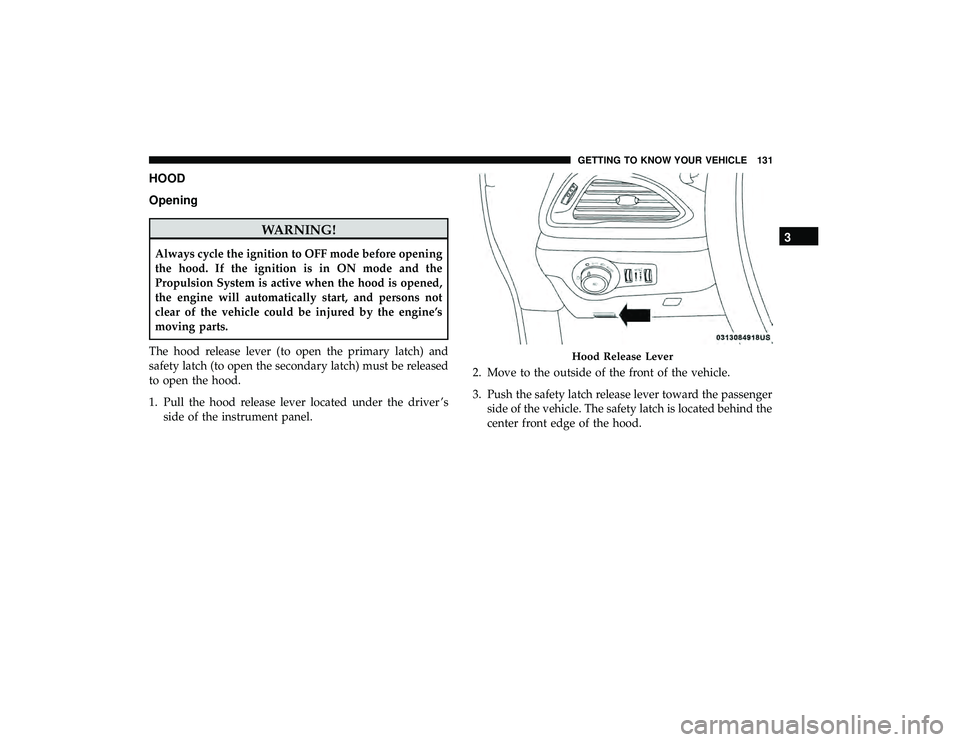
The hood release lever (to open the primary latch) and
safety latch (to open the secondary latch) must be released
to open the hood.
1. Pull the hood release lever located under the driver ’s side of the instrument panel. 2. Move to the outside of the front of the vehicle.
3. Push the safety latch release lever toward the passenger
side of the vehicle. The safety latch is located behind the
center front edge of the hood.
Hood Release Lever
3
GETTING TO KNOW YOUR VEHICLE 131