Page 116 of 492
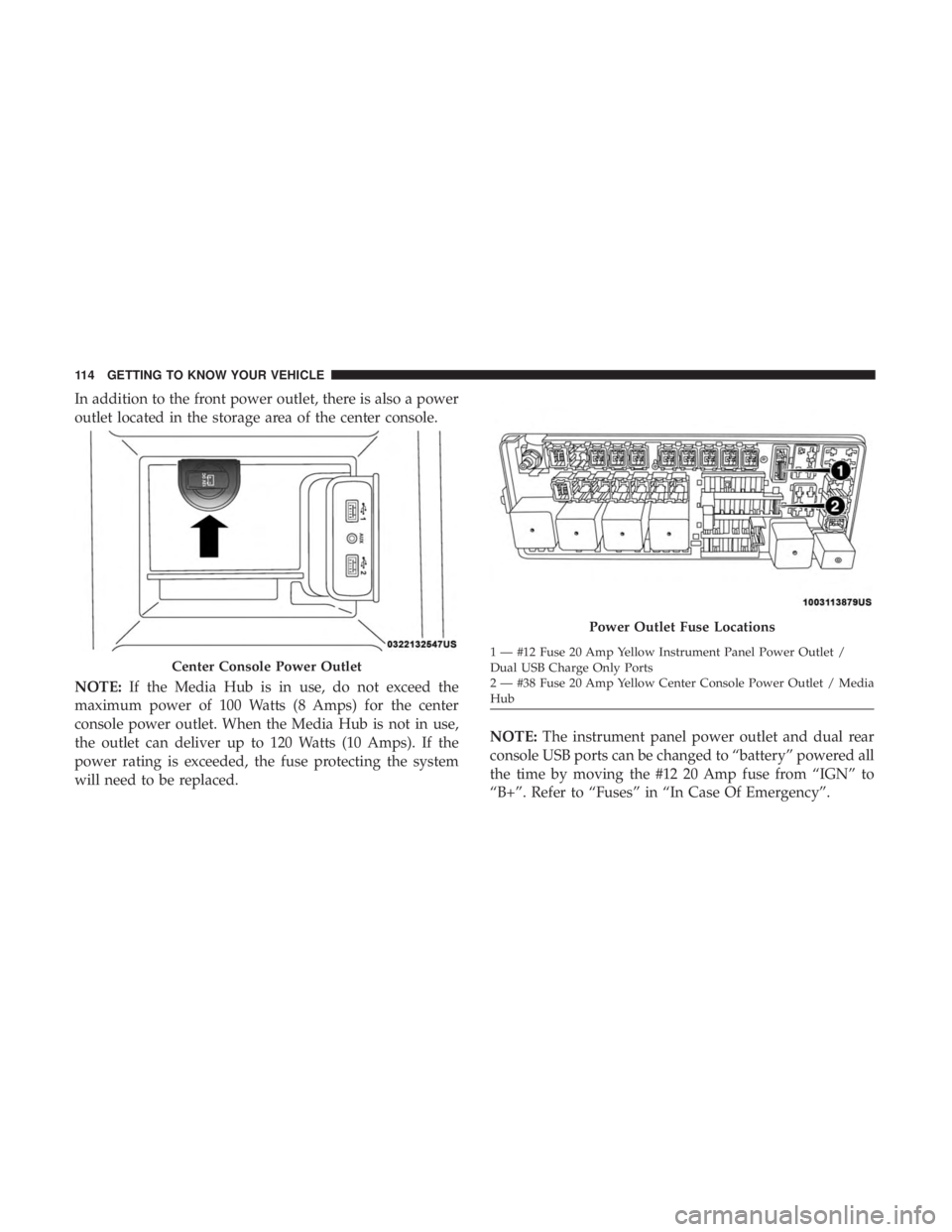
In addition to the front power outlet, there is also a power
outlet located in the storage area of the center console.
NOTE:If the Media Hub is in use, do not exceed the
maximum power of 100 Watts (8 Amps) for the center
console power outlet. When the Media Hub is not in use,
the outlet can deliver up to 120 Watts (10 Amps). If the
power rating is exceeded, the fuse protecting the system
will need to be replaced. NOTE:
The instrument panel power outlet and dual rear
console USB ports can be changed to “battery” powered all
the time by moving the #12 20 Amp fuse from “IGN” to
“B+”. Refer to “Fuses” in “In Case Of Emergency”.
Center Console Power Outlet
Power Outlet Fuse Locations
1 — #12 Fuse 20 Amp Yellow Instrument Panel Power Outlet /
Dual USB Charge Only Ports
2 — #38 Fuse 20 Amp Yellow Center Console Power Outlet / Media
Hub
114 GETTING TO KNOW YOUR VEHICLE
Page 118 of 492
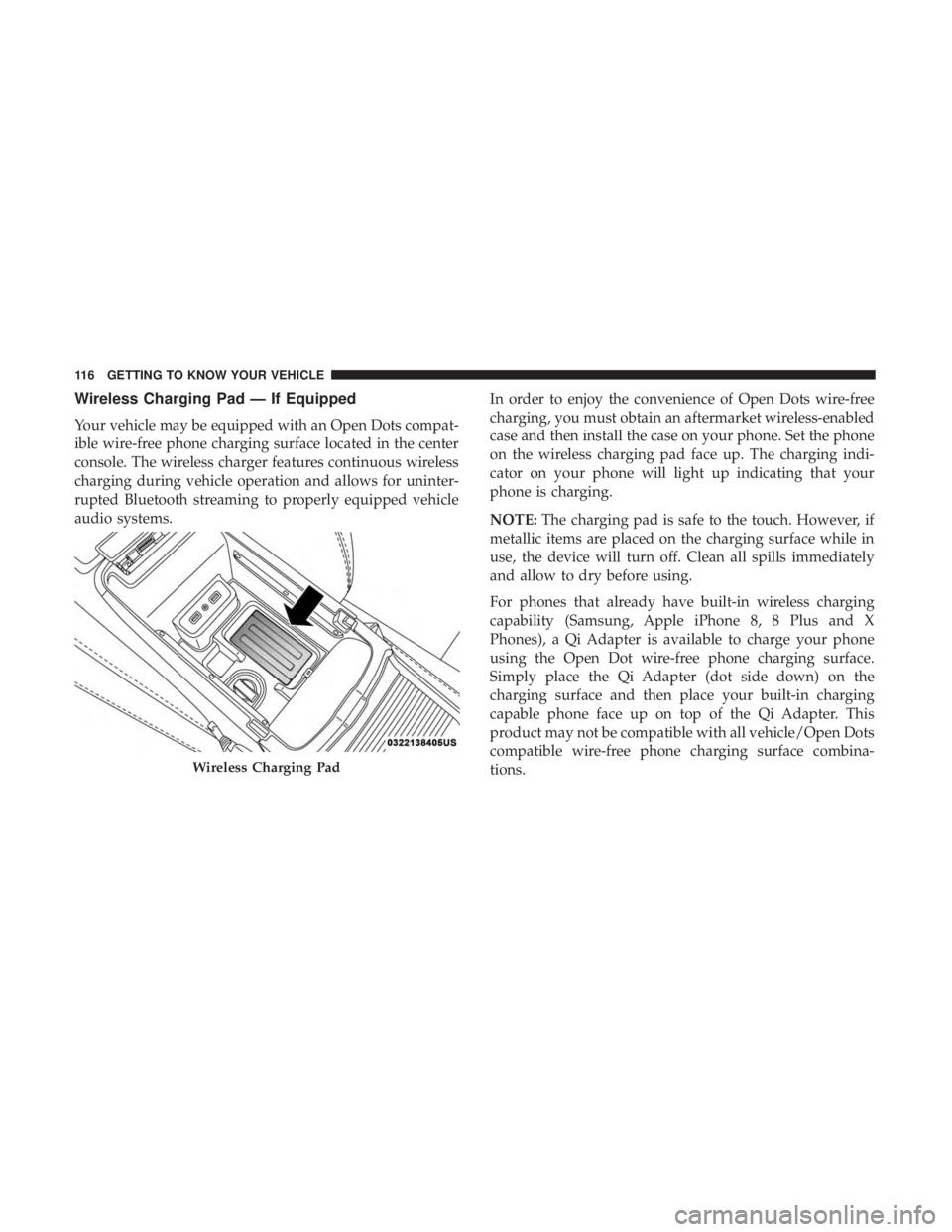
Wireless Charging Pad — If Equipped
Your vehicle may be equipped with an Open Dots compat-
ible wire-free phone charging surface located in the center
console. The wireless charger features continuous wireless
charging during vehicle operation and allows for uninter-
rupted Bluetooth streaming to properly equipped vehicle
audio systems.In order to enjoy the convenience of Open Dots wire-free
charging, you must obtain an aftermarket wireless-enabled
case and then install the case on your phone. Set the phone
on the wireless charging pad face up. The charging indi-
cator on your phone will light up indicating that your
phone is charging.
NOTE:
The charging pad is safe to the touch. However, if
metallic items are placed on the charging surface while in
use, the device will turn off. Clean all spills immediately
and allow to dry before using.
For phones that already have built-in wireless charging
capability (Samsung, Apple iPhone 8, 8 Plus and X
Phones), a Qi Adapter is available to charge your phone
using the Open Dot wire-free phone charging surface.
Simply place the Qi Adapter (dot side down) on the
charging surface and then place your built-in charging
capable phone face up on top of the Qi Adapter. This
product may not be compatible with all vehicle/Open Dots
compatible wire-free phone charging surface combina-
tions.
Wireless Charging Pad
116 GETTING TO KNOW YOUR VEHICLE
Page 233 of 492
WARNING!(Continued)
•When exiting the vehicle, always make sure the
ignition is in the OFF mode, remove the key fob from
the vehicle, and lock the vehicle.
• Never leave children alone in a vehicle, or with
access to an unlocked vehicle. Allowing children to
be in a vehicle unattended is dangerous for a number
of reasons. A child or others could be seriously or
fatally injured. Children should be warned not to
touch the parking brake, brake pedal or the trans-
mission gear selector.
• Do not leave the key fob in or near the vehicle (or in
a location accessible to children), and do not leave
the ignition in the ACC or ON/RUN mode. A child
could operate power windows, other controls, or
move the vehicle.
The transmission is controlled using a rotary electronic
gear selector located on the center console. The transmis-
sion gear range (PRNDL/S) is displayed both above the
gear selector and in the instrument cluster. To select a gear
range, simply rotate the gear selector. To access the L or S
position, push down on the gear selector and then rotate it.
You must also press the brake pedal to shift the transmis-
sion out of PARK (or NEUTRAL, when the vehicle is stopped or moving at low speeds). To shift past multiple
gear ranges at once (such as PARK to DRIVE), simply
rotate the gear selector to the appropriate detent. Select the
DRIVE range for normal driving.
NOTE:
In the event of a mismatch between the gear
selector position and the actual transmission gear (for
example, driver selects PARK while driving), the position
indicator will blink continuously until the selector is re-
turned to the proper position, or the requested shift can be
completed.
The electronically-controlled transmission adapts its shift
schedule based on driver inputs, along with environmental
and road conditions. The transmission electronics are self-
calibrating; therefore, the first few shifts on a new vehicle
may be somewhat abrupt. This is a normal condition, and
precision shifts will develop within a few hundred miles
(kilometers).
Only shift from DRIVE to PARK or REVERSE when the
accelerator pedal is released and the vehicle is stopped. Be
sure to keep your foot on the brake pedal when shifting
between these gears.
6
STARTING AND OPERATING 231
Page 320 of 492
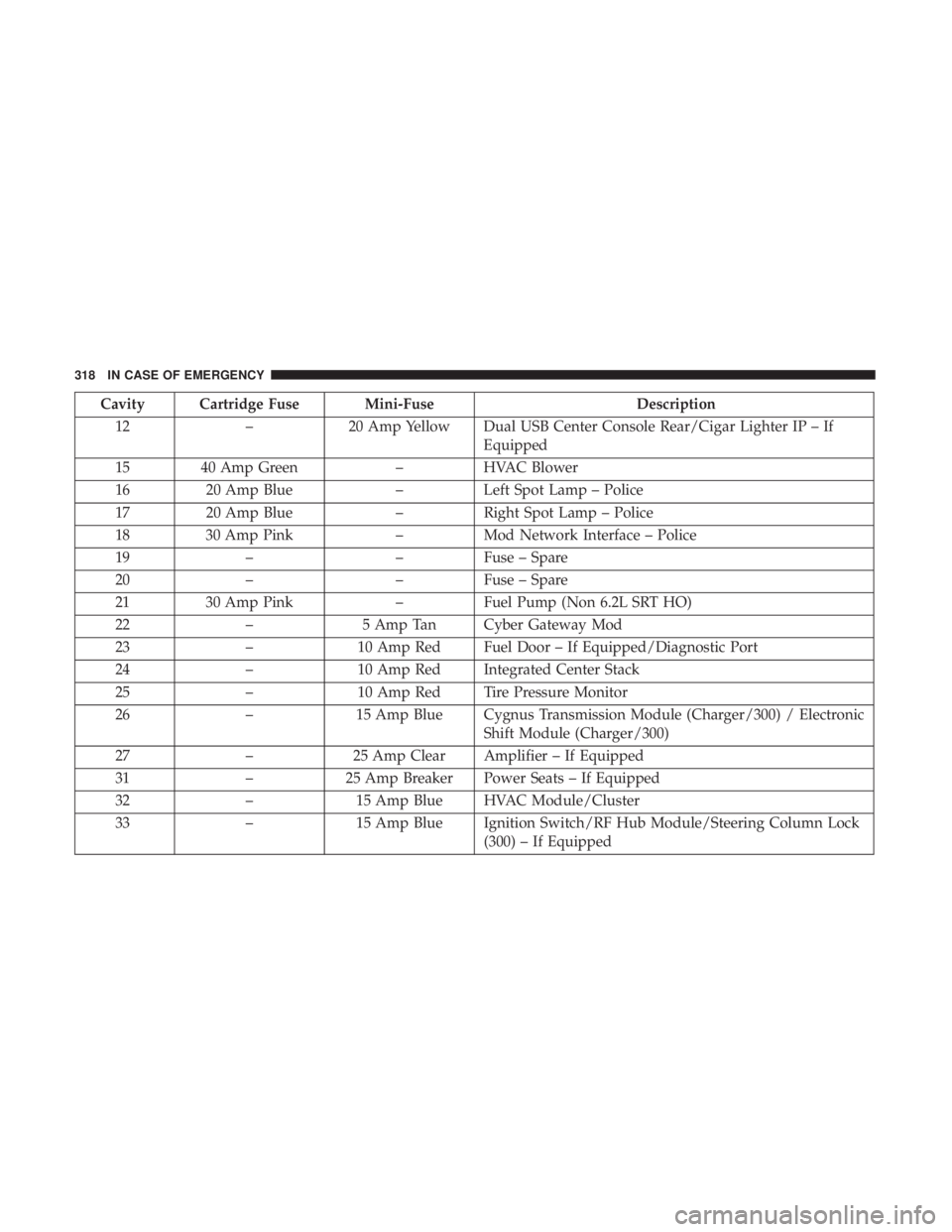
Cavity Cartridge Fuse Mini-FuseDescription
12 –20 Amp Yellow Dual USB Center Console Rear/Cigar Lighter IP – If
Equipped
15 40 Amp Green –HVAC Blower
16 20 Amp Blue –Left Spot Lamp – Police
17 20 Amp Blue –Right Spot Lamp – Police
18 30 Amp Pink –Mod Network Interface – Police
19 – –Fuse – Spare
20 – –Fuse – Spare
21 30 Amp Pink –Fuel Pump (Non 6.2L SRT HO)
22 –5 Amp Tan Cyber Gateway Mod
23 –10 Amp Red Fuel Door – If Equipped/Diagnostic Port
24 –10 Amp Red Integrated Center Stack
25 –10 Amp Red Tire Pressure Monitor
26 –15 Amp Blue Cygnus Transmission Module (Charger/300) / Electronic
Shift Module (Charger/300)
27 –25 Amp Clear Amplifier – If Equipped
31 –25 Amp Breaker Power Seats – If Equipped
32 –15 Amp Blue HVAC Module/Cluster
33 –15 Amp Blue Ignition Switch/RF Hub Module/Steering Column Lock
(300) – If Equipped
318 IN CASE OF EMERGENCY
Page 336 of 492
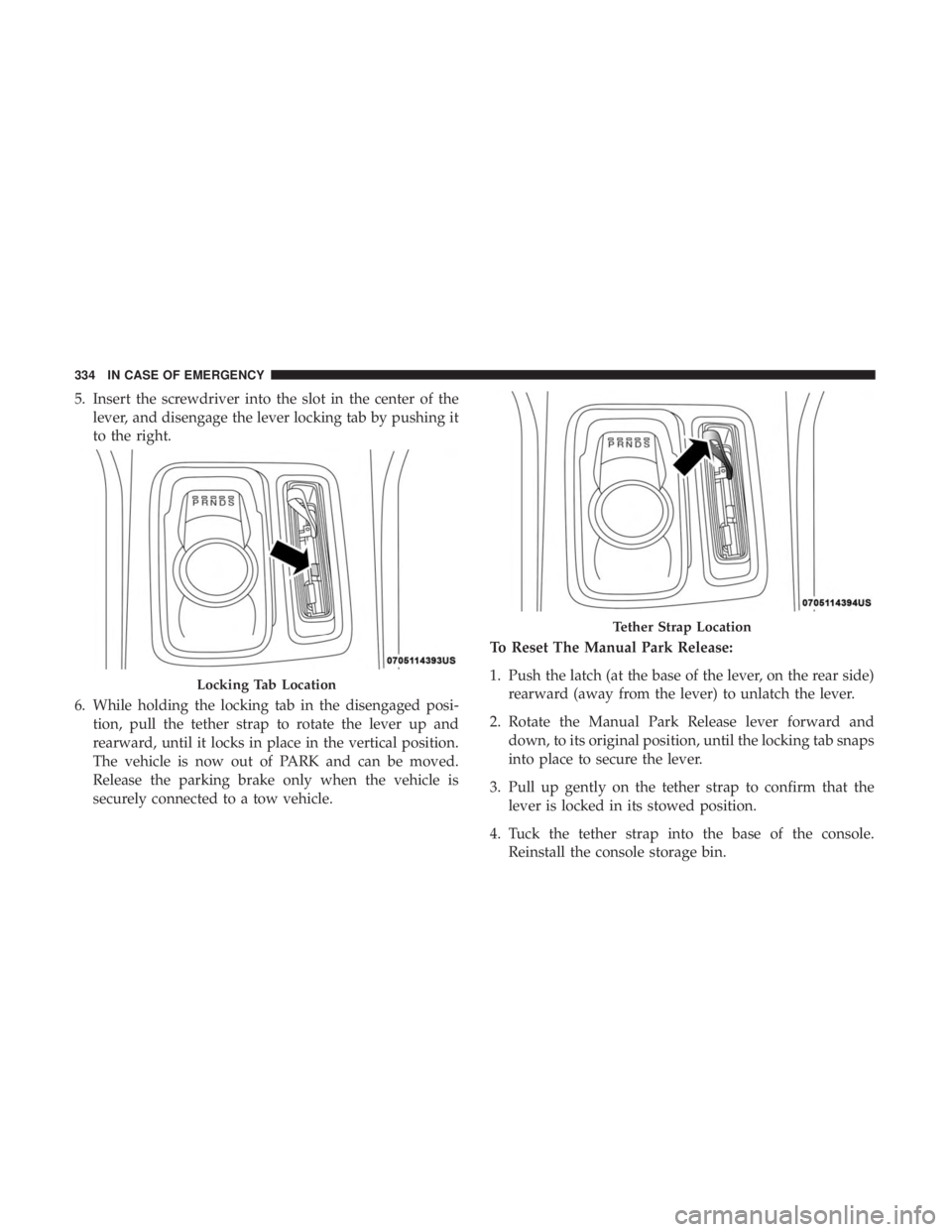
5. Insert the screwdriver into the slot in the center of thelever, and disengage the lever locking tab by pushing it
to the right.
6. While holding the locking tab in the disengaged posi- tion, pull the tether strap to rotate the lever up and
rearward, until it locks in place in the vertical position.
The vehicle is now out of PARK and can be moved.
Release the parking brake only when the vehicle is
securely connected to a tow vehicle. To Reset The Manual Park Release:
1. Push the latch (at the base of the lever, on the rear side)
rearward (away from the lever) to unlatch the lever.
2. Rotate the Manual Park Release lever forward and down, to its original position, until the locking tab snaps
into place to secure the lever.
3. Pull up gently on the tether strap to confirm that the lever is locked in its stowed position.
4. Tuck the tether strap into the base of the console. Reinstall the console storage bin.
Locking Tab Location
Tether Strap Location
334 IN CASE OF EMERGENCY
Page 449 of 492
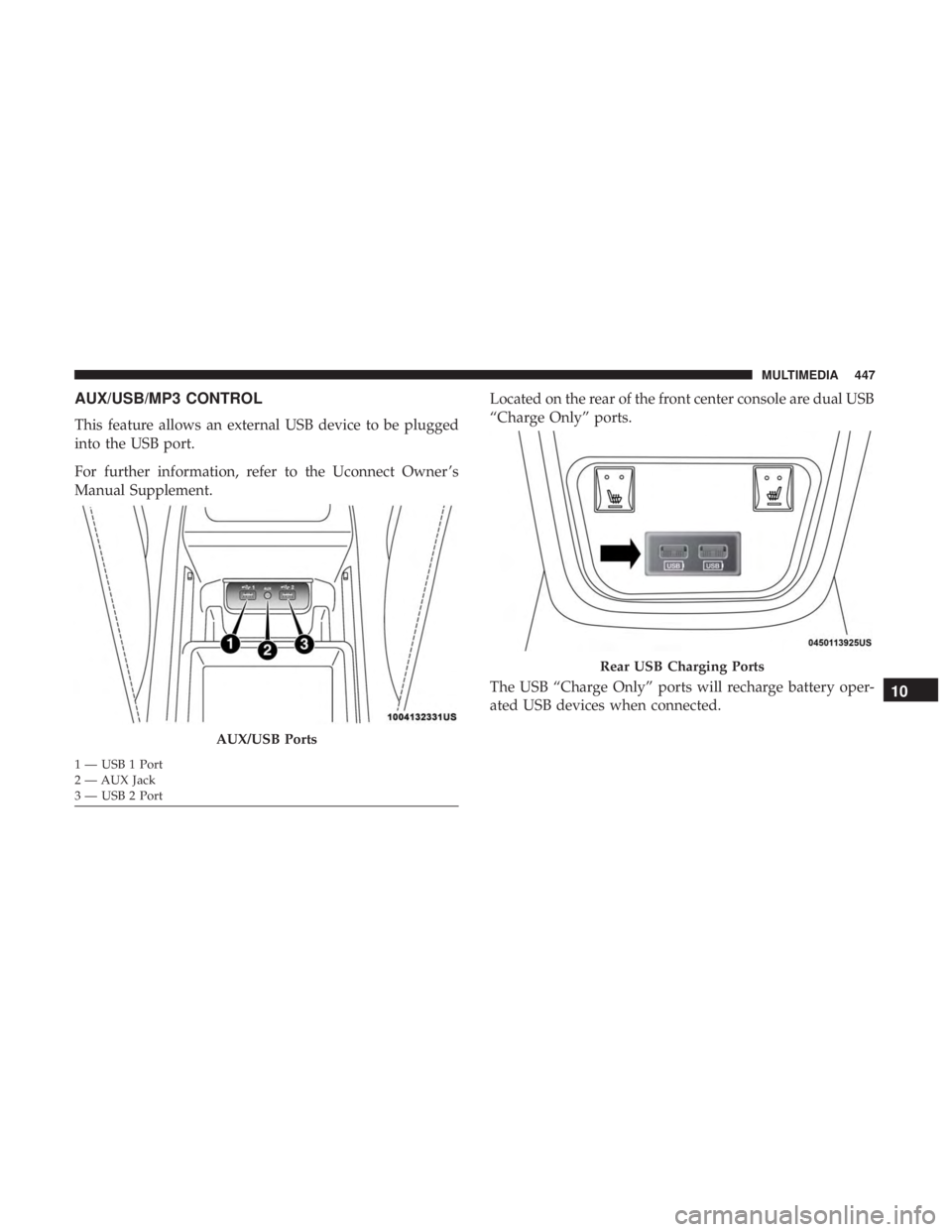
AUX/USB/MP3 CONTROL
This feature allows an external USB device to be plugged
into the USB port.
For further information, refer to the Uconnect Owner ’s
Manual Supplement.Located on the rear of the front center console are dual USB
“Charge Only” ports.
The USB “Charge Only” ports will recharge battery oper-
ated USB devices when connected.
AUX/USB Ports
1 — USB 1 Port
2 — AUX Jack
3 — USB 2 Port
Rear USB Charging Ports
10
MULTIMEDIA 447