2019 CHEVROLET SILVERADO stop start
[x] Cancel search: stop startPage 41 of 474

Chevrolet Silverado Owner Manual (GMNA-Localizing-U.S./Canada/Mexico-
1500-11698642) - 2019 - CRC - 2/20/19
40 Keys, Doors, and Windows
Transmitter Pocket without BucketSeatsTransmitter Pocket with BucketSeats
5. Place the new transmitter in the transmitter pocket/insert.
6. Press ENGINE START/STOP. When the transmitter is
learned, the DIC display will
show that it is ready to program
the next transmitter.
7. Remove the transmitter from the transmitter pocket/insert
and press
KorQon the
transmitter.
To program additional
transmitters, repeat Steps 5–7. When all additional transmitters
are programmed, press and
hold ENGINE START/STOP for
approximately 12 seconds to
exit programming mode.
8. Return the key back into the transmitter.
Starting the Vehicle with a Low
Transmitter Battery
If the transmitter battery is weak or if
there is interference with the signal,
the DIC may display NO REMOTE
DETECTED or NO REMOTE KEY
WAS DETECTED PLACE KEY IN
TRANSMITTER POCKET THEN
START YOUR VEHICLE when
starting the vehicle.
To start the vehicle:
Page 42 of 474

Chevrolet Silverado Owner Manual (GMNA-Localizing-U.S./Canada/Mexico-
1500-11698642) - 2019 - CRC - 2/20/19
Keys, Doors, and Windows 41
Transmitter Pocket without BucketSeatsTransmitter Pocket with BucketSeats
1. Place the transmitter in the transmitter pocket/insert.
2. With the vehicle in P (Park) or N (Neutral) press the brake
pedal and ENGINE
START/STOP.
Replace the transmitter battery
as soon as possible.
Battery Replacement
Replace the battery in the
transmitter soon if the DIC displays
REPLACE BATTERY IN
REMOTE KEY.
Caution
When replacing the battery, do
not touch any of the circuitry on
the transmitter. Static from your
body could damage the
transmitter.
To replace the battery: 1. Press the button on the RKE transmitter to remove the key.
Never pull the key out without
pressing the button.
Page 46 of 474

Chevrolet Silverado Owner Manual (GMNA-Localizing-U.S./Canada/Mexico-
1500-11698642) - 2019 - CRC - 2/20/19
Keys, Doors, and Windows 45
Starting the Engine Using Remote
Start1. Press and release
Q.
2. Immediately press and hold
/
until the turn signal lamps flash
or for at least four seconds.
When the vehicle starts, the
parking lamps will turn on. The
doors will be locked and the
climate control system may
come on.
The engine will continue to run
for 15 minutes. After
30 seconds, repeat
Steps 1 and 2 for a 15-minute
time extension.
Turn the ignition on to operate the
vehicle.
Extending Engine Run Time
The engine run time can be
extended by 15 minutes, for a total
of 30 minutes, if during the first
15 minutes Steps 1 and 2 are
repeated while the engine is still
running. An extension can be
requested 30 seconds after starting. A maximum of two remote starts,
or a single start with an extension,
is allowed between ignition cycles.
The vehicle's ignition must be
turned on and then back off to use
remote start again.
Canceling a Remote Start
To cancel a remote start, do one of
the following:
.
Press and hold
/until the
parking lamps turn off.
. Turn on the hazard warning
flashers.
. Turn the ignition on and then off.
Door Locks
{Warning
Unlocked doors can be
dangerous.
. Passengers, especially
children, can easily open
the doors and fall out of a
moving vehicle. The doors
(Continued)
Warning (Continued)
can be unlocked and
opened while the vehicle is
moving. The chance of
being thrown out of the
vehicle in a crash is
increased if the doors are
not locked. So, all
passengers should wear
seat belts properly and the
doors should be locked
whenever the vehicle is
driven.
. Young children who get into
unlocked vehicles may be
unable to get out. A child
can be overcome by
extreme heat and can suffer
permanent injuries or even
death from heat stroke.
Always lock the vehicle
whenever leaving it.
. Outsiders can easily enter
through an unlocked door
when you slow down or stop
(Continued)
Page 52 of 474
Chevrolet Silverado Owner Manual (GMNA-Localizing-U.S./Canada/Mexico-
1500-11698642) - 2019 - CRC - 2/20/19
Keys, Doors, and Windows 51
.Press the touch pad on the
tailgate handle after unlocking all
doors.
To close the tailgate, do one of the
following:
. Press
xon the RKE
transmitter once, then quickly
press and hold
xuntil the
tailgate completely closes. If
x
is released prior to it being fully
closed, the tailgate will reopen.
. Press and hold
5on the
center stack until the tailgate is
fully closed. If
5is released
prior to the tailgate being fully
closed, it will reopen. A chime
will sound when the tailgate is
fully closed.
. Press the touch pad on the
tailgate handle.
A chime sounds and the taillamps
flash during the closing operation.
If the warning chime is not
functioning, the tailgate will not power close. Power opening is still
enabled. See your dealer for
service.
The power tailgate may be
temporarily disabled after repeated
power cycling over a short period of
time. If this occurs, the tailgate can
still be operated manually.
The vehicle must be in P (Park) to
operate the power tailgate. If the
vehicle is shifted out of P (Park)
while the power function is in
progress, the tailgate will continue
to completion. If the vehicle is
accelerated while the tailgate is still
closing, the tailgate may stop and
reverse direction. Make sure the
tailgate is closed and latched before
driving.
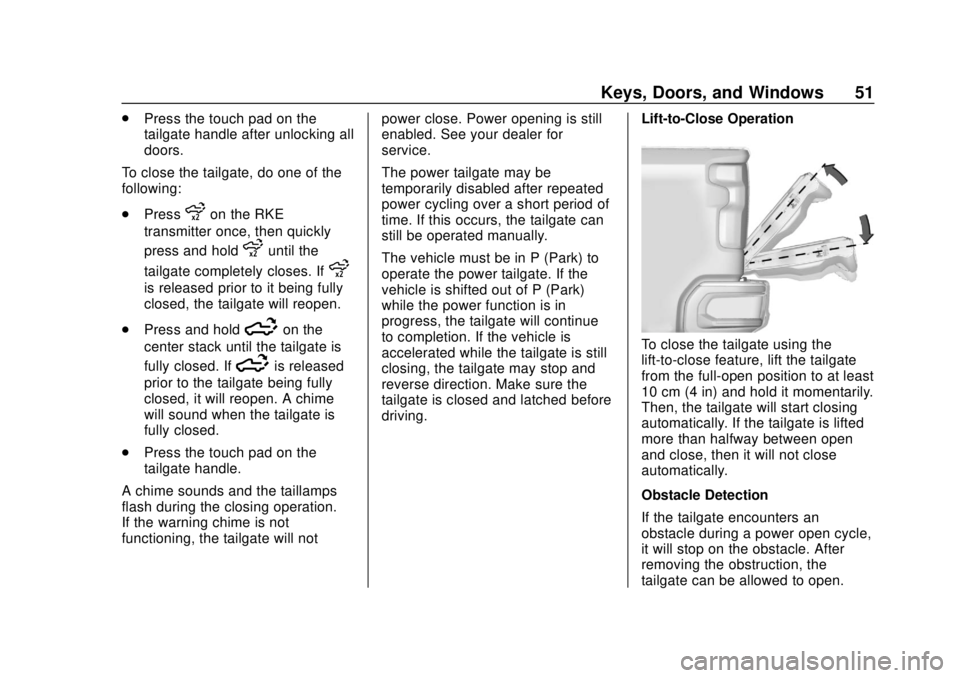
Lift-to-Close Operation
To close the tailgate using the
lift-to-close feature, lift the tailgate
from the full-open position to at least
10 cm (4 in) and hold it momentarily.
Then, the tailgate will start closing
automatically. If the tailgate is lifted
more than halfway between open
and close, then it will not close
automatically.
Obstacle Detection
If the tailgate encounters an
obstacle during a power open cycle,
it will stop on the obstacle. After
removing the obstruction, the
tailgate can be allowed to open.
Page 53 of 474
Chevrolet Silverado Owner Manual (GMNA-Localizing-U.S./Canada/Mexico-
1500-11698642) - 2019 - CRC - 2/20/19
52 Keys, Doors, and Windows
If the tailgate encounters an
obstacle during the closing cycle, it
will stop and reverse to full open.
If the tailgate encounters multiple
obstacles, the power function will
deactivate. After removing the
obstructions, manually close the
tailgate to resume normal power
operation.
Manual Operation
The tailgate can be manually closed
from the full-open position when the
tailgate is lifted in a continuous
motion. If the tailgate motion is
stopped between the full-open and
half-closed positions, the lift-to-close
feature can engage and power
close the tailgate. If the touch pad is
pressed during power operation, the
tailgate will stop and allow manual
operation. The tailgate must be held
after stopping, or it will continue
to open.Power Assist Steps
{Warning
To avoid personal injury or
property damage, before entering
or exiting the vehicle, be sure the
power assist step is fully
extended. Do not step on the
power assist step while it is
moving. Never place hands or
other body parts between the
extended power assist step and
the vehicle.
If equipped, the power assist steps,
when enabled, will extend when the
door is opened. They will retract
three seconds after the door is
closed or immediately if the vehicle
starts moving.
Keep hands, children, pets, objects,
and clothing clear of the power
assist steps when in motion.
The steps will reverse direction if
there is an obstruction. If possible,
carefully remove the obstruction,
then open and close the door on the same side to complete the motion.
If the obstruction is not cleared, the
assist steps remain extended.
Slight movement of the steps while
extended is normal.
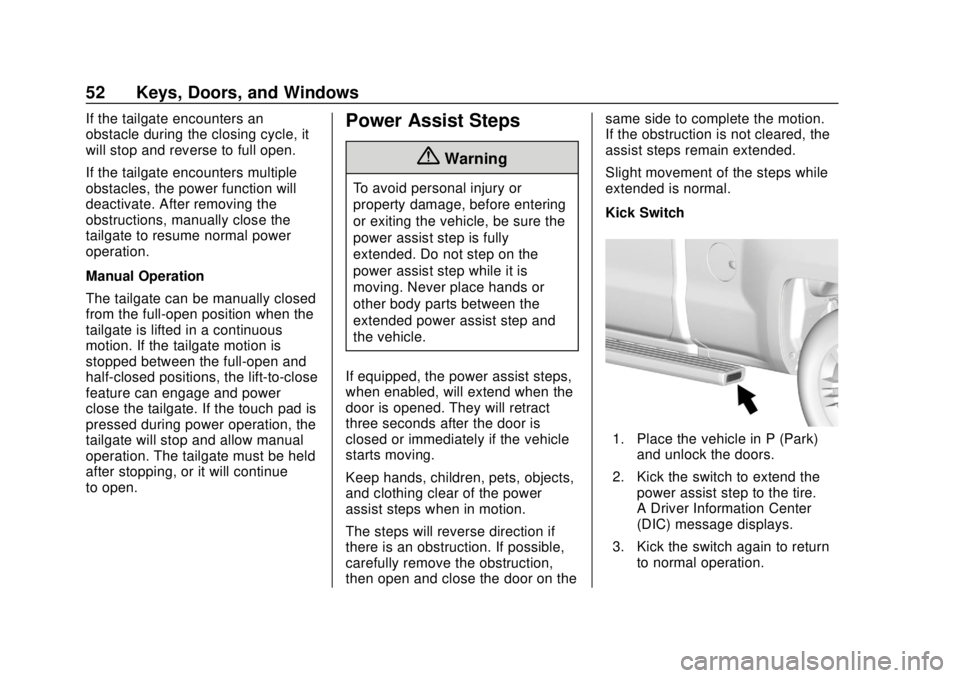
Kick Switch
1. Place the vehicle in P (Park)
and unlock the doors.
2. Kick the switch to extend the power assist step to the tire.
A Driver Information Center
(DIC) message displays.
3. Kick the switch again to return to normal operation.
Page 75 of 474

Chevrolet Silverado Owner Manual (GMNA-Localizing-U.S./Canada/Mexico-
1500-11698642) - 2019 - CRC - 2/20/19
74 Seats and Restraints
Identifying Driver Number
To identify the driver number:1. Start the vehicle with a different key or RKE transmitter. The
DIC should display the driver
number; 1 or 2. Turn the
ignition off and remove the key
or RKE transmitter from the
vehicle.
2. Start the vehicle with the initial key or RKE transmitter. The
DIC should display the other
driver number not shown in
Step 1.
Saving Memory Positions
Read these instructions completely
before saving memory positions.
To save preferred driving positions
1 and 2: 1. Turn the ignition on or to ACC/ ACCESSORY.
A DIC welcome message may
indicate driver number 1 or 2.
2. Adjust all available memory features to the desired driving
position. 3. Press and release SET; a beep
will sound.
4. Immediately press and hold the 1 or 2 memory button matching
the above DIC welcome
message until two beeps
sound.
If too much time passes
between releasing SET and
pressing 1, the memory
position will not be saved and
two beeps will not sound.
Repeat Steps 3 and 4.
1 or 2 corresponds to the driver
number. See “Identifying Driver
Number” previously in this
section.
5. Repeat Steps 1–4 for a second driver using 1 or 2.
To save the position for
Band
Seat Exit Memory, repeat Steps 1–4
using
B. This saves the position
for getting out of the vehicle.
Save preferred memory feature
positions to both 1 and 2 if you are
the only driver. Manually Recalling Memory
Positions
Press and hold 1, 2, or
Bto recall
the previously saved memory
positions.
To stop Manual Memory Recall
movement, release 1, 2, or
Bor
press any of the following controls:
. Power seat
. Memory SET
. Power mirror, with the driver or
passenger outside mirror
selected
Seat Entry Memory
The vehicle identifies the number of
the current driver ’s RKE transmitter
(1–8). See Remote Keyless Entry
(RKE) System Operation (Keyless
Access) 034 or
Remote Keyless Entry (RKE)
System Operation (Key Access)
0 42. If the RKE transmitter is 1 or
2, and Seat Entry Memory is
programmed on in vehicle
personalization, the positions saved
to the same memory button number
Page 76 of 474

Chevrolet Silverado Owner Manual (GMNA-Localizing-U.S./Canada/Mexico-
1500-11698642) - 2019 - CRC - 2/20/19
Seats and Restraints 75
1 or 2 are automatically recalled
when the ignition is turned on,
or turned from off to ACC/
ACCESSORY. RKE transmitters 3–8
will not provide automatic memory
recalls.
To turn Seat Entry Memory on or off,
see "Vehicle Personalization
Settings" previously in this section
andVehicle Personalization 0168.
The shift lever must be in P (Park)
to start Seat Entry Memory. Seat
Entry Memory will complete if the
vehicle is shifted out of P (Park)
prior to reaching the saved memory
position.
To stop Seat Entry Memory
movement, turn the ignition off or
press any of the following controls:
. Power seat
. Memory SET, 1, 2, or
B
.Power mirror, with the driver or
passenger outside mirror
selected
If the saved memory seat position
does not automatically recall or
recalls to the wrong positions, the driver
’s RKE transmitter number (1
or 2) may not match the memory
button number that positions were
saved to. Try saving the position to
the other memory button or try the
other RKE transmitter.
Seat Exit Memory
Seat Exit Memory is not linked to an
RKE transmitter. The position saved
to
Bis used for all drivers. To turn
Seat Exit Memory on or off, see
"Vehicle Personalization Settings"
previously in this section and
Vehicle Personalization 0168.
If turned on, the position saved to
Bis automatically recalled when
one of the following occurs:
. The vehicle is turned off and the
driver door is opened within a
short time.
. The vehicle is turned off with the
driver door open.
To stop Seat Exit Memory
movement, press any of the
following memory controls:
. Power seat .
Memory SET, 1, 2, or
B
.Power mirror, with the driver or
passenger outside mirror
selected
Obstructions
If something has blocked the driver
seat while recalling a memory
position, the recall may stop.
Remove the obstruction and try the
recall again. If the memory position
still does not recall, see your dealer
for service.
Heated and Ventilated
Front Seats
{Warning
If temperature change or pain to
the skin cannot be felt, the seat
heater may cause burns. To
reduce the risk of burns, use care
when using the seat heater,
especially for long periods of
time. Do not place anything on
the seat that insulates against (Continued)
Page 134 of 474

Chevrolet Silverado Owner Manual (GMNA-Localizing-U.S./Canada/Mexico-
1500-11698642) - 2019 - CRC - 2/20/19
Instruments and Controls 133
activated. SeeWasher Fluid0335
for information on filling the
windshield washer fluid reservoir.
{Warning
In freezing weather, do not use
the washer until the windshield is
warmed. Otherwise the washer
fluid can form ice on the
windshield, blocking your vision.
Clear snow and ice from the wiper
blades before using them. If frozen
to the windshield, carefully loosen or
thaw them. Damaged blades should
be replaced. See Wiper Blade
Replacement 0345.
Heavy snow or ice can overload the
wiper motor.
Wipe Parking
If the ignition is turned off while the
wipers are on LO, HI, or
3, they
will immediately stop. If the windshield wiper control is
then moved to OFF before the driver
door is opened or within 10 minutes,
the wipers will restart and move to
the base of the windshield.
If the ignition is turned off while the
wipers are performing wipes due to
windshield washing, the wipers
continue to run until they reach the
base of the windshield.
Compass
The vehicle may have a compass
display on the Driver Information
Center (DIC). The compass receives
its heading and other information
from the Global Positioning
System (GPS) antenna, Electronic
Stability Control (ESC), and vehicle
speed information.
The compass system is designed to
operate for a certain number of
miles or degrees of turn before
needing a signal from the GPS
satellites. When the compass
display shows CAL, drive the
vehicle for a short distance in an
open area where it can receive aGPS signal. The compass system
will automatically determine when a
GPS signal is restored and provide
a heading again.
Clock
The time and date for the clock can
be set using the infotainment
system. See
“Time/Date”in
“System” under“Settings” in the
infotainment manual.
Power Outlets
Accessory power outlets can be
used to plug in electrical equipment,
such as a cell phone or MP3 player.