2019 CHEVROLET SILVERADO Side Mirror
[x] Cancel search: Side MirrorPage 6 of 474

Chevrolet Silverado Owner Manual (GMNA-Localizing-U.S./Canada/Mexico-
1500-11698642) - 2019 - CRC - 2/20/19
In Brief 5
In Brief
Instrument Panel
Instrument Panel . . . . . . . . . . . . . . . . 6
Initial Drive Information
Initial Drive Information . . . . . . . . . . 8
Stop/Start System . . . . . . . . . . . . . . . 8
Remote Keyless Entry (RKE)System . . . . . . . . . . . . . . . . . . . . . . . . 9
Remote Vehicle Start . . . . . . . . . . . 9
Door Locks . . . . . . . . . . . . . . . . . . . . 10
Windows . . . . . . . . . . . . . . . . . . . . . . . 10
Seat Adjustment . . . . . . . . . . . . . . . 11
Memory Features . . . . . . . . . . . . . . 13
Heated and Ventilated Seats . . . 13
Head Restraint Adjustment . . . . 14
Seat Belts . . . . . . . . . . . . . . . . . . . . . 14
Passenger Sensing System . . . 14
Mirror Adjustment . . . . . . . . . . . . . . 15
Steering Wheel Adjustment . . . . 16
Interior Lighting . . . . . . . . . . . . . . . . 17
Exterior Lighting . . . . . . . . . . . . . . . 18
Windshield Wiper/Washer . . . . . . 19
Climate Controls . . . . . . . . . . . . . . . 19
Transmission . . . . . . . . . . . . . . . . . . 21
Four-Wheel Drive . . . . . . . . . . . . . . 22
Vehicle Features
Infotainment System . . . . . . . . . . . 23
Steering Wheel Controls . . . . . . . 23
Cruise Control . . . . . . . . . . . . . . . . . 23
Driver Information Center (DIC) . . . . . . . . . . . . . . . . . 23
Forward Collision Alert (FCA) System . . . . . . . . . . . . . . . . . . . . . . . 24
Forward Automatic Braking (FAB) . . . . . . . . . . . . . . . . 24
Front Pedestrian Braking (FPB) System . . . . . . . . . . . . . . . . . . . . . . . 24
Lane Keep Assist (LKA) . . . . . . . 25
Lane Change Alert (LCA) . . . . . . 25
Surround Vision . . . . . . . . . . . . . . . 25
Rear Vision Camera (RVC) . . . . 25
Rear Cross Traffic Alert (RCTA) System . . . . . . . . . . . . . . . . . . . . . . . 25
Park Assist . . . . . . . . . . . . . . . . . . . . 25
Power Outlets . . . . . . . . . . . . . . . . . 26
Universal Remote System . . . . . 26
Sunroof . . . . . . . . . . . . . . . . . . . . . . . . 26
Performance and Maintenance
Traction Control/Electronic Stability Control . . . . . . . . . . . . . . 27
Tire Pressure Monitor . . . . . . . . . . 28
Fuel (Gasoline - Except L87 6.2L Engine) . . . . . . . . . . . . . 28 Fuel (Gasoline - L87 6.2L
Engine) . . . . . . . . . . . . . . . . . . . . . . . 29
Fuel (Diesel) . . . . . . . . . . . . . . . . . . . 29
E85 or FlexFuel . . . . . . . . . . . . . . . . 29
Engine Oil Life System . . . . . . . . 29
Driving for Better Fuel Economy . . . . . . . . . . . . . . . . . . . . . 30
Roadside Assistance Program . . . . . . . . . . . . . . . . . . . . . . 30
Page 16 of 474

Chevrolet Silverado Owner Manual (GMNA-Localizing-U.S./Canada/Mexico-
1500-11698642) - 2019 - CRC - 2/20/19
In Brief 15
The passenger airbag status
indicator will light on the overhead
console when the vehicle is started.
SeePassenger Airbag Status
Indicator 0148.
Mirror Adjustment
Using hood-mounted air deflectors
and add-on convex mirror
attachments could decrease mirror
performance.
Exterior Mirrors
Manual Mirrors
If equipped, adjust manual mirrors
by moving them up and down or left
to right to see a little of the side of
the vehicle and to have a clear view
behind the vehicle.
See Manual Mirrors 056. Power Mirrors1. Select}or|for the driver or
passenger side mirror. The
switch will illuminate.
2. Press the arrows on the control pad to move the mirror up,
down, right, or left.
3. Adjust each outside mirror so that a little of the vehicle and
the area behind it can be seen.
See Power Mirrors 056.
If equipped with power folding
mirrors:
1. Press
gto fold the mirrors in
to the folded position.
2. Press
gagain to fold the
mirrors out to the driving
position.
For manual, power, and remote
folding mirrors, see Folding Mirrors
0 56.
The mirrors may also include a
memory function that works with the
memory seats. See Memory Seats
0 73.
Page 26 of 474

Chevrolet Silverado Owner Manual (GMNA-Localizing-U.S./Canada/Mexico-
1500-11698642) - 2019 - CRC - 2/20/19
In Brief 25
Lane Keep Assist (LKA)
If equipped, LKA may help avoid
crashes due to unintentional lane
departures. It may assist by gently
turning the steering wheel if the
vehicle approaches a detected lane
marking without using a turn signal
in that direction. It may also provide
a Lane Departure Warning (LDW)
alert as the lane marking is crossed.
The system will not assist or alert if
it detects that you are actively
steering. Override LKA by turning
the steering wheel. LKA uses a
camera to detect lane markings
between 60 km/h (37 mph) and
180 km/h (112 mph).
SeeLane Departure Warning (LDW)
0 270 and
Lane Keep Assist (LKA) 0270.
Lane Change Alert (LCA)
If equipped, the LCA system is a
lane-changing aid that assists
drivers with avoiding lane change
crashes that occur with moving
vehicles in the side blind zone areas
or with vehicles rapidly approaching these areas from behind. The LCA
warning display will light up in the
corresponding outside mirror and
will flash if the turn signal is on. The
Side Blind Zone Alert (SBZA)
system is included as part of the
LCA system.
See
Side Blind Zone Alert (SBZA)
0 267 and
Lane Change Alert (LCA) 0268.
Surround Vision
If equipped, views around the
vehicle appear in the infotainment
display to aid with parking and
low-speed maneuvers.
See “Surround Vision” under
Assistance Systems for Parking or
Backing 0255.
Rear Vision
Camera (RVC)
If equipped, RVC shows a view of
the area behind the vehicle on the
infotainment display when the
vehicle is shifted into R (Reverse) to
aid with parking and low-speed
backing maneuvers. See
Assistance Systems for Parking
or Backing 0255.
Rear Cross Traffic Alert
(RCTA) System
If equipped, the RCTA system
shows a triangle with an arrow on
the infotainment display to warn of
traffic behind your vehicle that may
cross your vehicle's path while in
R (Reverse). In addition, beeps will
sound, or the driver seat will pulse.
See Assistance Systems for Parking
or Backing 0255.
Park Assist
If equipped, Rear Park Assist (RPA)
uses sensors on the rear bumper to
assist with parking and avoiding
objects while in R (Reverse).
It operates at speeds less than
8 km/h (5 mph). RPA may show a
warning triangle on the infotainment
display and a graphic on the
instrument cluster to provide the
object distance. In addition, multiple
beeps or seat pulses may occur if
very close to an object.
Page 36 of 474

Chevrolet Silverado Owner Manual (GMNA-Localizing-U.S./Canada/Mexico-
1500-11698642) - 2019 - CRC - 2/20/19
Keys, Doors, and Windows 35
/:Press and releaseQ, then
immediately press and hold
/until
the turn signal lamps flash or for at
least four seconds. The engine may
be started from outside the vehicle
using the RKE transmitter. See
Remote Vehicle Start 044.
Q:Press to lock all doors and the
tailgate, if equipped.
If enabled, the turn signal lamps
flash and/or the horn may sound on
the second press to indicate locking
has occurred. If enabled, the horn chirps when
Qis pressed again
within three seconds. See Vehicle
Personalization 0168.
If the driver door is open when
Qis
pressed, all doors will lock and then
the driver door will immediately
unlock, if enabled. See Vehicle
Personalization 0168.
If the passenger door is open when
Qis pressed, all doors lock.
Pressing
Qarms the alarm system.
See Vehicle Alarm System 053.
If equipped with remote mirror
folding, pressing and holding
Qfor
one second will fold the mirrors,
if enabled. See Vehicle
Personalization 0168.
K:Press once to unlock only the
driver door. If
Kis pressed again
within three seconds, all remaining
doors and the tailgate unlock. The interior lamps may come on and
stay on for 20 seconds or until the
ignition is turned on.
If enabled, the turn signal lamps
flash twice to indicate unlocking has
occurred. If enabled, the exterior
lamps may turn on. See
Vehicle
Personalization 0168.
Pressing
Kon the RKE transmitter
disarms the alarm system. See
Vehicle Alarm System 053.
If equipped with remote mirror
folding, pressing and holding
Kfor
one second will unfold the mirrors,
if enabled. See Vehicle
Personalization 0168.
Press and hold
Kuntil the windows
fully open, if remote window
operation is enabled. See Vehicle
Personalization 0168.
x:Press twice quickly to open
the tailgate, if equipped.
Page 43 of 474

Chevrolet Silverado Owner Manual (GMNA-Localizing-U.S./Canada/Mexico-
1500-11698642) - 2019 - CRC - 2/20/19
42 Keys, Doors, and Windows
2. With the key removed, insert aflat, thin object in the center of
the transmitter to separate and
remove the back cover.
3. Lift the battery with a flat
object.
4. Remove the battery.
5. Insert the new battery, positive side toward the back cover.
Replace with a CR2032 or
equivalent battery.
6. Push together the transmitter.
Remote Keyless Entry
(RKE) System Operation
(Key Access)
The RKE transmitter functions may
work up to 60 m (197 ft) away from
the vehicle.
Other conditions can affect the
performance of the transmitter. See
Remote Keyless Entry (RKE)
System 034.
/:Press and releaseQ, then
immediately press and hold
/until
the turn signal lamps flash or for at least four seconds. The engine may
be started from outside the vehicle
using the RKE transmitter. See
Remote Vehicle Start
044.
Q:Press to lock all doors.
If enabled, the turn signal lamps
may flash and/or the horn may
sound on the second press to
indicate locking has occurred.
If enabled, the horn chirps when
Q
is pressed again within
three seconds. See Vehicle
Personalization 0168.
Pressing
Qarms the alarm system.
See Vehicle Alarm System 053.
If equipped with remote mirror
folding, pressing and holding
Qfor
one second will fold the mirrors,
if enabled. See Vehicle
Personalization 0168.
K:Press once to unlock only the
driver door. If
Kis pressed again
within three seconds, all remaining
doors unlock. The interior lamps
Page 57 of 474

Chevrolet Silverado Owner Manual (GMNA-Localizing-U.S./Canada/Mexico-
1500-11698642) - 2019 - CRC - 2/20/19
56 Keys, Doors, and Windows
Exterior Mirrors
Convex Mirrors
{Warning
A convex mirror can make things,
like other vehicles, look farther
away than they really are. If you
cut too sharply into the right lane,
you could hit a vehicle on the
right. Check the inside mirror or
glance over your shoulder before
changing lanes.
The passenger side mirror is convex
shaped. A convex mirror's surface is
curved so more can be seen from
the driver seat.
Manual Mirrors
If equipped, adjust manual mirrors
by moving the mirror up and down
or left to right to see a little of the
side of the vehicle and to have a
clear view behind the vehicle. Using hood-mounted air deflectors
and add-on convex mirror
attachments could decrease mirror
performance.
Power Mirrors
1. Select}or|for the driver or
passenger side mirror. The
switch will illuminate.
2. Press the arrows on the control pad to move the mirror up,
down, right, or left.
3. Adjust each outside mirror so that a little of the vehicle and
the area behind it can be seen. The mirrors may be equipped with a
memory function that works with the
memory seats. See
Memory Seats
0 73.
There may be cargo lamps on the
bottom of the mirrors. See Exterior
Cargo Lamps 0183.
Folding Mirrors
Manual Folding
If equipped, push the mirror toward
the vehicle to fold. Push the mirror
outward to return to its original
position.
Manually fold the mirrors inward to
prevent damage when going
through an automatic car wash.
Page 58 of 474

Chevrolet Silverado Owner Manual (GMNA-Localizing-U.S./Canada/Mexico-
1500-11698642) - 2019 - CRC - 2/20/19
Keys, Doors, and Windows 57
Power Folding
If equipped with power folding
mirrors:1. Press
gto fold the mirrors in
to the folded position.
2. Press
gagain to fold the
mirrors out to the driving
position.
Resetting the Power Folding
Mirrors
Reset the power folding mirrors if:
. The mirrors are accidentally
obstructed while folding. .
The mirrors are accidentally
manually folded/unfolded.
. The mirrors will not stay in the
unfolded position.
. The mirrors vibrate at normal
driving speeds.
Manually fold both mirrors if they
are out of sync. Fold and unfold the
mirrors three times using the mirror
controls to reset them to their
normal position. A popping noise
may be heard. This sound is normal
after a manual folding operation.
Remote Folding Mirrors
If equipped, press and holdQon
the RKE transmitter for
approximately one second to
remotely fold the exterior mirrors.
Press and hold
Kon the RKE
transmitter for approximately
one second to unfold. See Remote
Keyless Entry (RKE) System
Operation (Keyless Access) 034 or
Remote Keyless Entry (RKE)
System Operation (Key Access)
0 42. This feature can be turned on or off.
See
Vehicle Personalization 0168.
Task Lighting
If equipped, task lighting projects
light from the outside mirrors to the
sides of the vehicle. See Task
Lighting 0183.
Advanced Trailering Vision
System Side Cameras
If equipped, the Advanced Trailering
Vision System side cameras are on
the bottom of the outside mirrors. To
locate for cleaning, see “Surround
Vision (360 Degrees)” under
Assistance Systems for Parking or
Backing 0255.
Lane Change Alert (LCA)
The vehicle may have LCA. See
Lane Change Alert (LCA) 0268.
Side Blind Zone Alert
The vehicle may have Side Blind
Zone Alert. See Side Blind Zone
Alert (SBZA) 0267.
Page 59 of 474
Chevrolet Silverado Owner Manual (GMNA-Localizing-U.S./Canada/Mexico-
1500-11698642) - 2019 - CRC - 2/20/19
58 Keys, Doors, and Windows
Heated Mirrors
1
REAR :If equipped, the rear
window defogger also heats the
outside mirrors.
W: If equipped, press to turn the
heated outside mirrors on or off.
See “Rear Window Defogger” under
Climate Control Systems 0189 or
Dual Automatic Climate Control
System 0191.
Automatic Dimming
Mirror
If equipped, the driver outside mirror
automatically adjusts for the glare of
the headlamps from behind. This
feature comes on when the vehicle
is started.
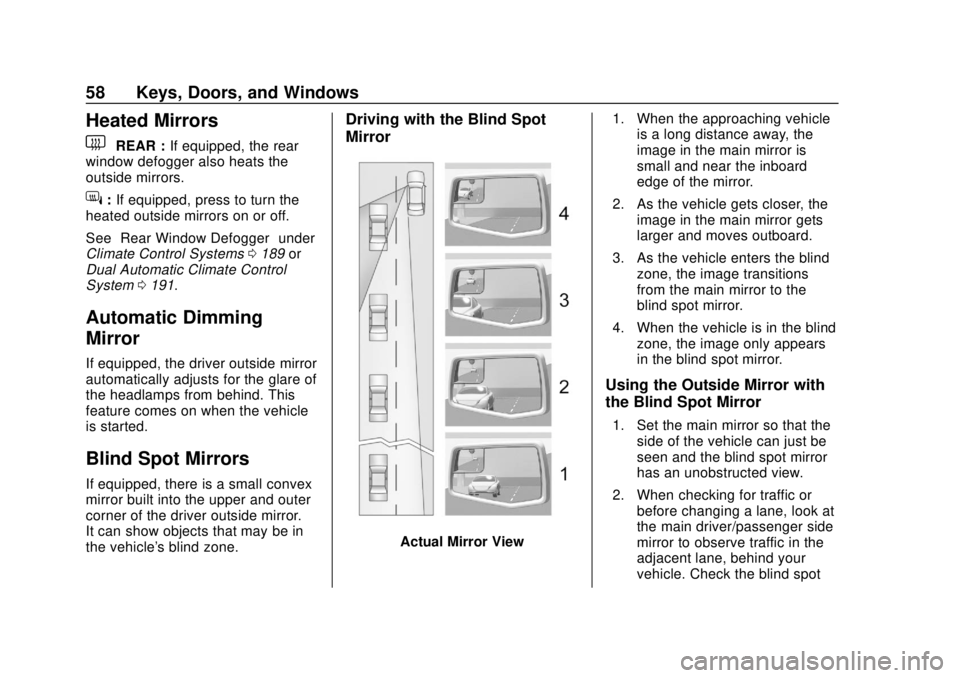
Blind Spot Mirrors
If equipped, there is a small convex
mirror built into the upper and outer
corner of the driver outside mirror.
It can show objects that may be in
the vehicle's blind zone.
Driving with the Blind Spot
Mirror
Actual Mirror View 1. When the approaching vehicle
is a long distance away, the
image in the main mirror is
small and near the inboard
edge of the mirror.
2. As the vehicle gets closer, the image in the main mirror gets
larger and moves outboard.
3. As the vehicle enters the blind zone, the image transitions
from the main mirror to the
blind spot mirror.
4. When the vehicle is in the blind zone, the image only appears
in the blind spot mirror.
Using the Outside Mirror with
the Blind Spot Mirror
1. Set the main mirror so that theside of the vehicle can just be
seen and the blind spot mirror
has an unobstructed view.
2. When checking for traffic or before changing a lane, look at
the main driver/passenger side
mirror to observe traffic in the
adjacent lane, behind your
vehicle. Check the blind spot