2019 CHEVROLET MALIBU Front end
[x] Cancel search: Front endPage 149 of 382
Chevrolet Malibu Owner Manual (GMNA-Localizing-U.S./Canada/Mexico-
12461813) - 2019 - crc - 12/11/18
Lighting 149
The high beams may not turn off
automatically if the system cannot
detect another vehicle's lamps
because of any of the following:
.
The other vehicle's lamps are
missing, damaged, obstructed
from view, or otherwise
undetected.
.
The other vehicle's lamps are
covered with dirt, snow, and/or
road spray.
.
The other vehicle's lamps cannot
be detected due to dense
exhaust, smoke, fog, snow, road
spray, mist, or other airborne
obstructions.
.
The vehicle's windshield is dirty,
cracked, or obstructed by
something that blocks the view
of the light sensor.
.
The vehicle is loaded such that
the front end points upward,
causing the light sensor to aim
high and not detect headlamps
and taillamps.
.
Driving on winding or hilly roads.The IntelliBeam system may need to
be disabled if any of the above
conditions exist.
Exterior Lamps Off
Reminder
A warning chime sounds if the driver
door is opened while the ignition is
off and the exterior lamps are on.
Headlamp High/
Low-Beam Changer
3
:Push the turn signal lever away
from you and release, to turn the
high beams on. To return to low
beams, push the lever again or pull
it toward you and release.
This indicator light turns on in the
instrument cluster when the
high-beam headlamps are on.
Flash-to-Pass
To flash the high beams, pull the
turn signal lever toward you, and
release.
Daytime Running
Lamps (DRL)
DRL can make it easier for others to
see the front of your vehicle during
the day. Fully functional DRL are
required on all vehicles first sold in
Canada.
The DRL system comes on in
daylight when the following
conditions are met:
.
The ignition is on.
.
The exterior lamp control is in
AUTO, if equipped.
.
The light sensor determines it is
daytime.
.
The vehicle is not in P (Park).
When the DRL are on, the taillamps,
sidemarker lamps, instrument panel
lights, and other lamps will not
be on.
Page 162 of 382
Chevrolet Malibu Owner Manual (GMNA-Localizing-U.S./Canada/Mexico-
12461813) - 2019 - crc - 12/11/18
162 Climate Controls
system does not detect possible
window fogging, it returns to normal
operation.
To turn Auto Defog off or on, see
“Climate and Air Quality”under
Vehicle Personalization0142.
Rear Window Defogger
K:Press to turn the rear window
defogger on or off. An indicator light
on the button comes on to show that
the rear window defogger is on. The
rear window defogger only works
when the ignition is on. The
defogger turns off when the ignition
is turned off or to ACC/
ACCESSORY.
The upper lines on the rear window
are antenna grids and are not
intended to defrost the glass.
The rear window defogger can be
set to automatic operation. See
“Climate and Air Quality”under
Vehicle Personalization0142.
When Auto Rear Defog is selected,
the rear window defogger turns on
automatically when the interior
temperature is cold and the outsidetemperature is about 7 °C (45 °F)
and below. The auto rear defogger
turns off automatically.
If equipped with heated outside
mirrors, they turn on when the rear
window defogger button is on and
help to clear fog or frost from the
surface of the mirror. SeeHeated
Mirrors048.
Caution
Do not try to clear frost or other
material from the inside of the
front windshield and rear window
with a razor blade or anything
else that is sharp. This may
damage the rear window
defogger grid and affect the
radio's ability to pick up stations
clearly. The repairs would not be
covered by the vehicle warranty.
Driver and Passenger Heated and
Ventilated Seats :If equipped,
press
LorMto heat the driver or
passenger seat.If equipped, press
{orCto
ventilate the driver or passenger
seat. SeeHeated and Ventilated
Front Seats062.
Remote Start Climate Control
Operation :If equipped with remote
start, the climate control system
may run when the vehicle is started
remotely. The system will use the
defrost setting if it is cold outside or
turn on using the coldest settings if
it is hot outside. The rear defog may
come on during remote start based
on cold ambient conditions. The
rear defog indicator light does not
come on during a remote start. The
front heated seats will turn on if it is
cold outside. The heated seat
indicator lights do not come on
during a remote start.
Sensor
The solar sensor, on top of the
instrument panel near the
windshield, monitors the solar heat.
Page 165 of 382
Chevrolet Malibu Owner Manual (GMNA-Localizing-U.S./Canada/Mexico-
12461813) - 2019 - crc - 12/11/18
Driving and Operating 165
Driving and
Operating
Driving Information
Distracted Driving . . . . . . . . . . . . 166
Defensive Driving . . . . . . . . . . . . . 167
Drunk Driving . . . . . . . . . . . . . . . . . 167
Control of a Vehicle . . . . . . . . . . . 167
Braking . . . . . . . . . . . . . . . . . . . . . . . 167
Steering . . . . . . . . . . . . . . . . . . . . . . 168
Off-Road Recovery . . . . . . . . . . . 168
Loss of Control . . . . . . . . . . . . . . . 169
Driving on Wet Roads . . . . . . . . 169
Hill and Mountain Roads . . . . . 170
Winter Driving . . . . . . . . . . . . . . . . 171
If the Vehicle Is Stuck . . . . . . . . 172
Vehicle Load Limits . . . . . . . . . . . 172
Starting and Operating
New Vehicle Break-In . . . . . . . . . 176
Ignition Positions . . . . . . . . . . . . . 176
Starting the Engine . . . . . . . . . . . 178
Stop/Start System . . . . . . . . . . . . 179
Engine Heater . . . . . . . . . . . . . . . . 180
Retained Accessory
Power (RAP) . . . . . . . . . . . . . . . . 181
Shifting Into Park . . . . . . . . . . . . . 181
Shifting out of Park . . . . . . . . . . . 182Parking over Things
That Burn . . . . . . . . . . . . . . . . . . . 183
Active Fuel Management . . . . . 183
Extended Parking . . . . . . . . . . . . 183
Engine Exhaust
Engine Exhaust . . . . . . . . . . . . . . 184
Running the Vehicle While
Parked . . . . . . . . . . . . . . . . . . . . . . 184
Automatic Transmission
Automatic Transmission . . . . . . 185
Manual Mode . . . . . . . . . . . . . . . . . 186
Brakes
Antilock Brake
System (ABS) . . . . . . . . . . . . . . . 188
Parking Brake . . . . . . . . . . . . . . . . 188
Electric Parking Brake . . . . . . . . 189
Brake Assist . . . . . . . . . . . . . . . . . . 190
Hill Start Assist (HSA) . . . . . . . . 191
Regenerative Braking
(Hybrid Only) . . . . . . . . . . . . . . . . 191
Ride Control Systems
Traction Control/Electronic
Stability Control . . . . . . . . . . . . . 192
Cruise Control
Cruise Control . . . . . . . . . . . . . . . . 194
Adaptive Cruise Control . . . . . . 196
Driver Assistance Systems
Driver Assistance Systems . . . 203
Assistance Systems for
Parking or Backing . . . . . . . . . . 205
Assistance Systems for
Driving . . . . . . . . . . . . . . . . . . . . . . 209
Forward Collision Alert (FCA)
System . . . . . . . . . . . . . . . . . . . . . . 209
Forward Automatic
Braking (FAB) . . . . . . . . . . . . . . . 211
Front Pedestrian Braking
(FPB) System . . . . . . . . . . . . . . . 213
Side Blind Zone
Alert (SBZA) . . . . . . . . . . . . . . . . 215
Lane Change Alert (LCA) . . . . . 215
Lane Departure
Warning (LDW) . . . . . . . . . . . . . 217
Lane Keep Assist (LKA) . . . . . . 217
Fuel
Top Tier Fuel . . . . . . . . . . . . . . . . . 219
Recommended Fuel (1.5L and
1.8L Engines) . . . . . . . . . . . . . . . 220
Recommended Fuel (2.0L
Engine) . . . . . . . . . . . . . . . . . . . . . 220
Prohibited Fuels . . . . . . . . . . . . . . 220
Fuels in Foreign Countries . . . 221
Fuel Additives . . . . . . . . . . . . . . . . 221
Filling the Tank . . . . . . . . . . . . . . . 221
Page 166 of 382
Chevrolet Malibu Owner Manual (GMNA-Localizing-U.S./Canada/Mexico-
12461813) - 2019 - crc - 12/11/18
166 Driving and Operating
Filling a Portable Fuel
Container . . . . . . . . . . . . . . . . . . . 223
Trailer Towing
General Towing
Information . . . . . . . . . . . . . . . . . . 223
Driving Characteristics and
Towing Tips . . . . . . . . . . . . . . . . . 224
Trailer Towing . . . . . . . . . . . . . . . . 227
Towing Equipment . . . . . . . . . . . . 229
Conversions and Add-Ons
Add-On Electrical
Equipment . . . . . . . . . . . . . . . . . . 231
Driving Information
Distracted Driving
Distraction comes in many forms
and can take your focus from the
task of driving. Exercise good
judgment and do not let other
activities divert your attention away
from the road. Many local
governments have enacted laws
regarding driver distraction. Become
familiar with the local laws in
your area.
To avoid distracted driving, keep
your eyes on the road, keep your
hands on the steering wheel, and
focus your attention on driving.
.
Do not use a phone in
demanding driving situations.
Use a hands-free method to
place or receive necessary
phone calls.
.
Watch the road. Do not read,
take notes, or look up
information on phones or other
electronic devices..
Designate a front seat
passenger to handle potential
distractions.
.
Become familiar with vehicle
features before driving, such as
programming favorite radio
stations and adjusting climate
control and seat settings.
Program all trip information into
any navigation device prior to
driving.
.
Wait until the vehicle is parked
to retrieve items that have fallen
to the floor.
.
Stop or park the vehicle to tend
to children.
.
Keep pets in an appropriate
carrier or restraint.
.
Avoid stressful conversations
while driving, whether with a
passenger or on a cell phone.
Page 168 of 382
Chevrolet Malibu Owner Manual (GMNA-Localizing-U.S./Canada/Mexico-
12461813) - 2019 - crc - 12/11/18
168 Driving and Operating
Once the power assist is used up, it
can take longer to stop and the
brake pedal will be harder to push.
Steering
Electric Power Steering
The vehicle has electric power
steering. It does not have power
steering fluid. Regular maintenance
is not required.
If power steering assist is lost due
to a system malfunction, the vehicle
can be steered, but may require
increased effort.
If the steering assist is used for an
extended period of time while the
vehicle is not moving, power assist
may be reduced.
If the steering wheel is turned until it
reaches the end of its travel and is
held against that position for an
extended period of time, power
steering assist may be reduced.
Normal use of the power steering
assist should return when the
system cools down.See your dealer if there is a
problem.
Curve Tips
.
Take curves at a reasonable
speed.
.
Reduce speed before entering a
curve.
.
Maintain a reasonable steady
speed through the curve.
.
Wait until the vehicle is out of
the curve before accelerating
gently into the straightaway.
Steering in Emergencies
.
There are some situations when
steering around a problem may
be more effective than braking.
.
Holding both sides of the
steering wheel allows you to turn
180 degrees without removing
a hand.
.
The Antilock Brake System
(ABS) allows steering while
braking.
Off-Road Recovery
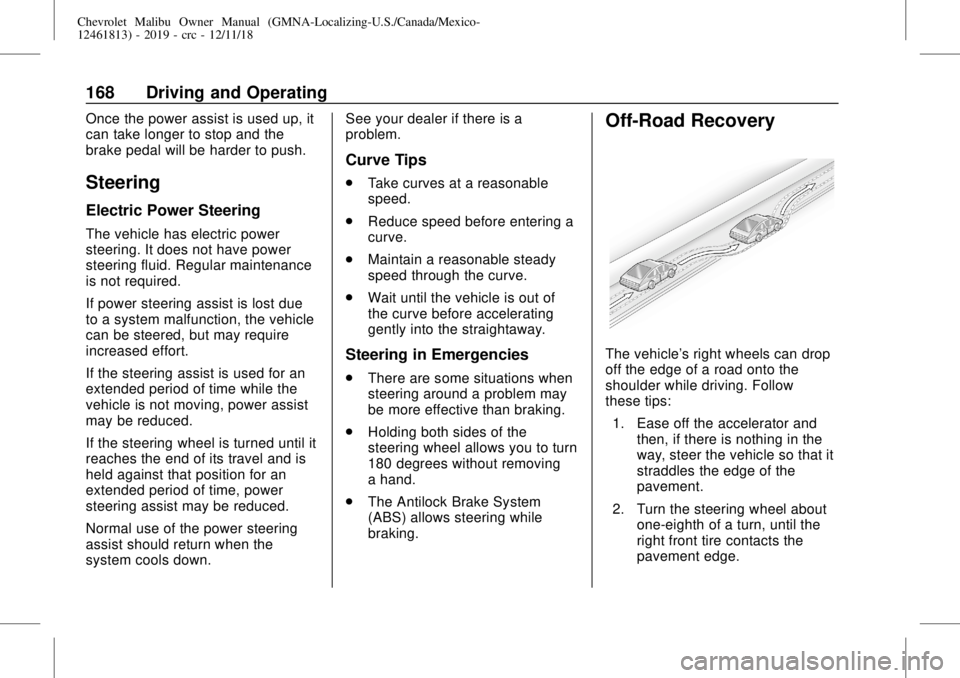
The vehicle's right wheels can drop
off the edge of a road onto the
shoulder while driving. Follow
these tips:
1. Ease off the accelerator and
then, if there is nothing in the
way, steer the vehicle so that it
straddles the edge of the
pavement.
2. Turn the steering wheel about
one-eighth of a turn, until the
right front tire contacts the
pavement edge.
Page 173 of 382
Chevrolet Malibu Owner Manual (GMNA-Localizing-U.S./Canada/Mexico-
12461813) - 2019 - crc - 12/11/18
Driving and Operating 173
{Warning
Do not load the vehicle any
heavier than the Gross
Vehicle Weight Rating
(GVWR), or either the
maximum front or rear Gross
Axle Weight Rating (GAWR).
This can cause systems to
break and change the way the
vehicle handles. This could
cause loss of control and a
crash. Overloading can also
reduce stopping distance,
damage the tires, and shorten
the life of the vehicle.Tire and Loading Information
Label
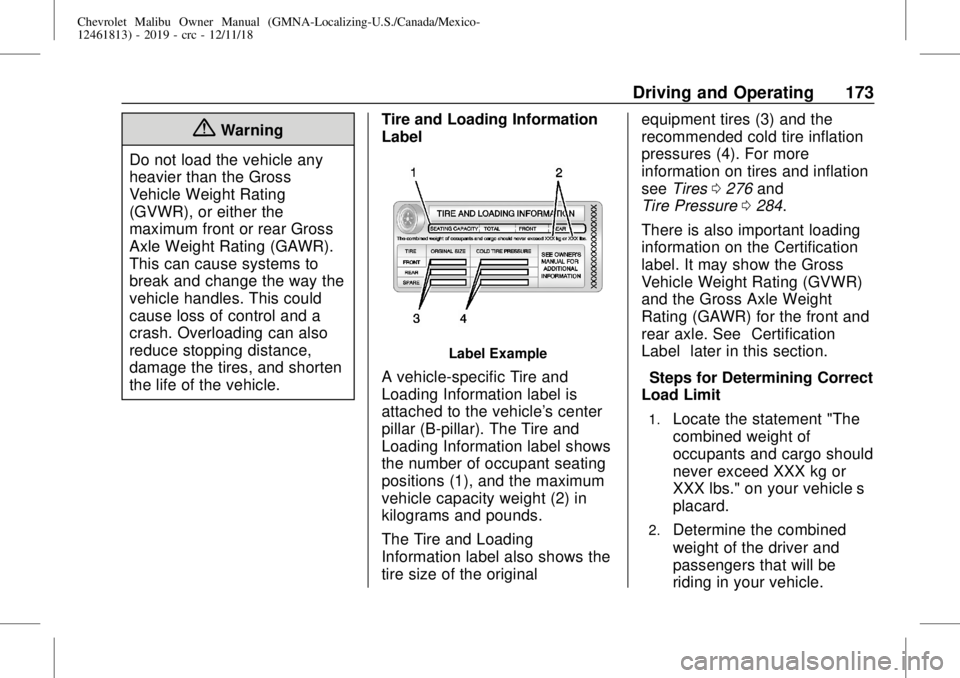
Label Example
A vehicle-specific Tire and
Loading Information label is
attached to the vehicle's center
pillar (B-pillar). The Tire and
Loading Information label shows
the number of occupant seating
positions (1), and the maximum
vehicle capacity weight (2) in
kilograms and pounds.
The Tire and Loading
Information label also shows the
tire size of the originalequipment tires (3) and the
recommended cold tire inflation
pressures (4). For more
information on tires and inflation
seeTires0276and
Tire Pressure0284.
There is also important loading
information on the Certification
label. It may show the Gross
Vehicle Weight Rating (GVWR)
and the Gross Axle Weight
Rating (GAWR) for the front and
rear axle. See“Certification
Label”later in this section.
“Steps for Determining Correct
Load Limit–
1.Locate the statement "The
combined weight of
occupants and cargo should
never exceed XXX kg or
XXX lbs." on your vehicle’s
placard.
2.Determine the combined
weight of the driver and
passengers that will be
riding in your vehicle.
Page 181 of 382
Chevrolet Malibu Owner Manual (GMNA-Localizing-U.S./Canada/Mexico-
12461813) - 2019 - crc - 12/11/18
Driving and Operating 181
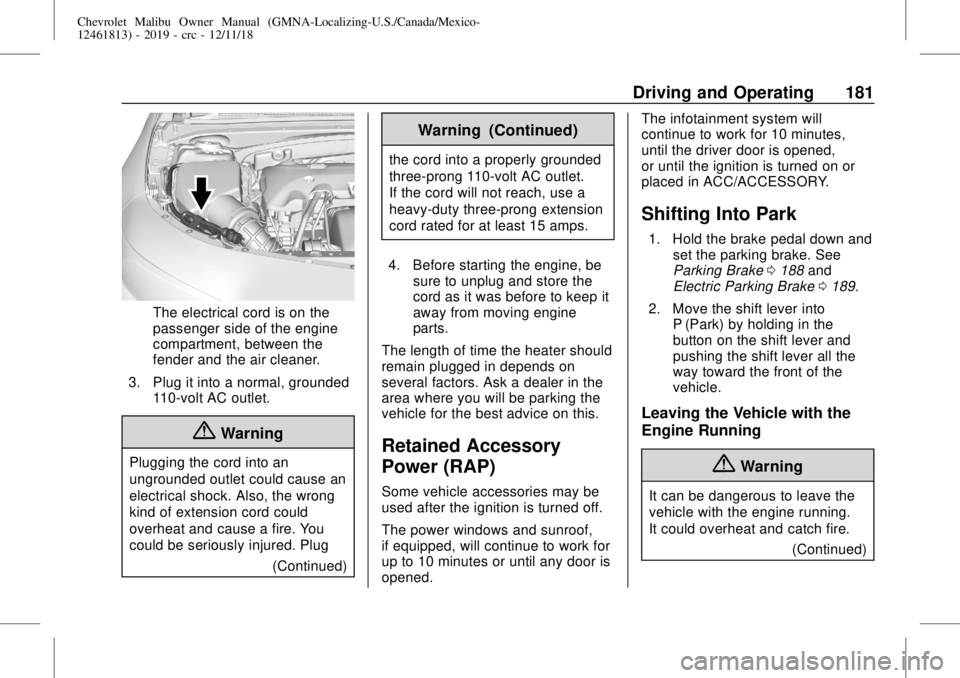
The electrical cord is on the
passenger side of the engine
compartment, between the
fender and the air cleaner.
3. Plug it into a normal, grounded
110-volt AC outlet.
{Warning
Plugging the cord into an
ungrounded outlet could cause an
electrical shock. Also, the wrong
kind of extension cord could
overheat and cause a fire. You
could be seriously injured. Plug
(Continued)
Warning (Continued)
the cord into a properly grounded
three-prong 110-volt AC outlet.
If the cord will not reach, use a
heavy-duty three-prong extension
cord rated for at least 15 amps.
4. Before starting the engine, be
sure to unplug and store the
cord as it was before to keep it
away from moving engine
parts.
The length of time the heater should
remain plugged in depends on
several factors. Ask a dealer in the
area where you will be parking the
vehicle for the best advice on this.
Retained Accessory
Power (RAP)
Some vehicle accessories may be
used after the ignition is turned off.
The power windows and sunroof,
if equipped, will continue to work for
up to 10 minutes or until any door is
opened.The infotainment system will
continue to work for 10 minutes,
until the driver door is opened,
or until the ignition is turned on or
placed in ACC/ACCESSORY.
Shifting Into Park
1. Hold the brake pedal down and
set the parking brake. See
Parking Brake0188and
Electric Parking Brake0189.
2. Move the shift lever into
P (Park) by holding in the
button on the shift lever and
pushing the shift lever all the
way toward the front of the
vehicle.
Leaving the Vehicle with the
Engine Running
{Warning
It can be dangerous to leave the
vehicle with the engine running.
It could overheat and catch fire.
(Continued)
Page 203 of 382
Chevrolet Malibu Owner Manual (GMNA-Localizing-U.S./Canada/Mexico-
12461813) - 2019 - crc - 12/11/18
Driving and Operating 203
Do Not Use ACC on Hills and
When Towing a Trailer
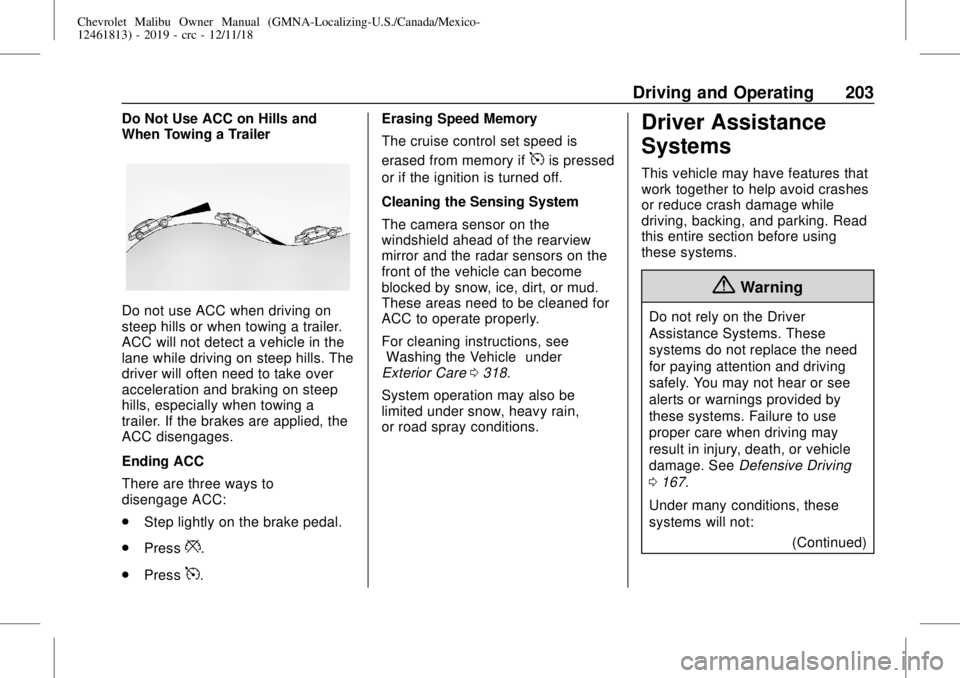
Do not use ACC when driving on
steep hills or when towing a trailer.
ACC will not detect a vehicle in the
lane while driving on steep hills. The
driver will often need to take over
acceleration and braking on steep
hills, especially when towing a
trailer. If the brakes are applied, the
ACC disengages.
Ending ACC
There are three ways to
disengage ACC:
.
Step lightly on the brake pedal.
.
Press
*.
.
Press
5.Erasing Speed Memory
The cruise control set speed is
erased from memory if
5is pressed
or if the ignition is turned off.
Cleaning the Sensing System
The camera sensor on the
windshield ahead of the rearview
mirror and the radar sensors on the
front of the vehicle can become
blocked by snow, ice, dirt, or mud.
These areas need to be cleaned for
ACC to operate properly.
For cleaning instructions, see
“Washing the Vehicle”under
Exterior Care0318.
System operation may also be
limited under snow, heavy rain,
or road spray conditions.
Driver Assistance
Systems
This vehicle may have features that
work together to help avoid crashes
or reduce crash damage while
driving, backing, and parking. Read
this entire section before using
these systems.
{Warning
Do not rely on the Driver
Assistance Systems. These
systems do not replace the need
for paying attention and driving
safely. You may not hear or see
alerts or warnings provided by
these systems. Failure to use
proper care when driving may
result in injury, death, or vehicle
damage. SeeDefensive Driving
0167.
Under many conditions, these
systems will not:
(Continued)