2019 CHEVROLET MALIBU interior lights
[x] Cancel search: interior lightsPage 63 of 382
Chevrolet Malibu Owner Manual (GMNA-Localizing-U.S./Canada/Mexico-
12461813) - 2019 - crc - 12/11/18
Seats and Restraints 63
Auto Heated Seats
When the vehicle is on, this feature
will automatically activate the
heated seats at the level required by
the vehicle’s interior temperature.
The active high, medium, low, or off
heated seat level will be indicated
by the manual heated seat buttons
on the center stack. Use the manual
heated seat buttons on the center
stack to turn auto heated seats off.
If the passenger seat is unoccupied,
the auto heated seats feature will
not activate that seat. The auto
heated seats feature can be
programmed to always be enabled
when the vehicle is on.
SeeVehicle Personalization0142.
Remote Start Auto Heated and
Ventilated Seats
During a remote start, the heated or
ventilated seats, if equipped, can be
turned on automatically. When it is
cold outside, the heated seats turn
on, and when it is hot outside the
ventilated seats turn on. The heated
or ventilated seats are canceled
when the ignition is turned on. Pressthe button to use the heated or
ventilated seats after the vehicle is
started.
The heated or ventilated seat
indicator lights on the button do not
turn on during a remote start.
The heated seat temperature
performance of an unoccupied seat
may be reduced. This is normal.
The heated or ventilated seats will
not turn on during a remote start
unless they are enabled in the
vehicle personalization menu. See
Remote Vehicle Start037and
Vehicle Personalization0142.Rear Seats
Rear Seat Reminder
If equipped, the message REAR
SEAT REMINDER LOOK IN REAR
SEAT displays under certain
conditions indicating there may be
an item or passenger in the rear
seat. Check before exiting the
vehicle.
This feature will activate when a
second row door is opened while
the vehicle is on or up to 10 minutes
before the vehicle is turned on.
There will be an alert when the
vehicle is turned off. The alert does
not directly detect objects in the rear
seat; instead, under certain
conditions, it detects when a rear
door is opened and closed,
indicating that there may be
something in the rear seat.
The feature is active only once each
time the vehicle is turned on and off,
and will require reactivation by
opening and closing the second row
doors. There may be an alert even
when there is nothing in the rear
seat; for example, if a child entered
Page 151 of 382
Chevrolet Malibu Owner Manual (GMNA-Localizing-U.S./Canada/Mexico-
12461813) - 2019 - crc - 12/11/18
Lighting 151
Turn and Lane-Change
Signals
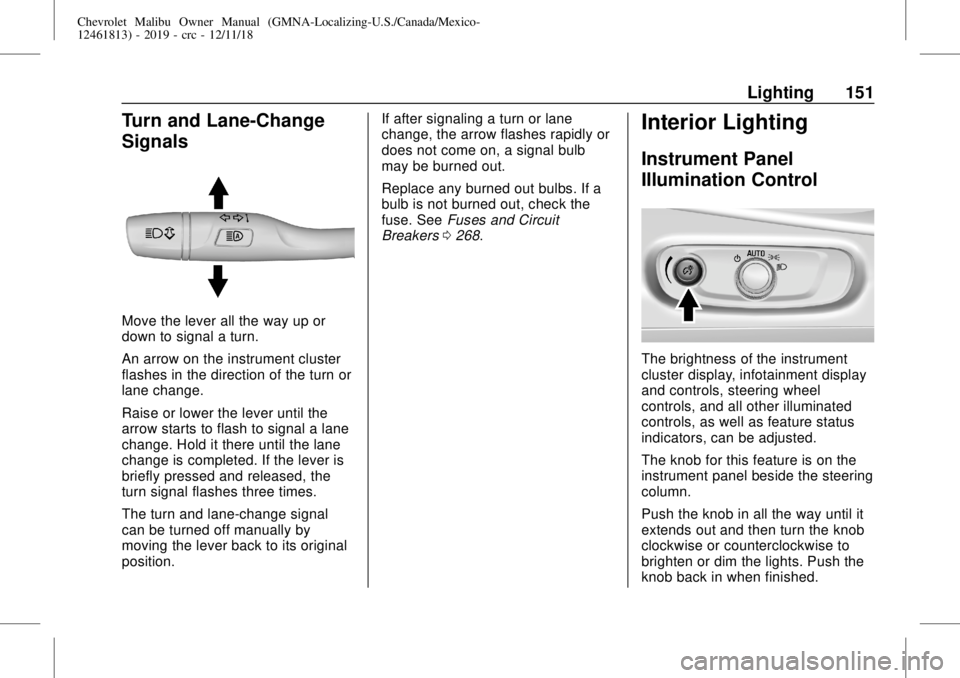
Move the lever all the way up or
down to signal a turn.
An arrow on the instrument cluster
flashes in the direction of the turn or
lane change.
Raise or lower the lever until the
arrow starts to flash to signal a lane
change. Hold it there until the lane
change is completed. If the lever is
briefly pressed and released, the
turn signal flashes three times.
The turn and lane-change signal
can be turned off manually by
moving the lever back to its original
position.If after signaling a turn or lane
change, the arrow flashes rapidly or
does not come on, a signal bulb
may be burned out.
Replace any burned out bulbs. If a
bulb is not burned out, check the
fuse. SeeFuses and Circuit
Breakers0268.
Interior Lighting
Instrument Panel
Illumination Control
The brightness of the instrument
cluster display, infotainment display
and controls, steering wheel
controls, and all other illuminated
controls, as well as feature status
indicators, can be adjusted.
The knob for this feature is on the
instrument panel beside the steering
column.
Push the knob in all the way until it
extends out and then turn the knob
clockwise or counterclockwise to
brighten or dim the lights. Push the
knob back in when finished.
Page 153 of 382
Chevrolet Malibu Owner Manual (GMNA-Localizing-U.S./Canada/Mexico-
12461813) - 2019 - crc - 12/11/18
Lighting 153
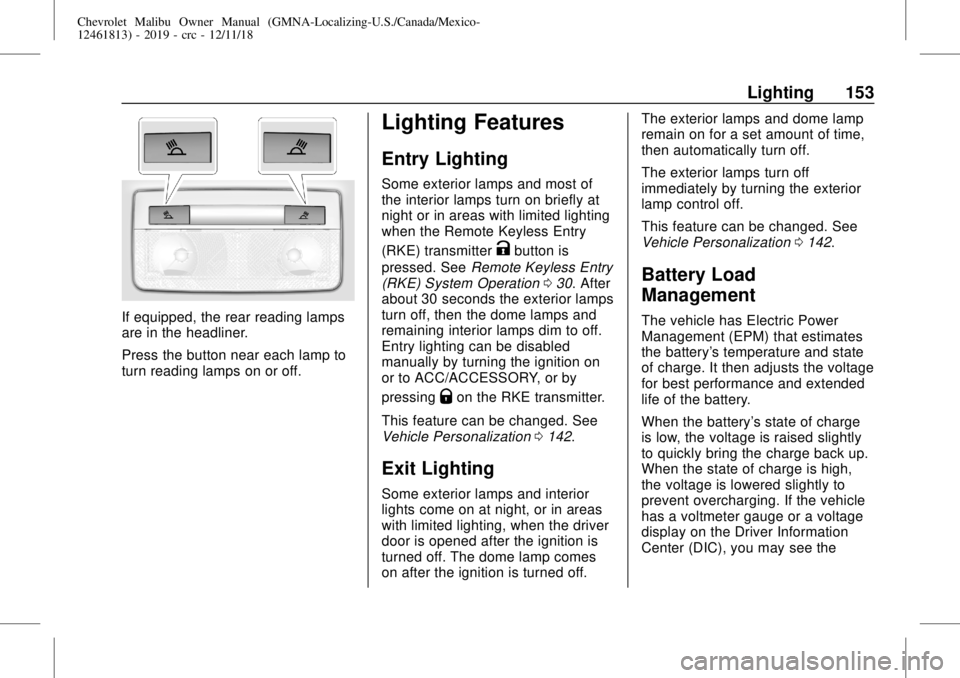
If equipped, the rear reading lamps
are in the headliner.
Press the button near each lamp to
turn reading lamps on or off.
Lighting Features
Entry Lighting
Some exterior lamps and most of
the interior lamps turn on briefly at
night or in areas with limited lighting
when the Remote Keyless Entry
(RKE) transmitter
Kbutton is
pressed. SeeRemote Keyless Entry
(RKE) System Operation030. After
about 30 seconds the exterior lamps
turn off, then the dome lamps and
remaining interior lamps dim to off.
Entry lighting can be disabled
manually by turning the ignition on
or to ACC/ACCESSORY, or by
pressing
Qon the RKE transmitter.
This feature can be changed. See
Vehicle Personalization0142.
Exit Lighting
Some exterior lamps and interior
lights come on at night, or in areas
with limited lighting, when the driver
door is opened after the ignition is
turned off. The dome lamp comes
on after the ignition is turned off.The exterior lamps and dome lamp
remain on for a set amount of time,
then automatically turn off.
The exterior lamps turn off
immediately by turning the exterior
lamp control off.
This feature can be changed. See
Vehicle Personalization0142.
Battery Load
Management
The vehicle has Electric Power
Management (EPM) that estimates
the battery's temperature and state
of charge. It then adjusts the voltage
for best performance and extended
life of the battery.
When the battery's state of charge
is low, the voltage is raised slightly
to quickly bring the charge back up.
When the state of charge is high,
the voltage is lowered slightly to
prevent overcharging. If the vehicle
has a voltmeter gauge or a voltage
display on the Driver Information
Center (DIC), you may see the
Page 162 of 382
Chevrolet Malibu Owner Manual (GMNA-Localizing-U.S./Canada/Mexico-
12461813) - 2019 - crc - 12/11/18
162 Climate Controls
system does not detect possible
window fogging, it returns to normal
operation.
To turn Auto Defog off or on, see
“Climate and Air Quality”under
Vehicle Personalization0142.
Rear Window Defogger
K:Press to turn the rear window
defogger on or off. An indicator light
on the button comes on to show that
the rear window defogger is on. The
rear window defogger only works
when the ignition is on. The
defogger turns off when the ignition
is turned off or to ACC/
ACCESSORY.
The upper lines on the rear window
are antenna grids and are not
intended to defrost the glass.
The rear window defogger can be
set to automatic operation. See
“Climate and Air Quality”under
Vehicle Personalization0142.
When Auto Rear Defog is selected,
the rear window defogger turns on
automatically when the interior
temperature is cold and the outsidetemperature is about 7 °C (45 °F)
and below. The auto rear defogger
turns off automatically.
If equipped with heated outside
mirrors, they turn on when the rear
window defogger button is on and
help to clear fog or frost from the
surface of the mirror. SeeHeated
Mirrors048.
Caution
Do not try to clear frost or other
material from the inside of the
front windshield and rear window
with a razor blade or anything
else that is sharp. This may
damage the rear window
defogger grid and affect the
radio's ability to pick up stations
clearly. The repairs would not be
covered by the vehicle warranty.
Driver and Passenger Heated and
Ventilated Seats :If equipped,
press
LorMto heat the driver or
passenger seat.If equipped, press
{orCto
ventilate the driver or passenger
seat. SeeHeated and Ventilated
Front Seats062.
Remote Start Climate Control
Operation :If equipped with remote
start, the climate control system
may run when the vehicle is started
remotely. The system will use the
defrost setting if it is cold outside or
turn on using the coldest settings if
it is hot outside. The rear defog may
come on during remote start based
on cold ambient conditions. The
rear defog indicator light does not
come on during a remote start. The
front heated seats will turn on if it is
cold outside. The heated seat
indicator lights do not come on
during a remote start.
Sensor
The solar sensor, on top of the
instrument panel near the
windshield, monitors the solar heat.
Page 377 of 382

Chevrolet Malibu Owner Manual (GMNA-Localizing-U.S./Canada/Mexico-
12461813) - 2019 - crc - 12/11/18
Index 377
How to Wear Seat Belts
Properly . . . . . . . . . . . . . . . . . . . . . . . . 68
HVAC . . . . . . . . . . . . . . . . . . . . . . 156, 159
I
Ignition Positions . . . . . . . . . . . . . . . 176
Immobilizer . . . . . . . . . . . . . . . . . . . . . . 46
Indicator
Pedestrian Ahead . . . . . . . . . . . . 128
Vehicle Ahead . . . . . . . . . . . . . . . . 128
Infants and Young Children,
Restraints . . . . . . . . . . . . . . . . . . . . . . 88
Information
Energy . . . . . . . . . . . . . . . . . . . . . . . 134
Publication Ordering . . . . . . . . . . 355
Infotainment . . . . . . . . . . . . . . . . . . . . 155
Infotainment System . . . . . . . . . . . . 359
Instrument Cluster . . . . . . . . . 115, 116
Instrument Panel Overview . . . . . . . 6
Interior Rearview Mirrors . . . . . . . . . 49
Introduction . . . . . . . . . . . . . . . . . . . . . . . 2
J
Jump Starting - North
America . . . . . . . . . . . . . . . . . . . . . . . 312
K
Keyless Entry
Remote (RKE) System . . . . . . . . . 30
Keys . . . . . . . . . . . . . . . . . . . . . . . . . . . . . 29
L
Labeling, Tire Sidewall . . . . . . . . . . 278
Lamps
Courtesy . . . . . . . . . . . . . . . . . . . . . . 152
Daytime Running (DRL) . . . . . . 149
Dome . . . . . . . . . . . . . . . . . . . . . . . . . 152
Exterior Controls . . . . . . . . . . . . . . 147
Exterior Lamps Off
Reminder . . . . . . . . . . . . . . . . . . . 149
Exterior Lighting Battery
Saver . . . . . . . . . . . . . . . . . . . . . . . 154
License Plate . . . . . . . . . . . . . . . . . 266
Malfunction Indicator
(Check Engine) . . . . . . . . . . . . . 124
On Reminder . . . . . . . . . . . . . . . . . 132
Reading . . . . . . . . . . . . . . . . . . . . . . 152
Lane Change Alert (LCA) . . . . . . . 215
Lane Departure
Warning (LDW) . . . . . . . . . . . . . . . . 217
Lane Keep Assist (LKA) . . . . . . . . 217
Lane Keep Assist Light . . . . . . . . . 128
Lap-Shoulder Belt . . . . . . . . . . . . . . . 70LATCH System
Replacing Parts after a
Crash . . . . . . . . . . . . . . . . . . . . . . . . . 99
LATCH, Lower Anchors and
Tethers for Children . . . . . . . . . . . . 93
LED Lighting . . . . . . . . . . . . . . . . . . . . 264
Lighting
Entry . . . . . . . . . . . . . . . . . . . . . . . . . 153
Exit . . . . . . . . . . . . . . . . . . . . . . . . . . . 153
Illumination Control . . . . . . . . . . . 151
LED . . . . . . . . . . . . . . . . . . . . . . . . . . 264
Lights
Airbag Readiness . . . . . . . . . . . . . 123
Antilock Brake System
(ABS) Warning . . . . . . . . . . . . . . 127
Brake System Warning . . . . . . . 126
Charging System . . . . . . . . . . . . . 124
Check Engine (Malfunction
Indicator) . . . . . . . . . . . . . . . . . . . . 124
Cruise Control . . . . . . . . . . . . . . . . 133
Door Ajar . . . . . . . . . . . . . . . . . . . . . 133
Electric Parking Brake . . . . . . . . 127
Engine Coolant
Temperature Warning . . . . . . . 130
Engine Oil Pressure . . . . . . . . . . 131
Flash-to-Pass . . . . . . . . . . . . . . . . . 149
High-Beam On . . . . . . . . . . . . . . . . 132
High/Low Beam Changer . . . . . 149
Page 378 of 382

Chevrolet Malibu Owner Manual (GMNA-Localizing-U.S./Canada/Mexico-
12461813) - 2019 - crc - 12/11/18
378 Index
Lights (cont'd)
Lane Keep Assist . . . . . . . . . . . . . 128
Low Fuel Warning . . . . . . . . . . . . 131
Seat Belt Reminders . . . . . . . . . . 122
Security . . . . . . . . . . . . . . . . . . . . . . 132
Service Electric Parking
Brake . . . . . . . . . . . . . . . . . . . . . . . 127
StabiliTrak OFF . . . . . . . . . . . . . . . 129
Tire Pressure . . . . . . . . . . . . . . . . . 130
Traction Control System
(TCS)/StabiliTrak . . . . . . . . . . . . 129
Traction Off . . . . . . . . . . . . . . . . . . . 129
Vehicle Ready . . . . . . . . . . . . . . . . 132
Locks
Automatic Door . . . . . . . . . . . . . . . . . 42
Delayed Locking . . . . . . . . . . . . . . . . 41
Door . . . . . . . . . . . . . . . . . . . . . . . . . . . . 39
Lockout Protection . . . . . . . . . . . . . . 42
Power Door . . . . . . . . . . . . . . . . . . . . . 41
Safety . . . . . . . . . . . . . . . . . . . . . . . . . . 42
Loss of Control . . . . . . . . . . . . . . . . . 169
Low Fuel Warning Light . . . . . . . . . 131
Low-Profile Tires . . . . . . . . . . . . . . . . 277
Lower Anchors and Tethers
for Children (LATCH
System) . . . . . . . . . . . . . . . . . . . . . . . . 93
Lumbar Adjustment . . . . . . . . . . . . . . 57
Front Seats . . . . . . . . . . . . . . . . . . . . . 57M
Maintenance
Records . . . . . . . . . . . . . . . . . . . . . . 341
Maintenance and Care
Additional . . . . . . . . . . . . . . . . . . . . . 335
Maintenance Schedule . . . . . . . . . 329
Recommended Fluids and
Lubricants . . . . . . . . . . . . . . . . . . . 338
Malfunction Indicator Lamp . . . . . 124
Manual Mode . . . . . . . . . . . . . . . . . . . 186
Memory Features . . . . . . . . . . . . . . . . 11
Memory Seats . . . . . . . . . . . . . . . . . . . 59
Messages
Engine Power . . . . . . . . . . . . . . . . 141
Vehicle . . . . . . . . . . . . . . . . . . . . . . . 141
Vehicle Speed . . . . . . . . . . . . . . . . 141
Mirrors
Automatic Dimming
Rearview . . . . . . . . . . . . . . . . . . . . . . 49
Convex . . . . . . . . . . . . . . . . . . . . . . . . . 47
Folding . . . . . . . . . . . . . . . . . . . . . . . . . 48
Heated . . . . . . . . . . . . . . . . . . . . . . . . . 48
Manual Rearview . . . . . . . . . . . . . . . 49
Power . . . . . . . . . . . . . . . . . . . . . . . . . . 48
Tilt in Reverse . . . . . . . . . . . . . . . . . . 48
Mirrors, Interior Rearview . . . . . . . . 49
Monitor System, Tire
Pressure . . . . . . . . . . . . . . . . . . . . . . 285
N
Navigation
Connected Services . . . . . . . . . . 368
Net, Convenience . . . . . . . . . . . . . . 106
New Vehicle Break-In . . . . . . . . . . . 176
O
Odometer . . . . . . . . . . . . . . . . . . . . . . . 119
Trip . . . . . . . . . . . . . . . . . . . . . . . . . . . .119
Off-Road
Recovery . . . . . . . . . . . . . . . . . . . . . 168
Oil
Engine . . . . . . . . . . . . . . . . . . . . . . . . 242
Engine Oil Life System . . . . . . . 245
Pressure Light . . . . . . . . . . . . . . . . 131
Older Children, Restraints . . . . . . . 86
Online Owner Center . . . . . . . . . . . 349
OnStar . . . . . . . . . . . . . . . . . . . . . . . . . 359
OnStar Additional
Information . . . . . . . . . . . . . . . . . . . . 362
OnStar Emergency . . . . . . . . . . . . . 361
OnStar Overview . . . . . . . . . . . . . . . 360
OnStar Security . . . . . . . . . . . . . . . . 362
Outlets
Power . . . . . . . . . . . . . . . . . . . . . . . . .110
Overheating, Engine . . . . . . . . . . . . 253