2019 CHEVROLET BOLT EV ECO mode
[x] Cancel search: ECO modePage 98 of 371

Chevrolet BOLT EV Owner Manual (GMNA-Localizing-U.S./Canada/Mexico-
12163003) - 2019 - crc - 5/18/18
Seats and Restraints 97
2. Secure the child restraint in theright front seating position with
the vehicle belts.
See Securing Child Restraints
(With the Seat Belt in the Rear
Seat) 0100 orSecuring Child
Restraints (With the Seat Belt
in the Front Seat) 0102.
3. Before placing a child in the child restraint, make sure it is
securely held in place. To
check, grasp the child restraint
at the belt path and attempt to
move it side to side and back
and forth. There should be no
more than 2.5 cm (1 in) of
movement for proper
installation.
Sedan Models 1. Attach and tighten the lower attachments to the lower
anchors. If the child restraint
does not have lower
attachments or the desired
seating position does not have
lower anchors, secure the child
restraint with the top tether and
the seat belts. Refer to the child restraint manufacturer
instructions and the
instructions in this manual.
1.1. Find the lower anchors
for the desired seating
position.
1.2. Put the child restraint on the seat.
For rear outboard seating
positions, if the head
restraint interferes with
the proper installation of
the child restraint, the
head restraint may be
removed. See “Head
Restraint Removal and
Reinstallation” at the end
of this section.
When installing a
rear-facing child restraint,
it may be necessary to
move the front seat
forward to properly install
the child restraint per the
child restraint
manufacturer instructions. 1.3. Attach and tighten the
lower attachments on the
child restraint to the lower
anchors.
2. If the child restraint manufacturer recommends that
the top tether be attached,
attach and tighten the top
tether to the top tether anchor,
if equipped. Refer to the child
restraint instructions and the
following steps:
2.1. Find the top tether
anchor.
2.2. Remove the cargo cover before installing the top
tether. Place the cargo
cover in its original
location after installing
your child restraint when
the head restraint is
removed.
2.3. Route, attach, and tighten the top tether according
to your child restraint
instructions and the
following instructions:
Page 117 of 371

Chevrolet BOLT EV Owner Manual (GMNA-Localizing-U.S./Canada/Mexico-
12163003) - 2019 - crc - 5/18/18
116 Instruments and Controls
Certain accessory power plugs may
not be compatible with the
accessory power outlet and could
overload vehicle or adapter fuses.
If a problem is experienced, see
your dealer.
When adding electrical equipment,
be sure to follow the proper
installation instructions included with
the equipment. SeeAdd-On
Electrical Equipment 0254.
Caution
Hanging heavy equipment from
the power outlet can cause
damage not covered by the
vehicle warranty. The power
outlets are designed for
accessory power plugs only, such
as cell phone charge cords.
Wireless Charging
The vehicle may have a wireless
charging pocket outside the armrest
of the center console. The system
operates at 145 kHz and wirelessly
charges one Qi compatible mobile device. The power output of the
system is capable of charging at a
rate up to 3 amp (19.5W), as
requested by the compatible mobile
device. See
Radio Frequency
Statement 0343.
{Warning
Wireless charging can affect the
operation of an implanted
pacemaker or other medical
devices. If you have one, it is
recommended to consult with
your doctor before using the
wireless charging system.
The vehicle must be on, in Service
Mode, or Retained Accessory
Power (RAP) must be active. The
wireless charging feature may not
correctly indicate charging when the
vehicle is in RAP. See Retained
Accessory Power (RAP) 0208.
The operating temperature is −20 °C
(−4 °F) to 60 °C (140 °F) for the
charging system and 0 °C (32 °F) to
35 °C (95 °F) for the mobile phone.
{Warning
Remove all objects from the
charging pocket before charging
your mobile phone. Objects, such
as coins, keys, rings, paper clips,
or cards, between the mobile
phone and the charger will
become very hot. On the rare
occasion that the charging system
does not detect an object, and the
object gets wedged between the
mobile phone and the charger,
remove the mobile phone and
allow the object to cool before
removing it from the charging
pocket, to prevent burns.
Page 122 of 371

Chevrolet BOLT EV Owner Manual (GMNA-Localizing-U.S./Canada/Mexico-
12163003) - 2019 - crc - 5/18/18
Instruments and Controls 121
Reconfigurable Instrument
Cluster
The cluster layout can be changed.
There are three display
configurations to choose from:
Classic, Modern, and Enhanced.
Use the steering wheel control to
move between the different display
zones and scroll through the
different displays. See“Layout”
under “Cluster Menu” following.
. Classic configuration displays
the speedometer with a
simplified battery gauge and
efficiency light.
. Modern configuration displays
the speedometer with a battery
gauge and efficiency gauge.
. Enhanced configuration displays
the speedometer with battery
gauge, efficiency ring, and
power gauge.
Cluster Menu
There is an interactive display area
in the center of the instrument
cluster.
Use the right steering wheel control
to open and scroll through the
different items and displays.
Press
oto access the cluster
applications. Use
worxto scroll
through the list of available
applications. Press
Vto select the
application, then press
pto enter
the application menu. Exit the menu
by pressing
o.
Not all applications will be available
on all vehicles. Cluster Menu Applications
.
Vehicle info. This is where the
Driver Information Center (DIC)
displays can be viewed. See
Driver Information Center (DIC)
0143.
. Audio
. Phone
. Onstar Navigation
. Layout
. Options
Audio
In the main view of the Audio
application, press
worxto scroll
through radio stations or move to
the next/previous track of a USB/
Bluetooth device that is connected
to the vehicle. Press
Vto select the
Audio app, then press
pto enter
the Audio menu. In the Audio menu
browse for music, select from the
favorites, or change the audio
source.
Page 125 of 371
Chevrolet BOLT EV Owner Manual (GMNA-Localizing-U.S./Canada/Mexico-
12163003) - 2019 - crc - 5/18/18
124 Instruments and Controls
Inefficient Driving/Aggressive
Braking
.Classic layout: The gauge and
leaf turn yellow.
. Modern layout: When driving
inefficiently, the ball turns yellow
and moves above the center of
the gauge. When braking
aggressively, the ball turns
yellow and moves below the
center of the gauge.
. Enhanced layout: The outer ring
of the speedometer turns yellow.
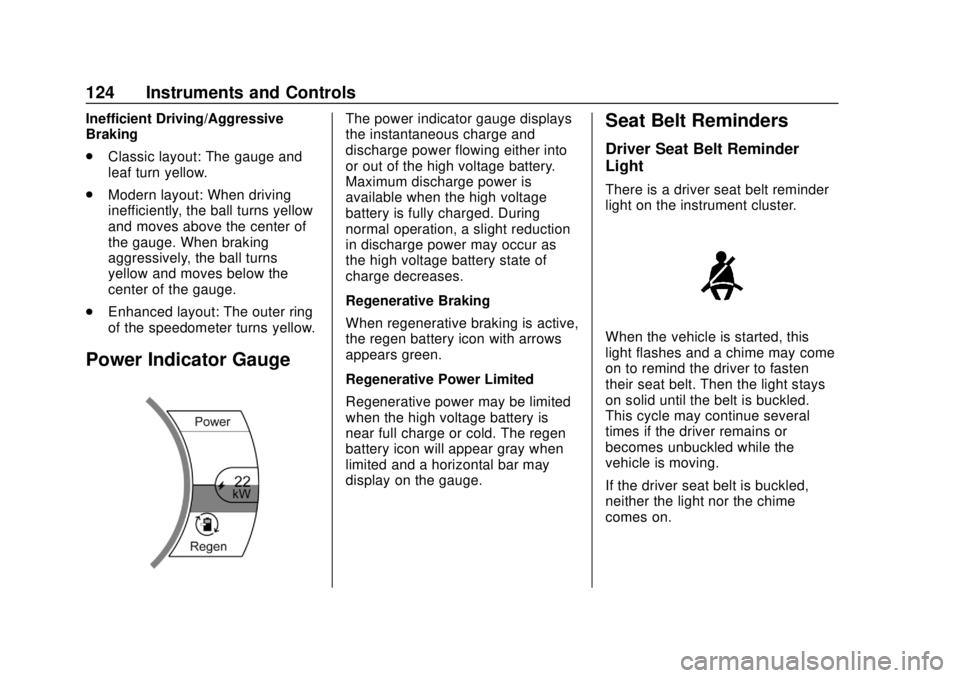
Power Indicator Gauge
The power indicator gauge displays
the instantaneous charge and
discharge power flowing either into
or out of the high voltage battery.
Maximum discharge power is
available when the high voltage
battery is fully charged. During
normal operation, a slight reduction
in discharge power may occur as
the high voltage battery state of
charge decreases.
Regenerative Braking
When regenerative braking is active,
the regen battery icon with arrows
appears green.
Regenerative Power Limited
Regenerative power may be limited
when the high voltage battery is
near full charge or cold. The regen
battery icon will appear gray when
limited and a horizontal bar may
display on the gauge.Seat Belt Reminders
Driver Seat Belt Reminder
Light
There is a driver seat belt reminder
light on the instrument cluster.
When the vehicle is started, this
light flashes and a chime may come
on to remind the driver to fasten
their seat belt. Then the light stays
on solid until the belt is buckled.
This cycle may continue several
times if the driver remains or
becomes unbuckled while the
vehicle is moving.
If the driver seat belt is buckled,
neither the light nor the chime
comes on.
Page 140 of 371
Chevrolet BOLT EV Owner Manual (GMNA-Localizing-U.S./Canada/Mexico-
12163003) - 2019 - crc - 5/18/18
Instruments and Controls 139
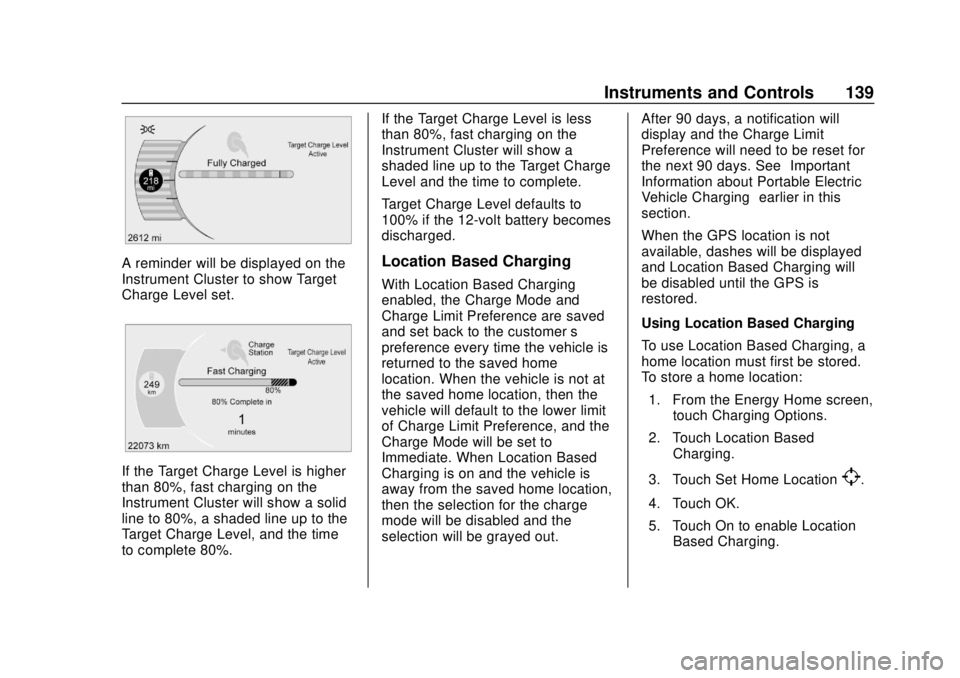
A reminder will be displayed on the
Instrument Cluster to show Target
Charge Level set.
If the Target Charge Level is higher
than 80%, fast charging on the
Instrument Cluster will show a solid
line to 80%, a shaded line up to the
Target Charge Level, and the time
to complete 80%.If the Target Charge Level is less
than 80%, fast charging on the
Instrument Cluster will show a
shaded line up to the Target Charge
Level and the time to complete.
Target Charge Level defaults to
100% if the 12-volt battery becomes
discharged.
Location Based Charging
With Location Based Charging
enabled, the Charge Mode and
Charge Limit Preference are saved
and set back to the customer
’s
preference every time the vehicle is
returned to the saved home
location. When the vehicle is not at
the saved home location, then the
vehicle will default to the lower limit
of Charge Limit Preference, and the
Charge Mode will be set to
Immediate. When Location Based
Charging is on and the vehicle is
away from the saved home location,
then the selection for the charge
mode will be disabled and the
selection will be grayed out. After 90 days, a notification will
display and the Charge Limit
Preference will need to be reset for
the next 90 days. See
“Important
Information about Portable Electric
Vehicle Charging” earlier in this
section.
When the GPS location is not
available, dashes will be displayed
and Location Based Charging will
be disabled until the GPS is
restored.
Using Location Based Charging
To use Location Based Charging, a
home location must first be stored.
To store a home location:
1. From the Energy Home screen, touch Charging Options.
2. Touch Location Based Charging.
3. Touch Set Home Location
[.
4. Touch OK.
5. Touch On to enable Location Based Charging.
Page 161 of 371
Chevrolet BOLT EV Owner Manual (GMNA-Localizing-U.S./Canada/Mexico-
12163003) - 2019 - crc - 5/18/18
160 Infotainment System
Before driving:
.Become familiar with the
operation, center stack controls,
and infotainment display
controls.
. Set up the audio by presetting
favorite stations, setting the
tone, and adjusting the
speakers.
. Set up phone numbers in
advance so they can be called
easily by pressing a single
control or by using a single voice
command if equipped with
Bluetooth phone capability.
See Defensive Driving 0196.
To play the infotainment system with
the ignition off, see Retained
Accessory Power (RAP) 0208.
Active Noise Cancellation (ANC)
If equipped, ANC reduces engine
noise in the vehicle’s interior. ANC
requires the factory-installed audio
system, radio, speakers, amplifier (if
equipped), induction system, and
exhaust system to work properly. Deactivation is required by your
dealer if related aftermarket
equipment is installed.
Theft-Deterrent Feature
The infotainment system has an
electronic security system installed
to prevent theft.
The infotainment system only works
in the vehicle in which it was first
installed, and cannot be used in
another vehicle.
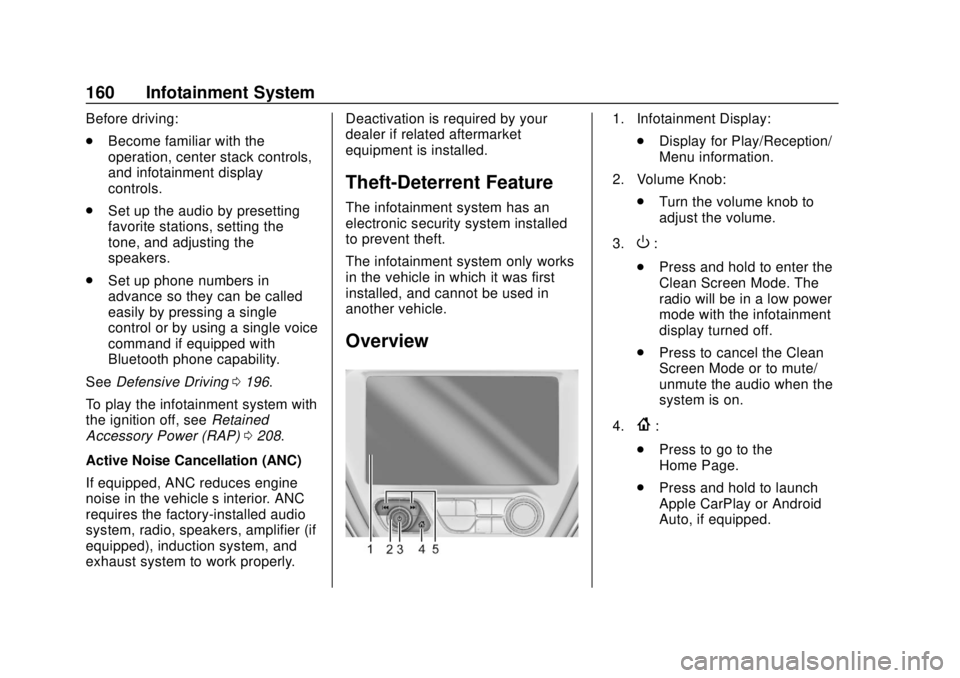
Overview
1. Infotainment Display:
.Display for Play/Reception/
Menu information.
2. Volume Knob: .Turn the volume knob to
adjust the volume.
3.
O:
. Press and hold to enter the
Clean Screen Mode. The
radio will be in a low power
mode with the infotainment
display turned off.
. Press to cancel the Clean
Screen Mode or to mute/
unmute the audio when the
system is on.
4.
{:
. Press to go to the
Home Page.
. Press and hold to launch
Apple CarPlay or Android
Auto, if equipped.
Page 176 of 371
Chevrolet BOLT EV Owner Manual (GMNA-Localizing-U.S./Canada/Mexico-
12163003) - 2019 - crc - 5/18/18
Infotainment System 175
.Bluetooth music can be played
only when a Bluetooth device
has been connected. To play
Bluetooth music, connect the
Bluetooth phone to the
infotainment system.
. If the Bluetooth device is
disconnected while playing
music, the music is
discontinued. The audio
streaming function may not be
supported in some Bluetooth
phones. Only one function can
be used at a time between the
Bluetooth hands-free phone
function or the Phone music
function. For example,
if switching to Bluetooth
hands-free phone mode while
playing Phone music, the music
streaming function will be
discontinued.
. For Bluetooth music to play, the
music must be played at least
once from the music player
mode of the mobile phone or
Bluetooth device after
connecting as a stereo headset.
After being played at least once, the music player will be
automatically played upon
entering play mode, and it will be
automatically stopped when the
music player mode ends. If the
mobile phone or Bluetooth
device is not in the waiting
screen mode, some devices may
not automatically play in
Bluetooth music play mode.
Playing Bluetooth Music
1. Touch
T.
2. Touch Audio, then Source on the screen.
3. Touch Bluetooth to select the connected Bluetooth device
music play mode.
Pause Touch
jduring playback.
Touch
ragain to resume
playback.
Playing the Next Music Touch
dto play the next music. Playing the Previous Music
Touch
gwithin two seconds of
playback time to play the
previous music.
Returning to the Beginning of the
Current Music Touch
gafter two seconds of
playback time.
Scanning Forward or Backward Hold
gordduring playback
to rewind or fast forward.
Release
gordto resume
playback at normal speed.
Playing Files Randomly Touch
Zduring playback.
Touch
Zagain to return to
normal playback.
Playing Files Repeatedly
1. Touch
"during playback.
2. Touch the desired option. .Repeat All: Plays all files
repeatedly.
. Repeat Song: Plays a
current file repeatedly.
Page 178 of 371
Chevrolet BOLT EV Owner Manual (GMNA-Localizing-U.S./Canada/Mexico-
12163003) - 2019 - crc - 5/18/18
Infotainment System 177
OnStar System
OnStar with 4G LTE
If equipped with OnStar 4G LTE, up
to seven devices, such as
smartphones, tablets, and laptops,
can be connected to high-speed
Internet through the vehicle’s built-in
Wi-Fi hotspot.
Call 1-888-4-ONSTAR
(1-888-466-7827) to connect to an
OnStar Advisor for assistance. See
www.onstar.com for a detailed
instruction guide, vehicle availability,
details, and system limitations.Services and apps vary by make,
model, year, carrier, availability, and
conditions. 4G LTE service is
available in select markets. 4G LTE
performance is based on industry
averages and vehicle systems
design. Some services require a
data plan.
Phone
Bluetooth
Bluetooth Wireless Technology
Bluetooth wireless technology
establishes a wireless link between
two devices supported with
Bluetooth. After the initial pairing,
the two devices can connect
automatically when turned on.
Bluetooth allows wireless
transmission of information among
Bluetooth phones, PDAs, or other
devices within close range by using
2.45 GHz frequency short-distance
wireless telecommunication
technologies. Within this vehicle,
users can make hands-free calls,
transmit hands-free data, and play
audio streaming files by connecting
a mobile phone with the system.
.
There may be restrictions on
using Bluetooth wireless
technology in some locations.