2019 CHEVROLET BOLT EV ECO mode
[x] Cancel search: ECO modePage 184 of 371
Chevrolet BOLT EV Owner Manual (GMNA-Localizing-U.S./Canada/Mexico-
12163003) - 2019 - crc - 5/18/18
Infotainment System 183
Android Auto
1. TouchT.
2. Touch Settings and find Android Auto.
3. Select On or Off.
Even if Projection is set to Off,
connecting the device and touching
Projection on the Home Page will
display a pop-up message:
. For Apple CarPlay function:
“While active, Apple CarPlay will
be displayed on this screen.”
. For Android Auto function:
“While active, Android Auto will
be displayed on this screen.”
When the device is first connected,
the device projection privacy
consent pop-up message will be
displayed.
. Touch Continue to activate the
projection feature.
. Touch Disable and the device is
charging only. If Android Auto is not activated,
make sure the mobile phone’s USB
connection mode is set to MTP.
If the device has not previously
been paired, the consent pop-up will
display when touching continue.
Teen Driver
If equipped, this allows multiple
keys to be registered for beginner
drivers, to encourage safe driving
habits. When the vehicle is started
with a Teen Driver key, it will
automatically activate certain safety
systems, allow setting of some
features, and limit the use of others.
The Report Card will record vehicle
data about driving behavior that can
be viewed later. When the vehicle is
started with a registered key, the
Driver Information Center (DIC)
displays a message that Teen Driver
is active.
To access:
1. Touch Settings on the Home Page, then touch Teen Driver. 2. Create a Personal Identification
Number (PIN) by choosing a
four-digit PIN. Re-enter the PIN
to confirm. To change the PIN,
select Change PIN.
The PIN is required to:
. Register or unregister keys.
. Change Teen Driver settings.
. Change or clear the Teen
Driver PIN.
. Access or delete Report
Card data.
Register keys to activate:
Any vehicle key can be registered,
up to a maximum of eight keys.
Label the key to tell it apart from the
other keys. 1. Start the vehicle.
2. The vehicle must be in P (Park).
3. From the Settings menu, select Teen Driver.
4. Enter the PIN.
Page 190 of 371

Chevrolet BOLT EV Owner Manual (GMNA-Localizing-U.S./Canada/Mexico-
12163003) - 2019 - crc - 5/18/18
Climate Controls 189
The heated seats, if equipped,
climate on/off, recirculation, heat,
and air conditioning can be
controlled by touching Climate
Settings on the infotainment
Home Page.
A selection can then be made on
the climate settings page.
Automatic Operation
The system automatically controls
the fan speed, air delivery, air
conditioning, electric heating, and
recirculation to heat or cool the
vehicle to the selected temperature.
When AUTO is lit, all five functions
operate automatically. Each function
can also be manually set and the
selected setting is displayed or the
indicator is lit. Functions not
manually set will continue to be
automatically controlled, even if the
AUTO indicator is not lit.
For automatic operation:1. Press AUTO. 2. Set the temperature. An initial
setting of 22 °C (72 °F) is
recommended. Allow the
system time to stabilize. Adjust
the temperature as needed.
Manual Operation
ON : Touch to turn the climate
control system on and off.
The climate control system will turn
on when any climate control button
is pressed on the center stack or
touched on the climate control
display. To turn the system off,
touch ON again.
DorC: Press the buttons to
increase or decrease the fan speed.
The fan speed setting appears on
the climate control display. Manually
adjusting the fan speed cancels
automatic fan control. Press AUTO
to return to automatic operation.
Touch ON to turn off the fan and the
climate control system.
Temperature Control : Turn the
knob clockwise or counterclockwise
to increase or decrease the
temperature setting. Air Delivery Mode Control :
Press
c,d, or0on the center stack
to change the direction of airflow.
Any combination of the three
buttons can be selected. The
selected air delivery mode button
indicator is lit.
Pressing any button cancels
automatic air delivery control and
the direction of the airflow can be
controlled manually. Press AUTO to
return to automatic operation.
0: Air is directed to the
windshield.
d: Air is directed to the instrument
panel outlets.
c: Air is directed to the floor
outlets.
0MAX : Air is directed to the
windshield and the fan runs at a
higher speed. Fog or frost is cleared
from the windshield more quickly.
When the button is pressed again,
the system returns to the previous
mode setting.
Page 191 of 371
Chevrolet BOLT EV Owner Manual (GMNA-Localizing-U.S./Canada/Mexico-
12163003) - 2019 - crc - 5/18/18
190 Climate Controls
For best results, clear all snow and
ice from the windshield before
defrosting.
L:Touch to turn on
recirculation.
An indicator light comes on. Air is
recirculated to quickly cool the
inside of the vehicle or to reduce the
entry of outside air and odors. Using
the recirculation mode for extended
periods may cause the windows to
fog. If this happens, select the
defrost mode.
Using air conditioning and
recirculation together for long
periods of time may cause the air
inside the vehicle to become too
dry. To prevent this from happening,
after the air in the vehicle has
cooled, turn the recirculation
mode off.
Touching this button cancels
automatic recirculation. Press AUTO
to return to automatic operation;
recirculation runs automatically as
needed.
vHEAT : Touch to turn the heater
on when the fan is on. A/C :
Touch to turn the air
conditioning on when the fan is on.
Auto Defog : The system will
monitor high humidity inside the
vehicle. When high humidity is
detected, the climate control system
may adjust to outside air supply and
turn on the air conditioner or the
heater. The fan speed may slightly
increase to help prevent fogging.
When high humidity is no longer
detected, the system will return to
its prior operation. To turn Auto
Defog off or on, see “Climate and
Air Quality” underVehicle
Personalization 0146.
Auto Heated Seats : If equipped,
when the vehicle is on, this feature
will automatically activate the
heated seats at the level required by
the vehicle’ s interior temperature. In
auto mode, the indicators
automatically show the level setting
required.
Use the manual heated seat buttons
on the infotainment display to turn
auto heated seats off. Once this feature is turned off, the auto heated
seats will be activated the next time
the vehicle is turned on.
In manual mode, the controls can
be accessed while the vehicle is on
by touching
(orMwith three level
indicators high, medium, low or off
on the climate control display. If the
passenger seat is unoccupied, the
auto heated seats feature will not
activate that seat.
See Heated Front Seats 060 and
Vehicle Personalization 0146.
Rear Window Defogger
K:Press to turn the rear window
defogger on or off. An indicator light
on the button comes on to show that
the rear window defogger is on.
The defogger only works when the
vehicle is on. The defogger will turn
off if the vehicle is turned off.
Page 196 of 371

Chevrolet BOLT EV Owner Manual (GMNA-Localizing-U.S./Canada/Mexico-
12163003) - 2019 - crc - 5/18/18
Driving and Operating 195
Driving and
Operating
Driving Information
Distracted Driving . . . . . . . . . . . . 196
Defensive Driving . . . . . . . . . . . . . 196
Drunk Driving . . . . . . . . . . . . . . . . . 197
Control of a Vehicle . . . . . . . . . . . 197
Braking . . . . . . . . . . . . . . . . . . . . . . . 197
Steering . . . . . . . . . . . . . . . . . . . . . . 197
Off-Road Recovery . . . . . . . . . . . 198
Loss of Control . . . . . . . . . . . . . . . 198
Driving on Wet Roads . . . . . . . . 199
Hill and Mountain Roads . . . . . 200
Winter Driving . . . . . . . . . . . . . . . . 200
If the Vehicle Is Stuck . . . . . . . . 201
Vehicle Load Limits . . . . . . . . . . . 201
Starting and Operating
New Vehicle Break-In . . . . . . . . . 205
Power Button . . . . . . . . . . . . . . . . . 205
Starting and Stopping theVehicle . . . . . . . . . . . . . . . . . . . . . . 207
Retained Accessory Power (RAP) . . . . . . . . . . . . . . . . 208
Shifting Into Park . . . . . . . . . . . . . 208
Shifting out of Park . . . . . . . . . . . 208
Extended Parking . . . . . . . . . . . . 209
Electric Vehicle Operating
Modes
Driver Selected Operating Modes . . . . . . . . . . . . . . . . . . . . . . 210
Electric Drive Unit
Electric Drive Unit . . . . . . . . . . . . 210
Brakes
Antilock BrakeSystem (ABS) . . . . . . . . . . . . . . . 214
Electric Parking Brake . . . . . . . . 215
Brake Assist . . . . . . . . . . . . . . . . . . 216
Hill Start Assist (HSA) . . . . . . . . 217
Regenerative Braking . . . . . . . . 217
Ride Control Systems
Traction Control/Electronic Stability Control . . . . . . . . . . . . . 218
Cruise Control
Cruise Control . . . . . . . . . . . . . . . . 220
Driver Assistance Systems
Driver Assistance Systems . . . 222
Assistance Systems forParking or Backing . . . . . . . . . . 224
Assistance Systems for Driving . . . . . . . . . . . . . . . . . . . . . . 227
Forward Collision Alert (FCA) System . . . . . . . . . . . . . . . . . . . . . . 227 Forward Automatic
Braking (FAB) . . . . . . . . . . . . . . . 229
Front Pedestrian Braking (FPB) System . . . . . . . . . . . . . . . 230
Side Blind Zone
Alert (SBZA) . . . . . . . . . . . . . . . . 232
Lane Change Alert (LCA) . . . . . 232
Lane Departure Warning (LDW) . . . . . . . . . . . . . 234
Lane Keep Assist (LKA) . . . . . . 234
Charging
When to Charge . . . . . . . . . . . . . . 236
Plug-In Charging . . . . . . . . . . . . . 237
Delayed Charging Override . . . 241
Charging Status Feedback . . . 241
Charge Cord . . . . . . . . . . . . . . . . . 246
Utility Interruption of Charging . . . . . . . . . . . . . . . . . . . . 252
Electrical Requirements for Battery Charging . . . . . . . . . . . . 253
Trailer Towing
General TowingInformation . . . . . . . . . . . . . . . . . . 254
Conversions and Add-Ons
Add-On ElectricalEquipment . . . . . . . . . . . . . . . . . . 254
Page 207 of 371

Chevrolet BOLT EV Owner Manual (GMNA-Localizing-U.S./Canada/Mexico-
12163003) - 2019 - crc - 5/18/18
206 Driving and Operating
instrument cluster, the vehicle is
ready to be driven. This could take
up to 15 seconds at extremely cold
temperatures.
Service Mode
This power mode is available for
service and diagnostics, and to
verify the proper operation of the
service vehicle soon light as may be
required for emission inspection
purposes. With the vehicle off, and
the brake pedal not applied,
pressing and holding POWER
Ofor
more than five seconds will place
the vehicle in Service Mode. The
instruments and audio systems will
operate as they do in ON/RUN, but
the vehicle will not be able to be
driven. The propulsion system will
not start in Service Mode. Press
POWER
Oagain to turn the
vehicle off.
Caution
Placing the vehicle in Service
Mode will use the 12-volt battery.
Do not use Service Mode for an
extended period, or the vehicle
may not start.
STOPPING THE VEHICLE/OFF :
To turn the vehicle off, apply the
brakes, press the button on top of
the shift lever to shift to P (Park) and
press POWER
O.
Alternatively, apply the brakes and
press POWER
O. The electric drive
unit will shift to P (Park) then shut
off automatically.
Retained Accessory Power (RAP)
will remain active until the driver
door is opened. If the vehicle must be shut off in an
emergency:
1. Brake using a firm and steady pressure. Do not pump the
brakes repeatedly. This may
deplete power assist, requiring
increased brake pedal force.
2. Shift the vehicle to N (Neutral). This can be done while the
vehicle is moving. After shifting
to N (Neutral), firmly apply the
brakes and steer the vehicle to
a safe location.
3. Come to a complete stop, shift to P (Park), and turn the vehicle
off by pressing POWERO.
4. Set the parking brake.
{Warning
Turning off the vehicle while
moving may disable the airbags.
While driving, only shut the
propulsion system off in an
emergency.
Page 238 of 371
Chevrolet BOLT EV Owner Manual (GMNA-Localizing-U.S./Canada/Mexico-
12163003) - 2019 - crc - 5/18/18
Driving and Operating 237
Plug-In Charging
This section explains the process
for charging the high voltage battery.
Do not allow the vehicle to remain in
temperature extremes for long
periods without being driven or
plugged in. It is recommended that
the vehicle be plugged in when
temperatures are below 0 °C (32 °F)
and above 32 °C (90 °F) to
maximize high voltage battery life.
When using a 120-volt AC electrical
outlet, it will take approximately
50 hours to charge the vehicle from
a fully depleted battery with the
12 amp AC current setting, allowing
approximately 6 km (4 mi) for every
hour of charging.
When using a 240-volt charging
station, it will take approximately
9.5 hours to charge the vehicle with
the 32 amp setting, allowing
approximately 40 km (25 mi) for
every hour of charging.Charge times will vary based on
battery condition, charge level, and
outside temperature. See
Programmable Charging
0132 for
charge mode selection.
If equipped, the vehicle can be
charged using DC charging
equipment typically found at service
stations and other public locations.
When using a DC charging station
with at least 80 kW of available
power, it will take approximately
30 minutes to recharge from a
depleted battery to an estimated
145 km (90 mi) of driving range.
This time estimate is applicable to
nominal temperature ranges. In
extreme hot or cold conditions, this
time may be lengthened. A full
charge will take additional time.
The charging system may run fans
and pumps that result in sounds
from the vehicle while it is turned
off. Additionally, clicking sounds
may be caused by the electrical
devices used while charging. The vehicle does not require indoor
charging area ventilation before,
during, or after charging.
The vehicle cannot be driven while
the charge cord is plugged into the
vehicle.
Charging Override
A CHARGING OVERRIDE/
INTERRUPTION OCCURRED
message may display to indicate
that a charging override or
interruption has occurred due to one
or more of the following events:
.
Override of the charge settings
by the owner.
. Unintended interruption of AC
power at the vehicle's
charge port.
. Interruption of charging by the
utility company.
There are several screens that will
display depending on the current
charging status. See Programmable
Charging 0132.
Page 253 of 371
Chevrolet BOLT EV Owner Manual (GMNA-Localizing-U.S./Canada/Mexico-
12163003) - 2019 - crc - 5/18/18
252 Driving and Operating
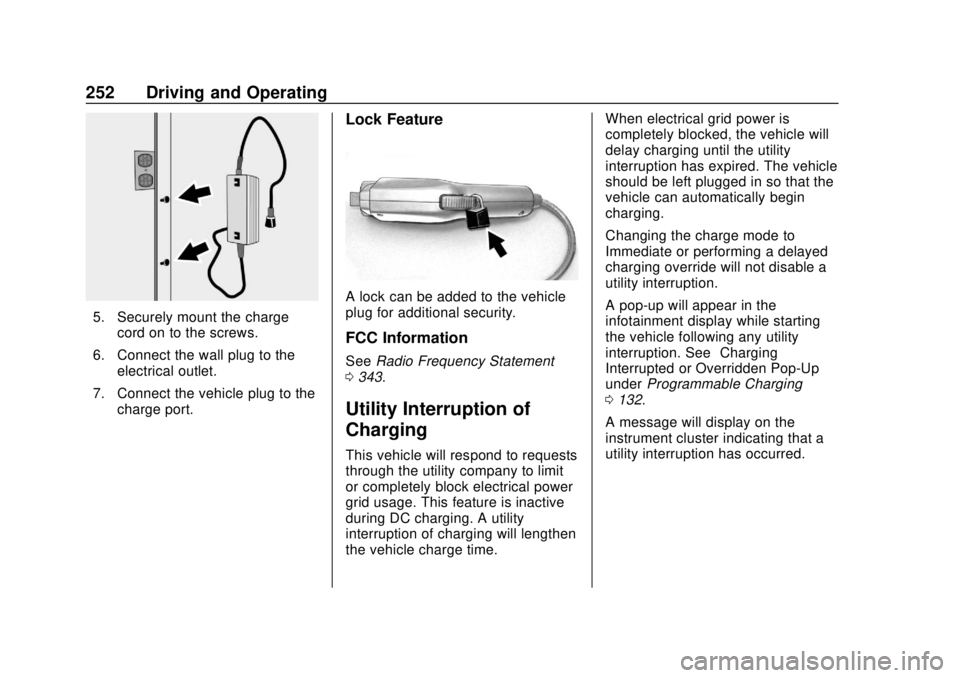
5. Securely mount the chargecord on to the screws.
6. Connect the wall plug to the electrical outlet.
7. Connect the vehicle plug to the charge port.
Lock Feature
A lock can be added to the vehicle
plug for additional security.
FCC Information
See Radio Frequency Statement
0 343.
Utility Interruption of
Charging
This vehicle will respond to requests
through the utility company to limit
or completely block electrical power
grid usage. This feature is inactive
during DC charging. A utility
interruption of charging will lengthen
the vehicle charge time. When electrical grid power is
completely blocked, the vehicle will
delay charging until the utility
interruption has expired. The vehicle
should be left plugged in so that the
vehicle can automatically begin
charging.
Changing the charge mode to
Immediate or performing a delayed
charging override will not disable a
utility interruption.
A pop-up will appear in the
infotainment display while starting
the vehicle following any utility
interruption. See
“Charging
Interrupted or Overridden Pop-Up”
under Programmable Charging
0 132.
A message will display on the
instrument cluster indicating that a
utility interruption has occurred.
Page 285 of 371
Chevrolet BOLT EV Owner Manual (GMNA-Localizing-U.S./Canada/Mexico-
12163003) - 2019 - crc - 5/18/18
284 Vehicle Care
Maximum Load Rating:The
load rating for a tire at the
maximum permissible inflation
pressure for that tire.
Maximum Loaded Vehicle
Weight
:The sum of curb
weight, accessory weight,
vehicle capacity weight, and
production options weight.
Normal Occupant Weight
:The
number of occupants a vehicle
is designed to seat multiplied by
68 kg (150 lbs). See Vehicle
Load Limits 0201.
Occupant Distribution
:
Designated seating positions.
Outward Facing Sidewall
:The
side of an asymmetrical tire that
has a particular side that faces
outward when mounted on a
vehicle. The side of the tire that
contains a whitewall, bears
white lettering, or bears
manufacturer, brand, and/or
model name molding that is higher or deeper than the same
moldings on the other sidewall
of the tire.
Passenger (P-Metric) Tire
:A
tire used on passenger cars and
some light duty trucks and
multipurpose vehicles.
Recommended Inflation
Pressure
:Vehicle
manufacturer's recommended
tire inflation pressure as shown
on the tire placard.
See Tire Pressure 0285 and
Vehicle Load Limits 0201.
Radial Ply Tire
:A pneumatic
tire in which the ply cords that
extend to the beads are laid at
90 degrees to the centerline of
the tread.
Rim
:A metal support for a tire
and upon which the tire beads
are seated.
Sidewall
:The portion of a tire
between the tread and the bead. Speed Rating
:An
alphanumeric code assigned to
a tire indicating the maximum
speed at which a tire can
operate.
Traction
:The friction between
the tire and the road surface.
The amount of grip provided.
Tread
:The portion of a tire that
comes into contact with
the road.
Treadwear Indicators
:Narrow
bands, sometimes called wear
bars, that show across the tread
of a tire when only 1.6 mm (1/
16 in) of tread remains. See
When It Is Time for New Tires
0 293.
UTQGS (Uniform Tire Quality
Grading Standards)
:A tire
information system that provides
consumers with ratings for a
tire's traction, temperature, and
treadwear. Ratings are
determined by tire
manufacturers using