2019 AUDI Q5 ECU
[x] Cancel search: ECUPage 130 of 392

Assistsystems
@Tips
Yoursettings areautomaticallysavedinIndi-
vidualmode.
Liftingandloweringthevehicle
Appliesto:vehicleswithairsuspension
>Presstheleftorrightarrowkey>page127,
fig.127untilthedesiredmodeappearsinthe
instrumentcluster/Infotainmentsystemdis-
play.Or
> SelectintheInfotainmentsystem:[MENU]but-
ton>Vehicle>Audidriveselect.
> Selectandconfirmthedesiredsetting.
@)Note
TheLift/OffroadmodeswitchestoAllroad
modewhendrivingaboveapproximately
20mph(30km/h)andthevehicleautomati-
callylowersagain.Thesemodesmayonlybe
usedonatemporarybasisandarenotintend-
edforcontinuousdriving.
@)Tips
—Thefilled-inboxesintheInfotainmentsys-
temrepresentthecurrentvehiclelevel.If
thesegmentiswhiteorblinking,thenthe
vehicleisliftingorlowering.Ifonlythebot-
tomsegmentisfilledin,thenthevehicleis
atthelowestlevel(lowestgroundclear-
ance).Ifallthe segmentsarefilledin,then
thevehicleisatthehighestlevel(highest
groundclearance).
—Thetargetlevelishighlightedwithared
framewhilethevehicleisliftingorlower-
ing.Theframeisthenhiddenwhentheve-
hiclereachesthetargetlevel.
—Thevehicleliftsuptothehighestlevelwhen
youselectLift/Offroad.Selectanother
modetolowerthevehicleagain.
128
Page 131 of 392

80A012721BG
Parkingaid
Parkingaid
Generalinformation
Appliesto:vehicleswitharearparkingsystem/parkingsys-
templus/rearviewcamera/peripheralcameras/parkassist.
Dependingonyourvehicle'sequipment,various
parkingaidswillhelpyouwhenparkingandma-
neuvering.
Therearparkingsystemisanaudible parkingaid
thatwarnsyouofobstaclesbehindthevehicle
=>page130.
Theparkingsystemplusassistsyouwhilepark-
ingusingaudioandvisualsignalstowarnyou
aboutobjectsdetectedinfrontof,behind,andat
thesides*ofthevehicle>page130.
Therearviewcamerashowstheareabehindthe
vehicleintheInfotainmentsystemdisplay.The
linesintherearviewcameraimagehelpyouto
parkormaneuver>page132.
Theperipheralcamerasgivevariousviewsto
helpyouwhenparkingormaneuvering
=page134.Theparkingsystemplusfunctions
arealsoavailable>page130.
Parkassisthelpsyoutolocatesuitableparking
spaceswhenparallelorperpendicularparking,
andalsohelpswhenleavingaparallelparking
space>page137.
ingsystemmaybe impairedasaresult.
HaveanauthorizedAudidealerorauthor-
izedAudiServiceFacilitychecktheirfunc-
tion.
ZA\WARNING
—Alwayslookfortrafficandcheckthearea
aroundyourvehiclebylookingatitdirectly
aswell.Theparkingsystemcannotreplace
thedriver'sattention.Thedriverisalways
responsiblewhenenteringorexitingapark-
ingspaceandduringsimilarmaneuvers.
—Pleasenotethatsomesurfaces,suchas
clothing,arenotdetectedbythesystem.
—Sensorsandcamerashaveblindspotsin
whichpeopleandobjectscannotbedetect-
ed.Beespeciallycautiousofsmallchildren
andanimals.
—Alwayskeepyoureyesonthevehicle'ssur-
roundings,usingtherearviewmirroraswell.
— Thesensorscanbedisplacedbyimpactsor
damagetotheradiatorgrille,bumper,
wheelhousingandtheunderbody.Thepark-
@)Note
—Someobjectsarenotdetectedordisplayed
bythesystemundercertaincircumstances:
—objectssuchasbarrierchains,trailerdraw
bars,verticalpolesorfences
—objectsabovethesensorssuchaswallex-
tensions
—objectswithcertainsurfacesorstructures
suchaschainlinkfencesorpowdersnow
—Ifyoucontinuedrivingclosertoalowob-
ject,itmaydisappearfromthe sensor
range.NotethatyouwillnoLongerbe
warnedaboutthisobstacle.
—Maintainenoughdistancefromthecurbto
reducetheriskofdamagetotherims.
@)Tips
—Thesystemmayprovideawarningeven
thoughtherearenoobstaclesinthecover-
ageareainsomesituations,suchas:
—certainroadsurfacesor whenthereistall
grass
—externalultrasonicsourcessuchasfrom
cleaningvehicles
—inheavyrain,snow,orthickvehicleex-
haust
—Werecommendthatyoupracticeparkingin
atraffic-freelocationorparkinglottobe-
comefamiliarwiththesystem.Practice
parkingingoodlightand weathercondi-
tions.
—Youcanchangethevolumeofthesignals
andthedisplay>page142.
—Whatappearsintheinfotainmentdisplayis
somewhattime-delayed.
—Thesensorsmustbekeptcleanandfreeof
snowandicefortheparkingaidtooperate.
— Therearviewcameraiscleanedwhenclean-
ingtherearwindow©page50.
129
Page 140 of 392

Parkingaid
system.Forinformationoncleaning,see
=>page343.
Whenparkingspacesaresmall,theparkingsys-
temsignalsacontinuoustonewhenanobstacle
islessthanapproximately0.7feet(0.20m)
away.Donotcontinuedrivingfarther.
ZAWARNING
—Alwaysreadandfollowtheapplicablewarn-
ings>AinGeneralinformationon
page129.
—Pleasenotethat parkassistonlycontrols
thesteering.Thedriverisalwaysresponsi-
bleforbrakingandaccelerating.
— Thedrivermustdecideiftheparkingspace
displayedissuitableforthevehicle.
—Thevehiclewillchangepositionwhenpark-
ing.Makesureyoudonotendangeranyoth-
erdrivers.
—Whenusingparkassisttodriveintoorout
ofaparkingspace,thesteeringwheelturns
quicklyonitsown.Reachingintothesteer-
ing
wheelspokeswhilethisishappeningcan
resultininjury.
@)Note
—Alwaysreadandfollowtheapplicablewarn-
ings>@inGeneralinformationon
page129.
—Parkassistguidesthevehicleeitheraway
fromcurbsorontothemifothervehicles
areparkedonthecurb.Makesurethatyour
vehicle'stiresandrimsarenotdamaged.
Takeoversteeringattherighttime.
—Certainconditionsaroundtheparkingspace
mayresultinthevehiclenotbeingparked
asexpected.
—Objectssuchaspillarsorposts.
—Groundcoveringsuchasgravel,snowor
ice
G)Tips
— TheElectronicStabilizationControl(ESC)
mustnotbe switchedoffduringtheparking
process>page145.
—Parkingintightcurveswith parkassistis
notpossible.
138
—Youcannotparkwith parkassistwhenyou
aretowingatrailerorhavetheconnectorin-
sertedinthetrailersocket.
Sleemela
Appliesto:vehicleswithparkassist
3S
2 x a
oO
Fig.147Centerconsole:Parkassistbutton
Fig.148Infotainment:Searchingforparkingspaces
>Toswitchtheparkassiston,pressthePebut-
ton>fig.147.The LEDinthebuttonwillturn
onandthedisplayforfindingaparkingspace
willappearintheInfotainmentsystem
>fig.148.
>Toswitchparkassistoff,pressthePebutton.
TheLEDinthebuttonturnsoff.
G)Tips
Thesystempreselectsaspacefromtheavail-
ableparkingoptionsassoonasaspaceisde-
tected.Youcanchangethesuggestedloca-
tion.
Page 141 of 392
80A012721BG
Parkingaid
Parkingspacesearch
Appliesto:vehicleswithparkassist
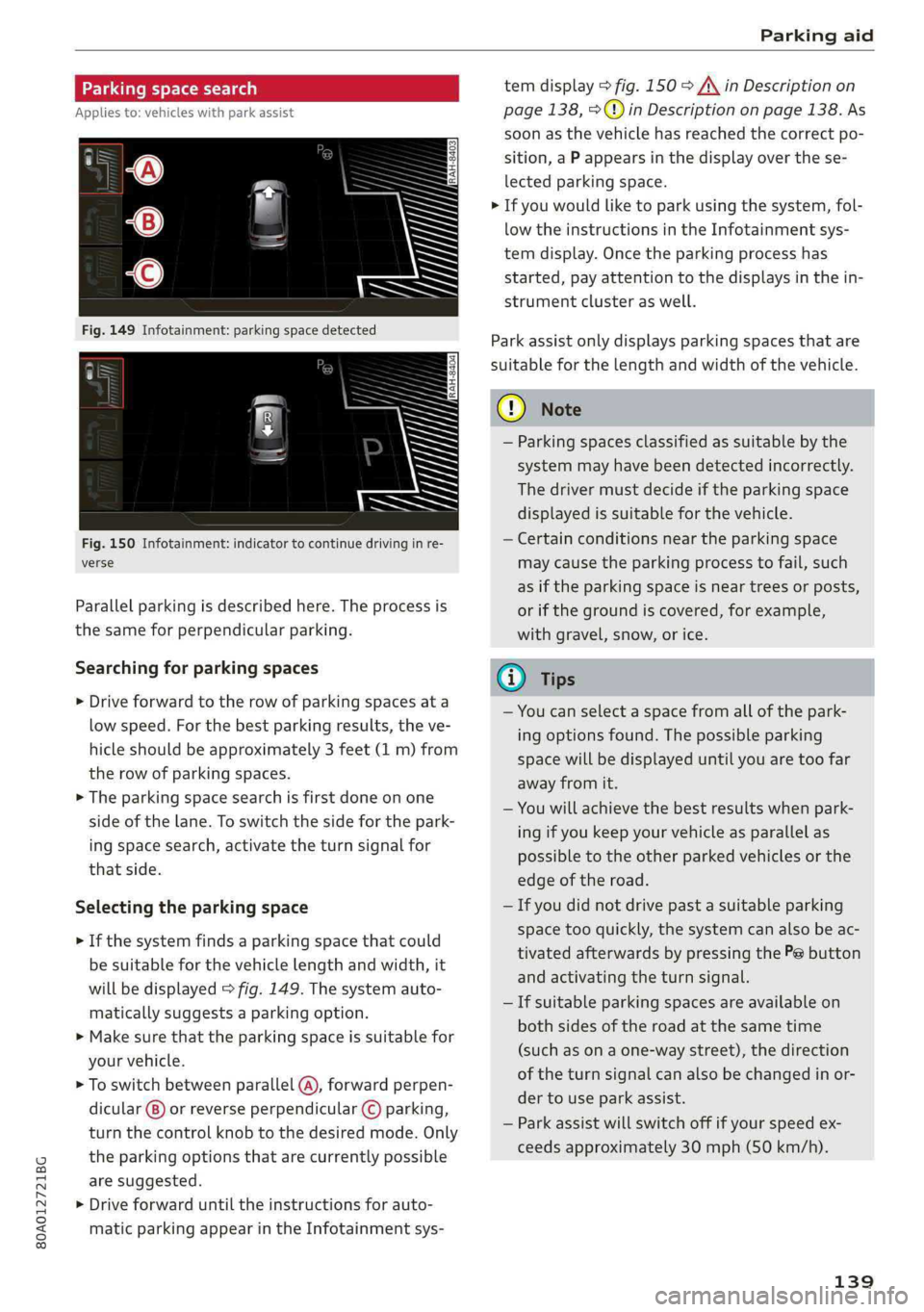
Fig.150Infotainment:indicatortocontinuedrivinginre-
verse
Parallelparkingisdescribedhere.Theprocessis
thesameforperpendicularparking.
Searchingforparkingspaces
>Driveforwardtotherowofparkingspacesata
lowspeed.Forthebestparkingresults,theve-
hicleshould beapproximately3feet(1m)from
therowofparkingspaces.
>Theparkingspacesearchisfirstdoneonone
sideofthelane.Toswitchthesideforthepark-
ingspacesearch,activatetheturnsignalfor
thatside.
Selectingtheparkingspace
>Ifthesystemfindsaparkingspacethatcould
besuitableforthevehiclelengthandwidth,it
willbedisplayed>fig.149.Thesystemauto-
maticallysuggestsaparkingoption.
>Makesurethattheparkingspaceissuitablefor
yourvehicle.
>Toswitchbetweenparallel(@),forwardperpen-
dicular()or reverseperpendicular©parking,
turnthecontrolknobtothedesiredmode.Only
theparkingoptionsthatarecurrentlypossible
aresuggested.
>Driveforwarduntiltheinstructionsforauto-
maticparkingappearintheInfotainmentsys-
temdisplay>fig.150>A\inDescriptionon
page138,>@)inDescriptiononpage138.As
soonasthevehiclehas reachedthecorrectpo-
sition,aPappearsinthedisplayoverthese-
lectedparkingspace.
>Ifyouwouldliketoparkusingthesystem,fol-
lowtheinstructionsintheInfotainmentsys-
temdisplay.Oncetheparkingprocesshas
started,payattentiontothedisplaysinthein-
strumentclusteraswell.
Parkassistonlydisplaysparkingspacesthatare
suitableforthelengthandwidthofthevehicle.
@)Note
—Parkingspacesclassifiedassuitablebythe
systemmayhavebeendetectedincorrectly.
Thedrivermustdecideiftheparkingspace
displayedissuitableforthevehicle.
—Certainconditionsnear theparkingspace
maycausetheparkingprocesstofail, such
asiftheparkingspaceisneartreesorposts,
orifthegroundiscovered,forexample,
withgravel,snow,orice.
@)Tips
—Youcanselectaspacefromallofthepark-
ingoptionsfound.Thepossibleparking
spacewillbedisplayeduntilyouaretoofar
awayfromit.
—Youwillachievethebestresultswhenpark-
ingifyoukeepyourvehicleasparallelas
possibletotheotherparkedvehiclesorthe
edgeoftheroad.
—Ifyoudidnotdrivepastasuitableparking
space tooquickly,thesystemcanalsobeac-
tivatedafterwardsbypressingthePebutton
andactivatingtheturnsignal.
—Ifsuitableparkingspacesareavailableon
bothsidesoftheroadatthesametime
(such asonaone-waystreet),thedirection
oftheturnsignalcanalsobechangedinor-
dertouseparkassist.
—Parkassistwillswitchoffifyourspeedex-
ceedsapproximately30mph(50km/h).
139
Page 146 of 392

IntelligentTechnology
IntelligentTechnology
ElectronicStabilization
Control(ESC)
ElectronicStabilizationControl(ESC)supports
driversafety.Itreducestheriskofslippingand
improvesdrivingstability.ESCdetectscriticalsit-
uations,suchasifthevehicleisoversteeringor
understeering,orifthewheelsare spinning.The
brakesareappliedortheenginetorqueisre-
ducedinordertostabilizethevehicle.Whenthe
ESCengages,theBindicatorlightblinksinthe
instrumentcluster.
ThefollowingsystemsareintegratedintheESC:
Anti-lockbrakingsystem(ABS)
ABSpreventsthewheelsfromlockingwhenbrak-
ing.Thevehiclecanstillbesteeredevenduring
hardbraking.Applysteadypressuretothebrake
pedal.Donotpumpthepedal.Apulsinginthe
brakepedalindicatesthatthesystemisacting to
stabilizethevehicle.
Brakeassistsystem
Thebrakeassistsystemcandecreasebrakingdis-
tance.Itincreasesbrakingpowerwhenthe driver
pressesthebrakepedalquicklyinemergencysit-
uations.Youmustpressandholdthebrakepedal
untilthedangeroussituationisover.Invehicles
withadaptivecruisecontrol*,thebrakeassist
systemismoresensitiveifthedistancedetected
tothevehicledrivingaheadistoosmall.
Anti-SlipRegulation(ASR)
ASRreducesdrivepowerwhenthedrivewheels
beginspinningandadaptsthepowertotheroad
conditions.Thismakesiteasiertostart,acceler-
ateanddriveuphills.
ElectronicDifferentialLock(EDL)
TheEDLappliesthe brakestowheelsthatare
slippingandtransfersthedrivepowertotheoth-
erwheels.Thisfunctionisnotavailableathigher
speeds.
144
Inextremecases,EDLautomaticallyswitchesoff
tokeepthebrakeonthebrakedwheelfromover-
heating.Thevehicleisstillfunctioningcorrectly.
EDLwillswitchonagainautomaticallywhencon-
ditionshavereturnedtonormal.
Powersteering
The ESCcanalsosupportvehiclestability
throughsteering.
Selectivewheeltorquecontrol
Selectivewheeltorquecontrolisusedwhendriv-
ingoncurves.Brakingistargetedtowardthe
wheelsontheinsideofthecurveasneeded.This
allowsmoreprecisedrivingincurves.
Automaticpost-collisionbrakingsystem
Theautomaticpost-collisionbrakingsystemcan
helptoreducetheriskofslidingandofaddition-
alcollisionsafteranaccident.Iftheairbagcon-
trolmoduledetectsacollision,thevehicleis
braked bytheESC.
Thevehicledoesnotbrakeautomaticallyifoneof
thefollowingoccurs:
—Thedriverpressestheacceleratorpedal
—TheESC,thebrakesystem,orthevehicleelec-
tricalsystemisnotfunctioning
ZAWARNING
— The ESCanditsintegratedsystemscannot
overcomethelimitsimposedbynatural
physicallaws.Thisisespeciallyimportanton
slipperyorwetroads.Ifthesystemsbegin
actingtostabilizeyourvehicle,youshould
immediatelyalteryourspeedtomatchthe
roadandtrafficconditions.Donotletthein-
creasedsafetyprovidedtemptyouintotak-
ingrisks.Thiscouldincreaseyourriskofa
collision.
—Pleasenotetheriskofacollisionincreases
whendrivingfast,especiallythroughcurves
andonslipperyorwetroads,andwhendriv-
ingtooclosetoobjectsahead.The ESC and
itsintegratedsystemscannotalwayspre-
ventcollisions-thereisstillariskofacci-
dents!
Page 150 of 392

IntelligentTechnology
Ifthisindicatorlightturnsonandstaysonand
thismessageappears,thepowersteeringmay
havefailed.
Stopthevehicleinasafelocationassoonaspos-
sible.Donotcontinuedriving.Seeanauthorized
AudidealerorauthorizedAudiServiceFacilityfor
assistance.
aSteering:malfunction!Youcancontinue
driving
Iftheindicatorlightturnsonandthismessage
appears,thesteeringwheelmaybemoredifficult
tomoveormoresensitivethanusual.Thesteer-
ing
wheelmayalsobeturnedtothesidewhen
drivingstraight.
DriveslowlytoanauthorizedAudidealeror au-
thorizedAudiServiceFacilitytohavethemal-
functioncorrected.
Dynamicsteering:correctingsteeringwheel
position
Iftheindicatorlightturnsonandthismessage
appears,thedynamicsteering”isreinitializing.
Thesteeringwheelwillbeeasytomoveafter
startingtheengine.Reinitializationmightbe
necessaryifthesteeringwheelwasmovedwhile
theenginewasswitchedoff.Thedisplayturnsoff
iftheinitializationwassuccessful.
@Tips
—Iftheaoralindicatorlightonlystayson
forashorttime,youmaycontinuedriving.
— Thedynamicsteeringstabilitysystems
=>page144arenotavailableintheeventof
asystemmalfunction.
—Foradditionalinformationondynamic
steering,see>page125.
Allwheeldrive(quattro)
Theall-wheeldrivesystemdistributesthedriving
powervariablytothefrontandrearaxletoim-
provethedrivingcharacteristics.Itworkstogeth-
erwithselectivewheeltorquecontrol,whichcan
activatewhendrivingthroughcurves
=>page144.
148
Appliesto:Vehicleswithquattroultra:Ifthe
drivingsituationdoesnotrequireallwheeldrive,
thentherearsection ofthedrivetrainwilldecou-
pleandthussavefuel.Thesystemconstantlyde-
terminesandanticipatesifallwheeldriveis
needed.Thisallowsthereardrivetrainto recou-
pleshortlybeforeitisneeded.
Theallwheeldriveconceptisdesignedforhigh
enginepower.Yourvehicleisexceptionallypow-
erfulandhasexcellentdrivingcharacteristics
bothundernormaldrivingconditionsandon
snowandice.Alwaysreadandfollowsafetypre-
cautions>A\.
ZAWARNING
—Eveninvehicleswithallwheeldrive,you
shouldadaptyourdrivingstyletothecur-
rentroadandtrafficconditionstoreduce
theriskofanaccident.
— Thebrakingabilityofyourvehicleislimited
tothetractionofthewheels.Inthisway,it
isnotdifferentfromatwowheeldrivevehi-
cle.Donotdrivetoofastbecausethisin-
creasestheriskofanaccident.
—Notethatonwetstreets,thefrontwheels
can“hydroplane’”ifdrivingatspeedsthat
aretoohigh.Unlikefrontwheeldrivevehi-
cles,theengineRPMdoesnotincreasesud-
denlywhenthevehiclebeginshydroplaning.
Adaptyourspeedtotheroadconditionsto
reducetheriskofanaccident.
Sportdifferential
Appliesto:Vehicleswithsportdifferential
Thesportdifferentialdistributesthedrivepower
totherearaxlebasedonthesituation.Thegoal
isahighlevelofagilityandabilitytoaccelerate
oncurves.Thevehicleisvery responsivetosteer-
ing.ThesettingsdependontheselectedAudi
driveselect*mode.
Energymanagement
Yourvehicleisequippedwithanintelligentener-
gymanagementsystemfordistributingelectrici-
ty.Thissignificantlyimprovesthestartingability
andincreasesthevehiclebatterylife.
Page 156 of 392

MultiMediaInterface
Openingtheselectionmenu/optionsmenu
thecontrolbuttons
= z
||zrxG3
Appliesto:MMIcontrolpanelwithintegratedcontrolbut-
tonsontheMMItouchcontrolpad
Fig.159ControlbuttonsontheMMIcontrolpanel
RAH-8542
Appliesto:MMIcontrolpanelwithseparatecontrolbut-
tonsontheMMIcontrolpanel
Fig.160ControlbuttonsontheMMIcontrolpanel
154
Selectionmenu:throughtheselectionmenu,
youcanopenadditionalfunctionswithinamenu
item(suchasRadio).
Requirement:theselectionmenusymbolmust
bedisplayedintheInfotainmentsystemdisplay
>fig.160.
Openingandclosingtheselectionmenu:press
theleftcontrolbutton>fig.160.Thenyoucan
selectandconfirmafunctionusingthecontrol
knob.
Optionsmenu:usingtheoptionsmenu,youcan
selectandconfirmcontext-dependentfunctions
aswellassettingswithinamenuitem(suchas
Radio).
Requirement:theoptionsmenusymbol[+]must
bedisplayedintheInfotainmentsystemdisplay
>fig.160.
Openingandclosingtheoptionsmenu:press
therightcontrolbutton>fig.160.Thenyoucan
selectandconfirmafunctionusingthecontrol
knob.
Meleeelak)Celieeerary
Thisguideshowsyouat aglancethepathsfor
openingadesiredmenuand itssettingsand
functions.
Exampleofapath
>Select:[RADIO]button>leftcontrolbutton>
FM.
Followingthepath
>Pressthe[RADIO]button.
>Presstheleftcontrolbutton.
>Turn thecontrolknobtotheFMmenuitemto
selectit.
>Pressthecontrolknobtoconfirmtheselected
FMmenuitem.
>Theselectedandconfirmedfunctionisexecut-
ed.In thisexample,theFMfrequencybandis
set.
Page 162 of 392
MultiMediaInterface
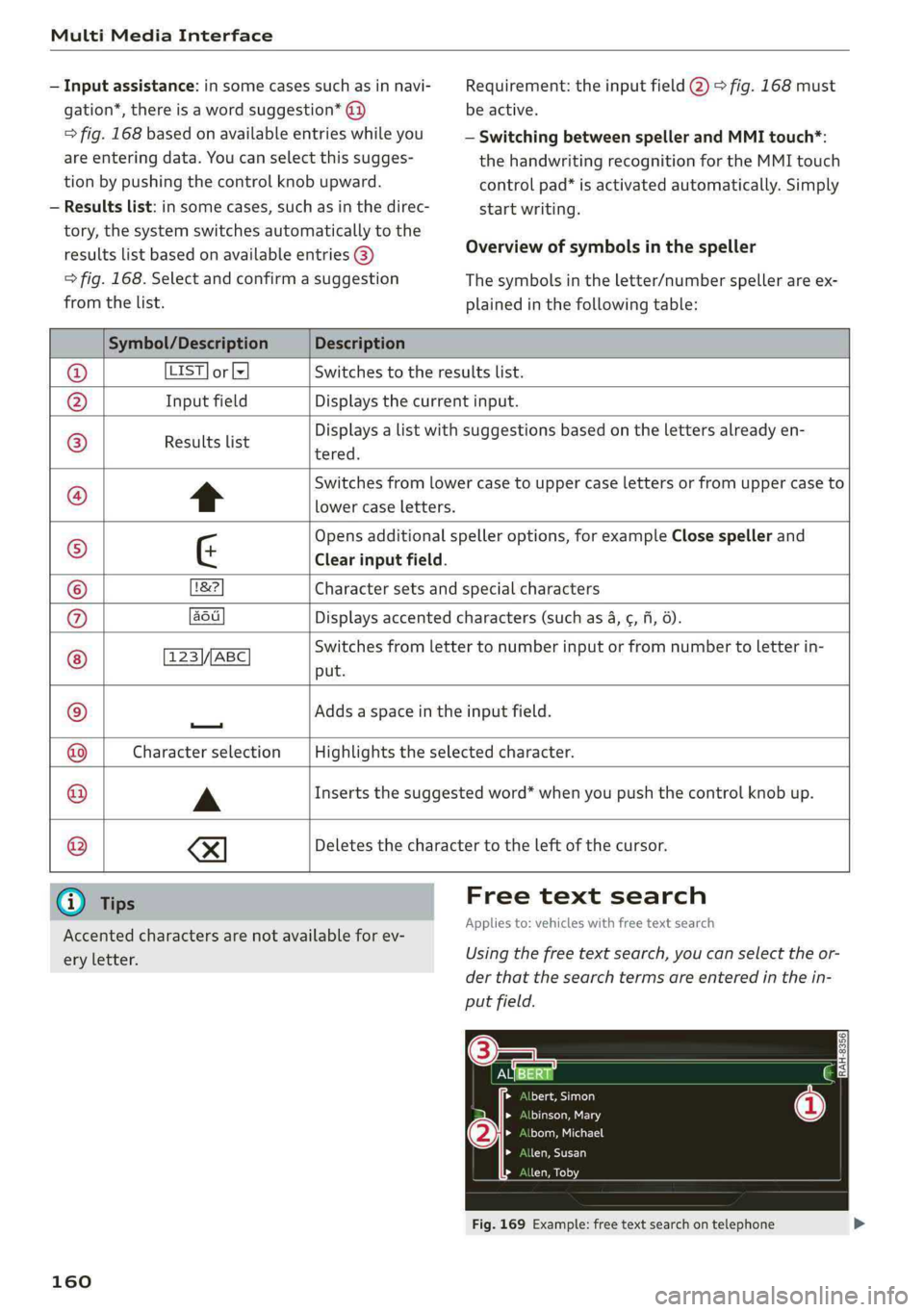
—Inputassistance:insomecasessuchasinnavi-
gation*,thereisawordsuggestion*@)
=>fig.168basedonavailableentrieswhileyou
areenteringdata.Youcanselectthissugges-
tionbypushingthecontrolknobupward.
—Resultslist:insomecases,suchasinthedirec-
tory,thesystemswitchesautomaticallytothe
resultslistbasedonavailableentries@)
>fig.168.Selectandconfirmasuggestion
fromthelist.
Requirement:theinputfield@)>fig.168must
beactive.
—SwitchingbetweenspellerandMMItouch*:
thehandwritingrecognitionfortheMMItouch
controlpad*isactivatedautomatically.Simply
startwriting.
Overviewofsymbolsinthespeller
Thesymbolsintheletter/numberspellerareex-
plainedinthefollowingtable:
Symbol/DescriptionDescription
LIST]orlxSwitchestotheresultslist.
InputfieldDisplaysthecurrentinput.
Resultslist
Displaysalistwithsuggestionsbasedonthelettersalreadyen-
tered.
*Switchesfromlowercasetouppercaselettersorfromuppercaseto
lowercaseletters.
Opensadditionalspelleroptions,forexampleClosespellerand
¢Clearinputfield.
1&2Charactersetsandspecialcharacters
aodDisplaysaccentedcharacters(suchas4,¢,fi,6).
123\//ABC ©
|O|O|
©
|
©
|
©
OO
put.
Switchesfromlettertonumberinputorfromnumbertoletterin-
—
Addsaspaceintheinputfield.
Characterselection@|
©
Highlightstheselectedcharacter.
AInsertsthesuggestedword*whenyoupushthecontrolknobup.
®
|e
XI
Deletesthecharactertotheleftofthecursor.
@Tips
Accentedcharactersarenotavailable forev-
eryletter.
160
Freetextsearch
Appliesto:vehicleswithfreetextsearch
Usingthefreetextsearch,youcanselecttheor-
derthatthesearchtermsareenteredinthein-
putfield.
EN)=) SA
aceite}
PSMELS
Draenei
> >
LaeCU)
>a7
Fig.169Example:freetextsearchontelephone