2019 AUDI Q5 steering
[x] Cancel search: steeringPage 119 of 392

80A012721BG
Assistsystems
Switchingonandoff
Appliesto:vehicleswithAudiactivelaneassist
B8V-0692
Fig.115Turnsignallever:buttonforactivelaneassist
a
B4M-0090
Fig.116Windshield:camerawindowforactivelaneassist
>Pressthebuttontoswitchthesystemonand
off=fig.115.Theindicatorlightintheinstru-
mentclusterturnsonoroff.
Analoginstru-|AudivirtualMeaningon
mentcluster|cockpit/head-|thecorre-
updisplay*spondingside
Greenline(s)|Greenline(s)|Activelaneas-
(left/right) (left/right)sistisactivat-
7\oyedandready
toprovide
warnings.
-RedlineActivelaneas-
(left/right)sistwillwarn
if8youbeforethe
vehicleleaves
a lane.The
steeringwheel
willalsovi-
bratelightly.
Yellowline(s)
(left/right)
7%
DIncertaincountries
Yellowline(s)
(left/right)
1%
Activelaneas-
sistisactivat-
ed,butisnot
readytopro-
videwarnings.
Ifthesystemisswitchedonbutisnotreadyto
providewarnings,oneofthefollowingcouldbe
thecause:
—Thereisnolane markerline
—Therelevantlanemarkerlinesarenotdetected
(forexample,markingsinaconstructionzone
orbecausetheyareobstructedbysnow,dirt,
waterorlighting)
—Thevehiclespeedisbelowtheactivationspeed
ofapproximately40mph(65km/h)
—Thelaneistoonarrowortoowide
—Thecurveistoonarrow
—Thedriver'shandsarenotonthesteering
wheel
@)Tips
— Makesurethecamerawindow>fig.116is
notcoveredbystickersorotherobjects.For
informationoncleaning,see>page343.
—Ifthesystemisreadyforoperation,itwill
remainreadyeachtimeitisswitchedon)).
117
Page 120 of 392

Assistsystems
Displayintheinstrumentcluster
Appliesto:vehicleswithAudiactivelaneassist
wmaq 9
=+a
Fig.117Instrumentcluster(multi-colordisplay):active
laneassistisswitched onandreadytoprovidewarnings
B8W-0099
Fig.118Instrumentcluster(monochromedisplay):active
laneassistisswitched on
YoucanopenuptheDriverassistancedisplayfor
theactivelaneassistusingthemultifunction
steeringwheelbuttons>page15.
Anadditionalindicatorappearsinthehead-up
display”.
Multi-ColorDisplay
See>fig.117.
118
Driverassistance
displayinthein-
strumentcluster
Meaningonthecorre-
spondingside
Greenline(s)
(leftorright)
Activelaneassistisacti-
vatedandreadytopro-
videwarnings.
Redline
(leftorright)
Activelaneassistwill
warnyoubeforethevehi-
cleleavesalane.The
steeringwheelwillalso
vibratelightly.
Grayline(s)
(leftorright)
Activelaneassistisacti-
vated,butisnotreadyto
providewarnings.
Monochromedisplay
See>fig.118.
Driverassistance
displayinthein-
strumentcluster
Meaningonthecorre-
spondingside
Lightgrayline(s)
(leftorright)
Activelaneassistisacti-
vatedandreadytopro-
videwarnings.
Blinkingline(s)
(leftorright)
Activelaneassistwill
warnyoubeforethevehi-
cleleavesalane.The
steeringwheelwillalso
vibratelightly.
Darkgrayline(s)
(leftorright)
Activelaneassistisacti-
vated,butisnotreadyto
providewarnings.
Messagesintheinstrumentclusterdisplay
Iftheactivelaneassistswitchesoffautomatical-
ly,theindicatorlightinthedisplayturnsoffand
oneofthefollowingmessagesappears:
1Audiactivelaneassist:malfunction!See
owner'smanual
DriveimmediatelytoanauthorizedAudidealer
orauthorizedAudiServiceFacilitytohavethe
malfunctionrepaired.
Audiactivelaneassist:currentlyunavaila-
ble.Cameraviewrestrictedduetosurround-
ings.Seeowner'smanual
Page 121 of 392

80A012721BG
Assistsystems
Thismessageappearsifthecameraisunableto
detectthelines.Thiscouldhappenif:
—Thecamerafieldofview>page117,fig.116is
dirtyorcoveredinice.Cleanthisareaonthe
windshield>page343.
—Thecamerafieldofviewisfoggedover.Wait
untilthe foghasclearedbeforeswitchingthe
activelaneassistonagain.
—Thesystemhasbeenunabletodetectthelanes
foranextendedperiodoftimeduetoroad con-
ditions.Switchactivelaneassistbackonwhen
thelinesaremorevisible.
Audiactivelaneassist:currentlyunavaila-
ble.Seeowner'smanual
Thereisatemporarymalfunctionthatmaypre-
vent theactivelaneassistfromswitchingon. Try
switchingtheactivelaneassistonagainlater.
Audiactivelaneassist:Pleasetake over
steering!
Thismessageappearsifyouarenotsteeringby
yourself.Activelaneassistisactivated,butisnot
readytoprovidewarnings.
Z\WARNING
Notethatmessagesmaybedelayedornot
displayedonvehicleswithaccessoriesmount-
edonthesteeringwheel,suchasasteering
wheelspinnerknob.Alwayskeep yourhands
onthesteeringwheel.
Adjustingthesteeringtimeandvibration
warning
Appliesto:vehicleswithAudiactivelaneassist
Youcanadjustindividualactivelaneassistset-
tingsintheInfotainmentsystem.
>SelectintheInfotainmentsystem:[MENU]but-
ton>Vehicle> leftcontrolbutton>Driveras-
sistance>Audiactivelaneassist.
DIncertaincountries
Steeringtime
Early:inthissetting,thecorrectivesteeringhap-
penscontinuouslytohelpkeepthevehicleinthe
center ofthelane.
Late:inthissetting,thesystemprovidescorrec-
tivesteeringjustbeforeawheelgoesoverade-
tectedlane markerline.
Vibrationwarning
Youcanswitchtheadditionalvibrationwarning
inthesteeringwheelonoroff.
ZA\WARNING
Withthevibrationwarningswitchedoff,there
willalsobenovisualwarningintheinstru-
mentclusterdisplaywhencrossingalane
markerline.
G@)Tips
Certain settings areautomaticallystoredand
assignedtothevehiclekeybeingused).
119
Page 127 of 392

80A012721BG
Assistsystems
@)Tips
—Youcancanceltheautomaticbrakeactiva-
tionwithincreasingbrakingforceifyouap-
plythe brakesyourselforaccelerateconsid-
erably.
—Insomesituations,rearcross-trafficassist
maywarnyouevenifthereisnocrosstraffic
ina criticalarea,forexamplewhenbacking
intoaparkingspaceormaneuvering.
—Therearcross-trafficassistalsoswitchesoff
whenyouswitchofftheESC.
— Thesystemisnotavailablewhentowinga
trailer.
—Foranexplanationonconformitywiththe
FCCregulationsintheUnitedStatesandthe
IndustryCanadaregulations,see
=>page370.
Messages
Appliesto:vehicleswithAudisideassist
Amessageappearsintheinstrumentclusterdis-
playifthesideassistswitchesoffautomatically.
BAudisideassist:malfunction!Pleasecontact
Service
eB]Audisideassistandexitwarning: malfunc-
tion!PleasecontactService
Thesystemcannotguaranteethatitwilldetect
vehiclescorrectlyandithasswitchedoff.The
sensorshavebeenmovedorarefaulty.Havethe
systemcheckedbyanauthorizedAudidealeror
authorizedAudiServiceFacilitysoon.
Audisideassist:currentlyunavailable.Sen-
sorvisionrestrictedduetosurroundings.See
owner'smanual
Audisideassistandexitwarning:currently
unavailable.Sensorvisionrestrictedduetosur-
roundings
Theradarsensorvisionisimpaired.Theareain
frontofthesensorsmustnot becoveredbybike
racks,stickers,leaves,snoworanyotherobjects.
Cleantheareacoveringthesensors,ifnecessary
=>page121,fig.122.
Audisideassist:currentlyunavailable.See
owner'smanual
Audisideassistandexitwarning:currently
unavailable.Seeowner'smanual
Sideassistcannotbe switchedonatthistimebe-
causethereisamalfunction(forexample,the
batterychargelevelmaybetoolow).
Audisideassist:unavailableintowingmode
Audisideassistandexitwarning:currently
unavailable.Towingmode
Sideassistswitchesoffautomaticallywhenthe
electricalconnectorinthefactory-installedtrail-
erhitchisconnected.Thereisnoguaranteethe
systemwillswitchoffwhenusingaretrofitted
trailerhitch.Donotusesideassistandtheexit
warningwhentowingatrailer.
Rearparkingaid:obstacledetectionrestrict-
ed
Therearcross-trafficassistisnotavailable.Ei-
thertheESCisswitchedoff,ortheradarsensors
maybecoveredbyabikerack,stickers,leaves,
snoworotherobjects.SwitchtheESCon,or
cleantheareainfront ofthesensorsifnecessary
=page121,fig.122.Ifthismessagecontinues
tobedisplayed,driveimmediatelytoanauthor-
izedAudidealerorauthorizedAudiServiceFacili-
tytohavethemalfunctionrepaired.
Audidriveselect
Introduction
Appliesto:vehicleswith Audidriveselect
Driveselectmakesitpossibletoexperiencedif-
ferenttypesofvehiclecharacteristicsinonevehi-
cle.YoucanselectthedrivingmodesOffroad*or
Lift/Offroad*,Allroad*,Comfort,AutoandDy-
namicintheInfotainmentsystem,forexample
toswitchfromasportytoacomfortabledriving
mode.IntheIndividualmode,thesettingscan
beadjustedtoyourpersonalpreferences.This
makesitpossibletocombinesettingssuchasa
sportyenginesettingwithlightsteering.
Appliesto:vehicleswith Audidriveselect
Thefollowingsystems,amongotherthings,are
influencedbydriveselect:
125
>
Page 128 of 392

Assistsystems
Engineandautomatictransmission
Dependingonthemode,theengineandauto-
matictransmissionrespondmorequicklyorina
morebalancedmannertoacceleratorpedal
movements.InthesportyDynamicmode,the
transmissionshiftsathigherspeedranges.
Airsuspension
Appliesto:vehicleswithairsuspension
Theairsuspensionisanelectronically-controlled
suspensionandlevelingsystem.Thefirmnessof
thesuspensionwilladapttothedrivingcondi-
tionsandthedrivingsituation.Thesystembalan-
cesoutchangesinload.Thevehiclelevelwillalso
adaptgraduallytothevehiclespeedinorderto
reducethewindresistanceathighspeedsandin-
creasethegroundclearanceatlowspeeds.The
settingsdependontheselectedAudidrivese-
lect*mode.
Suspensioncontrol*
Thesuspensioncontrol”usessensorsto record
informationregardingsteeringmovements,
brakingandaccelerationoperationsbythedriver,
roadsurface,drivingspeed,andload.Thismakes
itpossibletoadaptdampingtothedrivingsitua-
tionnearlyinrealtime.Withdriveselect,youcan
adjustthesuspensioncontrol tosporty(Dynam-
ic),comfortable(Comfort)orbalanced(Auto).
Steering
Thepowersteeringadapts.Indirectsteeringthat
moveseasilyasinComfortmodeisespecially
suitedtolongdrivesonhighways.TheDynamic
modeprovidessporty,directsteering.
Thefollowingapplies tovehicleswithdynamic
steering*:thesteeringratiochangesbasedonve-
hiclespeedinordertomaintainoptimumsteer-
ingeffort forthedriveratalltimes.This setsthe
steering tobelesssensitiveathigherspeedsin
ordertoprovideimprovedvehiclecontrol.Atre-
ducedspeeds,steeringismoredirectinorderto
keepthesteeringeffortasminimalaspossible
whenthe driverismaneuveringthevehicle.At
lowandaveragespeeds,dynamicsteering*addi-
tionallyprovidesmoreresponsivesteeringper-
formance.
126
Sportdifferential*
Dependingonthesetting,thedrivepoweratthe
rearaxlewillbedistributedwiththesportdiffer-
ential*tobemoresportyormoderate.
Adaptivecruisecontrol(ACC)*
Thebehaviorwhenacceleratingcanbeadjusted
fromcomfortabletosporty,dependingonthe
driveselectmode.Adaptivecruisecontrolalso
respondstothedrivingbehaviorofthevehicle
aheadinamoreconservativeorsportymanner.
Enginesound*
Theenginesoundadaptstothecurrentmode
andcan besubtletosporty.
@)Note
Appliesto:vehicleswithairsuspension
—Makesurethereisenoughclearanceabove
andbelowthevehiclewhenparking.The
heightofthevehicle(groundclearance)can
changeonceitisparkedduetotemperature
fluctuations,changestotheload condi-
tions,andchangestothedrivingmodes.
—
Whentransportingthevehicleonacarcar-
rier,train,ship,orbyothermeans,onlyse-
curethevehicleattheoutercircumference
ofthetires(thetreadsurface).Securingthe
vehicleattheaxlecomponents,suspension
struts,ortowingeyesisnotpermittedbe-
causethepressureintheairsuspension
strutscanchangeduringtransport.Theve-
hiclemightnot besecuredsufficientlyifthis
happens.
—Whentransportingthevehicleonaroad
carrier,railcarrier,shipcarrier,orothercar-
rier,itmayonlybesecuredatthe running
surfacesofthetires(circumference).Secur-
ingthevehicleattheaxlecomponents,sus-
pensionstruts,ortowingeyesisnotpermit-
tedbecausethepressureintheairsuspen-
sionstrutscanchangeduringtransport.The
vehiclemightnotbesecuredsufficientlyif
thishappens.
G)Tips
The"S"selectorleverpositionautomatically
engageswhentheDynamicmodeisselected.
Page 129 of 392

80A012721BG
Assistsystems
Selectingthedrivingmode
Appliesto:vehicleswithAudidriveselect
MONGaESd
Fig.127Centerconsole:controlsfordriveselect
coy
footfromtheacceleratorpedalso thatthere-
centlyselectedmodeisalsoactivatedfortheen-
oO3 35
saoo
%
>Presstheleftorrightarrowkey>fig.127until
thedesiredmodeappearsintheinstrument
cluster/Infotainmentsystemdisplay.Or
>SelectintheInfotainmentsystem:[MENU]but-
ton>Vehicle>Audidriveselect.
> Selectandconfirmthedesiredsetting.
Youcanchangethedrivingmodewhenthevehi-
gine.
Offroad”orLift/Offroad*-activatesoffroad
functionstosupportdrivingonroughterrain.The
engine,transmissionandsteeringadjustandthe
Start/Stopsystem*switchesoff.Appliestoair
suspension”:thevehiclealsoliftsforpassing
overobstaclestomaintainmaximumground
clearance.
Allroad*-onlyforairsuspension”:thevehicle
liftstomaintainhighergroundclearancefordif-
ficultstretchesofroad.
Comfort-providesacomfort-orientedvehicle
setupandissuitedforlongdrivesonhighways.
Auto-providesanoverallcomfortableyetdy-
namicdrivingfeelandissuitedforeverydayuse.
Dynamic-givesthedriverasportydrivingfeel
cleisstationaryorwhiledriving.Iftrafficper-
mits,afterchangingmodes, brieflyremoveyour
Individual->page127.
andissuited toasportydrivingstyle.
AdjustingtheIndividualmode
Appliesto:vehicleswithAudidriveselect
Youcanadjustthevehiclesettingstoyourpersonalpreferences.
>SelectintheInfotainmentsystem:[MENU]but-
ton>Vehicle>Audidriveselect>Individual>
rightcontrolbutton.
Theequipmentinyourvehiclewilldetermine
whichsettingsyoucanadjust.Thefollowingta-
blegivesanoverviewofthecharacteristics.
Afteryouhaveclosedthesettings,youwillauto-
maticallydriveintheIndividualmode.
Systemscomfortautodynamic
Engine/transmissionbalanced balancedsporty
Airsuspension*comfortablebalancedsporty
Steeringcomfortablebalancedsporty
Dynamicsteering*comfortable/indirect|balanced/directsporty/direct
Suspensioncontrol*comfortablebalancedsporty
Sportdifferential*offbalancedsporty
Enginesound*subtlesubtle/sporty®sporty
ACC*comfortablebalancedsporty
@)Subtleintheselectorleverposition"D"andsportyin"S".
127
Page 135 of 392

80A012721BG
Parkingaid
—Onlyuse therearviewcameratoassistyouif
itshowsagood,clearpicture.Forexample,
theimagemaybeaffectedbythesunshin-
ingintothelens,dirtonthelens,orifthere
isamalfunction.
—Usetherearviewcameraonlyiftheluggage
compartmentlidiscompletelyclosed.Make
sureanyobjectsyoumayhavemountedon
theluggagecompartmentliddonotblock
therearviewcamera.
— Thecameralensenlargesanddistortsthe
fieldofvision.Theobjectappearsbothal-
teredandinaccurateonthescreen.
—Incertainsituations,peopleorobjectsin
thedisplayappearcloserorfartheraway:
—Forobjectsthatdonottouchtheground,
suchasthebumperofaparkedvehicle,a
trailerhitchortherearofatruck.Donot
use the
orientationlinesinthiscase.
—Ifdrivenfromalevelsurfaceontoanin-
cline,oradownwardslope.
—Ifdriventowardprotrudingobjects.
—Ifthevehicleiscarryingtoomuchloadin
therear.
—Appliesto:vehicleswithairsuspension:the
accuracyoftheorientationlinesandblue
surfacesdecreaseswhenthevehicleis
raised/lowered>page125.
@)Note
—Alwaysreadandfollowtheapplicablewarn-
ings>@inGeneralinformationon
page129.
— Theorange-coloredorientationlinesinthe
Infotainmentdisplayshowthevehiclepath
basedonthesteeringwheelangle.The
front ofthevehicleswingsoutmorethan
therearofthevehicle.Maintainplentyof
distanceso thatanexteriormirrororacor-
nerofthevehicledoesnotcollidewithany
obstacles.
@)Tips
Thereisnodistancewarningfortherearand
thesides*whentrailertowingmodeisdetect-
ed.Thefrontsensorsremainactivated.The
visualdisplayswitchestotrailermode.The
rearviewcameraimagewillnotshowtheori-
entationlinesandthebluesurfaces.Thereis
noguaranteethefunctionswillswitchoff
whenusingaretrofittedtrailerhitch.
SicaReRol
Appliesto:vehicleswithrearviewcamera
Switchingonandoff
Requirement:thevehiclespeedmustbeunder
approximately6mph(10km/h).
>PressthePvbuttoninthecenterconsole
=>page131,fig.130.Ashortconfirmation
tonesoundsandtheLEDinthebuttonturns
on.
Switchingonautomatically
Thesystemswitchesonautomaticallywhenre-
versegearisengagedwhiletheengineisrun-
ning.Abrieftonewillsound.
Switchingoffautomatically
Thesystemswitchesoffautomaticallywhendriv-
ingforwardfasterthan6mph(10km/h).
Perpendicularparking
Applies
to:vehicleswithrearviewcamera
Thisviewmaybeusedwhenparkinginagarage
orinaparkingspace.
Fig.135Infotainmentsystem:aligningthevehicle
133
Page 136 of 392
Parkingaid
>Turn theInfotainmentsystemonandshiftinto
reversegear.
>Theorangeorientationlines@showthevehi-
cle'sdirectionoftravel.Turn thesteeringwheel
untiltheorangeorientationlinesalignwiththe
parkingspace>fig.134.Usethemarkings@)
tohelpyouestimatethedistancetoanobsta-
cle.Eachmarkingrepresentsapproximately3
feet(1m).Thebluearearepresentsanexten-
sionofthevehicle'soutlinebyapproximately
16feet(5meters)totherear.
>Whiledrivinginreversegear,adjustthesteer-
ingwheelangletofittheparkingspaceusing
theorangeorientationlinesforassistance>A\
inGeneralinformationonpage132,>@)in
Generalinformationonpage133.Area@)rep-
resentstherearbumper.Attheverylatest,
stopthevehiclewhentheredorientationline
@bordersanobject.
NirliCimUCW
Appliesto:vehicleswith rearviewcamera/peripheralcameras
andtrailerhitch
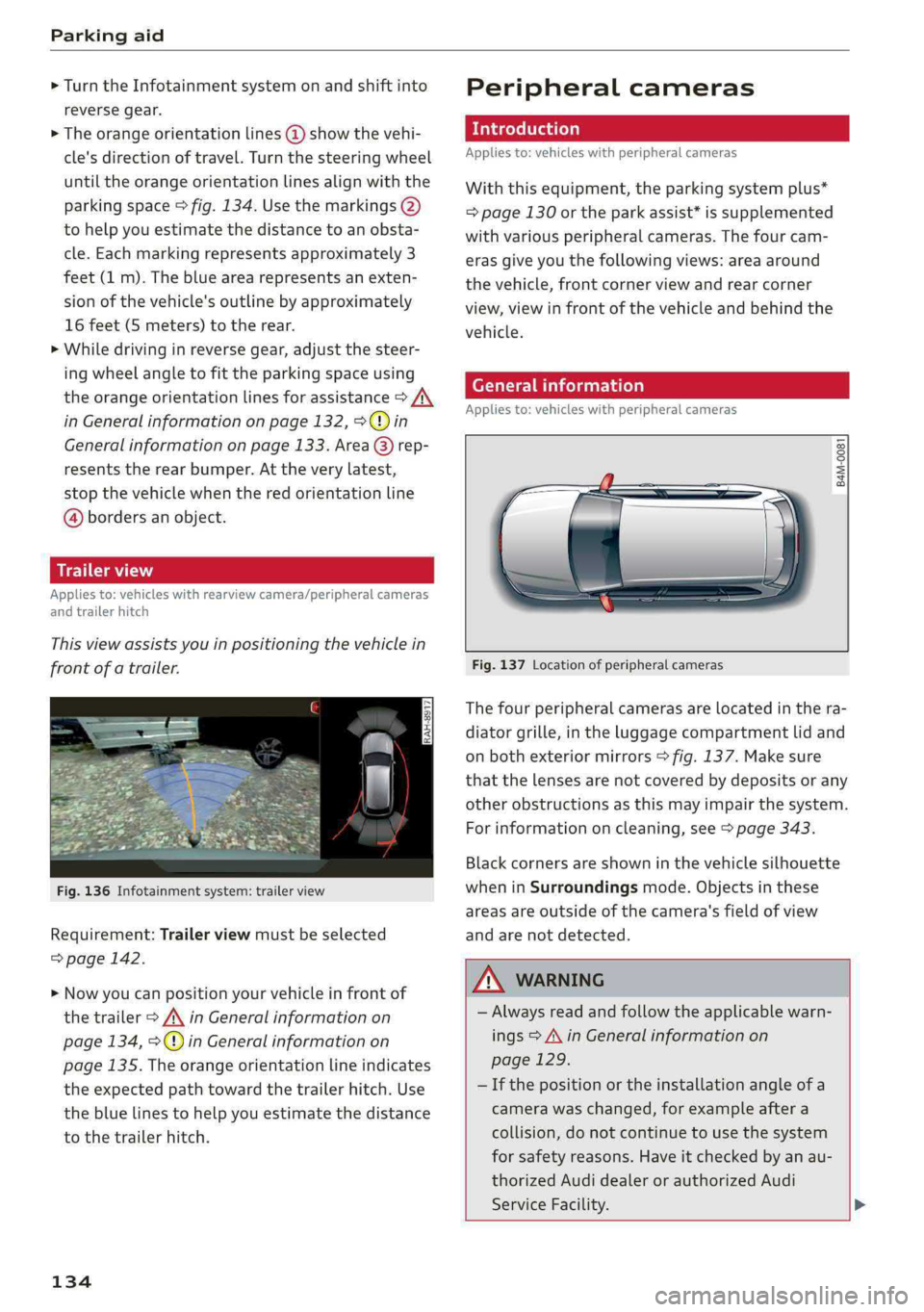
Thisviewassistsyouinpositioningthevehiclein
frontofatrailer.
Fig.136Infotainmentsystem:trailerview
Requirement:Trailerviewmustbeselected
=>page142.
>Nowyoucanpositionyourvehicleinfrontof
thetrailer>/\inGeneralinformationon
page134,>@)inGeneralinformationon
page135.Theorangeorientationlineindicates
theexpectedpathtowardthetrailerhitch.Use
thebluelinestohelpyouestimatethedistance
tothetrailerhitch.
134
Peripheralcameras
Introduction
Appliesto:vehicleswithperipheralcameras
Withthisequipment,theparkingsystemplus*
=page130ortheparkassist*issupplemented
withvariousperipheralcameras.Thefourcam-
erasgiveyouthefollowingviews:areaaround
thevehicle,frontcornerviewandrearcorner
view,viewinfrontofthevehicleandbehindthe
vehicle.
Generalinformation
Appliesto:vehicleswithperipheralcameras
B4M-0081
Fig.137Locationofperipheralcameras
Thefourperipheralcamerasarelocatedinthera-
diatorgrille,intheluggagecompartmentlidand
onbothexteriormirrors>fig.137.Makesure
thatthelensesarenotcoveredbydepositsorany
otherobstructionsasthismayimpairthesystem.
Forinformationoncleaning,see>page343.
Blackcornersareshowninthevehiclesilhouette
wheninSurroundingsmode.Objectsinthese
areasareoutsideofthecamera'sfieldofview
andarenotdetected.
Z\WARNING
—Alwaysreadandfollowtheapplicablewarn-
ings>A\inGeneralinformationon
page129.
—Ifthepositionortheinstallationangleofa
camerawaschanged,forexampleaftera
collision,donotcontinuetouse thesystem
forsafety reasons.Haveitcheckedby anau-
thorizedAudidealerorauthorizedAudi
ServiceFacility.>