2019 AUDI Q5 turn signal
[x] Cancel search: turn signalPage 119 of 392

80A012721BG
Assistsystems
Switchingonandoff
Appliesto:vehicleswithAudiactivelaneassist
B8V-0692
Fig.115Turnsignallever:buttonforactivelaneassist
a
B4M-0090
Fig.116Windshield:camerawindowforactivelaneassist
>Pressthebuttontoswitchthesystemonand
off=fig.115.Theindicatorlightintheinstru-
mentclusterturnsonoroff.
Analoginstru-|AudivirtualMeaningon
mentcluster|cockpit/head-|thecorre-
updisplay*spondingside
Greenline(s)|Greenline(s)|Activelaneas-
(left/right) (left/right)sistisactivat-
7\oyedandready
toprovide
warnings.
-RedlineActivelaneas-
(left/right)sistwillwarn
if8youbeforethe
vehicleleaves
a lane.The
steeringwheel
willalsovi-
bratelightly.
Yellowline(s)
(left/right)
7%
DIncertaincountries
Yellowline(s)
(left/right)
1%
Activelaneas-
sistisactivat-
ed,butisnot
readytopro-
videwarnings.
Ifthesystemisswitchedonbutisnotreadyto
providewarnings,oneofthefollowingcouldbe
thecause:
—Thereisnolane markerline
—Therelevantlanemarkerlinesarenotdetected
(forexample,markingsinaconstructionzone
orbecausetheyareobstructedbysnow,dirt,
waterorlighting)
—Thevehiclespeedisbelowtheactivationspeed
ofapproximately40mph(65km/h)
—Thelaneistoonarrowortoowide
—Thecurveistoonarrow
—Thedriver'shandsarenotonthesteering
wheel
@)Tips
— Makesurethecamerawindow>fig.116is
notcoveredbystickersorotherobjects.For
informationoncleaning,see>page343.
—Ifthesystemisreadyforoperation,itwill
remainreadyeachtimeitisswitchedon)).
117
Page 122 of 392

Assistsystems
Audisideassist
Appliesto:vehicleswithAudisideassist
B4M-0099}
Fig.119Sensordetectionrange
Fig.120Displayontheexteriormirror
Sideassist(lanechangeassist)helpsyoumonitor
yourblindspotandtrafficbehindyourvehicle.
Withinthelimitsofthesystem,itwarnsyou
aboutvehiclesthatarecomingcloserorthatare
travelingwithyouwithinsensorrange@)
>fig.119.If alanechangeisclassifiedascriti-
cal,thedisplay(2)intheexteriormirrorturnson
>fig.120.
Thedisplayintheleftexteriormirrorprovidesas-
sistancewhenmakingalanechangetotheleft,
whilethedisplayintherightexteriormirrorpro-
videsassistancewhenmakingalanechangeto
theright.
Informationstage
Aslongasyoudonotactivatetheturnsignal,
sideassistinformsyouaboutvehiclesthatare
detectedandclassifiedascritical.Thedisplayin
themirrorturnson,butisdim.
Thedisplayremainsdimintheinformationstage
sothatyourviewtowardthefrontisnotdistur-
bed.
120
Warningstage
Ifthedisplayinamirrorblinksbrightlywhenyou
activateaturnsignal,sideassistiswarningyou
aboutdetectedvehiclesthatithasclassifiedas
critical.Ifthishappens,checktrafficby glancing
intheexteriormirrorsandoveryourshoulder
=>A\inGeneralinformationonpage121.
Appliesto:vehicleswithactivelaneassist:the
displayinthemirrorcanalsoblinkifyouhavenot
activatedaturnsignal:ifyouareapproachinga
detectedlanemarkerlineanditappearsyouwill
beleavingthelane,sideassistwillwarnyou
aboutdetectedvehiclesthatithasclassifiedas
critical.
@Tips
Youcanadjustthebrightnessonofthedis-
playontherearviewmirror>page122.
Page 126 of 392

Assistsystems
NTearlier
Appliesto:vehicleswithrearcross-trafficassist
rey
S 2
=za
Fig.125Exampledisplay
Fig.126Infotainmentsystem:rearcross-trafficassistdis-
play
Activatingrearcross-trafficassist
Therearcross-trafficassistisactivatedautomati-
callyifyouturnontheparkingaid>page129or
shiftintoreversegear.
Therearcross-trafficassistcanwarnofapoten-
tialcollisionwithapproachingcross-trafficwhen
drivinginreverseatspeedsuptoapproximately
9mph(15km/h).Withinitslimits,thesystem
monitorstheareasbehindandnexttothevehicle
usingtheradarsensorswhenleavingaparking
space>page121,fig.122.Movingobjectsthat
areapproaching,suchascars,aredetected
>fig.125.
Ifthesystemdetectscriticalcrosstrafficwhen
backingoutofaparkingspace,itwillreactasfol-
lows:
—Visualindicator:anindicatorappearsintheIn-
fotainmentsystemdisplaywitharedarrow
symbol.Thearrowpointsinthedirectionfrom
whichtheobjectisapproaching>fig.126.
—Audiblewarningsignal:acontinuoustonemay
soundasanadditionalindicatorwhendrivingin
reverse.
124
—Automaticbrakeactivation:abriefactivation
ofthe brakesmayalsowarnyouofapotential
collisionwithanapproachingobject.
Theaudiblewarningsignalandtheautomatic
brakeactivationoccuronlywhendrivinginre-
verse.
ZAWARNING
—Therearcross-trafficassistisanassistsys-
temandcannotpreventacollisionbyitself.
Thedrivermustalwaysintervene.Thedriver
isalwaysresponsibleforbrakingatthecor-
recttime.
—Pleasenotethattherearcross-trafficassist
mayactivatethebrakesunexpectedly.Se-
cureanycargothatyouaretransportingto
reducetheriskofdamageorinjury.
—Automaticbrakingcannotbetriggered
againwithin20secondsafteranautomatic
brakeactivation.
—Ifthereisanacousticwarningsignalfrom
therearcross-trafficassist,thentheparking
systemmaynotwarnyouofdetectedobsta-
clesundercertaincircumstances.
— Theviewoftheradarsensorsmaybeim-
pairedbyleaves,snow,heavysprayordirt.
Cleantheareainfrontofthesensors
>page121,fig. 122.
Z\WARNING
—Therearcross-trafficassistwillnotprovide
alertsaboutpeopleandcannotwarnyou
abouteverytypeofapproachingobjects,
suchascyclists.Alwaysmonitorthetraffic
aswellasthevehicle'ssurroundingswithdi-
recteyecontact.
—Therearcross-trafficassistwillnotprovide
alertsifyourvehicleisparallelordiagonally
parkedorifyourvehicleispulledtoofarin-
totheparkingspacesothatitishiddenby
adjacentvehicles.
C)Note
Alsoreadtheinformationin©inGeneral
informationonpage122.
Page 133 of 392

80A012721BG
Parkingaid
Audiosignals
Thecloseryourvehiclegetstoadetectedobsta-
cle,theshorterthetimebetweentheaudiblesig-
nals.Acontinuoustonesoundswhenanobstacle
islessthanapproximately1foot(0.30m) away
fromthefrontorrearofthevehicle.Acontinu-
oustonesoundswhenanobstacleislessthan
approximately0.7feet(0.20m)awayfromthe
sides*ofthevehicle.Donotcontinuedrivingfor-
wardorinreverse>A\inGeneralinformationon
page129,>@inGeneralinformationon
page129.
Visualwarnings
ThevisualwarningsintheInfotainmentsystem
displayhelpyoutodetectthecriticalvehiclearea
andtoestimatethedistancetoanobstacle
>fig.129.
Redsegmentsshowidentifiedobstaclesthatare
inyourvehicle'spath.Theredlinesmarktheex-
pecteddirectionoftravelaccordingtothesteer-
ing
angle.Awhitesegmentindicatesanidenti-
fiedobstaclethatisoutsideofthevehicle'spath.
Asyourvehiclecomesclosertotheobstacle,the
segmentsmoveclosertothevehicle.Thecolli-
sionareahasbeenreachedwhenthenexttolast
segmentisdisplayed.Obstaclesinthecollision
area,includingthoseoutsideofthevehicle's
path,areshowninred.Donotcontinuedriving
forwardorinreverse>A\inGeneralinformation
onpage129,>@inGeneralinformationon
page129!
@Tips
— Thesegmentsinthesidearea*aredetected
andanalyzedwhenpassing.Ifyouswitch
theignitionoffandonagainoropenthe
door,orifthevehicleisstationaryforaperi-
odoftime,thesurroundingareamayhave
changedinthemeantime.In thisscenario,
thesidearea*willappearblackuntilthe
areahasbeendetectedandevaluated.
—Ifthedistancetoanobstacleremainscon-
stant,thevolumeofthedistancewarning
graduallylowersafterafewsecondsuntilit
ismuted(thisdoesnotapplytothecontinu-
oustone).Iftheobstaclecomescloserthan
itwasbeforethesoundwasmuted,the
tonewillsoundagain.Iftheobstaclebe-
comesfartherawaythanitwasbeforethe
soundwasmuted,notonewillsound. Pay
attentiontothevehicle'ssurroundings
whenyoustarttodrive.
—Thereisnodistancewarningfortherear
andthesides*whentrailertowingmodeis
detected.Thefrontsensorsremainactivat-
ed.Thevisualdisplayswitchestotrailer
mode.Thereisnoguaranteethefunctions
willswitchoffwhenusingaretrofittedtrail-
erhitch.
SYieaiaremilieKeli
Appliesto:vehicleswithparkingsystemplus/parkassist
2)3 35
x a a
Fig.130Centerconsole:parkingaidbutton
Switchingonandoff
Requirement:thevehiclespeedmustbeunder
approximately6mph(10km/h).
>PressthePtbuttoninthecenterconsole.A
shortconfirmationtonesoundsandtheLEDin
thebuttonturnson.
Switchingonautomatically
The
systemswitchesonautomaticallywhenre-
versegearisengagedwhiletheengineisrun-
ning.Abrieftonewillsound.
IfActivateautomaticallyisswitchedoninthe
Infotainmentsystemandifthevehicleap-
proachesanobstacleatspeedsunderapproxi-
mately6mph(10km/h),theparkingaidwill
switchonautomatically.Audiblesignalswill
soundoncetheobstacleiswithinthesensorde-
tectionarea.
131
>
Page 140 of 392

Parkingaid
system.Forinformationoncleaning,see
=>page343.
Whenparkingspacesaresmall,theparkingsys-
temsignalsacontinuoustonewhenanobstacle
islessthanapproximately0.7feet(0.20m)
away.Donotcontinuedrivingfarther.
ZAWARNING
—Alwaysreadandfollowtheapplicablewarn-
ings>AinGeneralinformationon
page129.
—Pleasenotethat parkassistonlycontrols
thesteering.Thedriverisalwaysresponsi-
bleforbrakingandaccelerating.
— Thedrivermustdecideiftheparkingspace
displayedissuitableforthevehicle.
—Thevehiclewillchangepositionwhenpark-
ing.Makesureyoudonotendangeranyoth-
erdrivers.
—Whenusingparkassisttodriveintoorout
ofaparkingspace,thesteeringwheelturns
quicklyonitsown.Reachingintothesteer-
ing
wheelspokeswhilethisishappeningcan
resultininjury.
@)Note
—Alwaysreadandfollowtheapplicablewarn-
ings>@inGeneralinformationon
page129.
—Parkassistguidesthevehicleeitheraway
fromcurbsorontothemifothervehicles
areparkedonthecurb.Makesurethatyour
vehicle'stiresandrimsarenotdamaged.
Takeoversteeringattherighttime.
—Certainconditionsaroundtheparkingspace
mayresultinthevehiclenotbeingparked
asexpected.
—Objectssuchaspillarsorposts.
—Groundcoveringsuchasgravel,snowor
ice
G)Tips
— TheElectronicStabilizationControl(ESC)
mustnotbe switchedoffduringtheparking
process>page145.
—Parkingintightcurveswith parkassistis
notpossible.
138
—Youcannotparkwith parkassistwhenyou
aretowingatrailerorhavetheconnectorin-
sertedinthetrailersocket.
Sleemela
Appliesto:vehicleswithparkassist
3S
2 x a
oO
Fig.147Centerconsole:Parkassistbutton
Fig.148Infotainment:Searchingforparkingspaces
>Toswitchtheparkassiston,pressthePebut-
ton>fig.147.The LEDinthebuttonwillturn
onandthedisplayforfindingaparkingspace
willappearintheInfotainmentsystem
>fig.148.
>Toswitchparkassistoff,pressthePebutton.
TheLEDinthebuttonturnsoff.
G)Tips
Thesystempreselectsaspacefromtheavail-
ableparkingoptionsassoonasaspaceisde-
tected.Youcanchangethesuggestedloca-
tion.
Page 141 of 392
80A012721BG
Parkingaid
Parkingspacesearch
Appliesto:vehicleswithparkassist
Fig.150Infotainment:indicatortocontinuedrivinginre-
verse
Parallelparkingisdescribedhere.Theprocessis
thesameforperpendicularparking.
Searchingforparkingspaces
>Driveforwardtotherowofparkingspacesata
lowspeed.Forthebestparkingresults,theve-
hicleshould beapproximately3feet(1m)from
therowofparkingspaces.
>Theparkingspacesearchisfirstdoneonone
sideofthelane.Toswitchthesideforthepark-
ingspacesearch,activatetheturnsignalfor
thatside.
Selectingtheparkingspace
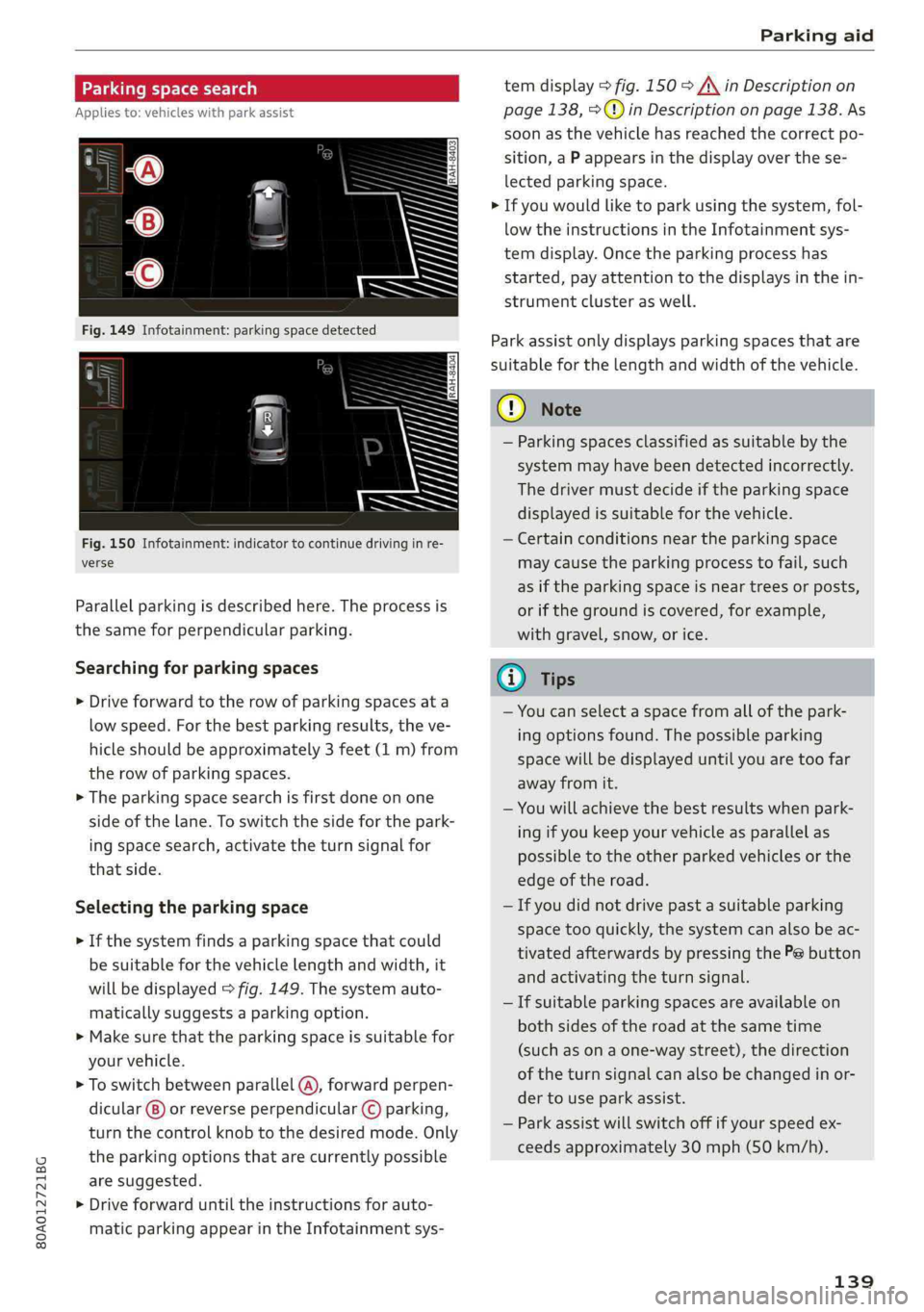
>Ifthesystemfindsaparkingspacethatcould
besuitableforthevehiclelengthandwidth,it
willbedisplayed>fig.149.Thesystemauto-
maticallysuggestsaparkingoption.
>Makesurethattheparkingspaceissuitablefor
yourvehicle.
>Toswitchbetweenparallel(@),forwardperpen-
dicular()or reverseperpendicular©parking,
turnthecontrolknobtothedesiredmode.Only
theparkingoptionsthatarecurrentlypossible
aresuggested.
>Driveforwarduntiltheinstructionsforauto-
maticparkingappearintheInfotainmentsys-
temdisplay>fig.150>A\inDescriptionon
page138,>@)inDescriptiononpage138.As
soonasthevehiclehas reachedthecorrectpo-
sition,aPappearsinthedisplayoverthese-
lectedparkingspace.
>Ifyouwouldliketoparkusingthesystem,fol-
lowtheinstructionsintheInfotainmentsys-
temdisplay.Oncetheparkingprocesshas
started,payattentiontothedisplaysinthein-
strumentclusteraswell.
Parkassistonlydisplaysparkingspacesthatare
suitableforthelengthandwidthofthevehicle.
@)Note
—Parkingspacesclassifiedassuitablebythe
systemmayhavebeendetectedincorrectly.
Thedrivermustdecideiftheparkingspace
displayedissuitableforthevehicle.
—Certainconditionsnear theparkingspace
maycausetheparkingprocesstofail, such
asiftheparkingspaceisneartreesorposts,
orifthegroundiscovered,forexample,
withgravel,snow,orice.
@)Tips
—Youcanselectaspacefromallofthepark-
ingoptionsfound.Thepossibleparking
spacewillbedisplayeduntilyouaretoofar
awayfromit.
—Youwillachievethebestresultswhenpark-
ingifyoukeepyourvehicleasparallelas
possibletotheotherparkedvehiclesorthe
edgeoftheroad.
—Ifyoudidnotdrivepastasuitableparking
space tooquickly,thesystemcanalsobeac-
tivatedafterwardsbypressingthePebutton
andactivatingtheturnsignal.
—Ifsuitableparkingspacesareavailableon
bothsidesoftheroadatthesametime
(such asonaone-waystreet),thedirection
oftheturnsignalcanalsobechangedinor-
dertouseparkassist.
—Parkassistwillswitchoffifyourspeedex-
ceedsapproximately30mph(50km/h).
139
Page 142 of 392

Parkingaid
Startingthe parkingprocess
Appliesto:vehicleswithparkassist
Theresponsibilityiswiththedriverwhenpark-
ing.
Requirement:asuitableparkingspacemustbe
foundandselected>page139.Thevehiclemust
initiallybestationary.
> Selectthereversegearafterstoppingbriefly.
>Removeyourhandsfromthesteeringwheel.
>Payattentiontothepathofthevehicle.When
thetrafficsituationallows,presstheaccelera-
torpedalaccordingly>A\inDescriptionon
page138,>@inDescriptiononpage138.
>FollowthevisualinstructionsintheInfotain-
mentsystemdisplayandinstrumentcluster
alongwiththewarningtonesuntiltheparking
processhasended.Thearrowsonthevehicle
indicatethenecessarydirectionoftravel.
Parkassistautomaticallysteersthevehicleinto
theparkingspacewhilethedriverpressesthe
pedals.Themaximumparkingspeedis4mph
(7km/h).
Interruptingtheparkassist
Ifthespeedistoohighand youtakeoversteer-
ing,parkassistswitchesoff.Tocontinueparking,
[email protected]
playswillappearagainintheInfotainmentsys-
temdisplayandtheinstrumentcluster.
G)Tips
Youcanalsocancelthedirectionoftravel
specifiedbythesystembyswitchingbetween
forwardandreversegears.Basedontheposi-
tionofthevehicle,thesystemthencalculates
theadditionalsteeringanddrivingdirections
formaneuvering.
Leavingaparallelparkingspace
Appliesto:vehicleswith parkassist
Theresponsibilityiswiththedriverwhenleaving
aparkingspace.
Ifyouparkedthevehicleinaparallelparking
space,parkassistcanhelpyoudriveoutofit.
140
>Starttheengine.
>PressthePebutton>page138,fig. 147.
>Waituntilamessageappearsthatrequeststhe
directiontotravelinforexitingtheparking
space.
>Activatetheappropriateturnsignal.Themes-
sageStartautomaticunparkingprocedureap-
pears.
>Removeyourhandsfromthesteeringwheel.
>Pressthecontrolknobtostarttheprocedure
forexitingtheparkingspace.
>Payattentiontothepathofthevehicle.When
thetrafficsituationallows,presstheaccelera-
torpedalaccordingly> A\inDescriptionon
page138,>@)inDescriptiononpage138.
>Followthevisualinstructions>page140and
thewarningtoneuntilthevehiclehasfinished
exitingtheparkingspace.
>Driveinthedirectionindicatedbythearrowson
thevehicle.
>Theprocedurehasendedwhenadditionalcor-
rectivemovementsarenolongernecessary.
Takeoversteering.
Parkassistautomaticallysteersthevehicleoutof
theparkingspacewhilethedriverpressesthe
pedals.Themaximumspeedforexitingaparking
spaceis3mph(5km/h).
Interruptingthe parkassist
Ifthespeedistoohighand youtakeoversteer-
ing,parkassistswitchesoff.Tocontinueexiting
theparkingspace,switchtheengineoffandon.
ThenpressthePebuttonagain.Otherwise,leave
theparkingspacewithoutusingparkassist.
Appliesto:vehicleswithparkassist
roo"Parkassist:canceled.Steeringinputbydriv-
er.Pleasetakeoversteering!
Parkassistwascanceledbecausethedrivertook
oversteering.Tocontinueparking, pressthePe
buttonagain.
Parkassist:timelimitexceeded
aor]Parkassist:canceled.Timelimitexceeded.
Pleasetakeoversteering!
Page 148 of 392
IntelligentTechnology
ZXWARNING
Youshouldonlyswitchoffroadmodeonor
switchESC/ASRoffifyourdrivingabilitiesand
thetrafficconditionspermit.Thereisariskof
sliding.
—Thestabilizationfunctionislimitedwhen
offroadmodeisswitchedon.Thedriving
wheelscouldspinandthevehiclecould
swerve,especiallyonslickorslipperyroad
surfaces.
—Thereisnovehiclestabilizationwhen
ESC/ASRareswitchedoff.
Hilldescentassist
Hilldescentassistmakesitpossibletodrive
downahillataconstantspeed.
a
2
g
= ©a
N
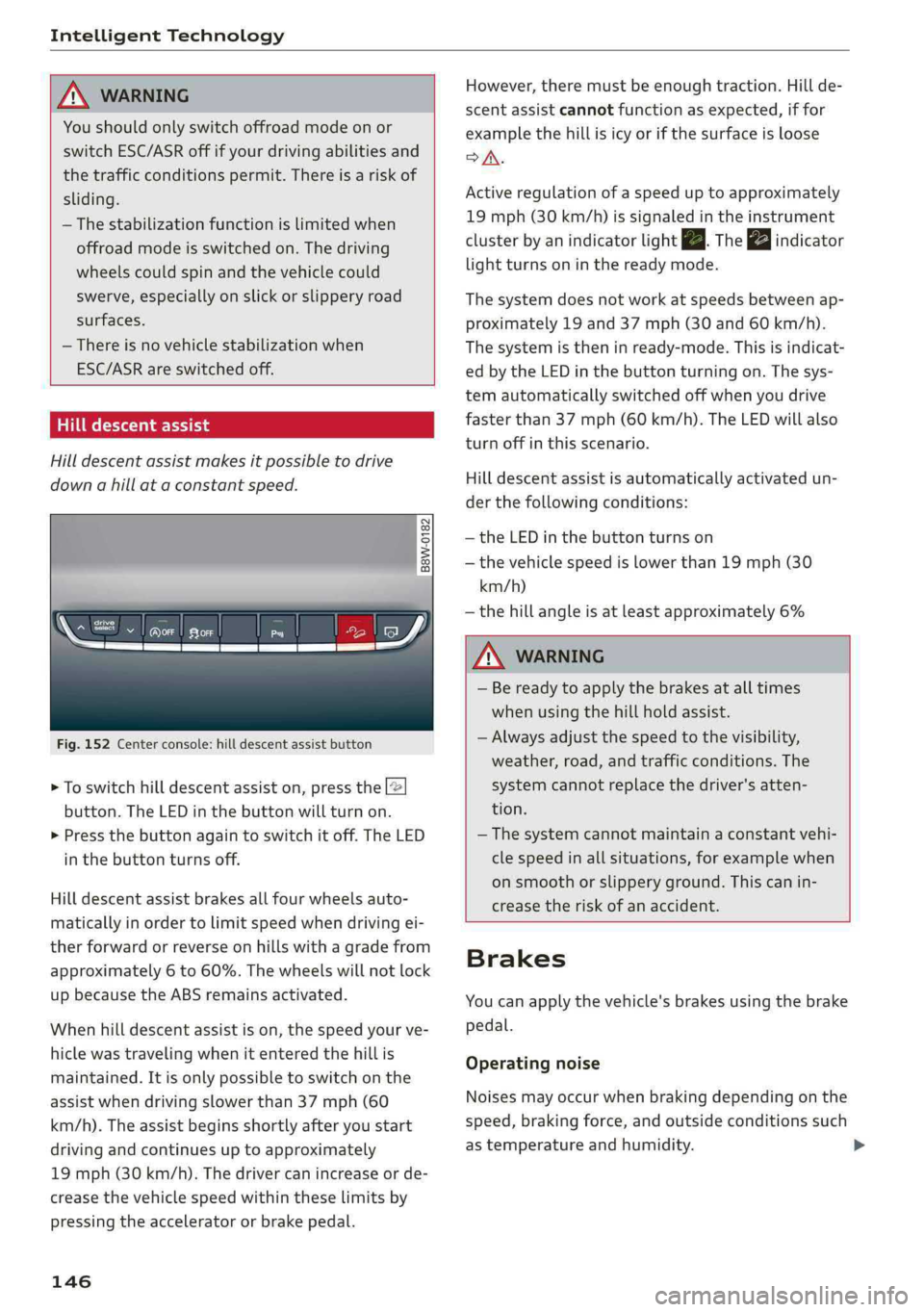
Fig.152Centerconsole:hilldescentassistbutton
>Toswitchhilldescentassiston,pressthe|@
button.TheLEDinthebuttonwillturnon.
>»Pressthebuttonagaintoswitchitoff.The LED
inthe buttonturnsoff.
Hilldescentassistbrakesallfourwheelsauto-
maticallyinordertolimitspeedwhendrivingei-
therforwardorreverseonhillswithagradefrom
approximately6to60%.Thewheelswillnotlock
upbecausetheABSremainsactivated.
Whenhilldescentassistison,thespeedyourve-
hiclewastravelingwhenitenteredthehillis
maintained.Itisonlypossibletoswitchonthe
assistwhendrivingslowerthan37mph(60
km/h).
Theassistbeginsshortlyafteryoustart
drivingandcontinuesuptoapproximately
19mph(30km/h).Thedrivercanincrease or de-
creasethevehiclespeedwithintheselimitsby
pressingtheacceleratororbrakepedal.
146
However,theremustbeenoughtraction.Hillde-
scentassistcannotfunctionasexpected,iffor
examplethehillisicyorifthesurfaceisloose
SA.
Activeregulationofaspeeduptoapproximately
19mph(30km/h)issignaledintheinstrument
clusterby anindicatorlightZB.Thegaindicator
lightturnsoninthereadymode.
Thesystemdoesnotworkatspeedsbetweenap-
proximately19 and 37mph(30and60km/h).
Thesystemistheninready-mode.Thisisindicat-
edbytheLEDinthebuttonturningon.Thesys-
temautomaticallyswitchedoffwhenyoudrive
fasterthan37mph(60 km/h).TheLEDwillalso
turnoffinthisscenario.
Hilldescentassistisautomaticallyactivatedun-
der thefollowingconditions:
—theLEDinthebuttonturnson
—thevehiclespeedislowerthan19mph(30
km/h)
—thehillangleisatleastapproximately6%
ZXWARNING
—Bereadytoapplythebrakesatalltimes
whenusingthehillholdassist.
—Alwaysadjustthespeedtothevisibility,
weather,road,andtrafficconditions.The
systemcannotreplacethedriver'satten-
tion.
—The systemcannotmaintainaconstantvehi-
clespeedinallsituations,forexamplewhen
onsmoothorslipperyground.Thiscanin-
creasetheriskofanaccident.
Brakes
Youcanapplythevehicle'sbrakesusingthebrake
pedal.
Operatingnoise
Noisesmayoccurwhenbrakingdependingonthe
speed,brakingforce,andoutsideconditionssuch
astemperatureandhumidity.