2019 AUDI Q5 length
[x] Cancel search: lengthPage 217 of 392

80A012721BG
Navigation
orientedtothedirectionoftravel.Atascaleof
62mi(100km)andlarger,themaporientation
istothenorth.
Overviewmap:theentireroutefromthevehicle
positiontothedestinationorthenextstopoveris
displayedonthemap.Themapscaledependson
the lengthoftherouteandadaptsautomatically.
Themapisorientedtothenorth.
Routeinformation
Thedisplayofrouteinformation,suchasthecur-
rentstreetbeingdrivenonorpointsofinterest
alongthecurrentroute>page212,fig.194,can
be switchedon/offorcanbeminimizedonthe
displayofupcomingmaneuvers.
Automaticzoom
On:themapscaleisadaptedautomaticallyde-
pendingonthetypeof roadbeingtraveled(ex-
pressway,highway,otherroads)sothatyoual-
wayshaveanoptimaloverviewoftheroadahead.
Thescalewillalsobeautomaticallyadapted
whenthereareupcomingmaneuverstoprovidea
betterdetailedview.
Intersection:whenrouteguidanceisactive,the
maptemporarilyzoomsintoadetailedscale
whenthereareupcomingmaneuverssothatyou
can seethestreetorturnbetter.
Off:themapscaleyouhavechosenismain-
tained.
MMImapcontents
Youcanswitchthedisplayofadditionalinforma-
tiononthemapintheInfotainmentsystemdis-
playonoroff.
Theweatherforecastisdisplayedona3mile(5
km)scaleonthemap.
Instrumentclustermapcontents
Youcanalsosetwhichmapcontentdisplaysin
theinstrumentcluster>page166.
))AUDIAGprovidesaccesstoservicesfromthirdpartypro-
viders.Permanentavailabilitycannotbeguaranteed,be-
causethatdependsonthethirdpartyprovider.
Satellitemap
Appliesto:vehicleswithnavigationsystem andAudiconnect
Infotainment
You candisplaythenavigationmapwithsatel-
liteimages.
SFigueroaSt
Fig.196Example:satellitemap
WWashingtonBlvd
LosAngeles
Requirement:therequirementsforAudiconnect
servicesmustbemet>page193.
>Pressthe [NAV/MAP]buttonrepeatedlyuntil
themapisdisplayed.
>Select:rightcontrolbutton>Mapsettings>
Mapdisplay>Satellitemap).
Themapdisplayisbasedondatareceivedfrom
theInternetintheformofsatelliteimages,
whicharethencombinedwiththeroadwaysfrom
theStandardmapview.Therearetwogigabytes
ofmemoryspaceintheMMImemorythatcanbe
usedtotemporarilystorethemapornavigation
datathatwasreceived.Thisisroughlythe
amountrequiredforthemap/navigationdatafor
a2,485mile(4,000km)route.Aslongasthe
satelliteimagesloadedforrouteguidanceare
stored,youcan usethemwithouthavinganac-
tivedataconnection.
GTips
—Thestoredsatellitemapdata!)canbede-
letedunderFactorysettings>Navigation
andonlinememory>page246.
~Thesatellitemap!)isupdatedregularly
wheneverthefunctionisopened.Theproc-
essmaytakeseveralseconds.
—Whenthesatellitemapdisplayisswitched
on)withthe3Dpositionmaptype,the
215
>
Page 219 of 392
80A012721BG
Navigation
@Tips
—Alwaysreadthechapter>page192.
— Theamountofavailableonlinemapupdates
inthevehicleislimited.Toupdatemorere-
gions,usethemapupdateviaSDcardat
www.audiusa.com/myaudi.
—Alwaysreadthechapter>page192,Audi
connect.
Trafficinformation
Appliesto:vehicleswithnavigationsystem
Coeenaes@
®Westbound#>Eastbound
@)Northbound
©>-@serthvoun
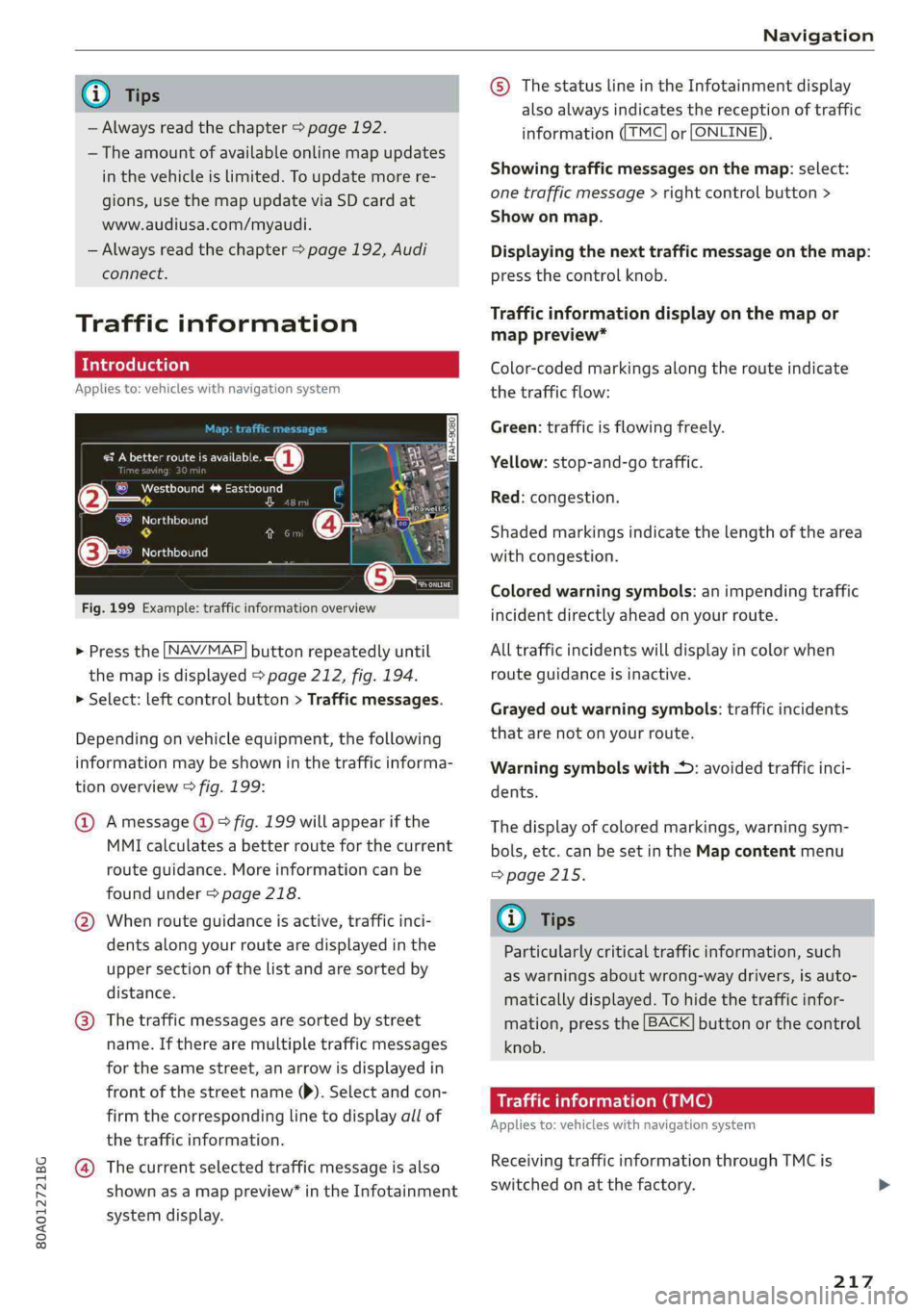
Fig.199Example:trafficinformationoverview
>Pressthe LNAV/MAP]buttonrepeatedlyuntil
themapisdisplayed>page212,fig.194.
>Select:leftcontrolbutton>Trafficmessages.
Dependingonvehicleequipment,thefollowing
informationmaybeshowninthetrafficinforma-
tionoverview>fig.199:
@Amessage(@)>fig.199willappearifthe
MMIcalculatesabetterrouteforthecurrent
routeguidance.Moreinformationcanbe
foundunder>page218.
@Whenrouteguidanceisactive,trafficinci-
dents along yourroutearedisplayedinthe
uppersectionofthelistandaresortedby
distance.
@®Thetrafficmessagesaresorted bystreet
name.Iftherearemultipletrafficmessages
forthesamestreet,anarrowisdisplayedin
frontofthestreetname()).Selectandcon-
firmthecorrespondinglinetodisplayallof
thetrafficinformation.
@Thecurrentselectedtrafficmessageisalso
shownasamappreview”intheInfotainment
systemdisplay.
©)ThestatuslineintheInfotainmentdisplay
alsoalwaysindicatesthereceptionoftraffic
informationTMC]orLONLINE}),
Showingtrafficmessagesonthemap:select:
onetrafficmessage>rightcontrolbutton>
Showonmap.
Displayingthe nexttrafficmessageonthemap:
pressthecontrolknob.
Trafficinformationdisplayonthemapor
mappreview*
Color-codedmarkingsalongtherouteindicate
thetrafficflow:
Green:trafficisflowingfreely.
Yellow:stop-and-gotraffic.
Red:congestion.
Shadedmarkingsindicatethelength ofthearea
withcongestion.
Coloredwarningsymbols:animpendingtraffic
incidentdirectlyaheadonyourroute.
Alltrafficincidentswilldisplayincolorwhen
routeguidanceisinactive.
Grayedoutwarningsymbols:trafficincidents
thatarenotonyourroute.
Warningsymbolswith*:avoidedtrafficinci-
dents.
Thedisplay ofcoloredmarkings,warningsym-
bols,etc.canbesetintheMapcontentmenu
=>page215.
G@)Tips
Particularlycriticaltrafficinformation,such
aswarningsaboutwrong-waydrivers,isauto-
maticallydisplayed.Tohidethetrafficinfor-
mation,pressthe[BACK]buttonorthecontrol
knob.
Trafficinformation(TMC)
Appliesto:vehicleswithnavigationsystem
ReceivingtrafficinformationthroughTMCis
switchedonatthefactory.
217
Page 251 of 392

80A012721BG
Systemsettings
Select:Audismartphone>adevicefromthelist
>rightcontrolbutton.
Toremoveyourmobiledevicefromthelist,select
andconfirm DeleteAppleCarPlaydeviceorDe-
leteAndroidAutodevice.
Systemupdate
>Select:[MENU]button>Settings>leftcontrol
button>Systemmaintenance.
—Systemupdate:insertthestoragedevicewith
theupdatedataintotheappropriatedrive
=page226.Selectandconfirm thedrive>
Startupdate.Thelengthoftheprocessde-
pendsonthesizeoftheupdate.
—Resetdriverinstallation:theselectedmedia
driverpackageisresettothesettingsatthe
timeofdelivery.
—Versioninformation:informationontheMMI
softwareversionandthenavigationdatabase*
softwareversionisdisplayed.TheSoftwarein-
formationfunctionalsoprovidesinformation
onthesoftwarecontainedintheMMIandthe
licensingagreement.
Soundsettings
ThesounddistributionandvolumeoftheMMI
canbeadjustedindividually.Thesettingsdepend
onthevehicleequipment.
Fig.216Adjustingthebalance/fader
>Select:[MENU]button>Sound>leftcontrol
button>Entertainment.
Treble/Bass
YoucanadjusttheTrebleandBasssettingsby
turningthecontrolknob.Thechangedsettings
onlyapplyfortheaudiosourcethatisactiveat
thetime.Thisallowsyoutoadjustthesoundset-
tingsforeachaudiosourceseparately.
Balance/fader(Soundfocus)
—Adjustingthesounddistributiontotheleftor
right:pressthecontrolknob.Turnthecontrol
knobtotheleftorrighttothedesiredposition.
—Adjustingthesounddistributiontothefront
orrear:pressthecontrolknobagain.Turnthe
controlknobtotheleftorrighttothedesired
Position.
—Adjustingthesounddistributionusingthe
MMItouch*:moveyourfingerontheMMI
touchcontrolpanelinthedesireddirection.
Soundeffects
SelectandconfirmaFocussetting:
—All:allspeakersinthevehicleareactive(sym-
metricalsounddistribution).
—Front:onlythespeakersinthefrontoftheve-
hicleareactive.
—Rear*:onlythespeakersintherearofthevehi-
cleareactive.
Selectandconfirma3Deffect*setting(surround
sound):
—Off:the3Deffectisswitchedoff.
—Low:the3Deffectisoptimized,forexample
foraudiobooks.
—Medium:the3Deffectisoptimizedforallsour-
ces.
—High:the3Deffectisatthemaximum.
Subwoofer*
Turnthecontrolknobtoadjustthesubwoofer.
Speeddependentvolumecontrol
Turnthecontrolknobtoadjusttheplaybackvol-
umetothenoiseinsidethevehicle.
249
Page 336 of 392
Wheels
installthetiresfromtherearaxle
onthefrontaxleandviceversa.
Thiswillallowthetirestohave
approximatelythesamelengthof
servicelife.
Forunidirectionaltires,makesure
thetiresareinstalledaccordingto
therunningdirectionindicatedon
thetiresidewall>page354.
Hiddendamage
Damagetotiresandrimscanof-
tenoccurinlocationsthatarehid-
den.Unusualvibrationsintheve-
hicleorpullingtoonesidemay
indicatethatthereistiredamage.
Reduceyourspeedimmediately.
Checkthetiresfordamage.Ifno
damageisvisiblefromtheout-
side,driveslowlyandcarefullyto
thenearestauthorizedAudideal-
erorauthorizedAudiServiceFa-
cilitytohavethevehicleinspect-
ed.
Z\WARNING
Treadthathasworntoolowor
uneventreaddepthsonthe
tirescanreducedrivingsafety.
Thiscanincreasetheriskofan
accidentbecauseithasanega-
tiveeffectonhandling,driving
throughcurves,andbraking,
334
andbecauseitincreasesthe
riskofhydroplaningwhendriv-
ingthroughdeeppuddles.
Tirepressure
+3S oO
2=7
ao
Fig.266Driver'ssideB-pillar:tirepres-
surelabel
B8K-1151
@‘SEATINGCAPACITYTOTALFRONTREARDEEeNOMBREDEPLACESTOTALAVANTARRIEREsore
xIbs.,a;
TIRESIZE
PNEU_|DIMENSIONS
FRONT
AVANT
REAR
ARRIERE
‘SPARE
DESECOURS
COLDTIREPRESSURE
PRESSIONDESPNEUS AFROID
amKPA,MlPSI
MaKPA,MlPSI
aKPA,MlPSI
Fig.267Tirepressurelabel
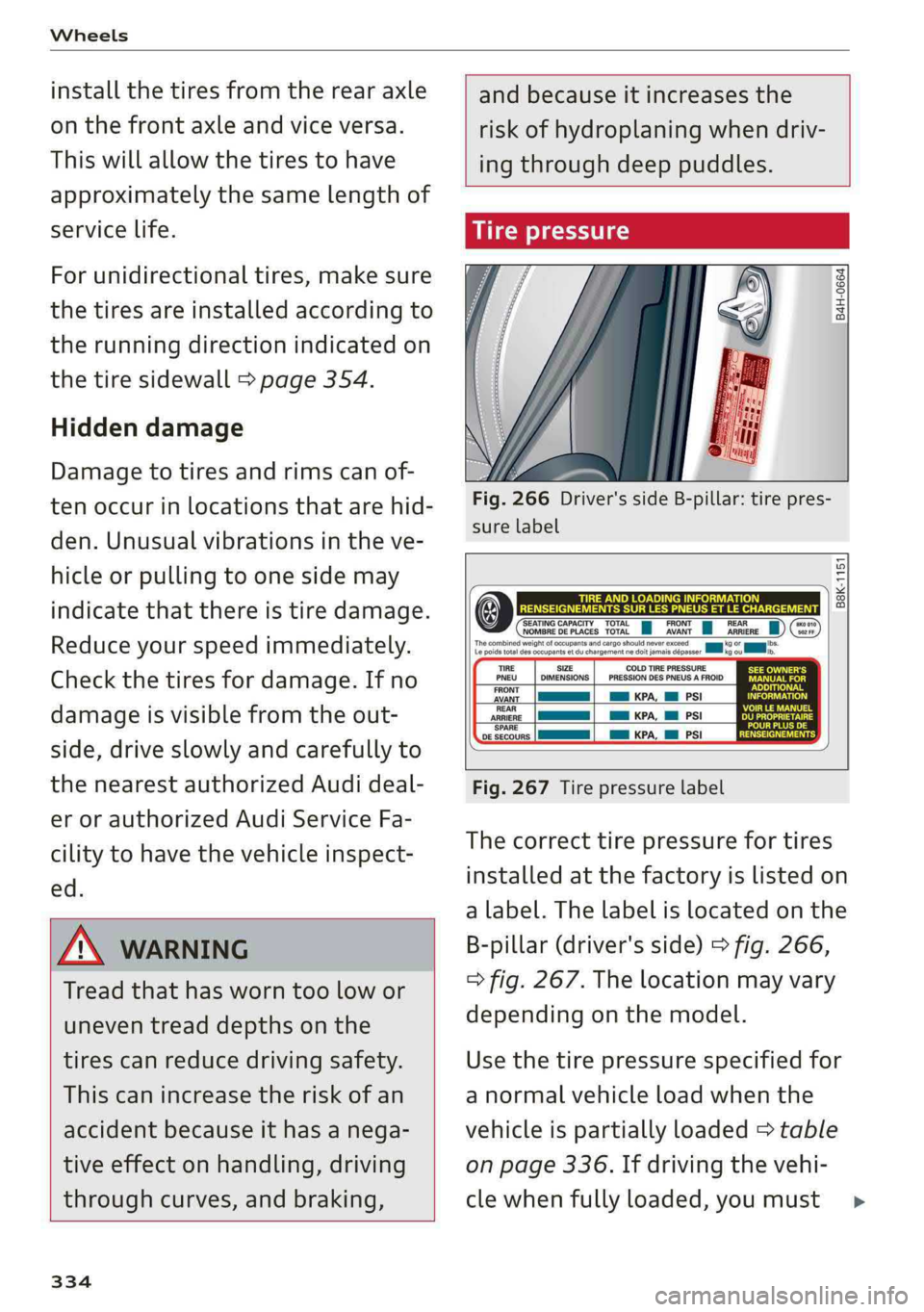
Thecorrecttirepressurefortires
installedatthefactoryislistedon
alabel.Thelabelislocatedonthe
B-pillar(driver'sside)>fig.266,
>fig.267.Thelocationmayvary
dependingonthemodel.
Usethetirepressurespecifiedfor
anormalvehicleloadwhenthe
vehicleispartiallyloaded>table
onpage336.Ifdrivingthevehi-
clewhenfullyloaded,youmust>