2019 AUDI Q5 length
[x] Cancel search: lengthPage 52 of 392

LightsandVision
thisliquidasquicklyaspossible,forexample
withawetsponge.
—Ifthelightreachingtherearviewmirroris
obstructed,theautomaticdimmingmirror
willnotfunctioncorrectly,
—Theautomaticdimmingmirrorsdonotdim
whentheinteriorlightingisturnedonor
thereversegearisselected.
Fig.45Sunvisor
Sunvisor
Thesunvisorsforthedriverandfrontpassenger
canbereleasedfromtheirmountsandturnedto-
wardthedoors>fig.45@).
Theycanalsobemovedbackandforthlength-
wiseinthisposition.
Vanitymirror
Themirrorlightswitchesonwhenthecoverover
thevanitymirror@)opens.
Appliesto:vehicleswithsunshade
<=
2 6 2
=7ao
Fig.46Reardoor:sunshade
sO
Reardoorsunshade
>Pullthesunshadeoutandattachittothere-
tainerontheupperdoorframe>fig.46.
Windshieldwipers
SeremeaROUeel
B4M-0018
B4M-0019
Fig.48Rearwindowwiperoperation
MovethewindshieldwiperleverS7tothecorre-
spondingposition:
@-Windshieldwipersoff
@-Rainsensormode.Thewindshieldwipers
switchononcethevehiclespeedexceedsapprox-
imately2mph(4km/h)anditisraining.The
higherthesensitivityoftherainsensorthatisset
(switch@)totheright),theearlierthewind-
shieldwipersreacttomoistureonthewind-
shield.Youcandeactivatetherainsensormode
intheInfotainmentsystem,whichswitchesthe
intermittentmodeon.Todothis,select:[MENU
button>Vehicle>leftcontrolbutton>Driveras-
sistance>Rainsensor.Inintermittentmode,
youcanadjusttheintervaltimeusingtheswitch
®.
@-Slowwiping
Page 57 of 392
80A012721BG
Seats
Seats
Generalinformation
ZAWARNING
See>page252,Drivingsafetyforimportant
information,tips,suggestionsandwarnings
thatyoushouldreadandfollowforyourown
safetyandthesafetyofyourpassengers.
Frontseats
Powerseatadjustment
=
Ss
£>imo
Fig.54Frontseat:adjustingtheseat(versionB)
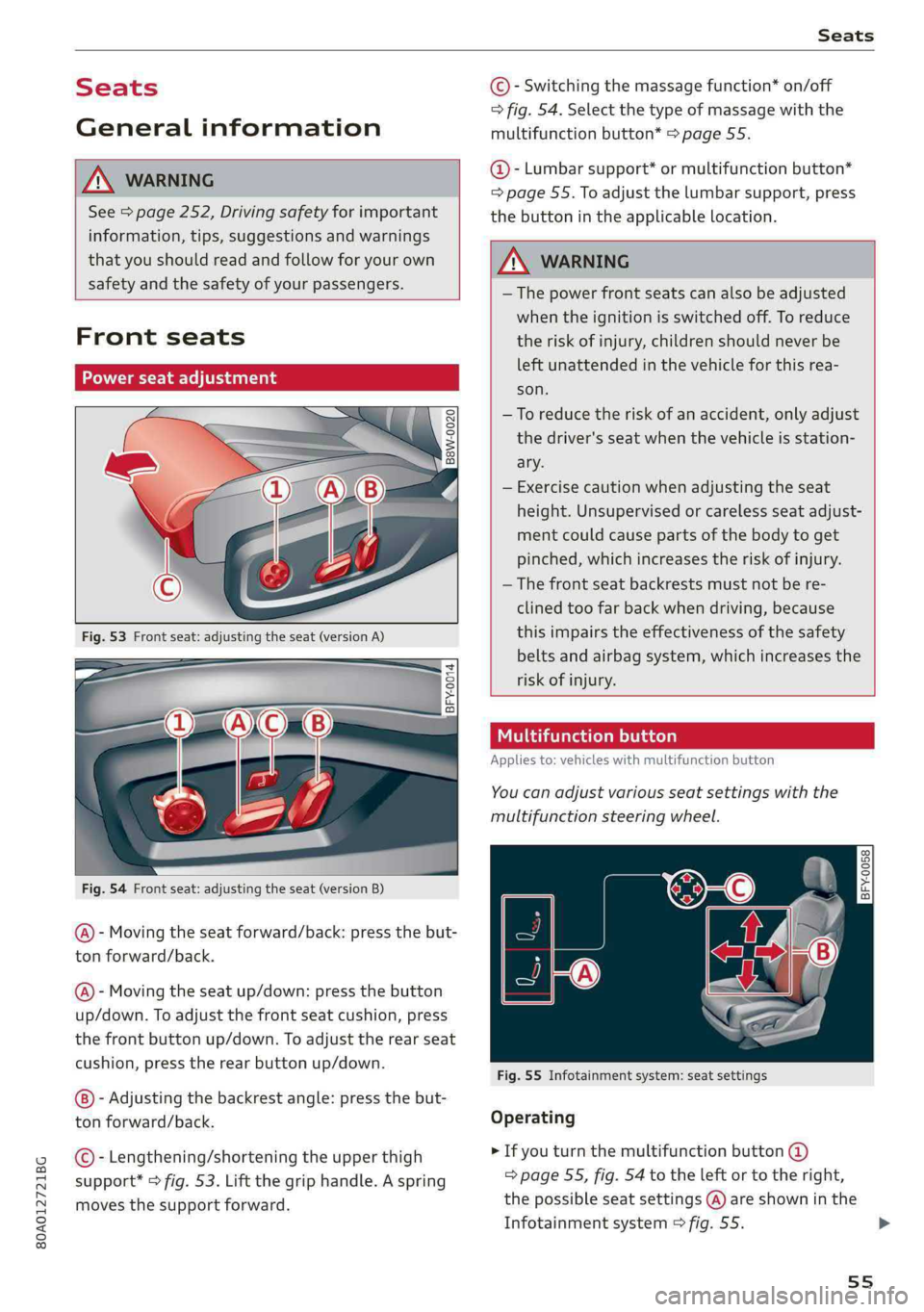
@-Movingtheseatforward/back:pressthebut-
ton forward/back.
@)-Movingtheseatup/down:pressthe button
up/down.Toadjustthefrontseatcushion,press
thefrontbuttonup/down.Toadjusttherearseat
cushion,presstherearbuttonup/down.
-Adjustingthebackrestangle:pressthebut-
tonforward/back.
©-Lengthening/shorteningtheupperthigh
support*>fig.53.Liftthegriphandle.Aspring
movesthesupportforward.
©-Switchingthemassagefunction*on/off
>fig.54.Selectthetypeofmassagewiththe
multifunctionbutton*>page55.
@-Lumbarsupport*ormultifunctionbutton*
=page55.Toadjustthelumbarsupport,press
thebuttonintheapplicablelocation.
Z\WARNING
— Thepowerfrontseatscanalsobeadjusted
whentheignitionisswitchedoff.To reduce
theriskofinjury,childrenshouldneverbe
leftunattendedinthevehicleforthisrea-
son.
—Toreducetheriskofanaccident,onlyadjust
thedriver'sseatwhenthevehicleisstation-
ary.
—Exercisecautionwhenadjustingtheseat
height.Unsupervisedorcarelessseatadjust-
mentcouldcausepartsofthebodytoget
pinched,whichincreasestheriskofinjury.
—Thefrontseatbackrestsmustnotbere-
clinedtoofarbackwhendriving,because
thisimpairstheeffectivenessofthesafety
beltsandairbagsystem,whichincreasesthe
riskofinjury.
Tatomelhace)
Appliesto:vehicleswithmultifunctionbutton
You canadjustvariousseatsettingswiththe
multifunctionsteeringwheel.
BFY-0058Om
C
Fig.55Infotainmentsystem:seatsettings
Operating
>Ifyouturnthemultifunctionbutton@
=>page55,fig.54totheleftortotheright,
thepossibleseatsettings@)areshowninthe
Infotainmentsystem>fig.55.>
55
Page 68 of 392
Stowingandusing
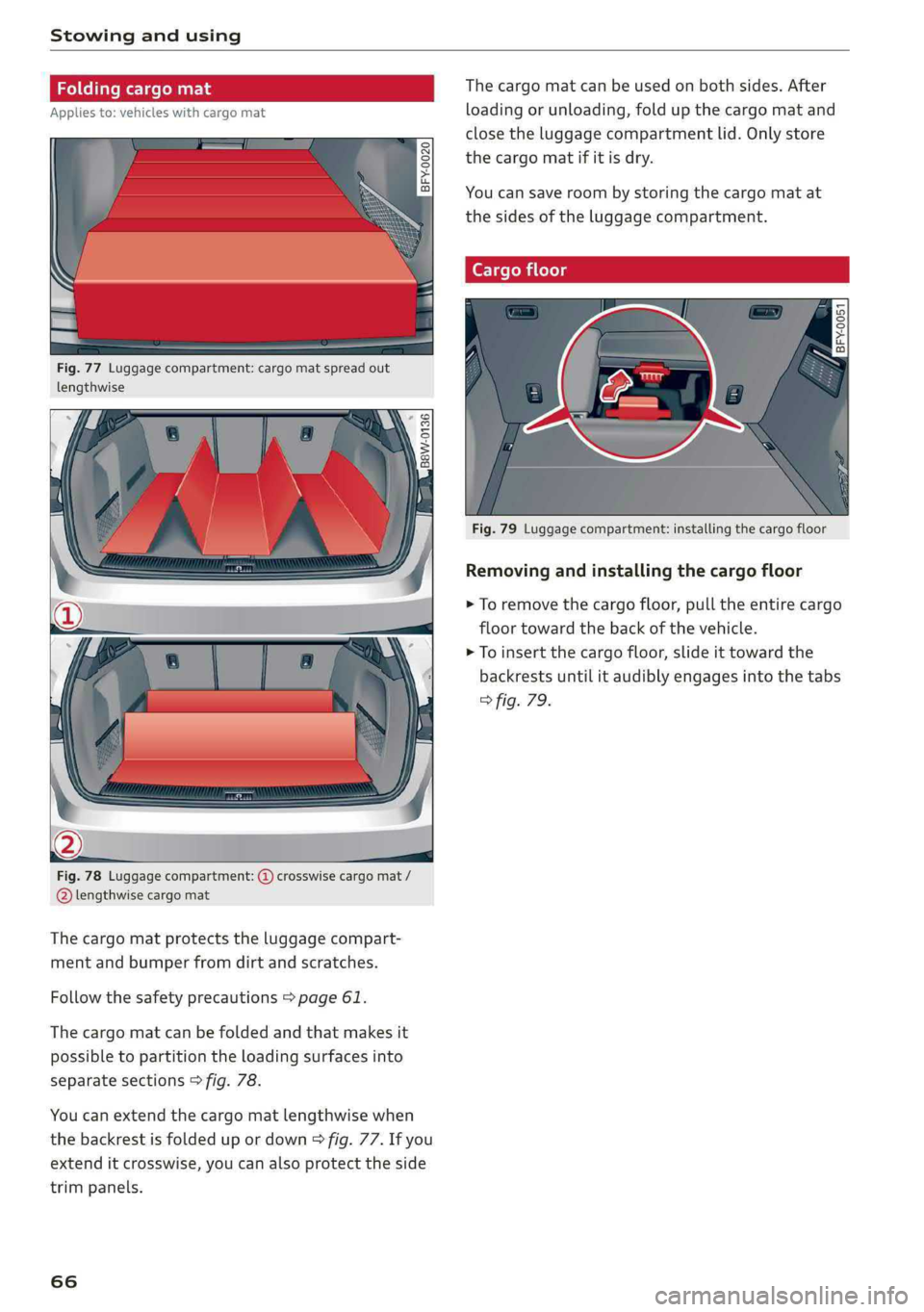
Fig.77Luggagecompartment:cargomatspreadout
lengthwise
B8W-0136
Fig.78Luggagecompartment:@crosswisecargomat/
@lengthwisecargomat
Thecargomatprotectstheluggagecompart-
mentand bumperfromdirtandscratches.
Followthesafetyprecautions>page61.
Thecargomatcanbefoldedandthatmakesit
possibletopartitiontheloadingsurfacesinto
separatesections>fig.78.
Youcanextendthecargomatlengthwisewhen
thebackrestisfoldedupordown9fig.77.Ifyou
extenditcrosswise,youcanalsoprotecttheside
trimpanels.
66
Thecargomatcanbeusedonbothsides.After
loadingorunloading,foldupthecargomatand
closetheluggagecompartmentlid. Onlystore
thecargomatifitisdry.
Youcansaveroombystoringthecargomatat
thesidesoftheluggagecompartment.
Fig.79Luggagecompartment:installingthecargofloor
Removingandinstallingthecargofloor
>Toremovethecargofloor,pulltheentirecargo
floortowardthebackofthevehicle.
>Toinsertthecargofloor,slideittowardthe
backrestsuntilitaudiblyengagesintothetabs
>fig.79.
Page 70 of 392

Stowingandusing
Installingthecoverprofile
Appliesto:vehicleswithroofrackssupplied by thefactory
—Afteryouhavemountedtheattachments,seal
theopeningsintheT-groove(%)withthecover
profile@).
—Ifyoudonotwanttouse theattachment,seal
thewholeT-groove()withthecoverprofile@).
—Ifnecessary,cutthecoverprofiletotheneces-
sarylength.
ZA\WARNING
—Followtheinstallationinstructionsprovided
withtheroofracksystem.Ifyoudonotse-
curetheroofracksystemandobjectsonthe
roofcorrectly,theycouldcomeloosefrom
thevehicleandcauseanaccident.
—Theriskofanaccidentincreases whenusing
aroofracksystem,becauseitchangesthe
drivingcharacteristicsbyshiftingthecenter
ofgravityand/ortheincreasingthesurface
areaexposedtowind.Youmayneedto
adaptyourdrivingstyleandspeedtothe
currentconditions.Werecommendthatyou
donotdrivefasterthan80mph(130
km/h).
—Distributethecargoevenlyontheroofrack
anddonotexceedthemaximumwidthor
themaximumtotalroofloadweight.
—Beforeeverytrip,allboltsandconnections
ontheroofrackmustbechecked.Tighten
themifnecessaryandrecheckthemregular-
ly.Ifyoudonotdothis,thereisahigherrisk
oftheroofrackortheattachmentsloosen-
ingorfallingoff.
—Appliesto:vehicleswithroofrackssupplied
bythefactory:Wheninstallingafactory-
suppliedroofracksystemontheroofrail,
theESCwillusesensorstoadaptitselfto
thedifferentcenterofgravityif itchanges
becauseofcarryingaload.Thisdoesnotoc-
cur whenusingotherroofracksystems,so
theriskofanaccidentwillincrease.
@)Note
—Ifyouuseotherroofluggageracksystems
ordonotinstalltheroofracksasspecified,
thenanydamagetothevehicleisnotcov-
ered bythewarranty.Carefullyfollowthe
68
assemblyandinstallationinstructionsin-
cludedwiththeroofrackcarriersystem.
—Toreducetheriskofdamage,youmustre-
movetheroofrackand attachmentbefore
takingyourvehiclethroughanautomatic
carwash.
—Makesurethattheluggagecompartment
lidandthepanoramicglassroof*donot
comeintocontactwithobjectsontheroof
whentheyareopen.
@)Forthesakeoftheenvironment
Energyusagewillincreasebecauseofthein-
creasedwindresistance.Removetheroofrack
whenyouarenolongerusingit.
Page 84 of 392

Driving
ZA\WARNING
Exceedingthemaximumspecifiedvaluescan
leadtoseriousinjuriesorvehicledamage.
—Allspecificationsweredeterminedbasedon
alevel,firm,andnon-slipperyroadsurface
indryweatherconditions.
—Theidealconditionsdonotapplyinoffroad
driving.Donotalwaysgoallthewayupto
themaximumvalues.Stayslightlybelow
themforsafety.
Messages
Thereisonlyonemottowhendrivingindifficult
conditionsandoffroad:driveslowlyandwith
caution!
Observethefollowingwhendrivingonunpaved
roads:
>Onlydriveinterrainthatissuitablefortheve-
hicleandyourdrivingability.Nevertakeanyun-
necessaryrisks!
>Driveslowlyandcarefully.
>Payattentiontothegroundclearanceofyour
vehicle.
>Activatetheoffroadmodeasneeded
=>page145.
>Usethehilldescentassistwhendrivingdown
steephills>page146.
Difficultterrainandoff-road
Whendrivinginunfamiliarareasandoffroad,
driveslowlyandkeeponthewatchforunexpect-
edobstacles(suchaspotholes,rocks,tree
stumps,etc.).
Topreventthevehiclefrombottomingoutandto
reducetheriskofunderbodydamage,youshould
driveacrossuneven groundononlyonesideof
thevehiclesothatonlytwoofyourwheelscross
theunevenarea,insteadofdrivingacrossthe
center oftheunevenareawithallfourwheels.
Drivequicklythroughsandyor marshyoff-road
sectionsanddonotstop,ifatallpossible.
Drivingthroughwater
Alsoreadtheinformationfoundin>page73.
82
Drivingonaslope
Ifyouareeverunabletodriveupahill,donottry
toturnaround.Drivebackdowninreversein-
stead.Otherwise youruntheriskof tippingover.
Ifthevehiclethreatenstotipoverwhendriving
acrossa slope,youmustimmediatelysteer
downhillinthedirectionoftheslope.
Donotparkyourvehicleonsteephills.
Toreducetheriskoftippingover,driveonhillsin
thedirectionofthedownwardslope(fallline)-
nevercrosswise.
Tiltangledisplay
Appliesto:vehicleswithatiltangledisplay
aireAdtic-Va
‘
tor
eesi
iesor}
Dara\
Peete
as
Fig.89Infotainmentsystem:tiltangledisplay
Youcanseethevehiclepositioninrelationtoa
levelplaneusingthetiltangledisplayintheIn-
fotainmentsystem.Boththesidewaysangle(A)
andthelengthwise angle(8)ofthevehicleare
displayed.Theaccuracydependsonthedriving
situationandisnormallyaround1°.Theside-
waysangleofyourvehicleshouldnotexceedthe
yellowrangeinthegauge.Ifitreachesthered
range,thereisa riskthatthevehiclemighttip
of.
Displayingthetiltangledisplay
>SelectintheInfotainmentsystem:[MENU]but-
ton>Vehicle> Lift/Offroador Allroad*.
Showingtheadditionaldisplay
Tochangethecontentsshownintherightareaof
thescreen,selectintheInfotainmentsystem:
rightcontrolbutton>Additionaldisplay.
Angle:thisdisplaysthecurrentsteeringwheel
angleandthemaximumanglethatwasreached>
Page 141 of 392
80A012721BG
Parkingaid
Parkingspacesearch
Appliesto:vehicleswithparkassist
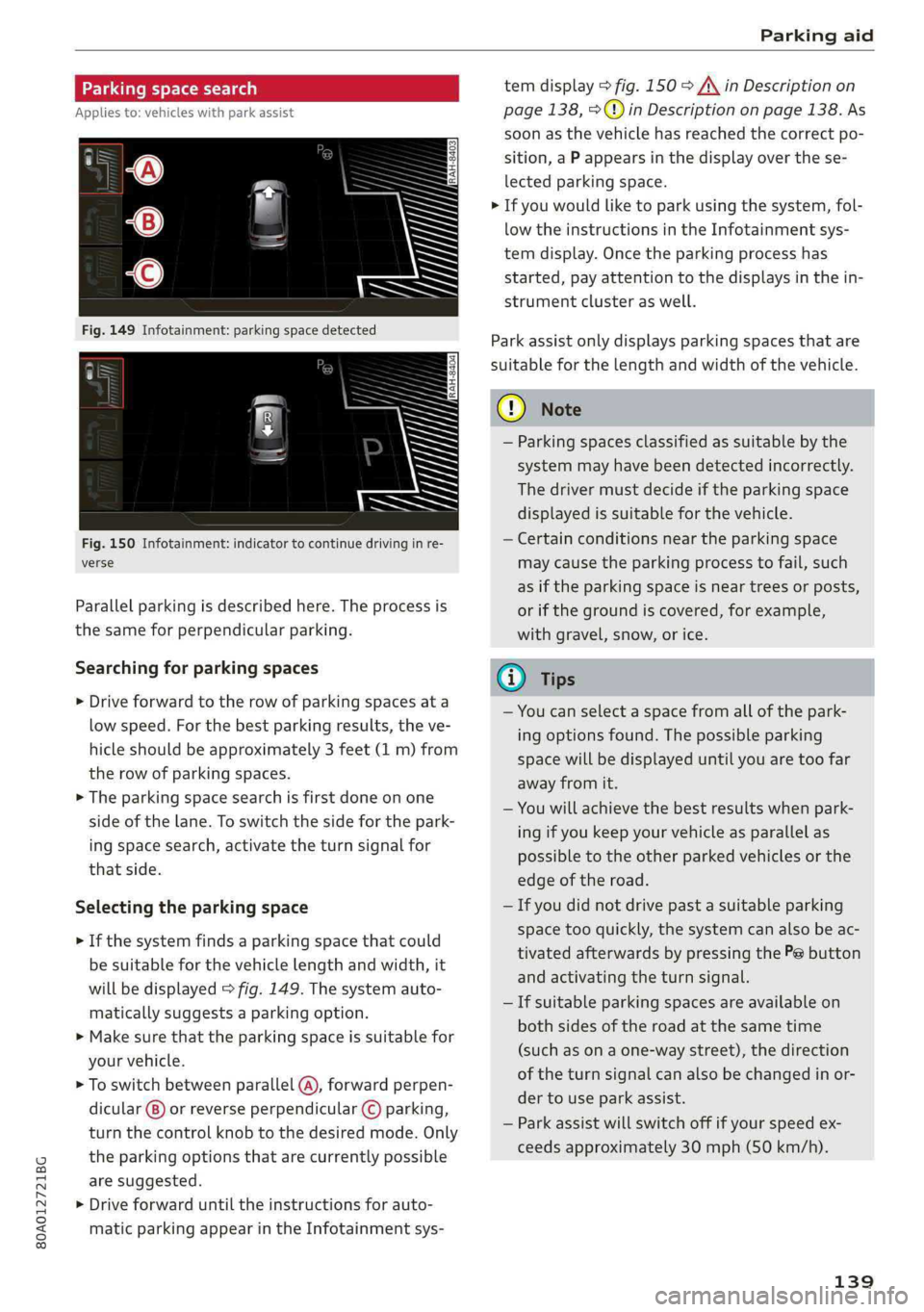
Fig.150Infotainment:indicatortocontinuedrivinginre-
verse
Parallelparkingisdescribedhere.Theprocessis
thesameforperpendicularparking.
Searchingforparkingspaces
>Driveforwardtotherowofparkingspacesata
lowspeed.Forthebestparkingresults,theve-
hicleshould beapproximately3feet(1m)from
therowofparkingspaces.
>Theparkingspacesearchisfirstdoneonone
sideofthelane.Toswitchthesideforthepark-
ingspacesearch,activatetheturnsignalfor
thatside.
Selectingtheparkingspace
>Ifthesystemfindsaparkingspacethatcould
besuitableforthevehiclelengthandwidth,it
willbedisplayed>fig.149.Thesystemauto-
maticallysuggestsaparkingoption.
>Makesurethattheparkingspaceissuitablefor
yourvehicle.
>Toswitchbetweenparallel(@),forwardperpen-
dicular()or reverseperpendicular©parking,
turnthecontrolknobtothedesiredmode.Only
theparkingoptionsthatarecurrentlypossible
aresuggested.
>Driveforwarduntiltheinstructionsforauto-
maticparkingappearintheInfotainmentsys-
temdisplay>fig.150>A\inDescriptionon
page138,>@)inDescriptiononpage138.As
soonasthevehiclehas reachedthecorrectpo-
sition,aPappearsinthedisplayoverthese-
lectedparkingspace.
>Ifyouwouldliketoparkusingthesystem,fol-
lowtheinstructionsintheInfotainmentsys-
temdisplay.Oncetheparkingprocesshas
started,payattentiontothedisplaysinthein-
strumentclusteraswell.
Parkassistonlydisplaysparkingspacesthatare
suitableforthelengthandwidthofthevehicle.
@)Note
—Parkingspacesclassifiedassuitablebythe
systemmayhavebeendetectedincorrectly.
Thedrivermustdecideiftheparkingspace
displayedissuitableforthevehicle.
—Certainconditionsnear theparkingspace
maycausetheparkingprocesstofail, such
asiftheparkingspaceisneartreesorposts,
orifthegroundiscovered,forexample,
withgravel,snow,orice.
@)Tips
—Youcanselectaspacefromallofthepark-
ingoptionsfound.Thepossibleparking
spacewillbedisplayeduntilyouaretoofar
awayfromit.
—Youwillachievethebestresultswhenpark-
ingifyoukeepyourvehicleasparallelas
possibletotheotherparkedvehiclesorthe
edgeoftheroad.
—Ifyoudidnotdrivepastasuitableparking
space tooquickly,thesystemcanalsobeac-
tivatedafterwardsbypressingthePebutton
andactivatingtheturnsignal.
—Ifsuitableparkingspacesareavailableon
bothsidesoftheroadatthesametime
(such asonaone-waystreet),thedirection
oftheturnsignalcanalsobechangedinor-
dertouseparkassist.
—Parkassistwillswitchoffifyourspeedex-
ceedsapproximately30mph(50km/h).
139
Page 208 of 392

Navigation
—ThenselectandconfirmStartrouteguidance.
Additionaldirectoryfunctionsinthenavigation
systemcanbefoundunder>page211.
@)Tips
—Addressesthathavebeenimportedfrom
yourmobiledeviceintotheMMIcanalsobe
usedasadestination.
—If acontactisgrayed outinthedirectory,
thiscontacthasneitheradestinationnoran
addressassignedtoit.
olelmneat)
Appliesto:vehicleswithnavigationsystem
>Pressthe LNAV/MAP]buttonrepeatedlyuntil
the Enterdestinationmenuisdisplayed
=>page203,fig.187.
>Select:leftcontrolbutton>Pointsofinterest.
—Changingthesearcharea:selectandconfirm
Searcharea>asearchareafromthelist.
Thefollowingsearchcategoriesareavailable:
Nearby:pointsofinterestcanbeselectedfrom
differentcategories.Thepointsofinterestare
listedstartingfromtheimmediatevicinityofthe
vehicleuptoaradiusofapproximately124miles
(200km).
Alongtheroute:pointsofinterestalongthe
routecanonlybeselectedduringactiveroute
guidance.Thepointsofinterestarelocateddi-
rectlyalongorintheimmediatevicinityofthe
calculatedroute.Thepointsofinterestcanlike-
wisebeselectedfromvariouscategories.Forex-
ample,youcansearchforahotelorparkinglot
atthedestination.
Neardestination/Nearstopover:pointsofinter-
estnearadestinationorastopover canonlybe
selectedduringactiverouteguidance.Thepoints
ofinterestcanlikewisebeselectedfromvarious
categories.Forexample,youcansearchforaho-
telorparkinglotatthedestination.
In anewcity:selectacountry/stateorsearchin
anewcity.Enterthenameofthedesiredcity.
Points ofinterestcanbeselectedfromvarious
categories.Thisfunctionallowsyoutosearchfor
206
points ofinterestinanycityregardlessoftheac-
tiverouteguidanceorthevehicleposition.
—Searchingforthenameofapointofinterest
intheselectedsearcharea:Select:Findentry
>Enter pointofinterest.Enterthenameofthe
pointofinterest.
—Searchingforapointofinterestinaspecific
category:selectSelectcategory.Selectand
confirmacategorysuchasRestaurants.
(i)Tips
—Distancestopointsofinterestaredisplayed
asastraight-linedistancefromyourcurrent
location.Theactualdistancefromyourcur-
rent locationtothepointofinterestisup-
datedautomatically.Thelistofpointsofin-
terestthatwerefoundisnotresortedwhen
thishappens.
—Theremaybeentriesinthelistthatcannot
bedisplayedcompletelyduetotheirlength.
Selectthecorrespondingentryfromthelist.
Select:rightcontrolbutton>Showdestina-
tiondetails.Detailedinformationforthese-
lectedentryinthelististhendisplayed.
Onlinepointofinterestsearch(online
search)
Appliesto:vehicleswithnavigationsystem andAudiconnect
Infotainment
You cansearchforpointsofinterestontheInter-
net.
Requirement:TherequirementsforAudiconnect
Infotainmentmustbemet>page192.
>Pressthe [NAV/MAP]buttonrepeatedlyuntil
theEnterdestinationmenuisdisplayed
=>page203,fig.187.
>Select:leftcontrolbutton>Onlinesearch.The
searcharealastsetisdisplayedintheinput
field.
—Changingthesearcharea:select:rightcontrol
button>Selectsearcharea.
—Searchingforonlinedestinationsinthese-
lectedsearcharea:enteranewcity/stateif
necessary.Enterthesearchterm,suchashotel.
Pressthecontrolknob.Selectandconfirm an
onlinedestinationfromthelist.
Page 216 of 392

Navigation
Routelist
Theroutelistcanonlybedisplayedwhenroute
guidanceisactiveandcontainsinformationre-
gardingtheroute,thenamesofthestreetsand
the lengthoftheroutesections.Whentraveling
onhighways,possibleparkinglotsandrestareas
areshown,whichyoucanselectasastopover.
POIsalongtheroute
Requirement:routeguidancemustbeactive.
Searchingforpointsofinterestalongyourcur-
rentrouteForadditionalinformation,see
=>page206.
Additionaloptionsonthemap
Appliesto:vehicleswithnavigationsystem
>Pressthe [NAV/MAP]buttonrepeatedlyuntil
themapisdisplayed>page212,fig.194.
>Presstherightcontrolbutton.
Dependingonthefunctionselected,thefollow-
ingoptionscanalsobeselectedundertheMap
menu:
Cancelrouteguidance:see>page208.
Mapsettings:see>page214.
Routecriteria:see>page212.
Voiceguidance:see>page212.
Navigationsettings:see>page211.
Showalternativeroutes:see>page210.
Parkingalongtheroute”:parkingoptionsnear
thevehiclearedisplayed.
Savecurrentposition:youcansaveyourcurrent
vehiclepositionasafavorite>page211orsave
itasacontactinthedirectory>page211.
Audiconnectatthislocation*:allowsyouto
searchforTravelinformationattheenteredlo-
cation(events,weatheratthedestination,etc.).
Onlinetrafficdata*:youcanswitchtheonline
trafficdataonoroff(M).
2)AUDIAGprovidesaccesstoservicesfromthirdpartypro-
viders.Permanentavailabilitycannotbeguaranteed,be-
causethatdependsonthethirdpartyprovider.
214
Countryinformation:see>page208.
Avoidroute*:whenrouteguidanceisactive,the
calculatedroutewillavoidtheareayouhave
specified(maximum:12mi(20km)),ifpossible.
Thenavigationsystemcalculatesanalternative
route.Theroutetobeavoidedthatyouhaveen-
teredappliesonlytothecurrentrouteandmust
besetagain,ifneeded.Theareasyouhavese-
lectedtoavoidwillappearwithredandwhite
shadingonthemap.
Moveroute*:moveyourfingerovertheMMI
touchcontrolpad*oruse thecontrolknobto ad-
justtherouteonthe overviewmap.
Mapsettings
Appliesto:vehicleswithnavigationsystem
>Pressthe LNAV/MAP]buttonrepeatedlyuntil
themapisdisplayed.
>Select:rightcontrolbutton>Mapsettings.
Dependingontheselectedfunction,thefollow-
ingsettingscanbeselected:
Mapcolors
Day/Night:themapisdisplayedwitha light/
darkbackground.
Automatic:themapdisplayadaptstothelight-
ingconditions(forexample,changingfromDay
toNightwhendrivingthroughatunnel).
Mapdisplay
Standard:see>page212,fig.195.
Satellitemap”:referto>page215,fig. 196.
Maporientation
Destinationmap:Themapshowsthedestination
andisorientedtothenorth.
2Dheading-upmap/2Dnorth-upmap:thecur-
rentvehiclepositionisdisplayed.Themapisori-
entedinthedirectionoftravelor tothenorth.
3Dheading-upmap”:thecurrentvehicleposi-
tionisshownonathree-dimensionalmapandis>