2019 AUDI E-TRON Mmi
[x] Cancel search: MmiPage 92 of 310

Driving
Messages
i Transmission: malfunction! Safely stop vehi-
cle
Do not continue driving. Stop the vehicle as soon
as possible in a safe location and secure it so it
does not roll. See an authorized Audi dealer or
authorized Audi Service Facility for assistance.
fs} Selector lever: malfunction! Gear change on-
ly possible if using both shift paddles.
There is a system malfunction in the selector lev-
er. You can continue driving with restricted func-
tion. The selector lever is not working. Gears can
only be selected by tapping both shift paddles at
the same time when the vehicle is stationary. The
“P” gear is automatically engaged when you
switch off the drive system. Drive to an author-
ized Audi dealer or authorized Audi Service Facili-
ty immediately to have the malfunction correct-
ed.
fs P button: malfunction! Auto P when engine
off. Please contact Service
There is a malfunction in the "P" button on the
selector lever. The “P” gear is automatically en-
gaged when you switch off the drive system.
Drive to an authorized Audi dealer or authorized
Audi Service Facility immediately to have the
malfunction corrected.
fs} Danger of rolling away! P not possible.
Please apply parking brake
The parking lock can no longer be engaged. Drive
to an authorized Audi dealer or authorized Audi
Service Facility immediately to have the malfunc-
tion corrected.
Drive system
The vehicle is able to recover energy by using “re-
cuperation”. The electric drive system operates
like a generator and converts a large portion of
kinetic energy into electrical energy that is stored
in the high-voltage battery. The vehicle is braked
during recuperation, which is similar to the en-
gine braking effect on a vehicle with a combus-
90
tion engine. This will happen automatically when
you press the brake pedal while driving in “D”
gear, or when you remove your foot from the ac-
celerator pedal.
When you press the brake pedal, recuperation is
used to brake the vehicle. The brakes will only be
activated if necessary. When driving normally,
this makes it possible to brake using only recu-
peration just before coming to stop and to lose
little energy and range from braking.
Setting options
You can set how strongly the vehicle should be
braked by recuperation while coasting.
> Applies to: MMI: Select on the home screen:
VEHICLE > Charging & Efficiency > Efficiency
assist > Recuperation.
Automatic: the recuperation braking effect is ad-
justed proactively* to the route or vehicles driv-
ing ahead, for example. You can temporarily ad-
just the braking effect by selecting a recuperation
level with the shift paddles.
Manual: the recuperation braking effect is con-
trolled manually. You can select a recuperation
level using the shift paddles.
Settings
using the shift paddles:
» Select © for a stronger braking effect.
> Select () for a weaker braking effect.
ZA WARNING
In certain situations, the recuperation may
brake proactively. However, the recuperation
braking effect is limited. Always be ready to
brake to reduce the risk of an accident.
G) Tips
If the ESC is limited or switched off, automat-
ic recuperation is not available and will not
brake.
Page 93 of 310

4KE012721BB
Driving
Range display
Aa
ey Peron eae RAX-0100
)
Crue
=i)
3
=
Fig. 86 Range monitor (diagram)
You can display the projected range of the vehi-
cle.
> Applies to: MMI: Select on the home screen:
VEHICLE > Vehicle information.
> You may need to scroll down to the Range
monitor display.
@® Range potential (value)
@ Range potential (graphic)
@®) Total range (graphic)
@ Total range (value)
® Range mode
Range potential: the value indicates an addition-
al amount of distance that can be gained by turn-
ing off certain convenience functions. The con-
venience functions with high energy usage are
listed on the display.
Range mode: to maximize the current range, you
can use the button to set the vehicle to a mode
with less energy consumption. For example, this
switches off convenience functions and reduces
the drive power and maximum speed. You can ex-
it this mode by either pressing the button again,
pressing the Audi drive select* button, or switch-
ing off the ignition.
@) Tips
— The range can also be displayed in the in-
strument cluster under the “Vehicle infor-
mation” tab.
— The values given are based on the latest
consumption values.
Vehicle sound
The electric drive system generates considerably
less noise than a combustion engine. An artificial
engine sound is generated when driving electri-
cally so that the vehicle can be heard from the
outside when driving. The vehicle sound auto-
matically fades out at higher speeds when the
sounds from the tires and wind start increasing.
ZA WARNING
Other road users may not be able to defini-
tively hear electric vehicles when they are
driving. This increases the risk of an accident
particularly when driving in areas with little
traffic, when maneuvering, or when driving in
reverse.
aati ele eyi ata aed (Tare Ag
Taare)
The amount of energy usage, the environmental
impact, and the wear on the drive system,
brakes, and tires depend largely on your driving
style. Note the following information for efficient
and environmentally-conscious driving:
— Select the Audi drive select* efficiency mode
=> page 98.
— Turn off electrical equipment that is not need-
ed, for example seat heating*.
— Anticipate upcoming traffic situations while
driving to avoid unnecessary acceleration and
braking. Use the efficiency assist* > page 135.
— Brake early and evenly to use recuperation.
— Avoid driving at high speeds.
— Avoid adding extra weight to the vehicle if pos-
sible, for example by not leaving roof racks or
bike racks installed when they are not needed.
— Have maintenance performed regularly on the
vehicle.
— Do not drive with winter tires during the summ-
er.
— Make sure the tire pressure is correct
=> page 253.
91
Page 96 of 310

Driving
Setting and releasing the parking brake
>» Setting: pull the © switch.
> 1f 2 / © appears, the parking brake is hold-
ing the vehicle. You can remove your foot from
the brake pedal.
> Releasing: when the ignition is switched on,
press and hold the brake pedal and press the ©)
button.
If the red indicator light flashes, the braking
force has not built up enough or it has decreased.
You can also secure the vehicle by selecting the
“P” gear or pressing the brake pedal.
Automatically releasing the parking brake
when starting to drive
Requirement: the driver's door must be closed
and the driver’s safety belt must be fastened.
> Press the accelerator pedal to start to drive.
ZA WARNING
—To reduce the risk of an accident, always
make sure the vehicle is situated safely
while stationary.
— If the parking brake is set, it can release au-
tomatically when the accelerator pedal is
pressed. To reduce the risk of an accident,
do not inadvertently press the accelerator
pedal and always shift into “P” when the ve-
hicle is stopped.
— If the power supply fails, you cannot set the
parking brake once it is released, or release
it if it is set. In this case, park the vehicle on
level ground and secure it by engaging the
"P” gear. Contact an authorized Audi dealer
or authorized Audi Service Facility for assis-
tance.
@) Tips
— On steep inclines, especially when in trailer
mode, the vehicle may roll backwards unin-
tentionally when starting to drive. To re-
duces the risk of this happening, pull and
hold the ©) switch while pressing the accel-
erator pedal. If enough drive power has
built up at the wheels and the vehicle does
not roll backwards, then release the switch
to start to drive.
94
— If you leave the vehicle when “D” or “R” are
engaged, the parking brake will be set auto-
matically.
— Noises when the parking brake is set and re-
leased are normal and are not a cause for
concern.
— The parking brake goes through a self-test
cycle at regular intervals when the vehicle is
stopped. Any noises associated with this are
normal.
Applies to: vehicles with hold assist
If the vehicle is stopping frequently, the system
can assist the driver in a comfortable transition
when starting to drive from a stop, for example,
at a red light, ona hill, or in stop-and-go traffic.
Switching the hold assist on and off
You can switch the hold assist on and off in the
MMI.
> Applies to: MMI: Select on the home screen:
VEHICLE > Settings & Service > Hold assist.
Starting to drive with hold assist
Requirement: the driver's door must be closed,
the drive system must be active, and “D” gear
must be selected.
> Press and hold the brake pedal for several sec-
onds while the vehicle is stationary.
> roe appears, the hold assist is holding the ve-
hicle. You can remove your foot from the brake
pedal.
> Press the accelerator pedal to start to drive.
In certain situations, the hold assist may transfer
the function of holding the vehicle to the parking
brake.
When in “R” gear, the hold assist is switched off
to help improve maneuverability. Press the brake
pedal to secure the vehicle.
ZA WARNING
— The hold assist cannot hold the vehicle on
inclines in every scenario (for example, on
slippery or icy ground). Be ready to apply the |>
Page 100 of 310

Driving dynamic
Driving dynamic
Audi drive select
Introduction
Applies to: vehicles with Audi drive select
Drive select makes it possible to experience dif
ferent types of vehicle characteristics in one vehi-
cle. With different driving modes, the driver can
switch the setting, for example from sporty to
comfortable. In the individual mode, the set-
tings can be adjusted to your personal preferen-
ces. This makes it possible to combine settings
such as a sporty drivetrain setting with light
steering.
Selecting the driving mode
Applies to: vehicles with Audi drive select
Fig. 87 Center console: Audi drive select button
> Press the left or right arrow key > fig. 87 until
the desired mode appears in the MMI. Or:
> Applies to: MMI: Select on the home screen:
VEHICLE > Audi drive select.
You can change the driving mode when the vehi-
cle is stationary or while driving. If traffic per-
mits, briefly remove your foot from the accelera-
tor pedal after changing modes so that the mode
you have selected will be activated for the drive
system.
offroad* - Provides assistance when driving off-
road. The vehicle will be raised to the second-
highest level using the air suspension®. The ESC
will be restricted and the hill descent assist* will
be activated. The vehicle will exit this mode after
the ignition is switched off.
98
allroad* - Provides balanced vehicle handling.
The vehicle will be raised to the second-highest
level using the air suspension*.
efficiency* - The vehicle switches to a fuel-effi-
cient vehicle setup and and supports the driver
with
fuel economy messages. The “E” driving pro-
gram is selected.
comfort - Provides a comfort-oriented vehicle
setup and is suited for long drives on highways.
auto - Provides an overall comfortable yet dy-
namic driving feel and is suited for everyday use.
dynamic - Gives the driver a sporty driving feel
and is suited to a sporty driving style. The “S”
driving program is selected.
individual > page 98.
@) Tips
Specific settings are stored automatically in
the active personal profile.
Adjusting the “individual” mode
Applies to: vehicles with Audi drive select
You can adjust details about the vehicle settings.
The settings are stored based on the user and will
be available again the next time the vehicle is
driven.
> Applies to: MMI: Select on the home screen:
VEHICLE > Audi drive select.
> Press individual 7.
The equipment in your vehicle will determine
which settings you can adjust.
Drive
The drive system will react to accelerator pedal
moves more quickly or in a more balanced man-
ner.
Steering
The power steering > page 100 adapts. Indirect
steering that moves easily is especially suited to
long drives on highways.
Page 101 of 310

4KE012721BB
Driving dynamic
Suspension*
The suspension > page 99 adjusts to be tighter
or more comfort-oriented when it comes to
damping of uneven spots on the road.
The vehicle ground clearance is adjusted by the
air suspension* based on the setting.
Suspension
Adaptive dampers
Applies to: vehicles with suspension control
The adaptive dampers are an electronically-con-
trolled damping system. The firmness of the sus-
pension will adapt to the driving conditions and
the driving situation. The settings depend on the
selected Audi drive select* mode.
Air suspension
Applies to: vehicles with air suspension
The air suspension is an electronically-controlled
suspension and leveling system. The firmness of
the suspension will adapt to the driving condi-
tions and the driving situation. The system balan-
ces out changes in load. The vehicle level will also
adapt gradually to the vehicle speed in order to
reduce the wind resistance at high speeds and in-
crease the ground clearance at low speeds. The
settings depend on the selected Audi drive se-
lect* mode.
Displaying the vehicle level
> Applies to: MMI: Select on the home screen:
VEHICLE > Audi drive select.
The filled-in boxes represent the current vehicle
level. The more boxes that are filled in, the high-
er the ground clearance. The box that corre-
sponds with the current vehicle level will flash
while the vehicle is lifting or lowering. The target
level is indicated by a red outline.
Raising the vehicle
> Applies to: MMI: Select on the home screen:
VEHICLE > Audi drive select.
> Press Raise to reach the highest vehicle level
and thus the maximum ground clearance.
>» Press Lower to lower the vehicle down again.
The Audi drive select* mode will be changed if
necessary when the vehicle is raised.
The vehicle will lower when at speeds of approxi-
mately 22 mph (35 km/h) and lower. This func-
tion may only be used temporarily when in-
creased ground clearance is necessary. It is not
intended for long drives.
C) Note
When transporting the vehicle on a road carri-
er, rail carrier, ship carrier, or other carrier, it
may only be secured at the running surfaces
of the tires (circumference). Securing the ve-
hicle at the axle components, suspension
struts, or towing eyes is not permitted be-
cause the pressure in the air suspension
struts can change during transport. The vehi-
cle might not be secured sufficiently if this
happens.
Ground clearance
The vehicle height and clearance can be influ-
enced by the following factors:
— Change in temperature
— Change in load
— Change to the Audi drive select* mode
— Lifting and lowering via the air suspension*
Z\ WARNING
To reduce the risk of injury, make sure no one
gets pinched when the vehicle level is chang-
ing, for example when cleaning the under-
body or the wheel housings.
@) Note
Always make sure there is enough clearance
above and below the vehicle. This is especially
important for entrances with height restric-
tions, for example, before driving into under-
ground garages. You could also scrape the
ground when driving over the edges of curbs
or on steep ramps, which could damage your
vehicle.
99
Page 111 of 310
4KE012721BB
High-voltage system
—If the battery has been charged to the desired
level, the charging unit cover will automatically
relock. Otherwise, the cover must be manually
locked. To do this, press the center of the but-
ton @,.
— Disconnect the charging cable from the power
supply if necessary or return it securely to the
charging station.
— Install the protective caps on the charging ca-
ble again.
— If you are transporting the charging cable in
the vehicle, store it securely > page 113.
If the charging connector cannot be removed,
you must unlock it manually > page 111.
ing, drive immediately to an authorized Audi
dealer or authorized Audi Service Facility
and have the malfunction corrected to re-
duce the risk of injury.
ZA WARNING
— When closing the cover on the charging
unit, make sure the area where the cover is
closing is clear to reduce the risk of injury.
— Do not disconnect the charging cable from
the socket or the vehicle charging port while
the vehicle is charging. End the charging
process before removing the charging cable
from the socket in order to reduce the risk of
damaging the connector contacts from
sparks.
— Never drive with the charging unit open. If
the cover on the charging unit is open, it
could hit other road users and potentially
cause injury.
— If a charging unit is damaged, the vehicle
must not be charged at the damaged charg-
ing port or at the charging port on the other
side* to reduce the risk of injury.
— If the charging unit is damaged or the
charging unit cover cannot close or is miss-
@) Note
— If you drive with an open charging unit, both
the cover and the electronics installed be-
hind it could be damaged. Check before ev-
ery drive after charging if the cover is
locked.
— Applies to: vehicles with charging ports on
the driver and front passenger’s side: Never
attempt to charge the vehicle using both
charging ports at the same time, because
this could damage the charging infrastruc-
ture.
(i) Tips
— Applies to: MMI: in addition to other set-
tings, you can also select if the charging
connector should be released automatically
after the immediate charging process is
complete. To do this, select on the home
screen: VEHICLE > Charging & Efficiency >
Charging > <3 > DC connector: unlock after
charging ends.
— The parking brake may make noises when
connecting the charging connector.
— Remove ice and snow in the charging unit
using a hand brush and solvent-free deicing
spray.
— The vehicle radio and TV systems may have
limited reception when charging the vehicle.
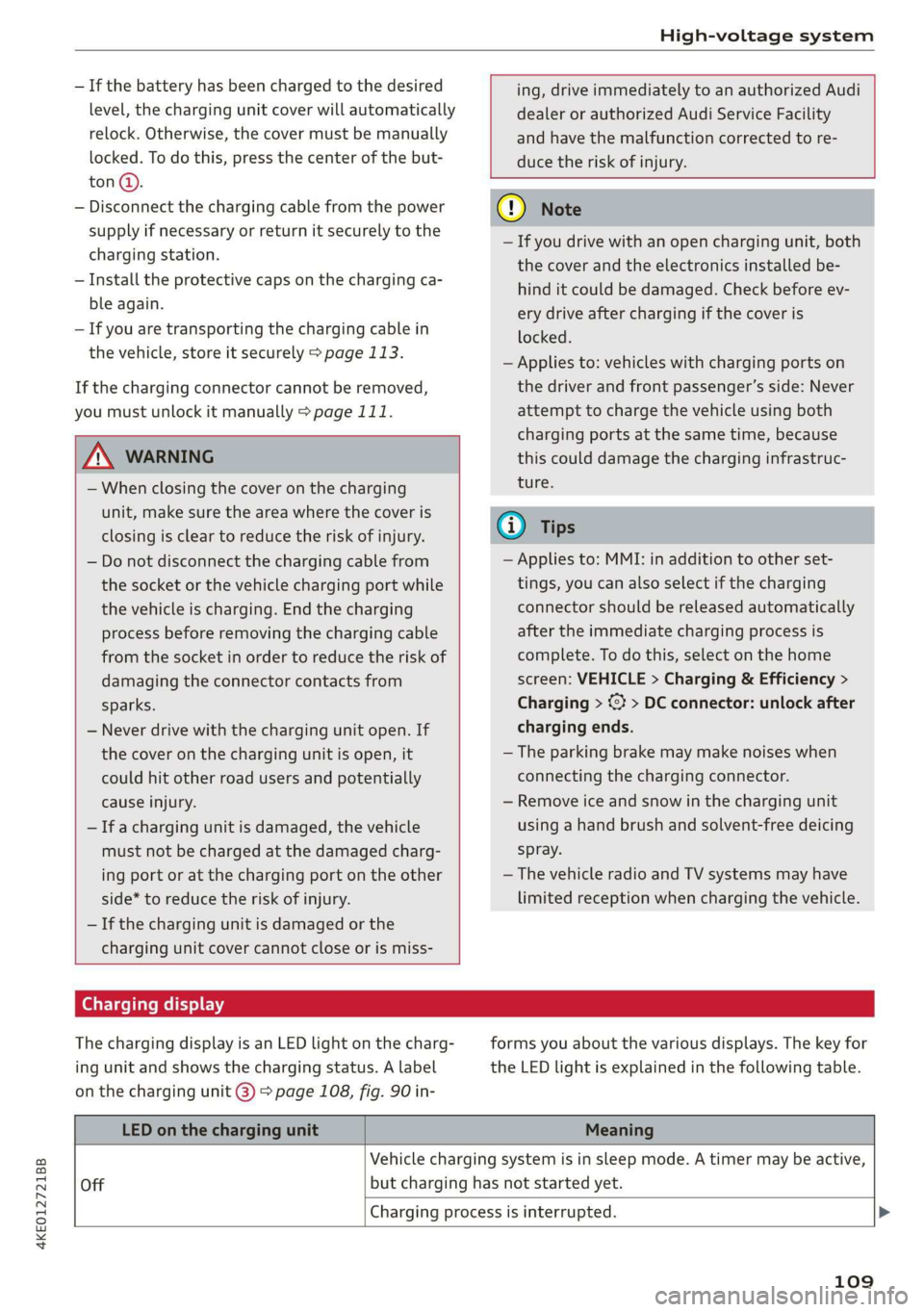
Charging display
The charging display is an LED light on the charg-
ing unit and shows the charging status. A label
on the charging unit @) > page 108, fig. 90 in-
forms you about the various displays. The key for
the LED light is explained in the following table.
LED on the charging unit Meaning
Vehicle charging system is in sleep mode. A timer may be active,
Off but charging has not started yet.
Charging process is interrupted. >
109
Page 112 of 310

High-voltage system
LED on the charging unit Meaning
White Pulsing
Connection between the power source and the vehicle is being
established.
Green
Pulsing The high-voltage battery is charging.
Flashing A timer is active, but charging has not started yet.
On High-voltage battery charging process is completed.
Yellow
On
No power supply was recognized even though the charging cable
is plugged in. Have the power supply or power supply system in-
spected. When using the Audi charging system, check the status
displays on the unit > table on page 115. See an authorized Au-
di dealer or authorized Audi Service Facility for assistance if nec-
essary.
Flashing
The vehicle is not secured from rolling away. Check if “P” is en-
gaged and the parking brake is set. If the LED continues to
flash, see an authorized Audi dealer or authorized Audi Service
Facility for assistance.
Red
On
The charging connector may not be able to lock correctly in the
vehicle charging port. Check if the charging connector is insert-
ed correctly. Remove the charging connector and plug it in the
charging port again, or use a different charging station. If the
LED stays turned on, there is a malfunction either in the vehicle
charging system or at the power source. See an authorized Audi
dealer or authorized Audi Service Facility for assistance if neces-
sary.
Both charging unit covers are open. Try to close one of the cov-
ers by hand. If the LED stays turned on, the high-voltage battery
may not be charging. See an authorized Audi dealer or author-
ized Audi Service Facility for assistance.
The outside temperature is too low or too high.
@ Tips
The operation status indicated by the LED on
> Applies to: MMI: Select on the home screen:
VEHICLE > Charging & Efficiency > Charging.
>» When the timer is displayed, swipe your finger
the charging unit are is displayed in the in-
strument cluster gy.
Setting the charging target
You can set the charging target, meaning you can
set the maximum charge level to which the high-
voltage battery should be charged. The charging
target can be set between 50% and 100%. For
daily usage, Audi recommends setting the charg-
ing target at 80%. This can extend the service life
of the high-voltage battery. Before long trips, Au-
di recommends setting the charging target at
100% for the highest possible range.
110
on the display toward the right.
> Press on the right section of the battery charge
level display.
> Set the desired charging target.
G) Tips
If you set the charging target lower than the
current battery charge level while charging,
then the charging process will be canceled. If
you set the charging target above the current
battery charge level again, then the charging
process will resume. This does not apply if you
are charging at a charging station, where you
have authenticated yourself manually. If this >
Page 113 of 310

4KE012721BB
High-voltage system
is the case, authenticate yourself again at the
charging station.
Sytem nas
By setting a timer, you determine when your vehi-
cle should reach the desired charging target.
When the timer is activated, it will be run regu-
larly at the set time. In addition to the charging
target, you can also specify if your vehicle should
be heated or cooled to the temperature set in the
climate control system. You can turn on multiple
timers at the same time. The active timer is indi-
cated by the respective number in © in the upper
section of the display.
> Applies to: MMI: Select on the home screen:
VEHICLE > Charging & Efficiency > Charging.
> When the charging target is displayed, swipe
your finger on the display toward the left.
Multiple timers are displayed that you can set
separately.
> To set a timer, select > in the line for the de-
sired timer.
> Select one ore more days of the week and select
Next.
> Set the desired departure time and select OK.
> To also activate the climate control with a tim-
er, select F.
> To turn ona timer, select CD.
> To activate the timer that is turned on, select
©. A colored bar will turn on in the button.
If the set departure time for the timer is too
soon, the desired charging target may not be
reached.
G) Tips
It is not possible to charge using the timer at
some charging stations.
Advanced charging settings
With the advanced charging settings, you can de-
fine
addresses at which certain charging settings
should apply (for example, charging target, mini-
mum charge). If your vehicle is in the vicinity of
the address, the charging settings will be auto-
matically applied.
> Applies to: MMI: Select on the home screen:
VEHICLE > Charging & Efficiency > Charging >
<2} > Advanced charging settings.
> To define new settings for a certain address, se-
lect +. Follow the instructions in the display.
> To edit existing settings for a certain address,
press the respective button.
> To delete existing settings for a certain ad-
dress, select Z.
Emergency release
You can release the charging unit cover or the
charging connector manually.
Fig. 91 Motor compartment: emergency release
Charging unit cover emergency release
> Open the hood > page 236.
> Open the cover in the motor compartment on
the side of the applicable charging port.
> Loosen the red loop (@ from the retainer and
then pull on the loop carefully >@.
> If necessary, open the charging unit cover by
hand.
Manually releasing the charging connector
If you are not able to pull the charging connector
out of the vehicle charging port, there may bea
malfunction. You must use the emergency re-
lease to release the vehicle charging connector.
Requirement: the “P” gear must be selected, the
vehicle must be unlocked, and the charging proc-
ess must be complete or must have been can-
celed.
> End the charging process > page 108, Cancel-
ing or completing charging.
> Open the hood & page 236.
111