2019 AUDI E-TRON Mmi
[x] Cancel search: MmiPage 31 of 310

4KE012721BB
Opening and closing
Opening and closing
Central locking
(ee emul ela)
Z\ WARNING
— If you leave the vehicle, switch the ignition
off and take the key with you. This applies
particularly when children remain in the ve-
hicle. Otherwise, children could start the ve-
hicle or operate electrical equipment (such
as power windows), which increases the risk
of an accident.
— Applies to: vehicles with anti-theft alarm
system: When the vehicle is locked from the
outside, no one - especially children - should
remain in the vehicle, because the windows
can no longer be opened from the inside
= page 32, Anti-theft alarm system.
Locked doors make it more difficult for
emergency workers to enter the vehicle,
which puts lives at risk.
All doors and the luggage compartment lid can
be centrally unlocked and locked at once. You can
select in the MMI if the entire vehicle or only the
driver's door should unlock when unlocking the
vehicle > page 30. The turn signals flash twice
when you unlock the vehicle and flash once when
you lock the vehicle. If they do not flash when
locking, then one of the doors, the luggage com-
partment lid, or the hood is not closed complete-
ly.
Depending on the vehicle equipment, you may
have different options for centrally unlocking and
locking your vehicle.
— Vehicle key > page 34
— Sensors in the door handles > page 34
— Lock cylinder on the driver's door > page 32
— Central locking switch inside > page 31
Key / vehicle key
The term “vehicle key” refers to the remote con-
trol key or convenience key*. The convenience
key* is a remote control key with special func-
tions > page 34 and > page 86.
Power closing*
When closing a door or the luggage compart-
ment lid, you only have to Let it fall lightly into
the latch. It then closes automatically > A.
Automatic locking
If you unlock the vehicle but then do not open
any of the doors, the luggage compartment, or
the hood within a short period time, the vehicle
locks again automatically. This feature prevents
the vehicle from being accidentally left unlocked
for along period of time.
Automatic locking (Auto Lock)
The Auto Lock function locks all doors and the
luggage compartment lid once the speed has ex-
ceeded approximately 9 mph (15 km/h).
The vehicle will unlock again if the unlock func-
tion in the central locking switch is pressed, one
of the door handles is pulled, the “P” gear is en-
gaged, or the ignition is switched off.
In the event of a crash with airbag deployment,
the doors will also automatically unlock to allow
access to the vehicle.
Unintentionally locking yourself out
Only lock your vehicle when all of the doors and
the luggage compartment lid are closed and
there is no key in the vehicle. This reduces the
risk of locking yourself out accidentally.
The following features help to reduce the risk of
locking your vehicle key in the vehicle:
— If the driver's door is open, the vehicle cannot
be locked by pressing the f& button on the re-
mote control key or by touching the locking
sensor* on a door.
— If the most recently used convenience key* is
inside the luggage compartment, the luggage
compartment lid will automatically open again
after closing it >@.
— If the convenience key* that was last used is de-
tected inside the vehicle, then the vehicle can-
not be locked from the outside > ©.
29
>
Page 32 of 310

Opening and closing
ZA WARNING
Follow the safety precautions > page 29.
Z\ WARNING
Applies to: vehicles with power closing
—To reduce the risk of injury, make sure that
the area where the door is closing is clear
during the closing process.
— The closing process can be stopped at any
time by pulling on the outer or inner door
handle.
@) Note
Applies to: vehicles with convenience key
— If the convenience key that was last used is
detected inside the passenger compart-
ment, then the vehicle cannot be locked
from the outside using the sensor. Take the
convenience key with you and lock the vehi-
cle again. Otherwise, the vehicle will not be
protected against unauthorized access.
— If you lock the vehicle using the button on
the vehicle key with the front passenger's
or rear door open while accidentally placing
the key in the passenger compartment and
closing the door, the vehicle will not lock.
The turn signals will flash several times to
indicate this. If you do not open the vehicle
within a short time to remove the vehicle
key, then the vehicle will lock automatically.
This prevents the vehicle from being left un-
locked for long periods of time. The key will
then be locked inside the vehicle.
— If the convenience key* that was used last is
detected inside the luggage compartment,
it will not be possible to lock the luggage
compartment and the luggage compart-
ment lid will open. The turn signals will
flash several times to indicate this. The
doors will lock. Always take the convenience
key with you, or unauthorized people may
be able to enter the vehicle.
@ Tips
— Do not leave valuables unattended in the ve-
hicle. A locked vehicle is not a safe!
30
— The LED in the driver's door rail blinks when
you lock the vehicle. If the LED lights up for
approximately 30 seconds after locking,
there is a malfunction in the central locking
system. Have the problem corrected by an
authorized Audi dealer or authorized Audi
Service Facility.
Setting the central locking system
You can adjust the central locking system to your
preferences. The settings depend on the vehicle
equipment.
> Applies to: MMI: Select on the home screen:
VEHICLE > Settings & Service > Central lock-
ing.
Door unlocking
—If you select All, all doors and the luggage
compartment lid will be unlocked when unlock-
ing.
— If you select Driver's door, only the driver's
door will be unlocked. To unlock all doors and
the luggage compartment lid, press the &@ but-
ton on the vehicle key twice. In vehicles with a
convenience key”, only the driver's door will un-
lock when you pull the driver's door handle. If
you pull another door handle, the entire vehicle
will be unlocked.
The entire vehicle will always be locked when you
press the & button.
Long press to open windows
You can select if all windows and the panoramic
glass roof* should open using the vehicle key
=> page 40, Convenience opening and closing. If
you press and hold the fj button on the vehicle
key, all of the windows and the panoramic glass
roof* will close.
Disable rear lid handle
You can select if the luggage compartment lid
can open with the handle. If you activate this
function, the luggage compartment lid can only
be opened with the <¥ or 4s button on the vehi-
cle key or in the driver's door. In vehicles with a
convenience key*, you can still open the luggage
compartment lid using the handle if an
Page 36 of 310

Opening and closing
near the vehicle working in the same fre-
quency range (such as a mobile device or ra-
dio equipment). Always check if your vehicle
is locked.
— Applies to: MMI: You can view the number
of keys programmed to the vehicle by se-
lecting on the home screen: VEHICLE > Set-
tings & Service > Vehicle information.
— For an explanation on conformity with the
FCC regulations in the United States and the
Industry Canada regulations, see
=> page 289.
Vehicle key
RAZ-0025)
my
Fig. 26 Door handle: sensor for locking
You can unlock and lock your vehicle using either
the buttons on the vehicle key or the sensors* in
the door handles, or you can unlock your vehicle
using the sensors in the luggage compartment
lid handle. The settings in the MMI specify which
doors will unlock > page 30.
The symbol for the luggage compartment lid may
differ depending on the vehicle key. The <¥ or 4S
symbol may be on the button.
Unlocking or locking using the vehicle key
buttons
> To unlock the vehicle, press the f button
=> page 33, fig. 25.
> To lock the vehicle, press the f9 button once.
> To open the luggage compartment lid, press
and hold the < button for at least one second
or press the 4S button twice > A\ in General
)) The closing function applies to vehicles that also have au-
tomatic luggage compartment lid operation.
34
information on page 35 and >@) in General
information on page 36.
> To close or lock the luggage compartment
lid ), press and hold the <3/ As button for at
least one second when the ignition is switched
off > A\ in General information on page 35.
Unlocking or locking using the sensors
Applies
to: vehicles with convenience key
> To unlock a door or the luggage compartment
lid, grasp the door handle or luggage compart-
ment lid handle.
> To lock the vehicle, close the doors and touch
the outer sensor on the door handle once
=> fig. 26. Do not grasp the door handle while
locking the vehicle, or else the vehicle will not
lock. The door cannot be opened for a brief pe-
riod directly after locking it. This way you have
the opportunity to check if the doors locked
correctly.
ZA\ WARNING
Follow the safety precautions > page 29.
@) Tips
— Only use the vehicle key when you can see
the
vehicle.
— The vehicle can only be locked when the "P”
selector lever position is engaged.
G@) Tips
Applies to: vehicles with convenience key
—When unlocking or locking the vehicle, the
convenience key cannot be more than ap-
proximately 4 feet (1.5 m) away from the
door handle or luggage compartment.
— Unlocking with the convenience key (keyless
access) can be deactivated in the MMI sys-
tem > page 30.
—To prevent the vehicle battery from dis-
charging, the energy management gradual-
ly switches off convenience functions that
are not needed. You then may no longer be
able to unlock your vehicle with the sensors.
Page 38 of 310

Opening and closing
— Applies to: vehicles with power-operated or
sensor-controlled luggage compartment lid:
Pay careful attention when closing the lug-
gage compartment lid. Otherwise, you could
cause serious injury to yourself or others de-
spite the pinch protection.
© Note
The luggage compartment lid can bump into
objects such as the garage ceiling when open-
ing and become damaged.
@ Tips
— When the vehicle is locked, the luggage
compartment lid can be unlocked separately
by pressing the << or 4s button on the ve-
hicle key. The luggage compartment lid
locks automatically when it is closed again.
— The ability to open the luggage compart-
ment lid using the handle can be deactivat-
ed or activated in the MMI > page 30.
Opening and closing the luggage
compartment lid
Fig. 28 Driver's door: opening the luggage compartment.
lid
Opening the luggage compartment lid
> When the ignition is switched off, press and
hold the < button on the vehicle key for at
least one second or press the 4s button twice.
Or
> Engage the “P” selector lever position and pull
the < button in the driver's door. Or
> Applies to: vehicles without convenience key:
Unlock the vehicle using the @ / <3 / As button
on the vehicle key and press the handle in the
luggage compartment lid. Or
36
> Applies to: vehicles with convenience key: Press
the handle in the luggage compartment lid.
The vehicle key cannot be more than approxi-
mately 4 feet (1.5 m) away from the luggage
compartment.
Closing the luggage compartment lid
> Applies to: vehicles without automatic luggage
compartment lid: Use the inside grip to pull the
luggage compartment lid down and allow it to
drop gently to close it. Or
> Applies to: vehicles with automatic luggage
compartment lid: Note > page 36.
> See > page 36, Automatic luggage compart-
ment lid.
Z\ WARNING
Follow the safety precautions > page 35.
Automatic luggage compartment lid
Applies to: vehicles with automatic luggage compartment lid
Fig. 29 Luggage compartment lid: @ closing button*, 2)
lock button* (vehicles with convenience key*)
Opening the luggage compartment lid
> When the ignition is switched off, press and
hold the <3 button > page 33, fig. 25 on the
vehicle key for at least one second or press the
3 button twice. Or
> Engage the "P" selector lever position and pull
the <3 button* in the driver's door. Or
> Applies to: vehicles with convenience key: Press
the handle in the luggage compartment lid.
The vehicle key cannot be more than approxi-
mately 4 feet (1.5 m) away from the luggage
compartment.
Page 41 of 310
4KE012721BB
Opening and closing
Child safety lock
The child safety lock prevents the rear doors
from being opened from the inside and the rear
power windows from being operated.
ry a 3 2
<=
og a
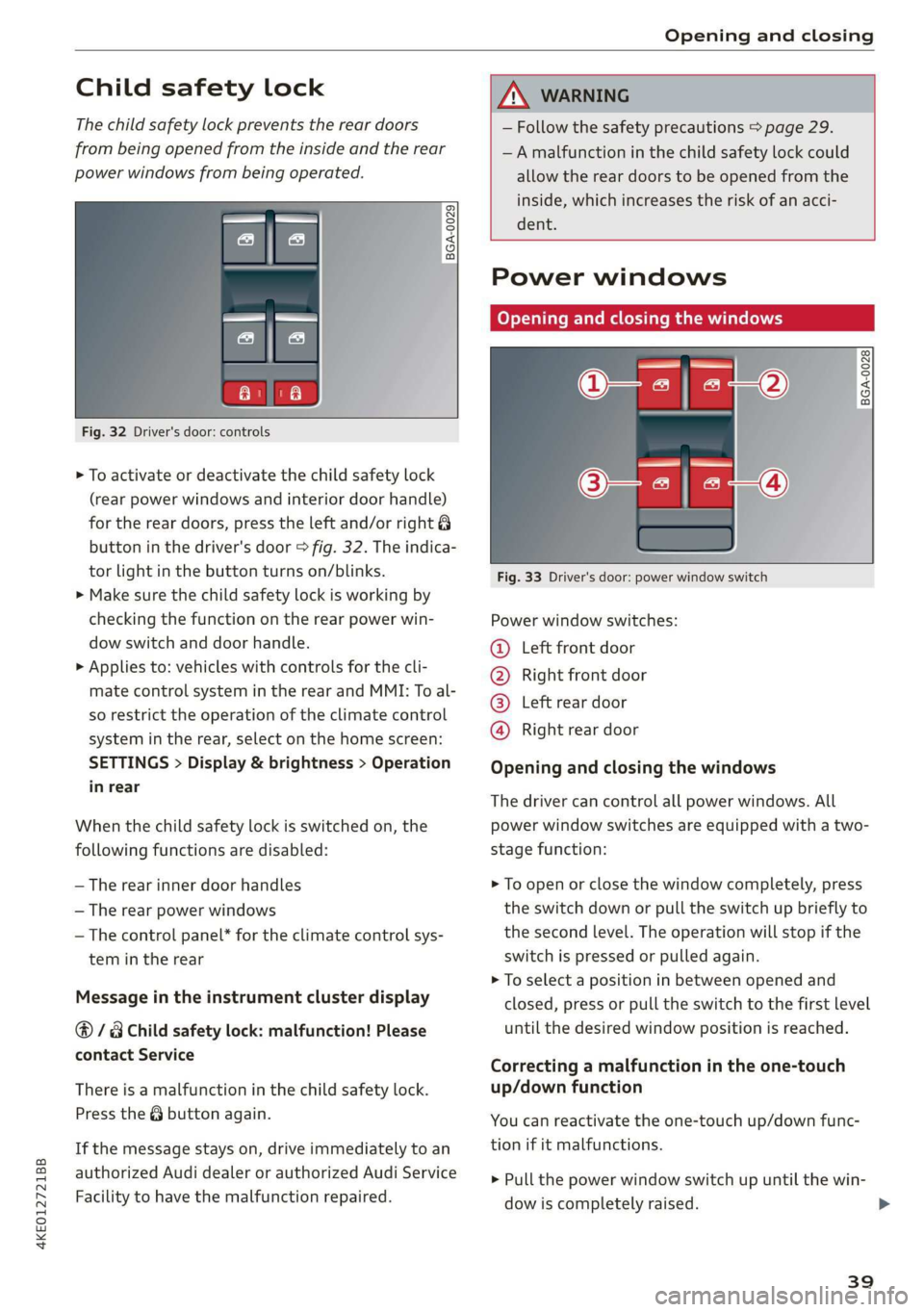
Fig. 32 Driver's door: controls
> To activate or deactivate the child safety lock
(rear power windows and interior door handle)
for the rear doors, press the left and/or right 8
button in the driver's door > fig. 32. The indica-
tor light in the button turns on/blinks.
> Make sure the child safety lock is working by
checking the function on the rear power win-
dow switch and door handle.
> Applies to: vehicles with controls for the cli-
mate control system in the rear and MMI: To al-
so restrict the operation of the climate control
system in the rear, select on the home screen:
SETTINGS > Display & brightness > Operation
in rear
When the child safety lock is switched on, the
following functions are disabled:
— The rear inner door handles
— The rear power windows
— The control panel* for the climate control sys-
tem in the rear
Message in the instrument cluster display
@/ Child safety lock: malfunction! Please
contact Service
There is a malfunction in the child safety lock.
Press the @ button again.
If the message stays on, drive immediately to an
authorized Audi dealer or authorized Audi Service
Facility to have the malfunction repaired.
— Follow the safety precautions > page 29.
—A malfunction in the child safety lock could
allow the rear doors to be opened from the
inside, which increases the risk of an acci-
dent.
Power windows
Opening and closing the windows
___BGA-0028
Fig. 33 Driver's door: power window switch
Power window switches:
@ Left front door
® Right front door
@® Left rear door
@ Right rear door
Opening and closing the windows
The driver can control all power windows. All
power window switches are equipped with a two-
stage function:
> To open or close the window completely, press
the switch down or pull the switch up briefly to
the second level. The operation will stop if the
switch is pressed or pulled again.
> To select a position in between opened and
closed, press or pull the switch to the first level
until the desired window position is reached.
Correcting a malfunction in the one-touch
up/down function
You can reactivate the one-touch up/down func-
tion if it malfunctions.
> Pull the power window switch up until the win-
dow is completely raised.
39
>
Page 42 of 310

Opening and closing
> Release the switch and pull it up again for at
least one second.
Z\ WARNING
— Follow the safety precautions > page 29.
— Never close the windows carelessly or in an
uncontrolled manner, because this increases
the risk of injury.
@) Tips
You can still open and close the windows for
several minutes after turning the ignition off.
The power window switch is not disabled until
the driver's door or front passenger's door is
opened.
Convenience opening and closing
Applies to: vehicles with convenience key
Convenience opening or closing the windows
or panoramic glass roof*
You can set in the MMI if all windows or the roof*
should open or close all at once > page 30, Set-
ting the central locking system.
> Press and hold the f or fj button on the vehicle
key until all windows and the roof* have
reached the desired position > /\.
> Applies to: vehicles with convenience key:
Touch the sensor* on one of the door handles
and continue touching it until all of the win-
dows and the roof* are closed. Do not place
your hand in the door handle when doing this.
When all of the windows and the roof* are
closed, the turn signals will flash once.
Z\ WARNING
— Never close the windows or panoramic glass
roof* carelessly or in an uncontrolled man-
ner, because this increases the risk of injury.
— For security reasons, the windows and the
Panoramic glass roof* can only be opened
and closed with the vehicle key at a maxi-
mum distance of approximately 6.5 feet
(2 m) from the vehicle. Always pay attention
when using the ff button to close the win-
dows and the panoramic glass roof* so that
40
no one is pinched. The closing process will
stop immediately when the ff button is re-
leased.
Panoramic glass roof
Operating the panoramic glass roof and
roof sunshade
Applies to: vehicles with panoramic glass roof and roof sun-
shade
Fig. 34 Headliner: panoramic glass roof and sunshade*
buttons
The control buttons are equipped with a two-
stage function.
When tilting or opening the roof, the roof sun-
shade will open partially or completely if the sun-
shade is closed.
Operating the roof sunshade
> Opening and closing the sunshade: push the
switch in the headliner (3) forward or toward
the rear to the second level.
> Partially opening the sunshade: press the -&&
switch to the first level until the sunshade
reaches the desired position.
Operating the roof
> Tilting the roof: press the <> switch in the
headliner briefly upward to the second level ().
> Closing the tilted roof: pull the <> switch
downward briefly to the second level.
> Opening the roof: slide the <> switch back
briefly twice in a row to the second level (2).
> Closing the roof: push the <> switch forward
briefly to the second level.
> Opening or closing partially: slide the <> switch
to the first level and hold it there until the roof
reaches the desired position.
Page 43 of 310

4KE012721BB
Opening and closing
Quick opening
You can also open the roof and roof sunshade in
one movement.
> Push the <> switch back briefly to the second
level @).
Roof emergency closing
If an object is detected when closing, the roof
will open again automatically. In this case, you
can
then close it with the power emergency clos-
ing function.
> Within five seconds after the sunroof opens au-
tomatically, pull the applicable button until the
roof is closed.
ZA WARNING
To reduce the risk of injury, always pay atten-
tion when closing the roof. Always switch the
ignition off and take the key with you when
leaving the vehicle.
() Note
Always close the roof when you leave the vehi-
cle and when there is precipitation to reduce
the risk of damage to the interior equipment,
particularly the electronic equipment.
@) Tips
— After switching off the ignition, the roof and
sunshades can still be operated for several
minutes as long as neither of the front
doors are opened.
— It is not possible to open the roof when
temperatures are too low.
D_ The possible number of hand-held transmitters depends
on the equipment.
Garage door opener
Applies to: vehicles with garage door opener
io) + 3 g
¢
o a
ent systems
With the garage door opener, you can activate
systems such as the garage doors, security sys-
tems or house lights from inside your vehicle.
These functions are operated in the MMI. Multi-
ple receivers can be programmed, which can con-
trol the functions of up to eight!) hand-held
transmitters.
ZA WARNING
— When operating or programming the garage
door opener, make sure that no people or
objects are in the area immediately sur-
rounding the equipment. People can be in-
jured or property can be damaged if struck
when closing.
— Do not allow yourself to be distracted from
traffic by the viewing and operating the dis-
plays.
G Tips
— If you sell your vehicle, remove the key user
= page 28 and reset all settings to the fac-
tory settings > page 232.
— For an explanation on conformity with the
FCC regulations in the United States and the
Industry Canada regulations, see
=> page 289.
41
Page 44 of 310

Opening and closing
@ Tips
Before you program your system to the ga-
rage door opener, first check the compatibili-
ty:
— Ask an authorized Audi dealer or authorized
Audi Service Facility or check at www.
homelink.com. You can also find more infor-
mation about HomeLink there.
— You can display information about Home-
Link (compatibility level/status/country
code/HomeLink generation) in the MMI:
— Select on the home screen: VEHICLE > Set-
tings & Service > Garage door opener > @.
Applies to: vehicles with garage door opener
Requirements: the remote control transmitter
must be programmed > page 42, the vehicle
must be within range of the system, and the igni-
tion must be switched on.
There are multiple options to open or close the
system (such as the garage door).
> If you have only programmed one remote con-
trol transmitter, press the 2 button on the
lower display. Or
> If you have programmed multiple remote con-
trol transmitters, press the r button on the
lower display and then press the respective sys-
tem button. Or
> If you have configured the programmable
steering wheel button*, press the button
=> page 26 and then press the respective button
for the system. Or
> Applies to: vehicles with GPS pairing: If you
have programmed GPS pairing, press on the re-
spective button in the upper display (notifica-
tion center > page 19). As you approach the
system, the button is displayed on the MMI.
If transmission was successful, the message:
Send to: XXX will appear.
Only applies to rolling code systems
42
Applies to: vehicles with garage door opener
You can program both fixed code and rolling code
systems in the MMI using the procedure that is
described.
Requirement: the ignition must be switched on.
Programming the system
Applies to: MMI
Requirement: the hand transmitter must be
present and the vehicle must be within range of
the system (such as the garage door) that you
would like to program.
> If you are programming the garage door opener
for the first time, press the rd button on the
lower display. Follow the instructions in the
MMI. Or
> If you would like to program other systems, se-
lect on the home screen: VEHICLE > Settings &
Service > Garage door opener. Select the de-
sired button: G@). Follow the instructions in the
MMI.
> If you would like to reprogram systems that are
already programmed, select on the home
screen: VEHICLE > Settings & Service > Garage
door opener. Press the 4 button and select 7
for the system to be reprogrammed. Select:
Program. Follow the instructions in the MMI.
With some systems, the garage door opener will
be immediately available after programming.
With other systems, the garage door opener
must also be synchronized.
Synchronizing”
Requirement: the hand transmitter must already
be programmed and the vehicle must be within
range of the system (such as the garage door).
If the system synchronization is performed di-
rectly after the programming procedure, follow
the instructions on the MMI.
If you would like to sync at a later time: