2019 Alfa Romeo Stelvio brakes
[x] Cancel search: brakesPage 3 of 244

Dear Customer,
We would like to congratulate and thank you for choosing an Alfa Romeo.
We have written this handbook to help you get to know all the features of your vehicle and use it in the best possible way. This vehicle
is intended for daily use as well as for specific uses. Please take your time to familiarise with all the dynamic features of your car.
Here you will find information, advice and important warnings regarding use of your vehicle and how to achieve the best performance
from the technical features of your Alfa Romeo.
You are advised to read it right through before taking to the road for the first time, to become familiar with the controls and above all
with those concerning brakes, steering and gearbox; at the same time, you can understand the vehicle behaviour on different road
surfaces.
This document also provides a description of special features and tips, as well as essential information for the safe driving, care and
maintenance of your Alfa Romeo over time.
After reading it, you are advised to keep the handbook inside the vehicle, for an easy reference and for making sure it remains on
board the vehicle should it be sold.
In the attached Warranty Booklet you will also find the description of the Services that Alfa Romeo offers to its customers, the
Warranty Certificate and the detail of the terms and conditions for maintaining its validity.
We are sure that these will help you to get in touch with and appreciate your new car and the service provided by the people at Alfa
Romeo.
Enjoy reading. Happy motoring!
IMPORTANT
This Owner Handbook describes all vehicle versions. Optional contents, equipment meant for specific Markets or particular
versions are not identified as such in the text: you need to consider only the information related to the version you own. Any
content introduced throughout the production of the model, outside the specific request of options at the time of purchase, will
be identified with the wording(where provided).
All data contained in this publication are intended to help you use your vehicle in the best possible way. Alfa Romeo S.p.A. aims
at a constant improvement of the vehicles produced. For this reason it reserves the right to make changes to the model
described for technical and/or commercial reasons.
For further information, contact an Alfa Romeo Dealership.
Page 74 of 244

ACTIVE SAFETYSYSTEMS
The vehicle may be equipped with the
following active safety devices:
ABS (Anti-Lock Brakes);
DTC (Drive Train Control);
ESC (Electronic Stability Control);
TC (Traction Control);
PBA (Panic Brake Assist);
HSA (Hill Start Assist);
AST (Alfa™ Steering Torque);
HDC (Hill Discent Control)
For the operation of the systems, see the
following pages.
ABS (Anti-lock Braking System)
This system, which is an integral part of
the braking system, prevents one or more
wheels from locking and slipping in all
road surface conditions, irrespective of
the intensity of the braking action,
ensuring that the vehicle can be
controlled even during emergency
braking and optimising stopping
distances.
The system intervenes during braking
when the wheels are about to lock,
typically in emergency braking or
low-grip conditions, when locking may be
more frequent.
The system also improves control and
stability of the vehicle when braking on a
surface where the grip of the left and
right wheels varies, or on corners.The Electronic Braking Force Distribution
(EBD) system completes the system
allowing the brake force to be distributed
between the front and rear wheels.
System intervention
The ABS equipped on this vehicle is
provided with the "Brake by wire"
(Integrated Brake System - IBS) function.
With this system, the brake pedal
command given by pressing the brake
pedal is not transmitted hydraulically but
electronically, therefore, the light
pulsation that could be felt on the pedal
with the traditional system is no longer
perceptible.29) 30) 31) 32) 33) 34)
DTC (Drive Train Control)SYSTEM(where provided)
Some versions of this vehicle are
equipped with a four-wheel drive system
(AWD), activated on request, which offers
an optimal drive for countless driving
conditions and road surfaces. The system
reduces the slipping of the tyres to a
minimum, automatically redistributing
the torque to the front and rear wheels,
as needed.
To maximize fuel savings, the car with
AWD automatically passes to rear-wheel
drive (RWD) when the road and
environmental conditions are such that
they would not cause the tyres to slip.When the road and environmental
conditions require better traction, the
vehicle automatically goes to AWD mode.
35)
IMPORTANT If the system failure symbol
switches on, after starting the engine or
while driving, it means that the AWD
system is not working properly. If the
warning message activates frequently, it
is recommended to carry out the
maintenance operations.
36)
ESC (Electronic Stability Control)
SYSTEM
The ESC system improves the directional
control and stability of the car in various
driving conditions.
The ESC system corrects the car’s
understeer and oversteer, distributing
the brake force on the appropriate
wheels. The torque supplied by the
engine can also be reduced in order to
maintain control of the vehicle.
The ESC system uses sensors installed
on the car to determine the trajectory
that the driver intends to follow and
compares it with the car’s effective
trajectory. When the real trajectory
deviates from the desired trajectory, the
ESC system intervenes to counter the
vehicle’s understeer or oversteer.
Oversteer: occurs when the car is
72
SAFETY
Page 76 of 244

AST (Alfa™ Steering Torque)SYSTEM
52)
The AST function integrates the ESC
system with the electric power steering
to increase the safety level of the whole
vehicle.
In critical situations (braking on surfaces
with different grip conditions), through
the AST function, the ESC system
controls the steering to implement an
additional torque contribution on the
steering wheel, to suggest the most
correct manoeuvre to the driver.
The coordinated action of the brakes and
steering increases the sensation of
safety and control of the vehicle.
HDC (Hill Descent Control)SYSTEM(where provided)
On vehicles equipped in this way, this
function is an integral part of the ESC
system and is aimed at keeping the
vehicle at a constant speed during a
descent, operating autonomously and in
different ways on the brakes.
In this way the vehicle stability and
completely safe driving are guaranteed,
above all in poor grip conditions and
steep descents.The system has three different modes:
Off: the system is deactivated;
Enabled: the system is enabled and
ready to intervene when the activation
conditions are met;
Active: the system actively controls
the car speed.
Enabling the system
To enable the system, press the button
fig. 57.
The system is enabled if the car speed is
below 20 mph (30 km/h). The system
stays enabled until the car speed reaches
37 mph (60 km/h): the system is disabled
at faster speed.
System activation is indicated by the
white
icon on the display
fig. 58 turning on fixed.System activation
Once enabled, the HDC system will
activate automatically if the car is driven
downhill on a steep slope, higher than
8%.
The speed set for the HDC system can be
adjusted using the SET switch fig. 59 (in
the range from 1.25 mph - 15.5 mph to
6 km/h - 20 mph). Once the desired speed
has been reached, release the SET switch
and the HDC system will maintain the set
speed.
It is also possible to reduce the set speed
with the brake pedal. The system will
acquire the current speed when the pedal
is released as the reference.
5706006V0001EM
5806006V0002EM
74
SAFETY
Page 81 of 244

No acoustic/visual signal is generated at
speeds slower than 30 km/h.
Acoustic/visual signal is generated at
speeds faster than 30 km/h, instead.
The system may lightly brake to warn the
driver if a possible frontal accident is
detected (limited braking). Signals and
limited braking are intended to allow the
driver to react promptly, in order to
prevent or reduce the effects of a
potential accident.
In situations with the risk of collision, if
the system detects no intervention by
the driver, it provides automatic braking
to help slow the car and mitigate the
potential frontal accident (automatic
braking). If intervention by the driver on
the brake pedal is detected but not
deemed sufficient, the system may
intervene in order to improve the
reaction of the braking system, therefore
reducing vehicle speed further
(additional assistance in braking stage).
The system will intervene automatically
in case of imminent collision or impact
against a pedestrian crossing the road
(speed under 31 mph (50 km/h)).
IMPORTANT For safety reasons, when
the car has stopped, the brake callipers
may remain blocked for about 2 seconds.
Make sure you press the brake pedal if
the vehicle moves slightly forwards.
Engagement/disengagement
The Forward Collision Warning system
can be deactivated (and then reactivated)
via the Connect system. To access the
function, on the main menu select the
following items in sequence: "Settings",
"Safety", "Forward Collision Warning" and
"Status".
The system can be deactivated even with
the ignition device ON.
IMPORTANT The system status can be
changed with vehicle at a standstill only.
Activation/deactivation
The Forward Collision Warning system is
activated whenever the engine is started
regardless of the Connect system
setting.
After deactivation, the system will not
warn the driver about a possible collision
with the vehicle ahead, regardless of the
setting selected with the Connect
system.
IMPORTANT Each time the engine is
started, the system is activated
regardless of where was when it was
previously switched off.
This function is not active at a speed
lower than 4.3 mph (7 km/h) or higher
than 124 mph (200 km/h).
The system is active when:
each time the engine is started;
is active (ON) in the Connect system;
the ignition device is at ON;
- the vehicle speed is between 4.3 and
124 mph (7 and 200 km/h);
the front seat belts are fastened.
Changing the system sensitivity
The sensitivity of the system can be
changed through the Connect system
menu, choosing from one of the following
three options: "Near", "Med" or "Far". See
the description in the Connect system
supplement for how to change the
settings.
The default option is "Med". With this
setting, the system warns the driver of a
possible collision with the vehicle in front
when that vehicle is at a standard
distance, between that of the other two
settings.
With the system sensitivity set to "Far",
the system will warn the driver of a
possible accident with the vehicle in front
when that vehicle is at a greater distance,
thus providing the possibility of acting on
the brakes more lightly and gradually.
This setting provides the drivers with the
maximum possible reaction time to
prevent a potential accident.
With the option set to "Near", the system
will warn the driver of a possible accident
with the vehicle in front when that vehicle
is close. This setting offers the driver a
lower reaction time compared to the
79
Page 82 of 244

"Med" and "Far" settings, in the event of a
potential accident, but permits more
dynamic driving of the car.
The system sensitivity setting is kept in
the memory when the engine is switched
off.
System limited operation warning
If the dedicated message is displayed, a
condition limiting the system operation
may have occurred. The possible reasons
of this limitation are something blocking
the camera view or a fault.
In this condition it will still be possible to
drive the car normally, but automatic
braking will not be available in the event
of an impending collision.
If an obstruction is signalled, clean the
area of the windscreen shown in fig. 63.
When the conditions limiting the system
functions end, this will go back to normal
and complete operation. Should the fault
persist, contact an Alfa Romeo
Dealership.
System failure warning
If the system switches off and a
dedicated message is shown on the
display, it means that there is a fault on
the system.
In this case, it is still possible to drive the
car, but you are advised to contact an
Alfa Romeo Dealership as soon as
possible.Radar warning not available
If conditions are such that the radar
cannot detect obstacles correctly, the
system is deactivated and a dedicated
message appears on the display. This
generally occurs in the event of poor
visibility, such as when it is snowing or
raining heavily.
The system can also be temporarily
dimmed due to obstructions such as mud,
dirt or ice on the bumper. In such cases, a
dedicated message will be shown on the
display and the system will be
deactivated. This message can
sometimes appear in conditions of high
reflectivity (e.g. tunnels with reflective
tiles or ice or snow). When the conditions
limiting the system functions end, this
will go back to normal and complete
operation.
In certain particular cases, this dedicated
message could be displayed when the
radar is not detecting any vehicles or
objects within its view range.
If atmospheric conditions are not the real
reason behind this message, check if the
sensor is dirty. It may be necessary to
clean or remove any obstructions in the
area shown in fig. 62.
If the message appears often, even in the
absence of atmospheric conditions such
as snow, rain, mud or other obstructions,contact an Alfa Romeo Dealership for a
sensor alignment check.
In the absence of visible obstructions,
cleaning the radar surface, by manually
removing the decorative cover trim,
could be required. Have this operation
performed at an Alfa Romeo Dealership.
IMPORTANT It is recommended that you
do not install devices, accessories or
aerodynamic attachments in front of the
sensor or darken it in any way, as this can
compromise the correct functioning of
the system.
Frontal collision alarm with active
braking
(where provided)
If this function is selected, the brakes are
operated to reduce the speed of the car
in the event of potential frontal impact.
This function applies an additional
braking pressure if the braking pressure
applied by the driver does not suffice to
prevent potential frontal impact.
The function is active with speed above
4.3 mph (7 km/h).
Driving in special conditions
In certain driving conditions, such as, for
example:
driving close to a bend;
the vehicle ahead is leaving a
roundabout;
80
SAFETY
Page 124 of 244
There is a risk of inadvertently activating
it and losing control of the vehicle due to
unexpected excessive speed.
Pausing / Deactivating
With the device enabled (speed not set),
press the
button.
With the device activated (speed set),
press the
button to enter the Paused
state. The display shows the white icon
with the speed in brackets. Press the
button again to deactivate the device
completely.
SETTING THE DESIRED SPEED
Speeds from 30 km/h (or 20 mph for
markets with instrument panels set
to mph) to 160 km/h (or 100 mph for
markets with instrument panels set
to mph) can be set.
When the vehicle reaches the desired
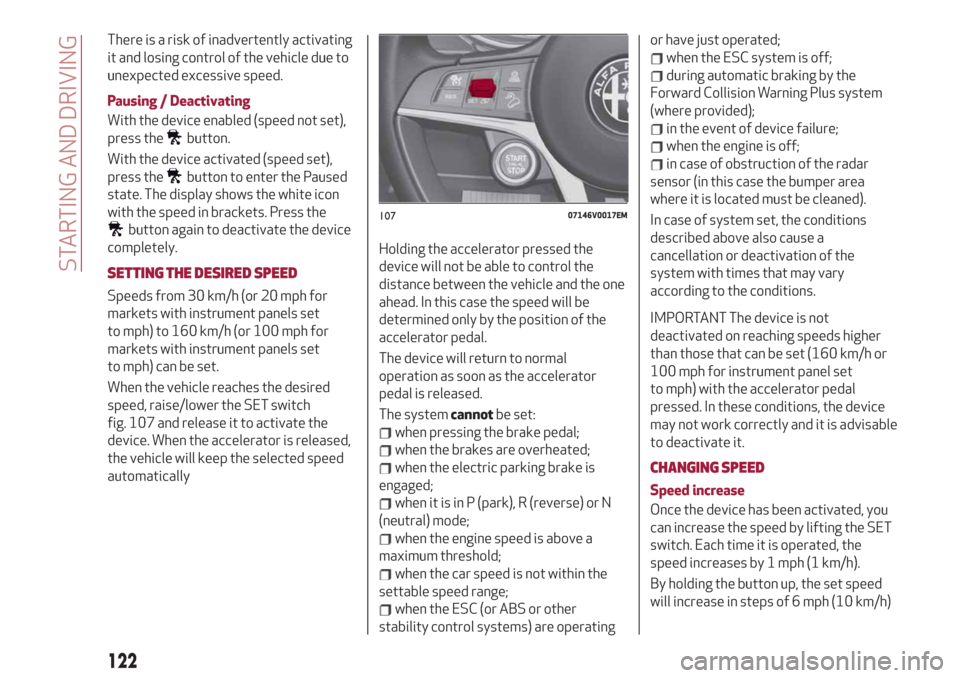
speed, raise/lower the SET switch
fig. 107 and release it to activate the
device. When the accelerator is released,
the vehicle will keep the selected speed
automaticallyHolding the accelerator pressed the
device will not be able to control the
distance between the vehicle and the one
ahead. In this case the speed will be
determined only by the position of the
accelerator pedal.
The device will return to normal
operation as soon as the accelerator
pedal is released.
The systemcannotbe set:
when pressing the brake pedal;
when the brakes are overheated;
when the electric parking brake is
engaged;
when it is in P (park), R (reverse) or N
(neutral) mode;
when the engine speed is above a
maximum threshold;
when the car speed is not within the
settable speed range;
when the ESC (or ABS or other
stability control systems) are operatingor have just operated;
when the ESC system is off;
during automatic braking by the
Forward Collision Warning Plus system
(where provided);
in the event of device failure;
when the engine is off;
in case of obstruction of the radar
sensor (in this case the bumper area
where it is located must be cleaned).
In case of system set, the conditions
described above also cause a
cancellation or deactivation of the
system with times that may vary
according to the conditions.
IMPORTANT The device is not
deactivated on reaching speeds higher
than those that can be set (160 km/h or
100 mph for instrument panel set
to mph) with the accelerator pedal
pressed. In these conditions, the device
may not work correctly and it is advisable
to deactivate it.
CHANGING SPEED
Speed increase
Once the device has been activated, you
can increase the speed by lifting the SET
switch. Each time it is operated, the
speed increases by 1 mph (1 km/h).
By holding the button up, the set speed
will increase in steps of 6 mph (10 km/h)
10707146V0017EM
122
STARTING AND DRIVING
Page 125 of 244

until the button is released, then the new
speed will be stored.
Decreasing speed
Once the device has been activated, you
can decrease the speed by lowering the
SET switch. Each time it is operated, the
speed decreases by 1 mph (1 km/h).
By holding the button down, the set
speed will decrease in steps of 6 mph
(10 km/h) until the button is released,
then the new speed will be stored.
IMPORTANT Moving the SET switch
allows you to adjust the speed according
to the selected unit of measurement
("metric" or "imperial") set on the
Connect system (see dedicated
supplement).
Important notes
By keeping the accelerator pedal
depressed, the car can continue to
accelerate beyond the set speed. In this
case, use the SET switch to set the speed
to the vehicle’s current speed.
When the SET button is pressed to
reduce the speed, the braking system
intervenes automatically if the engine
brake does not slow the car down
sufficiently to reach the set speed. The
device holds the set speed uphill and
downhill; however a slight variation is
entirely normal, particularly on slight
gradients.The automatic transmission could change
to a lower gears when driving downhill or
when accelerating. This is normal and
necessary to maintain the set speed.
The device is switched off while driving if
the brakes overheat.
ACCELERATING WHEN OVERTAKING
When driving with the device active and
following a vehicle, the device provides
additional acceleration to facilitate
overtaking, when travelling over a given
speed and switches on the left direction
indicator (of the right indicator for
right-hand drive versions).
In left-hand traffic, the overtaking assist
function is only active when the left-hand
lane is used for overtaking the vehicle
ahead (the opposite activation logic is
used in right-hand traffic countries).
The device detects the direction of
traffic automatically when the vehicle
passes from left-hand traffic to
right-hand traffic. In this case, the
overtaking assist function is only active
when the reference vehicle is overtaken
on the right. The additional acceleration
is activated when the driver uses the
right direction indicator.
In this condition, the device no longer
provides the overtaking assist function
on the left-hand side until it determinesthat the vehicle has returned to left-hand
traffic conditions.
RECALLING THE SPEED
Once the system has been cancelled but
not deactivated, if a speed was
previously set simply press the RES
button and remove your foot from the
accelerator to recall it.
The system will be set to the last stored
speed.
Before returning to the previously set
speed, bring the speed close to that
value, then press the RES button and
release it.
IMPORTANT The recall function must
only be used if the road and traffic
conditions so allow. Recalling an
excessively high or low speed for the
current traffic and road conditions could
cause an acceleration or a deceleration
10807146V0018EM
123
Page 126 of 244

of the vehicle. Failure to comply with
these precautions may cause serious
accidents and fatal injuries.
SETTING THE DISTANCE BETWEEN
VEHICLES
The distance between your vehicle and
the vehicle ahead may be set to 1 bar
(short), 2 bars (medium), 3 bars (long) or
4 bars (maximum) fig. 109.
The distances from the vehicle ahead are
proportional to speed.
The interval of time with respect to the
vehicle ahead remains constant and
varies from 1 second (for the short
distance 1-bar setting) to 2 seconds (for
the maximum distance 4-bar setting).
The set distance is shown on the display
with a dedicated symbol.
The setting is 4 (maximum) the first time
the device is used. After the distance hasbeen modified by the driver, the new
distance will be stored also after the
system is deactivated and reactivated.
To decrease the distance
Press and release the fig. 110 button to
decrease the distance setting. The
distance setting decreases by one bar
(shorter) every time the button is
pressed.
The set speed is held if there are no
vehicles ahead. Once the shortest
distance has been reached, a further
press of the button will set the longest
distance.
If a vehicle is detected in the same lane at
a lower speed, the symbol on the display
turns from grey to white. The device
automatically adjusts the car’s speed to
maintain the set distance, regardless of
the set speed.
The vehicle holds the set distance until:
the vehicle ahead accelerates to a
speed higher than the set speed;
the vehicle ahead leaves the lane or
the detection field of the Active Cruise
Control sensor;
the distance setting is changed;
Active Cruise Control is
deactivated/paused.
IMPORTANT The maximum breaking
applied by the device is limited. The
driver may apply the brakes in all cases if
needed.
IMPORTANT If the device predicts that
the level of braking is not sufficient to
maintain the set distance, the word
“BRAKE!” or a dedicated message on the
display warns the driver that the vehicle
ahead is too close. An acoustic signal is
also emitted. In this case, it is advisable
to brake immediately as necessary to
hold a safe distance from the vehicle
ahead.
IMPORTANT The driver is responsible for
ensuring that there are no pedestrians,
other vehicles or objectives along the
direction of the vehicle. Failure to comply
with these precautions may cause
serious accidents and injuries.
IMPORTANT The driver is fully
responsible for holding a safe distance
10907146S0019EM11007146V0015EM
124
STARTING AND DRIVING