Page 23 of 649

22
Quick Reference Guide
AcuraWatchTM * (P 445)
AcuraWatch
TM is a driver support system
which employs the use of two distinctly
different kinds of sensors, a radar sensor
located behind the emblem and a front
sensor camera mounted to the interior side
of the windshield, behind the rearview
mirror.
The camera is located
behind the rearview
mirror.
Front Sensor
Camera
Radar Sensor
The radar sensor is
behind the emblem.
Collision Mitigation
Braking System
TM
(CMBS
TM) (P446)
Can assist you when there is a possibility of
your vehicle colliding with a vehicle or a
pedestrian detected in front of yours. The
CMBS
TM is designed to alert you when a
potential collision is determined, as well as
to reduce your vehicle speed to help
minimize collision severity when a collision is
deemed unavoidable.
Adaptive Cruise Control
(ACC) with Low Speed
Follow (LSF)
(P455)
Helps maintain a constant vehicle speed and
a set following-interval behind a vehicle
detected ahead of yours and, if the detected
vehicle comes to a stop, can decelerate and
stop your vehicle, wi thout you having to
keep your foot on the brake or the
accelerator.
Lane Keeping Assist
System (LKAS)
(P471)
Provides steering input to help keep the
vehicle in the middle of a detected lane and
provides audible and visual alerts if the
vehicle is detected drifting out of its lane.
Road Departure
Mitigation (RDM) System
(P479)
Alerts and helps to assist you when the
system detects a possibility of your vehicle
unintentionally crossing over detected lane
markings and/or leaving the roadway
altogether.
19 ACURA RDX-31TJB6000.book 22 ページ 2018年4月26日 木曜日 午後4時51分
Page 46 of 649

45
uuAirbags uTypes of Airbags
Continued
Safe Driving
Types of Airbags
Your vehicle is equipped with four types of airbags:
• Front airbags: Airbags in front of the driver’s and front passenger’s seats.
• Knee airbags: Airbags under the steering column and under the glove box.
• Side airbags: Airbags in the driver’s and front passenger’s seat-backs.
• Side curtain airbags: Airbags above the side windows.
Each is discussed in the following pages.
Front Airbags (SRS)
The front SRS airbags inflate in a moderate-to-severe frontal collision to help protect
the head and chest of the driver and/or front passenger.
SRS (Supplemental Restraint System) indica tes that the airbags are designed to
supplement seat belts, not replace them . Seat belts are the occupant’s primary
restraint system.
The front airbags are housed in the center of the steering wheel for the driver, and
in the dashboard for the front pass enger. Both airbags are marked SRS AIRBAG.
■Housing Locations
1Types of Airbags
The airbags can inflate whenever the power mode is
in ON.
After an airbag inflates in a crash, you may see a
small amount of smoke. This is from the combustion
process of the infl ator material and is not harmful.
People with respiratory pr oblems may experience
some temporary discomfort. If this occurs, get out of
the vehicle as soon as it is safe to do so.
1 Front Airbags (SRS)
During a frontal crash severe enough to cause one or
both front airbags to deploy, the airbags can inflate
at different rates, dependi ng on the severity of the
crash, whether or not the se at belts are latched, and/
or other factors. Frontal airbags are designed to
supplement the seat belts to help reduce the
likelihood of head and chest injuries in frontal
crashes.
19 ACURA RDX-31TJB6000.book 45 ページ 2018年4月26日 木曜日 午後4時51分
Page 91 of 649
90
uuIndicators u
Instrument Panel
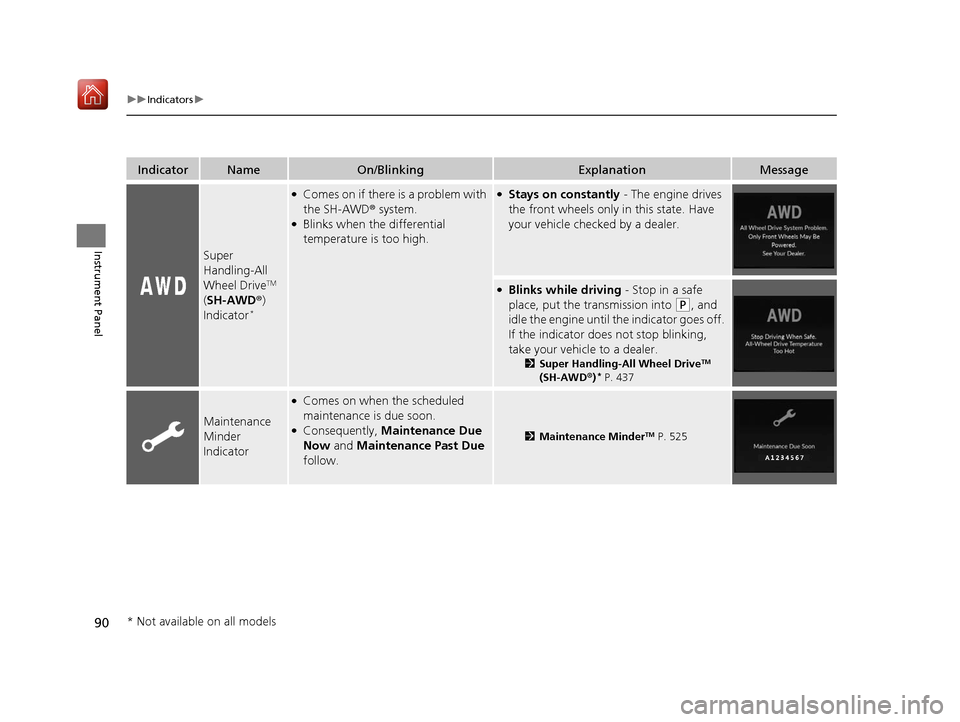
IndicatorNameOn/BlinkingExplanationMessage
Super
Handling-All
Wheel Drive
TM
( SH-AWD ®)
Indicator
*
●Comes on if there is a problem with
the SH-AWD ® system.
●Blinks when the differential
temperature is too high.
●Stays on constantly - The engine drives
the front wheels only in this state. Have
your vehicle checked by a dealer.
●Blinks while driving - Stop in a safe
place, put the transmission into
(P, and
idle the engine until th e indicator goes off.
If the indicator does not stop blinking,
take your vehicle to a dealer.
2 Super Handling-All Wheel DriveTM
(SH-AWD ®)* P. 437
Maintenance
Minder
Indicator
●Comes on when the scheduled
maintenance is due soon.
●Consequently, Maintenance Due
Now and Maintenance Past Due
follow.2 Maintenance MinderTM P. 525
* Not available on all models
19 ACURA RDX-31TJB6000.book 90 ページ 2018年4月26日 木曜日 午後4時51分
Page 110 of 649

109
uuIndicators uMulti-Information Display Warning and Information Messages
Continued
Instrument Panel
MessageConditionExplanation
• Appears when you turn the Auto Idle Stop system
on.
2 Auto Idle Stop P. 428
•Appears when Auto Idle Stop Display On has
been selected from the customization menu.
2 Customized Features P. 332
2Auto Idle Stop P. 428
•Appears when Auto Idle Stop does not activate for
some reason.
• Appears when the engine restarts automatically.
• Appears when the battery temperature is around
14°F (−10°C) or lower.
• Appears when Auto Idle Stop does not activate
because the climate control sy stem is in use, and the
difference between the set temperature and actual
interior temperature becomes significant.
• Appears when Auto Idle Stop does not activate
because the engine coolant temperature is too low
or high.
•Appears when Auto Idle Stop does not activate
because the battery charge level is low.
• Appears when the battery is low performance.
19 ACURA RDX-31TJB6000.book 109 ページ 2018年4月26日 木曜日 午後4時51分
Page 111 of 649
110
uuIndicators uMulti-Information Display Warn ing and Information Messages
Instrument Panel
MessageConditionExplanation
•Appears when the hood is opened.●Close the hood.
•Appears when Auto Idle Stop does not activate
because the pressure to the brake pedal is not
enough.●Depress the brake pedal firmly.
•Appears when Auto Engine Idle Stop Display On
has been selected from the customization menu.
• Appears when the system is under the following
conditions while Auto Idle Stop activates:
- The climate control system is in use, and the
difference between the set temperature and actual
interior temperature becomes significant.
- The humidity in the interior is high.
- The battery charge level is low.●The engine restarts automatically in a few seconds.
2 Starting the Engine P. 411
19 ACURA RDX-31TJB6000.book 110 ページ 2018年4月26日 木曜日 午後4時51分
Page 127 of 649
126
Instrument Panel
Gauges and Displays
Gauges
Gauges include the speedometer, tachometer, fuel gauge, and related indicators.
They are displayed when the power mode is in ON.
Displays your driving speed in mph (U.S.) or km/h (Canada).
Shows the number of engine revolutions per minute.
Displays the amount of fuel left in the fuel tank.
Displays the temperature of the engine coolant.
■Speedometer
■Tachometer
■Fuel Gauge
■Temperature Gauge
1 Fuel Gauge
NOTICE
You should refuel when the reading approaches .
Running out of fuel can cause the engine to misfire,
damaging the cata lytic converter.
The actual amount of remain ing fuel may differ from
the fuel gauge reading.E
1 Temperature Gauge
NOTICE
Driving with the temperat ure gauge pointer in the
upper zone can cause serious engine damage. Pull
safely to the side of th e road and allow engine
temperature to return to normal. 2 Overheating P. 606
19 ACURA RDX-31TJB6000.book 126 ページ 2018年4月26日 木曜日 午後4時51分
Page 129 of 649
uuGauges and Displays uMulti-Information Display
128
Instrument Panel
Shows the current traveling direction of the vehicle.
Shows the current dynamic mode.
2 Integrated Dynamics System P. 426
Shows the current speed limit based on
information compiled through the navigation
system.
■Compass*
■Dynamic Mode
■Speed Limit Information*1Speed Limit Information*
The speed limit displayed on the screen may differ to
the actual speed limit.
The speed limit for some roads is not displayed.
* Not available on all models
19 ACURA RDX-31TJB6000.book 128 ページ 2018年4月26日 木曜日 午後4時51分
Page 130 of 649
129
uuGauges and Displays uMulti-Information Display
Continued
Instrument Panel
Roll the right selector wheel to view different types of content.
■Switching the Display1Switching the Display
If a warning initially appear s, you can - after reading
it - press the right sele ctor wheel to proceed
immediately to the cont ent or to any other
warning(s).
Right Selector Wheel Warning
Messages
Trip Computer
Speed/
Distance Units Tire Pressure
for Each Tire
Maintenance
Navigation
*
Sport Gauge
Settings SH-AWD®*Minimal
* Not available on all models
19 ACURA RDX-31TJB6000.book 129 ページ 2018年4月26日 木曜日 午後4時51分