Page 142 of 649
141
uuGauges and Displays uHead-Up Display*
Instrument Panel
Shows your driving speed in mph or km/h.
Shows the current mode for ACC with LSF and the LKAS.
2 Adaptive Cruise Control (ACC) with Low Speed Follow (LSF) P. 455
2 Lane Keeping Assist System (LKAS) P. 471
Shows you turn-by-turn driv ing directions to your destination linked with the
navigation system.
2 Refer to the Navigation System Manual
Shows the current speed limit based on information compiled through the
navigation system.
■Vehicle Speed
■Current Mode for ACC with LSF and the LKAS
■Turn-by-Turn Directions
■Speed Limit Information
1 Vehicle Speed
Switch between mph and km/h by using the multi-
information display or customized features on the
audio/information screen.
2 Speed/Distance Units P. 134
1Speed Limit Information
The speed limit displayed on the screen may differ to
the actual speed limit.
The speed limit for some roads is not displayed.
19 ACURA RDX-31TJB6000.book 141 ページ 2018年4月26日 木曜日 午後4時51分
Page 192 of 649

191
uuOperating the Switches Around the Steering Wheel uAuto High-Beam
Continued
Controls
Auto High-Beam
Using a camera mounted to the inside of the windshield, this system detects light
sources ahead of the vehicle. Depending on the light source, the system
automatically switches the headlights to hi gh beam for optimal visibility at night.1Auto High-Beam
The auto high-beam determines when to change the
headlight beams by responding to the brightness of
the lights ahead of your vehicle. In the following
cases, the system may not respond to the lights
properly:
•The brightness of the lights from the preceding or
oncoming vehicle is intense or poor.
•Visibility is poor due to the weather (rain, snow,
fog, windshield frost, etc.).
•Other light sources, such as street lights and
electric billboards are illuminating the road ahead.
•The brightness level of th e road ahead constantly
changes.
•The road is bumpy or has many curves.
•A vehicle cuts in front of you, or a vehicle in front
of you is not in the preceding or oncoming
direction.
•Your vehicle is tilted with a heavy load in the rear.
If you find the timing of beam changes inconvenient
for driving, change the headlight beams manually.
If you do not want the system to be activated at any
time when the headlight switch is in AUTO , consult a
dealer or disable the system. 2 Disabling or Re-enabling the System P. 193
■The headlight switch is in AUTO.■The lever is in the low beam
position.
■The low beams are on and the
system recognizes that you are
driving at night.
■The vehicle speed is above 25 mph
(40 km/h).
The system operates when:
When the camera detects lig hts coming from a preceding or oncoming vehicle, the
headlights remain in low beam.
When the camera detects no lights coming from a preceding or oncoming vehicle,
the headlights change to high beam.
The view angle or distance that the camera can detect lights ahead differs
depending on conditions, such as the brightness of the lights and the weather.
How it works
19 ACURA RDX-31TJB6000.book 191 ページ 2018年4月26日 木曜日 午後4時51分
Page 199 of 649
198
uuOperating the Switches Around the Steering Wheel uBrightness Control
Controls
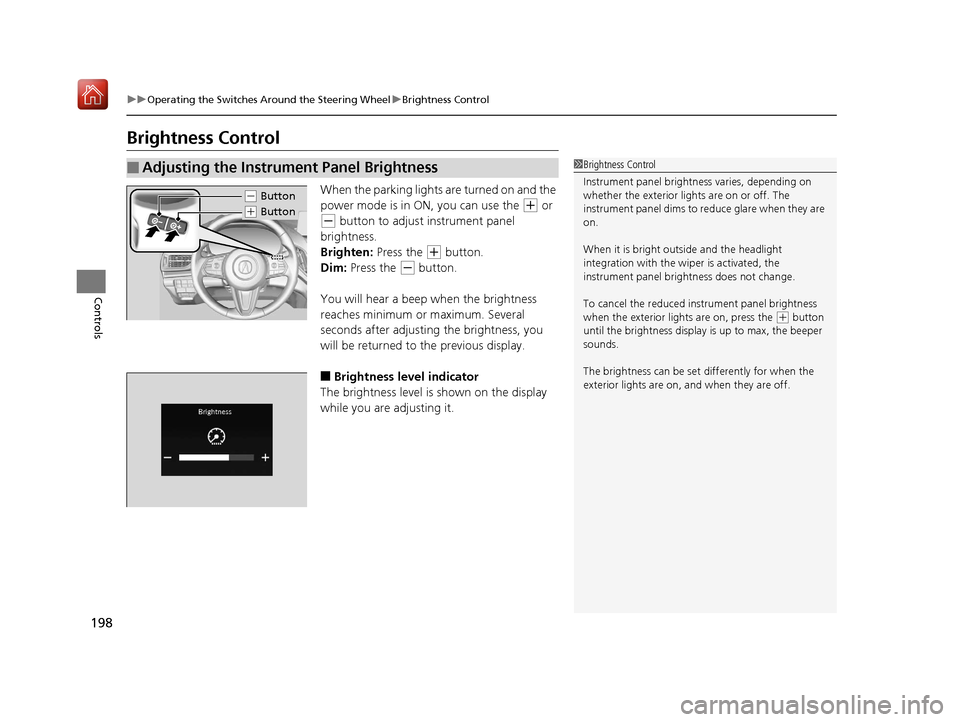
Brightness Control
When the parking lights are turned on and the
power mode is in ON, you can use the
(+ or
(- button to adjust instrument panel
brightness.
Brighten: Press the
(+ button.
Dim: Press the
(- button.
You will hear a beep when the brightness
reaches minimum or maximum. Several
seconds after adjusting the brightness, you
will be returned to the previous display.
■Brightness level indicator
The brightness level is shown on the display
while you are adjusting it.
■Adjusting the Instrument Panel Brightness1 Brightness Control
Instrument panel brightne ss varies, depending on
whether the exterior lights are on or off. The
instrument panel dims to reduce glare when they are
on.
When it is bright out side and the headlight
integration with the wi per is activated, the
instrument panel bri ghtness does not change.
To cancel the reduced in strument panel brightness
when the exterior lights are on, press the
( + button
until the brightness display is up to max, the beeper
sounds.
The brightness can be set differently for when the
exterior lights are on, and when they are off.
( - Button
(+ Button
19 ACURA RDX-31TJB6000.book 198 ページ 2018年4月26日 木曜日 午後4時51分
Page 201 of 649

200
uuOperating the Switches Around the Steering Wheel uRear Defogger/Heated Door Mirror Button
Controls
Rear Defogger/Heated Door Mirror Button
Press the rear defogger and heated door mirror button to defog the rear window
and mirrors when the power mode is in ON.
The rear defogger and heated door mirrors
automatically switch off after 10-30 minutes
depending on the outside temperature.
Heated Windshield Button
Press the heated windshield button to deic e the windshield at the wiper park area
and along the driver side edge of the wi ndshield when the power mode is in ON.
The heated windshield will automatically
switch off after 15 minutes.
1 Rear Defogger/Heated Door Mirror Button
This system consumes a lot of power, so turn it off
when the window has been defogged.
Also, do not use the system for a long time while the
engine is idling. This may weaken the battery, making
it difficult to start the engine.
When the power mode is se t to ON and the outside
temperature is below 41°F (5°C), the heated door
mirror may automatically activate for 10 minutes.
Canadian models
1 Heated Windshield Button
This system consumes a lot of power, so turn it off
when the window has been deiced. Also, do not use
the system for a long peri od when the engine is
idling. This may weaken the battery, making it
difficult to start the engine.
When the power mode is se t to ON and the outside
temperature is below 39°F (4°C), the heated
windshield may automatically activate for up to 15
minutes.
19 ACURA RDX-31TJB6000.book 200 ページ 2018年4月26日 木曜日 午後4時51分
Page 228 of 649

Continued227
uuInterior Lights/Interior Convenience Items uInterior Convenience Items
Controls
To open the sunglasses holder, press and
release the indent. To close, press it again until
it latches.
You can store eyeglasses and other small
items in this holder.
The power mode must be in ON to use the
heated steering wheel.
Press the button on the left side of the
steering wheel.
When a comfortable temperature is reached,
press the button again to turn it off.
The heated steering wheel is turned off every
time you start the engine, even if you turned it
on the last time yo u drove the vehicle.
■Sunglasses Holder1Sunglasses Holder
Keep the holder closed wh ile driving except when
accessing stored items.
Press
■Heated Steering Wheel*1 Heated Steering Wheel*
Do not use the heated steering wheel continuously
when the engine is off. Under such conditions, the
battery may be weaken ed, making the engine
difficult to start.
Heated Steering Wheel Button
Indicator
* Not available on all models
19 ACURA RDX-31TJB6000.book 227 ページ 2018年4月26日 木曜日 午後4時51分
Page 229 of 649

uuInterior Lights/Interior Convenience Items uInterior Convenience Items
228
Controls
The power mode must be in ON to use the
seat heaters and ventilators*.
Press the seat heater or the seat ventilation
*
button:
Once - The HI setting (three indicators on)
Twice - The MID setting (two indicators on)
Three times - The LO setting (one indicator on)
Four times - The OFF se tting (no indicators on)
Press the AUTO button:
The system automatically selects the setting
most suitable to the ambient environment.
When the power mode is turned on after it is
turned off, the previous setting of front seat
heaters and ventilators
* are maintained.
■Front Seat Heaters and Ventilation*1 Front Seat Heaters and Ventilation*
Do not use the seat heater s and the seat ventilation
even in LO when the engine is off. Under such
conditions, the battery ma y be weakened, making
the engine difficult to start.
After a certain period of time, the strength setting for
the seat heaters will automatically be reduced by one
level at a time until the seat heater shuts off. The
elapsed time varies according to the interior
environment.
3WARNING
Heat induced burns are possible when
using seat heaters.
Persons with a diminished ability to sense
temperature (e.g., persons with diabetes,
lower-limb nerve damage, or paralysis) or
with sensitive skin should not use seat
heaters.
Models with seat ventilation
Models without seat ventilation
* Not available on all models
19 ACURA RDX-31TJB6000.book 228 ページ 2018年4月26日 木曜日 午後4時51分
Page 230 of 649
229
uuInterior Lights/Interior Convenience Items uInterior Convenience Items
Controls
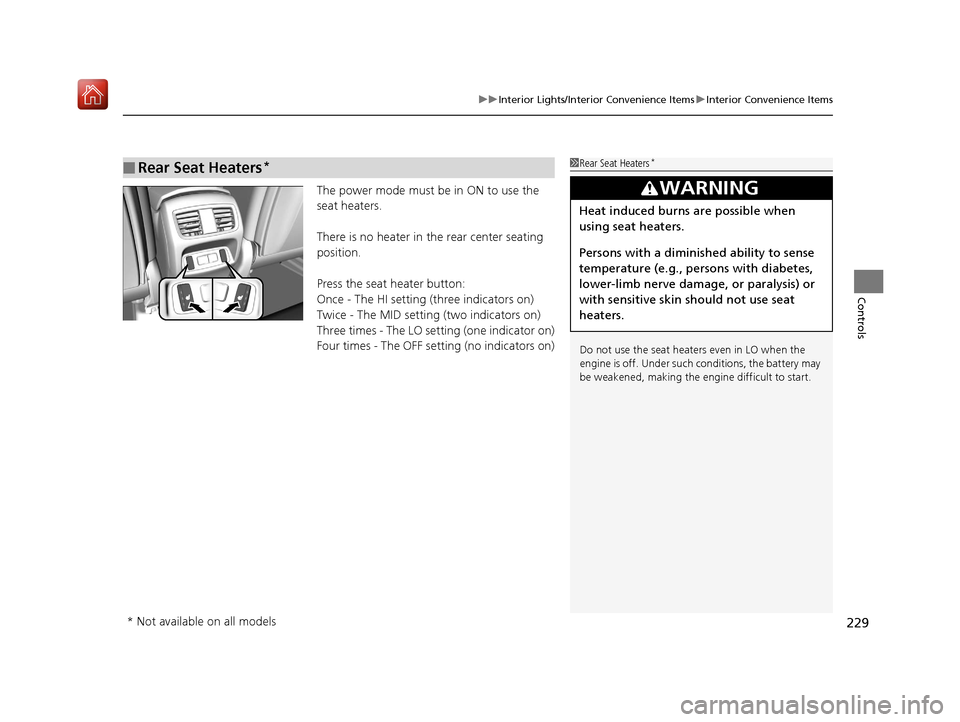
The power mode must be in ON to use the
seat heaters.
There is no heater in the rear center seating
position.
Press the seat heater button:
Once - The HI setting (three indicators on)
Twice - The MID setting (two indicators on)
Three times - The LO setting (one indicator on)
Four times - The OFF setting (no indicators on)
■Rear Seat Heaters*1 Rear Seat Heaters*
Do not use the seat heaters even in LO when the
engine is off. Under such conditions, the battery may
be weakened, making the engine difficult to start.
3WARNING
Heat induced burns are possible when
using seat heaters.
Persons with a diminished ability to sense
temperature (e.g., persons with diabetes,
lower-limb nerve damage, or paralysis) or
with sensitive skin should not use seat
heaters.
* Not available on all models
19 ACURA RDX-31TJB6000.book 229 ページ 2018年4月26日 木曜日 午後4時51分
Page 235 of 649
uuClimate Control System u
234
Controls
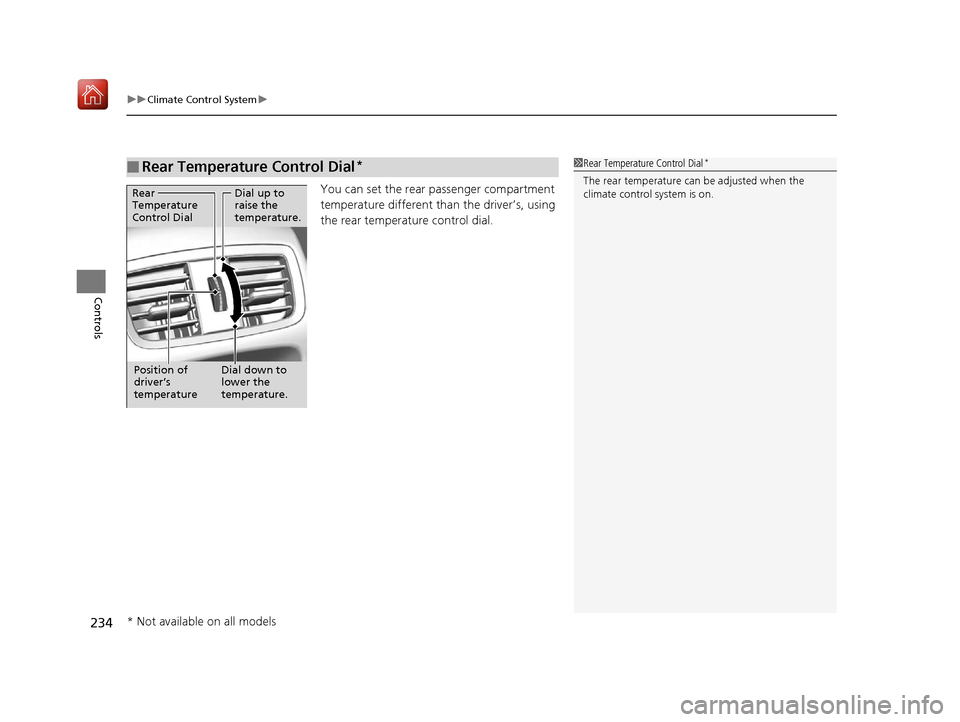
You can set the rear passenger compartment
temperature different than the driver’s, using
the rear temperature control dial.
■Rear Temperature Control Dial*1 Rear Temperature Control Dial*
The rear temperature can be adjusted when the
climate control system is on.Dial up to
raise the
temperature.
Dial down to
lower the
temperature.
Rear
Temperature
Control Dial
Position of
driver’s
temperature
* Not available on all models
19 ACURA RDX-31TJB6000.book 234 ページ 2018年4月26日 木曜日 午後4時51分