Page 197 of 649
196
uuOperating the Switches Around the Steering Wheel uWipers and Washers
Controls
The rear wiper and washer can be used when
the power mode is in ON.
■Wiper switch (OFF, INT, ON)
Change the wiper switch setting according to
the amount of rain.
■Washer ( *)
Sprays on the rear window and rearview
camera
* while you rotate the switch to this
position.
Hold it to activate the rear wiper and to spray
the washer. Once released, the washer spray
will stop and the rear wi per will return to its
selected switch setting after a few sweeps.
■Operating in reverse
When you select the transmission to
(R with the windshield wipers activated, the
rear wiper operates automatically as follows even if its switch is off.
■Rear Wiper/Washer
INT : Intermittent
OFF ON : Continuous wipe
Washer
Windshield Wiper OperationRear Wiper Operation
IntermittentIntermittent
Low speed wipe
High speed wipeContinuous
* Not available on all models
19 ACURA RDX-31TJB6000.book 196 ページ 2018年4月26日 木曜日 午後4時51分
Page 199 of 649
198
uuOperating the Switches Around the Steering Wheel uBrightness Control
Controls
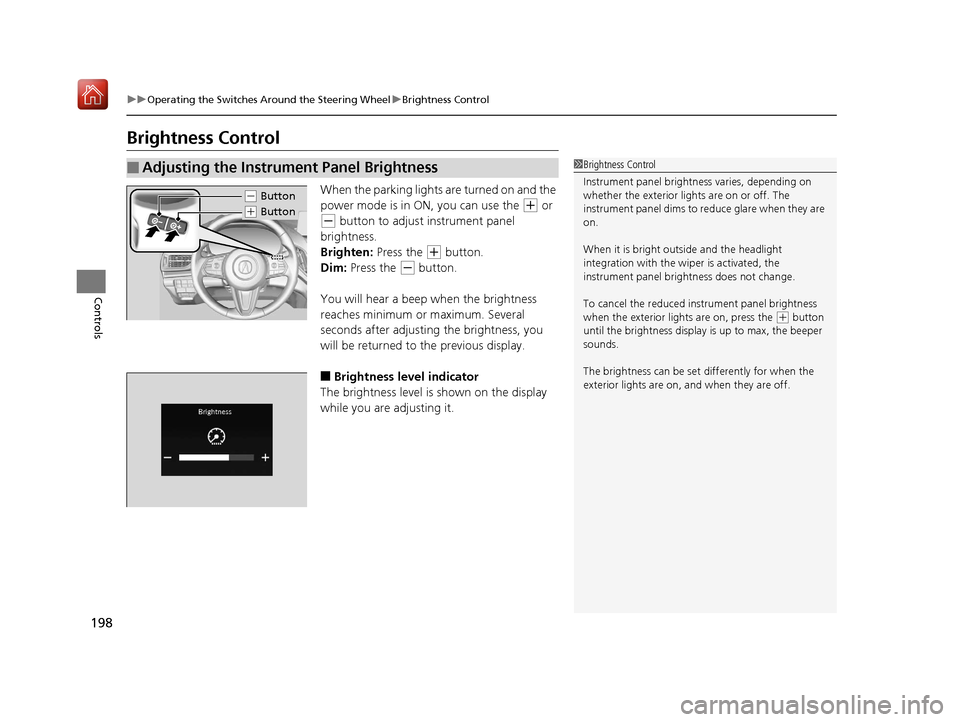
Brightness Control
When the parking lights are turned on and the
power mode is in ON, you can use the
(+ or
(- button to adjust instrument panel
brightness.
Brighten: Press the
(+ button.
Dim: Press the
(- button.
You will hear a beep when the brightness
reaches minimum or maximum. Several
seconds after adjusting the brightness, you
will be returned to the previous display.
■Brightness level indicator
The brightness level is shown on the display
while you are adjusting it.
■Adjusting the Instrument Panel Brightness1 Brightness Control
Instrument panel brightne ss varies, depending on
whether the exterior lights are on or off. The
instrument panel dims to reduce glare when they are
on.
When it is bright out side and the headlight
integration with the wi per is activated, the
instrument panel bri ghtness does not change.
To cancel the reduced in strument panel brightness
when the exterior lights are on, press the
( + button
until the brightness display is up to max, the beeper
sounds.
The brightness can be set differently for when the
exterior lights are on, and when they are off.
( - Button
(+ Button
19 ACURA RDX-31TJB6000.book 198 ページ 2018年4月26日 木曜日 午後4時51分
Page 220 of 649

219Continued
Controls
Interior Lights/Interior Convenience Items
Interior Lights
■ON
The interior lights come on regardless of
whether the tailgate and doors are open or
closed.
■DOOR
The interior lights come on in the following
situations:
• When the tailgate or any of the doors are
opened.
• You unlock the driver’s door.
• When the power mode is set to VEHICLE
OFF (LOCK).
■OFF
The interior lights remain off regardless of
whether the tailgate or any doors are open or
closed.
■Interior Light Buttons1 Interior Light Buttons
When the DOOR button is pressed, the interior lights
fade out and go off about 30 seconds after the doors
are closed.
The lights go off after about 30 seconds in the
following situations:
•When you unlock the driver’s door but do not open
it.
•When you set the power mode to VEHICLE OFF
(LOCK) but do not open a door.
You can change the interi or lights dimming time.
2 Customized Features P. 332
The interior lights go off i mmediately in the following
situations:
•When you lock the driver’s door.
•When you close the driver’s door in ACCESSORY
mode.
•When you set the power mode to ON.
To avoid draining the ba ttery, do not leave the
interior light on for an extended length of time when
the engine is off.
If you leave any of the tailgate or doors open in
VEHICLE OFF (LOCK) mode, th e interior lights go off
after about 15 minutes.
DOOR Button
OFF Button
ON Button
19 ACURA RDX-31TJB6000.book 219 ページ 2018年4月26日 木曜日 午後4時51分
Page 231 of 649

230
Controls
Climate Control System
Using Automatic Climate Control
The automatic climate control system maintains the interior temperature you select.
The system also selects the proper mix of heated or cooled air that raises or lowers
the interior temperature to your pr eference as quickly as possible.
Use the system when the engine is running.
1. Press the AUTO button.
2. Adjust the interior temperature using the driver’s side or passenger’s side
temperature control buttons.
3. Press the (ON/OFF) button to cancel.1Using Automatic Climate Control
If any buttons are presse d while using the climate
control system in auto, the function of the button
that was pressed will take priority.
The AUTO indicator will go off, but functions
unrelated to the button th at was pressed will be
controlled automatically.
During idle-stops, air-conditioning is suspended, and
only the blower remains active.
If you do not want air-cond itioning suspended, press
the Auto Idle Stop OFF button to cancel idle-stop.
To prevent cold air from bl owing in from outside, the
fan may not start i mmediately when the AUTO
button is pressed.
If the interior is very warm, you can cool it down
more rapidly by partial ly opening the windows,
turning the system on auto, and setting the
temperature to low. Change the fresh air mode to
recirculation mode until the temperature cools down.
When you set the temperat ure to the lower or upper
limit, Lo or Hi is displayed.
Pressing the button switches the climate
control system between on and off. When turned on,
the system returns to your last selection.
Floor and
defroster
vents
Floor
vents
Dashboard and floor
vents, and back of
the center console
Dashboard vents
and back of the
center console
AUTO Button
Driver’s Side
Temperature
Control Buttons Passenger’s Side
Temperature
Control Buttons
A/C (Air Conditioning) Button (ON/OFF) Button
Fan Control Button SYNC
(Synchronization) Button
(Recirculation) Button
19 ACURA RDX-31TJB6000.book 230 ページ 2018年4月26日 木曜日 午後4時51分
Page 246 of 649

245
Features
Audio System Basic Operation
You can use the audio system for 30 minutes when the power mode to VEHICLE OFF
(LOCK) with the driver’s door closed, the system will then turn off automatically.
If you want to keep using it, we recomme nd that you turn the power mode to
ACCESSORY or ON.
VOL/AUDIO (Volume/Power) Knob:
Push to turn the audio sy stem on and off. Turn
to adjust the volume wh en audio system is on.
/ (Seek/Skip) Buttons: Press to
change station, channel, song or file.
(Back) Button: Press to go back to the
previous display when it is displayed. (Home) Button: Press to go to the home
screen. (Cards List) Button: Press to display the
cards list of the secondary information area on
the audio/information screen.
2 Secondary Information Area P. 252
True Touchpad A: Click or swipe the pad
with your finger, or move your finger along
the pad to operate the primary information
area on the audio/information screen.
True Touchpad B: Click or swipe the pad
with your finger to operate the secondary
information area on the audio/information
screen.
1 Audio System Basic Operation
True Touchpad Operation
2 True Touchpad Operation P. 246
Primary Information Area 2 Primary Information Area P. 249
Secondary Information Area 2 Secondary Information Area P. 252
(Home) Button
(Back) Button
True Touchpad A (Cards List) Button
Audio/Information Screen
/ (Seek/
Skip) Buttons
VOL /AUDIO (Volume/
Power) Knob
True Touchpad B
19 ACURA RDX-31TJB6000.book 245 ページ 2018年4月26日 木曜日 午後4時51分
Page 248 of 649
247
uuAudio System Basic Operation uTrue Touchpad Operation
Continued
Features
■Flick
Flick (or drag) your finger up/down or left/
right to scroll in lists or change pages
throughout the system.
■Hand-writing a character
Move your finger quickly to trace a character
on the true touchpad.
■Swipe with two fingers
Swipe (or drag) two fingers across the screen
to move the map.
Models with navigation system
19 ACURA RDX-31TJB6000.book 247 ページ 2018年4月26日 木曜日 午後4時51分
Page 253 of 649
uuAudio System Basic Operation uAudio/Information Screen
252
Features
You can see the audio, HFL information, navigation mini map*, and clock
information on the secondary information area using the true touchpad B.
■Switching the card
Swipe up or down the true touchpad B to cycle through the following screen.
■Secondary Information Area1Secondary Information Area
SiriusXM ® radio service notifications are displayed in
the secondary information area.
Secondary Information Area
1 Switching the card
The card in the secondary information area will
change depending on the sc reen displayed in the
primary information area.
Now Playing Audio
Navigation*
Clock
* Not available on all models
19 ACURA RDX-31TJB6000.book 252 ページ 2018年4月26日 木曜日 午後4時51分
Page 255 of 649
uuAudio System Basic Operation uAudio/Information Screen
254
Features
■To change to a next screen
Swiping true touchpad A left or right takes you to the next screen.
■Home Screen1 Home Screen
The home screen has 2 pages. You can add up to 8
pages.
Press the (home) button to go directly back to
the first page of the home screen from any page.
Current page position
True Touchpad A
Swipe left to go to
the additional pages
of the home screen.Swipe right to
display the All Apps
screen.
19 ACURA RDX-31TJB6000.book 254 ページ 2018年4月26日 木曜日 午後4時51分


