Page 103 of 649
102
uuIndicators uMulti-Information Display Warn ing and Information Messages
Instrument Panel
MessageConditionExplanation
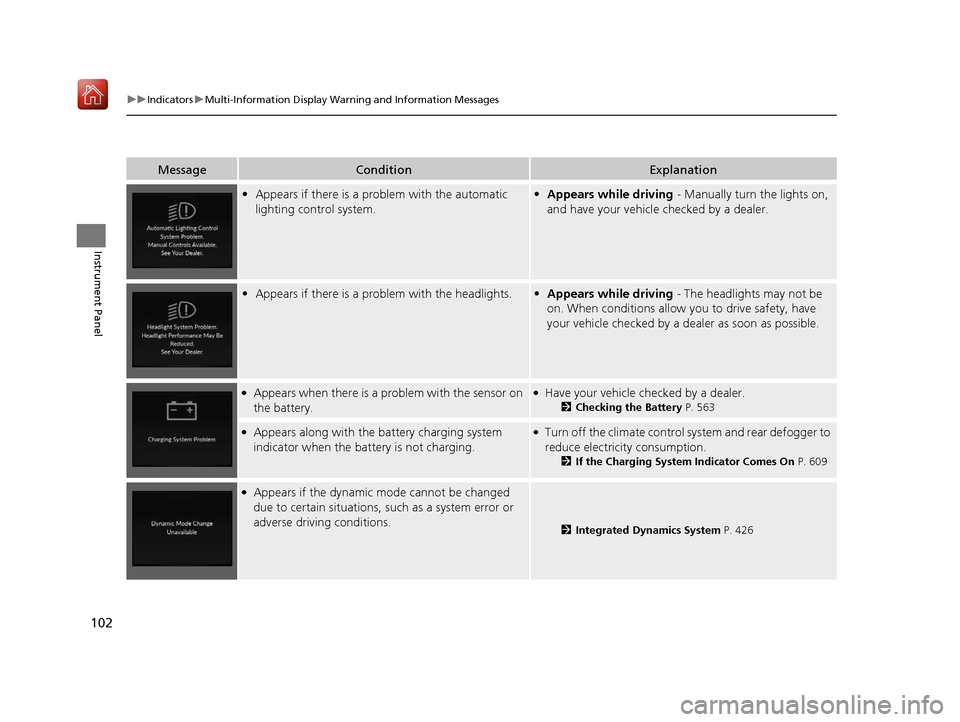
•Appears if there is a problem with the automatic
lighting control system.•Appears while driving - Manually turn the lights on,
and have your vehicle checked by a dealer.
• Appears if there is a problem with the headlights.•Appears while driving - The headlights may not be
on. When conditions allow you to drive safety, have
your vehicle checked by a de aler as soon as possible.
●Appears when there is a problem with the sensor on
the battery.●Have your vehicle checked by a dealer.
2 Checking the Battery P. 563
●Appears along with the battery charging system
indicator when the batte ry is not charging.●Turn off the climate control system and rear defogger to
reduce electricity consumption.
2If the Charging System Indicator Comes On P. 609
●Appears if the dynamic mode cannot be changed
due to certain situations, such as a system error or
adverse driving conditions.
2 Integrated Dynamics System P. 426
19 ACURA RDX-31TJB6000.book 102 ページ 2018年4月26日 木曜日 午後4時51分
Page 107 of 649
106
uuIndicators uMulti-Information Display Warn ing and Information Messages
Instrument Panel
MessageConditionExplanation
●Appears after you set the power mode to
ACCESSORY or ON.2Starting the Engine P. 411
•Appears when the engine does not restart
automatically due to the following reasons:
- The hood is open.
- There is a problem in the sy stem that disables Auto
Idle Stop.●Follow the normal procedure to start the engine.
2 Starting the Engine P. 411
●Appears when the steering wheel is locked.●Move the steering wheel left and right while pressing the
ENGINE START/STOP button.
●Appears after the driver’s door is opened when the
power mode is in ACCESSORY.●Change the power mode to VEHICLE OFF.
2ENGINE START/STOP Button P. 182
Canadian models
19 ACURA RDX-31TJB6000.book 106 ページ 2018年4月26日 木曜日 午後4時51分
Page 109 of 649
108
uuIndicators uMulti-Information Display Warn ing and Information Messages
Instrument Panel
MessageConditionExplanation
•Appears if you press the ENGINE START/STOP
button while the vehicle is moving.• The message will disappear after six seconds or when
the power mode is set to VEHICLE OFF.
●Appears after the driver’s door is opened when the
power mode is in ACCESSORY.●Press and hold the ENGINE START/STOP button with
your foot off the brake pedal to change the power
mode to VEHICLE OFF.
●Appears if you try to start the engine when the
transmission is in
(N and the parking brake is
disengaged.
●Put the transmission into (P, then start the engine in
the normal procedure.
2 Starting the Engine P. 411
19 ACURA RDX-31TJB6000.book 108 ページ 2018年4月26日 木曜日 午後4時51分
Page 112 of 649
111
uuIndicators uMulti-Information Display Warning and Information Messages
Continued
Instrument Panel
MessageConditionExplanation
• Appears when you try to ch ange the gear position
without depressing the brake pedal.• Depress the brake pedal, then select a shift button.
• Appears when you try to ch ange the gear position
without releasing your foot off the accelerator pedal.• Release your foot off the acce lerator pedal, then select
a shift button.
• Appears when you try to change the shift position
after the position has auto matically been changed to
(P with the driver’s door open and the driver’s seat
belt unfastened.
●Press the (P button if you leave the vehicle.
U.S.
Canada
19 ACURA RDX-31TJB6000.book 111 ページ 2018年4月26日 木曜日 午後4時51分
Page 113 of 649

112
uuIndicators uMulti-Information Display Warn ing and Information Messages
Instrument Panel
MessageConditionExplanation
•Appears when the (P button is pressed while the
vehicle is moving.
• Appears if you put the transmission into
(R while
the vehicle is moving forward, or into
(D while the
vehicle is reversing.
• Make sure that the vehicl e comes to a stop before
operating the select button.
• Appears when you set the power mode to OFF while
driving.•Immediately stop in a safe place, set the parking brake,
then restart the engine. If the message disappears,
continue driving.
•Appears if the vehicle is stopped and the driver’s seat
belt is unfastened, as ther e is a possibility that the
vehicle may roll.• When the vehicle is idling or when you are parking or
exiting the vehicle, put the transmission into
(P before
releasing the brake pedal.
2 Shift Operation P. 420
●Appears when you attempt to change to another
gear position with the transmission in
(P and the
engine OFF.
●To select another gear position while in (P, the engine
must be ON.
19 ACURA RDX-31TJB6000.book 112 ページ 2018年4月26日 木曜日 午後4時51分
Page 114 of 649
113
uuIndicators uMulti-Information Display Warning and Information Messages
Continued
Instrument Panel
MessageConditionExplanation
• Appears when you press the (P button but it is not
engaged due to low ATF temperature.●Depress the brake pedal until this message disappear.
• Appears when the temperature of the transmission
is starting to get too hot.
• The performance of the vehicle may be reduced.•Until the message disappears, reduce your speed and
allow the system to cool down.
• Appears if you depress the accelerator pedal when
the transmission is in
(N.
•Release the accelerator pedal. After that, depress the
brake pedal and change the transmission position.
19 ACURA RDX-31TJB6000.book 113 ページ 2018年4月26日 木曜日 午後4時51分
Page 115 of 649
114
uuIndicators uMulti-Information Display Warn ing and Information Messages
Instrument Panel
MessageConditionExplanation
•Appears when you press and hold (N button for
more than two seconds.• Disappears when you set the gear position to a gear
other than
(N.
2 If you want to keep the transmission in (N
position [car wash mode] P. 422
• Appears for a few seconds if you have not pressed
the
(N button long enough to initiate Neutral-Hold
mode.
2 If you want to keep the transmission in (N
position [car wash mode] P. 422
• Appears when you set the power mode to ON
without fastening the driver’s seat belt.
• Appears when you change the gear position after
(P has been automatically selected with the driver’s
door open, the driver’s se at belt unfastened, then
the brake pedal is released.
• Fasten the seat belt properly before you start to drive.
2 Shift Operation P. 420
19 ACURA RDX-31TJB6000.book 114 ページ 2018年4月26日 木曜日 午後4時51分
Page 116 of 649
115
uuIndicators uMulti-Information Display Warning and Information Messages
Continued
Instrument Panel
MessageConditionExplanation
• Appears if there is a prob lem with the auto high-
beam.• Manually operate the headlight switch.
• If you are driving with th e high-beam headlights when
this happens, the headlights are changed to low beams.
●Appears when ACC with LSF has been automatically
canceled.●You can resume the set speed after the condition that
caused ACC with LSF to cancel improves. Press the
RES/+ button.
2Adaptive Cruise Control (ACC) with Low Speed
Follow (LSF) P. 455
●Flashes when the system senses a likely collision with
a vehicle in front of you.●Take the appropriate means to prevent a collision (apply
the brakes, change lanes, etc.)
2Collision Mitigation Braking SystemTM (CMBSTM)
P. 446
2 Adaptive Cruise Control (ACC) with Low Speed
Follow (LSF) P. 455
19 ACURA RDX-31TJB6000.book 115 ページ 2018年4月26日 木曜日 午後4時51分


