2018 YAMAHA AEROX50 lock
[x] Cancel search: lockPage 6 of 78

Table of contentsSafety information............................ 1-1
Further safe-riding points ............... 1-5
Description....................................... 2-1
Left view ......................................... 2-1
Right view ....................................... 2-2
Controls and instruments ............... 2-3
Instrument and control functions... 3-1
Main switch/steering lock............... 3-1
Indicator lights and warning
lights............................................ 3-2
Multi-function display ..................... 3-3
Handlebar switches ........................ 3-6
Front brake lever ............................ 3-7
Rear brake lever ............................. 3-7
Fuel tank cap .................................. 3-7
Fuel ................................................. 3-8
Catalytic converter ....................... 3-10
Kickstarter .................................... 3-10
Seats ............................................ 3-11
Storage compartment .................. 3-12
For your safety – pre-operation
checks............................................... 4-1
Operation and important riding
points................................................ 5-1
Starting a cold engine .................... 5-1
Starting off ...................................... 5-2
Acceleration and deceleration ........ 5-2Braking ............................................ 5-3
Tips for reducing fuel
consumption ................................ 5-3
Engine break-in ............................... 5-4
Parking ............................................ 5-4
Periodic maintenance and
adjustment........................................ 6-1
Periodic maintenance chart for the
emission control system .............. 6-2
General maintenance and
lubrication chart ........................... 6-3
Removing and installing the
cowling and panel........................ 6-6
Checking the spark plug ................. 6-7
Engine oil and oil strainer ................ 6-9
Final transmission oil..................... 6-11
Coolant.......................................... 6-12
Replacing the air filter element
and cleaning the check hose..... 6-13
Checking the throttle grip free
play ............................................ 6-14
Valve clearance ............................. 6-14
Tires .............................................. 6-15
Cast wheels................................... 6-16
Checking the front and rear brake
lever free play ............................ 6-17
Checking the front and rear brake
pads ........................................... 6-17
Checking the brake fluid level ....... 6-18
Changing the brake fluid ............... 6-19Checking and lubricating the
cables ........................................ 6-19
Checking and lubricating the
throttle grip and cable ............... 6-20
Lubricating the front and rear
brake levers ............................... 6-20
Checking and lubricating the
centerstand ............................... 6-21
Checking the front fork ................. 6-21
Checking the steering................... 6-22
Checking the wheel bearings ....... 6-22
Battery .......................................... 6-23
Replacing the fuse ........................ 6-24
Replacing the headlight bulb ........ 6-25
Replacing the auxiliary light bulb
(for CHE) .................................... 6-26
Replacing the tail/brake light
bulb ........................................... 6-27
Replacing a turn signal light
bulb ........................................... 6-27
License plate light......................... 6-28
Troubleshooting............................ 6-28
Troubleshooting charts................. 6-29
Scooter care and storage................ 7-1
Matte color caution......................... 7-1
Care ................................................ 7-1
Storage ........................................... 7-4U1GBE1E0.book Page 1 Tuesday, October 17, 2017 11:45 AM
Page 15 of 78

Description
2-2
2
EAU10421
Right view
12 3
4
5 6 7 9
8
1. Grab bar (page 5-2)
2. Fuel tank cap (page 3-7)
3. Passenger seat (page 3-11)
4. Rider seat (page 3-11)
5. Main switch/steering lock (page 3-1)
6. Battery/fuse (page 6-23/6-24)
7. Passenger footrest
8. Engine oil filler cap (page 6-9)9. Centerstand (page 6-21)
U1GBE1E0.book Page 2 Tuesday, October 17, 2017 11:45 AM
Page 17 of 78
Instrument and control functions
3-1
3
EAU10462
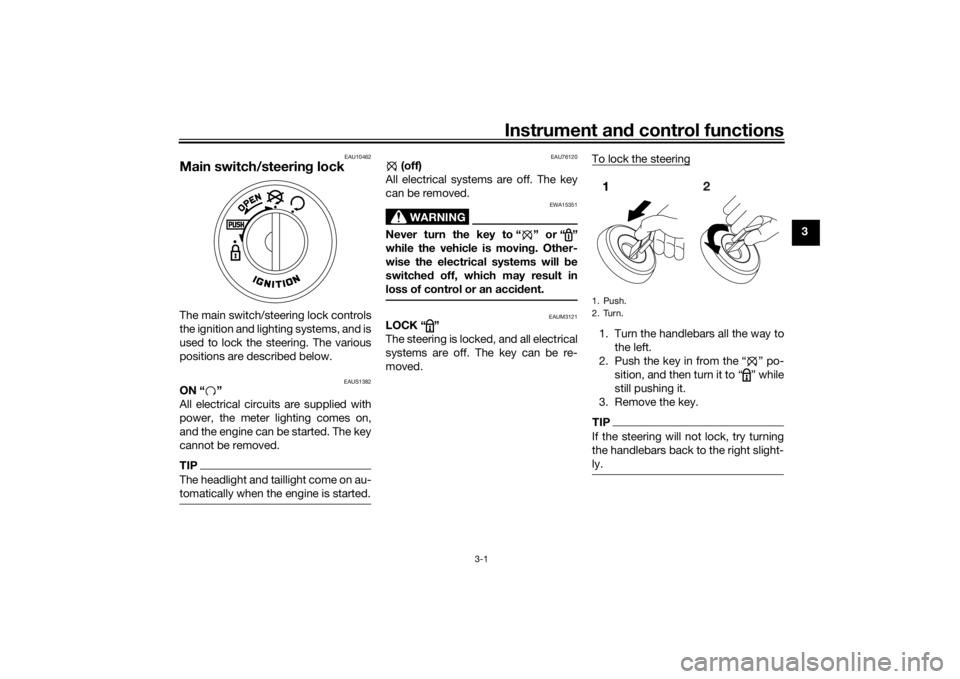
Main switch/steering lockThe main switch/steering lock controls
the ignition and lighting systems, and is
used to lock the steering. The various
positions are described below.
EAUS1382
ON “ ”
All electrical circuits are supplied with
power, the meter lighting comes on,
and the engine can be started. The key
cannot be removed.TIPThe headlight and taillight come on au-
tomatically when the engine is started.
EAU76120
(off)
All electrical systems are off. The key
can be removed.
WARNING
EWA15351
Never turn the key to “ ” or “ ”
while the vehicle is moving. Other-
wise the electrical systems will be
switched off, which may result in
loss of control or an accident.
EAUM3121
LOCK “ ”
The steering is locked, and all electrical
systems are off. The key can be re-
moved.To lock the steering
1. Turn the handlebars all the way to
the left.
2. Push the key in from the “ ” po-
sition, and then turn it to “ ” while
still pushing it.
3. Remove the key.TIPIf the steering will not lock, try turning
the handlebars back to the right slight-
ly.1. Push.
2. Turn.
U1GBE1E0.book Page 1 Tuesday, October 17, 2017 11:45 AM
Page 18 of 78
Instrument and control functions
3-2
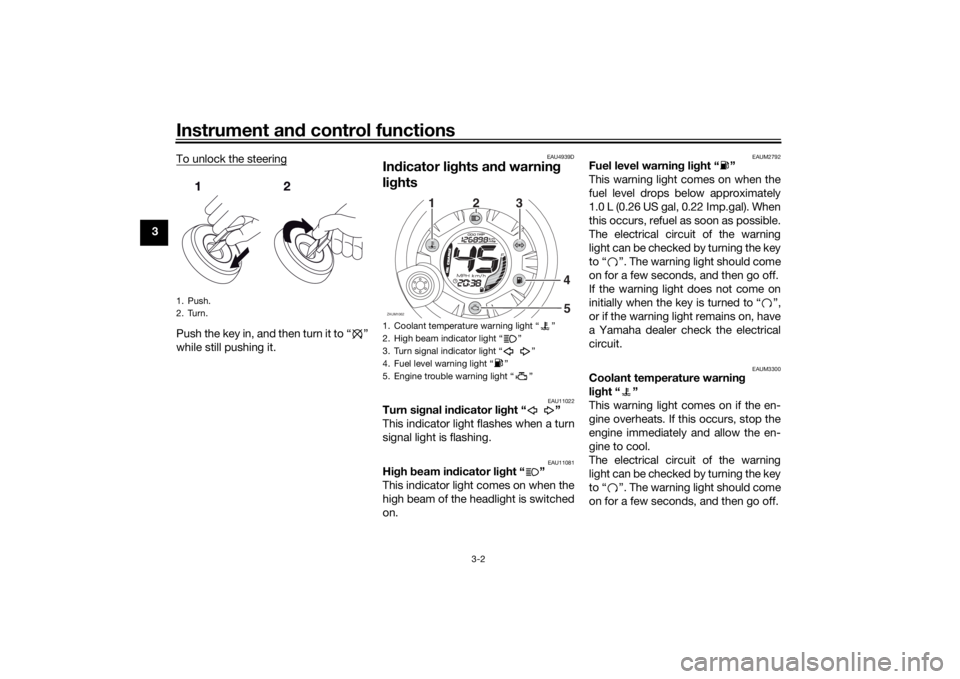
3To unlock the steering
Push the key in, and then turn it to “ ”
while still pushing it.
EAU4939D
Indicator lights and warning
lights
EAU11022
Turn signal indicator light “ ”
This indicator light flashes when a turn
signal light is flashing.
EAU11081
High beam indicator light “ ”
This indicator light comes on when the
high beam of the headlight is switched
on.
EAUM2792
Fuel level warning light “ ”
This warning light comes on when the
fuel level drops below approximately
1.0 L (0.26 US gal, 0.22 Imp.gal). When
this occurs, refuel as soon as possible.
The electrical circuit of the warning
light can be checked by turning the key
to “ ”. The warning light should come
on for a few seconds, and then go off.
If the warning light does not come on
initially when the key is turned to “ ”,
or if the warning light remains on, have
a Yamaha dealer check the electrical
circuit.
EAUM3300
Coolant temperature warning
light “ ”
This warning light comes on if the en-
gine overheats. If this occurs, stop the
engine immediately and allow the en-
gine to cool.
The electrical circuit of the warning
light can be checked by turning the key
to “ ”. The warning light should come
on for a few seconds, and then go off.
1. Push.
2. Turn.
1. Coolant temperature warning light “ ”
2. High beam indicator light “ ”
3. Turn signal indicator light “ ”
4. Fuel level warning light “ ”
5. Engine trouble warning light “ ”ZAUM1062
O
IL CHA
NGE
12
3
4
5
U1GBE1E0.book Page 2 Tuesday, October 17, 2017 11:45 AM
Page 19 of 78

Instrument and control functions
3-3
3 If the warning light does not come on
initially when the key is turned to “ ”,
or if the warning light remains on, have
a Yamaha dealer check the electrical
circuit.
NOTICE
ECA10022
Do not continue to operate the en-
gine if it is overheating.TIPIf the engine overheats, see page 6-30
for further instructions.
EAU78310
Engine trouble warning light “ ”
This warning light comes on if a prob-
lem is detected in the engine or other
vehicle control system. If this occurs,
have a Yamaha dealer check the on-
board diagnostic system.
The electrical circuit of the warning
light can be checked by turning the key
to “ ”. The warning light should come
on for a few seconds, and then go off.
If the warning light does not come on
initially when the key is turned to “ ”,
or if the warning light remains on, have
a Yamaha dealer check the vehicle.
EAUM3131
Multi-function displayTIPThe multi-function display performs
the following self-test for three sec-
onds in order to check the electrical
circuit.
The speedometer digits display
from 0 to 80, and then from 80 to
0 in kilometers. If the speedometer
is set to miles, the digits will dis-
play from 0 to 50, and then from
50 to 0.All LCD segments and warning
lights come on and then go off.
WARNING
EWA12313
Be sure to stop the vehicle before
making any setting changes to the
multi-function display. Changing
settings while riding can distract the
operator and increase the risk of an
accident.The multi-function display is equipped
with the following:
a digital clock
a digital speedometer (which
shows riding speed)
an odometer (which shows the to-
tal distance traveled)
a tripmeter (which shows the dis-
tance traveled since it was last set
to zero)
a fuel reserve tripmeter (which
shows the distance traveled on
the fuel reserve)
an oil change indicator (which
shows when the engine oil should
be changed)
a fuel gauge
a self-diagnosis device
1. Speedometer
2. Oil change indicator “OIL CHANGE”
3. Clock
4. “RESET/SELECT” button
5. Odometer/tripmeters/fuel reserve tripmeter
6. Fuel gaugeZAUM1063
O
I
L CHA
NGE56
1
3
42
U1GBE1E0.book Page 3 Tuesday, October 17, 2017 11:45 AM
Page 20 of 78
Instrument and control functions
3-4
3
TIPBe sure to turn the key to “ ” be-
fore using the “RESET/SELECT”
button.
For the U.K. only: To switch the
speedometer and odometer/trip-
meter displays between kilome-
ters and miles, when the main
switch is turned to “ ”, press the
“RESET/SELECT” button for at
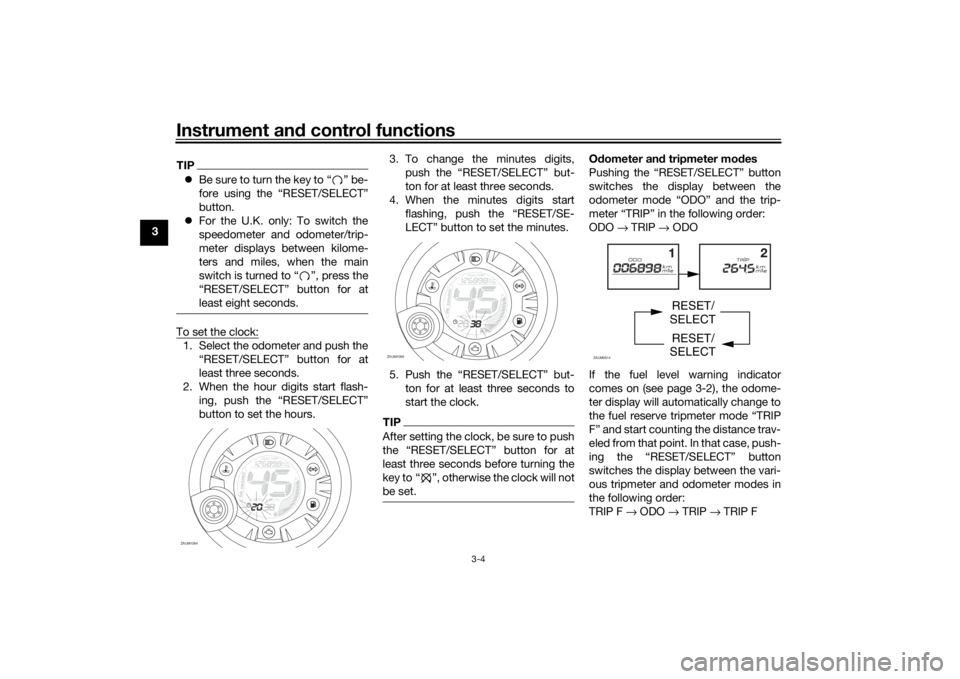
least eight seconds.To set the clock:1. Select the odometer and push the
“RESET/SELECT” button for at
least three seconds.
2. When the hour digits start flash-
ing, push the “RESET/SELECT”
button to set the hours.3. To change the minutes digits,
push the “RESET/SELECT” but-
ton for at least three seconds.
4. When the minutes digits start
flashing, push the “RESET/SE-
LECT” button to set the minutes.
5. Push the “RESET/SELECT” but-
ton for at least three seconds to
start the clock.
TIPAfter setting the clock, be sure to push
least three seconds before turning the
key to Ž, otherwise the clock will not
be set.
Odometer and tripmeter modes
Pushing the “RESET/SELECT” button
switches the display between the
odometer mode “ODO” and the trip-
meter “TRIP” in the following order:
ODO → TRIP → ODO
If the fuel level warning indicator
comes on (see page 3-2), the odome-
ter display will automatically change to
the fuel reserve tripmeter mode “TRIP
F” and start counting the distance trav-
eled from that point. In that case, push-
ing the “RESET/SELECT” button
switches the display between the vari-
ous tripmeter and odometer modes in
the following order:
TRIP F → ODO → TRIP → TRIP F
ZAUM1064
OIL CHA
NGE
ZAUM1065
O
IL
CHAN
GE
ZAUM0914
RESET/
SELECT
RESET/
SELECT
U1GBE1E0.book Page 4 Tuesday, October 17, 2017 11:45 AM
Page 23 of 78
Instrument and control functions
3-7
3
EAU12902
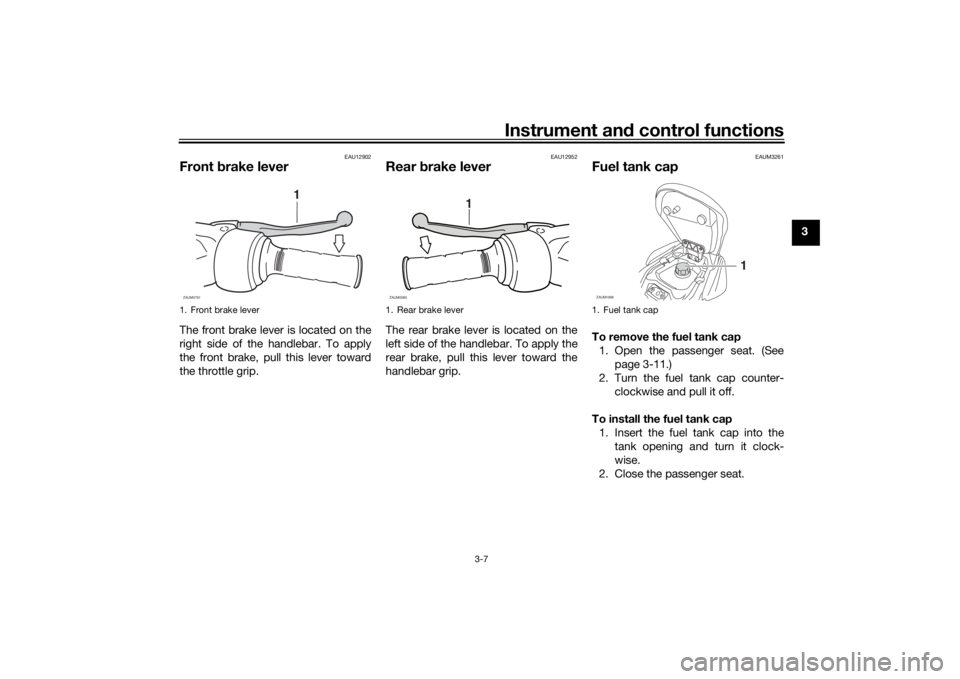
Front brake leverThe front brake lever is located on the
right side of the handlebar. To apply
the front brake, pull this lever toward
the throttle grip.
EAU12952
Rear brake leverThe rear brake lever is located on the
left side of the handlebar. To apply the
rear brake, pull this lever toward the
handlebar grip.
EAUM3261
Fuel tank capTo remove the fuel tank cap
1. Open the passenger seat. (See
page 3-11.)
2. Turn the fuel tank cap counter-
clockwise and pull it off.
To install the fuel tank cap
1. Insert the fuel tank cap into the
tank opening and turn it clock-
wise.
2. Close the passenger seat.
1. Front brake lever
1
ZAUM0791
1. Rear brake lever
1
ZAUM0085
1. Fuel tank capZAUM1068
1
U1GBE1E0.book Page 7 Tuesday, October 17, 2017 11:45 AM
Page 27 of 78
Instrument and control functions
3-11
3
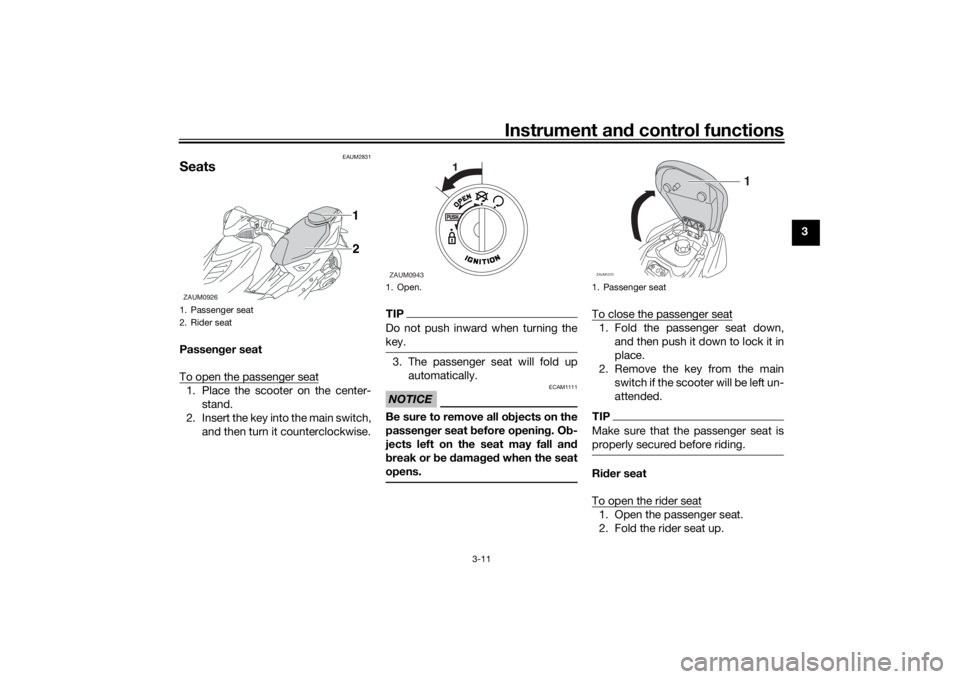
EAUM2831
SeatsPassenger seat
To open the passenger seat1. Place the scooter on the center-
stand.
2. Insert the key into the main switch,
and then turn it counterclockwise.
TIPDo not push inward when turning the
key.3. The passenger seat will fold up
automatically.NOTICE
ECAM1111
Be sure to remove all objects on the
passenger seat before opening. Ob-
jects left on the seat may fall and
break or be damaged when the seat
opens.
To close the passenger seat1. Fold the passenger seat down,
and then push it down to lock it in
place.
2. Remove the key from the main
switch if the scooter will be left un-
attended.TIPMake sure that the passenger seat is
properly secured before riding.Rider seat
To open the rider seat1. Open the passenger seat.
2. Fold the rider seat up.
1. Passenger seat
2. Rider seatZAUM0926
2 1
1. Open.ZAUM0943
1. Passenger seatZAUM1070
1
U1GBE1E0.book Page 11 Tuesday, October 17, 2017 11:45 AM