2018 VOLVO XC60 On Call
[x] Cancel search: On CallPage 503 of 660

AUDIO, MEDIA AND INTERNET
}}
* Option/accessory.501
Settings for Bluetooth devices
Settings for Bluetooth-connected devices.
1. Tap Settings in the Top view.
2. Tap
CommunicationBluetooth
Devices and select settings:
•
Add device - start the procedure for pairing
a new device.
•
Previously paired devices - list con-
nected/paired devices.
•
Remove device - remove a connected
device.
•
Allowed services for this device - select
what the device will be used for: making calls, sending/receiving messages, stream-ing media, Internet connection.
•
Internet connection connect the vehicle to
the Internet using the device's Bluetooth connection.
Bluetooth ®
declaration of conformityUSA FCC CAUTION Changes or modifications not expressly approved by the party responsible for compliance couldvoid the user's authority to operate the equip-ment. This transmitter must not be co-located oroperated in conjunction with any other antennaor transmitter. Canada This device complies with Industry Canada license-exempt RSS standard(s). Operation issubject to the following two conditions: (1) this device may not cause interference, and(2) this device must accept any interference, including interference that may cause undesiredoperation of the device.
Related information
•
Phone (p. 492)
• Phone settings (p. 500)
• Internet-connected vehicle
* (p. 501)
• Connecting a phone to the car via Bluetoothfor the first time (p. 493)
Internet-connected vehicle
*
When the vehicle is connected to the Internet, it is possible to use web radio and music servicesvia apps, download software and contact retail-ers from the vehicle.
The vehicle can be connected to the Internet using Bluetooth, Wi-Fi or the vehicle's integratedmodem.
Page 506 of 660

||
AUDIO, MEDIA AND INTERNET
* Option/accessory.
504 tion to the vehicle has been broken, e.g. when the phone has been removed from the vehicle. Thephone's tethering function will then need to bereactivated the next time the phone's hotspot isused to connect to the Internet. When a phone is connected to the vehicle, it will be saved for future use. When the maximumnumber of 50 connected phones has beenreached, the first will be deleted. To display a listof saved networks or to manually delete saved networks, tap
SettingsCommunication
Wi-FiSaved networks.
Technical and security requirements for Wi-Fi connection are described in a separate section.
Related information
• Internet-connected vehicle
* (p. 501)
• Deleting Wi-Fi networks (p. 507)
• No or poor Internet connection (p. 506)
• Wi-Fi technology and security (p. 507)
Connect the car to the Internet viacar modem (SIM card) For vehicles equipped with Volvo On Call, it is possible to establish an Internet connection viathe vehicle modem and a personal SIM card (P-SIM).
When the vehicle is connected using the inte- grated modem, the Volvo On Call services willuse this connection. 1.
Insert a personal SIM card in the holder in the passenger-side footwell.
2. Tap
Settings in the Top view.
3. Tap
CommunicationVehicle Modem
Internet.
4. Activate/deactivate by tapping to check/ uncheck the
Vehicle modem Internet box. 5. If a different connection was used previously,
confirm the connection change.
6. Enter the SIM card's PIN code. > The vehicle will connect to the network.
Related information
• Internet-connected vehicle
* (p. 501)
• No or poor Internet connection (p. 506)
• Vehicle modem settings (p. 505)
Page 507 of 660

AUDIO, MEDIA AND INTERNET
}}
505
Vehicle modem settings
Your vehicle is equipped with a modem that can be used to connect the vehicle to the Internet. Itis also possible to share this Internet connectionover Wi-Fi.
1. Tap Settings in the Top view.
2. Tap
CommunicationVehicle Modem
Internet and select settings:
•
Vehicle modem Internet - select this to
use the vehicle's modem to connect to the Internet.
•
Data usage - tap Reset to reset the coun-
ter for the amount of data received and sent.
•
Network Select carrier
- select a service provider
manually or automatically.
Data roaming - if the box is checked, the
vehicle modem will attempt to connect to the Internet when the vehicle is outside its homenetwork (e.g. if you are in another country).Please note that this could entail additionalcharges. Consult with your service providerfor data roaming terms under your contract.
•
SIM card PIN Change PIN
- a maximum of 4 digits can be
entered.
Disable PIN - select whether a PIN code
will be required to access the SIM card. •
Send request code - used to e.g. download
or check the balance remaining on a prepaid phone card. This function is specific to yourservice provider.
Related information
• Connect the car to the Internet via carmodem (SIM card) (p. 504)
• No or poor Internet connection (p. 506)
Sharing Internet from the vehicle viaWi-Fi hotspot (tethering)
When the vehicle is connected to the Internet, other devices may share the vehicle's Internet connection 12
.
The network service provider (SIM card) must support Internet sharing (tethering). 1. Tap
Settings in the Top view.
Page 524 of 660
WHEELS AND TIRES
522
Tires
The function of the tires is to carry loads, provide traction on road surfaces, reduce vibrations andprotect the wheels from wear.
The tires significantly influence the vehicle's driv- ing characteristics. The type, dimensions, tirepressure and speed rating have a considerableimpact on how the vehicle performs. Your vehicle is equipped with tires according to the vehicle's tire information placard on the B-pil-lar (the structural member at the side of the vehi-cle, at the rear of the driver's door opening).
WARNING
A damaged tire could cause the driver to lose control of the vehicle.
CAUTION
Some Volvo models are equipped with an Ultra High Performance tire and wheel com-bination designed to provide maximum drypavement performance with consideration forhydroplaning resistance. They may be moresusceptible to road hazard damage and,depending on driving conditions, may achievea tread life of less than 30,000 km (20,000miles). Even if this vehicle is equipped withVolvo's advanced AWD or stability system,these tires are not designed for winter driving,and should be replaced with winter tires whenweather conditions dictate.
The tires have good road holding characteristics and offer good handling on dry and wet surfaces.It should be noted however that the tires havebeen developed to give these features on snow/ice-free surfaces. Most models are equipped with "all-season" tires, which provide a somewhat higher degree of road-holding on slippery road surfaces than tires with-out the "all-season" rating. However, for optimalroadholding on icy or snow-covered roads, werecommend snow tires on all four wheels. When replacing tires, be sure that the new tires are the same size designation, type (radial) andpreferably from the same manufacturer, on all four wheels. Otherwise there is a risk of alteringthe vehicle's roadholding and handling characte-ristics.
Recommended tiresOn delivery, the car is equipped with Volvo origi- nal tires that have the VOL
1
marking on the side
of the tires. These tires have been designed spe- cifically for your vehicle. It is therefore importantwhen replacing tires that the new tires have thissame marking to help maintain the vehicle's driv-ing characteristics, comfort and fuel consumption.
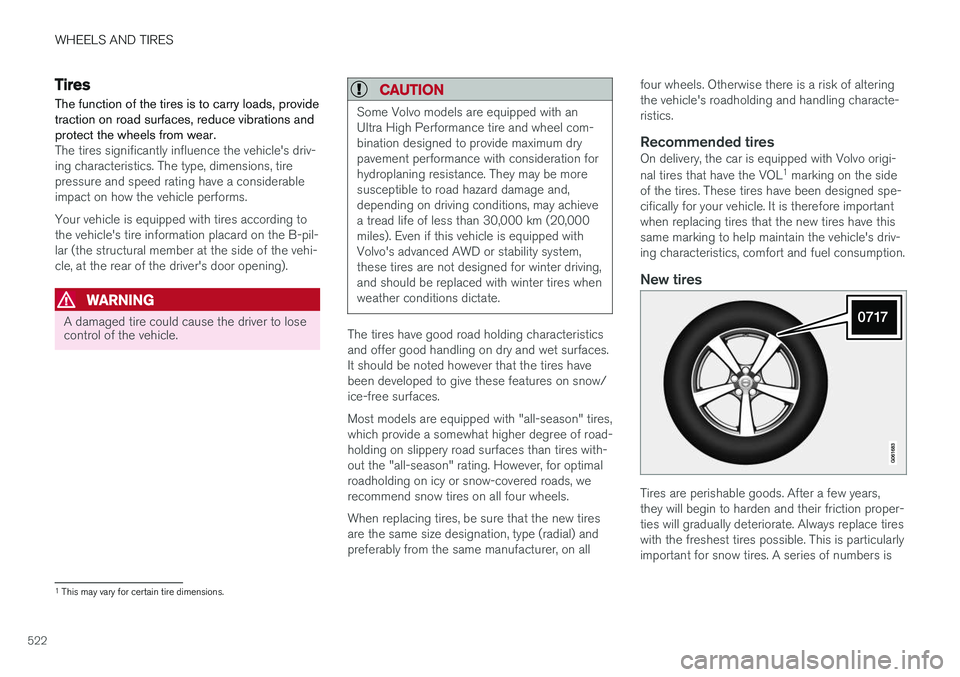
New tires
Tires are perishable goods. After a few years, they will begin to harden and their friction proper-ties will gradually deteriorate. Always replace tireswith the freshest tires possible. This is particularlyimportant for snow tires. A series of numbers is
1 This may vary for certain tire dimensions.
Page 529 of 660

WHEELS AND TIRES
527
NOTE
The tire's load index and speed rating may not appear on the sidewall because they arenot required by law.
7.M+S or M/S = Mud and Snow, AT = All Ter-
rain, AS = All Season
8. U.S. DOT Tire Identification Number (TIN) : This begins with the letters "DOT" and
indicates that the tire meets all federalstandards. The next two numbers are thefactory code where the tire was manufac-tured, the next two are the tire size code andthe last four numbers represent the weekand year the tire was made. For example,0717 means that the tire was manufacturedduring week 7 of 2017. The numbers inbetween are marketing codes used at themanufacturer's discretion. This informationhelps a tire manufacturer identify a tire forsafety recall purposes.
9. Tire Ply Composition and Material Used :
Indicates the number of plies indicates or thenumber of layers of rubber-coated fabric inthe tire tread and sidewall. Tire manufactur-ers also must indicate the ply materials in thetire and the sidewall, which include steel,nylon, polyester, and others.
10. Maximum Load : Indicates the maximum
load in pounds and kilograms that can becarried by the tire. Refer to the vehicle's tire information placard located on the B-Pillarfor the correct tire pressure for your vehicle.
11. Treadwear, Traction, and Temperaturegrades .
12. Maximum permissible inflation pressure: the greatest amount of air pressure that should ever be put in the tire. This limit is setby the tire manufacturer.
Speed SymbolA tire's Speed Symbol (SS) indicates the maxi-mum speed for which the tire has been certifiedand should be at least equivalent to the vehicle'stop speed. Winter tires, with or without studs, are exceptions and may use a lower SS. When winter tires areinstalled, the vehicle may not be driven fasterthan the tires' SS. The vehicle's speed should always be determined by the posted speed limit and traffic and roadconditions, not the tire's SS. The following table indicates the maximum per- missible speed for each SS.
M 130 km/h (81 mph)
Q 160 km/h (100 mph)
T 190 km/h (118 mph)
H 210 km/h (130 mph)
V 240 km/h (149 mph)
W 270 km/h (168 mph)
Y 300 km/h (186 mph)
WARNING
• The wheel and tire sizes for your Volvo are specified to meet stringent stabilityand handling requirements. Unapprovedwheel/tire size combinations can nega-tively affect your vehicle's stability andhandling.
• Any damage caused by installation ofunapproved wheel/tire size combinationswill not be covered by your new vehiclewarranty. Volvo assumes no responsibilityfor death, injury, or expenses that mayresult from such installations.
Related information
•
Tires (p. 522)
Page 542 of 660

||
WHEELS AND TIRES
* Option/accessory.
540 10. Crank it up until it is properly aligned and it is
in contact with the vehicle's jack attachment point. Make sure the top of the jack (or thegarage lift arms) is correctly positioned in theattachment point, with the bump on the topof the jack in the recess in the attachmentpoint and the base positioned vertically underthe attachment point.
11. Turn the jack so that the crank is as far as possible from the side of the vehicle, whichwill position the jack's arms perpendicular tothe vehicle's direction of movement.
12. Raise the vehicle until the wheel to be changed can move freely. Unscrew the wheelbolts and lift off the wheel.
Related information
• Leveling control settings
* (p. 429)
• When changing wheels (p. 536)
• Hoisting the vehicle (p. 579)
• Jack
* (p. 537)
• Tool kit (p. 536)
• Installing a wheel (p. 540)
Installing a wheel
Instructions for installing a wheel during a wheel change.
NOTE
The jack provided with your vehicle is intended to be used only in temporary situa-tions such as changing wheels in the event ofa flat tire. Only the jack that came with yourparticular model should be used to lift thevehicle. If the vehicle needs to be lifted morefrequently or for a prolonged period, using agarage jack or hoist is recommended. Alwaysfollow this device's instructions for use.
WARNING
• Apply the parking brake and put the gear selector in the Park (
P) position.
• Block the wheels standing on the ground, use rigid wooden blocks or large stones.
• Check that the jack is not damaged, thethreads are properly lubricated and it isfree from dirt.
• Be sure the jack is on a firm, level, non-slippery surface and that it is upright andnot leaning.
• The jack must correctly engage in thejack attachment.
• No objects should be placed between thebase of the jack and the ground, orbetween the jack and the attachment baron the vehicle.
• Never let anyone remain in the vehiclewhen it is raised on a jack.
• If a tire must be changed near passingtraffic, make sure all passengers move toa safe location.
• Use a jack intended for the vehicle whenchanging a tire. For any other job, usestands to support the vehicle.
• Never crawl under or allow any part ofyour body to be extended under a vehiclesupported by a jack.
Page 546 of 660

WHEELS AND TIRES
544
Snow chains
Using snow chains and/or snow tires can help improve traction in winter driving conditions.
WARNING
Use Volvo genuine snow chains or equivalent snow chains that are suitable for the vehicle model and the tire and wheel sizes. Only one-
sided snow chains are permitted.
If uncertain about snow chains, Volvo recom- mends contacting an authorized Volvo work-shop. Use of the wrong snow chains couldcause serious damage to the vehicle andresult in an accident.
CAUTION
Snow chains can be used on the vehicle, with the following restrictions:
• Volvo recommends not using snowchains on wheel dimensions larger than18 inches.
• Always follow the manufacturer's installa-tion instructions carefully. Install chainsas tightly as possible and retighten peri-odically.
• Only put snow chains on the front wheels(also applies to all-wheel drive vehicles).
• If accessory, aftermarket or "custom"tires and wheels with different dimen-sions than the original tires and wheelsare used, snow chains in some casesmay NOT be used. Sufficient distancebetween the chains and brakes, suspen-sion and body components must bemaintained.
• Check local regulations regarding the useof snow chains before installing.
• Never exceed the snow chain manufac-turer's specified maximum speed limit.Under no circumstances should youexceed 50 km/h (30 mph).
• Avoid bumps, holes or sharp turns whendriving with snow chains.
•Avoid driving on surfaces without snow as this wears out both the snow chains andthe tires.
• The handling of the vehicle can beadversely affected when driving withchains. Avoid fast or sharp turns as wellas locked wheel braking.
• Some types of strap-on chains affectbrake components and therefore mustNOT be used.
Consult a Volvo retailer for more information about snow chains.
Related information
•
Winter driving (p. 434)
Page 548 of 660

||
WHEELS AND TIRES
546
Sealing compound bottle
Switch
Connecting
NOTE
Do not break the seal of the bottle before use. The seal is broken automatically whenthe bottle is screwed into place.
WARNING
Please keep the following points in mind when using the tire sealing system:
• The sealing compound bottle (no. 8 in the illustration) contains 1) rubber latex, natu-ral and 2) ethanediol. These substancesare harmful if swallowed.
• The contents of this bottle may causeallergic skin reactions or otherwise bepotentially harmful to the respiratory tract,the skin, the central nervous system, andthe eyes.
Precautions:
• Keep out of reach of children.
• Do not ingest the contents.
• Avoid prolonged or repeated contact with the skin. Remove any clothing that has come into contact with sealant.
• Wash thoroughly after handling.
First aid: • Skin: Wash affected areas of the skin with soap and water. Get medical atten-tion if symptoms occur.
• Eyes: Flush with plenty of water for least15 minutes, occasionally lifting the upperand lower eyelids. Get medical attention ifsymptoms occur.
• Inhalation: Move the exposed person to fresh air. If irritation persists, get medicalattention.
• Ingestion: Do NOT induce vomitingunless directed to do so by medical per-sonnel. Get medical attention.
• Disposal: Dispose of this material and itscontainer at a hazardous or special wastecollection point.
WARNING
•
Do not remove the bottle while the tire sealing system is being used.
• Do not remove the hose while the tiresealing system is being used.
1. Turn on the vehicle's hazard warning flashers if the tire sealing system is to be used in anarea with traffic. If the puncture was caused by a nail or simi- lar object, do not remove it. It will help sealthe hole.
2. Peel off the speed limit sticker from the side of the compressor. Affix the decal to a clearlyvisible location on the windshield to remindthe driver not to exceed this speed limit. Donot drive faster than 80 km/h (50 mph) whileusing a tire that has been temporarilyrepaired with the tire sealing system.