Page 91 of 660
DISPLAYS AND VOICE CONTROL
89
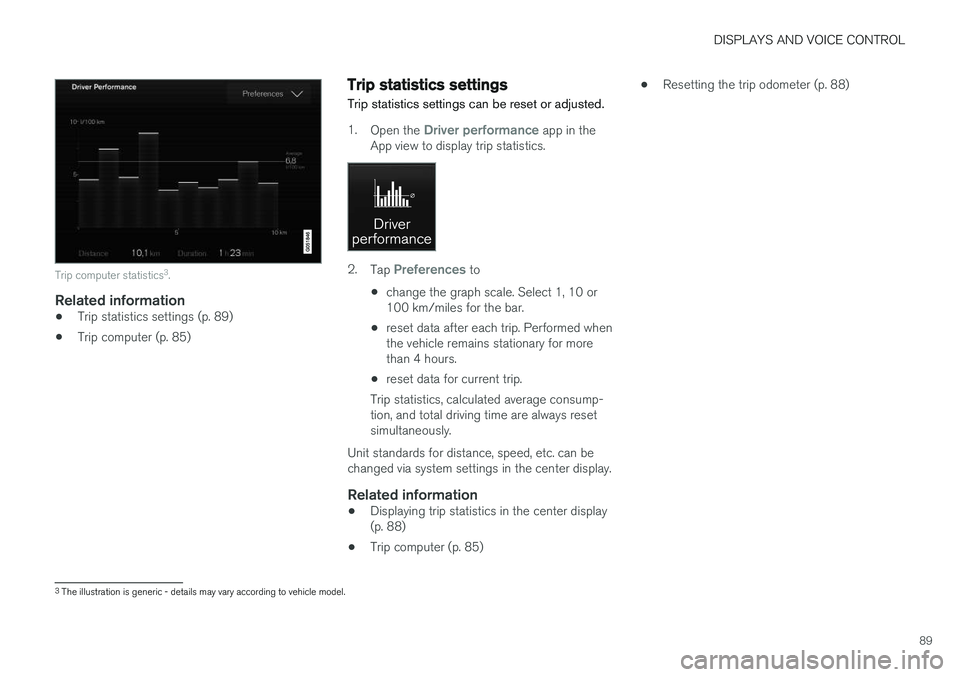
Trip computer statistics3
.
Related information
• Trip statistics settings (p. 89)
• Trip computer (p. 85)
Trip statistics settings
Trip statistics settings can be reset or adjusted.
1. Open the Driver performance app in the
App view to display trip statistics.
2. Tap Preferences to
• change the graph scale. Select 1, 10 or 100 km/miles for the bar.
• reset data after each trip. Performed whenthe vehicle remains stationary for morethan 4 hours.
• reset data for current trip.
Trip statistics, calculated average consump-tion, and total driving time are always resetsimultaneously.
Unit standards for distance, speed, etc. can bechanged via system settings in the center display.
Related information
• Displaying trip statistics in the center display(p. 88)
• Trip computer (p. 85) •
Resetting the trip odometer (p. 88)
3
The illustration is generic - details may vary according to vehicle model.
Page 435 of 660

STARTING AND DRIVING
}}
433
•
Fuel consumption is increased at high speeds - air resistance increases with speed.
• Remove unnecessary items from the vehicle- the heavier the load, the higher the fuelconsumption.
• Maintain the correct pressure in the tires andcheck pressure regularly.
• The type of tires used could affect fuel con-sumption - consult a retailer for advice onsuitable tires.
• Do not use winter tires after the winter sea-son has ended.
• Roof loads increase air resistance andincrease fuel consumption. Remove roofboxes, ski racks, etc. that are not in use.
• Avoid driving with the windows open.
• Using the trip computer's fuel consumptionindicators can help you learn how to drivemore economically.
Other factors that decrease fuel
consumption
• Dirty air cleaner.
• Dirty engine oil and clogged oil filter.
• Incorrect front-end alignment.
• Incorrect wheel alignment.
Some of the above items and others are checked as part of Volvo's standard maintenance sched-ule.
Related information
• Drive-E
‒ purer driving pleasure (p. 27)
• ECO drive mode (p. 420)
• Checking tire pressure (p. 529)
Preparing for a long trip
It is important to have the vehicle's systems and equipment checked carefully before driving longdistances.
Check that:
• the engine is running properly and that fuel consumption is normal
• there are no leaks (fuel, oil or other fluid)
• the brake pedal is functioning optimally
• all lights are working
‒
adjust the headlight
height if the vehicle is carrying a heavy load
• tire tread depth and air pressure are at cor-rect levels. Change to snow tires when driv-ing in areas where there is a risk of snowy oricy roads.
• the start battery is sufficiently charged
• the wiper blades are in good condition
Related information
• Checking tire pressure (p. 529)
• Filling washer fluid (p. 626)
• Winter driving (p. 434)
• Economical driving (p. 432)
• Vehicle modem settings (p. 505)
• Loading recommendations (p. 561)
• Driving with a trailer (p. 443)
• Pilot Assist (p. 303)
Page 575 of 660

MAINTENANCE AND SERVICE
}}
573
Emission inspection readiness
How do states use OBD II for emission
inspections?
Many states connect a computer directly to a vehicle's OBD II system. The inspector can thenread "faults." In some states, this type of inspec-tion has replaced the tailpipe emission test.
How can my vehicle fail OBD II emission
inspection?
Your vehicle can fail OBD II emission inspection for any of the following reasons:
• If your Check Engine (MIL) light is lit, yourvehicle may fail inspection.
• If your vehicle's Check Engine light was lit,but went out without any action on your part,OBD II will still have a recorded fault. Yourvehicle may pass or fail, depending on theinspection practices in your area.
• If you had recent service that required dis-connecting the battery, OBD II diagnosticinformation may be incomplete and "notready" for inspection. A vehicle that is notready may fail inspection.
How can I prepare for my next OBD II
emission inspection?
• If your Check Engine (MIL) light is lit - or was lit but went out without service, have your vehicle diagnosed and, if necessary, servicedby a qualified Volvo technician.
• If you recently had service for a lit CheckEngine light, or if you had service thatrequired disconnecting the battery, a periodof driving is necessary to bring the OBD IIsystem to "ready" for inspection. Two half-hour trips of mixed stop-and-go/highwaydriving are typically needed to allow OBD II toreach readiness. Your Volvo retailer can pro-vide you with more information on planning atrip.
• Maintain your vehicle in accordance with yourvehicle's maintenance schedule.
Owner maintenancePeriodic maintenance requirements and intervalsare described in your vehicle's Warranty andService Records Information booklet. The following points can be carried out between the normally scheduled maintenance services.
Each time the car is refueled:
•Check the engine oil level.
• Clean the windshield, windshield wipers, headlights, and taillights.
Monthly:
• Check cold tire pressure in all tires. Inspect the tires for wear.
• Check that engine coolant and other fluidlevels are between the indicated "min" and"max" markings.
• Clean interior glass surfaces with a glasscleaner and soft paper towels.
• Wipe driver information displays with a softcloth.
• Visually inspect battery terminals for corro-sion. Corrosion may indicate a loose terminalconnector, or a battery near the end of itsuseful service life. Consult your Volvo retailerfor additional information.
As needed:
Wash the car, including the undercarriage, to reduce wear that can be caused by a buildup ofdirt, and corrosion that can be caused by salt res-idues. Clean leaves and twigs from air intake vents at the base of the windshield, and from other placeswhere they may collect.
NOTE
Complete service information for qualified technicians is available online for purchase orsubscription at www.volvotechinfo.com.
Page 657 of 660

INDEX
655
Traction control 266
Traffic information 465
Trailer 445
driving with a trailer 443
Lamps 446
swaying 445
Trailer Stability Assist 445 trailer 445
Trailer stabilizer 266 Trailer towing trailer hitch 442
Transmission 411 automatic 412
Transmission fluid grade 639
Travel Link 474 Fuel 477
Notifications 476
Sports 478
weather 475
Tread depth 525, 543
Tread wear indicator 525
Trip computer 85, 87
Trip odometer 85
Trip odometer resetting 88
Trip statistics 88
Troubleshooting Adaptive Cruise Control 298
Troubleshooting the camera sensor 324
TSA - Trailer Stability Assist 266, 445
Tunnel detection 153
Turn off engine 400
Turn signals 156Type approval radar system 322
U
Uniform Tire Quality Grading 528
Units 130
Unknown vehicle component 262Unlocking
settings 234
with key blade 243
USB socket for connecting media 486
V
Vehicle care 614, 615, 617, 618, 619, 620leather upholstery 612
Vehicle Event Data 33 Vehicle functions in the center display 120
Vehicle key bat. low 236Vehicle modem connecting vehicle to Internet 504
settings 505
Vehicle recovery 450
Vehicle status 576 inflation pressure 534
Vehicle upholstery 609, 611, 612, 613, 614
Vehicle weight 635
Ventilation 206, 207 Seats 216
Video 484, 486 settings 485
Voice control 143 climate 202
phone 145
radio and media 146
settings 146
VOL mark 522