Page 250 of 632
2504-3. Operating the lights and wipers
YARIS_HV_OM_Europe_OM52J66E
Rear window wiper and washer
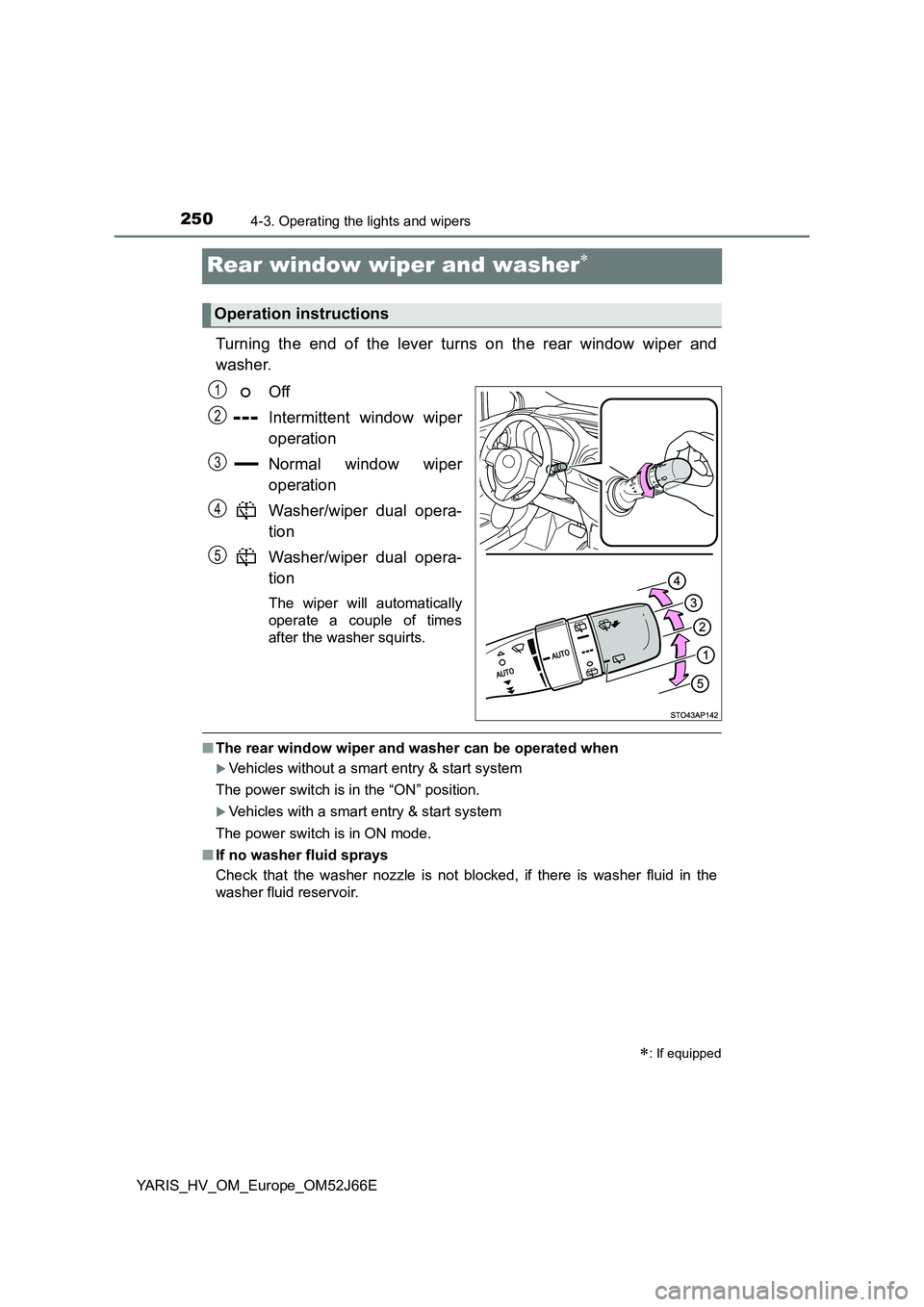
Turning the end of the lever turns on the rear window wiper and
washer.
Off
Intermittent window wiper
operation
Normal window wiper
operation
Washer/wiper dual opera-
tion
Washer/wiper dual opera-
tion
The wiper will automatically
operate a couple of times
after the washer squirts.
■ The rear window wiper and washer can be operated when
Vehicles without a smart entry & start system
The power switch is in the “ON” position.
Vehicles with a smart entry & start system
The power switch is in ON mode.
■ If no washer fluid sprays
Check that the washer nozzle is not blocked, if there is washer fluid in the
washer fluid reservoir.
: If equipped
Operation instructions
1
2
3
4
5
Page 251 of 632
2514-3. Operating the lights and wipers
4
Driving
YARIS_HV_OM_Europe_OM52J66E
NOTICE
■When the rear window is dry
Do not use the wiper, as it may damage the rear window.
■ When the washer fluid tank is empty
Do not operate the switch continually as the washer fluid pump may over-
heat.
■ When a nozzle becomes blocked
In this case, contact any authorized Toyota retailer or Toyota authorized
repairer, or any reliable repairer.
Do not try to clear it with a pin or other object. The nozzle will be damaged.
Page 252 of 632
2524-4. Refueling
YARIS_HV_OM_Europe_OM52J66E
Opening the fuel tank cap
●Vehicles without a smart entry & start system
Turn the power switch to the “LOCK” position and ensure that all
the doors and windows are closed.
● Vehicles with a smart entry & start system
Turn the power switch off and ensure that all the doors and win-
dows are closed.
● Confirm the type of fuel.
■Fuel types
P. 601
■ Fuel tank opening for unleaded gasoline
To help prevent incorrect fueling, your vehicle has a fuel tank opening that
only accommodates the special nozzle on unleaded fuel pumps.
Perform the following steps to open the fuel tank cap:
Before refueling the vehicle
Page 276 of 632
2764-5. Toyota Safety Sense
YARIS_HV_OM_Europe_OM52J66E
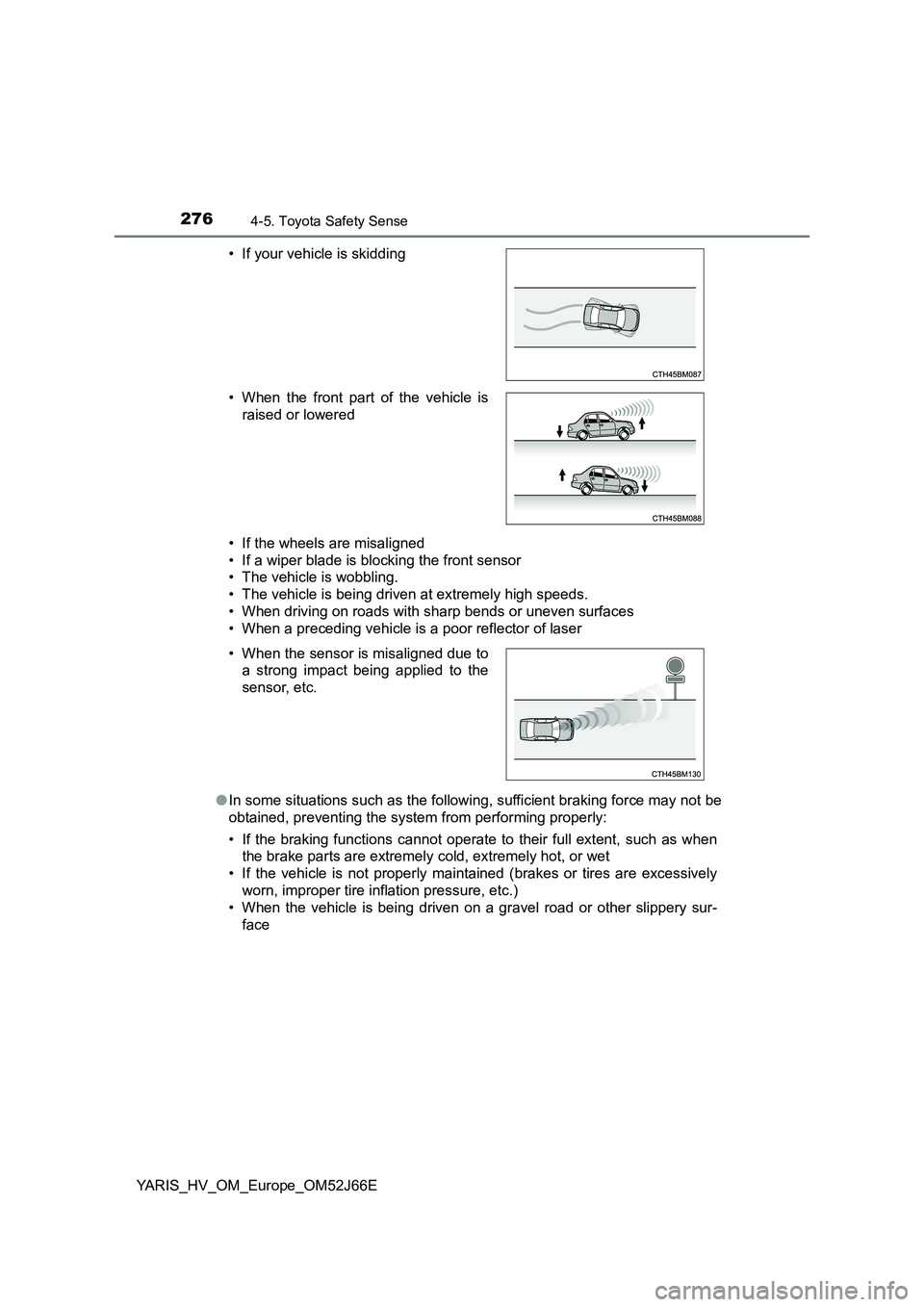
• If the wheels are misaligned
• If a wiper blade is blocking the front sensor
• The vehicle is wobbling.
• The vehicle is being driven at extremely high speeds.
• When driving on roads with sharp bends or uneven surfaces
• When a preceding vehicle is a poor reflector of laser
● In some situations such as the following, sufficient braking force may not be
obtained, preventing the system from performing properly:
• If the braking functions cannot operate to their full extent, such as when
the brake parts are extremely cold, extremely hot, or wet
• If the vehicle is not properly maintained (brakes or tires are excessively
worn, improper tire inflation pressure, etc.)
• When the vehicle is being driven on a gravel road or other slippery sur-
face
• If your vehicle is skidding
• When the front part of the vehicle is
raised or lowered
• When the sensor is misaligned due to
a strong impact being applied to the
sensor, etc.
Page 303 of 632
303
4
4-6. Using the driving support systems
Driving
YARIS_HV_OM_Europe_OM52J66E
Driving assist systems
◆ECB (Electronically Controlled Brake System)
The electronically controlled system generates braking force corre-
sponding to the brake operation
◆ABS (Anti-lock Brake System)
Helps to prevent wheel lock when the brakes are applied suddenly,
or if the brakes are applied while driving on a slippery road surface
◆Brake assist
Generates an increased level of braking force after the brake pedal
is depressed when the system detects a panic stop situation
◆VSC (Vehicle Stability Control)
Helps the driver to control skidding when swerving suddenly or
turning on slippery road surfaces
◆TRC (Traction Control)
Helps to maintain drive power and prevent the drive wheels from
spinning when starting the vehicle or accelerating on slippery roads
◆Hill-start assist control
Helps to reduce the backward movement of the vehicle when start-
ing on an uphill
◆EPS (Electric Power Steering)
Employs an electric motor to reduce the amount of effort needed to
turn the steering wheel
To keep driving safety and performance, the following systems
operate automatically in response to various driving situations.
Be aware, however, that these systems are supplementary and
should not be relied upon too heavily when operating the vehi-
cle.
Page 314 of 632
3144-7. Driving tips
YARIS_HV_OM_Europe_OM52J66E
Accelerate the vehicle slowly, keep a safe distance between you and
the vehicle ahead, and drive at a reduced speed suitable to road con-
ditions.
● Park the vehicle and move the shift lever to P without setting the
parking brake. The parking brake may freeze up, preventing it from
being released. If the vehicle is parked without setting the parking
brake, make sure to block the wheels.
Failure to do so may be dangerous because it may cause the vehi-
cle to move unexpectedly, leading to an accident.
● If the vehicle is parked without setting the parking brake, confirm
that the shift lever cannot be moved out of P*.
*: The shift lever will be locked if it is attempted to be shifted from P to any
other position without depressing the brake pedal. If the shift lever can be
shifted from P, there may be a problem with the shift lock system. Have the
vehicle inspected by any authorized Toyota retailer or Toyota authorized
repairer, or any reliable repairer immediately.
When driving the vehicle
When parking the vehicle
Page 340 of 632
3405-5. Using an external device
YARIS_HV_OM_Europe_OM52J66E
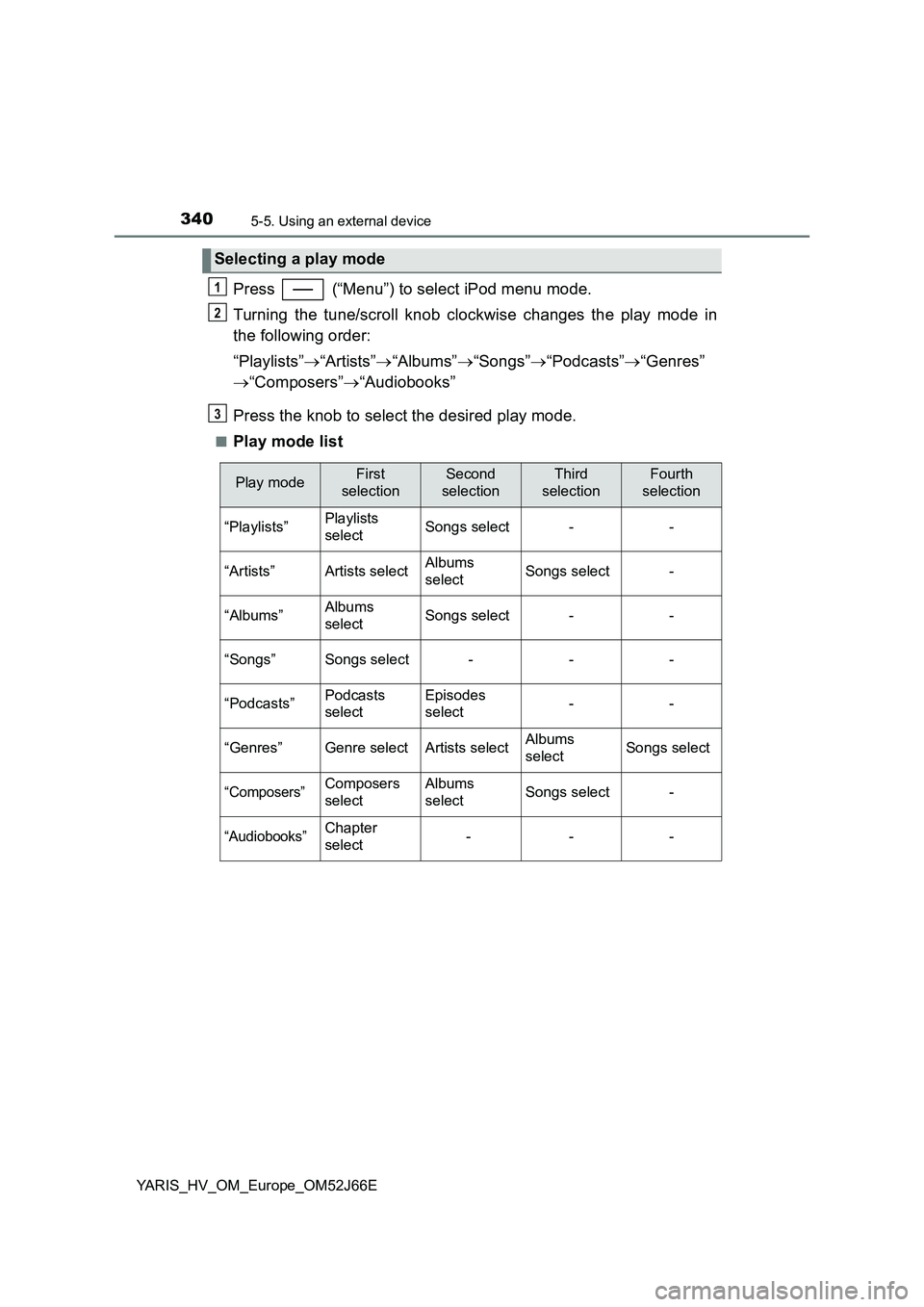
Press (“Menu”) to select iPod menu mode.
Turning the tune/scroll knob clockwise changes the play mode in
the following order:
“Playlists” “Artists”“Albums”“Songs”“Podcasts”“Genres”
“Composers”“Audiobooks”
Press the knob to select the desired play mode.
■Play mode list
Selecting a play mode
1
2
3
Play modeFirst
selection
Second
selection
Third
selection
Fourth
selection
“Playlists”Playlists
selectSongs select--
“Artists”Artists selectAlbums
selectSongs select-
“Albums”Albums
selectSongs select--
“Songs”Songs select---
“Podcasts”Podcasts
select
Episodes
select--
“Genres”Genre selectArtists selectAlbums
selectSongs select
“Composers”Composers
select
Albums
selectSongs select-
“Audiobooks”Chapter
select---
Page 369 of 632
3695-7. “SETUP” menu
5
Audio system
YARIS_HV_OM_Europe_OM52J66E
Select “Delete contacts” using the tune/scroll knob. (P. 358)
Select the desired phone number using the knob and press
(“Yes”).
To delete all the registered phone numbers, select “All delete” using
the knob and press (“Yes”).
Press (“A-Z”) to display the registered names in alphabetical
order of the initial.
Select “Delete other PB” using the tune/scroll knob. ( P. 358)
Select the desired phonebook using the knob and press
(“Yes”).
Select “Call volume” using the tune/scroll knob. ( P. 358)
Change the call volume.
To decrease the volume: Turn the knob counterclockwise.
To increase the volume: Turn the knob clockwise.
To set the volume, press (“Back”).
Deleting a registered phone number
Deleting another cellular phone’s phonebook
Setting call volume
1
2
1
2
1
2