Page 81 of 520

812. Instrument cluster
2
Instrument cluster
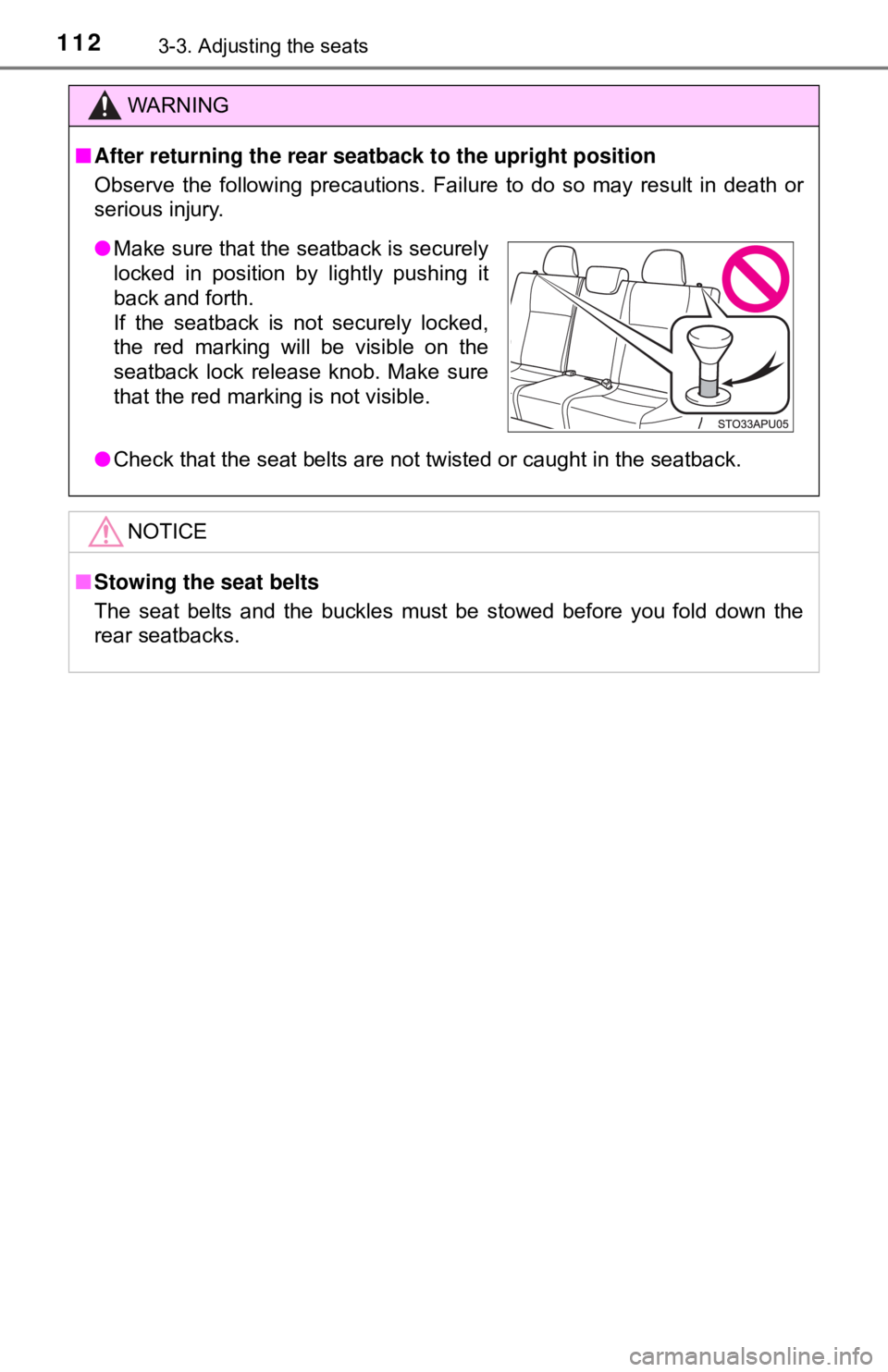
*1: These lights turn on when the engine switch is turned to the “ON” positionto indicate that a system check is being performed. They will turn off after
the engine is started, or after a few seconds. There may be a malfunction
in a system if a light does not come on, or if the lights do not turn off. Have
the vehicle inspected by your Toyota dealer.
*2: If equipped
*3: The light turns on to indicate the engine coolant temperature is low.
*4: Vehicles with an automatic transmission
*5: The light flashes to indicate that the system is operating.
*6: This light illuminates on the center panel.
*7: The light comes on when the system is turned off.
*8: The light comes on when system settings are changed.
*9: The light flashes in yellow to indicate that the vehicle is deviating from thelane.
*1, 5
Slip indicator ( →P. 216)
*1, 2, 7PCS warning light
(→P. 180)
*1
“TRAC OFF” indicator
(→P. 216)
*1, 6
(Except Canada)
“AIR BAG ON/
OFF” indicator
(→P. 49)
*1
VSC off indicator
(→P. 217)
*1, 6
(Canada)
“AIR BAG ON/
OFF” indicator
(→P. 49)
*2, 5, 8PCS activation indicator
(→P. 177)
Page 82 of 520
822. Instrument cluster
WARNING
■If a safety system warning light does not come on
Should a safety system light such as the ABS and SRS warning light not
come on when you start the engine, this could mean that these systems are
not available to help protect you in an accident, which could result in death
or serious injury. Have the vehicle inspected by your Toyota dealer immedi-
ately if this occurs.
NOTICE
■ To prevent damage to the engine and its components
The engine may be overheating if the high engine coolant temperature
warning light flashes or turns on. In this case, immediately stop the vehicle
in a safe place, and check the engine after it has cooled completely.
( →P. 453)
Page 88 of 520

882. Instrument cluster
The temperature display shows temperatures within the range of
-40°F (-40°C) and 122°F (50°C).
■Display
In the following situations, the correct outside temperature may not
be displayed, or the display may take longer than normal to change:
●When the vehicle is stopped, or moving at low speeds (less than
16 mph [25 km/h])
● When the outside temperature has changed suddenly (at the
entrance/exit of a ga rage, tunnel, etc.)
■When “− −” or “E” is displayed
The system may be malfunctioning. Take your vehicle to your
Toyota dealer.
■ When disconnecting and reco nnecting battery terminals
The following information data will be reset.
● Driving range
● Average fuel consumption
● Average vehicle speed
● Clock data
■ Liquid crystal display
Small spots or light spots may appear on the display. This phenomenon is
characteristic of liquid crystal displa y, and there is no problem continuing to
use the display.
■ Changing the pre-collision warning timing
→P. 181
Outside temperature display
NOTICE
■The multi-information disp lay at low temperatures
Allow the interior of the vehicle to warm up before using the liquid crystal
information display. At extremely low temperatures, the display monitor may
respond slowly, and display changes may be delayed.
Page 95 of 520

953-1. Key information
3
Operation of each component
■Key battery depletion
If the wireless remote control function does not operate, the battery may be
depleted. Replace the battery when necessary.
■ Customization that can be conf igured at your Toyota dealer
Settings (e.g. wireless remote control system) can be changed.
(Customizable features: →P. 488)
■ Certification for the wireless remote control
U.S.A.
FCC ID: HYQ23AAA
FCC ID: HYQ12BBY
NOTE:
This device complies with part 15 of the FCC Rules. Operation is subject to
the following two conditions: (1) This device may not cause harmful interfer-
ence, and (2) this device must accept any interference received, including
interference that may cause undesired operation.
FCC WARNING:
Changes or modifications not expressly approved by the party responsible for
compliance could void the user’s authority to operate the equipment.
Canada
NOTE:
This device complies with Industry Canada licence-exempt RSSs.
Operation is subject to the following two conditions: (1) This device may not
cause interference; and (2) This device must accept any interference, includ-
ing interference that may cause undesired operation of the device.
NOTICE
■ To prevent key damage
Observe the following:
● Do not subject the keys to strong shocks, expose them to high tempera-
tures by placing them in direct sunlight, or get them wet.
● Do not expose the keys to electromagnetic materials or attach any mate-
rial that blocks electromagnetic waves to the key surface.
● Do not disassemble the wireless remote control key.
Page 102 of 520
1023-2. Opening, closing and locking the doors
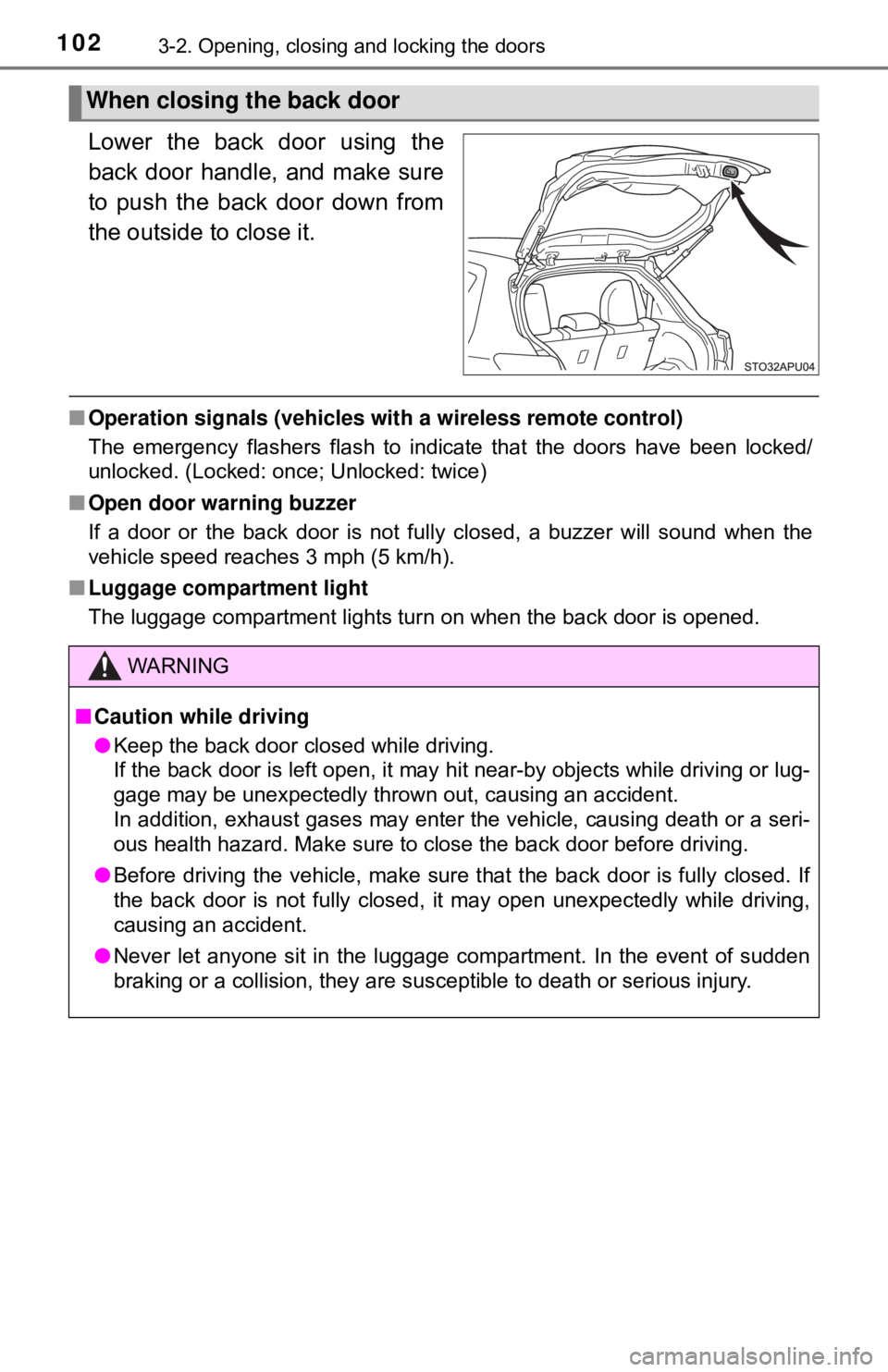
Lower the back door using the
back door handle, and make sure
to push the back door down from
the outside to close it.
■Operation signals (vehicles with a wireless remote control)
The emergency flashers flash to indicate that the doors have been locked/
unlocked. (Locked: once; Unlocked: twice)
■ Open door warning buzzer
If a door or the back door is not fully closed, a buzzer will sound when the
vehicle speed reaches 3 mph (5 km/h).
■ Luggage compartment light
The luggage compartment lights turn on when the back door is opened.
When closing the back door
WARNING
■Caution while driving
● Keep the back door closed while driving.
If the back door is left open, it may hit near-by objects while driving or lug-
gage may be unexpectedly thrown out, causing an accident.
In addition, exhaust gases may enter the vehicle, causing death or a seri-
ous health hazard. Make sure to close the back door before driving.
● Before driving the vehicle, make sure that the back door is fully closed. If
the back door is not fully closed, it may open unexpectedly while driving,
causing an accident.
● Never let anyone sit in the luggage compartment. In the event of sudden
braking or a collision, they are susceptible to death or serious injury.
Page 104 of 520
1043-2. Opening, closing and locking the doors
WARNING
●Do not pull on the back door damper stay to close the back door, and do
not hang on the back door damper stay.
Doing so may cause hands to be caught or the back door damper stay to
break, causing an accident.
● If a bicycle carrier or similar heavy object is attached to the back door, it
may suddenly shut again after being opened, causing someone’s hands,
head or neck to be caught and injured. When installing an accessory part
to the back door, using a genuine Toyota part is recommended.
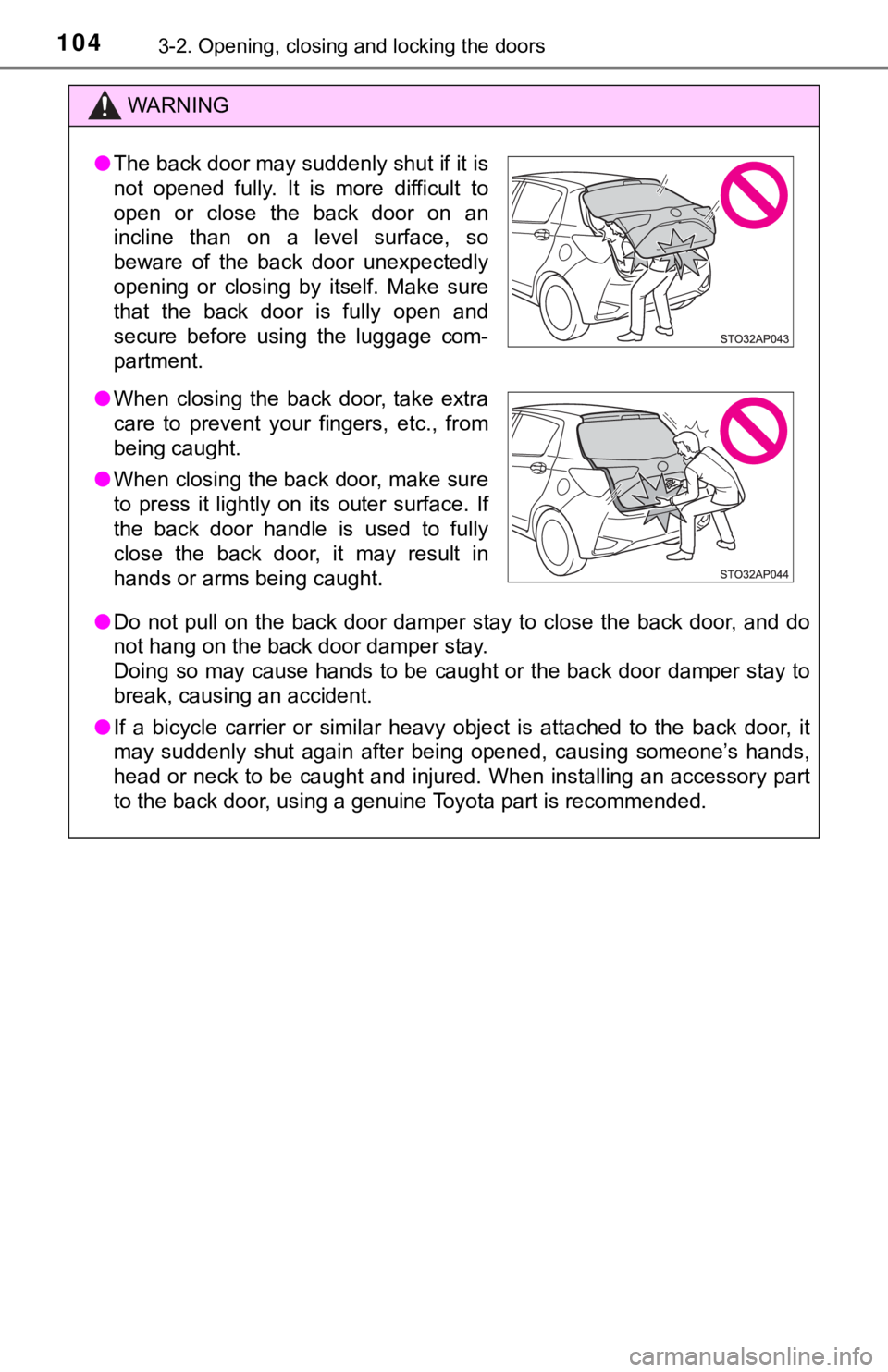
●The back door may suddenly shut if it is
not opened fully. It is more difficult to
open or close the back door on an
incline than on a level surface, so
beware of the back door unexpectedly
opening or closing by itself. Make sure
that the back door is fully open and
secure before using the luggage com-
partment.
● When closing the back door, take extra
care to prevent your fingers, etc., from
being caught.
● When closing the back door, make sure
to press it lightly on its outer surface. If
the back door handle is used to fully
close the back door, it may result in
hands or arms being caught.
Page 112 of 520
1123-3. Adjusting the seats
WARNING
■After returning the rear seat back to the upright position
Observe the following precautions. Failure to do so may result in death or
serious injury.
● Check that the seat belts are not twisted or caught in the seatback.
NOTICE
■Stowing the seat belts
The seat belts and the buckles must be stowed before you fold down the
rear seatbacks.
● Make sure that the seatback is securely
locked in position by lightly pushing it
back and forth.
If the seatback is not securely locked,
the red marking will be visible on the
seatback lock release knob. Make sure
that the red marking is not visible.
Page 130 of 520

1304-1. Before driving
■Eco-friendly driving (vehicles with an automatic transmission)
● The vehicle speed is approximately 80 mph (130 km/h) or higher.
Eco Driving Indicator Light can be activated or deactivated. ( →P. 87)
■ Operating your vehicle in a foreign country
Comply with the relevant vehicle registration laws and confirm the availability
of the correct fuel. ( →P. 471)
During Eco-friendly acceleration opera-
tion (Eco driving), Eco Driving Indicator
Light will turn on. When the accelerator
pedal is depressed excessively, and when
the vehicle is stopped, the light turns off.
Eco Driving Indicator Light will not operate
in the following conditions:
●
The shift lever is in anything other than
D.
WARNING
Observe the following precautions.
Failure to do so may result in death or serious injury.
■When starting the vehicle (automatic transmission)
Always keep your foot on the brake pedal while stopped with the engine
running. This prevents the vehicle from creeping.
■ When driving the vehicle
● Do not drive if you are unfamiliar with the location of the brake and ac\
cel-
erator pedals to avoid depressing the wrong pedal.
• Accidentally depressing the accelerator pedal instead of the brake
pedal will result in sudden acceleration that may lead to an accident.
• When backing up, you may twist your body around, leading to difficulty
in operating the pedals. Make sure to operate the pedals properly.
• Make sure to keep a correct driving posture even when moving the vehicle only slightly. This allows you to depress the brake and accelera-
tor pedals properly.
• Depress the brake pedal using your right foot. Depressing the brake pedal using your left foot may delay response in an emergency, result-
ing in an accident.