Page 246 of 520
2465-4. Using the radio
Search for desired stations by turning the “TUNE SCROLL” knob or
pressing the “SEEK>” or “
Select “(add new)”
To change the preset station to a different one, select and hold the preset
station.
Select “Yes”.
Select “OK” after setting the new preset station.
■Refreshing the station list
Select “Refresh” on the “Station List” screen.
To cancel the refresh, select “Cancel Refresh”.
■ Reception sensitivity
●Maintaining perfect radio reception at all times is difficult due to the continu-
ally changing position of the antenna, differences in signal strength and sur-
rounding objects, such as trains, transmitters, etc.
● The radio antenna is mounted on the roof.
Setting station presets
1
2
3
4
Page 255 of 520
2555-6. Using an external device
5
Multimedia system
■iPod problems
To resolve most problems encountered when using your iPod, disconnect
your iPod from the vehicle iPod connection and reset it. For instructions on
how to reset your iPod, refer to your iPod Owner’s Manual.
■ Error messages
MessageCause/Correction procedures
“Connection error. Please
consult your Owner’s Man-
ual for instructions on how
to connect the iPod.”
This indicates a problem in the iPod or its con-
nection.
“No music files found.”This indicates that there is no music data in
the iPod.
“No videos found.”This indicates that no video files are included
in the iPod.
“There are no songs avail-
able for playback. Please
add compatible files to
your iPod.”
This indicates that songs are not found in a
selected playlist.
“iPod authorization unsuc-
cessful.”This indicates that the display multimedia sys-
tem failed to authorize the iPod.
Please check your iPod.
Page 293 of 520

2935-9. Bluetooth® phone
5
Multimedia system
Contact/Call History Settings
The contacts can be transferred from a Bluetooth® phone to the sys-
tem. Contacts can also be added, edited and deleted.
The call history can be deleted and contacts and favorites can be
changed.
Display the “Phone/Message Settings” screen. ( →P. 291)
Select “Contact/Call History Settings”.
Select the desired item to be
set. For PBAP compatible
Bluetooth
® phones, select to
set “Automatic Transfer” on/
off. When set to on, the
phone’s contact data and his-
tory are automatically trans-
ferred.
Select to update contacts
from the connected phone.
( → P. 294)
Select to sort contacts by the first name or last name field.
Select to add contacts to the favorites list. ( →P. 298)
Select to delete contacts from the favorites list. ( →P. 300)
Select to display contact images.
Select to clear contacts from the call history.
*
Select to add new contacts to the contact list.* ( → P. 296)
Select to edit contacts in the contact list.
* (→ P. 297)
Select to delete contacts from the contact list.
* ( → P. 298)
Select to reset all setup items.
*: For PBAP compatible Bluetooth® phones only, this function is available
when “Automatic Transfer” is set to off.
1
2
3
1
2
3
4
5
6
7
8
9
10
11
Page 348 of 520

3487-2. Maintenance
■Resetting the maintenance required reminder light (except Canada)
After the required maintenance is performed according to the maintenance
schedule, please reset the reminder light.
To reset the reminder light, follow the procedures described below:
Switch the display to the trip meter “A” when the engine is running.
(→ P. 85)
Turn the engine switch to the “LOCK” position.
While pressing the display change button ( →P. 85), turn the engine
switch to the “ON” position (do not start the engine because reset mode
will be canceled). Continue to press and hold the button until the trip
meter displays “000000”.
■ Allow inspection and repairs to be performed by a Toyota dealer
●Toyota technicians are well-trained specialists and are kept up to date with
the latest service information. They are well informed about the operations
of all systems on your vehicle.
● Keep a copy of the repair order. It proves that the maintenance that has
been performed is under warranty cove rage. If any problem should arise
while your vehicle is under warranty, your Toyota dealer will promptly take
care of it.
WARNING
■ If your vehicle is not properly maintained
Improper maintenance could result in serious damage to the vehicle and
possible death or serious injury.
■ Handling of the battery
● Engine exhaust, some of its constituents, and a wide variety of automobile
components contain or emit chemicals known to the State of California to
cause cancer and birth defects and other reproductive harm. Work in a
well ventilated area.
● Oils, fuels and fluids contained in vehicles as well as waste produced by
component wear contain or emit chemic als known to the State of Califor-
nia to cause cancer and birth defects or other reproductive harm. Avoid
exposure and wash any affected area immediately.
● Battery posts, terminals and related accessories contain lead and lead
compounds which are known to cause brain damage. Wash your hands
after handling. ( →P. 367)
1
2
3
Page 372 of 520
3727-3. Do-it-yourself maintenance
■How to initialize the tire pressure warning systemPark the vehicle in a safe place and turn the engine switch to the
“LOCK” position.
Initialization cannot be performed while the vehicle is moving.
Adjust the tire pressure to the specified cold tire inflation pres-
sure level. ( →P. 469)
Make sure to adjust the tire pressu re to the specified cold tire infla-
tion pressure level. The tire pressure warning system will operate
based on this pressure level.
Turn the engine switch to the “ON” position.
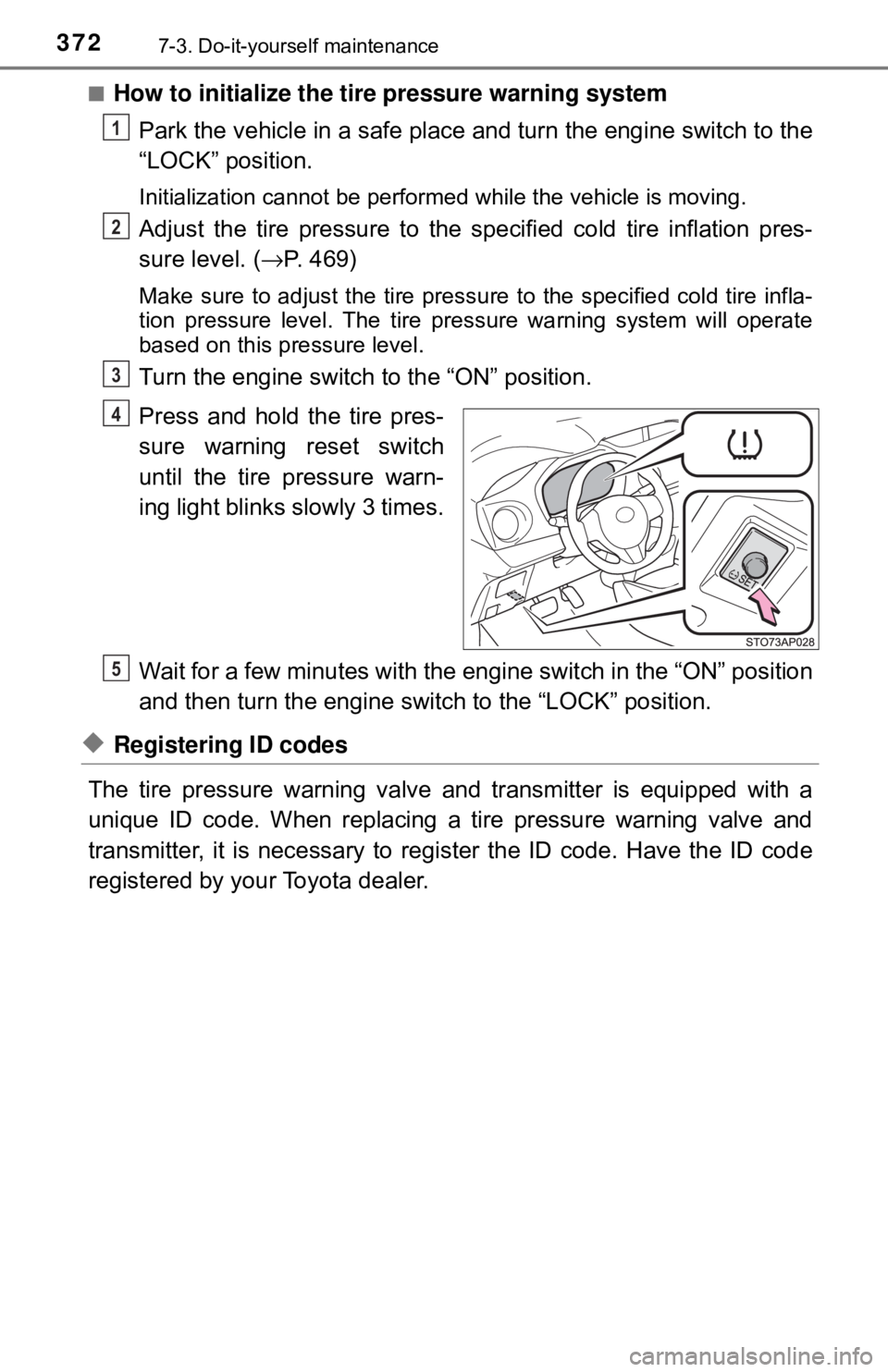
Press and hold the tire pres-
sure warning reset switch
until the tire pressure warn-
ing light blinks slowly 3 times.
Wait for a few minutes with the eng ine switch in the “ON” position
and then turn the engine switch to the “LOCK” position.
◆Registering ID codes
The tire pressure warning valve and transmitter is equipped with a
unique ID code. When replacing a tire pressure warning valve and
transmitter, it is necessary to register the ID code. Have the ID code
registered by your Toyota dealer.
1
2
3
4
5
Page 375 of 520
3757-3. Do-it-yourself maintenance
7
Maintenance and care
■Initializing the tire pressure warning system (vehicles with a tire
pressure warning system)
Initialize the system with the tire infl ation pressure adjusted to the speci-
fied level.
■If the tread on snow tires wears down below 0.16 in. (4 mm)
The effectiveness of the tire s as snow tires is lost.
■If you press the tire pressure warning reset switch accidentally (vehi-
cles with a tire pressure warning system)
If initialization is performed, adjust the tire inflation pressure to the speci-
fied level and initialize the tire pressure warning system again.
■When the initialization of the tire pressure warning system has failed
(vehicles with a tire pressure warning system)
Initialization can be completed in a few minutes. However, in the following
cases, the settings ha s not been recorded and the system will not operate
properly. If repeated attempts to record tire inflation pressure settings are
unsuccessful, have the vehicle in spected by your Toyota dealer.
●When operating the tire pressure wa rning reset switch, the tire pressure
warning light does not blink 3 times.
●After driving for a certain period of time since the initialization has been
completed, the warning light comes on after blinks for 1 minute.
■Certification for the tire pressure warning system
FCC ID: PAXPMVC010
FCC ID: HYQ23AAD
NOTE:
This device complies with part 15 of the FCC Rules. Operation is subject
to the following two conditions: (1) This device may not cause harmful
interference, and (2) this device must accept any interference received,
including interference that may cause undesired operation.
FCC WARNING:
Changes or modifications not expressl y approved by the party responsi-
ble for compliance could void the user ’s authority to operate the equip-
ment.
Page 376 of 520
3767-3. Do-it-yourself maintenance
WARNING
■When inspecting or replacing tires
Observe the following precautions to prevent accidents.
Failure to do so may cause damage to parts of the drive train as well as
dangerous handling characteristics, which may lead to an accident
resulting in death or serious injury.
●Do not mix tires of different makes, models or tread patterns.
Also, do not mix tires of remarkably different treadwear.
●Do not use tire sizes other than those recommended by Toyota.
●Do not mix differently constructed tires (radial, bias-belted or bias-ply
tires).
●Do not mix summer, all season and snow tires.
●Do not use tires that have been used on another vehicle.
Do not use tires if you do not know how they were used previously.
●Do not tow if your vehicle has a compact spare tire installed.
■When initializing the tire pressure warning system (vehicles with a
tire pressure warning system)
Do not operate the tire pressure warning reset switch without first
adjusting the tire inflation pressure to the specified level. Otherwise, the
tire pressure warning light may not come on even if the tire inflation
pressure is low, or it may come on when the tire inflation pressure is
actually normal.
Page 426 of 520
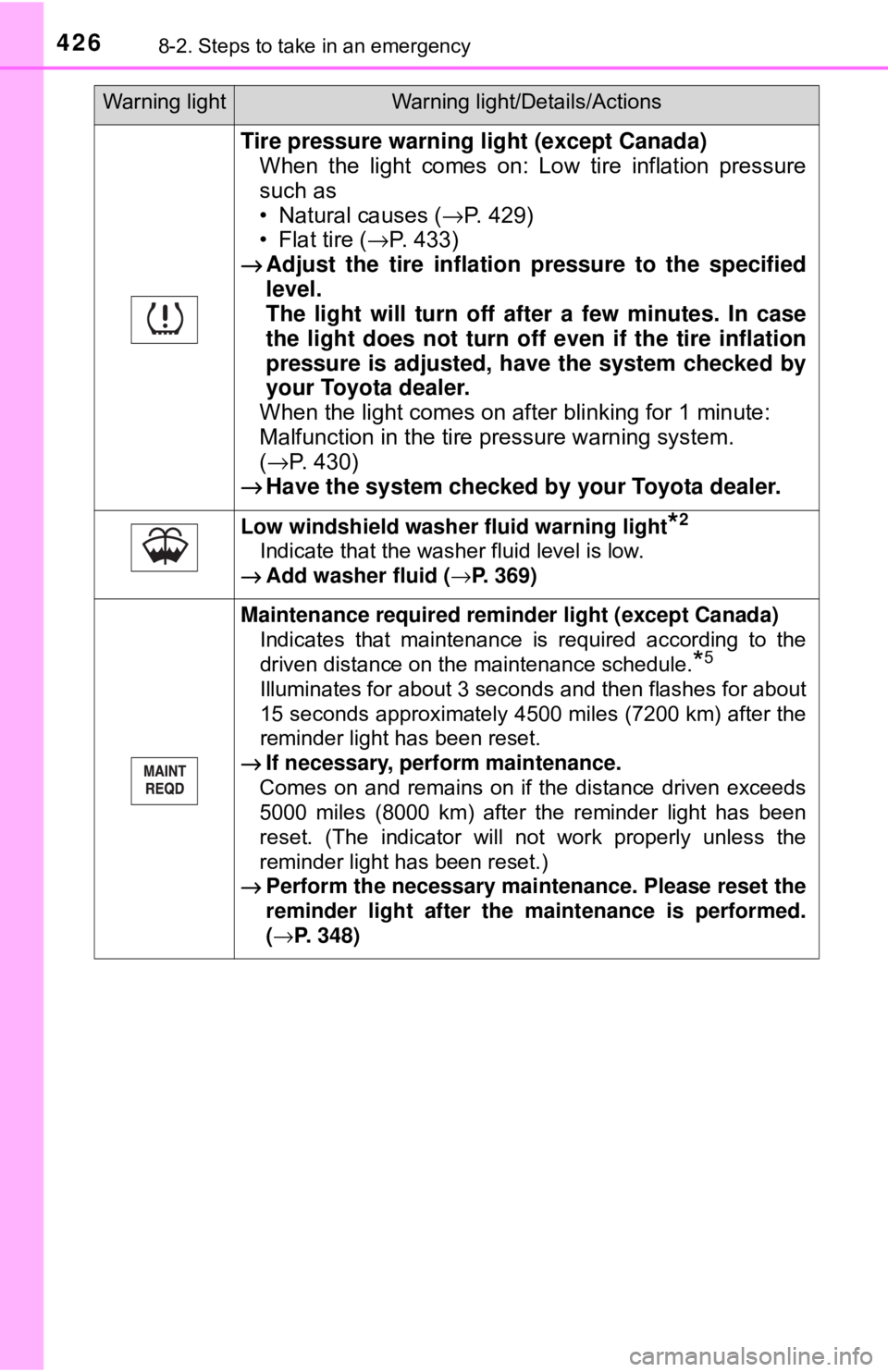
4268-2. Steps to take in an emergency
Tire pressure warning light (except Canada)When the light comes on: Low tire inflation pressure
such as
• Natural causes ( →P. 429)
• Flat tire ( →P. 433)
→ Adjust the tire inflation pressure to the specified
level.
The light will turn off af ter a few minutes. In case
the light does not turn off even if the tire inflation
pressure is adjusted, have the system checked by
your Toyota dealer.
When the light comes on after blinking for 1 minute:
Malfunction in the tire pressure warning system.
( → P. 430)
→ Have the system checked by your Toyota dealer.
Low windshield washer fluid warning light*2
Indicate that the washer fluid level is low.
→ Add washer fluid ( →P. 369)
Maintenance required reminder light (except Canada)
Indicates that maintenance is required according to the
driven distance on the maintenance schedule.
*5
Illuminates for about 3 seconds and then flashes for about
15 seconds approximately 4500 miles (7200 km) after the
reminder light has been reset.
→ If necessary, perform maintenance.
Comes on and remains on if the distance driven exceeds
5000 miles (8000 km) after the reminder light has been
reset. (The indicator will not work properly unless the
reminder light has been reset.)
→ Perform the necessary maintenance. Please reset the
reminder light after the maintenance is performed.
(→P. 348)
Warning lightWarning light/Details/Actions