Page 229 of 660
229
4
4-2. Driving procedures
Driving
AVENSIS_OM_OM20C79E_(EE)
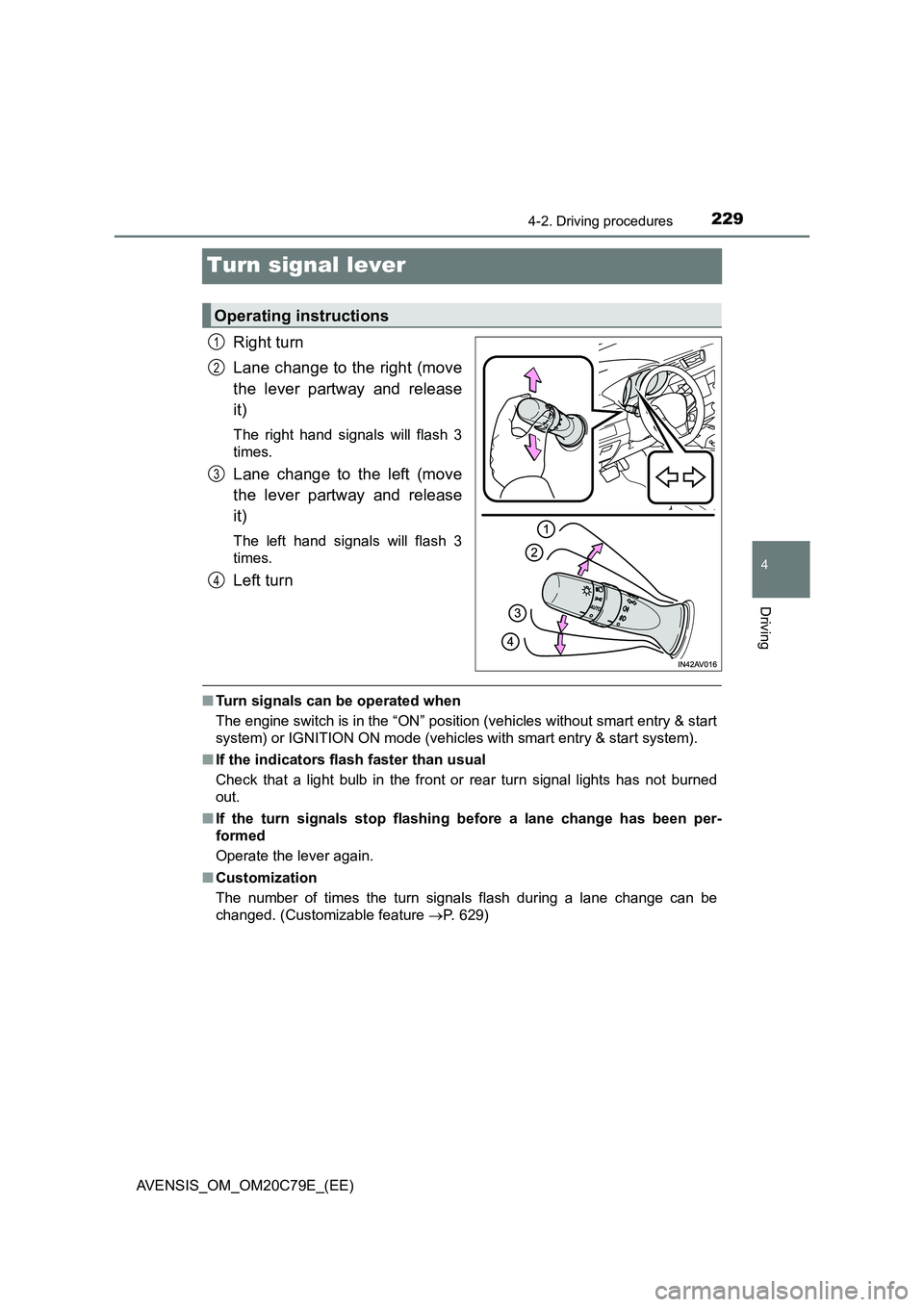
Turn signal lever
Right turn
Lane change to the right (move
the lever partway and release
it)
The right hand signals will flash 3
times.
Lane change to the left (move
the lever partway and release
it)
The left hand signals will flash 3
times.
Left turn
■ Turn signals can be operated when
The engine switch is in the “ON” position (vehicles without smart entry & start
system) or IGNITION ON mode (vehicles with smart entry & start system).
■ If the indicators flash faster than usual
Check that a light bulb in the front or rear turn signal lights has not burned
out.
■ If the turn signals stop flashing before a lane change has been per-
formed
Operate the lever again.
■ Customization
The number of times the turn signals flash during a lane change can be
changed. (Customizable feature P. 629)
Operating instructions
1
2
3
4
Page 230 of 660
2304-2. Driving procedures
AVENSIS_OM_OM20C79E_(EE)
Parking brake
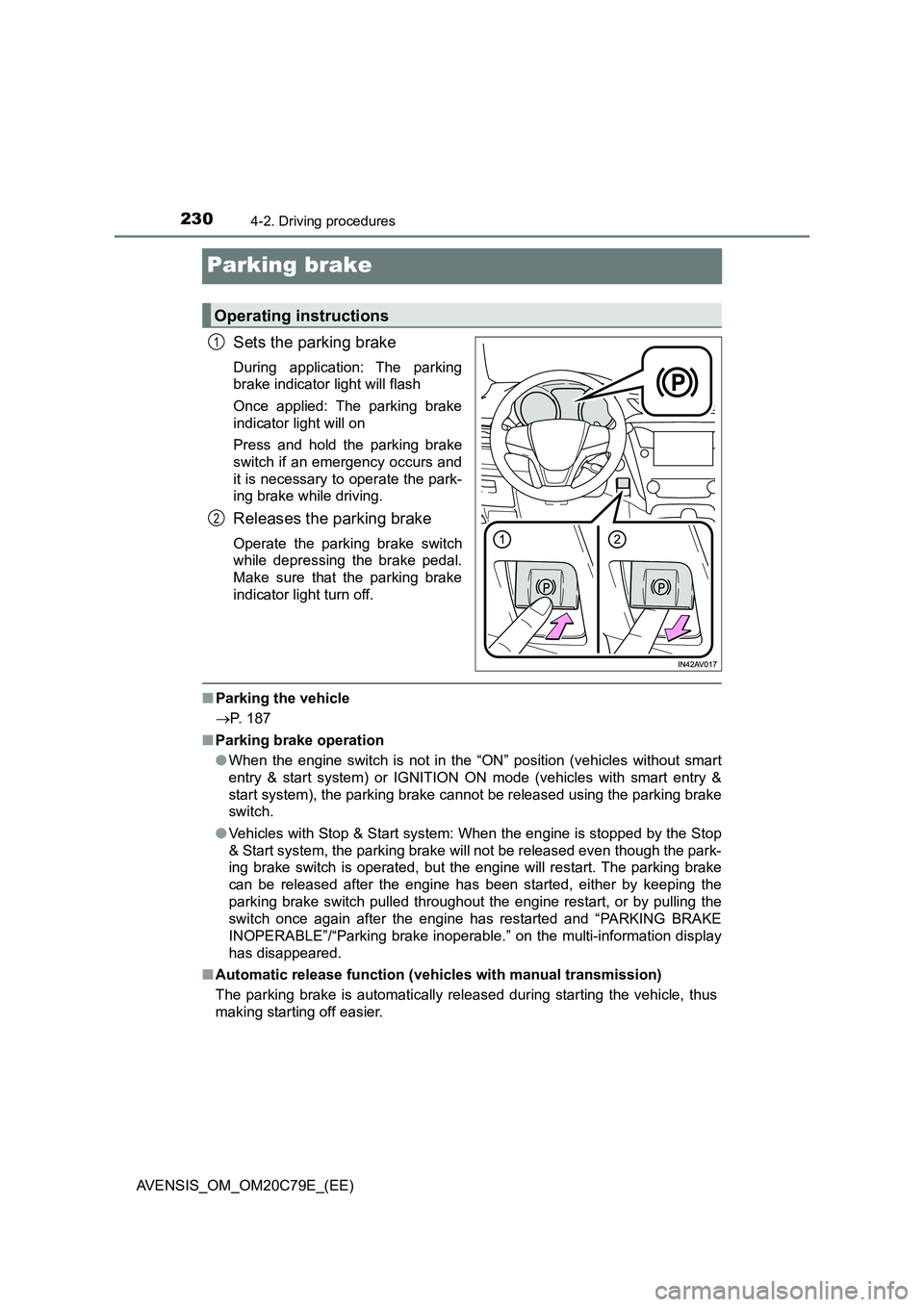
Sets the parking brake
During application: The parking
brake indicator light will flash
Once applied: The parking brake
indicator light will on
Press and hold the parking brake
switch if an emergency occurs and
it is necessary to operate the park-
ing brake while driving.
Releases the parking brake
Operate the parking brake switch
while depressing the brake pedal.
Make sure that the parking brake
indicator light turn off.
■Parking the vehicle
P. 187
■Parking brake operation
●When the engine switch is not in the “ON” position (vehicles without smart
entry & start system) or IGNITION ON mode (vehicles with smart entry &
start system), the parking brake cannot be released using the parking brake
switch.
●Vehicles with Stop & Start system: When the engine is stopped by the Stop
& Start system, the parking brake will not be released even though the park-
ing brake switch is operated, but the engine will restart. The parking brake
can be released after the engine has been started, either by keeping the
parking brake switch pulled throughout the engine restart, or by pulling the
switch once again after the engine has restarted and “PARKING BRAKE
INOPERABLE”/“Parking brake inoperable.” on the multi-information display
has disappeared.
■Automatic release function (vehicles with manual transmission)
The parking brake is automatically released during starting the vehicle, thus
making starting off easier.
Operating instructions
1
2
Page 233 of 660
233
4
4-3. Operating the lights and wipers
Driving
AVENSIS_OM_OM20C79E_(EE)
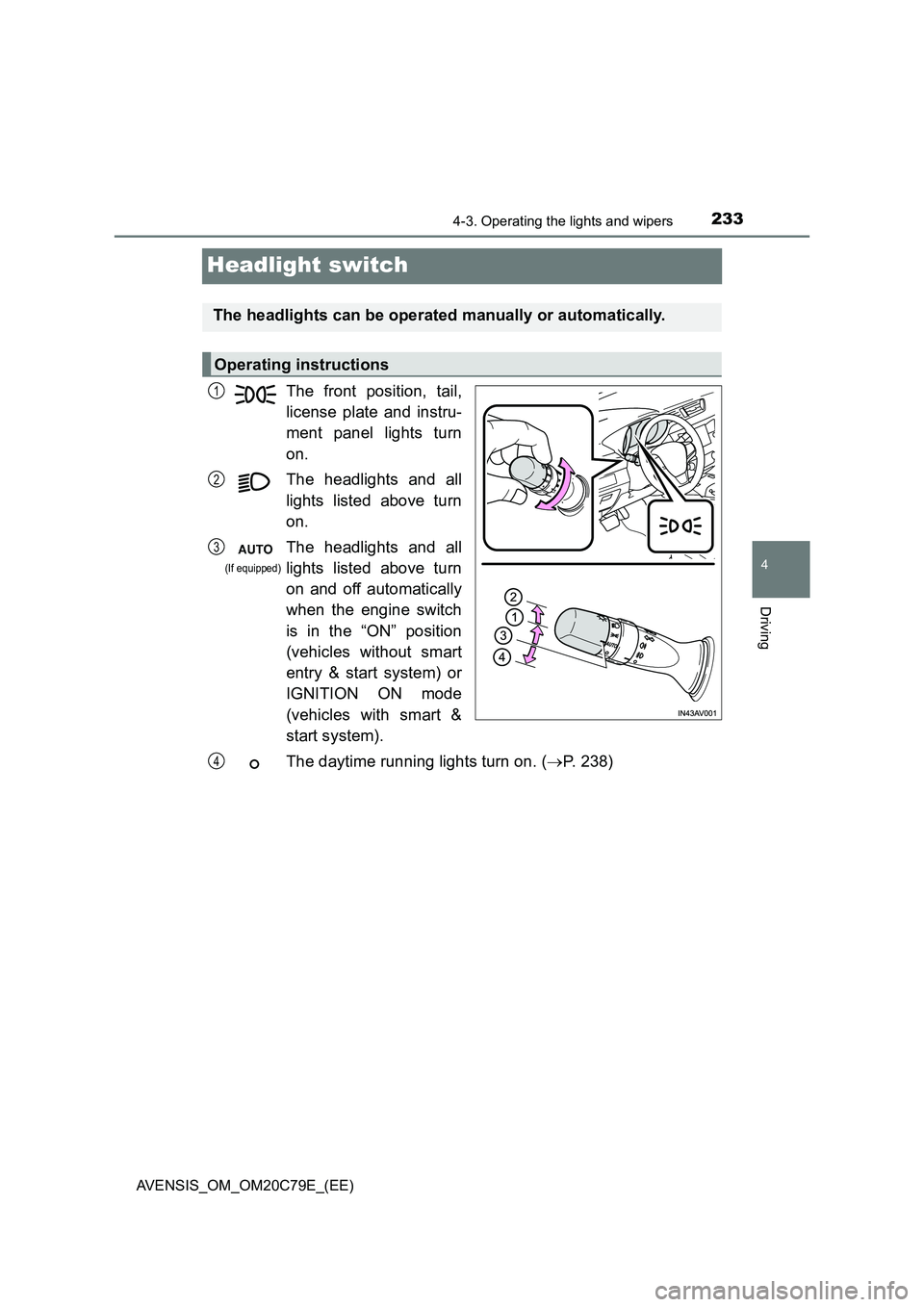
Headlight switch
The front position, tail,
license plate and instru-
ment panel lights turn
on.
The headlights and all
lights listed above turn
on.
The headlights and all
lights listed above turn
on and off automatically
when the engine switch
is in the “ON” position
(vehicles without smart
entry & start system) or
IGNITION ON mode
(vehicles with smart &
start system).
The daytime running lights turn on. ( P. 238)
The headlights can be operated manually or automatically.
Operating instructions
1
2
3
(If equipped)
4
Page 239 of 660
2394-3. Operating the lights and wipers
4
Driving
AVENSIS_OM_OM20C79E_(EE)■Automatic light off system
Vehicles without smart entry & start system
●When the light switch is in the “AUTO” position, the headlight and all the
lights turn off automatically if the engine switch is turned to the “ACC” or
“LOCK” position.
●When the light switch is in the position, the front fog lights turn off
automatically if the engine switch is turned to the “ACC” or “LOCK” position.
●When the light switch is in the
position, the headlights and front fog
lights turn off automatically if the engine switch is turned to “ACC” or “LOCK”
position.
The front position and tail lights turn off automatically after 20 minutes.
To turn the lights on again, turn the engine switch to the “ON” position, or turn
the light switch to the position once and then back to the or
position.
Vehicles with smart entry & start system
●When the light switch is in the “AUTO” position, the headlight and all the
lights turn off automatically if the engine switch is turned to ACCESSORY
mode or turned off.
●When the light switch is in the position, the front fog lights turn off
automatically if the engine switch is turned to ACCESSORY mode or turned
off.
●When the light switch is in the
position, the headlights and front fog
lights turn off automatically if the engine switch is turned to ACCESSORY
mode or turned off.
The front position and tail lights turn off automatically after 20 minutes.
To turn the lights on again, turn the engine switch to IGNITION ON mode, or
turn the light switch to the position once and then back to the or
position.
■Light reminder buzzer
Vehicles without smart entry & start system
A buzzer sounds when the engine switch is turned to the “LOCK” or “ACC”
position and the driver’s door is opened while the lights are turned on.
Vehicles with smart entry & start system
A buzzer sounds when the engine switch is turned off or to ACCESSORY
mode and the driver’s door is opened while the lights are turned on.
Page 245 of 660
2454-3. Operating the lights and wipers
4
Driving
AVENSIS_OM_OM20C79E_(EE)
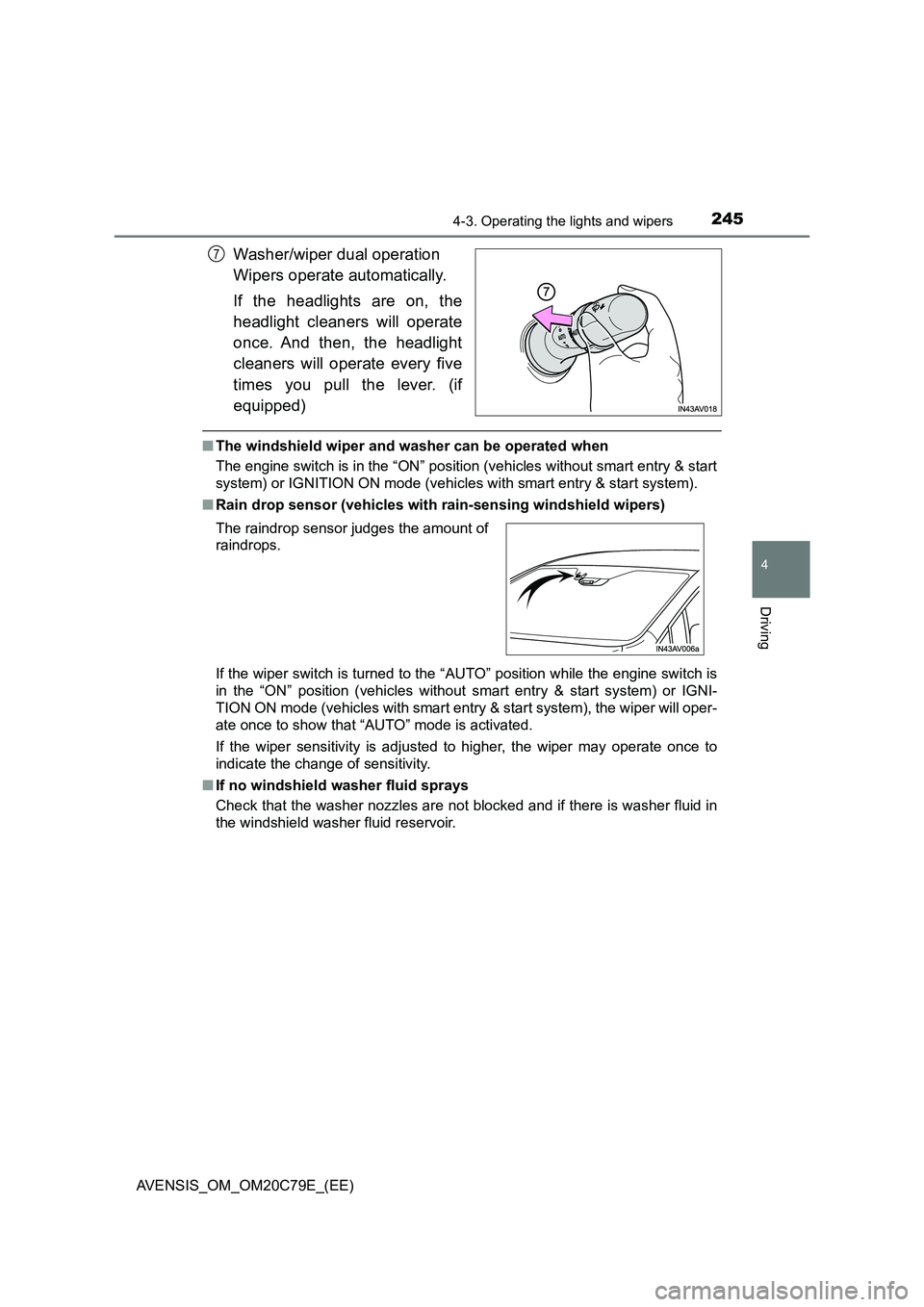
Washer/wiper dual operation
Wipers operate automatically.
If the headlights are on, the
headlight cleaners will operate
once. And then, the headlight
cleaners will operate every five
times you pull the lever. (if
equipped)
■The windshield wiper and washer can be operated when
The engine switch is in the “ON” position (vehicles without smart entry & start
system) or IGNITION ON mode (vehicles with smart entry & start system).
■Rain drop sensor (vehicles with rain-sensing windshield wipers)
If the wiper switch is turned to the “AUTO” position while the engine switch is
in the “ON” position (vehicles without smart entry & start system) or IGNI-
TION ON mode (vehicles with smart entry & start system), the wiper will oper-
ate once to show that “AUTO” mode is activated.
If the wiper sensitivity is adjusted to higher, the wiper may operate once to
indicate the change of sensitivity.
■If no windshield washer fluid sprays
Check that the washer nozzles are not blocked and if there is washer fluid in
the windshield washer fluid reservoir.
7
The raindrop sensor judges the amount of
raindrops.
Page 247 of 660
247
4
4-3. Operating the lights and wipers
Driving
AVENSIS_OM_OM20C79E_(EE)
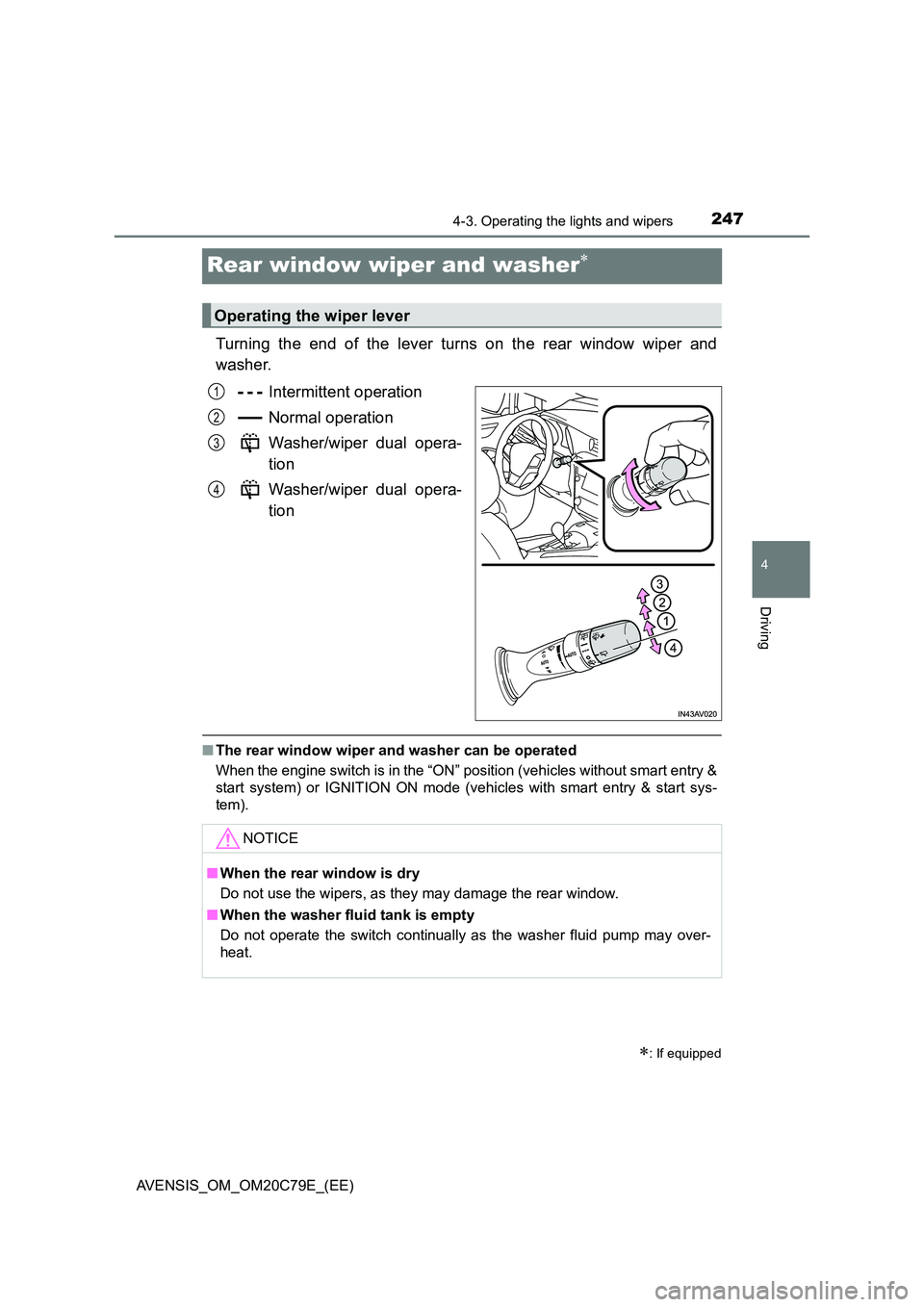
Rear window wiper and washer
Turning the end of the lever turns on the rear window wiper and
washer.
Intermittent operation
Normal operation
Washer/wiper dual opera-
tion
Washer/wiper dual opera-
tion
■ The rear window wiper and washer can be operated
When the engine switch is in the “ON” position (vehicles without smart entry &
start system) or IGNITION ON mode (vehicles with smart entry & start sys-
tem).
: If equipped
Operating the wiper lever
1
2
3
4
NOTICE
■ When the rear window is dry
Do not use the wipers, as they may damage the rear window.
■ When the washer fluid tank is empty
Do not operate the switch continually as the washer fluid pump may over-
heat.
Page 249 of 660
2494-4. Refueling
4
Driving
AVENSIS_OM_OM20C79E_(EE)
WARNING
■Refueling the vehicle
Observe the following precautions while refueling the vehicle.
Failure to do so may result in death or serious injury.
● After exiting the vehicle and before opening the fuel door, touch an
unpainted metal surface to discharge any stat ic electricity. It is important to
discharge static electricity before re fueling because sparks resulting from
static electricity can cause fuel vapors to ignite while refueling.
● Always hold the grips on the fuel tank cap and turn it slowly to remove it.
A whooshing sound may be heard when the fuel tank cap is loosened.
Wait until the sound cannot be heard before fully removing the cap.
In hot weather, pressurized fuel may spray out of the filler neck and cause
injury.
● Do not allow anyone that has not discharged static electricity from their
bodies to come close to an open fuel tank.
● Do not inhale vaporized fuel.
Fuel contains substances that are harmful if inhaled.
● Do not smoke while refueling the vehicle.
Doing so may cause the fuel to ignite and cause a fire.
● Do not return to the vehicle or touch any person or object that is statically
charged.
This may cause static electricity to build up, resulting in a possible ignition
hazard.
■ When refueling
Observe the following precautions to pr event fuel overflowing from the fuel
tank:
● Securely insert the fuel nozzle into the fuel filler neck.
● Stop filling the tank after the fuel nozzle automatically clicks off.
● Do not top off the fuel tank.
NOTICE
■Refueling
Do not spill fuel during refueling.
Failure to do so may damage the vehicle, such as causing the exhaust sys-
tems to operate abnormally or damaging fuel system components or the
vehicle’s painted surface.
Page 272 of 660
2724-5. Toyota Safety Sense
AVENSIS_OM_OM20C79E_(EE)
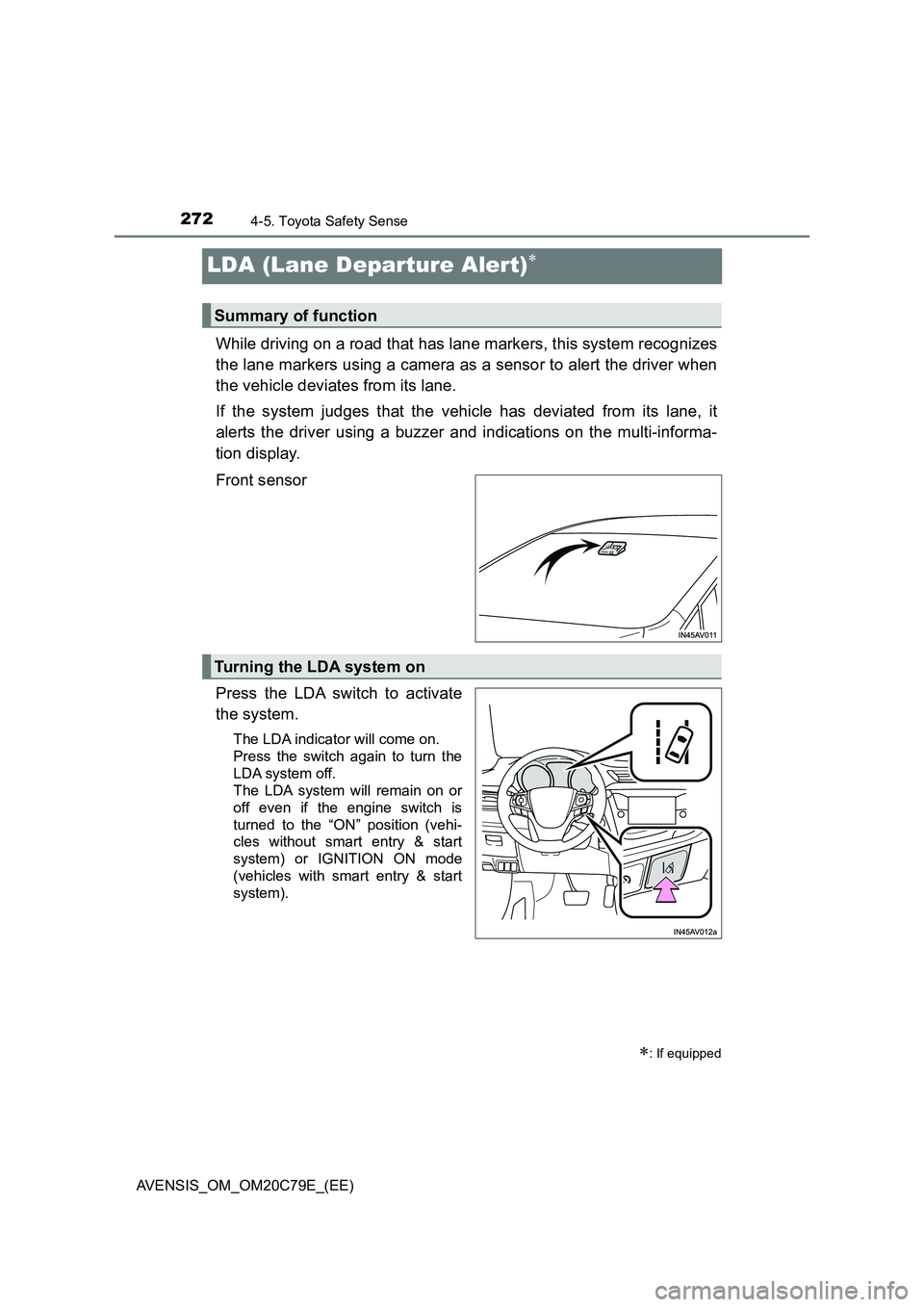
LDA (Lane Departure Alert)
While driving on a road that has lane markers, this system recognizes
the lane markers using a camera as a sensor to alert the driver when
the vehicle deviates from its lane.
If the system judges that the vehicle has deviated from its lane, it
alerts the driver using a buzzer and indications on the multi-informa-
tion display.
Front sensor
Press the LDA switch to activate
the system.
The LDA indicator will come on.
Press the switch again to turn the
LDA system off.
The LDA system will remain on or
off even if the engine switch is
turned to the “ON” position (vehi-
cles without smart entry & start
system) or IGNITION ON mode
(vehicles with smart entry & start
system).
: If equipped
Summary of function
Turning the LDA system on