2018 TOYOTA AVENSIS warning lights
[x] Cancel search: warning lightsPage 277 of 660
2774-5. Toyota Safety Sense
4
Driving
AVENSIS_OM_OM20C79E_(EE)
WARNING
■Situations unsuitable for LDA system
Do not use the LDA system in any of the following situations.
Otherwise, the system may not function correctly and could result in an
accident.
● When driving with tire chains, a spare tire, or similar equipment
● When there are objects or structures along the roadside that might be mis-
interpreted as lane markers (such as guardrails, a curb, reflector posts,
etc.)
● When driving on snowy roads
● When pavement lane markers are difficult to see due to rain, snow, fog,
sand, dirt, etc.
● When there are visible lines on the pavement from road repairs, or if the
remains of old lane markers are still visible on the road
● When driving on a road with lane closures due to maintenance, or when
driving in a temporary lane
NOTICE
■ To prevent damage to or incorrect operation of the LDA system
● Do not modify the headlights or attach stickers to the surface of the lights.
● Do not modify the suspension. If your suspension needs repairs, contact
any authorized Toyota retailer or Toyota authorized repairer, or any reliable
repairer.
● Do not install or place anything on the hood or the grille. Also, do not install
a grille guard (bull bars, kangaroo bar, etc.).
Page 299 of 660
2994-6. Using the driving support systems
4
Driving
AVENSIS_OM_OM20C79E_(EE)■When to use the Stop & Start system
●If the engine is stopped by the Stop & Start system and the shift lever is
shifted into a position other than N with the clutch pedal released, a buzzer
will sound and Stop & Start indicator will flash. This indicates that the engine
is only stopped by the Stop & Start system, not that the engine has been
turned off completely.
●Use the Stop & Start system when stopping the vehicle temporarily at red
lights, intersections, etc. When stopping the vehicle for a longer period of
time, turn off the engine completely.
●When the system cannot operate, is canceled, or is malfunctioning, warning
messages and the warning buzzer are used to inform the driver. (P. 539)
●Vehicles with smart entry and start system: Even if the engine switch is
pressed during an engine stop, the engine does not restart. Start the engine
by shifting the shift lever to N and performing a normal engine start opera-
tion.
●When the engine restarts after having been stopped by the Stop & Start sys-
tem, the power outlet may be temporarily unusable, but this does not indi-
cate a malfunction.
●Installation and removal of electrical components and wireless devices may
affect the Stop & Start system, contact any authorized Toyota retailer or
Toyota authorized repairer, or any reliable repairer.
■If the windshield is fogged up while the engine is stopped by the Stop &
Start system
Turn the windshield defogger on. (The engine will start due to the automatic
engine start function.) (P. 394, 401)
If the windshield fogs up frequently, press the Stop & Start cancel switch to
deactivate the system.
■Air conditioning system while the engine is stopped by the Stop & Start
system (vehicles with an air conditioning system)
While the engine is stopped by the Stop & Start system, the air conditioning
system (cooling, heating and dehumidifying functions) is cancelled and it only
blows air or stops blowing air. In order to prevent the air conditioning system
from being cancelled, deactivate the Stop & Start system by pressing the Stop
& Start cancel switch.
Page 500 of 660
5007-3. Do-it-yourself maintenance
AVENSIS_OM_OM20C79E_(EE)
■After a fuse is replaced
● If the lights do not turn on even after the fuse has been replaced, a bulb may
need replacement. ( P. 501)
● If the replaced fuse blows again, have the vehicle inspected by any autho-
rized Toyota retailer or Toyota authorized repairer, or any reliable repairer.
■ If there is an overload in the circuits
The fuses are designed to blow, protecting the wiring harness from damage.
WARNING
■ To prevent system breakdowns and vehicle fire
Observe the following precautions.
Failing to do so may cause damage to the vehicle, and possibly a fire or
injury.
● Never use a fuse of a higher amperage rating than indicated, or use any
other object in place of a fuse.
● Always use a genuine Toyota fuse or equivalent.
Never replace a fuse with a wire, even as a temporary fix.
● Do not modify the fuse or the fuse box.
NOTICE
■Before replacing fuses
Have the cause of electrical overload determined and repaired by any
authorized Toyota retailer or Toyota authorized repairer, or any reliable
repairer, as soon as possible.
Page 516 of 660
5167-3. Do-it-yourself maintenance
AVENSIS_OM_OM20C79E_(EE)
WARNING
■Replacing light bulbs
● Turn off the headlights. Do not attempt to replace the bulb immediately
after turning off the headlights.
The bulbs become very hot and may cause burns.
● Do not touch the glass portion of the light bulb with bare hands. When it is
unavoidable to hold the glass portion, use and hold with a clean dry cloth
to avoid getting moisture and oils on the bulb.
Also, if the bulb is scratched or dropped, it may blow out or crack.
● Fully install light bulbs and any parts used to secure them. Failing to do so
may result in heat damage, fire, or water entering the headlight unit. This
may damage the headlights or cause condensation to build up on the lens.
● Do not attempt to repair or disassemble light bulbs, connectors, electric
circuits or component parts.
Doing so may result in death or serious injury due to electric shock.
■ To prevent damage or fire
Make sure bulbs are fully seated and locked.
Page 530 of 660
5308-2. Steps to take in an emergency
AVENSIS_OM_OM20C79E_(EE)
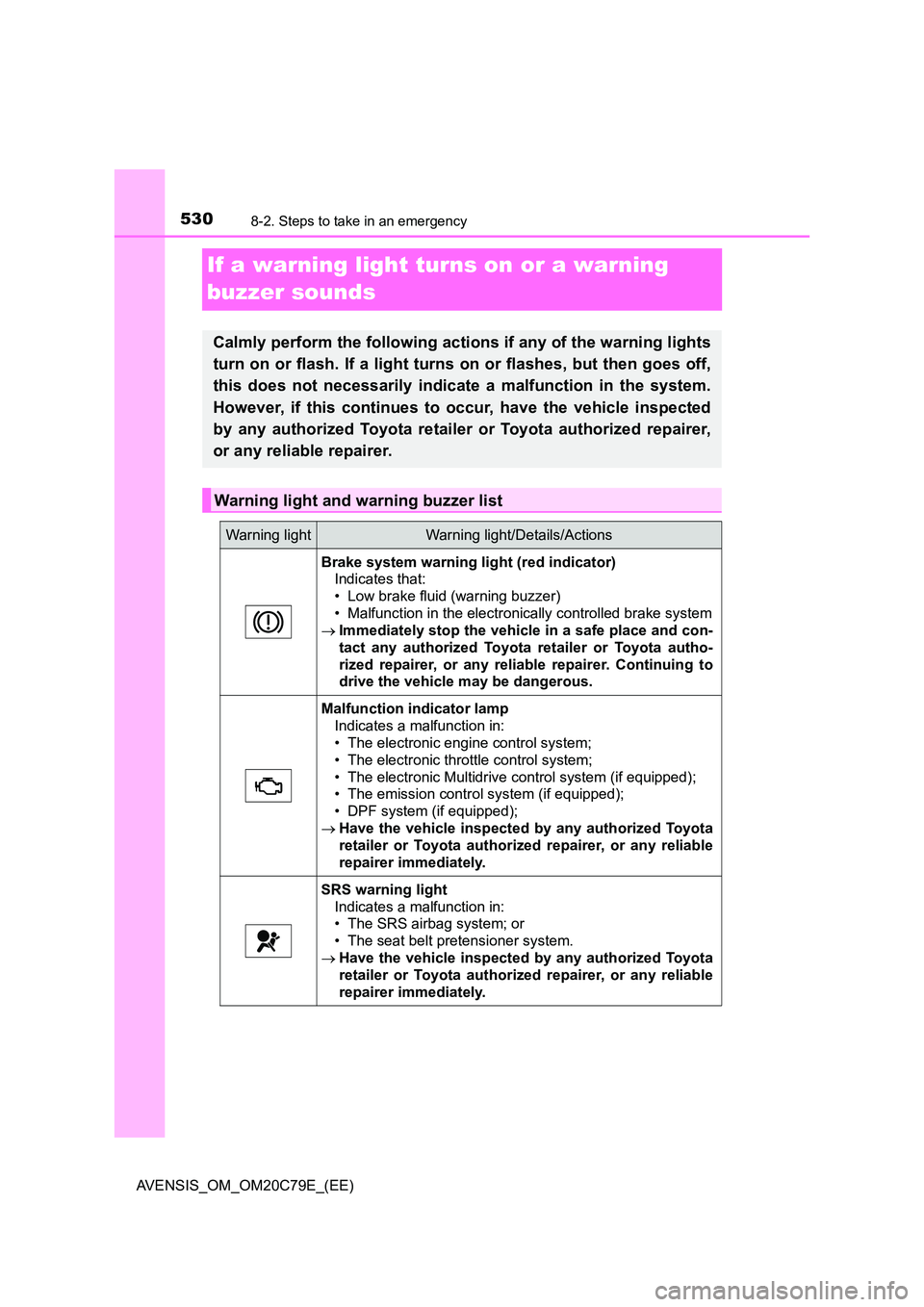
If a warning light turns on or a warning
buzzer sounds
Calmly perform the following actions if any of the warning lights
turn on or flash. If a light turns on or flashes, but then goes off,
this does not necessarily indicate a malfunction in the system.
However, if this continues to occur, have the vehicle inspected
by any authorized Toyota retailer or Toyota authorized repairer,
or any reliable repairer.
Warning light and warning buzzer list
Warning lightWarning light/Details/Actions
Brake system warning light (red indicator)
Indicates that:
• Low brake fluid (warning buzzer)
• Malfunction in the electronically controlled brake system
Immediately stop the vehicle in a safe place and con-
tact any authorized Toyota retailer or Toyota autho-
rized repairer, or any reliable repairer. Continuing to
drive the vehicle may be dangerous.
Malfunction indicator lamp
Indicates a malfunction in:
• The electronic engine control system;
• The electronic throttle control system;
• The electronic Multidrive control system (if equipped);
• The emission control system (if equipped);
• DPF system (if equipped);
Have the vehicle inspected by any authorized Toyota
retailer or Toyota authorized repairer, or any reliable
repairer immediately.
SRS warning light
Indicates a malfunction in:
• The SRS airbag system; or
• The seat belt pretensioner system.
Have the vehicle inspected by any authorized Toyota
retailer or Toyota authorized repairer, or any reliable
repairer immediately.
Page 532 of 660
5328-2. Steps to take in an emergency
AVENSIS_OM_OM20C79E_(EE)
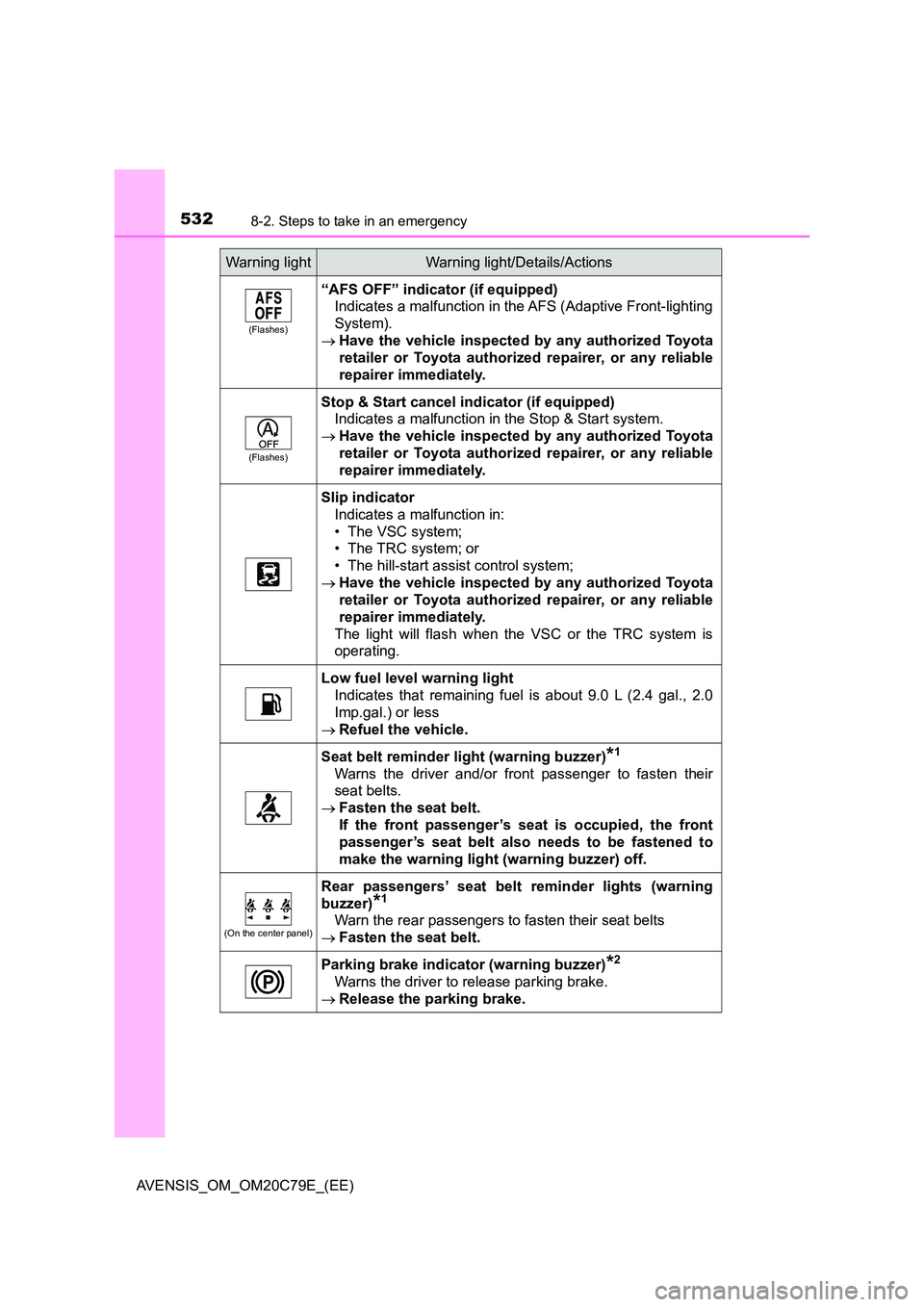
(Flashes)
“AFS OFF” indicator (if equipped)
Indicates a malfunction in the AFS (Adaptive Front-lighting
System).
Have the vehicle inspected by any authorized Toyota
retailer or Toyota authorized repairer, or any reliable
repairer immediately.
(Flashes)
Stop & Start cancel indicator (if equipped)
Indicates a malfunction in the Stop & Start system.
Have the vehicle inspected by any authorized Toyota
retailer or Toyota authorized repairer, or any reliable
repairer immediately.
Slip indicator
Indicates a malfunction in:
• The VSC system;
• The TRC system; or
• The hill-start assist control system;
Have the vehicle inspected by any authorized Toyota
retailer or Toyota authorized repairer, or any reliable
repairer immediately.
The light will flash when the VSC or the TRC system is
operating.
Low fuel level warning light
Indicates that remaining fuel is about 9.0 L (2.4 gal., 2.0
Imp.gal.) or less
Refuel the vehicle.
Seat belt reminder light (warning buzzer)*1
Warns the driver and/or front passenger to fasten their
seat belts.
Fasten the seat belt.
If the front passenger’s seat is occupied, the front
passenger’s seat belt also needs to be fastened to
make the warning light (warning buzzer) off.
(On the center panel)
Rear passengers’ seat belt reminder lights (warning
buzzer)*1
Warn the rear passengers to fasten their seat belts
Fasten the seat belt.
Parking brake indicator (warning buzzer)*2
Warns the driver to release parking brake.
Release the parking brake.
Warning lightWarning light/Details/Actions
Page 545 of 660
5458-2. Steps to take in an emergency
AVENSIS_OM_OM20C79E_(EE)
8
When trouble arises
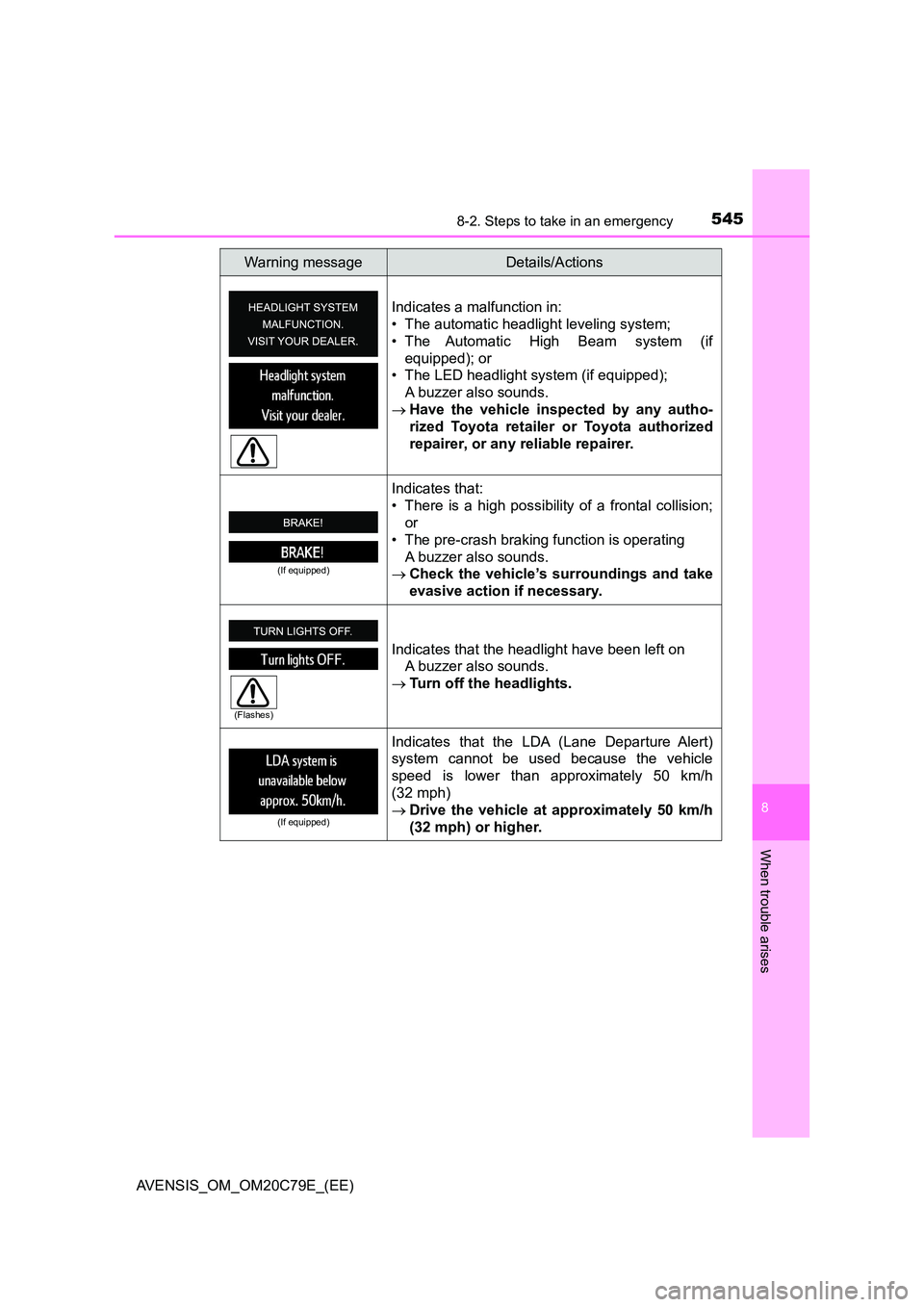
Indicates a malfunction in:
• The automatic headlight leveling system;
• The Automatic High Beam system (if
equipped); or
• The LED headlight system (if equipped);
A buzzer also sounds.
Have the vehicle inspected by any autho-
rized Toyota retailer or Toyota authorized
repairer, or any reliable repairer.
(If equipped)
Indicates that:
• There is a high possibility of a frontal collision;
or
• The pre-crash braking function is operating
A buzzer also sounds.
Check the vehicle’s surroundings and take
evasive action if necessary.
Indicates that the headlight have been left on
A buzzer also sounds.
Turn off the headlights.
(If equipped)
Indicates that the LDA (Lane Departure Alert)
system cannot be used because the vehicle
speed is lower than approximately 50 km/h
(32 mph)
Drive the vehicle at approximately 50 km/h
(32 mph) or higher.
Warning messageDetails/Actions
(Flashes)
Page 645 of 660
645Alphabetical index
AVENSIS_OM_OM20C79E_(EE)
Audio system*......................... 318
Antenna................................. 330
Audio input ............................ 359
AUX port ............................... 359
Bluetooth
® audio ................... 374
CD player .............................. 331
iPod ....................................... 342
MP3/WMA disc ..................... 331
Optimal use ........................... 323
Portable music player ........... 322
Radio..................................... 325
Steering wheel audio
switch.................................. 321
USB memory......................... 351
Audio system
(with navigation system)
*
Automatic air conditioning
system
Air conditioning filter.............. 491
Automatic air conditioning
system ................................ 398
Automatic headlight
leveling system...................... 240
Automatic High Beam ............. 278
Automatic light control
system .................................... 238
AUX port
*................................. 322
Auxiliary box ............................ 421
Back door ................................. 143
Wireless remote control
key ...................................... 121
Back-up lights
Replacing light bulbs ..... 509, 510
Wattage................................. 625Battery
Battery checking ................... 463
If the battery is discharged.... 595
Preparing and checking
before winter....................... 312
Replacing .............................. 597
Bluetooth
®*............................. 384
Audio system ........................ 374
Hands-free system
(for cellular phone) ............. 360
Registering/removing a
Bluetooth
® device............... 367
Selecting a Bluetooth®
device ................................. 368
Wireless communication ....... 360
Bluetooth
® audio*................... 374
Bluetooth® phone*
(audio system) ....................... 360
Deleting the call history......... 371
Making a call ......................... 378
Managing speed dials ........... 371
Managing the contacts.......... 372
Phone settings ...................... 368
Receiving a call..................... 380
Speaking on the phone ......... 381
Bottle holders .......................... 415
Brake
Fluid ...................................... 622
Parking brake........................ 230
Warning light ................. 530, 531
Warning message ................. 537
Brake assist ............................. 306
Break-in tips ............................. 189
Brightness control
Instrument light
control......................... 106, 114
B
*: For vehicles with navigation system or multimedia system, refer to
“Navigation and multimedia system Owner’s manual”.