2018 TESLA MODEL 3 brake
[x] Cancel search: brakePage 63 of 165
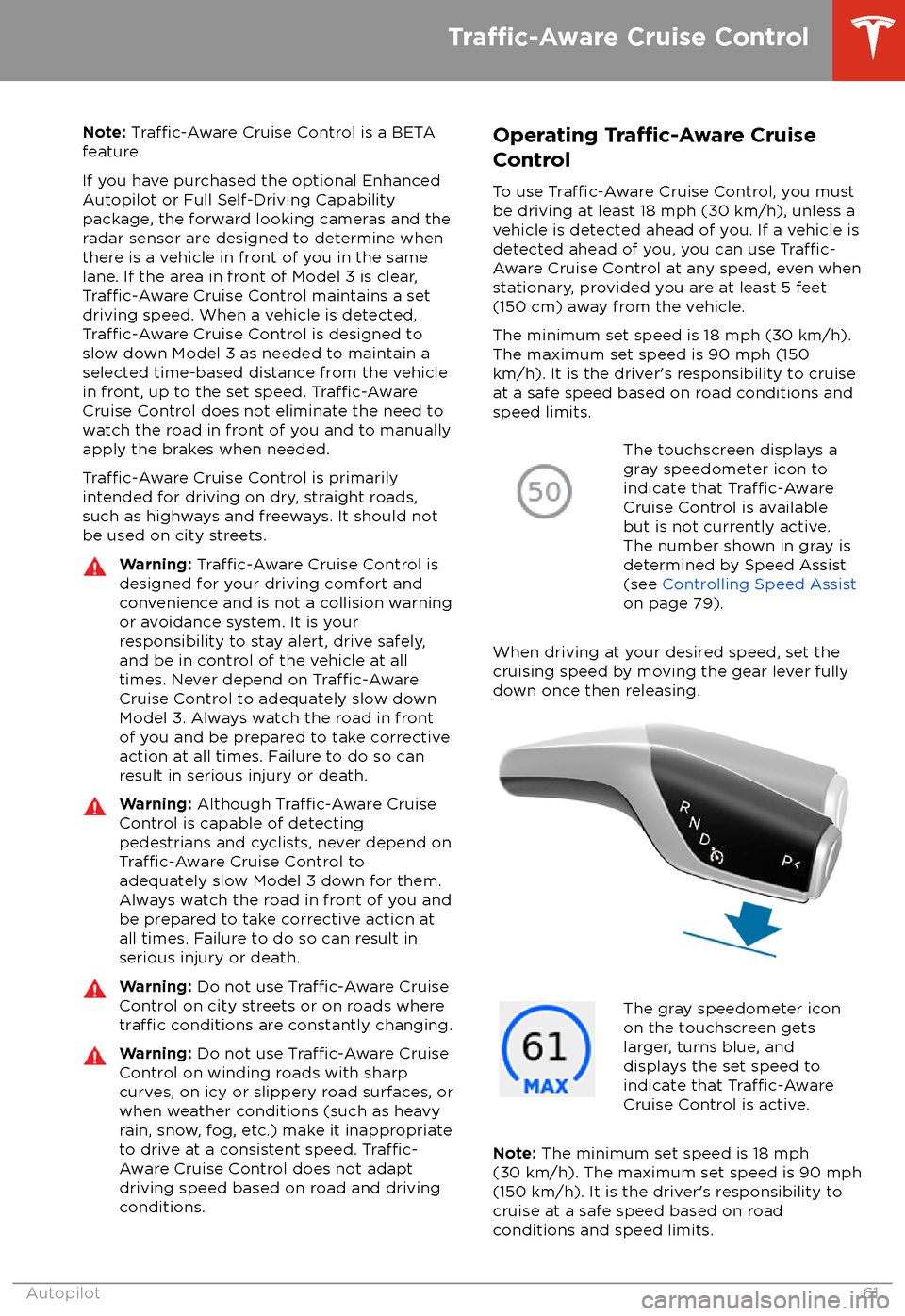
Note: Traffic-Aware Cruise Control is a BETA
feature.
If you have purchased the optional Enhanced Autopilot or Full Self-Driving Capabilitypackage, the forward looking cameras and theradar sensor are designed to determine when
there is a vehicle in front of you in the same
lane. If the area in front of Model 3 is clear,
Traffic-Aware Cruise Control maintains a set
driving speed. When a vehicle is detected,
Traffic-Aware Cruise Control is designed to
slow down Model 3 as needed to maintain a selected time-based distance from the vehiclein front, up to the set speed.
Traffic-AwareCruise Control does not eliminate the need to
watch the road in front of you and to manually
apply the brakes when needed.
Traffic-Aware Cruise Control is primarily
intended for driving on dry, straight roads,
such as highways and freeways. It should not be used on city streets.
Warning: Traffic-Aware Cruise Control is
designed for your driving comfort and
convenience and is not a collision warning or avoidance system. It is your
responsibility to stay alert, drive safely,
and be in control of the vehicle at all
times. Never depend on
Traffic-AwareCruise Control to adequately slow down
Model 3. Always watch the road in front
of you and be prepared to take corrective
action at all times. Failure to do so can
result in serious injury or death.
Warning: Although Traffic-Aware Cruise
Control is capable of detecting
pedestrians and cyclists, never depend on
Traffic-Aware Cruise Control to
adequately slow Model 3 down for them.
Always watch the road in front of you and
be prepared to take corrective action at
all times. Failure to do so can result in
serious injury or death.
Warning: Do not use Traffic-Aware Cruise
Control on city streets or on roads where
traffic conditions are constantly changing.
Warning: Do not use Traffic-Aware Cruise
Control on winding roads with sharp
curves, on icy or slippery road surfaces, or
when weather conditions (such as heavy
rain, snow, fog, etc.) make it inappropriate
to drive at a consistent speed.
Traffic-
Aware Cruise Control does not adapt
driving speed based on road and driving
conditions.
Operating Tra
Page 67 of 165
Warning: Overtake Acceleration increases
your driving speed whenever the
appropriate turn signal is engaged, and
accelerates Model 3 closer to the vehicle
ahead. Although
Traffic-Aware Cruise
Control continues to maintain distance
from the vehicle ahead, it is important to be aware that your selected following
distance is reduced when Overtake
Acceleration is active, particularly in cases
where it may not be your intention to overtake the vehicle you are following.
Canceling and Resuming
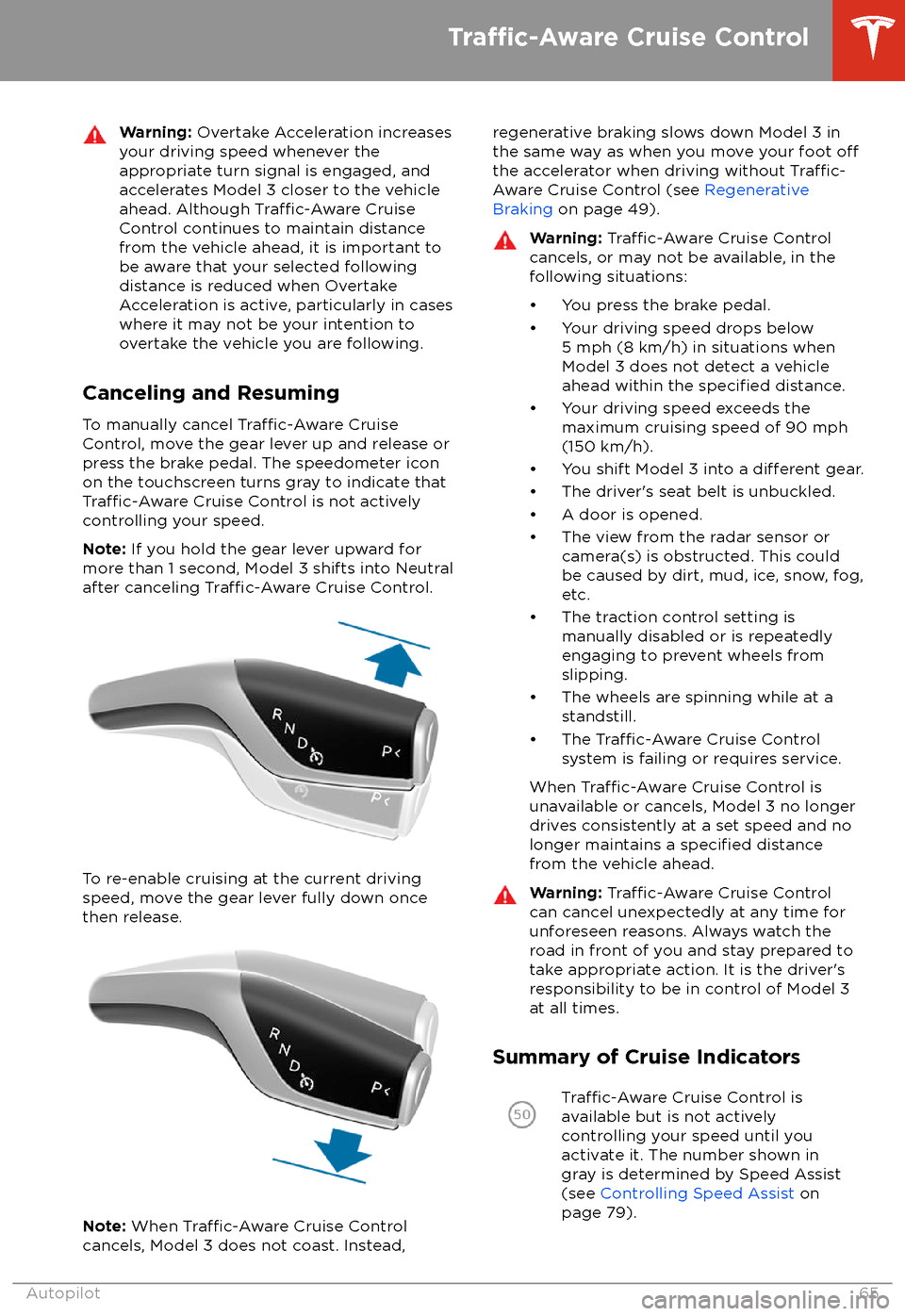
To manually cancel
Traffic-Aware Cruise
Control, move the gear lever up and release or
press the brake pedal. The speedometer icon
on the touchscreen turns gray to indicate that
Traffic-Aware Cruise Control is not actively
controlling your speed.
Note: If you hold the gear lever upward for
more than 1 second, Model 3 shifts into Neutral
after canceling
Traffic-Aware Cruise Control.
To re-enable cruising at the current driving
speed, move the gear lever fully down once then release.
Note: When Traffic-Aware Cruise Control
cancels, Model 3 does not coast. Instead,
regenerative braking slows down Model 3 in
the same way as when you move your foot offthe accelerator when driving without Traffic-
Aware Cruise Control (see Regenerative
Braking on page 49).
Warning: Traffic-Aware Cruise Control
cancels, or may not be available, in the
following situations:
Page 75 of 165

In situations where Autopark cannot operatedue to inadequate sensor data, the
touchscreen displays a message indicating that you must manually park Model 3.
Note: If you press the brake when Autopark is
actively parking Model 3, the parking process
pauses until you touch Resume on the
touchscreen.
Note: Autopark detects potential
perpendicular parking spaces that are at least
9.5 feet (2.9 meters) wide with a vehicle
parked on each side. Autopark detects parallel parking spaces that are at least 20 feet (6
meters), but less than 30 feet (9 meters) long.
Autopark does not operate on angled parkingspaces.Warning: Never depend on Autopark tofind a parking space that is legal, suitable,
and safe. Autopark may not always detect
objects in the parking space. Always
perform visual checks to
confirm that a
parking space is appropriate and safe.
Warning: When Autopark is actively
steering Model 3, the steering wheel moves in accordance with Autopark
Page 79 of 165
Warning: Forward Collision Warning may
provide a warning in situations where the
likelihood of collision may not exist. Stay
alert and always pay attention to the area
in front of Model 3 so you can anticipate whether any action is required.Warning: Forward Collision Warning
operates only when driving between
approximately 7 mph (10 km/h) and 90
mph (150 km/h).Warning: Forward Collision Warning does
not provide a warning when the driver is
already applying the brake.
Automatic Emergency Braking
The forward looking camera(s) and the radar
sensor are designed to determine the distance
from an object (vehicle, motorcycle, bicycle, or
pedestrian) traveling in front of Model 3.
When a frontal collision is considered
unavoidable, Automatic Emergency Braking is
designed to apply the brakes to reduce the
severity of the impact.
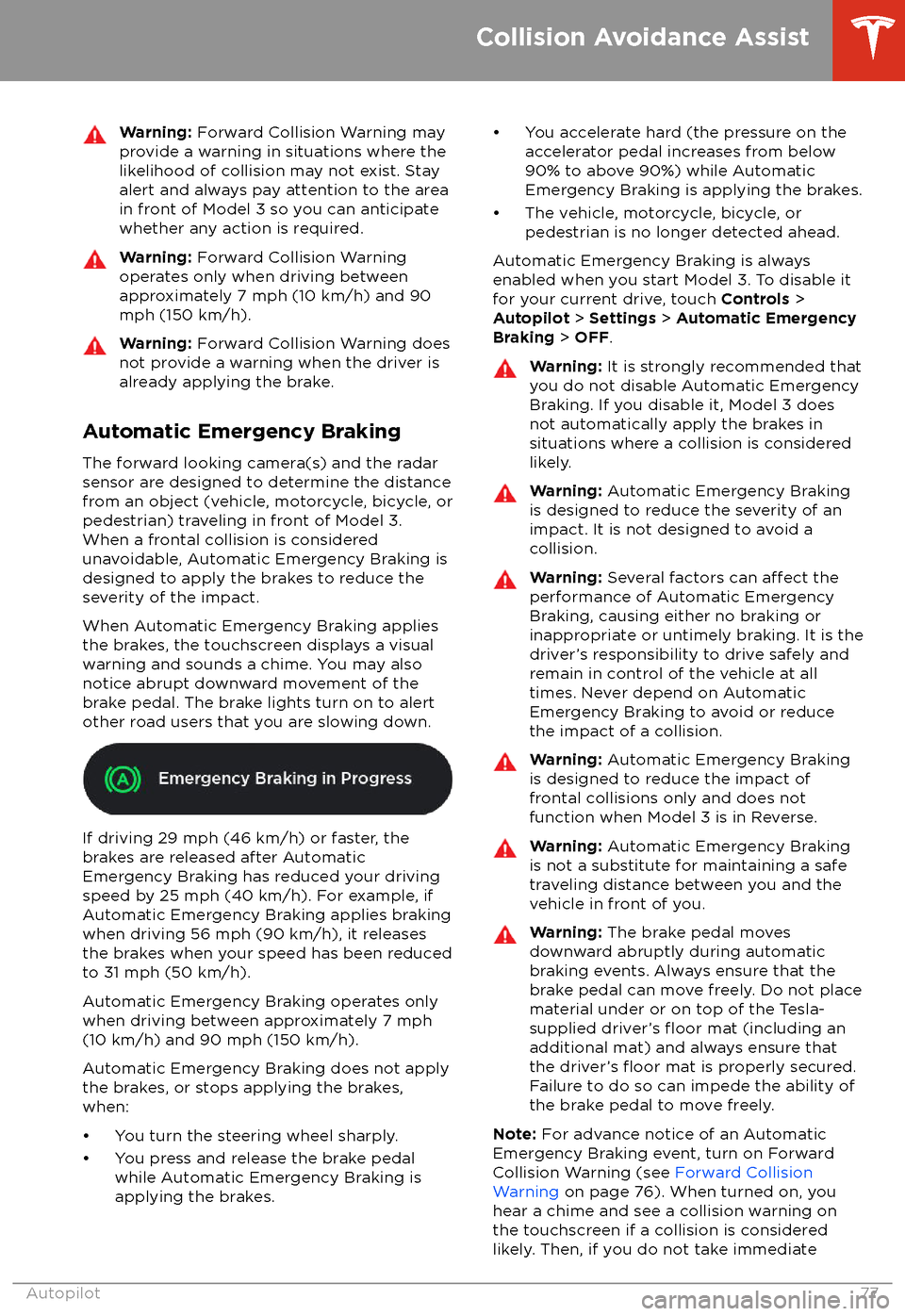
When Automatic Emergency Braking applies
the brakes, the touchscreen displays a visual
warning and sounds a chime. You may also
notice abrupt downward movement of the
brake pedal. The brake lights turn on to alert
other road users that you are slowing down.
If driving 29 mph (46 km/h) or faster, the
brakes are released after Automatic
Emergency Braking has reduced your driving
speed by 25 mph (40 km/h). For example, if
Automatic Emergency Braking applies braking
when driving 56 mph (90 km/h), it releases
the brakes when your speed has been reduced to 31 mph (50 km/h).
Automatic Emergency Braking operates only
when driving between approximately 7 mph (10 km/h) and 90 mph (150 km/h).
Automatic Emergency Braking does not apply the brakes, or stops applying the brakes,when:
Page 85 of 165
DrivingAcceleration: Adjust the amount of acceleration. Chill limits acceleration for
a slightly smoother and gentler ride, whereas Standard provides the normal
level of acceleration.
Note: When Chill is selected, Chill displays on the touchscreen above the
driving speed.
Steering Mode : Adjust the amount of
effort required to turn the steering
wheel. Sport feels more responsive whereas Comfort feels easier to drive
and park (see Adjusting Steering
Effort on page 36).
Regenerative Braking : When you release the accelerator when driving,
regenerative braking slows Model 3 and feeds any surplus energy back to
the Battery. If set to LOW, Model 3 does not slow down as quickly, but also
feeds less energy back to the Battery (see Regenerative Braking on page
49).
Note: Regardless of the setting selected, the energy gained by regenerative
braking is reduced if the Battery is full, or is extremely cold or hot (in which
case, surplus energy is used to heat or cool it).
Traction Control : Turn slip start on to allow wheels to spin (see Traction
Control on page 51).
Creep : When on, Model 3 applies forward torque in Drive and backwards
torque in Reverse when you release the brake pedal (similar to a conventional vehicle with an automatic transmission). The torque moves the
vehicle slowly on
flat roads, but may require you to press the accelerator
pedal in some situations (for example, when on a steep hill or driveway).
When
off, Model 3 is free rolling when you let your foot off the brake pedal
and the motor does not apply torque until the accelerator pedal is pressed.
You can adjust this setting only when Model 3 is in Park.
Warning: Never rely on Creep to apply enough torque to prevent your
vehicle from rolling down a hill. Always apply brakes to remain stopped
or the accelerator to proceed up the hill. Failure can result in property
damage and/or a collision.
Controls and Settings
Using the Touchscreen83
Page 87 of 165

ServiceWiper Service Mode: Make wiper blades easy to access (see Wiper Blades
and Washer Jets on page 122).
Adjust Headlights : Make adjustments to the level of the headlights to
accommodate a load you are carrying (see Headlight Adjustments on page
46).Caution: Headlights should only be adjusted by Tesla Service.
Towing: Prepare Model 3 for towing by keeping it in Neutral (which
disengages the parking brake and prevents damage to the rear motor that is
caused by wheels turning as Model 3 is pulled onto a
flatbed truck). See
Instructions for Transporters on page 146.
Owner
Page 121 of 165

Cleaning the ExteriorTo prevent damage to the paint, immediately
remove corrosive substances (bird droppings, tree resin, dead insects, tar spots, road salt,
industrial fallout, etc.). Do not wait until Model
3 is due for a complete wash. If necessary, use
denatured alcohol to remove tar spots and
stubborn grease stains, then immediately wash the area with water and a mild, non-detergent soap to remove the alcohol.
Follow these steps when washing the exterior
of Model 3:
1. Rinse Thoroughly
Before washing,
flush grime and grit from
the bodywork using a hose. Flush away
accumulations of mud in areas where
debris easily collects (such as wheel
arches and panel seams). If salt has been
used on the highways (such as during
winter months), thoroughly rinse all traces
of road salt from the underside of the vehicle.
2. Hand Wash
Hand wash Model 3 using a clean soft
cloth and cold or lukewarm water
containing a mild, high-quality car
shampoo.
3. Rinse with Clean Water
After washing, rinse with clean water to
prevent soap from drying on the surfaces.
4. Dry Thoroughly and Clean Exterior Glass
After washing and rinsing, dry thoroughly
with a chamois.
Clean windows and mirrors using an automotive glass cleaner. Do not scrape,
or use any abrasive cleaning
fluid on glass
or mirrored surfaces.
Cautions for Exterior CleaningCaution: Do not use windshield treatmentfluids. Doing so can interfere with wiper
friction and cause a chattering sound.Caution: Do not use hot water or
detergents.Caution: Do not wash in direct sunlight.Caution: If using a pressure washer,
maintain a distance of at least 12" (30 cm)
between the nozzle and the surface of
Model 3. Keep the nozzle moving and do not concentrate the water jet on any one
area.Caution: Do not aim water hoses directly
at window, door or hood seals, or through
wheel apertures onto brake components.Caution: Avoid using tight-napped or
rough cloths, such as washing mitts.Caution: If washing in an automatic car
wash, use Touchless car washes only. These car washes have no parts (brushes,
etc.) that touch the surfaces of Model 3.
Using any other type of car wash could
cause damage that is not covered by the
warranty.Caution: Ensure the wipers are off before
washing Model 3 to avoid the risk of damaging the wipers.Caution: Do not use chemical based
wheel cleaners. These can damage the
finish on the wheels.
Caution: Avoid using a high pressure
power washer on the camera(s) or
parking sensors (if equipped) and do not
clean a sensor or camera lens with a
sharp or abrasive object that can scratch
or damage its surface.Warning: Never spray liquid at a high
velocity (for example, if using a pressure
washer) towards the charge port while
Model 3 is charging. Failure to follow
these instructions can result in serious
injury or damage to the vehicle, charging
equipment, or property.
Cleaning
Maintenance119
Page 126 of 165
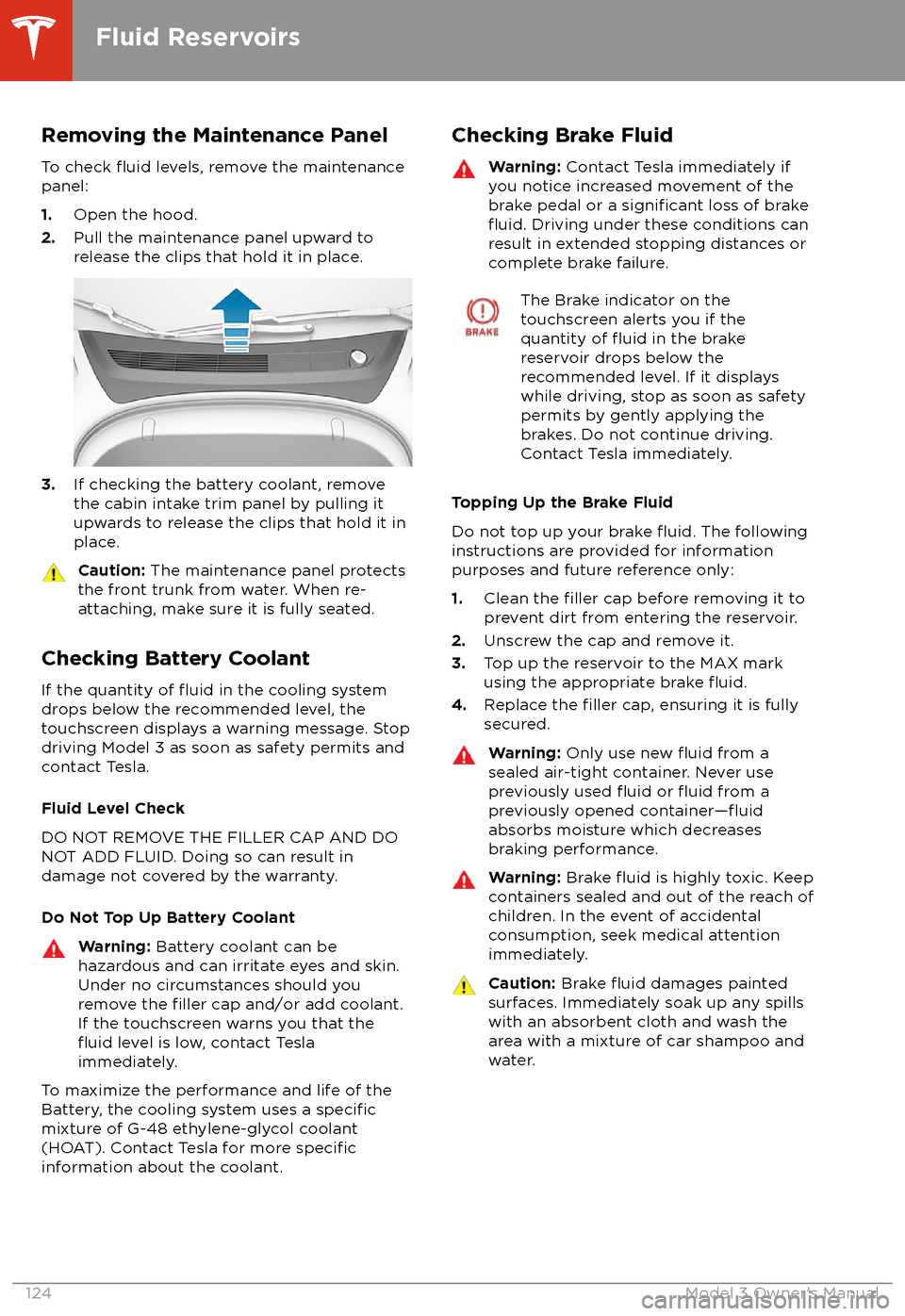
Removing the Maintenance PanelTo check
fluid levels, remove the maintenance
panel:
1. Open the hood.
2. Pull the maintenance panel upward to
release the clips that hold it in place.
3. If checking the battery coolant, remove
the cabin intake trim panel by pulling it
upwards to release the clips that hold it in
place.
Caution: The maintenance panel protects
the front trunk from water. When re-
attaching, make sure it is fully seated.
Checking Battery Coolant
If the quantity of
fluid in the cooling system
drops below the recommended level, the
touchscreen displays a warning message. Stop
driving Model 3 as soon as safety permits and
contact Tesla.
Fluid Level Check
DO NOT REMOVE THE FILLER CAP AND DO
NOT ADD FLUID. Doing so can result in damage not covered by the warranty.
Do Not Top Up Battery Coolant
Warning: Battery coolant can be
hazardous and can irritate eyes and skin.
Under no circumstances should you
remove the
filler cap and/or add coolant.
If the touchscreen warns you that the
fluid level is low, contact Tesla
immediately.
To maximize the performance and life of the
Battery, the cooling system uses a specificmixture of G-48 ethylene-glycol coolant
(HOAT). Contact Tesla for more specificinformation about the coolant.
Checking Brake FluidWarning: Contact Tesla immediately if
you notice increased movement of the brake pedal or a
significant loss of brakefluid. Driving under these conditions can
result in extended stopping distances or complete brake failure.
The Brake indicator on the
touchscreen alerts you if the
quantity of
fluid in the brake
reservoir drops below the
recommended level. If it displays
while driving, stop as soon as safety
permits by gently applying the
brakes. Do not continue driving.
Contact Tesla immediately.
Topping Up the Brake Fluid
Do not top up your brake
fluid. The following
instructions are provided for information purposes and future reference only:
1. Clean the
filler cap before removing it to
prevent dirt from entering the reservoir.
2. Unscrew the cap and remove it.
3. Top up the reservoir to the MAX mark
using the appropriate brake
fluid.4. Replace the filler cap, ensuring it is fully
secured.
Warning: Only use new fluid from a
sealed air-tight container. Never use
previously used
fluid or fluid from a
previously opened container