2018 SUBARU WRX brake
[x] Cancel search: brakePage 398 of 578

(411,1)
北米Model "A1700BE-B" EDITED: 2017/ 10/ 11
electronic parking brake indicator light is
off.
–Depress the accelerator pedal with
the driver’s seatbelt fastened and with
the doors closed.
–Press the electronic parking brake
switch with the brake pedal depressed.
.Under certain conditions, including a
malfunction of the Auto Vehicle Hold, a
warning buzzer will sound and a warning
message will appear on the combination
meter display (color LCD). All warning
messages should be strictly observed.
.On a steep slope, the vehicle cannot be
kept stopped by the Auto Vehicle Hold
function. In such a case, depress and hold
the brake pedal.
.When stopping on a steep slope with
the Auto Vehicle Hold function activated,
the electronic parking brake may automa-
tically be applied after stopping, then the
electronic parking brake indicator light
may flash. In such a case, depress and
hold the brake pedal while stopped.
Otherwise, the vehicle may move. When
getting out of the vehicle, stop the vehicle
on a flat surface, then apply the electronic
parking brake.
.If the Auto Vehicle Hold ON indicator
light does not illuminates even after
pressing the Auto Vehicle Hold switch with
the operating conditions met, the functionmay have a malfunction. Contact your
SUBARU dealer for an inspection.
.You may hear a sound while the Auto
Vehicle Hold function is keeping your
vehicle stopped. This is normal, and does
not represent a malfunction.
.While the vehicle is kept stopped by the
Auto Vehicle Hold function, the brake
pedal may feel stiff. However, this is not a
malfunction.
.When using the Auto Vehicle Hold
function, depress the brake pedal firmly.
Otherwise, the Auto Vehicle Hold may not
operate.
.When the Auto Vehicle Hold switch is
pressed and held for more than 30
seconds, the Auto Vehicle Hold ON in-
dicator light will turn off and further opera-
tion of the switch will be ignored. To make
the switch usable again, turn the ignition
switch to the“LOCK”/“OFF”position and
then turn it to the“ON”position.
Hill start assist system
WARNING
.The Hill start assist system is a
device only for helping the driver
to START the vehicle on an uphill
grade. To prevent accidents
when the vehicle is parked on a
slope, be sure to firmly set the
parking brake. When setting the
parking brake, make sure that the
vehicle remains stationary when
the clutch pedal (MT models) and
brake pedal (both MT and CVT
models) are released.
.Do not turn the ignition switch to
the“LOCK”/“OFF”position while
the Hill start assist system is
operating. The Hill start assist
system will be deactivated, caus-
ing an accident.NOTEFor models with the electronic parking
brake system:
.The Hill start assist system will
activate when the Auto Vehicle Hold
function is deactivated.
.The Hill start assist system will
–CONTINUED–
Starting and operating/Hill start assist system
7-49
7
Page 399 of 578

(412,1)
北米Model "A1700BE-B" EDITED: 2017/ 10/ 11
deactivate when the Auto Vehicle Hold
function is activated.
The Hill start assist system is a device to
make the following vehicle operations
easier.
1) Starting forward facing uphill
2) Starting backward facing downhill
A) Brake pedal (both MT models and CVT
models)
B) Clutch pedal (MT models only)In both these cases, the Hill start assist
system operates under the following con-ditions.
.when depressing both the clutch pedal
and the brake pedal (MT models)
.when the vehicle has stopped with the
brake pedal depressed (CVT models)
Braking power is maintained temporarily
(for approximately 2 seconds) by the Hill
start assist system after the brake pedal is
released. The driver is therefore able to
start the vehicle in the same way as on a
level grade, just using the clutch pedal (MT
models only) and accelerator pedal (all
models).
If the braking power of the Hill start assist
system is insufficient after the brake pedal
is released, apply more braking power by
depressing the brake pedal again.
The Hill start assist system may not
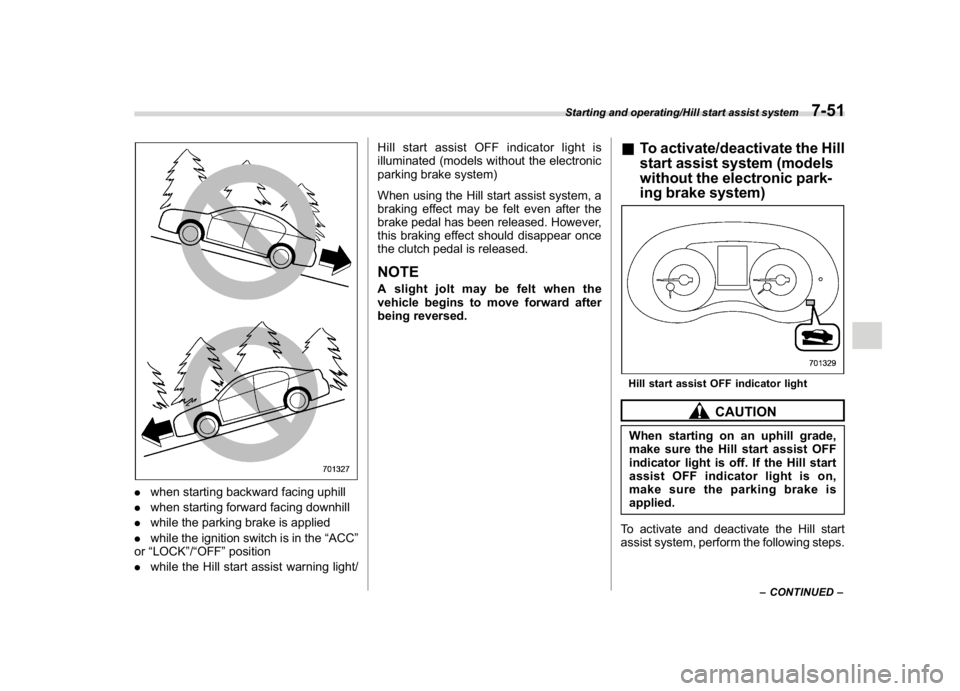
operate on slight grades. Also, the Hill
start assist system does not operate in the
following cases.
Starting and operating/Hill start assist system
7-50
Page 400 of 578
(413,1)
北米Model "A1700BE-B" EDITED: 2017/ 10/ 11
.when starting backward facing uphill
.when starting forward facing downhill
.while the parking brake is applied
.while the ignition switch is in the“ACC”
or“LOCK”/“OFF”position
.while the Hill start assist warning light/Hill start assist OFF indicator light is
illuminated (models without the electronic
parking brake system)
When using the Hill start assist system, a
braking effect may be felt even after the
brake pedal has been released. However,
this braking effect should disappear once
the clutch pedal is released.
NOTEA slight jolt may be felt when the
vehicle begins to move forward after
being reversed.
&To activate/deactivate the Hill
start assist system (models
without the electronic park-
ing brake system)Hill start assist OFF indicator light
CAUTION
When starting on an uphill grade,
make sure the Hill start assist OFF
indicator light is off. If the Hill start
assist OFF indicator light is on,
make sure the parking brake is
applied.
To activate and deactivate the Hill start
assist system, perform the following steps.
–CONTINUED–
Starting and operating/Hill start assist system
7-51
7
Page 401 of 578
(414,1)
北米Model "A1700BE-B" EDITED: 2017/ 10/ 11
NOTEIf you make an error when performing
any steps in the following procedure,
place the ignition switch in the“LOCK”/
“OFF”position once and then start
over again.
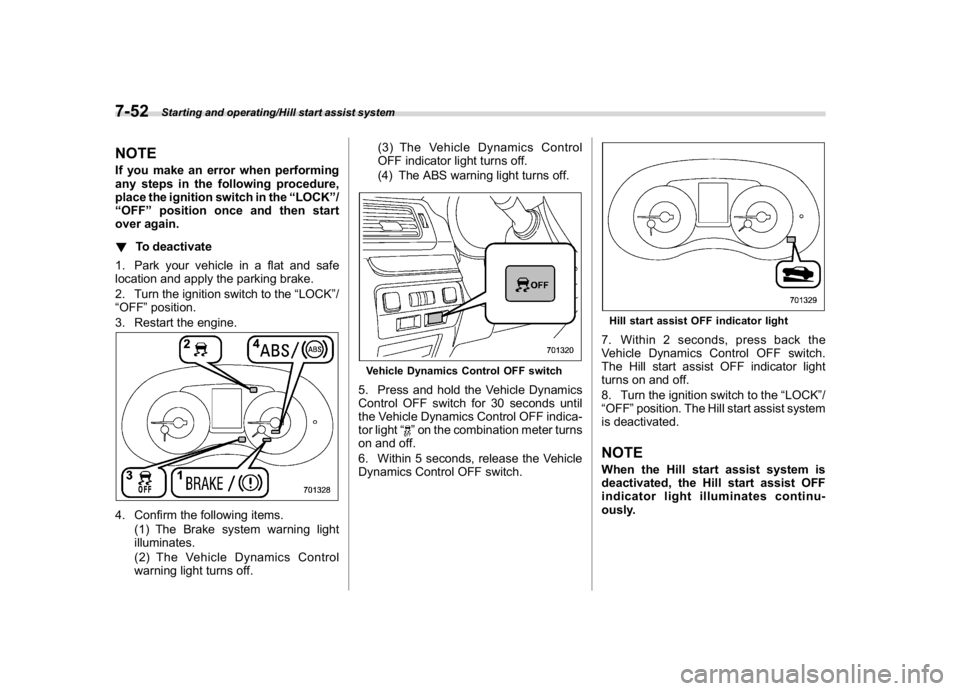
!To deactivate
1. Park your vehicle in a flat and safe
location and apply the parking brake.
2. Turn the ignition switch to the“LOCK”/
“OFF”position.
3. Restart the engine.4. Confirm the following items.
(1) The Brake system warning light
illuminates.
(2) The Vehicle Dynamics Control
warning light turns off.(3) The Vehicle Dynamics Control
OFF indicator light turns off.
(4) The ABS warning light turns off.
Vehicle Dynamics Control OFF switch5. Press and hold the Vehicle Dynamics
Control OFF switch for 30 seconds until
the Vehicle Dynamics Control OFF indica-
tor light“
”on the combination meter turns
on and off.
6. Within 5 seconds, release the Vehicle
Dynamics Control OFF switch.
Hill start assist OFF indicator light7. Within 2 seconds, press back the
Vehicle Dynamics Control OFF switch.
The Hill start assist OFF indicator light
turns on and off.
8. Turn the ignition switch to the“LOCK”/
“OFF”position. The Hill start assist system
is deactivated.NOTEWhen the Hill start assist system is
deactivated, the Hill start assist OFF
indicator light illuminates continu-
ously.
Starting and operating/Hill start assist system
7-52
Page 402 of 578

(415,1)
北米Model "A1700BE-B" EDITED: 2017/ 10/ 13
!To reactivate
To reactivate the Hill start assist system,
repeat steps 1 to 8. When the Hill start
assist system is activated, the Hill start
assist OFF indicator light turns off.&Hill start assist warning light/
Hill start assist OFF indicator
light (models without the
electronic parking brake sys-
tem)Refer to“Hill start assist warning light/Hill
start assist OFF indicator light (models
without electronic parking brake system)”
F3-24.
Cruise controlNOTEFor models with the EyeSight system:
Refer to the Owner’s Manual supple-
ment for the EyeSight system.
Cruise control enables you to maintain a
constant vehicle speed without holding
your foot on the accelerator pedal and it is
operative when the vehicle speed is 20
mph (30 km/h) or more.
WARNING
.Do not use the cruise control
under any of the following condi-
tions. These may cause loss of
vehicle control.
–driving up or down a steep
grade
–driving on slippery or winding
roads
–driving in heavy traffic
.When using the cruise control,
always set the speed appropri-
ately according to the speed limit,
traffic flow, road conditions, and
other conditions.
NOTE.On uphill and downhill slopes, de-
pending on the degree of the slope and
the load of the vehicle, there may be
cases when a constant speed cannot
be guaranteed.
.If the cruise control indicator does
not appear even after pressing the
cruise control main button, it is possi-
ble that there is a malfunction in the
system. We recommend that you con-
tact your SUBARU dealer for an inspec-
tion.
.Make sure the cruise control system
is turned off when the cruise control is
not in use to avoid unintentionally
setting the cruise control.
–CONTINUED–
Starting and operating/Cruise control
7-53
7
Page 404 of 578

(417,1)
北米Model "A1700BE-B" EDITED: 2017/ 10/ 11
tion to the“D”indication.&To temporarily cancel the
cruise controlYou can temporarily cancel the cruise
control in the following ways..Press the“CANCEL”button.
.Depress the brake pedal.
.Depress the clutch pedal (MT models
only).
WARNING
For CVT models, you can cancel the
cruise control by shifting the select
lever into the“N”position. However,
do not shift the lever into the“N”
position while driving except in case
of emergency. If the select lever isshifted into the“N”position, the
engine brake will no longer work.
This could result in an accident.
The cruise control set indicator in the
combination meter disappears when the
cruise control is canceled.
To resume the cruise control after it has
been temporarily canceled and with vehi-
cle speed of approximately 20 mph (30
km/h) or more, press the“RES/SET”
switch to the“RES”side to return to the
original cruising speed automatically.
The cruise control set indicator in the
combination meter will automatically ap-
pear at this time.
&To turn off the cruise controlThere are two ways to turn off the cruise
control:
.Press the cruise control main button
again.
.Turn the ignition switch to the“ACC”or
“LOCK”/“OFF”position (but only when the
vehicle is completely stopped).&To change the cruising speed!To increase the speed (by the“RES/
SET”switch)Press the“RES/SET”switch to the“RES”
side and hold it until the vehicle reaches
the desired speed. Then, release the
switch. The vehicle speed at that moment
will be memorized and treated as the new
set speed.
–CONTINUED–
Starting and operating/Cruise control
7-55
7
Page 405 of 578
(418,1)
北米Model "A1700BE-B" EDITED: 2017/ 10/ 11
You can increase the set speed 1 mph (1.6
km/h) or 1 km/h (0.6 mph) each time by
pressing the“RES/SET”switch to the
“RES”side quickly.
!To increase the speed (by accelera-
tor pedal)
1. Depress the accelerator pedal to ac-
celerate the vehicle to the desired speed.
2. Press the“RES/SET”switch to the
“SET”side once. Now the desired speed is
set and the vehicle will keep running at that
speed without depressing the accelerator
pedal.NOTECVT models:
.If you depress the accelerator pedal
with the Sport Sharp (S#) mode se-
lected, the select lever/gear position
indicator may change from the“D”
indication to the current gear position
indication.
.If you depress the accelerator pedal
fully with the Intelligent (I) mode or the
Sport (S) mode selected, the transmis-
sion will operate like a conventional
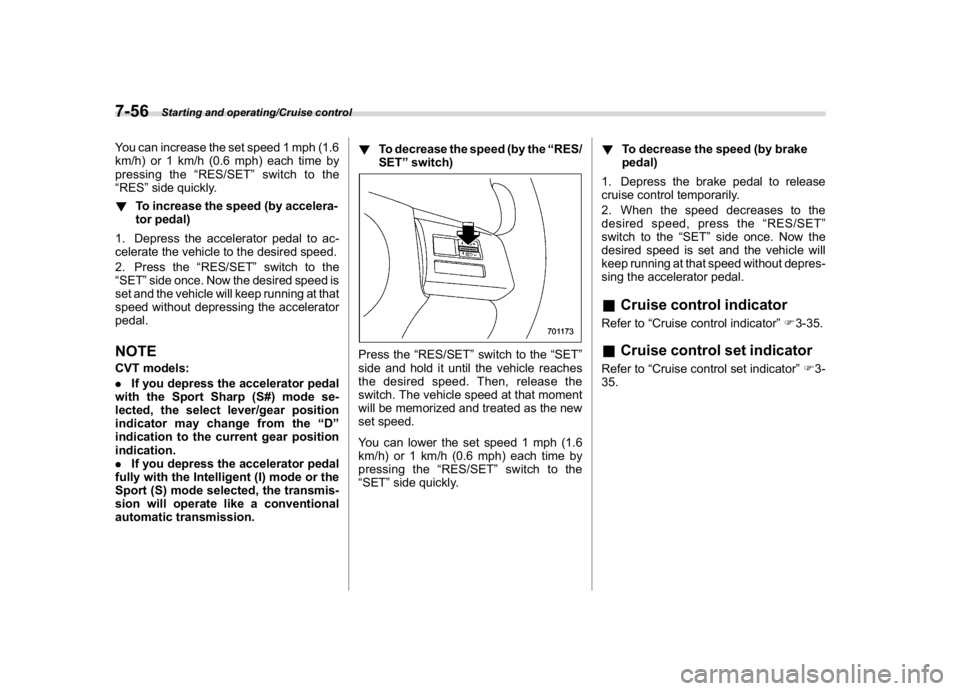
automatic transmission.!To decrease the speed (by the“RES/
SET”switch)
Press the“RES/SET”switch to the“SET”
side and hold it until the vehicle reaches
the desired speed. Then, release the
switch. The vehicle speed at that moment
will be memorized and treated as the new
set speed.
You can lower the set speed 1 mph (1.6
km/h) or 1 km/h (0.6 mph) each time by
pressing the“RES/SET”switch to the
“SET”side quickly.!To decrease the speed (by brake
pedal)
1. Depress the brake pedal to release
cruise control temporarily.
2. When the speed decreases to the
desired speed, press the“RES/SET”
switch to the“SET”side once. Now the
desired speed is set and the vehicle will
keep running at that speed without depres-
sing the accelerator pedal.
&Cruise control indicatorRefer to“Cruise control indicator”F3-35.&Cruise control set indicatorRefer to“Cruise control set indicator”F3-
35.
Starting and operating/Cruise control
7-56
Page 415 of 578
(428,1)
北米Model "A1700BE-B" EDITED: 2017/ 10/ 11
aligned, a system malfunction
may occur, including the inability
to detect vehicles entering the
detection areas. If any strong
shock is applied to the bumper,
be sure to contact your SUBARU
dealer for inspection.
–Do not disassemble the radar
sensors.
NOTEIf the radar sensors require repair or
replacement, or the bumper area
around the radar sensors requires
repair, paintwork or replacement, con-
tact your SUBARU dealer for assis-
tance.
Reverse Automatic Braking
System (if equipped)Reverse Automatic Braking is a system
designed to help avoid collisions or reduce
collision damage when reversing the
vehicle. If a wall or an obstacle is detected
in the reversing direction, the system will
notify the driver with a warning sound and
may activate the vehicle’s brakes auto-
matically.
WARNING
.Reverse Automatic Braking is not
a system intended to replace the
driver’s responsibility to check
surrounding areas for vehicles or
obstacles to avoid a collision.
.The driver is responsible for driv-
ing safely. Always be sure to
check the surroundings visually
when reversing the vehicle.
.There are some cases in which
the vehicle cannot avoid colli-
sion, because the system opera-
tion has limitations. The warning
sound or automatic braking may
be delayed or may not operate at
all even when an obstacle is
present..The system is not designed to
detect people (including chil-
dren), animals or other moving
objects.
.Depending on the vehicle condi-
tion or the surrounding environ-
ment, the sonar sensor’s ability
to detect objects may become
unstable.
NOTEThe Reverse Automatic Braking Sys-
tem records and stores the following
data when automatic braking operates.
It does not record conversations, per-
sonal information or other audio data.
.Distance from the object
.Vehicle speed
.Accelerator pedal operation status
.Brake pedal operation status
.Select lever position
.Outside temperature
.The sensitivity setting of the sonar
sensors
SUBARU and third parties con-
tracted by SUBARU may acquire
and use the recorded data for the
purpose of vehicle research and
development. SUBARU and third
parties contracted by SUBARU will
Starting and operating/Reverse Automatic Braking System
7-66