2018 SUBARU WRX key
[x] Cancel search: keyPage 289 of 578

(298,1)
北米Model "A1700BE-B" EDITED: 2017/ 10/ 11
!Connecting a USB device
You can connect a USB device to the
vehicle USB port. Refer to“Connecting
and disconnecting a USB memory/porta-
ble device”F5-16.
!How to change the source
The USB Audio playback screen can be
reached by the following methods:
.Connect a USB memory. Refer to
“Connecting and disconnecting a USB
memory/portable device”F5-16.
.Select the“USB/iPod”key on the
source select screen. Refer to“Selecting
an audio source”F5-17.!Select play mode
The play mode settings display will appear
when play mode key is touched. Select the
preferred play mode from the following
items.
Icon Function
Touch to start 1 track repeat.Touch to start repeat all.Touch to start folder repeat.Touch to start shuffle all.Touch to start shuffle folder.Return to the control screen.
&iPodAudio files on the iPod can be played.
WARNING
Do not operate the player’s controls
or connect the iPod while driving.
Doing so may result in loss of
control of your vehicle and cause
an accident or serious injury.
CAUTION
.Do not leave your portable player
in the car. In particular, high
temperatures inside the vehicle
may damage the portable player.
.Do not push down on or apply
unnecessary pressure to the por-
table player while it is connected
as this may damage the portable
player or its terminal.
.Do not insert foreign objects into
the port as this may damage the
portable player or its terminal.
Audio/Audio set
5-54
Page 291 of 578

(300,1)
北米Model "A1700BE-B" EDITED: 2017/ 10/ 11
!How to change the source
The iPod operation screen can be reached
by the following methods:
.Connect an iPod. Refer to“Connecting
and disconnecting a USB memory/porta-
ble device”F5-16.
.Select the“USB/iPod”key on the
source select screen. Refer to“Selecting
an audio source”F5-17.
!Select play mode
The play mode settings display will appear
when play mode key is touched. Select the
preferred play mode from the following
items.
Icon Function
Touch to start 1 track repeat.Touch to start repeat all.Touch to start shuffle all.Touch to turn off shuffle.Touch to start shuffle album.Return to the control screen.
!iPod settings
You can choose the following items from
the list screen after touching the
tab on
the screen.
Icon Function
Select to display the play list.Select to display tracks list.Select to display artists list.Select to display albums list.Select to open other list (“Gen-
res”,“Composers”,“Audiobooks”
and“Podcast”).Select to open“Genres”list.Select to open“Composers”list.Select to open“Audiobooks”list.Select to open“Podcasts”list.
&Bluetooth audioThe Bluetooth audio system enables users
to enjoy listening to music that is played on
a portable player on the vehicle speakers
via wireless communication.
This audio system supports Bluetooth, a
wireless data system capable of playing
portable audio music without cables. If
your device does not support Bluetooth,
the Bluetooth audio system will not func-
tion.
WARNING
.Do not operate the player’s con-
trols or connect to the Bluetooth
audio system while driving.
Doing so may result in loss of
control of your vehicle and cause
an accident or serious injury.
.Your audio unit is fitted with
Bluetooth antennas. People with
implantable cardiac pacemakers,
cardiac resynchronization ther-
apy-pacemakers or implantable
cardioverter defibrillators should
maintain a reasonable distance
between themselves and the
Bluetooth antennas. The radio
waves may affect the operation
of such devices.
Audio/Audio set
5-56
Page 293 of 578

(302,1)
北米Model "A1700BE-B" EDITED: 2017/ 10/ 11
NOTE.Depending on the Bluetooth device
that is connected to the system, the
music may start playing when selecting
the
key while it is paused. Con-
versely, the music may pause when
selecting the
key while it is playing.
.In the following conditions, the sys-
tem may not function:
–The Bluetooth device is turned
off.
–The Bluetooth device is not con-
nected.
–The Bluetooth device has a low
battery.
.It may take time to connect the
phone when Bluetooth audio is being
played.
.For operating the portable player,
see the instruction manual that comes
with it.
.If the Bluetooth device is discon-
nected due to poor reception from the
Bluetooth network when the ignition
switch is in the“ACC”or“ON”position,
the system will automatically recon-
nect to the portable player.
.If the Bluetooth device is discon-
nected on purpose, such as it was
turned off, this does not happen. Re-
connect the portable player manually.
.Bluetooth device information is re-gistered when the Bluetooth device is
connected to the Bluetooth audio sys-
tem. When selling or disposing of the
vehicle, remove the Bluetooth audio
information from the system. Refer to
“Bluetooth
®settings”F5-64.
!Connecting a Bluetooth device
To use the Bluetooth audio system, it is
necessary to register a Bluetooth device
with the system.
.Registering an additional device
1. Select the“Add”key on the Bluetooth
devices connection screen.
2. For more information: Refer to“Regis-
tering/connecting Bluetooth
®device”F5-
64.
.Selecting a registered device
1. Select the“Select”key on the Blue-
tooth devices connection screen.
2. For more information: Refer to“BT
Devices Connection screen”F5-67.
!How to change the source
Select the“BT Audio”key on the source
select screen. Refer to“Selecting an audio
source”F5-17.
NOTEDepending on the type of portable
player connected, some functions
may not be available and/or the screen
may look differently than shown in this
manual.
!Select play mode
The play mode settings display will appear
when play mode key is touched. Select the
preferred play mode from the following
items.
Icon Function
Touch to start 1 track repeat.Touch to start repeat all.Touch to repeat the tracks in the
group.Touch to start shuffle all.Touch to play tracks in the order
in which they are registered in the
audio device.Touch to start shuffle group.
Audio/Audio set
5-58
Page 295 of 578

(304,1)
北米Model "A1700BE-B" EDITED: 2017/ 10/ 11
!Control screen and audio panelNo. Function&1
Select to display the audio source
selection screen.
&2
Select to adjust the audio gain level.
Refer to“
Audio level settings”F5-60.
&3
Turn to adjust volume.
Press to turn the audio system on/off.
&4
Press to select an audio source.
Refer to“
Selecting an audio source”
F5-17.
&5
Press to display the sound setting
screen. Refer to“
Unit settings”F5-18.
!Connecting a portable audio device
You can connect a portable audio device to
the vehicle AUX jack. Refer to“Connecting
and disconnecting a USB memory/porta-
ble device”F5-16.
!How to change the source
The AUX operation screen can be reached
by the following methods:
.Connect a portable audio device. Refer
to“Connecting and disconnecting a USB
memory/portable device”F5-16.
.Select the“AUX”key on the source
select screen. Refer to“Selecting an audio
source”F5-17.
!Audio level settings
You can set the audio gain level.
1. Select the
tab on the screen, and
then touch the right side key of the“Audio
Level”key.
2. Select the audio level from the follow-
ing items.
.Low
.Mid
.High
Audio/Audio set
5-60
Page 299 of 578
(308,1)
北米Model "A1700BE-B" EDITED: 2017/ 10/ 11
Bluetooth
®settingsWARNING
Be sure to park the vehicle in a safe
location before connecting or oper-
ating a Bluetooth phone or audio
device. Failure to do so may result in
loss of control of your vehicle and
cause an accident or serious injury.&Regulatory informationThe Bluetooth
®word mark and logos are
registered trademarks owned by Bluetooth
SIG, Inc.
&Registering/connecting
Bluetooth
®device
You can register up to five devices,
regardless of whether they are Bluetooth
phones or audio devices.NOTE.Once the phone has been registered,
it is possible to use the hands-free
system or Bluetooth audio.
.Devices cannot be registered whiledriving.
!Registering a Bluetooth phone for
the first time
To use the hands-free system, it is
necessary to register a Bluetooth phone
with the system.
For details about registering a Bluetooth
device: Refer to“Registering a Bluetooth
Audio device for the first time”F5-65.
1. Turn the Bluetooth connection setting
of your cell phone on.
.This function is not available when
Bluetooth connection setting of your
cell phone is set to off.
2. Press the HOME button and select the
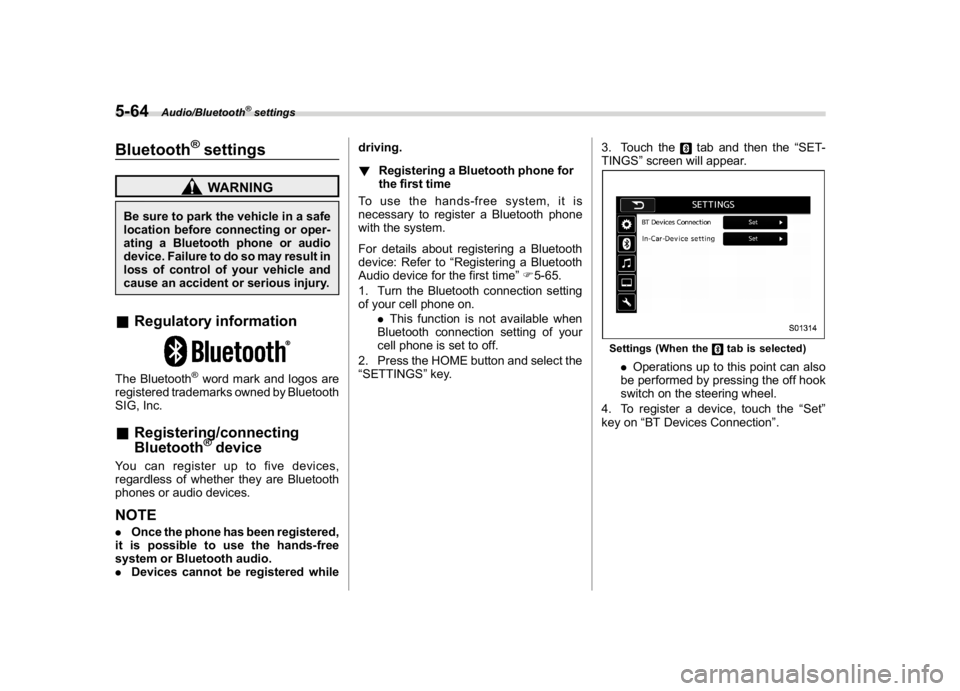
“SETTINGS”key.3. Touch the
tab and then the“SET-
TINGS”screen will appear.
Settings (When the
tab is selected)
.Operations up to this point can also
be performed by pressing the off hook
switch on the steering wheel.
4. To register a device, touch the“Set”
key on“BT Devices Connection”.
Audio/Bluetooth
®settings
5-64
Page 300 of 578

(309,1)
北米Model "A1700BE-B" EDITED: 2017/ 10/ 11
“BT Devices Connection”screen (At the
initial startup and when no device is
registered).5. Touch the“Add”key.When the“Add”key is selected (Waiting
for the connection request from a device).
.For details about operating the Blue-
tooth device, see the manual that
comes with it.
.To cancel the registration, touch the
“Cancel”key.
6. Register the Bluetooth device using
your Bluetooth device.
.A PIN-code is not required for SSP
(Secure Simple Pairing) compatible
Bluetooth devices. Depending on the
type of Bluetooth device being con-
nected, a message confirming regis-
tration may be displayed on the Blue-
tooth device’s screen. Respond and
operate the Bluetooth device accord-
ing to the confirmation message.
7. Check that the screen is displayed
when registration is complete.
.The system waits for connection
requests coming from the registered
device.
.At this stage, the Bluetooth functions
are not yet available.
!Registering a Bluetooth Audio de-
vice for the first time
To use the Bluetooth Audio, it is necessary
to register an audio device with the
system.
The device registration procedure is the
same for both the hands-free system andBluetooth audio.
1. Display the“BT Devices Connection”
screen. Refer to“Registering a Bluetooth
phone for the first time”F5-64.
2. Select the“Add”key.
The“Add”key is not displayed when five
devices are already registered.
To add another device, you need to delete
one of the registered devices.
Press the
key for the device to be
deleted, and then select the“OK”key.
3. Register the Bluetooth device using
your Bluetooth device.
.A PIN-code is not required for SSP
(Secure Simple Pairing) compatible
Bluetooth devices. Depending on the
type of Bluetooth device being con-
nected, a message confirming regis-
tration may be displayed on the Blue-
tooth device’s screen. Respond and
operate the Bluetooth device accord-
ing to the confirmation message.
4. Check that the screen is displayed
when registration is complete.
.The system waits for connection
requests coming from the registered
device.
.At this stage, the Bluetooth functions
are not yet available.
–CONTINUED–
Audio/Bluetooth
®settings
5-65
5
Page 302 of 578

(311,1)
北米Model "A1700BE-B" EDITED: 2017/ 10/ 11
&Setting Bluetooth details!BT Devices Connection screen
1. Press the HOME button.
2. Touch the“SETTINGS”key and then
touch the
tab.
3. Touch the“BT Devices Connection”
key and then select the desired device to
register.
“BT Devices Connection”screen (One
device is registered.)
No. Function&1
Register the device. Refer to“
Register-
ing/connecting Bluetooth
®device”F5-64.
&2
Make the connection to the registered
device.No. Function
&3
This shows the status of the device
connection profile. (The icon illuminates
while connected.)
&4
Delete the registered device. Refer to
“Deleting a Bluetooth device”F5-68.
&5
Switch to connect/disconnect Bluetooth
communication. Refer to“
Bluetooth ON/
OFF”F5-67.
!Connecting a Bluetooth device
Up to 5 Bluetooth devices (phones and
audio devices) can be registered.
If more than 1 Bluetooth device has been
registered, select which device to connect
to.
1. Display the“BT Devices Connection”
screen. Refer to“BT Devices Connection
screen”F5-67.
2. Select the device to be connected.
.Supported profile icons will be dis-
played.
–
: Phone
–: Audio device
–: Smartphone Application
.Supported profile icons for currently
connected devices will illuminate.
.The audio icon illuminates only when
in the Bluetooth audio mode.
.All icons are dimmed when Blue-
tooth is set to off or when the connec-tion cannot be made with the device.
NOTE.It may take time if the device con-
nection is carried out during Bluetooth
audio playback.
.Depending on the type of Bluetooth
device being connected, it may be
necessary to perform additional steps
on the device.
.It is not possible to establish a
Bluetooth connection with iOS devices
currently connected with a USB cable.
.Supported profile icons of the un-
selected devices are not displayed if
several Bluetooth devices have been
registered.
!Bluetooth ON/OFF
1. Display the“BT Devices Connection”
screen. Refer to“BT Devices Connection
screen”F5-67.
2. Select the“ON”or“OFF”key by the
right side of the“Connect with Bluetooth”
key. The“ON”key establishes a connec-
tion, and the“OFF”key disconnects the
connection.
–CONTINUED–
Audio/Bluetooth
®settings
5-67
5
Page 303 of 578

(312,1)
北米Model "A1700BE-B" EDITED: 2017/ 10/ 11
NOTEThe setting is fixed as the“OFF”key
when no device is registered.
!Deleting a Bluetooth device
1. Display the“BT Devices Connection”
screen. Refer to“BT Devices Connection
screen”F5-67.
2. Select the desired device.
3. Touch the
key for the device to be
deleted, and then select the“OK”key.
NOTEWhen deleting a Bluetooth phone, the
contact data will be deleted at the same
time.
!“In-Car-Device setting”screen
The Bluetooth settings can be confirmed
and changed.
1. Display the“SETTINGS”screen. Refer
to“Registering a Bluetooth phone for the
first time”F5-64.
2. On the“SETTINGS”screen for“In-
Car-Device setting”, select the“Set”key.
No. Function&1
Display the Bluetooth device address
of the in-vehicle equipment.
&2
Display the Bluetooth device name of
the in-vehicle equipment. The default
name is“SUBARU BT”, which can be
changed by selecting it and entering
alphanumeric characters.
&3
Display the PIN code of the in-vehicle
equipment. The default code is
“1234”, which can be changed by
selecting it and entering numbers.
&4
Delete one character from the cur-
rently selected item (BT device name
or the PIN code).
&5
Save the current BT device name and
PIN code.
&6
Numeric input keys.No. Function
&7
Switch the screen to input characters.
!Editing the Bluetooth device
name
The device name can be set or changed.
1. Touch the“Name”key.
2. Enter a name and then select the“Set”
key.
!Editing the PIN-Code
The PIN-code can be set or changed.
1. Select the“PIN”Key.
2. Enter a PIN-code and then select the
“Set”key.
NOTEIf the“PIN”key is already selected, the
“ABC”key is cross-hatched and dis-
abled.
Audio/Bluetooth
®settings
5-68