2018 SUBARU WRX key
[x] Cancel search: keyPage 314 of 578

(323,1)
北米Model "A1700BE-B" EDITED: 2017/ 10/ 11
!For PBAP incompatible but OPP
compatible Bluetooth phones
1. Select the“Download 1 Entry”key.
2. Transfer the contact data to the system
using a Bluetooth phone.
.This operation may be unnecessary
depending on the type of cell phone.
.To cancel this function, select the
“Cancel”key.
3. Check that a confirmation screen is
displayed when the operation is complete.
NOTETo download all items, you may need to
change the settings in your cell phone
beforehand.
!Deleting the contact data
You can delete the phonebook data stored
in the audio set.
1. Display the“PHONE”screen. Refer to
“How to change the hands-free phone
system”F5-72.
2. Touch the“Contacts”key, and then
select the“Delete All”key.
3. Select the“OK”key when the con-
firmation screen appears.
NOTE.Manual transfer operation cannot be
performed while driving.
.If your cell phone is neither PBAP
nor OPP compatible, the contacts can-
not be transferred.
.Depending on the type of Bluetooth
phone:
–It may be necessary to perform
additional steps on the phone when
transferring contact data.
Voice command systemThe voice command system enables the
audio, hands-free phone system, etc. to be
operated using voice commands.
Refer to the“Command list”F5-83 for
samples of voice commands.
Voice commands can be used even when
you set the system to another language.
For details about setting language, refer to
“General settings”F5-19.&Using the voice command
system!Steering switch1) Talk switch
–CONTINUED–
Audio/Voice command system
5-79
5
Page 329 of 578
(340,1)
北米Model "A1700BE-B" EDITED: 2017/ 10/ 11
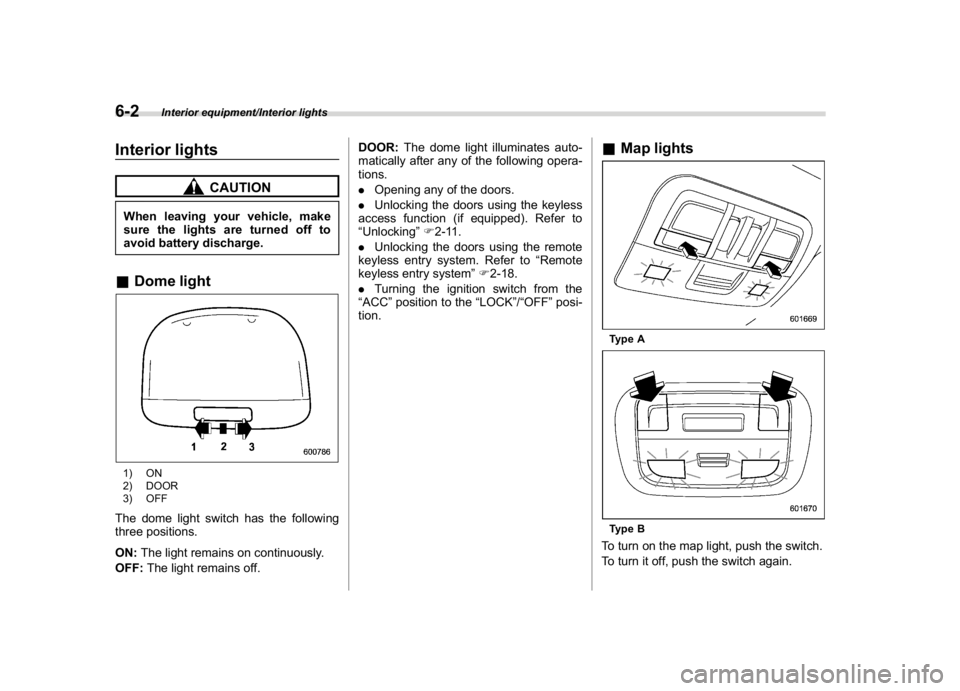
Interior lights
CAUTION
When leaving your vehicle, make
sure the lights are turned off to
avoid battery discharge.&Dome light1) ON
2) DOOR
3) OFFThe dome light switch has the following
three positions.
ON:The light remains on continuously.
OFF:The light remains off.DOOR:The dome light illuminates auto-
matically after any of the following opera-
tions.
.Opening any of the doors.
.Unlocking the doors using the keyless
access function (if equipped). Refer to
“Unlocking”F2-11.
.Unlocking the doors using the remote
keyless entry system. Refer to“Remote
keyless entry system”F2-18.
.Turning the ignition switch from the
“ACC”position to the“LOCK”/“OFF”posi-
tion.
&Map lightsType AType BTo turn on the map light, push the switch.
To turn it off, push the switch again.
Interior equipment/Interior lights
6-2
Page 330 of 578

(341,1)
北米Model "A1700BE-B" EDITED: 2017/ 10/ 11
!Automatic illumination (type A map
lights)
The map lights illuminate automatically in
the following cases.
.Any of the doors is opened.
.The doors are unlocked using the
keyless access function (if equipped).
Refer to“Unlocking”F2-11.
.The doors are unlocked using the
remote keyless entry transmitter.
.The ignition switch is turned from the
“ACC”position to the“LOCK”/“OFF”posi-
tion.&OFF delay timerThe following lights have an automatic
illumination function.
.dome light (when the dome light switch
is in the“DOOR”position)
.map light (type A)
After being illuminated automatically,
these lights remain on for several seconds
and then gradually turn off after all doors
are closed.
While the lights are illuminated, the lights
turn off immediately after any of the
following operations.
.Turning the ignition switch from the
“LOCK”/“OFF”position to the“ACC”or
“ON”position..Locking all doors using the keyless
access function (if equipped).
.Locking all doors using the remote
keyless entry system.
The setting for the period of time in which
the lights remain on (OFF delay timer) can
be changed by a SUBARU dealer. Contact
your SUBARU dealer for details. Also, the
setting can be changed by operating the
multi-function display (color LCD). For
details, refer to“Interior light setting”F3-
61.
Sun visorsTo block out glare, swing down the visors.
To use the sun visor at a side window,
swing it down and move it sideways.
–CONTINUED–
Interior equipment/Sun visors
6-3
6
Page 332 of 578

(343,1)
北米Model "A1700BE-B" EDITED: 2017/ 10/ 11
Storage compartment
CAUTION
.Always keep the storage com-
partment closed while driving to
reduce the risk of injury in the
event of a sudden stop or an
accident.
.Do not store spray cans, contain-
ers with flammable or corrosive
liquids or any other dangerous
items in the storage compart-
ment.
&Glove box1) Rotate the key clockwise to lock.
2) Rotate the key counterclockwise to un-
lock.To open the glove box, pull the handle.
To close it, push the lid firmly upward.NOTE.For models with the“keyless access
with push-button start system”, use the
emergency key to lock or unlock the
glove box.
.The emergency key is directional. If
the key cannot be inserted, change the
direction that the grooved side is facing
and insert it again.
&Center consoleTo open the lid, pull up the lock release.
Interior equipment/Storage compartment
6-5
6
Page 342 of 578

(353,1)
北米Model "A1700BE-B" EDITED: 2017/ 10/ 11
To turn on the rear view image cancel
delay function:
1. Touch the rear view image screen.1)“Delay”key2. Touch the“Delay”key.
It is possible to turn on/off the function by
touching the“Delay”key.NOTEIf the rear view screen is not touched
for 5 seconds, both the“Delay”and
“Display Adjustment”keys will turn off.
Touch the rear view screen to display
the keys again.
When the rear view image cancel delay
function is on, the rear view image screen
can be automatically returned to the
previous screen if any of the following aremet.
.9 seconds have passed since the shift
lever/select lever has shifted from the“R”
position to another position.
.The vehicle speed exceeds 5 mph (8
km/h).
.The select lever is shifted into the“P”
position (CVT models).
&Viewing range on the screen
CAUTION
The range that can be viewed with
the rear view camera is limited.
Always be sure to check with your
eyes when moving backward and
proceed slowly.
Range of viewRange of view
–CONTINUED–
Interior equipment/Rear view camera
6-15
6
Page 345 of 578

(356,1)
北米Model "A1700BE-B" EDITED: 2017/ 10/ 11
!Feature of distance marker1) 3 feet (1 m) line
2) 10 feet (3 m) lineThe distance marker shows the distance
on the road. If there is a car or other object
close behind, distance cannot be correctly
displayed.
&Display adjustment1. Touch the rear view image screen.1) Display Adjustment key2. Touch the“Display Adjustment”key.1) Back key
3. Touch“+”or“”to change the setting.
4. After setting, touch the back key to
display the rear view image again.
Interior equipment/Rear view camera
6-18
Page 359 of 578

(372,1)
北米Model "A1700BE-B" EDITED: 2017/ 10/ 11
controlled throttle’s self-diagnosis
function. To overcome it, keep the
ignition switch in the“ON”position
for approximately 10 seconds before
starting the engine.&Models without push-button
start systems!Starting engine
CAUTION
Do not operate the starter motor
continuously for more than 10 sec-
onds. If the engine fails to start after
operating the starter for 5 to 10
seconds, wait for 10 seconds or
more before trying again.NOTEDo not shift the shift lever/select lever
while the starter is cranking.
!MT models
1. Apply the parking brake.
2. Turn off unnecessary lights and acces-
sories.
3. Depress the clutch pedal to the floor
and shift the shift lever into neutral. Hold
the clutch pedal to the floor while starting
the engine.The starter motor will only operate when
the clutch pedal is depressed fully to the
floor.
4. Turn the ignition switch to the“ON”
position and check the operation of the
warning and indicator lights. Refer to
“Warning and indicator lights”F3-13.
5. Turn the ignition switch to the“START”
positionwithoutdepressing the accelera-
tor pedal. Release the key immediately
after the engine has started.
If the engine does not start, perform the
procedure described in“If the engine does
not start”F7-11.
6. Confirm that all warning and indicator
lights have turned off after the engine has
started.
!CVT models
1. Apply the parking brake.
2. Turn off unnecessary lights and acces-
sories.
3. Shift the select lever to the“P”or“N”
position (preferably the“P”position).
The starter motor will only operate when
the select lever is at the“P”or“N”position.
4. Turn the ignition switch to the“ON”
position and check the operation of the
warning and indicator lights. Refer to
“Warning and indicator lights”F3-13.
5. Turn the ignition switch to the“START”positionwithoutdepressing the accelera-
tor pedal. Release the key immediately
after the engine has started.
If the engine does not start, perform the
procedure described in“If the engine does
not start”F7-11.
6. Confirm that all warning and indicator
lights have turned off after the engine has
started.
While the engine is warming up, make sure
that the select lever is at the“P”or“
N”
position and that the parking brake is
applied.
CAUTION
If you restart the engine while the
vehicle is moving, shift the select
lever into the“N”position. Do not
attempt to place the select lever of a
moving vehicle into the“P”position.
Starting and operating/Starting and stopping the engine
7-10
Page 361 of 578

(374,1)
北米Model "A1700BE-B" EDITED: 2017/ 10/ 11
switch the power status to“OFF”.
Wait 10 seconds, and then push
the push-button ignition switch
to start the engine.
NOTE.When pressing the push-button igni-
tion switch with the clutch pedal (MT
models) or the brake pedal (CVT mod-
els) depressed:
–The engine starter operates for a
maximum of 10 seconds and after
starting the engine, the starter stops
automatically.
–You can start the engine regard-
less of the power status.
.If the engine does not start, check
the security indicator light. Then press
the push-button ignition switch without
depressing the clutch pedal (MT mod-
els) or the brake pedal (CVT models) to
switch the power to“OFF”.
–If the light had illuminated, try to
start the engine again.
–If the light had been off, press the
push-button ignition switch while
depressing the clutch pedal (MT
models) or the brake pedal (CVT
models) more forcefully.
.The engine may not start depending
on the radio wave conditions aroundthe vehicle. In such a case, refer to
“Starting engine”F9-27.
.If the vehicle battery is discharged,
the steering cannot be unlocked.
Charge the battery.
.Do not shift the shift lever/select
lever while the starter is cranking.
1) Operation indicator
2) Push-button ignition switchThe design of the push-button ignition
switch may be slightly different depending
on the models.
When you press the push-button ignition
switch with the clutch pedal (MT models)/
brake pedal (CVT models) depressed, the
engine will start. The start procedure of the
engine is as follows.!MT models
1. Carry the access key fob, and sit in the
driver’s seat.
2. Apply the parking brake.
3. Shift the shift lever in neutral.
4. Depress the brake pedal.
5. Depress the clutch pedal until the
indicator on the push-button ignition switch
turns green.
6. While depressing the clutch pedal,
press the push-button ignition switch.
!CVT models
1. Carry the access key fob, and sit in the
driver’s seat.
2. Apply the parking brake.
3. Shift the select lever in the“P”position.
The engine can also start when the select
lever is in the“N”position, however, for
safety reasons, start in the“P”position.
4. Depress the brake pedal until the
operation indicator on the push-button
ignition switch turns green. When starting
with the select lever in the“N”position, the
indicator does not turn green.
5. While depressing the brake pedal,
press the push-button ignition switch.
Starting and operating/Starting and stopping the engine
7-12