2018 SUBARU CROSSTREK display
[x] Cancel search: displayPage 308 of 474
(317,1)
北米Model "A1320BE-C" EDITED: 2017/ 10/ 10
!To increase the speed (by accelera-
tor pedal)
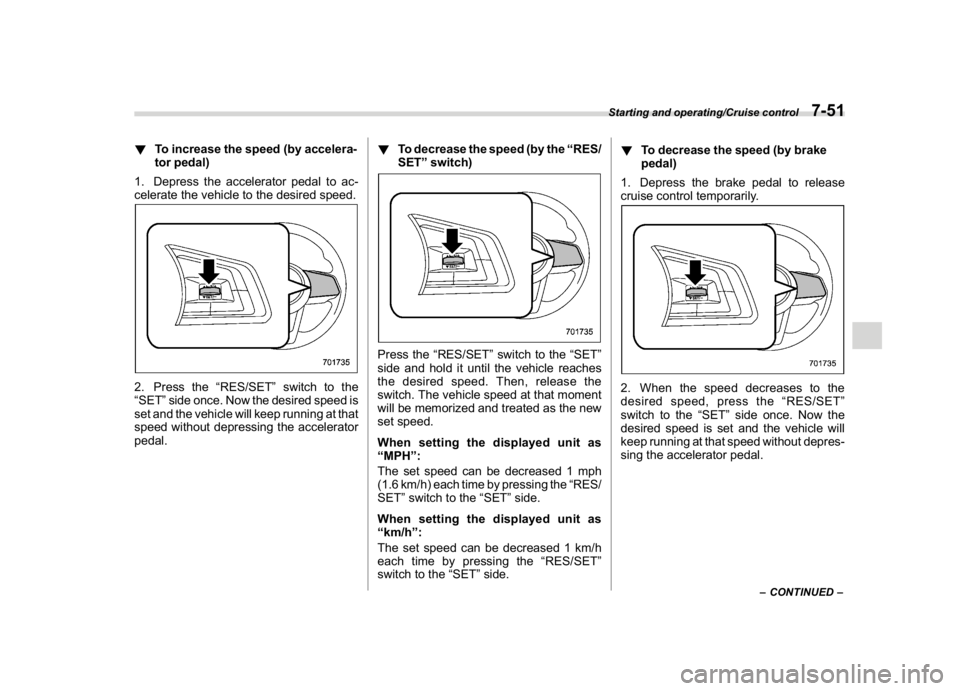
1. Depress the accelerator pedal to ac-
celerate the vehicle to the desired speed.2. Press the“RES/SET”switch to the
“SET”side once. Now the desired speed is
set and the vehicle will keep running at that
speed without depressing the accelerator
pedal.!To decrease the speed (by the“RES/
SET”switch)
Press the“RES/SET”switch to the“SET”
side and hold it until the vehicle reaches
the desired speed. Then, release the
switch. The vehicle speed at that moment
will be memorized and treated as the new
set speed.
When setting the displayed unit as
“MPH”:
The set speed can be decreased 1 mph
(1.6 km/h) each time by pressing the“RES/
SET”switch to the“SET”side.
When setting the displayed unit as
“km/h”:
The set speed can be decreased 1 km/h
each time by pressing the“RES/SET”
switch to the“SET”side.!To decrease the speed (by brake
pedal)
1. Depress the brake pedal to release
cruise control temporarily.
2. When the speed decreases to the
desired speed, press the“RES/SET”
switch to the“SET”side once. Now the
desired speed is set and the vehicle will
keep running at that speed without depres-
sing the accelerator pedal.
–CONTINUED–
Starting and operating/Cruise control
7-51
7
Page 313 of 474

(322,1)
北米Model "A1320BE-C" EDITED: 2017/ 10/ 10
with a low body height such as
sports cars or a trailer with no
cargo)
–Vehicles that are not approaching
your vehicle even though they are in
the detection area (either on a
neighboring lane to the rear or be-
side your vehicle when reversing)
(The system determines the pre-
sence of approaching vehicles
based on data detected by the radar
sensors.)
–Vehicles traveling at significantly
different speeds
–Vehicles driving in parallel at al-
most the same speed as your vehi-
cle for a prolonged time
–Oncoming vehicles
–Vehicles in a lane beyond the
neighboring lane
–Vehicles travelling at a signifi-
cantly lower speed that you are
trying to overtake
.On a road with extremely narrow
lanes, the system may detect vehicles
driving in a lane next to the neighboring
lane.
.When the 8-inch audio/navigation
system is performing a software up-
date, the RCTA warning icons may not
be displayed on the audio/navigation
screen until the update is complete.
&BSD/RCTA approach indica-
tor light/warning buzzerWhen the BSD/RCTA is active, the BSD/
RCTA approach indicator light will operate
to alert the driver when there are vehicles
in the neighboring lanes. When reversing
the vehicle, the BSD/RCTA approach
indicator light and warning buzzer will
operate to alert the driver that a vehicle is
approaching from the left or right side.
!BSD/RCTA approach indicator lightBSD/RCTA approach indicator lightIt is mounted in each side of the outside
mirrors.
The indicator light will illuminate when a
vehicle approaching from behind is de-
tected.
The indicator light will flash to warn thedriver of dangers under the following
conditions.
.While the indicator light illuminates, if
you operate the turn signal lever toward
the side in which this light turned on.
.When reversing the vehicle while the
system detects a vehicle approaching
from either side.
!BSD/RCTA approach indicator
light dimming function
When the headlights are turned on, the
brightness of the BSD/RCTA approach
indicator light will be reduced.
NOTE.You may have difficulty recognizing
the BSD/RCTA approach indicator light
under the following conditions.
–When affected by direct sunlight
–When affected by the headlight
beams from the vehicles behind
.While the illumination brightness
control dial is in the fully upward
position, even if the headlights are
turned on, the brightness of the BSD/
RCTA approach indicator light will not
be reduced. For details about the
illumination brightness control dial,
refer to“Illumination brightness con-
trol”F3-12.
Starting and operating/BSD/RCTA
7-56
Page 314 of 474
(323,1)
北米Model "A1320BE-C" EDITED: 2017/ 10/ 10
!BSD/RCTA approach warning buz-
zer (only when reversing)
A warning buzzer sounds along with
flashing of the BSD/RCTA approach in-
dicator light to warn the driver of dangers.
The setting of the warning buzzer volume
can be changed by operating the combi-
nation meter display (color LCD). For
details, refer to“Menu screens”F3-38.
!Safety tips regarding the BSD/RCTA
approach indicator light/warning
buzzer
.In the following cases, operation of the
BSD/RCTA approach indicator light and
the warning buzzer may be delayed or the
system may fail to issue these warnings.
–When a vehicle moves to the neigh-
boring lane from a lane next to the
neighboring lane
–When driving on a steep incline or
on repeated sharp uphill and downhill
grades
–When going beyond a pass
–When both your vehicle and a
vehicle driving on a neighboring lane
are driving on the far side of each lane.
–When several narrowly-spaced ve-
hicles are approaching in a row
–In low radius bends (tight bends or
when making turns at an intersection)–When there is a difference in height
between your lane and the neighboring
lane
–Immediately after the BSD/RCTA is
activated by pressing the BSD/RCTA
OFF switch
–Immediately after the shift lever/
select lever is shifted to the“R”position
–When extremely heavy cargo is
loaded in the cargo area
.During reversing, operation of the BSD/
RCTA approach indicator light and the
warning buzzer may be delayed or the
system may fail to issue these warnings
under the following conditions.
–When backing out of an angled
parking space
–When a large-sized vehicle is
parked next to your vehicle (That
vehicle prevents the propagation of
radar waves.)
–When reversing on sloped roads
–When reversing at a high speed
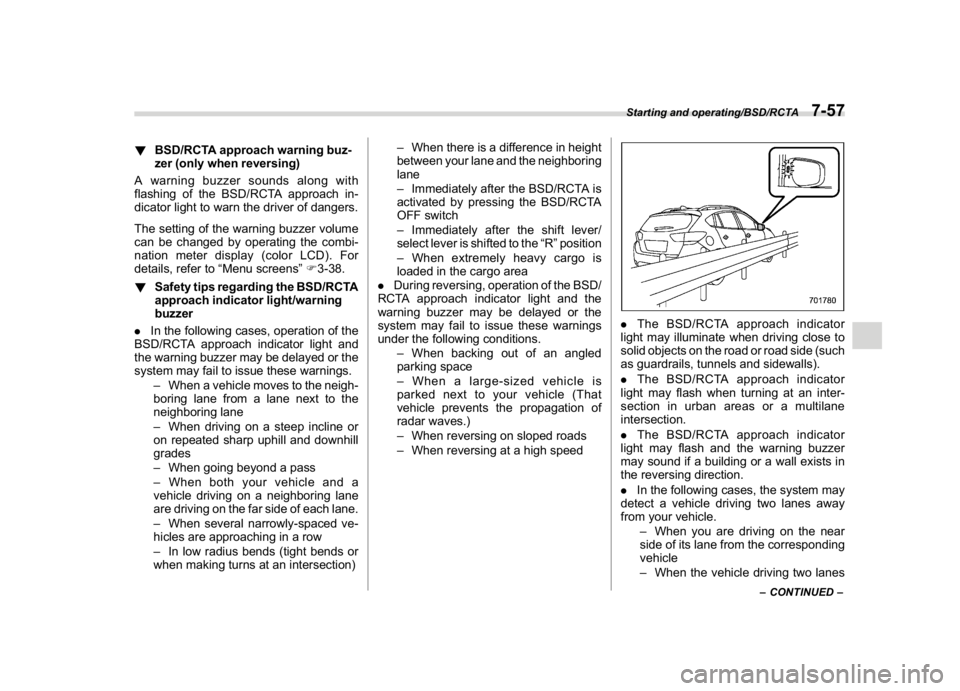
.The BSD/RCTA approach indicator
light may illuminate when driving close to
solid objects on the road or road side (such
as guardrails, tunnels and sidewalls).
.The BSD/RCTA approach indicator
light may flash when turning at an inter-
section in urban areas or a multilane
intersection.
.The BSD/RCTA approach indicator
light may flash and the warning buzzer
may sound if a building or a wall exists in
the reversing direction.
.In the following cases, the system may
detect a vehicle driving two lanes away
from your vehicle.
–When you are driving on the near
side of its lane from the corresponding
vehicle
–When the vehicle driving two lanes
–CONTINUED–
Starting and operating/BSD/RCTA
7-57
7
Page 315 of 474

(324,1)
北米Model "A1320BE-C" EDITED: 2017/ 10/ 10
away is driving on the near side of its
lane from your vehicle
&BSD/RCTA warning indicator!System temporary stop indicatorSystem temporary stop indicatorThis indicator appears when the system is
used under the following conditions.
.Extremely high or low temperatures
.When abnormal voltage exists for the
vehicle battery
.When the radar sensor is significantly
misaligned
Once the above conditions are corrected,
the system will recover from the temporary
stop condition and the indicator will dis-
appear. If the indicator remains displayedfor a prolonged time, have the system
inspected at a SUBARU dealer.
!System temporary stop indicator
due to reduced radar sensitivity
System temporary stop indicator due to
reduced radar sensitivityThis indicator appears when the detect-
ability of the radar sensors is reduced.
Once the condition is corrected, the
system will recover from the temporary
stop condition and the indicator will dis-
appear. If the indicator remains displayed
for a prolonged time, have the system
inspected at a SUBARU dealer.!System malfunction indicator
System malfunction indicator
1) At first, this message will appear
2) Then this message will appearThis indicator appears when a malfunction
occurs in the system. Contact a SUBARU
dealer and have the system inspected.
Starting and operating/BSD/RCTA
7-58
Page 320 of 474

(329,1)
北米Model "A1320BE-C" EDITED: 2017/ 10/ 10
tem is set to on
.The select lever is in the“R”position
.The vehicle speed is between 1 to 9
mph (1.5 to 15 km/h)NOTE.In the following cases, the Reverse
Automatic braking system will not
operate. Promptly contact a SUBARU
dealer to have the system inspected.
–The EyeSight warning indicator
is illuminated
–The Reverse Automatic Braking
fail indicator is illuminated
.When the Reverse Automatic Brak-
ing system OFF indicator is illumi-
nated, the Reverse Automatic braking
system cannot be operated.
.In the following cases, the system
may not be able to properly detect an
obstacle. Promptly contact a SUBARU
dealer to have the system inspected.
–A sticker, paint, or a chemical is
applied to the rear bumper near the
sonar sensor
–The rear bumper is modified
–The rear bumper has been re-
moved and reattached
–The ground clearance is changed
due to the vehicle’s loading condi-
tion or modification
–Ice, snow or mud is adhered tothe rear bumper near the sonar
sensor
–The rear bumper is exposed to
strong impact, or the rear bumper is
deformed
.When the 8-inch audio/navigation
system is performing a software up-
date, the Reverse Automatic Braking
System may not display the following
items on the audio/navigation screen
until the update is complete.
–Display Icon on/off Function
–Distance Indicator Image
–Warning Message
.On a steep hill, the system’s auto-
matic braking ability will be reduced.
.The system is designed to avoid
collisions by automatic hard braking
when the vehicle’s reversing speed is
less than approximately 3 mph (5 km/h).
However, the system does not guaran-
tee that the vehicle will be able to avoid
collisions in any situation.
.If the vehicle is reversed at an
extremely slow speed, the driver’s
operation may be prioritized. In this
case, automatic braking will not oper-
ate.
.The system may not be able to detect
the following objects
–Sharp or thin objects such as
poles, fences and ropes which maynot reflect the sound wave emitted
from the sonar sensor
–Objects that are too close to the
rear bumper when the select lever is
set to the“R”position
–Objects with a surface which may
not reflect the sound wave emitted
from the sonar sensor such as a
chain link fence.
.Objects the system is not designed
to detect
–Pedestrians
–Moving objects including moving
vehicles
–Objects which absorb sound
waves such as cloth or snow
–Objects whose surface has a
diagonal angle
–Objects that are low to the ground
such as parking blocks
–Objects that are high above the
ground such as objects hanging
from above
.The system may not be able to
properly detect objects or may cause
a system malfunction when the follow-
ing conditions exist
High frequency sound from other
sources are nearby
–Horn sound from another vehicle
–Engine sound from other vehi-
–CONTINUED–
Starting and operating/Reverse Automatic Braking System
7-63
7
Page 322 of 474
(331,1)
北米Model "A1320BE-C" EDITED: 2017/ 10/ 10
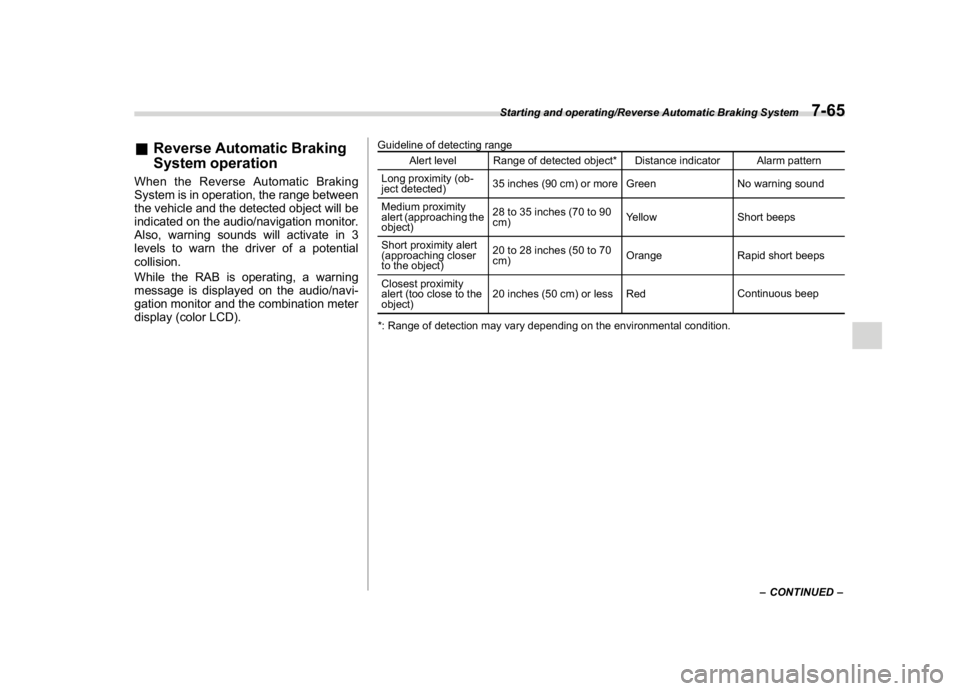
&Reverse Automatic Braking
System operationWhen the Reverse Automatic Braking
System is in operation, the range between
the vehicle and the detected object will be
indicated on the audio/navigation monitor.
Also, warning sounds will activate in 3
levels to warn the driver of a potential
collision.
While the RAB is operating, a warning
message is displayed on the audio/navi-
gation monitor and the combination meter
display (color LCD).
Guideline of detecting range
Alert level Range of detected object* Distance indicator Alarm pattern
Long proximity (ob-
ject detected)35 inches (90 cm) or more Green No warning sound
Medium proximity
alert (approaching the
object)28 to 35 inches (70 to 90
cm)Yellow Short beeps
Short proximity alert
(approaching closer
to the object)20 to 28 inches (50 to 70
cm)Orange Rapid short beeps
Closest proximity
alert (too close to the
object)20 inches (50 cm) or less RedContinuous beep
*: Range of detection may vary depending on the environmental condition.
–CONTINUED–
Starting and operating/Reverse Automatic Braking System
7-65
7
Page 324 of 474
(333,1)
北米Model "A1320BE-C" EDITED: 2017/ 10/ 10
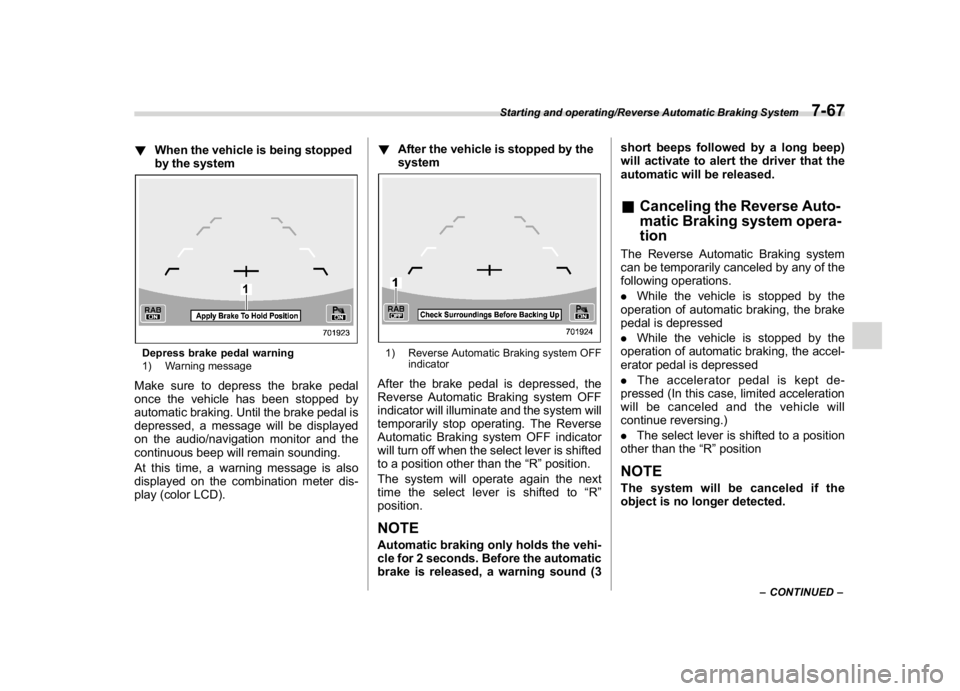
!When the vehicle is being stopped
by the systemDepress brake pedal warning
1) Warning messageMake sure to depress the brake pedal
once the vehicle has been stopped by
automatic braking. Until the brake pedal is
depressed, a message will be displayed
on the audio/navigation monitor and the
continuous beep will remain sounding.
At this time, a warning message is also
displayed on the combination meter dis-
play (color LCD).!After the vehicle is stopped by the
system
1) Reverse Automatic Braking system OFF
indicatorAfter the brake pedal is depressed, the
Reverse Automatic Braking system OFF
indicator will illuminate and the system will
temporarily stop operating. The Reverse
Automatic Braking system OFF indicator
will turn off when the select lever is shifted
to a position other than the“R”position.
The system will operate again the next
time the select lever is shifted to“R”
position.NOTEAutomatic braking only holds the vehi-
cle for 2 seconds. Before the automatic
brake is released, a warning sound (3short beeps followed by a long beep)
will activate to alert the driver that the
automatic will be released.
&Canceling the Reverse Auto-
matic Braking system opera-
tionThe Reverse Automatic Braking system
can be temporarily canceled by any of the
following operations.
.While the vehicle is stopped by the
operation of automatic braking, the brake
pedal is depressed
.While the vehicle is stopped by the
operation of automatic braking, the accel-
erator pedal is depressed
.The accelerator pedal is kept de-
pressed (In this case, limited acceleration
will be canceled and the vehicle will
continue reversing.)
.The select lever is shifted to a position
other than the“R”positionNOTEThe system will be canceled if the
object is no longer detected.
–CONTINUED–
Starting and operating/Reverse Automatic Braking System
7-67
7
Page 325 of 474
(334,1)
北米Model "A1320BE-C" EDITED: 2017/ 10/ 10
&Reverse Automatic Braking
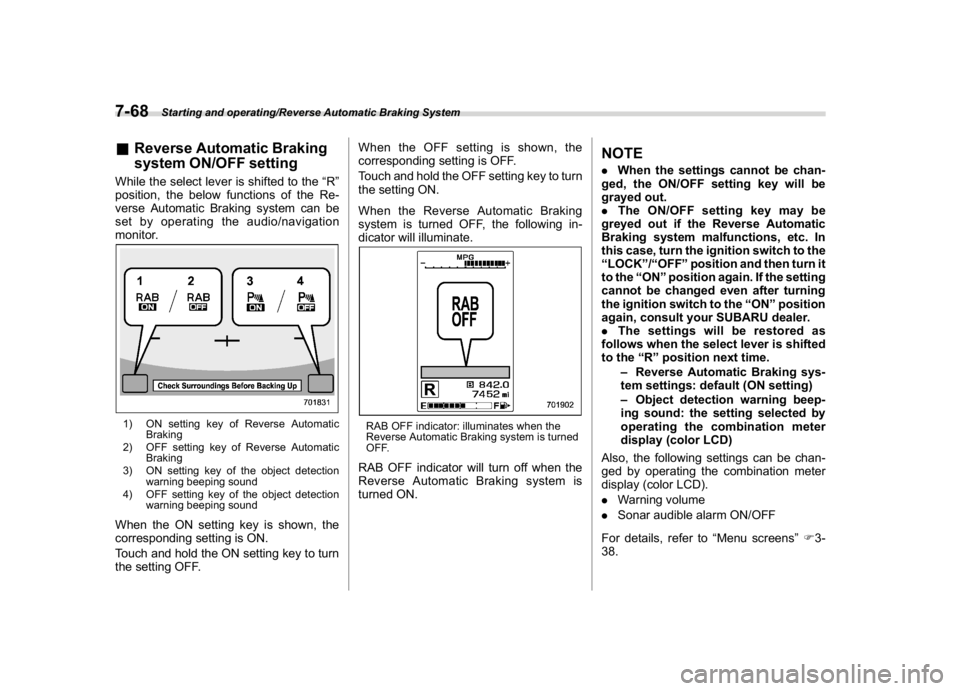
system ON/OFF settingWhile the select lever is shifted to the“R”
position, the below functions of the Re-
verse Automatic Braking system can be
set by operating the audio/navigation
monitor.1) ON setting key of Reverse Automatic
Braking
2) OFF setting key of Reverse Automatic
Braking
3) ON setting key of the object detection
warning beeping sound
4) OFF setting key of the object detection
warning beeping soundWhen the ON setting key is shown, the
corresponding setting is ON.
Touch and hold the ON setting key to turn
the setting OFF.When the OFF setting is shown, the
corresponding setting is OFF.
Touch and hold the OFF setting key to turn
the setting ON.
When the Reverse Automatic Braking
system is turned OFF, the following in-
dicator will illuminate.
RAB OFF indicator: illuminates when the
Reverse Automatic Braking system is turned
OFF.RAB OFF indicator will turn off when the
Reverse Automatic Braking system is
turned ON.
NOTE.When the settings cannot be chan-
ged, the ON/OFF setting key will be
grayed out.
.The ON/OFF setting key may be
greyed out if the Reverse Automatic
Braking system malfunctions, etc. In
this case, turn the ignition switch to the
“LOCK”/“OFF”position and then turn it
to the“ON”position again. If the setting
cannot be changed even after turning
the ignition switch to the“ON”position
again, consult your SUBARU dealer.
.The settings will be restored as
follows when the select lever is shifted
to the“R”position next time.
–Reverse Automatic Braking sys-
tem settings: default (ON setting)
–Object detection warning beep-
ing sound: the setting selected by
operating the combination meter
display (color LCD)
Also, the following settings can be chan-
ged by operating the combination meter
display (color LCD).
.Warning volume
.Sonar audible alarm ON/OFF
For details, refer to“Menu screens”F3-
38.
Starting and operating/Reverse Automatic Braking System
7-68