2018 SUBARU CROSSTREK display
[x] Cancel search: displayPage 220 of 474
(225,1)
北米Model "A1320BE-C" EDITED: 2017/ 10/ 10
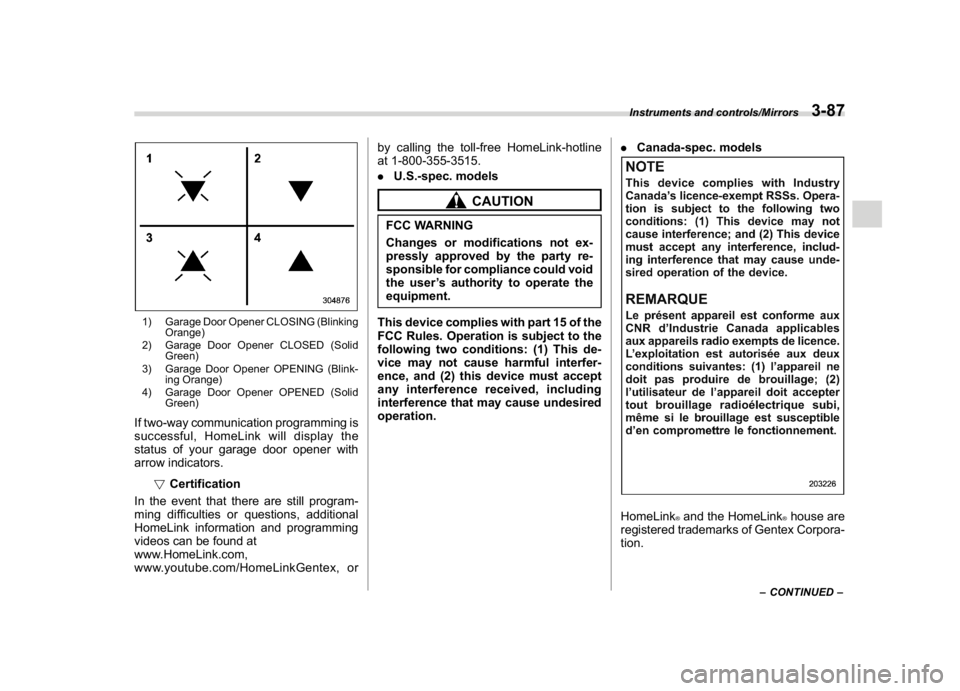
1) Garage Door Opener CLOSING (Blinking
Orange)
2) Garage Door Opener CLOSED (Solid
Green)
3) Garage Door Opener OPENING (Blink-
ing Orange)
4) Garage Door Opener OPENED (Solid
Green)If two-way communication programming is
successful, HomeLink will display the
status of your garage door opener with
arrow indicators.
!Certification
In the event that there are still program-
ming difficulties or questions, additional
HomeLink information and programming
videos can be found at
www.HomeLink.com,
www.youtube.com/HomeLinkGentex, orby calling the toll-free HomeLink-hotline
at 1-800-355-3515.
.U.S.-spec. models
CAUTION
FCC WARNING
Changes or modifications not ex-
pressly approved by the party re-
sponsible for compliance could void
the user’s authority to operate the
equipment.
This device complies with part 15 of the
FCC Rules. Operation is subject to the
following two conditions: (1) This de-
vice may not cause harmful interfer-
ence, and (2) this device must accept
any interference received, including
interference that may cause undesired
operation..Canada-spec. models
HomeLink
®and the HomeLink
®house are
registered trademarks of Gentex Corpora-
tion.
–CONTINUED–
Instruments and controls/Mirrors
3-87
3
Page 223 of 474
(228,1)
北米Model "A1320BE-C" EDITED: 2017/ 10/ 10
outside mirrors have been cleared and the
windshield blade rubbers have been
deiced completely before that time, press
the control switch to turn them off.
For climate control system (type B and
C),it is possible for the defogger and
deicer system to be set to continuous
operation mode by a SUBARU dealer.
Consult your SUBARU dealer for details.
Also, for models with a combination meter
display (color LCD), it is possible to set the
defogger and deicer system for the con-
tinuous operation mode. For details, refer
to“Vehicle Setting”F3-41.
CAUTION
.To prevent the battery from being
discharged, do not operate the
defogger and deicer system con-
tinuously for any longer than
necessary.
.Do not use sharp instruments or
window cleaner containing abra-
sives to clean the inner surface of
the rear window. They may da-
mage the conductors printed on
the window.
NOTE.Turn on the defogger and deicer
system if the wipers are frozen to the
windshield.
.If the windshield is covered with
snow, remove the snow so that the
windshield wiper deicer works effec-
tively.
.While the defogger and deicer sys-
tem is in the continuous operation
mode:
–If the vehicle speed remains at 9
mph (15 km/h) or lower for 15
minutes, the windshield wiper dei-
cer system automatically stops op-
erating. However, the rear window
defogger system and outside mirror
defogger system maintain continu-
ous operation in this condition.
–If the vehicle battery voltage
drops below the permissible level,
continuous operation of the defog-
ger system and deicer system is
canceled and the system stops
operating.
Tilt/telescopic steering wheel
WARNING
.Do not adjust the steering wheel
tilt/telescopic position while driv-
ing. This may cause loss of
vehicle control and result in per-
sonal injury.
.If the lever cannot be raised to the
fixed position, adjust the steering
wheel again. It is dangerous to
drive without locking the steering
wheel. This may cause loss of
vehicle control and result in per-
sonal injury.
Instruments and controls/Tilt/telescopic steering wheel
3-90
Page 229 of 474
(236,1)
北米Model "A1320BE-C" EDITED: 2017/ 10/ 10
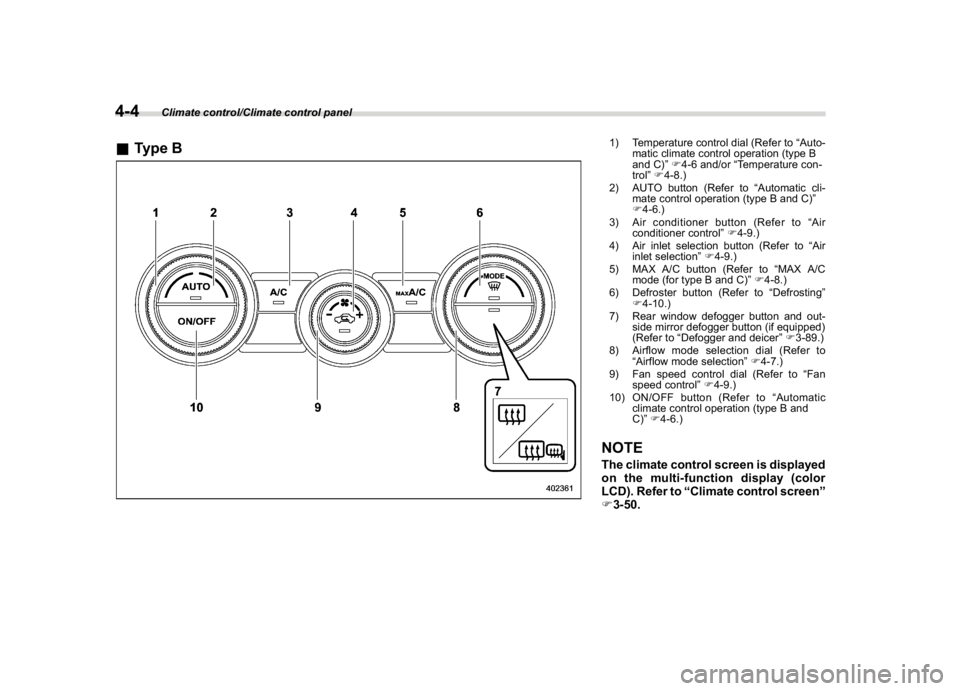
&Type B
1) Temperature control dial (Refer to“Auto-
matic climate control operation (type B
and C)”F4-6 and/or“Temperature con-
trol”F4-8.)
2) AUTO button (Refer to“Automatic cli-
mate control operation (type B and C)”
F4-6.)
3) Air conditioner button (Refer to“Air
conditioner control”F4-9.)
4) Air inlet selection button (Refer to“Air
inlet selection”F4-9.)
5) MAX A/C button (Refer to“MAX A/C
mode (for type B and C)”F4-8.)
6) Defroster button (Refer to“Defrosting”
F4-10.)
7) Rear window defogger button and out-
side mirror defogger button (if equipped)
(Refer to“Defogger and deicer”F3-89.)
8) Airflow mode selection dial (Refer to
“Airflow mode selection”F4-7.)
9) Fan speed control dial (Refer to“Fan
speed control”F4-9.)
10) ON/OFF button (Refer to“Automatic
climate control operation (type B and
C)”F4-6.)NOTEThe climate control screen is displayed
on the multi-function display (color
LCD). Refer to“Climate control screen”
F3-50.
Climate control/Climate control panel
4-4
Page 230 of 474
(237,1)
北米Model "A1320BE-C" EDITED: 2017/ 10/ 10
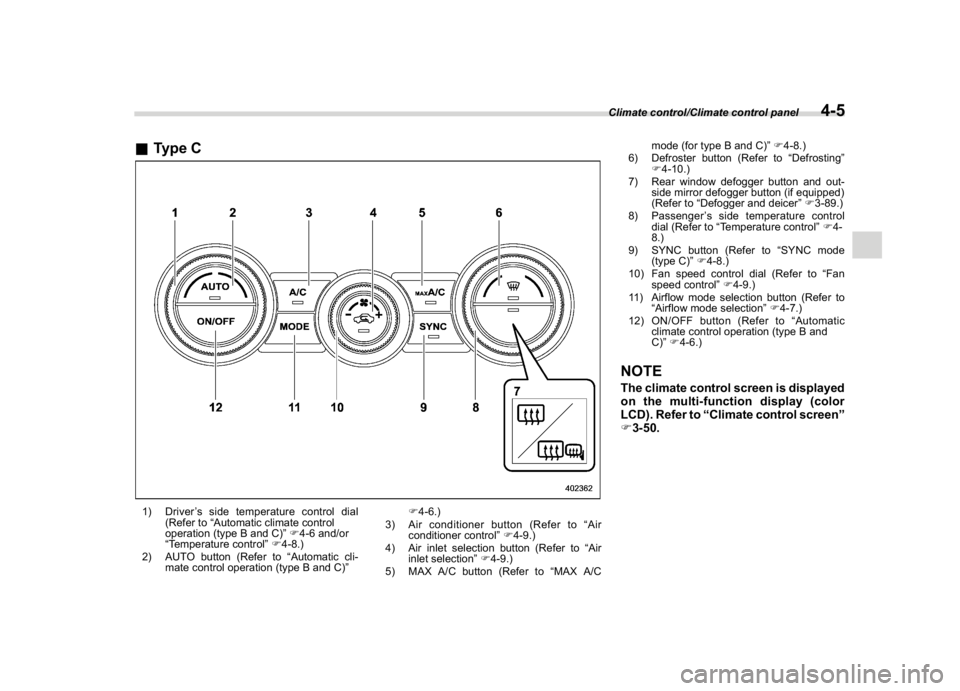
&Type C1) Driver’s side temperature control dial
(Refer to“Automatic climate control
operation (type B and C)”F4-6 and/or
“Temperature control”F4-8.)
2) AUTO button (Refer to“Automatic cli-
mate control operation (type B and C)”F4-6.)
3) Air conditioner button (Refer to“Air
conditioner control”F4-9.)
4) Air inlet selection button (Refer to“Air
inlet selection”F4-9.)
5) MAX A/C button (Refer to“MAX A/Cmode (for type B and C)”F4-8.)
6) Defroster button (Refer to“Defrosting”
F4-10.)
7) Rear window defogger button and out-
side mirror defogger button (if equipped)
(Refer to“Defogger and deicer”F3-89.)
8) Passenger’s side temperature control
dial (Refer to“Temperature control”F4-
8.)
9) SYNC button (Refer to“SYNC mode
(type C)”F4-8.)
10) Fan speed control dial (Refer to“Fan
speed control”F4-9.)
11) Airflow mode selection button (Refer to
“Airflow mode selection”F4-7.)
12) ON/OFF button (Refer to“Automatic
climate control operation (type B and
C)”F4-6.)
NOTEThe climate control screen is displayed
on the multi-function display (color
LCD). Refer to“Climate control screen”
F3-50.Climate control/Climate control panel
4-5
4
Page 231 of 474

(238,1)
北米Model "A1320BE-C" EDITED: 2017/ 10/ 10
Automatic climate control
operation (type B and C)When this mode is selected, the fan speed,
airflow distribution, air-inlet control, and air
conditioner compressor operation are
automatically controlled. To activate this
mode, perform the following.
1. Press the AUTO button. The indicator
light“FULL AUTO”on the multi-function
display (color LCD) illuminates.
2. Set the preferred temperature using
the temperature control dial.NOTE.Operate the automatic climate con-
trol system when the engine is running.
.Even when cooling is not necessary,
the air conditioner compressor will
automatically turn on if the temperature
is set much lower than the current
outlet air temperature. Even in this
case, the“A/C”indicator light on the
control panel illuminates.
.The controllable temperature range
may vary depending on the regional
specifications of the vehicle.
.If you operate any of the buttons on
the control panel other than the ON/
OFF button, rear window defogger
button, SYNC button and temperature
control dial(s) during FULL AUTO modeoperation, the“FULL”indicator light on
the multi-function display (color LCD)
will turn off and the“AUTO”indicator
light will remain illuminated. You can
then manually control the system as
desired using the button you operated.
To change the system back to the FULL
AUTO mode, press the AUTO button.
To turn off the climate control system,
press the ON/OFF button. Then the air
inlet selection will be set to the following.
.When the air inlet selection is set to
auto mode: Outside air circulation
.When the air inlet selection is set to
manual mode: No change
&SensorsThe sensors are located as follows.1) Interior air temperature sensor
2) Solar sensorThe automatic climate control system
employs several sensors. These sensors
Climate control/Automatic climate control operation (type B and C)
4-6
Page 246 of 474
(253,1)
北米Model "A1320BE-C" EDITED: 2017/ 10/ 10
using the remote keyless entry transmitter.
Refer to“Remote keyless entry system”
F2-17.
.The ignition switch is turned from the
“ACC”position to the“LOCK”/“OFF”posi-
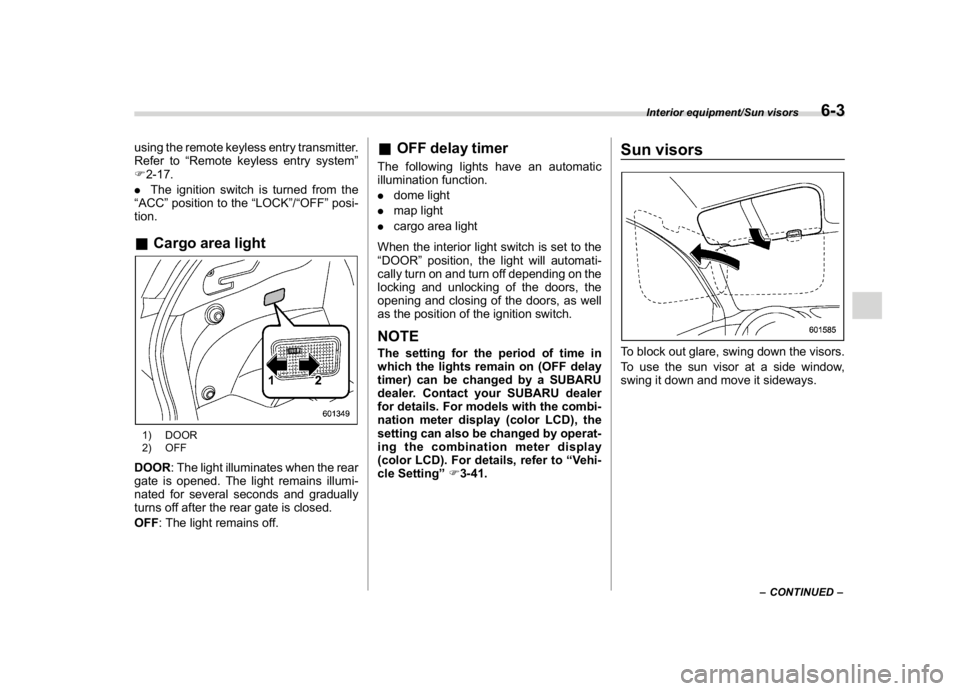
tion.&Cargo area light1) DOOR
2) OFFDOOR: The light illuminates when the rear
gate is opened. The light remains illumi-
nated for several seconds and gradually
turns off after the rear gate is closed.
OFF: The light remains off.
&OFF delay timerThe following lights have an automatic
illumination function.
.dome light
.map light
.cargo area light
When the interior light switch is set to the
“DOOR”position, the light will automati-
cally turn on and turn off depending on the
locking and unlocking of the doors, the
opening and closing of the doors, as well
as the position of the ignition switch.NOTEThe setting for the period of time in
which the lights remain on (OFF delay
timer) can be changed by a SUBARU
dealer. Contact your SUBARU dealer
for details. For models with the combi-
nation meter display (color LCD), the
setting can also be changed by operat-
ing the combination meter display
(color LCD). For details, refer to“Vehi-
cle Setting”F3-41.
Sun visorsTo block out glare, swing down the visors.
To use the sun visor at a side window,
swing it down and move it sideways.
–CONTINUED–
Interior equipment/Sun visors
6-3
6
Page 306 of 474
(315,1)
北米Model "A1320BE-C" EDITED: 2017/ 10/ 10
“SET”side and release it. Then release the
accelerator pedal.NOTEIf the set vehicle speed has not been
memorized (other than when it has
been temporarily canceled), the vehicle
speed can be set even if the“RES/SET”
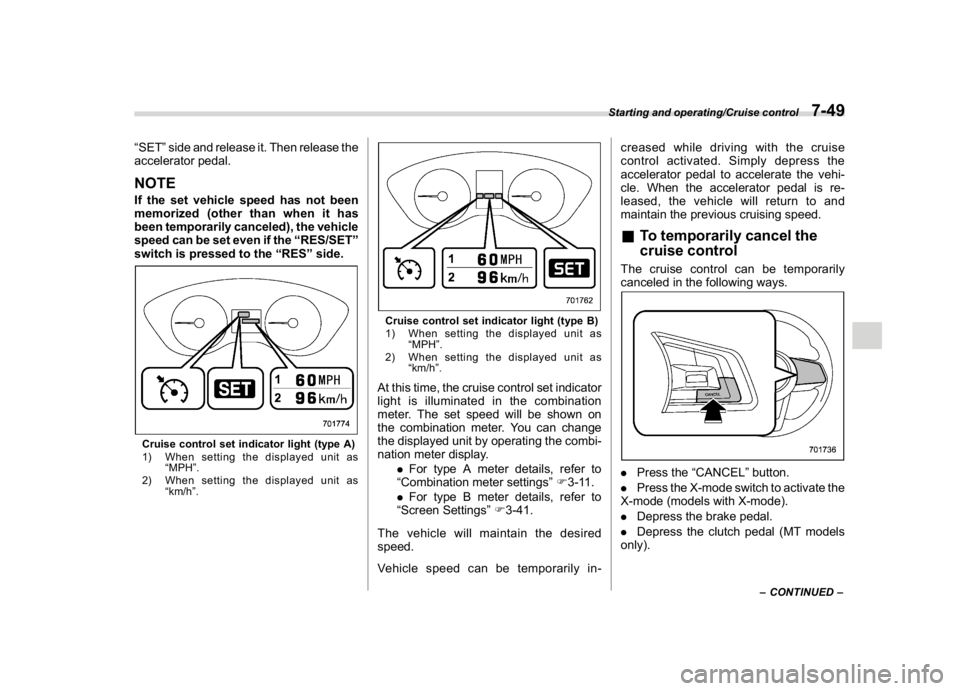
switch is pressed to the“RES”side.Cruise control set indicator light (type A)
1) When setting the displayed unit as
“MPH”.
2) When setting the displayed unit as
“km/h”.
Cruise control set indicator light (type B)
1) When setting the displayed unit as
“MPH”.
2) When setting the displayed unit as
“km/h”.At this time, the cruise control set indicator
light is illuminated in the combination
meter. The set speed will be shown on
the combination meter. You can change
the displayed unit by operating the combi-
nation meter display.
.For type A meter details, refer to
“Combination meter settings”F3-11.
.For type B meter details, refer to
“Screen Settings”F3-41.
The vehicle will maintain the desired
speed.
Vehicle speed can be temporarily in-creased while driving with the cruise
control activated. Simply depress the
accelerator pedal to accelerate the vehi-
cle. When the accelerator pedal is re-
leased, the vehicle will return to and
maintain the previous cruising speed.
&To temporarily cancel the
cruise controlThe cruise control can be temporarily
canceled in the following ways..Press the“CANCEL”button.
.Press the X-mode switch to activate the
X-mode (models with X-mode).
.Depress the brake pedal.
.Depress the clutch pedal (MT models
only).
–CONTINUED–
Starting and operating/Cruise control
7-49
7
Page 307 of 474
(316,1)
北米Model "A1320BE-C" EDITED: 2017/ 10/ 10
WARNING
For CVT models, you can cancel the
cruise control by shifting the select
lever into the“N”position. However,
do not shift the lever into the“N”
position while driving except in case
of emergency. If the select lever is
shifted into the“N”position, the
engine brake will no longer work.
This could result in an accident.
The cruise control set indicator light in the
combination meter turns off when the
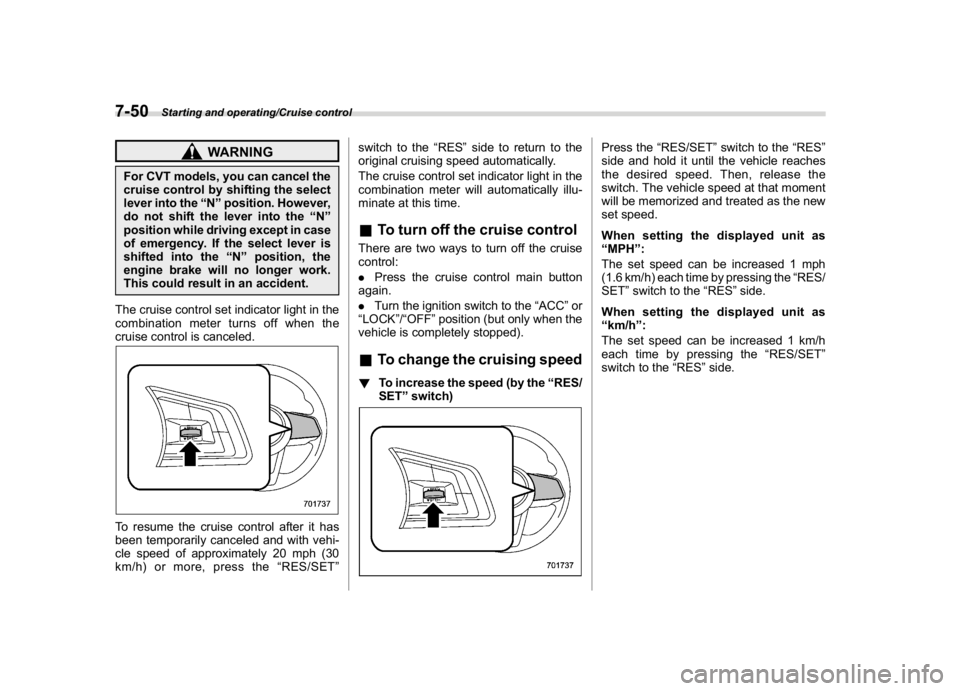
cruise control is canceled.To resume the cruise control after it has
been temporarily canceled and with vehi-
cle speed of approximately 20 mph (30
km/h) or more, press the“RES/SET”switch to the“RES”side to return to the
original cruising speed automatically.
The cruise control set indicator light in the
combination meter will automatically illu-
minate at this time.
&To turn off the cruise controlThere are two ways to turn off the cruise
control:
.Press the cruise control main button
again.
.Turn the ignition switch to the“ACC”or
“LOCK”/“OFF”position (but only when the
vehicle is completely stopped).&To change the cruising speed!To increase the speed (by the“RES/
SET”switch)
Press the“RES/SET”switch to the“RES”
side and hold it until the vehicle reaches
the desired speed. Then, release the
switch. The vehicle speed at that moment
will be memorized and treated as the new
set speed.
When setting the displayed unit as
“MPH”:
The set speed can be increased 1 mph
(1.6 km/h) each time by pressing the“RES/
SET”switch to the“RES”side.
When setting the displayed unit as
“km/h”:
The set speed can be increased 1 km/h
each time by pressing the“RES/SET”
switch to the“RES”side.
Starting and operating/Cruise control
7-50