2018 SUBARU CROSSTREK keyless entry
[x] Cancel search: keyless entryPage 130 of 474
(133,1)
北米Model "A1320BE-C" EDITED: 2017/ 10/ 10
Rear gate
WARNING
.To prevent dangerous exhaust
gas from entering the vehicle,
always keep the rear gate closed
while the engine is running.
.Do not attempt to shut the rear
gate while holding the recessed
grip. Also avoid closing the rear
gate by pulling on the recessed
grip from inside the cargo space.
There is a danger of your hand
being caught and injured.NOTEIf the rear gate cannot be unlocked due
to a discharged vehicle battery, a mal-
function in the door locking/unlocking
system or other causes, you can unlock
it by manually operating the rear gate
lock release lever.
For the procedure, refer to“Rear gate–
if the rear gate cannot be opened”F9-
19.
&Lock/unlockThe rear gate can be locked and unlocked
using any of the following systems.
.Power door locking switch: Refer to
“How to operate the power door locking
switches”F2-23.
.Keyless access with the push-button
start system (if equipped): Refer to“Key-
less access with push-button start system”
F2-2.
.Remote keyless entry system: Refer to
“Remote keyless entry system”F2-17.
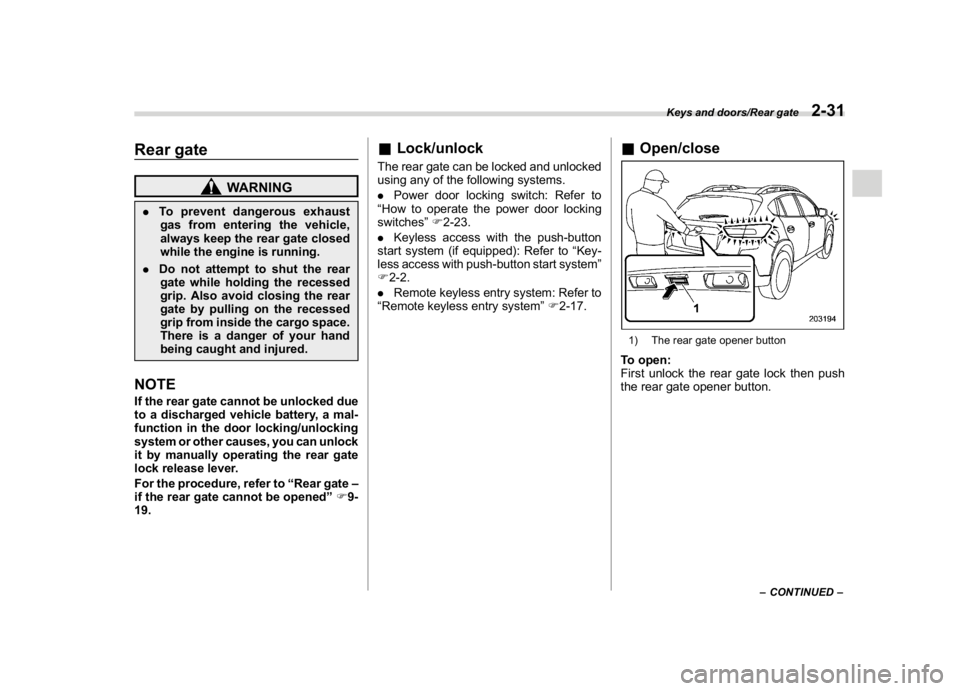
&Open/close1) The rear gate opener buttonTo open:
First unlock the rear gate lock then push
the rear gate opener button.
–CONTINUED–
Keys and doors/Rear gate
2-31
2
Page 138 of 474
(143,1)
北米Model "A1320BE-C" EDITED: 2017/ 10/ 10
CAUTION
Do not turn the ignition switch to the
“START”position while the engine
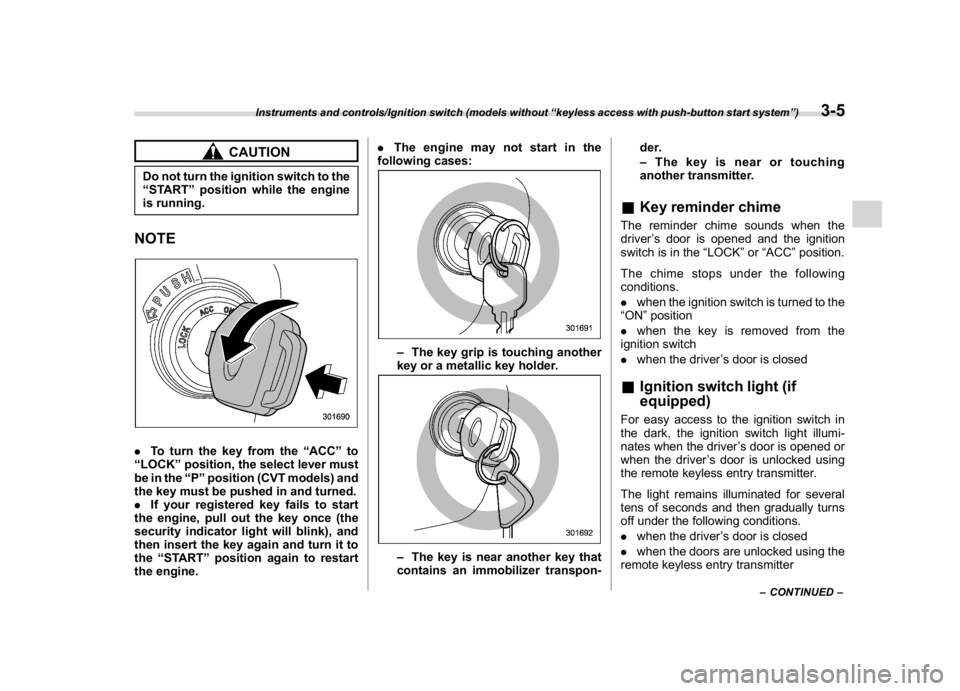
is running.NOTE.To turn the key from the“ACC”to
“LOCK”position, the select lever must
be in the“P”position (CVT models) and
the key must be pushed in and turned.
.If your registered key fails to start
the engine, pull out the key once (the
security indicator light will blink), and
then insert the key again and turn it to
the“START”position again to restart
the engine..The engine may not start in the
following cases:
–The key grip is touching another
key or a metallic key holder.–The key is near another key that
contains an immobilizer transpon-der.
–The key is near or touching
another transmitter.
&Key reminder chimeThe reminder chime sounds when the
driver’s door is opened and the ignition
switch is in the“LOCK”or“ACC”position.
The chime stops under the following
conditions.
.when the ignition switch is turned to the
“ON”position
.when the key is removed from the
ignition switch
.when the driver’s door is closed&Ignition switch light (if
equipped)For easy access to the ignition switch in
the dark, the ignition switch light illumi-
nates when the driver’s door is opened or
when the driver’s door is unlocked using
the remote keyless entry transmitter.
The light remains illuminated for several
tens of seconds and then gradually turns
off under the following conditions.
.when the driver’s door is closed
.when the doors are unlocked using the
remote keyless entry transmitter
–CONTINUED–
Instruments and controls/Ignition switch (models without“keyless access with push-button start system”)
3-5
3
Page 139 of 474
(144,1)
北米Model "A1320BE-C" EDITED: 2017/ 10/ 10
The light turns off immediately under the
following conditions.
.when the ignition switch is turned to the
“ON”position
.when all doors and the rear gate are
locked using the remote keyless entry
transmitter
Push-button ignition switch
(models with“keyless access
with push-button start sys-
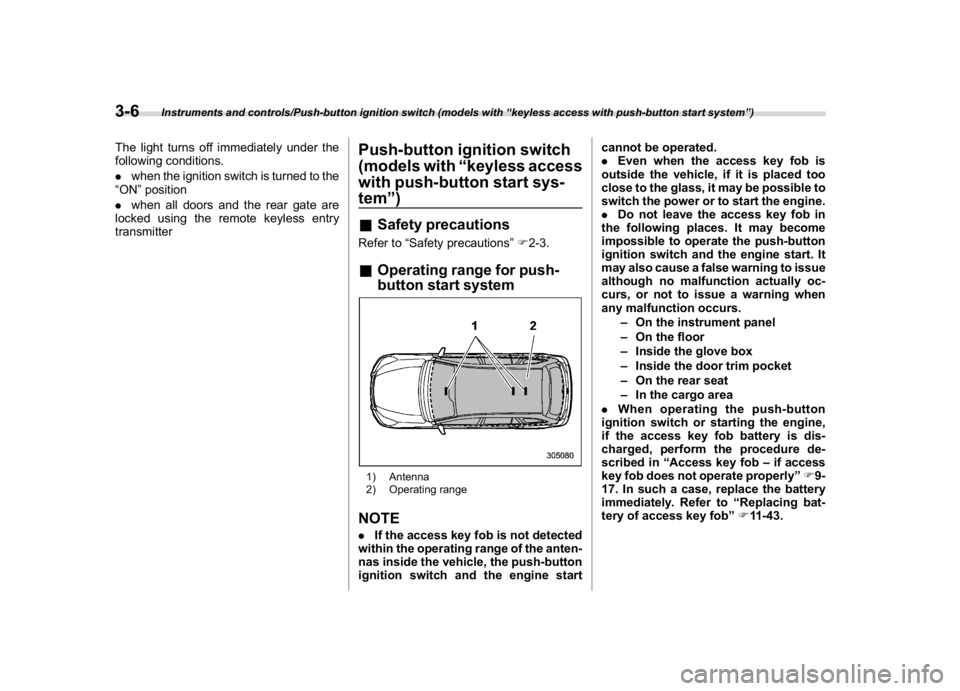
tem”)&Safety precautionsRefer to“Safety precautions”F2-3.&Operating range for push-
button start system1) Antenna
2) Operating rangeNOTE.If the access key fob is not detected
within the operating range of the anten-
nas inside the vehicle, the push-button
ignition switch and the engine startcannot be operated.
.Even when the access key fob is
outside the vehicle, if it is placed too
close to the glass, it may be possible to
switch the power or to start the engine.
.Do not leave the access key fob in
the following places. It may become
impossible to operate the push-button
ignition switch and the engine start. It
may also cause a false warning to issue
although no malfunction actually oc-
curs, or not to issue a warning when
any malfunction occurs.
–On the instrument panel
–On the floor
–Inside the glove box
–Inside the door trim pocket
–On the rear seat
–In the cargo area
.When operating the push-button
ignition switch or starting the engine,
if the access key fob battery is dis-
charged, perform the procedure de-
scribed in“Access key fob–if access
key fob does not operate properly”F9-
17. In such a case, replace the battery
immediately. Refer to“Replacing bat-
tery of access key fob”F11-43.
Instruments and controls/Push-button ignition switch (models with“keyless access with push-button start system”)
3-6
Page 167 of 474

(172,1)
北米Model "A1320BE-C" EDITED: 2017/ 10/ 10
&Basic operationControl switch
1)
(Up)
2)/SET (enter)
3)(Down)
By operating“
”or“
”of the control
switch, the screens and selection items
can be switched. When the“
/SET”
switch is pulled toward you, the item can
be selected and set.
If there are some useful messages, such
as vehicle information, warning informa-
tion, etc., they will interrupt the current
screen, and appear on the display accom-
panied by a beep. If such a screen is
displayed, take proper action according to
the message shown on the screen.
The warning screen will return to theoriginal screen after a few seconds. While
the“
”information reminder is shown on
the display, it may be possible to display
the warning screen again. To recall the
message marked with“
”on the display,
pull the“
/SET”switch on the steering
wheel toward you.
NOTEWhen the multi-function display (color
LCD) is set to the setting screen, the
combination meter display (color LCD)
cannot be controlled pressing on the
“
”,“
”and“
/SET”on the control
switch.
&Welcome screen and Good-
bye screenWhen the driver’s door is opened and
closed after unlocking the door, the wel-
come screen will appear on the combina-
tion meter display (color LCD) for approxi-
mately 20 seconds.
When the ignition switch is turned to the
“LOCK”/“OFF”position, the combination
meter display (color LCD) gradually turns
off (Good-bye screen).
NOTE.Once the welcome screen appears, it
takes a certain period of time to display
it again.
.If the ignition switch is operated
after unlocking the driver’s door, the
welcome screen will not appear even
when the driver’s door is opened and
closed.
.The welcome screen will disappear
when you lock the driver’s door by
using the remote keyless entry system
(all models) or the keyless access
function (if equipped) while the wel-
come screen is displayed.
.The welcome screen including the
multi-function display (color LCD) (if
equipped) and the audio/navigation
unit can be set to on or off. For details,
refer to“Welcome Screen”F3-41.
Instruments and controls/Combination meter display (color LCD)
3-34
Page 173 of 474

(178,1)
北米Model "A1320BE-C" EDITED: 2017/ 10/ 10
1st menu2nd menu 3rd menu
Vehicle Setting Keyless Entry System Audible Signal (if equipped)
Hazard Warning Flasher
Security Relocking (if equipped)
Driver Door Unlock (if equipped)
Rear Gate/Trunk Unlock (if equipped)
Defogger―
Interior Light―
Auto Light Sensor (if equipped)―
Welcome Lighting (if equipped) Approaching Time Set
Leaving Time Set
One-touch lane changer―
Default Settings――
Instruments and controls/Combination meter display (color LCD)
3-40
Page 174 of 474

(179,1)
北米Model "A1320BE-C" EDITED: 2017/ 10/ 10
By operating the“
”or“
”switch on the
steering wheel, you can select the menu.
Pull the“
/SET”switch to enter the
selected menu.
NOTEIf you enter the“Go Back”menu, the
system will return to the previous
screen.
!Screen Settings
After entering the“Screen Settings”menu,
select one of the following menus.
!Welcome Screen
The welcome screen can be activated or
deactivated.
!Good-bye Screen
The good-bye screen can be activated or
deactivated.
!Gauge Initial Movement
The movement of the meter needles and
gauge needles that occurs when the
ignition switch is turned to the“ON”
position can be activated or deactivated.
!Units
Changes the units displayed in the combi-
nation meter display (color LCD), the type
A multi-function display (black and white)
and the type B multi-function display (colorLCD).
!Tire Pressure Units (if equipped)
Changes the units displayed in the Tire
Pressure Monitoring system.
!Languages
Changes the language displayed in the
combination meter display (color LCD)
and the multi-function display (color LCD).
!Warning Volume (if equipped)
Sets the EyeSight warning volume, the
BSD/RCTA warning volume and the RAB
warning volume.
!EyeSight (models with EyeSight
system)
NOTEFor models with the EyeSight system,
refer to the Owner’s Manual supple-
ment for the EyeSight system.
!RAB (models with EyeSight system)
The Sonar Audible Alarm can be set to on
or off.NOTEFor models with Reverse Automatic
Braking system, refer to“Reverse
Automatic Braking System”F7-61.!Sonar Audible Alarm
When the Reverse Automatic Braking
system is in operation, the warning sound
to notify that an obstacle is detected in the
rear can be activated or deactivated.
!Vehicle Setting
After entering the“Vehicle Setting”menu,
select one of the following menus.
!Keyless Entry System
Sets the settings used when the keyless
access function was operated.
.Audible Signal (if equipped)
Sets the electronic chirp that sounds when
the door is locked or unlocked.
.Hazard Warning Flasher
Sets the operation of the hazard warning
flasher that blinks when the door is locked
or unlocked.
.Security Relocking (if equipped)
The automatic locking operation period
can be set or customized. Select the
preferred seconds to customize the opera-
tion period.
.Driver Door Unlock (if equipped)
Select only the driver’s door to unlock or all
doors to unlock simultaneously when the
driver’s door is unlocked.
.Rear Gate/Trunk Unlock (if equipped)
Select only the rear gate to unlock or all
–CONTINUED–
Instruments and controls/Combination meter display (color LCD)
3-41
3
Page 200 of 474
(205,1)
北米Model "A1320BE-C" EDITED: 2017/ 10/ 10
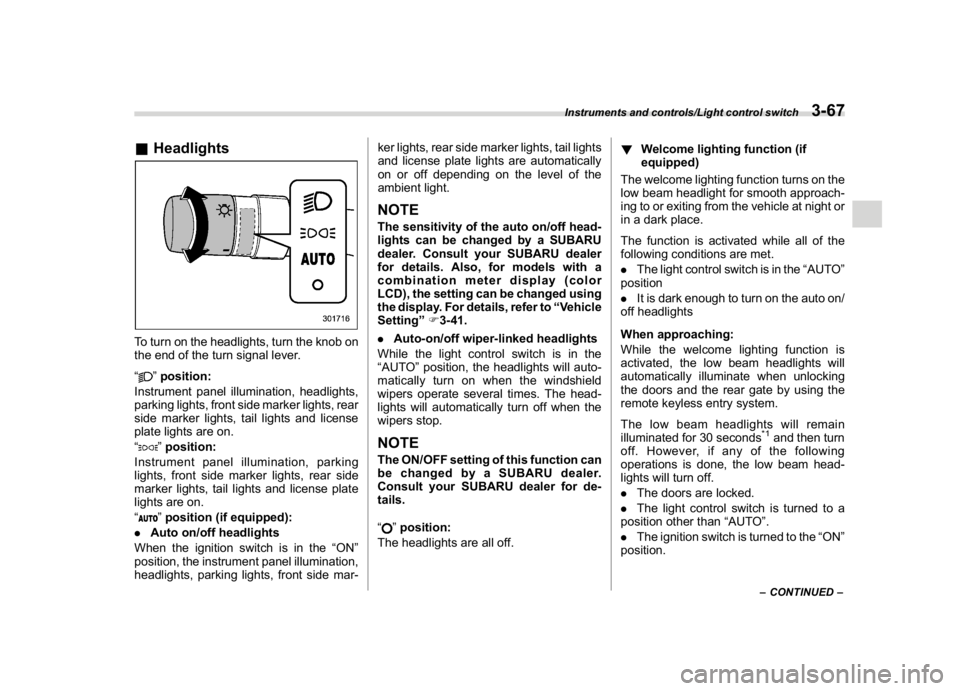
&HeadlightsTo turn on the headlights, turn the knob on
the end of the turn signal lever.
“
”position:
Instrument panel illumination, headlights,
parking lights, front side marker lights, rear
side marker lights, tail lights and license
plate lights are on.
“”position:
Instrument panel illumination, parking
lights, front side marker lights, rear side
marker lights, tail lights and license plate
lights are on.
“”position (if equipped):
.Auto on/off headlights
When the ignition switch is in the“ON”
position, the instrument panel illumination,
headlights, parking lights, front side mar-ker lights, rear side marker lights, tail lights
and license plate lights are automatically
on or off depending on the level of the
ambient light.
NOTEThe sensitivity of the auto on/off head-
lights can be changed by a SUBARU
dealer. Consult your SUBARU dealer
for details. Also, for models with a
combination meter display (color
LCD), the setting can be changed using
the display. For details, refer to“Vehicle
Setting”F3-41.
.Auto-on/off wiper-linked headlights
While the light control switch is in the
“AUTO”position, the headlights will auto-
matically turn on when the windshield
wipers operate several times. The head-
lights will automatically turn off when the
wipers stop.NOTEThe ON/OFF setting of this function can
be changed by a SUBARU dealer.
Consult your SUBARU dealer for de-
tails.
“
”position:
The headlights are all off.!Welcome lighting function (if
equipped)
The welcome lighting function turns on the
low beam headlight for smooth approach-
ing to or exiting from the vehicle at night or
in a dark place.
The function is activated while all of the
following conditions are met.
.The light control switch is in the“AUTO”
position
.It is dark enough to turn on the auto on/
off headlights
When approaching:
While the welcome lighting function is
activated, the low beam headlights will
automatically illuminate when unlocking
the doors and the rear gate by using the
remote keyless entry system.
The low beam headlights will remain
illuminated for 30 seconds
*1and then turn
off. However, if any of the following
operations is done, the low beam head-
lights will turn off.
.The doors are locked.
.The light control switch is turned to a
position other than“AUTO”.
.The ignition switch is turned to the“ON”
position.
–CONTINUED–
Instruments and controls/Light control switch
3-67
3
Page 245 of 474
(252,1)
北米Model "A1320BE-C" EDITED: 2017/ 10/ 10
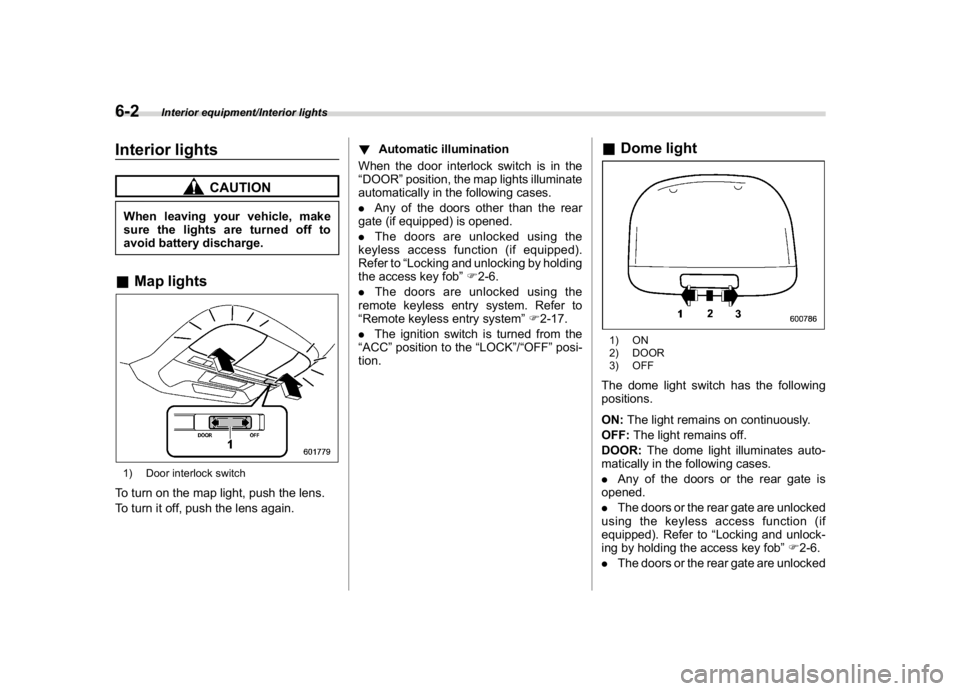
Interior lights
CAUTION
When leaving your vehicle, make
sure the lights are turned off to
avoid battery discharge.&Map lights1) Door interlock switchTo turn on the map light, push the lens.
To turn it off, push the lens again.!Automatic illumination
When the door interlock switch is in the
“DOOR”position, the map lights illuminate
automatically in the following cases.
.Any of the doors other than the rear
gate (if equipped) is opened.
.The doors are unlocked using the
keyless access function (if equipped).
Refer to“Locking and unlocking by holding
the access key fob”F2-6.
.The doors are unlocked using the
remote keyless entry system. Refer to
“Remote keyless entry system”F2-17.
.The ignition switch is turned from the
“ACC”position to the“LOCK”/“OFF”posi-
tion.
&Dome light1) ON
2) DOOR
3) OFFThe dome light switch has the following
positions.
ON:The light remains on continuously.
OFF:The light remains off.
DOOR:The dome light illuminates auto-
matically in the following cases.
.Any of the doors or the rear gate is
opened.
.The doors or the rear gate are unlocked
using the keyless access function (if
equipped). Refer to“Locking and unlock-
ing by holding the access key fob”F2-6.
.The doors or the rear gate are unlocked
Interior equipment/Interior lights
6-2