2018 SUBARU CROSSTREK oil
[x] Cancel search: oilPage 181 of 474
(186,1)
北米Model "A1320BE-C" EDITED: 2017/ 10/ 10
&FeaturesThe multi-function display (color LCD) has
the following functions.
Description Page
Displays useful messages, such
as notification, etc.3-49
Displays basic screens (e.g. fuel
consumption screen, etc.)3-50
Sets and adjusts maintenance
notification3-61
Also, the multi-function display (color LCD)
can also be used to set and initialize the
multi-function display (color LCD) itself.NOTE.When the vehicle is in motion,
certain functions and selections may
not be available.
.You can set the language and units
for both the multi-function display
(color LCD) and the combination meter
at the same time. For details about
setting the language and units, refer to
“Menu screens”F3-38.
.The images displayed in this Own-
er’s Manual are sample images. The
actual image may vary depending on
the market and vehicle specifications.
&Welcome screenWhen the driver’s door is opened and
closed, the welcome screen will appear for
a short time.NOTE.The welcome screen will disappear
when the ignition switch is turned to the
“ON”position while the welcome
screen is displayed.
.The welcome screen can be set to on
or off. For details, refer to“Screen
Settings”F3-41.
.For a certain period of time after the
welcome screen has once appeared, it
may not appear again even when the
driver’s door is opened and closed
again. This does not indicate a mal-
function.
&Self-check screen
NOTEWhen the setting is“On”, the self check
screen appears. For details about this
setting, refer to“On/Off setting”F3-61.
When the ignition switch is turned to the
“ON”position, the vehicle self-check will
be performed. The screens corresponding
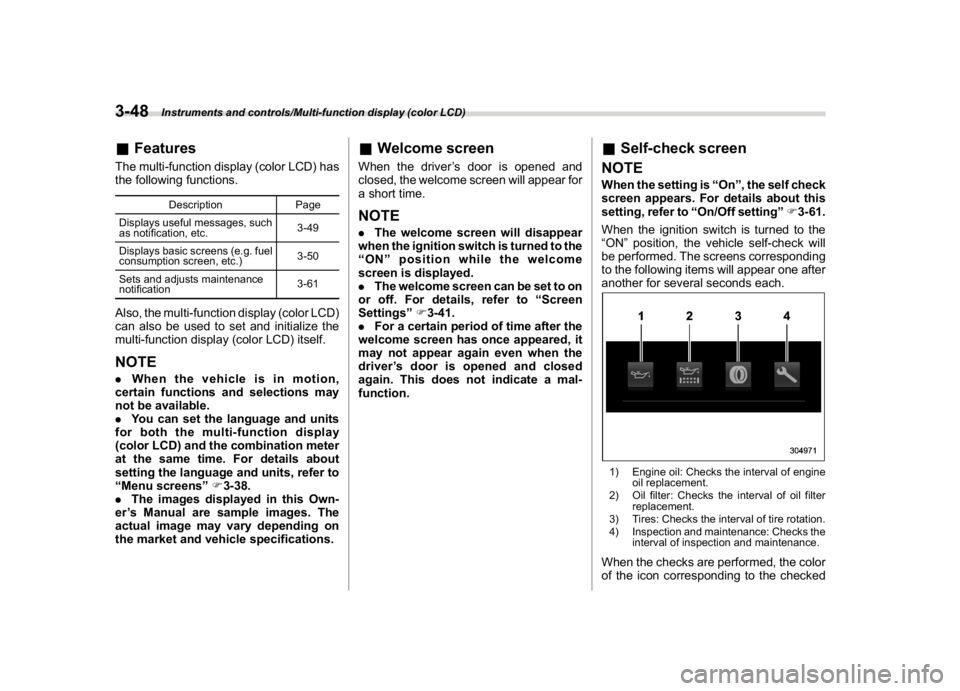
to the following items will appear one after
another for several seconds each.1) Engine oil: Checks the interval of engine
oil replacement.
2) Oil filter: Checks the interval of oil filter
replacement.
3) Tires: Checks the interval of tire rotation.
4) Inspection and maintenance: Checks the
interval of inspection and maintenance.When the checks are performed, the color
of the icon corresponding to the checked
Instruments and controls/Multi-function display (color LCD)
3-48
Page 187 of 474
(192,1)
北米Model "A1320BE-C" EDITED: 2017/ 10/ 10
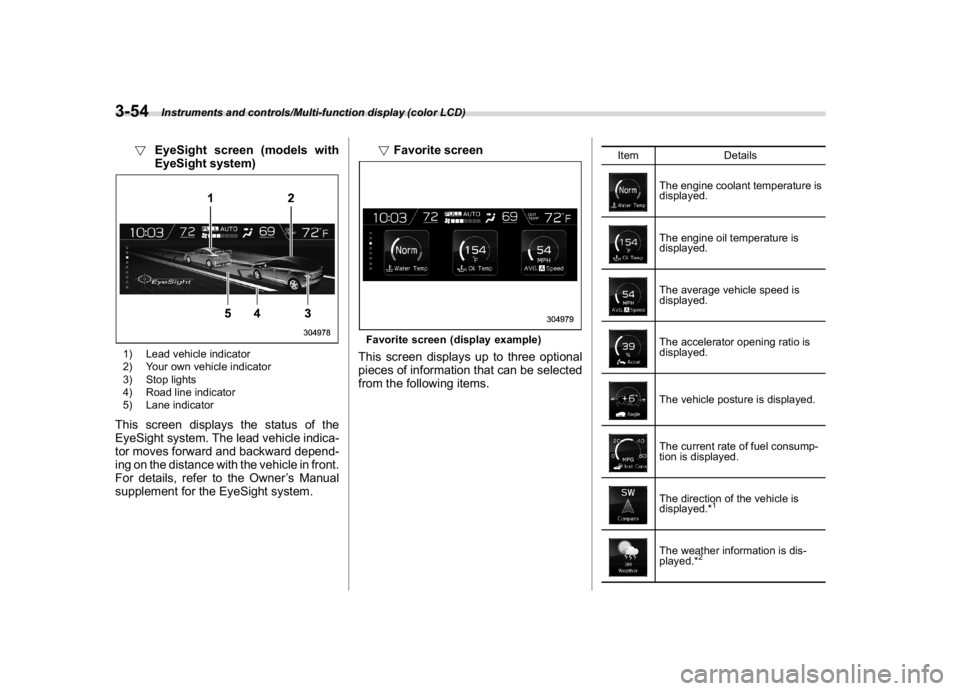
!EyeSight screen (models with
EyeSight system)1) Lead vehicle indicator
2) Your own vehicle indicator
3) Stop lights
4) Road line indicator
5) Lane indicatorThis screen displays the status of the
EyeSight system. The lead vehicle indica-
tor moves forward and backward depend-
ing on the distance with the vehicle in front.
For details, refer to the Owner’s Manual
supplement for the EyeSight system.!Favorite screen
Favorite screen (display example)This screen displays up to three optional
pieces of information that can be selected
from the following items.
Item Details
The engine coolant temperature is
displayed.The engine oil temperature is
displayed.The average vehicle speed is
displayed.The accelerator opening ratio is
displayed.The vehicle posture is displayed.The current rate of fuel consump-
tion is displayed.The direction of the vehicle is
displayed.*
1
The weather information is dis-
played.*
2
Instruments and controls/Multi-function display (color LCD)
3-54
Page 191 of 474
(196,1)
北米Model "A1320BE-C" EDITED: 2017/ 10/ 10
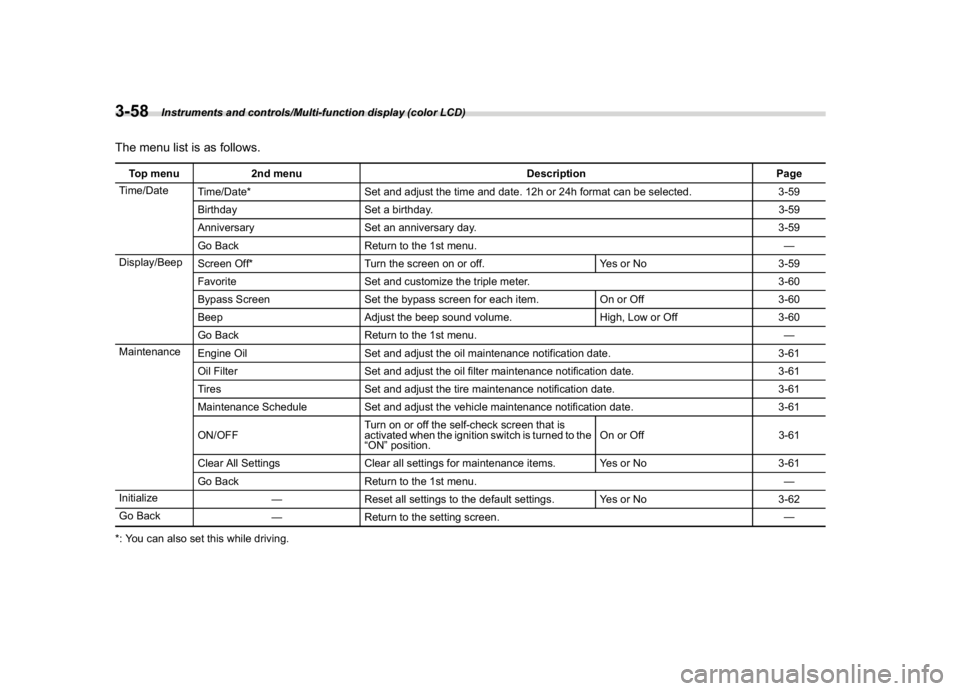
The menu list is as follows.Top menu 2nd menu Description Page
Time/Date
Time/Date* Set and adjust the time and date. 12h or 24h format can be selected. 3-59
Birthday Set a birthday.3-59
Anniversary Set an anniversary day. 3-59
Go Back Return to the 1st menu.—
Display/Beep
Screen Off* Turn the screen on or off. Yes or No 3-59
Favorite Set and customize the triple meter. 3-60
Bypass Screen Set the bypass screen for each item. On or Off 3-60
Beep Adjust the beep sound volume. High, Low or Off 3-60
Go Back Return to the 1st menu.—
Maintenance
Engine Oil Set and adjust the oil maintenance notification date. 3-61
Oil Filter Set and adjust the oil filter maintenance notification date. 3-61
Tires Set and adjust the tire maintenance notification date. 3-61
Maintenance Schedule Set and adjust the vehicle maintenance notification date. 3-61
ON/OFFTurn on or off the self-check screen that is
activated when the ignition switch is turned to the
“ON”position.On or Off 3-61
Clear All Settings Clear all settings for maintenance items. Yes or No 3-61
Go Back Return to the 1st menu.—
Initialize
—Reset all settings to the default settings. Yes or No 3-62
Go Back
—Return to the setting screen.—
*: You can also set this while driving.
Instruments and controls/Multi-function display (color LCD)
3-58
Page 194 of 474
(199,1)
北米Model "A1320BE-C" EDITED: 2017/ 10/ 10
without applying the setting changes.
!Maintenance settings
You can set maintenance reminders.
!Engine oil setting
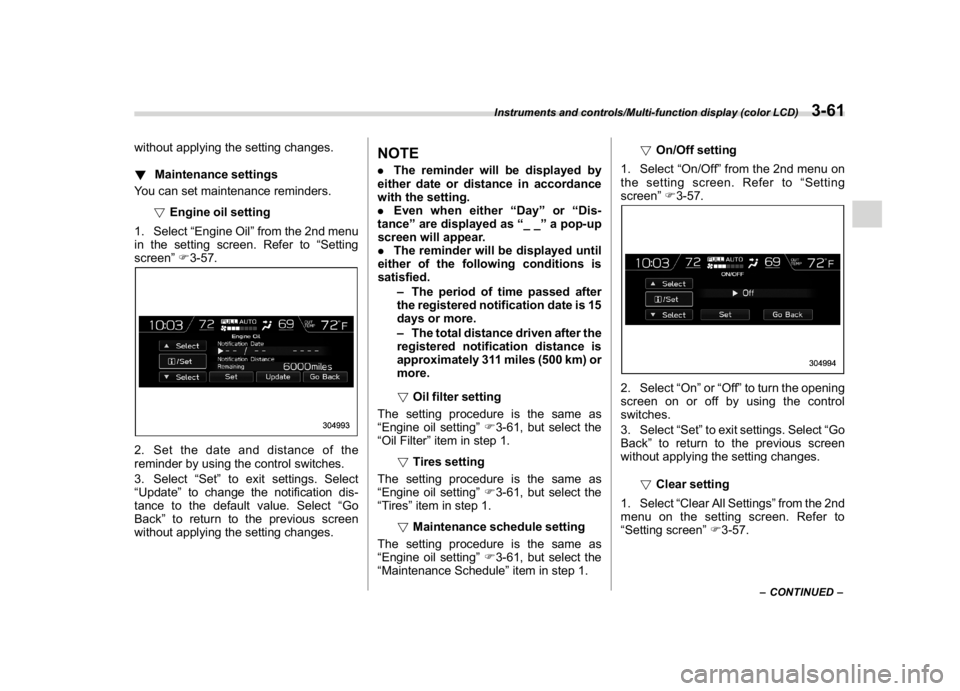
1. Select“Engine Oil”from the 2nd menu
in the setting screen. Refer to“Setting
screen”F3-57.2. Set the date and distance of the
reminder by using the control switches.
3. Select“Set”to exit settings. Select
“Update”to change the notification dis-
tance to the default value. Select“Go
Back”to return to the previous screen
without applying the setting changes.
NOTE.The reminder will be displayed by
either date or distance in accordance
with the setting.
.Even when either“Day”or“Dis-
tance”are displayed as“__”a pop-up
screen will appear.
.The reminder will be displayed until
either of the following conditions is
satisfied.
–The period of time passed after
the registered notification date is 15
days or more.
–The total distance driven after the
registered notification distance is
approximately 311 miles (500 km) or
more.
!Oil filter setting
The setting procedure is the same as
“Engine oil setting”F3-61, but select the
“Oil Filter”item in step 1.
!Tires setting
The setting procedure is the same as
“Engine oil setting”F3-61, but select the
“Tires”item in step 1.
!Maintenance schedule setting
The setting procedure is the same as
“Engine oil setting”F3-61, but select the
“Maintenance Schedule”item in step 1.!On/Off setting
1. Select“On/Off”from the 2nd menu on
the setting screen. Refer to“Setting
screen”F3-57.
2. Select“On”or“Off”to turn the opening
screen on or off by using the control
switches.
3. Select“Set”to exit settings. Select“Go
Back”to return to the previous screen
without applying the setting changes.
!Clear setting
1. Select“Clear All Settings”from the 2nd
menu on the setting screen. Refer to
“Setting screen”F3-57.
–CONTINUED–
Instruments and controls/Multi-function display (color LCD)
3-61
3
Page 226 of 474

(233,1)
北米Model "A1320BE-C" EDITED: 2017/ 10/ 10
Ventilator control....................................................4-2
Center ventilators.................................................. 4-2
Side ventilators...................................................... 4-2
Climate control panel.............................................4-2
Type A ................................................................... 4-3
Type B ................................................................... 4-4
Type C ................................................................... 4-5
Automatic climate control operation
(type B andC) ......................................................4-6
Sensors................................................................. 4-6
Manual climate controloperation..........................4-7
Airflow mode selection........................................... 4-7
MAX A/C mode (for type B and C).......................... 4-8
Temperature control............................................... 4-8
Fan speed control.................................................. 4-9
Air conditioner control........................................... 4-9Air inlet selection...................................................4-9
To turn off the climate control system.....................4-9
Defrosting..............................................................4-10
Operating tips for heater andair conditioner.... 4-10
Cleaning ventilation grille.....................................4-10
Efficient cooling after parking in direct sunlight .... 4-10
Lubrication oil circulation in the refrigerant
circuit................................................................ 4-11
Checking air conditioning system before summer
season.............................................................. 4-11
Cooling and dehumidifying in high humidity
and low temperature weather conditions ............ 4-11
Air conditioner compressor shut-off when
engine is heavily loaded.................................... 4-11
Refrigerant for your climate control system.......... 4-11
Air filtration system...............................................4-11
Replacing a cabin air filter....................................4-12
Climate control
4
Page 236 of 474
(243,1)
北米Model "A1320BE-C" EDITED: 2017/ 10/ 10
allow outside air to circulate into the
heated interior. This results in quicker
cooling by the air conditioner. Keep the
windows closed during the operation of the
air conditioner for maximum cooling effi-
ciency.&Lubrication oil circulation in
the refrigerant circuitOperate the air conditioner compressor at
a low engine speed (at idle or low driving
speeds) a few minutes each month during
the off-season to circulate its oil.&Checking air conditioning
system before summer sea-
sonCheck the air conditioner unit for refriger-
ant leaks, hose conditions, and proper
operation each spring. Have the air con-
ditioning system checked by your
SUBARU dealer.&Cooling and dehumidifying in
high humidity and low tem-
perature weather conditionsUnder certain weather conditions (high
relative humidity, low temperatures, etc.) a
small amount of water vapor emission
from the air outlets may be noticed. This
condition is normal and does not indicateany problem with the air conditioning
system.
&Air conditioner compressor
shut-off when engine is
heavily loadedTo improve acceleration and gas mileage,
the air conditioner compressor is designed
to temporarily shut off during air condi-
tioner operation whenever the accelerator
is fully depressed such as during rapid
acceleration or when driving on a steep
upgrade.&Refrigerant for your climate
control systemYour air conditioner uses ozone friendly
refrigerant HFC134a. Therefore, the meth-
od of adding, changing or checking the
refrigerant is different from the method for
CFC12 (freon). Consult your SUBARU
dealer for service. Repairs needed as a
result of using the wrong refrigerant are not
covered under warranty.
Air filtration systemYour vehicle’s air conditioning system is
equipped with an air filtration system.
Replace the cabin air filter according to
the replacement schedule found in the
“Warranty and Maintenance Booklet”. This
schedule should be followed to maintain
the filter’s dust collection ability. Under
extremely dusty conditions, the filter
should be replaced more frequently. Have
your filter checked or replaced by your
SUBARU dealer. For replacement, use
only a genuine SUBARU air filter kit.
CAUTION
Contact your SUBARU dealer if the
following occurs, even if it is not yet
time to change the filter:
.Reduction of the airflow through
the vents.
.Windshield gets easily fogged or
misted.NOTEThe filter can influence the air condi-
tioning, heating and defroster perfor-
mance if not properly maintained.
–CONTINUED–
Climate control/Air filtration system
4-11
4
Page 250 of 474
(257,1)
北米Model "A1320BE-C" EDITED: 2017/ 10/ 10
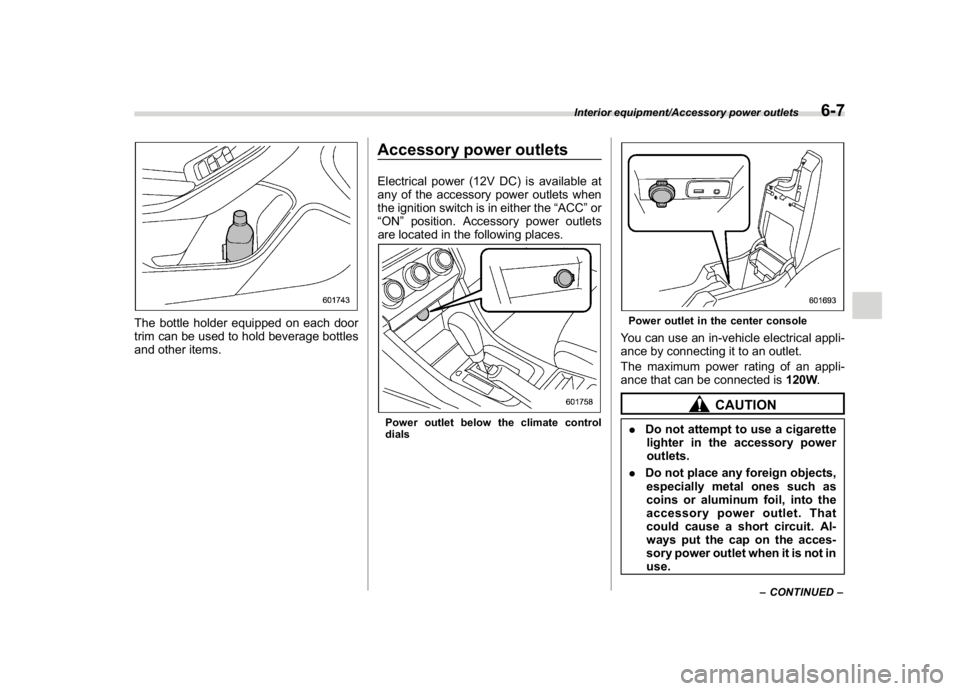
The bottle holder equipped on each door
trim can be used to hold beverage bottles
and other items.
Accessory power outletsElectrical power (12V DC) is available at
any of the accessory power outlets when
the ignition switch is in either the“ACC”or
“ON”position. Accessory power outlets
are located in the following places.Power outlet below the climate control
dials
Power outlet in the center consoleYou can use an in-vehicle electrical appli-
ance by connecting it to an outlet.
The maximum power rating of an appli-
ance that can be connected is120W.
CAUTION
.Do not attempt to use a cigarette
lighter in the accessory power
outlets.
.Do not place any foreign objects,
especially metal ones such as
coins or aluminum foil, into the
accessory power outlet. That
could cause a short circuit. Al-
ways put the cap on the acces-
sory power outlet when it is not in
use.
–CONTINUED–
Interior equipment/Accessory power outlets
6-7
6
Page 265 of 474
(274,1)
北米Model "A1320BE-C" EDITED: 2017/ 10/ 10
on a dynamometer, tell your emission
inspector not to place your SUBARU
AWD vehicle on a two-wheel dynam-
ometer.Otherwise, serious transmis-
sion damage will result.
The U.S. Environmental Protection
Agency (EPA) and states using two-wheel
dynamometers in their emission testing
program have EXEMPTED SUBARU
AWD vehicles from the portion of the
testing program that involves a two-wheel
dynamometer. There are some states that
use four-wheel dynamometers in their
testing program. When properly used, this
equipment should not damage a SUBARU
AWD vehicle.
Under no circumstances should the rear
wheels be jacked off the ground, nor
should the driveshaft be disconnected in
an attempt to bypass AWD for state
emission testing. An AWD vehicle must
be tested using an AWD dynamometer
with all 4 wheels driven and loaded.
Preparing to driveYou should perform the following checks
and adjustments every day before you
start driving.
1. Check that all windows, mirrors, and
lights are clean and unobstructed.
2. Check the appearance and condition
of the tires. Also check tires for proper
inflation.
3. Look under the vehicle for any sign of
leaks.
4. Check that no small animals enter the
engine compartment.
5. Check that the hood and rear gate are
fully closed.
6. Check the adjustment of the seat.
7. Check the adjustment of the inside and
outside mirrors.
8. Fasten your seatbelt. Check that your
passengers have fastened their seatbelts.
9. Check the operation of the warning
and indicator lights when the ignition
switch is turned to the“ON”position.
10. Check the gauges, indicator and warn-
ing lights after starting the engine.
CAUTION
Trapping small animals in the cool-
ing fan and belts of the engine may
result in a malfunction. Check that
no small animal enters the engine
compartment and under the vehicle
before starting the engine.NOTE.Engine oil, engine coolant, brake
fluid, washer fluid and other fluid levels
should be checked daily, weekly or at
fuel stops.
.When towing a trailer, refer to“Trai-
ler hitch (dealer option)”F8-14
Starting and operating/Preparing to drive
7-8