2018 Seat Ateca roof
[x] Cancel search: roofPage 138 of 348

Operation
– Pr e
s
s the button on the remote control
twice. The volumetric sensor and tilt sen-
sors will be deactivated. The alarm system remains activated.
The vehicle interior monitoring and the anti-
tow system are automatically switched on
again next time the vehicle is locked.
The vehicle interior monitoring and anti-tow
sensor (tilt sensor) are automatically switch-
ed on when the anti-theft alarm is switched
on. In order to activate it, all the doors and
the rear lid must be closed.
If you wish to switch off the vehicle interior
monitoring and the anti-tow system, it must
be done each time that the vehicle is locked;
if not, they will be automatically switched on.
The vehicle interior monitoring and the anti-
tow system should be switched off if animals
are left inside the locked vehicle (otherwise,
their movements will trigger the alarm) or
when, for example, the vehicle is transported
or has to be towed with only one axle on the
ground.
False alarms
Interior monitoring will only operate correctly
if the vehicle is completely closed. Please ob-
serve related legal requirements.
The following cases may cause a false alarm:
● Open windows (partially or fully). ●
Panoramic/ti lting sunroof open (partially or
completely).
● Movement of objects inside the vehicle,
such a
s loose papers, items hanging from
the rear vision mirror (air fresheners), etc. Note
● If the v
ehicle is relocked and the alarm is
activated without the volumetric sensor func-
tion, relocking will activate the alarm with all
its functions, except the volumetric sensor.
This function is reactivated when the alarm is
switched on again, unless it is deliberately
switched off.
● If the alarm has been triggered by the volu-
metric sensor
, this will be indicated by a
flashing of the warning lamp on the driver
door when the vehicle is opened. The flash is
different to the flash indicating the alarm is
activated.
● The vibration of a mobile phone left inside
the vehic
le may cause the vehicle interior
monitoring alarm to trigger, as both sensors
react to movements and shakes inside the ve-
hicle.
● If on activating the alarm, any door or the
rear lid i
s open, only the alarm will be activa-
ted. The vehicle interior monitoring and the
anti-tow system will only be activated once
all the doors are closed (including the rear
lid). Deactivating the vehicle interior moni-
t
orin
g and anti-t
ow system* When the vehicle is locked, the alarm will be
trigg
er
ed if movements are detected in the
interior (e.g. by animals) or if the vehicle's in-
clination is changed (e.g. during transport).
You can prevent the alarm from being trig-
gered accidentally by switching off the vehi-
cle interior monitoring and/or tow-away pro-
tection.
● To switch off the interior monitoring and
to w-
away protection, switch off the ignition
and, using the Infotainment system, select: button >
S
ET
TINGS function button > Open-
in g and c
lo
sing > Central locking > Switch off
alarm.
● When the vehicle is locked now, the vehicle
interior monitorin
g and the tow-away protec-
tion are switched off until the next time the
door is opened.
If the anti-theft security system (Safelock)*
››› page 133 is switched off, the vehicle interi-
or monitoring and the tow-away protection
are automatically switched off. WARNING
Observe the safety warnings ›››
in Descrip-
tion on pag e 125
. 136
Page 143 of 348
Opening and closing
windows have reached the required posi-
tion.
C on
v
enience close function
– Press and hold the button on the r
emote
control key until all the windows are closed
››› , or
– Lock the driver's door with the key and hold
the k ey
in the
itat>lock position un-
til all the windows are closed
Programming convenience opening in the
Easy Connect*
– Select: button > SETTINGS
fu
nction
b
utton > Opening and closing > Open-
ing the window by holding down
button or > Front window on/off .WARNING
● Never c lo
se the windows without due care
or proper control. There is a risk of suffering
injury.
● For safety reasons, you should only use the
remote c
ontrol open and close functions with-
in about 2 metres of the vehicle. To avoid in-
juries, always keep an eye on the windows
when pressing the button to close them. The
windows stop moving as soon as the button
is released. One-touch opening and closing
One-touch opening and closing means you
do not h
av
e to hold down the button.
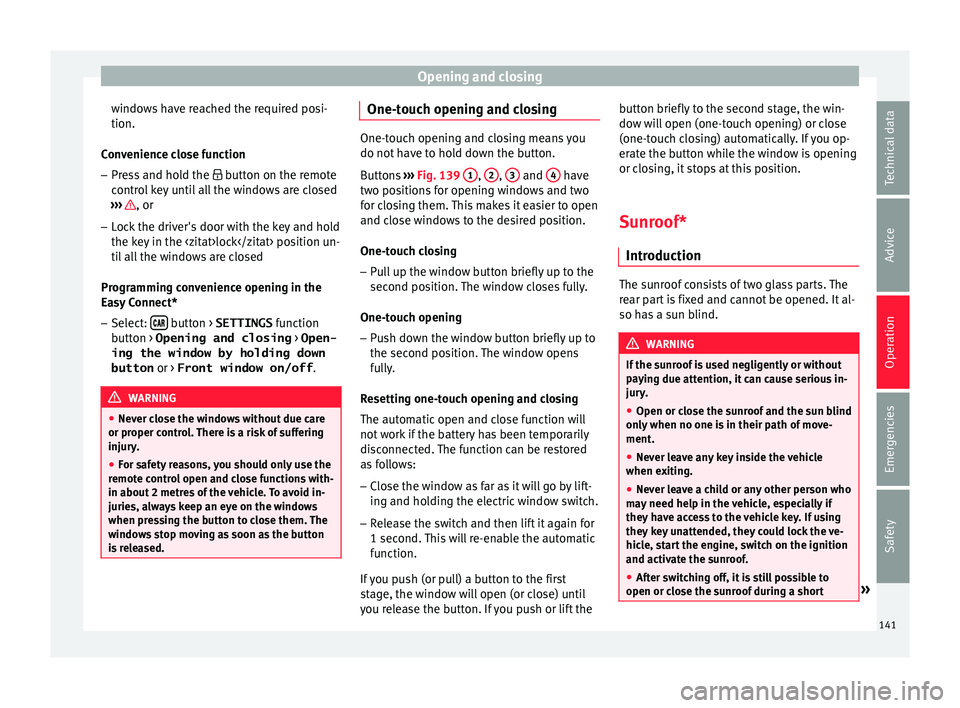
Buttons ››› Fig. 139 1 ,
2 ,
3 and
4 have
two po s
itions for opening windows and two
for closing them. This makes it easier to open
and close windows to the desired position.
One-touch closing
– Pull up the window button briefly up to the
second pos
ition. The window closes fully.
One-touch opening
– Push down the window button briefly up to
the second po s
ition. The window opens
fully.
Resetting one-touch opening and closing
The automatic open and close function will
not work if the battery has been temporarily
disconnected. The function can be restored
as follows:
– Close the window as far as it will go by lift-
ing and hol
ding the electric window switch.
– Release the switch and then lift it again for
1 second. Thi
s will re-enable the automatic
function.
If you push (or pull) a button to the first
stage, the window will open (or close) until
you release the button. If you push or lift the button briefly to the second stage, the win-
dow wi
ll open (one-touch opening) or close
(one-touch closing) automatically. If you op-
erate the button while the window is opening
or closing, it stops at this position.
Sunroof*
Introduction The sunroof consists of two glass parts. The
re
ar p
art is fixed and cannot be opened. It al-
so has a sun blind. WARNING
If the sunroof is used negligently or without
pa y
ing due attention, it can cause serious in-
jury.
● Open or close the sunroof and the sun blind
only when no one i
s in their path of move-
ment.
● Never leave any key inside the vehicle
when exitin
g.
● Never leave a child or any other person who
may
need help in the vehicle, especially if
they have access to the vehicle key. If using
they key unattended, they could lock the ve-
hicle, start the engine, switch on the ignition
and activate the sunroof.
● After switching off, it is still possible to
open or close the s
unroof during a short » 141
Technical data
Advice
Operation
Emergencies
Safety
Page 144 of 348
Operation
space of time provided that neither the driver
nor pa
s
senger door is opened. CAUTION
● To pr ev
ent damage, during winter tempera-
tures remove any ice or snow that might be
on the car roof before opening the sunroof or
adjusting the tilt position.
● Before leaving the vehicle or in case of rain-
fal
l, always close the sunroof. With the sun-
roof open or in a tilted position, water can en-
ter the interior and can cause considerable
damage to the electrical system. As a result,
other damage can occur in the vehicle. Note
● Le av
es and other loose objects that accu-
mulate on the sunroof rails should be regular-
ly cleaned away either by hand or with a vac-
uum.
● If the sunroof does not work correctly, the
anti-trap fu
nction will not work either. Con-
tact a specialised workshop. Opening and closing the sunroof
Fig. 140
On the interior roof lining: sunroof
b utt
on. The sunroof only works when the ignition is
sw
it
c
hed on. Once the ignition has been
switched off, you can still open or close the
sunroof for a few minutes provided the driver
door and the front passenger door are not
opened.
The sun blind automatically opens along with
the sunroof if completely closed or if in front
of the sunroof. The sun blind remains in the
previous position and does not automatically
close with the sunroof. The sun blind can on-
ly be closed completely once the sunroof has
been closed.
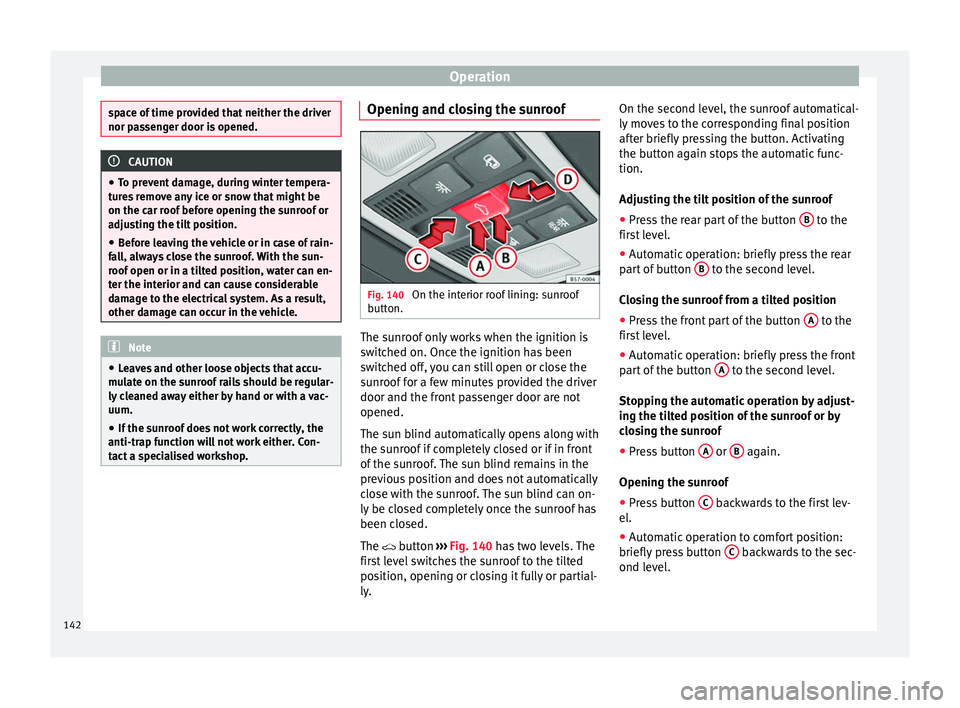
The button ›››
Fig. 140 has two levels. The
first level switches the sunroof to the tilted
position, opening or closing it fully or partial-
ly. On the second level, the sunroof automatical-
ly mov
es to the corresponding final position
after briefly pressing the button. Activating
the button again stops the automatic func-
tion.
Adjusting the tilt position of the sunroof
● Press the rear part of the button B to the
fir s
t
level.
● Automatic operation: briefly press the rear
part
of button B to the second level.
C lo
s
ing the sunroof from a tilted position
● Press the front part of the button A to the
fir s
t
level.
● Automatic operation: briefly press the front
part
of the button A to the second level.
St op
pin
g the automatic operation by adjust-
ing the tilted position of the sunroof or by
closing the sunroof
● Press button A or
B again.
Openin g the s
u
nroof
● Press button C backwards to the first lev-
el .
● Aut om
atic operation to comfort position:
briefly pre
ss button C backwards to the sec-
ond l ev
el
.
142
Page 145 of 348

Opening and closing
Closing the sunroof
● Press button D forwards to the first level.
● Automatic operation: briefly press button
D forwards to the second level.
St op
pin
g the automatic operation during the
opening or closing
● Press button C or
D again.
Opening and closing the sun blind Fig. 141
On the interior roof lining: switches
f or the s
u
n blind. The electrical sun blind works when the igni-
tion i
s
sw
itched on.
When the sunroof is in its most tilted posi-
tion, the sun blind automatically goes into a
ventilation position. The sun blind remains in
this position also with the sunroof closed. Buttons
››› Fig. 141 1 and
2 have two lev-
el s.
The fir
st level opens or closes the sun
blind fully or partially.
By briefly pressing the button to the second
level, the sun blind automatically moves to
the corresponding final position. Activating
the button again stops the automatic func-
tion.
Once the ignition has been switched off, you
can still open or close the sun blind for a few
minutes provided the driver door and the
front passenger door are not opened.
Opening the sun blind
● Press button 1 to the first level.
● Automatic operation: briefly press button
1 to the second level.
C lo
s
ing the sun blind
● Press button 2 to the first level.
● Automatic operation: briefly press button
2 to the second level.
St op
pin
g the automatic operation during the
opening or closing
● Press button 1 or
2 again.
Note
When the sunroof is open, the electric sun
blind c an on
ly be closed to the front edge of
the sunroof. Anti-trap function of the panoramic
s
lidin
g s
unroof and the sun blind The anti-trap function can reduce the risk of
injury
when c
losing the sunroof and the sun
blind ››› . If the sunroof or sun blind en-
cou nt
er resistance or an obstacle when clos-
ing, they reopen immediately.
● Check why the sunroof or sun blind do not
close.
● T
ry to close the sunroof or sun blind again.
● If the sunroof or sun blind cannot be closed
due to an o b
stacle or some resistance, it
stops at the corresponding position and then
opens. For automatic closing, a new closing
attempt might take place.
● If the sunroof or sun blind is still unable to
close, c
lose it without the anti-trap function.
Closing the sunroof or sun blind without the
anti-trap function
● Sunroof: within approx. 5 seconds of hav-
ing activ
ated the roll-back function, press the
button ›››
Fig. 140 to the second level in
the direction of arrow ›››
Fig. 140 D until the
s u
nr
oof closes completely.
● Sun blind: within appr
ox. 5 seconds of hav-
ing activated the anti-trap function, press
button ›››
Fig. 141 2 until the sun blind
c lo se
s completely.
● The sunroof or sun blind close without the
anti-trap fu
nction intervening! »
143
Technical data
Advice
Operation
Emergencies
Safety
Page 146 of 348

Operation
● If the s
u
nroof or sun blind will still not
close, visit a specialised workshop. WARNING
Closing the sunroof or sun blind without the
anti-trap f u
nction can cause serious injuries.
● Always be careful when closing the sunroof
and sun b
lind.
● No person should ever remain in the way of
the sunr
oof or sun blind, especially when
closing without the anti-trap function.
● The anti-trap function does not prevent fin-
gers
or other parts of the body from becom-
ing trapped against the roof frame and inju-
ries occurring. Lights and visibility
Light s
R el
ated video Fig. 142
Vehicle lights Side light and dipped beam headlight
Read the additional information carefully
› ›
›
page 30
The driver is personally responsible for the
correct use and adjustment of the lights in all
situations.
Audible warnings to advise the driver that
the lights have not been switched off
If the key is not in the ignition and the driver
door is open, an audible warning signal is
heard in the following cases: this is a remind-
er to turn off the lights. ●
When the parkin
g light is on ››› page 145.
● When the light switch is in position or
. WARNING
The side lights or daytime running lights are
not bright enough t
o illuminate the road
ahead and to ensure that other road users are
able to see you.
● Always use your dipped beam head lights if
it is
raining or if visibility is poor. WARNING
If the headlights are set too high and not
used c orr
ectly, there is a risk of dazzling or
distracting other road users. This could result
in a serious accident.
● Always make sure that the headlights are
correctly
adjusted. Note
The legal requirements regarding the use of
vehic l
e lights in each country must be ob-
served. 144
Page 170 of 348

Operation
Variable floor in the tilted position
When the v
ari
able floor is tilted you can ac-
cess the spare wheel/anti-puncture kit area.
● Lift the variable floor in the high position
usin
g the handle 1
› ››
Fig. 169
, p ull it up
and push it towards the backrest of the rear
seats until the floor folds along the hinge line
and the movable part of the floor is resting
on itself.
● Rest the floor on its housings ›››
Fig. 170
(arrows).
Variable floor with folded seats
● To move from the high position to the low
position, lif
t the floor using the handle
››› Fig. 169 1 and pull it back a little.
● Push the variable floor towards the folded
r e
ar se
ats with the handle 1 using some
do wn
w
ard pressure so that the moving part
of the floor is flush with the backs of the rear
seats. WARNING
During a sudden driving or braking manoeu-
vre, or in the ev ent
of an accident, objects
could be flung though the interior and cause
serious or fatal injuries.
● Always secure objects, even when the lug-
gage c
ompartment floor is properly lifted.
● Only objects that do not protrude more
than 2/3 the height of
the floor may be car- ried between the rear seat and the raised lug-
gag
e c
ompartment floor.
● Only objects that do not weigh than ap-
prox
imately 7.5 kg may be carried between
the rear seat and the raised luggage compart-
ment floor. CAUTION
● The m aximum w
eight that can be loaded on
the luggage compartment variable floor in
the top position is 150 kg.
● Do not let the luggage compartment floor
fal
l when closing it. Always carefully guide it
downwards in a controlled manner. Other-
wise, the lining and the floor of the luggage
compartment could be damaged. Note
SEAT recommends the use of straps to secure
ob j
ects to retaining rings. Roof carrier*
Intr oduction The vehicle roof has been designed to opti-
mi
se aer
ody
namics. For this reason, cross
bars or conventional roof carrier systems can-
not be secured to the roof water drains. As the roof water drains are integrated in the
roof t
o reduce air resistance, only SEAT-ap-
proved cross bars and roof carrier systems
can be used.
Cases in which cross bars and the roof carri-
er system should be disassembled.
● When they are not used.
● When the vehicle is washed in a car wash.
● When the vehicle height exceeds the maxi-
mum height, for ex
ample, in some garages. WARNING
When heavy or bulky loads are transported
on the roof c
arrier system, car driving per-
formance is affected, as the centre of gravity
shifts and there is greater wind resistance.
● Always secure the load properly using belts
or retainin
g straps that are suitable and in a
good condition.
● Bulky, heavy, long or flat loads have a neg-
ative effect
on aerodynamics, the centre of
gravity and driving performance.
● Avoid sudden braking and manoeuvres.
● Adapt your speed and driving style at all
times t
o suit visibility, weather, road and traf-
fic conditions. CAUTION
● Remo v
e the cross bars and the roof carrier
system before entering a car wash. 168
Page 171 of 348

Transport and practical equipment
●
Vehic l
e height is increased by the installa-
tion of cross bars or a roof carrier system and
the load secured on them. For this purpose,
check that your vehicle's height does not sur-
pass the headspace limit, for example, for un-
derpasses or for entering garage doors.
● Cross bars, the roof carrier system and the
load sec
ured on them should not interfere
with the roof aerial or hamper the path of the
panoramic sun roof and the rear lid.
● On opening the rear lid make sure that it
does not
knock into the roof load. For the sake of the environment
When cross bars and a roof carrier system are
ins t
alled, the increased air resistance means
that the vehicle uses more fuel. Attach the cross bars and the roof car-
rier sy
s
t
em Fig. 171
Attachment points for the roof rail-
in g
s
for the roof carrier system. The crossbars are the basis of a series of spe-
c
i
al
roof carrier systems. For safety reasons,
special fixtures must be used to safely trans-
port luggage, bicycles, skis, surf boards or
boats on the roof. Suitable accessories can
be acquired at SEAT dealerships.
Always secure the crossbars and the roof car-
rier system properly. Always take the assem-
bly instructions that come with the crossbars
and the roof carrier system in question into
account.
The crossbars are assembled on the roof rail-
ings. The distance between crossbars
››› Fig. 171 A should be between 70 and 90
c m and the di
s
tance between the crossbars and the brackets of the roof railings
B must
be 15 c m. WARNING
Incorrect attachment and use of the cross-
bar s
and the roof carrier system may cause
the whole system to detach from the roof and
cause an accident and injuries.
● Always take the manufacturer assembly in-
structions
into account.
● Use only crossbars and the roof carrier sys-
tem when they ar
e in perfect condition and
are properly secured.
● Secure the crossbars and the roof carrier
syst
em properly.
● Check threaded joints and attachments
travel
ling and if necessary tighten them after
you have travelled a short distance. When
making long trips, check the threaded joints
whenever you stop for a rest.
● Always fit the special roof carrier systems
correctly
for wheels, skis and surfboards, etc.
● Do not modify or repair the crossbars or
roof c
arrier system. Note
Always read the assembly instructions that
come w ith the c
rossbars and the roof carrier
system carefully and keep them in the vehi-
cle. 169
Technical data
Advice
Operation
Emergencies
Safety
Page 172 of 348

Operation
Loading the roof carrier system The load can only be secured if the crossbars
and the roof
c
arrier system are properly in-
stalled ››› .
Max imum authori
sed roof load
The maximum permissible roof load is 75 kg.
This figure comes from the combined weight
of the roof carrier, the cross bars and the load
itself on the roof ››› .
Alw a
ys check the weight of the roof carrier
system, the cross bars and the weight of the
load to be transported and weigh them if
necessary. Never exceed the maximum au-
thorised roof load.
If you are using cross bars and a roof carrier
with a lower weight rating, you will not be
able to carry the maximum authorised roof
load. In this case, do not exceed the maxi-
mum weight limit for the roof carrier which is
listed in the fitting instructions.
Distributing a load
Distribute loads uniformly and secure them
correctly ››› .
Chec k
att
achments
Once the cross bars and roof carrier system
have been installed, check the bolted con-
nections and attachments after a short jour- ney and subsequently with a certain frequen-
cy. WARNING
Exceeding the maximum authorised roof load
can r e
sult in accidents and considerable vehi-
cle damage.
● Never exceed the maximum authorised
load on the r
oof and on the axles or the vehi-
cle's maximum authorised weight.
● Never exceed the load capacity of the cross
bars
and the roof carrier system, even if the
maximum authorised roof load has not been
reached.
● Secure heavy items as far forward as possi-
ble and di
stribute the vehicle load uniformly. WARNING
If the load is loose or not secured, it could fall
from the r oof
carrier system or cause acci-
dents and injuries.
● Always use belts or retaining straps that
are suit
able and in a good condition.
● Secure the load properly. Air conditioning
He atin
g,
ventilation and cool-
ing
Introduction Read the additional information carefully
›› ›
page 51
Viewing Climatronic information
On the screen of Climatronic control unit and
on the screen of the factory-fitted Easy Con-
nect system, the theoretical values of the
temperature zones are shown.
The unit of temperature measurement can be
changed in the Easy Connect system.
Dust and pollen filter
The dust and pollen filter with its activated
charcoal cartridge serves as a barrier against
impurities in the air taken into the vehicle in-
terior.
The dust and pollen filter must be changed
regularly so that air conditioner performance
is not adversely affected.
If the filter loses efficiency prematurely due
to use in areas with very high levels of air
pollution, the filter must be changed more
frequently than stated in the Service Sched-
ule.
170