2018 Seat Alhambra service
[x] Cancel search: servicePage 8 of 324

Table of Contents
Park Assist system* (Park Assist) . . . . . . . . . . . 214
Rear assist* (Rear View Camera) . . . . . . . . . . . . 217
Cruise control* (Cruise control system -
C C
S)
. . . . . . . . . . . . . . . . . . . . . . . . . . . . . . . . . . . 221
Lane Assist system* . . . . . . . . . . . . . . . . . . . . . . 222
Blind spot detector (BSD) with rear cross traffic
alert
(RCTA) . . . . . . . . . . . . . . . . . . . . . . . . . . . . . 225
Traffic signal detection (Sign Assist)* . . . . . . . . 230
Tiredness detection (recommendation to take
a break)
. . . . . . . . . . . . . . . . . . . . . . . . . . . . . . . . 232
Dynamic Chassis control (DCC)* . . . . . . . . . . . . 233
Tyre monitoring systems . . . . . . . . . . . . . . . . . . 234
Towing bracket device . . . . . . . . . . . . . . . . . . . . 237
Driving with a trailer . . . . . . . . . . . . . . . . . . . . . . 237
Advice . . . . . . . . . . . . . . . . . . . . . . . . . . . . . . . . 247
Care and maintenance . . . . . . . . . . . . . . . . . . . . 247
Accessories, replacement of parts and modifi-
cations
. . . . . . . . . . . . . . . . . . . . . . . . . . . . . . . . 247
Caring for and cleaning the vehicle exterior . . . 253
Caring for and cleaning the vehicle interior . . . 259
Notes for the user . . . . . . . . . . . . . . . . . . . . . . . . 263
Checking and refilling levels . . . . . . . . . . . . . . . 264
Filling the tank . . . . . . . . . . . . . . . . . . . . . . . . . . 264
Fuel . . . . . . . . . . . . . . . . . . . . . . . . . . . . . . . . . . . 267
Selective catalytic reduction* (AdBlue) . . . . . . 268
Working in the engine compartment . . . . . . . . 271
Engine oil . . . . . . . . . . . . . . . . . . . . . . . . . . . . . . 274
Engine coolant . . . . . . . . . . . . . . . . . . . . . . . . . . 277
Brake fluid . . . . . . . . . . . . . . . . . . . . . . . . . . . . . 281
Windscreen washer reservoir . . . . . . . . . . . . . . 283
Vehicle battery . . . . . . . . . . . . . . . . . . . . . . . . . . 283
Wheels and tyres . . . . . . . . . . . . . . . . . . . . . . . . 287
Tyres . . . . . . . . . . . . . . . . . . . . . . . . . . . . . . . . . . 287
Winter service . . . . . . . . . . . . . . . . . . . . . . . . . . . 295 Technical data
. . . . . . . . . . . . . . . . . . . . . . . . 297
Technical features . . . . . . . . . . . . . . . . . . . . . . . 297
Important information . . . . . . . . . . . . . . . . . . . . 297
Towing a trailer . . . . . . . . . . . . . . . . . . . . . . . . . . 298
Wheels . . . . . . . . . . . . . . . . . . . . . . . . . . . . . . . . 299
Engine data . . . . . . . . . . . . . . . . . . . . . . . . . . . . . 300
Dimensions . . . . . . . . . . . . . . . . . . . . . . . . . . . . . 305
Index . . . . . . . . . . . . . . . . . . . . . . . . . . . . . . . . . 307
6
Page 20 of 324

The essentials
Seat belt tensioners In the event of a head-on, lateral or rear colli-
sion, the se
at
belts on the front seats and the
outer seats of the second row will tighten au-
tomatically.
The tensioner can be triggered only once.
››› in Service and disposal of belt ten-
sion devices on page 69
››› page 68 Adjusting the exterior mirrors
Fig. 23
In the driver door: exterior mirror con-
tr o
l
s Adjusting the exterior mirrors: Turn the knob
t
o the c
orr
esponding position: Turning the knob to the desired posi-
tion, adjus
t the mirrors on the driver
side (L, left) and the passenger side (R,
right) to the direction desired.
Depending on the equipment fitted on
the vehicle, the mirrors may be heated
according to the outside temperature.
Folding in mirrors.
››› in Exterior mirrors on page 142
››› page 141 Adjusting the steering wheel
Fig. 24
Mechanical steering wheel adjust-
ment Adjust the steering wheel before your trip
and on
ly
when the
vehicle is stationary.
L/R
●
Push the l
ever ››› Fig. 24 1 downwards.
● Adjust the steering wheel so that you can
ho l
d ont
o the steering wheel with both hands
on the outside of the ring at the 9 o'clock and
3 o'clock positions and your arms slightly
bent.
● Push the lever firmly upwards until it is
flush to the s
teering column ››› in Adjust-
in g the s
t
eering wheel position on
page 59.
››› in Adjusting the steering wheel po-
sition on page 59 18
Page 30 of 324

The essentials
A specialised workshop will be able to pro-
gr amme or modif
y
additional functions, ac-
cording to the vehicle equipment. SEAT rec-
ommends taking your car in for technical
service.
Some menu options can only be read when
the vehicle is at a standstill.
As long as a priority 1 warning is displayed, it
will not be possible to read the menus. To
display the menus, confirm the warning by
pressing OK .
Summary of the menu structure ■
Mu ltif
unction display (MFD) ››› page 30
■ Travelling time
■ Current fuel consumption
■ Average fuel consumption
■ Operating range
■ Distance covered
■ Average speed
■ Digital display of speed
■ Oil temperature digital display
■ Speed warning
■ Audio ›››
Booklet Radio or ›››
Booklet Navi-
gation system
■ Navigation ›››
Booklet Navigation system
■ Telephone ›››
Booklet Radio or ›››
Booklet
Navigation system
■ Auxiliary heating ›››
page 180 ■
Activ ation
■ Pr
ogramme On / Off
■ Disconnection
■ Timer 1-3
■ Day
■ Time
■ Minute
■ Activate
■ Duration
■ Operating mode
■ Heat
■ Ventilation
■ Day
■ Default setting
■ Vehicle condition ››› page 29
■ Configuration ››› page 31
■ Multifunction display data
■ Travelling time
■ Current fuel consumption
■ Average fuel consumption
■ Distance covered
■ Operating range
■ Average speed
■ Digital display of speed
■ Speed warning
■ Compass
■ Convenience ››› page 32
■ Central locking system (Central locking)
■Automatic lock (Auto. lock) On / Off ■
Automatic unlocking (Auto. unlock.)
On / Off
■ Unlocking doors (Door unlock.: All,
One door, Vehicle side, Individual)
■ Back
■ Electric windows
■ Off
■ All
■ Driver
■ Back
■ Mirror angle (Mirror angle) On / Off
■ Adjusting mirrors (Adjust. mirrors)
■ Individual
■ Synchronised
■ Back
■ Factory settings (Factory settings)
■ Back
■ Lights & visibility ››› page 32
■ Coming Home
■ Leaving Home
■ Footwell light
■ Convenience turn signals On / Off
■ Default setting
■ Tourist light On / Off
■ Time
■ Winter tyres
■ Language
■ Units
■ Second speed display On / Off 28
Page 31 of 324
The essentials
■ Aut oho
l
d
■ Service
■ Info
■ Reset
■ Default setting
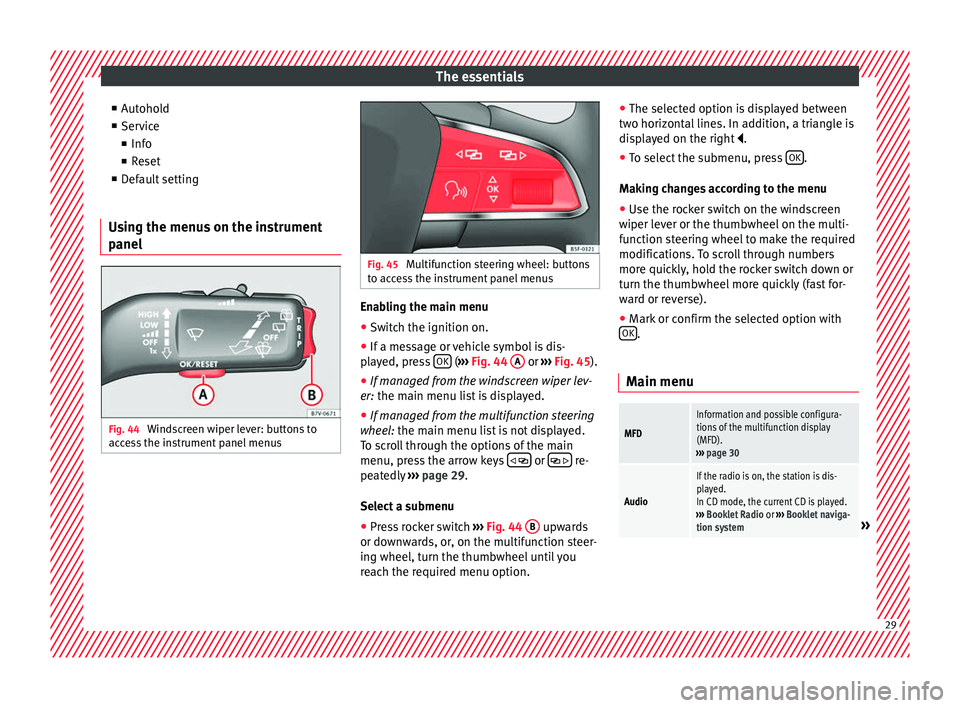
Using the menus on the instrument
panel Fig. 44
Windscreen wiper lever: buttons to
ac c
e
ss the instrument panel menus Fig. 45
Multifunction steering wheel: buttons
to ac c
ess the instrument panel menus Enabling the main menu
● Switch the ignition on.
● If a message or vehicle symbol is dis-
p l
a
yed, press OK (
››
› Fig. 44 A or
››
› Fig. 45 ).
● If managed from the windscreen wiper lev-
er: the main menu lis
t is displayed.
● If managed from the multifunction steering
wheel:
the main menu list is not displayed.
To scroll through the options of the main
menu, press the arrow keys or
re-
pe at
edly
››› page 29.
Select a submenu ● Press rocker switch ›››
Fig. 44 B upwards
or do wn
w
ards, or, on the multifunction steer-
ing wheel, turn the thumbwheel until you
reach the required menu option. ●
The selected option i
s displayed between
two horizontal lines. In addition, a triangle is
displayed on the right .
● To select the submenu, press OK .
M ak
in
g changes according to the menu
● Use the rocker switch on the windscreen
wiper lev
er or the thumbwheel on the multi-
function steering wheel to make the required
modifications. To scroll through numbers
more quickly, hold the rocker switch down or
turn the thumbwheel more quickly (fast for-
ward or reverse).
● Mark or confirm the selected option with
OK .
Main menu
MFD
Information and possible configura-
tions of the multifunction display
(MFD).
››› page 30
Audio
If the radio is on, the station is dis-
played.
In CD mode, the current CD is played.
››› Booklet Radio or ››› Booklet naviga-
tion system
» 29
Page 33 of 324

The essentialsSpeed warn-
ing at --- km/hIf the stored speed is exceeded (be-
tween 30 - 250 km/h, or 18 -
155 mph), an audible warning is given
together with a visual warning.
Changing between display modes
● In vehicles without multifunction steering
whee l:
press the lever.
● Vehicles with a multifunction steering
wheel:
press the button or .
Storing a speed for the speed warning
● Select the display Speed warning at
--- km/h .
● Pr e
ss OK to store the current speed and
sw it
c
h off the warning.
● In addition, set the required speed by
pres
sing the rocker switch on the windscreen
wiper lever or using the or buttons on
the multifunction steering wheel during the
subsequent 5 seconds. Next, press OK again
or w ait
a f
ew seconds. The speed is stored
and the warning activated.
● To switch off , pres
s OK . The stored speed is
del et
ed.
M
anually erasing memory 1 or 2
● Select the memory that you wish to erase.
● Hold down OK for approximately 2 sec-
ond s. P
er
sonalising the displays
It is
possible to select which of the displays
in the multifunction display you wish to see
on the instrument panel in the settings
menu. The units of measurement can also be
modified ››› page 31.
Configuration Menu
Multifunc-
tion display
dataConfiguration of the multifunction dis-
play data that you wish to see on the in-
strument panel display ››› page 30.
Compass
Changing the magnetic region and cali-
bration of the compass. To calibrate the
compass, please follow the instructions
given on the instrument panel display.
ConvenienceChanging vehicle convenience functions
››› page 32.
Lights & vis-
ibilityConfiguration of vehicle lighting
››› page 32.
Time
Changing the hours and minutes of the
instrument panel clock and the naviga-
tion system. The time can be set here
and the choice can be made between
the 24-hour and 12-hour display. The S
in the upper part of the display indicates
that the clock is set to summer time.
Winter tyres
Changing the visual and audible speed
warnings. This function should only be
used when the vehicle is fitted with win-
ter tyres, which are not designed for
travel at high speeds.
LanguageChanging the language of the display
texts and the navigation system.
UnitsChanging the units of measurement for
the temperature, consumption and dis-
tance.
Second
speedSwitching second speed display on and
off.
ServiceCheck the service notifications or reset
the service intervals to zero.
Factory set-
tingsSome functions of the Configuration
menu will be reset to the factory value.
BackThe main menu is displayed again. 31
Page 37 of 324

The essentials
Top up “AdBlue”, or there is a
fault in the “AdBlue” system.›››
page
268
Fuel tank not closed correctly.›››
page
264
Lane Assist is switched on, but
not active.›››
page
223 Other warning lamps
Left or right turn signal.›››
page
130
Hazard warning lights on.››› page
134
Use the foot brake!
Change
››› page
193
Brake
››› page
188
Cruise control operating.›››
page
221
Lane Assist is switched on and
active.›››
page
223
Main beam on or flasher on.›››
page
130 Headlight adjustment (Light
Assist) on.
Electronic immobiliser active.›››
page
183
Service interval display›››
page
105
Mobile telephone is connected
via Bluetooth to the original
telephone device.
›››
Booklet
Radio or
››› Booklet
Navigation
system
Mobile telephone battery
charge meter. Available only
for pre-installed factory-fitted
devices.
Freezing warning. The outside
temperature is lower than +4°C
(+39°F).›››
page
104
Start-Stop system activated.›››
page
209
Start-Stop system unavailable.
››› in Control and warning lamps on
page 107
››› page 107 Gearbox lever
M anua
l
gearbox Fig. 47
Gear shift pattern of a 6-speed man-
ual g
e
arbox The position of the gears is indicated on the
g
e
arbo
x lever ››› Fig. 47.
● Press the clutch pedal and keep your foot
right down.
● Mo
ve the gearbox lever to the required po-
sition.
● Rel
ease the clutch.
Selecting r
everse gear
● Press the clutch pedal and keep your foot
right down.
● W
ith the gearbox lever in neutral, push it
downw
ards, move it to the left as far as it will
go and then forwards to select reverse
››› Fig. 47 R .
» 35
Page 43 of 324

The essentials
● Zone B : You can add oil but keep the level
in th at
zone.
● Zone C : Add oil up to zone
B .
T op
pin
g up engine oil
● Unscrew cap from oil filler opening.
● Add oil slowly.
● At the same time, check the level to ensure
you do not a
dd too much.
● When the oil level reaches at least zone B ,
u n
s
crew the engine oil filler cap carefully.
Motor oil specifications
Petrol engines
With LongLife serviceVW 504 00
Without LongLife serviceVW 504 00, VW 502 00
Diesel engines
With LongLife serviceVW 507 00
Without LongLife serviceVW 507 00 Engine oil additives
No type of
a
d
ditive should be mixed with the
engine oil. The deterioration caused by these
additives is not covered by the warranty.
››› in Topping up engine oil on
page 277
››› page 274 Coolant
Fig. 55
Engine compartment: coolant expan-
s ion t
ank
cap. The coolant tank is located in the engine
c
omp
ar
tment ›››
page 274.
When the engine is cold, replace the coolant
when the level is below .
Coolant specifications
The engine cooling system is supplied from
the factory with a specially treated mixture of
water and at least 40 % of the additive G13
(TL-VW 774 J), purple. This mixture gives the
necessary frost protection down to -25°C (-13°F) and protects the light alloy parts of
the engine coo
ling system against corrosion.
It also prevents scaling and considerably rai-
ses the boiling point of the coolant.
To protect the cooling system, the percentage
of additive must always be at least 40 %,
even in warm climates where anti-freeze pro-
tection is not required.
If for weather reasons further protection is
necessary, the proportion of additive may be
increased, but only up to 60 %; otherwise an-
tifreeze protection will diminish and this will
worsen cooling.
When the coolant is topped up, use a mixture
of distilled water and at least 40 % of the
G13 or G12 plus-plus (TL-VW 774 G) additive
(both are purple) to obtain an optimum anti-
corrosion protection ››› in Coolant specifi-
c ation
s on p
age 279. The mixture of G13
with G12 plus (TL-VW 774 F), G12 (red) or
G11 (green-blue) engine coolants will signifi-
cantly reduce anti-corrosion protection and
should therefore be avoided ››› in Coolant
s pec
ific
ations on page 279.
››› in Coolant specifications on
page 279
››› page 277 41
Page 44 of 324

The essentials
Brake fluid Fig. 56
Engine compartment: brake fluid res-
er v
oir c
ap. The brake fluid reservoir is located in the en-
gine c
omp
ar
tment ›››
page 274
.
The level should be between the and
marks. If it is below , please visit a Techni-
cal Service.
››› in Checking the brake fluid level on
page 282
››› page 281 Windscreen washer
Fig. 57
In the engine compartment: wind-
s c
r
een washer reservoir top. The windscreen washer reservoir is located in
the en
gine c
omp
artment ›››
page 274.
To top up, mix water with a product recom-
mended by SEAT.
In cold temperatures, add anti-freeze.
››› in Checking and topping up the
windscreen washer reservoir on
page 283
››› page 283 Battery
The battery is located in the engine compart-
ment
›
›
› page 274. It does not require maintenance. It is checked as part of the In-
spection Ser
vice.
››› in Checking the electrolyte level of
the vehicle battery on page 285
››› page 283 42