Page 64 of 258

The display of information shown below DEPENDS ON THE VEHICLE EQUIPMENT \
AND COUNTRY.
Examples of selectionsInterpreting the display selected
On-board computer")
1.58
TRIP COMPUTER: trip settings (4/5)
The display of information shown below DEPENDS ON THE VEHICLE EQUIPMENT \
AND COUNTRY.
Examples of selectionsInterpreting the display selected
On-board computer with distance before
next service message (cntd.)
h) Mileage before service or oil change.Mileage before service
With the ignition switched on and the engine not running ,
when the message “SERVICE INTERVALS” is displayed, press
button 2 or 3 for around 5 seconds to display the mileage before
the next service, then briefly press button 2 or 3 to view the
mileage before the next oil change (distance or time remaining
before the next service). When the range approaches its limit,
there are several possible scenarios:
– distance/time remaining less than 900 miles (1,500 km) or
one month : the message “Service due in” is displayed, ac-
companied by the nearest term (distance or time);
– range equal to 0 km/miles or service date reached: the
message “Service required ” is displayed accompanied by
warning light
©.
The vehicle requires an oil change as soon as possible.
SERVICE
INTERVALS
Oil change in
30 000 Kms / 24 MO
Service due in
300 Kms / 24 DAYS
Service required
Depending on the vehicle, the mileage before an oil change varies accord\
ing to the driving style (frequent driving at low speed ,
door-to-door journeys, extensive use at idling speed, towing a trailer, etc.). The distance remaining until the next oil change can
therefore decrease more quickly in some cases than the actual distance t\
ravelled.
Resetting: to reset the mileage before the next service, press and hold button 2 or 3 for approximately 10 seconds until the
display shows the mileage before service without flashing.
NB: if a service is performed without changing the engine oil, only the mi\
leage before the next service should be reset. In the
event of an oil change, both the distance before the next service and th\
e next oil change should be reset.
Page 66 of 258
1.60
TRIP COMPUTER AND WARNING SYSTEM: information messages
Examples of messagesInterpreting the display selected
« PARKING BRAKE ON » Indicates that the parking brake has been applied.
« PLEASE REMOVE KEYCARD » Request to remove the RENAULT card from the reader when you leave the vehicle.
« TRACTION
CONTROL OFF » Indicates that you have deactivated the traction control function.
« TURN STEERINGWHEEL + START » Turn the steering wheel slightly whilst pressing the vehicle start button\
to unlock the steering
column.
« STEERING WHEEL NOT LOCKED » Indicates that the steering column has not been locked.
These can help in the vehicle starting phase, or give information about \
a selection or a driving status.
Examples of information messages are given in the following pages.
Page 67 of 258

1.61
TRIP COMPUTER AND WARNING SYSTEM: operating fault messages
These appear with the © warning light and mean that you should drive very carefully to an author\
ised dealer as
soon as possible. If you fail to follow this recommendation, you risk da\
maging your vehicle.
They disappear when the display selection key is pressed or after severa\
l seconds and are stored in the computer log. The
© warning light stays on. Examples of operating fault messages are given \
in the following pages.
Examples of messages Interpreting the display selected
« CLEAN DIESEL FILTER » Indicates the presence of water in the diesel filter; contact an approve\
d Dealer
as soon as possible.
« CHECK VEHICLE » Indicates a fault in one of the pedal sensors, battery management system\
or oil
level sensor.
« CHECK AIRBAG » Indicates a fault in the restraint system in addition to the seat belts.\
In the event
of an accident, it is possible that they may not be triggered.
« CHECK ANTI-POLLUTION SYSTEM » Indicates a fault in the vehicle’s particle filter system.
Page 68 of 258
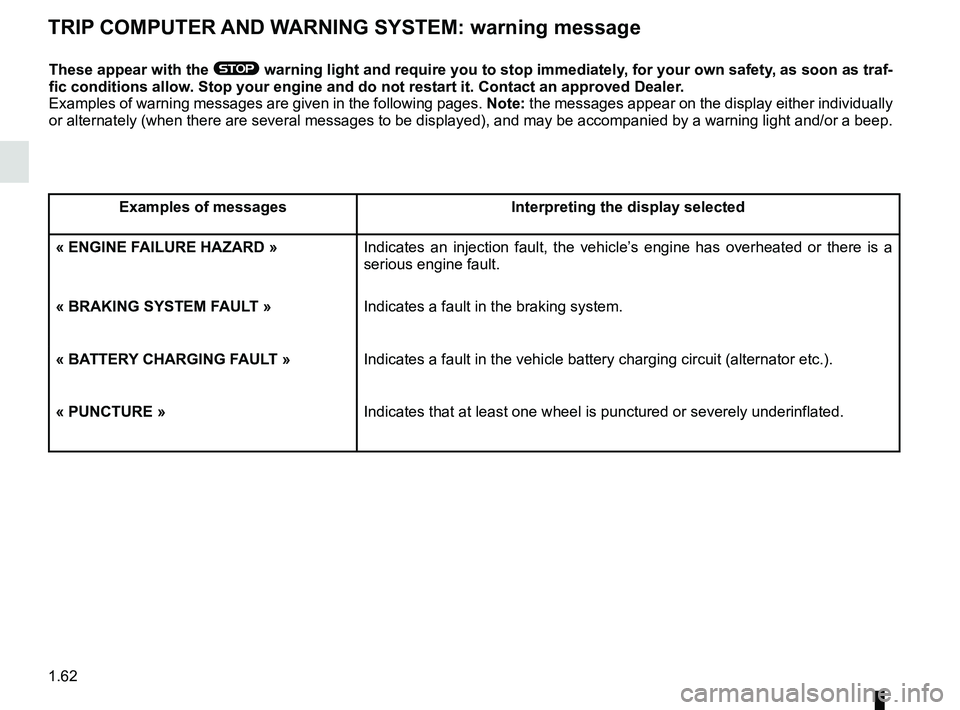
1.62
TRIP COMPUTER AND WARNING SYSTEM: warning message
These appear with the ® warning light and require you to stop immediately, for your own safety, as soon as traf-
fic conditions allow. Stop your engine and do not restart it. Contact an approved Dealer.
Examples of warning messages are given in the following pages. Note: the messages appear on the display either individually
or alternately (when there are several messages to be displayed), and \
may be accompanied by a warning light and/or a beep.
Examples of messages Interpreting the display selected
« ENGINE FAILURE HAZARD » Indicates an injection fault, the vehicle’s engine has overheated or there is a
serious engine fault.
« BRAKING SYSTEM FAULT » Indicates a fault in the braking system.
« BATTERY CHARGING FAULT » Indicates a fault in the vehicle battery charging circuit (alternator e\
tc.).
« PUNCTURE » Indicates that at least one wheel is punctured or severely underinflated\
.
Page 74 of 258

1.68
Adjusting the headlight beam
height
Depending on the vehicle, the headlight
adjustment is automatic, based on the
vehicle load.
“Follow-me-home lighting”
function
This function allows you to briefly switch
on the dipped beam headlights (to pro-
vide light when opening a gate, etc.).
With the engine and lights switched
off and the ring 2 in position 0 or AUTO, pull the stalk 1 towards you: the dipped
beam headlights come on for approxi-
mately thirty seconds. To increase this
duration, you may pull the stalk up to
four times (total time restricted to two
minutes). The message “Follow-me
home for - - -” accompanied by the
lighting time is displayed on the instru-
ment panel to confirm the action. You
can then lock your vehicle.
To switch off the lights before they go
out automatically, turn ring 2 to any po-
sition, then return it to position AUTO.
EXTERIOR LIGHTING AND SIGNALS (2/3)
12
Switching off the lights
There are two possibilities:
– manually, move ring 2 to position 0;
– the lights will go out automatically when the engine is switched off, the
driver’s door is opened or the vehicle
is locked. In this case, the next time
the engine is started, the lights will
be switched back on according to the
position of the ring 2, taking into ac-
count the exterior light level, without
moving the stalk 1.
Welcome and goodbye
function
(depending on vehicle)
Once the function is activated, the side
lights come on automatically when the
vehicle is unlocked.
They switch off automatically:
– approximately one minute after light- ing up;
– when starting the engine based on the position of the lighting stalk;
or
– upon locking the vehicle.áMain beam headlights
With the engine running and
the dipped beam headlights on, push
stalk 1. This indicator light on the instru-
ment panel comes on.
To return to the dipped headlight posi-
tion, pull stalk 1 towards you again.
Lights-on reminder buzzer
A warning beep sounds when the driv-
er’s door is opened to warn you that the
lights are still on.
Page 76 of 258

1.70
éHazard warning lights
Press switch 2.
This switch activates all four direction
indicators and the side indicator lights
simultaneously. It must only be used in
an emergency to warn drivers of other
vehicles that you have had to stop in
an area where stopping is prohibited or
unexpected, or that you are obliged to
drive under special conditions.
Depending on the vehicle, the hazard
warning lights may come on auto-
matically under heavy deceleration.
You can switch them off by pressing
switch 2 once.
Direction indicators
Move stalk 1 parallel to the steering
wheel and in the direction you are going
to turn it.
One-touch mode
When driving, it is possible that the
steering wheel may not be turned suf-
ficiently to return the stalk automatically
to its starting position.
In this case, move the stick 1 to half-
way, then release it: it will return to its
initial position and the indicator light
flashes three times.
Horn
Press steering wheel boss A.
Headlight flasher
Pull stalk 1 towards you to flash the
headlights.
AUDIBLE AND VISUAL SIGNALS
A
1
2
Page 83 of 258

1.77
FUEL TANK (2/3)
3
Filling with fuel
With the ignition off, insert the nozzle
and insert it fully before turning it on to
fill the fuel tank (risk of splashing).
Keep the nozzle in this position through-
out the entire filling operation.
When the pump cuts out automatically
at the end of the filling procedure, a
maximum of two further filling attempts
may be made, as there must be suffi-
cient space in the fuel tank to allow for
expansion.
Make sure that no water enters the fuel
tank during filling. The cover A and its
surround must remain clean.
Petrol versions
Using leaded petrol will damage the
antipollution system and may lead to a
loss of warranty.
To ensure that the fuel tank is not filled
with leaded petrol, the fuel tank filler
neck contains a restrictor fitted with a
foolproof system which only allows
the nozzle for unleaded petrol to be
used (at the pump).
Vehicle fitted with the Stop and
Start function
To fill up with fuel, the engine must
be stopped (and not on standby):
stop the engine by pressing the
engine stop button 3 (please refer
to the information on “Starting and
Stopping the engine” in Section 2).
Persistent fuel odour
If you notice a persistent
fuel odour you should:
– stop the vehicle as soon as traf- fic conditions allow and switch off
the ignition;
– switch on the hazard warning lights and ask your passengers to
leave the vehicle and stay clear
of the traffic;
– contact an approved Dealer.
Page 90 of 258

2.6
FUNCTION STOP AND START (1/4)
This system enables a reduced fuel
consumption and lower greenhouse
gas emissions. The system is acti-
vated automatically when the vehicle is
started. While driving, the system stops
the engine (standby) when the vehicle
is at a standstill (traffic jam, traffic lights,
etc).
Conditions for engine
standby
The vehicle has set off from where it
was parked;
For vehicles equipped with auto-
matic gearboxes:
– the gearbox is in position D, M or N;
and
– the brake pedal is depressed (suffi-ciently hard);
and
– the accelerator pedal is not de- pressed;
and
– the speed is zero for around 1 second.
The engine remains on standby if posi-
tion P is selected, or if position N is se-
lected with the handbrake engaged and
the brake pedal released. For vehicles equipped with manual
gearboxes:
– the gearbox is in neutral;
and
– the clutch pedal is released.
If the warning light
flashes,
this means that the clutch pedal is
not sufficiently released;
and
– the vehicle speed is less than ap- proximately 7 mph (3 km/h).
In all vehicles, the warning light
on the instrument panel is lit when the
engine is on standby.
The vehicle equipment remain opera-
tional while the engine is stopped.
If the engine stalls while the system
is in operation, pressing the clutch
pedal right down will start it again.
Before getting out of the
vehicle, you must switch
off the ignition by pressing
the engine stop (please see
“Starting, stopping the engine”).
Keep your vehicle station-
ary when the engine is
on standby (shown by the
warning light
on the
instrument panel).