2018 RENAULT CAPTUR warning light
[x] Cancel search: warning lightPage 51 of 258

1.45
DRIVING POSITION: RIGHT-HAND DRIVE (2/2)
The equipment fitted, described below, DEPENDS ON THE VERSION AND COUNTRY.
1 Side air vent.
2 Passenger Airbag location.
3 Heating or air conditioning con-
trols.
4 Centre air vents.
5 Multimedia touch screen.
6 Hazard warning lights switch.
7 Door electric locking switch.
8 Windscreen demister outlet.
9 Stalk:
– direction indicator lights;
– exterior lights;
– front fog lights;
– rear fog lights.
10 Instrument panel. 11 Driver Airbag and horn location.
12 Multimedia system voice control
button.
13 Stalk:
– windscreen and rear screen wash/wipe;
– trip computer and warning system information readout.
14 Controls for:
– electric headlight beam adjust-
ment,
– instrument panel lighting dimmer,
– activate/deactivate the parking
distance control system,
– activation/deactivation of the
function Stop and Start.
15 Cruise control/speed limiter con-
trols.
16 Control for adjusting steering
wheel height and reach.
17 Engine start/stop button.
18 Handbrake.
19 Activation/deactivation control for
ECO mode ECO.
20 Main switch for:
– speed limiter;
– cruise control.
21 Gear lever.
22 Cigarette lighter/accessories
socket.
23 RENAULT card reader.
24 Glovebox.
25 Bonnet release control.
Page 52 of 258

1.46
WARNING LIGHTS (1/5)
In some cases, the appearance of a
warning light is accompanied by a mes-
sage.
šSide light warning light
áMain beam headlight tell-
tale
kDipped beam headlight tell-
tale
gFront fog light tell-tale
fRear fog light telltale
cLeft-hand direction indicator
tell-tale
bRight-hand direction indica-
tor tell-tale
åIndicator lightAirbag
This lights up when the ignition
is switched on and goes out after a few
seconds.
If it does not come on when the igni-
tion is switched on, or comes on when
the engine is running, there is a fault in
the system.
Contact your approved Dealer as soon
as possible.
MLow fuel level warning light
This lights up when the ignition
is switched on and goes out after a few
seconds.
If it lights up when driving, fill up with
fuel as soon as possible. There is only
approximately 30 miles (50 km) worth
of fuel left.
A
If no lights or sounds are ap-
parent, this indicates a fault
in the instrument panel. This
indicates that it is essential
to stop immediately (as soon as traf-
fic conditions allow). Ensure that the
vehicle is correctly immobilised and
contact an approved Dealer.
Instrument panel A: lights up when the
ignition is switched on.
With the lights on, you can adjust the
brightness by turning the knob 1.
The © warning light means
you should drive very carefully to
an approved dealer as soon as pos-
sible. If you fail to follow this recom-
mendation, you risk damaging your
vehicle.
Warning light ® re-
quires you to stop immedi-
ately, for your own safety,
as soon as traffic conditions
allow. Switch off the engine and do
not restart it. Contact an approved
Dealer.
The display of information shown below DEPENDS ON THE VEHICLE EQUIPMENT \
AND COUNTRY.
1
Page 53 of 258

1.47
WARNING LIGHTS (2/5)
®STOP light
This lights up when the ignition
is switched on and goes out as soon as
the engine is started. It comes on with
other warning lights and/or messages,
and is accompanied by a beep.
It requires you to stop immediately, for
your own safety, as soon as traffic con-
ditions allow. Switch off the engine and
do not restart it.
Contact an approved Dealer.
ÀOil pressure warning light
This lights up when the ignition
is switched on and goes out after a few
seconds.
If it comes on on the road, accompa-
nied by the
® warning light and a
beep, stop immediately and cut the ig-
nition.
Check the oil level. If the level is normal,
the indicator light is being lit by some-
thing else. Contact an approved Dealer.
©Warning light
This lights up when the ignition
is switched on and goes out as soon as
the engine is started. It can light up in
conjunction with other indicator lights
and/or messages on the instrument
panel.
It means you should drive very care-
fully to an approved dealer as soon as
possible. If you fail to follow this recom-
mendation, you risk damaging your ve-
hicle.
DHandbrake on and brake cir-
cuit incident warning light
This comes on when the ignition is
switched on and goes out as soon as
the handbrake is released.
If it comes on during braking and is ac-
companied by the
® warning light
and a beep, it indicates that the fluid
level in the circuit is low or that there is
a braking system fault.
Stop as soon as traffic conditions allow
and contact an approved Dealer.
ÚBattery charge warning light
This lights up when the ignition
is switched on and goes out after a few
seconds.
If it comes on on the road, accompa-
nied by the
® warning light and a
beep, this indicates an overload or dis-
charge in the electrical circuit.
Stop as soon as traffic conditions allow
and contact an approved Dealer.
A
The display of information shown below DEPENDS ON THE VEHICLE EQUIPMENT \
AND COUNTRY.
Page 54 of 258

1.48
xAnti-lock braking warning
light
This lights up when the ignition is
switched on and goes out after a few
seconds.
If it lights up when you are driving, it in-
dicates a fault in the anti-lock braking
system.
Braking will then be as normal, without
the ABS. Contact an approved Dealer
as soon as possible.
ÔCoolant temperature warn-
ing light
This comes on when the ignition is
switched on.
If it turns red, stop and let the engine
idle for a minute or two.
The temperature should lower and the
warning light should return to a blue
colour. If not, stop the engine. Let the
engine cool down before checking the
coolant.
Contact an approved Dealer.
WARNING LIGHTS (3/5)
Warning light for the elec-
tronic stability program
(ESC) and traction control system
This lights up when the ignition is
switched on and goes out after a few
seconds.
There are several reasons for the warn-
ing light to come on: please refer to the
information on “Driver correction de-
vices and aids” in Section 2.
ÄToxic Fume Filter System
Warning Light
On vehicles which are equipped with it,
if the vehicle is in the engine standby
phase this light comes on when you
start the engine and, depending on the
vehicle, when you switch off the ignition
(refer to the information on the “Stop
and Start function” in Section 2) then
goes out.
– If it lights up continuously, consult your approved dealer as soon as
possible;
– if it flashes, reduce the engine speed until the light stops flashing. Contact
your approved Dealer as soon as
possible.
Refer to the information on “Advice:
antipollution, fuel economy and driving”
in Section 2.
A
The display of information shown below DEPENDS ON THE VEHICLE EQUIPMENT \
AND COUNTRY.
Page 55 of 258

1.49
WARNING LIGHTS (4/5)
ÉPreheating warning light
(diesel version)
This should come on when the igni-
tion is switched on. It indicates that the
heater plugs are in operation.
It goes out when preheating is com-
plete. The engine can be started.
Assisted parking brake fault
light
Please refer to the information on the
“Assisted parking brake” in Section 2.
ΦSpeed limiter and cruise
control indicator lights
See the information on the “Speed lim-
iter” and “Cruise control” in Section 2.
Engine standby warning
light
Please see information about “Stop and
Start function” in Section 2.
Unavailability of engine
standby warning light
Please see information in the para-
graph on “Stop and Start Function” in
Section 2.
A
The display of information shown below DEPENDS ON THE VEHICLE EQUIPMENT \
AND COUNTRY.
Tyre pressure loss warning
Please refer to the information
on the “Tyre pressure loss warning” in
Section 2.
Š‰Gear change indicator
This lights up to advise you to
change to a higher gear (up arrow) or
lower gear (down arrow).
\bMode warning light ECO
This comes on when ECO
mode is activated.
Please refer to the information on “Eco-
driving” in Section 2.
2 Door(s) open warning light
Page 56 of 258

The display of information shown below DEPENDS ON THE VEHICLE EQUIPMENT \
AND COUNTRY.
On display B
Passenger Airbag ON
Refer to the information on
“Child safety: dea")
1.50
WARNING LIGHTS (5/5)
The display of information shown below DEPENDS ON THE VEHICLE EQUIPMENT \
AND COUNTRY.
On display B
Passenger Airbag ON
Refer to the information on
“Child safety: deactivating/activating
the front passenger airbag” in Section 1.
¹Passenger Airbag OFF
Refer to the information on
“Child safety: deactivating/activating
the front passenger airbag” in
Section 1).
ßFront seat belt reminder
warning light
This lights up on the central display
when the engine is started then, if the
driver’s or front passenger’s seat belt
(if this seat is occupied) is not fastened
and the vehicle has reached approxi-
mately 12 mph (20 km/h), it flashes and
a bleep sounds for around 2 minutes.
Note: an object placed on the passen-
ger seat base may activate the warning
light in some cases.
B
Rear seat belt reminder (depending
on vehicle)
The
ß warning light comes on on
the central display, accompanied by a
message on the instrument panel, indi-
cating the number of seat belts buckled
for approximately 30 seconds each:
– the vehicle is started;
– a door is opened;
– a rear seat belt is fastened or unfas- tened.
Check that the rear passengers are
wearing seat belts and that the number
of seat belt shown as fastened corre-
sponds to the number of rear bench
seat places occupied.
Page 59 of 258
1.53
ON-BOARD COMPUTER: general information (1/2)
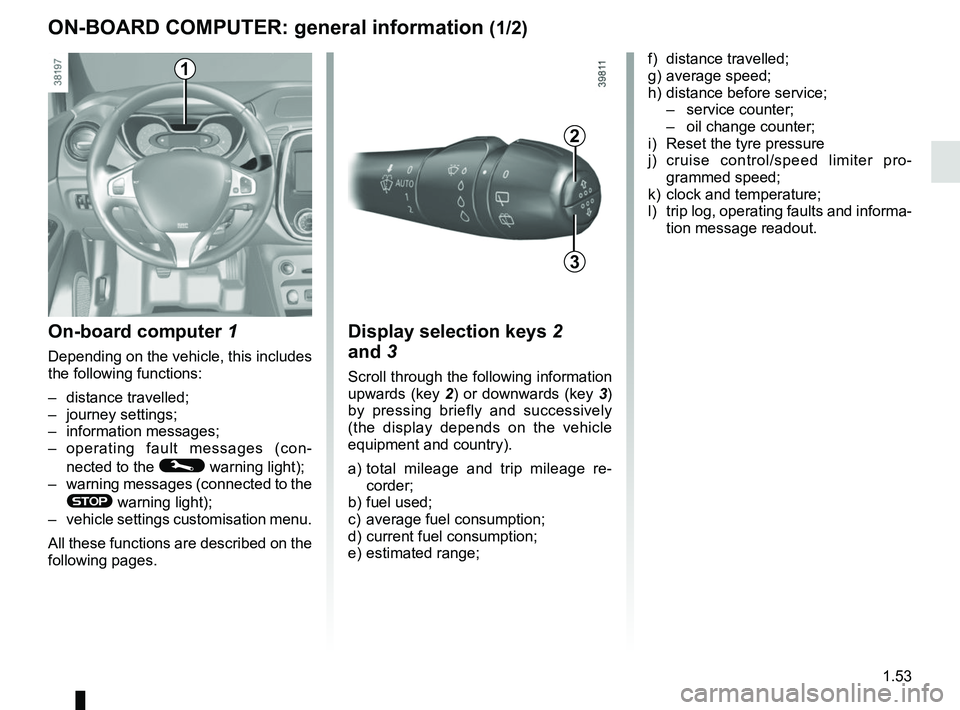
On-board computer 1
Depending on the vehicle, this includes
the following functions:
– distance travelled;
– journey settings;
– information messages;
– operating fault messages (con-
nected to the
© warning light);
– warning messages (connected to the
® warning light);
– vehicle settings customisation menu.
All these functions are described on the
following pages.
Display selection keys 2
and 3
Scroll through the following information
upwards (key 2) or downwards (key 3)
by pressing briefly and successively
(the display depends on the vehicle
equipment and country).
a) total mileage and trip mileage re-
corder;
b) fuel used;
c) average fuel consumption;
d) current fuel consumption;
e) estimated range;
2
3
f) distance travelled;
g) average speed;
h) distance before service;
– service counter;
– oil change counter;
i) Reset the tyre pressure
j) cruise control/speed limiter pro- grammed speed;
k) clock and temperature;
l) trip log, operating faults and informa- tion message readout.1
Page 63 of 258

The display of information shown below DEPENDS ON THE VEHICLE EQUIPMENT \
AND COUNTRY.
Examples of selectionsInterpreting the display selected
On-board computer")
1.57
TRIP COMPUTER: trip settings (3/5)
The display of information shown below DEPENDS ON THE VEHICLE EQUIPMENT \
AND COUNTRY.
Examples of selectionsInterpreting the display selected
On-board computer with mileage-
before-service message
h) Mileage before service or oil change.Mileage before service
With the ignition switched on, the engine not running and
the display set to “SERVICE INTERVALS”, press button 2 or 3
for approximately 5 seconds to display the mileage before serv-
ice (distance or time to the next service). When the range ap-
proaches its limit, there are several possible scenarios:
– distance/time remaining less than 900 miles (1,500 km) or
one month : the message “Service due in” is displayed, ac-
companied by the nearest term (distance or time);
– range equal to 0 km/miles or service date reached: the
message “Service required ” is displayed accompanied by
warning light
©.
The vehicle requires a service as soon as possible.
SERVICE
INTERVALS
Service in
30 000 Kms / 12 MO
Service due in
300 Kms / 24 DAYS
Service required
Resetting: to reset the distance before service, press and hold button 2 or 3 for approximately 10 seconds until the display
shows the service mileage without flashing.
NB: if a service is performed without changing the engine oil, only the mi\
leage before the next service should be reset. In the
event of an oil change, both the distance before the next service and th\
e next oil change should be reset.