2018 Peugeot Boxer ser
[x] Cancel search: serPage 169 of 232
167
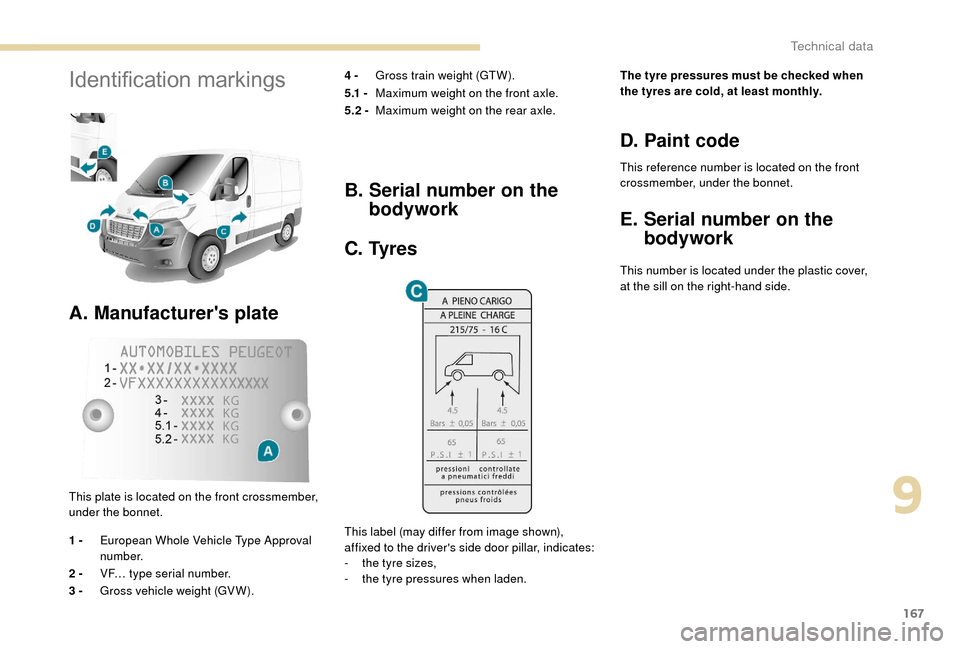
Identification markings
A. Manufacturer's plate
4 - Gross train weight (GTW).
5.1 - Maximum weight on the front axle.
5.2 - Maximum weight on the rear axle.
This plate is located on the front crossmember,
under the bonnet.
1 - European Whole Vehicle Type Approval
number.
2 - VF… type serial number.
3 - Gross vehicle weight (GV W).
B. Serial number on the
bodywork
C. Tyres
This label (may differ from image shown),
affixed to the driver's side door pillar, indicates:
-
t
he tyre sizes,
-
t
he tyre pressures when laden. The tyre pressures must be checked when
the tyres are cold, at least monthly.
D. Paint code
This reference number is located on the front
crossmember, under the bonnet.
E. Serial number on the
bodywork
This number is located under the plastic cover,
at the sill on the right-hand side.
9
Technical data
Page 182 of 232

180
Tipper
Safety recommendations
The tipper body is raised by an electro-
hydraulic unit powered by the vehicle's battery.The tipper body is raised and lowered by
pressing and holding the corresponding
buttons on the magnetic and portable remote
control situated on a
support in the cab.
The tipper body is raised by the motor in the
electro-hydraulic unit.
The tipper body is lowered by a solenoid valve
that opens the fluid return of the ram.
A safety device prevents the tipper body from
dropping when it is not moving or is being
raised. •
N
ever drive with a drop panel lowered.
•
E
nsure that there is no person or
obstacle nearby (below or above)
when unloading.
•
N
ever leave the tipper body raised
when not in use.
•
A
lways discharge the load with the
upper part of the rear drop panel
secured.
•
O
bser ve the maximum payload on the
weight plate on the vehicle.
•
C
heck regularly that the suspension
is in good condition and that the tyres
are inflated to the recommended
pressures.
•
D
istribute the load uniformly in the
tipper body.
•
T
ransport similar products that
discharge easily.
•
N
ever drive, even slowly, with the
tipper body raised.
Tip onto a
sur face that is flat
and hard: a sur face that is
sloping or loose could cause
the centre of gravity to shift,
making the whole vehicle
unstable.
Special features
Page 183 of 232

181
Characteristics
EquipmentDetails
Tipper Tipper base made of 2
strips of 2.5 mm thick zinc-coated high tensile
steel, joined by central and longitudinal laser welding.
Tipper body painted vehicle body colour.
Tipper structure 2
main longerons in galvanised high tensile steel.
1
tubular steel ram head cross member.
Cross members in galvanised high tensile steel. Protected against
corrosion by application of a
powder coating.
Sub-frame 2 "C" section longerons made of 2.5
mm thick high tensile steel, interior
strengthening by enlarged lower wings.
Fixing to the base vehicle by high tensile steel brackets.
1
machine-welded tubular steel ram foot cross member, hot galvanised.
1
rear articulation cross member in galvanised steel.
Stop brackets at the ends of the longerons.
Rear lamp protection grille.
Cycle guard and wing supports in galvanised steel.
Body sides Body sides in high tensile steel, 15/10
thickness, cold formed, assembled
by continuous laser welding.
Anti-corrosion protection assured by a
powder coating paint finish.
Catches with reinforced zinc protection integrated into the form of the
sides.
Ladder carrier Galvanised steel uprights. Panels and cross members in painted steel
with clinched bolts.
Electro-pump unit 12
Volts/2 kW.
Operating temperature range: -20
to +70°C.
Hydraulic ram Expansion type, nitride ram, 3 -section, dia.: 107
mm
Maximum pressure: 20
bar.
Hydraulic fluid Mineral type ISO HV 46
or equivalent.
Dimensions
This conversion is only available on the
L2 single cab; refer to the table below for the
characteristics of the tipper.
Tipper (in mm)
Load length 3,200
Overall length 3,248
Load width 2,000
Overall width 2 ,1 0 0
Height of body sides 350
Conversion weight (in kg) 550
For information on the characteristics
of the L2
chassis cab, refer to the
"Dimensions" section for the floor cab
model.
10
Special features
Page 185 of 232

183
Check and top up the fluid level regularly.
Replace the fluid annually. Replace the fluid if it
contains water.
Check the condition of the hydraulic hose and
the sealing of the hydraulic system regularly.
Pump and motor
Requires no ser vicing; the ball bearings are
lubricated for life and the pump bearings by the
pumped fluid.
Lubrication
The tipper body and ram pivots do not have
grease nipples. Lubricate the hinges and
retainers for the tipper body sides regularly,
as well as the catches for the rear tipper body
side.
Sub-chassis and tipper body
For maximum life, we recommend that you
clean your tipper body by washing it down
regularly with a hose.
Touch up paint chips quickly to avoid rust
spreading.After 8
months of use, check the
tightening torque of the fixings of the
underbody to the chassis (following the
recommendations of the body converter).
Cleaning the valve slider
F Loosen the cap 244A paying attention to
the ball and retrieving it.
F
U
sing a wide screwdriver, unscrew the
bore/piston bolt assembly.
F
C
heck that the piston slides smoothly and
remove any impurities. Pass a
magnet over
if there is any swar f present.
F
R
efit the assembly and ensure that the
piston slides smoothly. Retain the ball with
some grease on the plug for reassembly.
F
B
leed the hydraulic unit.
Bleeding the electro-hydraulic
unit
F Remove the hexagonal plug 257 .
F S lacken by a half turn the bolt 587 located
inside, using a
6 mm Allen key.
F
O
perate the electro-hydraulic unit for a few
moments by pressing the raise button.
F
T
he tipper body does not rise, or rises very
slowly. When fluid flows from the orifice,
the system is bled.
F
R
etighten the bolt 587
and refit the plug
257 . Check that the tipper body lowers
c o r r e c t l y.
Detailed view of the UD2386 electro-
h ydraulic unit
Maintenance
Reser voir
For safety reasons, we strongly advise
against doing anything under the tipper
body while it is being operated or while it
is being serviced.
10
Special features
Page 186 of 232

184
Troubleshooting
SymptomsElectricalHydraulic Verification/Check
The hydraulic unit does not operate. X
Power supply harness and relay.
X Control harness (control unit).
X Circuit breaker.
Unit very noisy, body rises slowly. X Pick-up strainer blocked or squashed at the bottom of the reser voir.
New unit very noisy, body rises quickly. X Pump alignment, change the unit.
The ram goes down on its own. X Return valve squashed or jammed.
The ram does not go down. X
Yes, check the valve slider and bleed.
Refer to the "Maintenance" section.
X No, check the return valve winding and electrical connections.
X No, replace the solenoid.
X No, check the alignment of the ram.
The unit operates but does not generate pressure. X
Valve slider jammed if no solenoid on the unit.
Refer to the "Maintenance" section.
X Pressure relief, adjustment, cleanliness.
X Pump seal failed.
X Motor/pump coupling.
X Pump loose on its bracket.
The hydraulic unit does not operate. X Solenoid jammed, replace it or tighten the nut behind the strainer.
The control unit does not operate. XCheck the connections and contacts.
Emulsion in the reser voir. X
Return pipe incorrectly fitted.
X Fluid level too low.
Fluid discharged from the breather. X Too much fluid.
X
Breather diaphragm tolerance a
little wide, to be replaced.
Only valid for UD2386
units.
The fuse blows while lowering. XReplace the return valve winding.
Special features
Page 191 of 232

5
Adjustment
- D irect adjustment .
The screen virtual keypad can be used to
enter a
single number corresponding to
a
station.
-
T
he "more" or "less" graphic symbols allow
precise adjustment of the frequency.
Info
-
I
nformation .
Display information on the current radio
station.
Audio
-
E
qualiser .
Adjust the bass, mid-range and treble.
-
B
alance/Fade .
Adjust the balance of the speakers, front
and rear, left and right.
Press the button in the middle of the arrows
to balance the adjustments.
-
V
olume/Speed .
Select the desired setting, the option is
highlighted.
-
L
oudness .
Optimise audio quality at low volume.
-
A
utomatic radio .
Adjust the radio on startup or restore the
active state the last time the ignition was
switched to STOP.
-
R
adio off delay .
Adjust the setting.
-
A
UX vol. adjustment .
Adjust the settings.DAB (Digital Audio
Broadcasting) radio
Digital Radio
Digital radio provides higher quality
reception and also the graphical display
of current information on the radio station
being listened to.
The different "multiplex/ensembles" offer
a
choice of radio stations in alphabetical
o r d e r.
Press repeatedly on " RADIO" to
display the "DAB Radio".
Select the " Navigate" tab.
Select a
list from the filters
proposed: " All", "Genres ",
" Ensembles " and then select
a
radio station.
Press the " Update" button to update
the list of "DAB Radio" stations
received.
DAB/FM tracking
"DAB" does not cover 100% of the
te r r i to r y.
When the digital radio signal is weak,
the " AF" (alternative frequencies) option
allows you to continue listening to the
same station, by automatically switching to
the corresponding "FM" analogue station
(if there is one).
When the system switches to analogue
radio, there is a
difference of a few
seconds with sometimes a
change in
volume.
When the digital signal is restored, the
system automatically changes back to
" DA B ".
If the "DAB" station being listened to is
not available, the sound will cut out while
the digital signal is too weak and the
alternative "AF" frequency will be greyed
out.
.
Touch screen Audio-Telematic system
Page 192 of 232

6
Media
Press "MEDIA" to display the media
menus:
Press the 9
or: buttons to play the previous/
next track.
Press and hold the buttons for fast for ward or
rewind in the track selected.
Navigate
-
N
avigate by: Playing currently, Ar tists,
Albums, Genres, Tracks, Playlists, Audio
books, Podcasts .
Navigate and select tracks on the active
device.
The selection options depend on the device
connected or type of CD inserted.
Source
-
C
D, AUX, USB .
Select the desired audio source from those
available or insert a
device intended for
this purpose; the system starts playing the
source automatically.
-
Bl
uetooth
®.
Pair a
Bluetooth® audio device.
Info
-
I
nformation .
Display information on the track playing. Random
Press the button to play tracks on the CD, USB,
iPod or Bluetooth
® device in random order.
Repeat
Press the button to activate this function.
Audio
-
E
qualiser .
Adjust the bass, mid-range and treble.
-
B
alance/Fade .
Adjust the balance of the speakers, front
and rear, left and right.
Press the button in the middle of the arrows
to balance the adjustments.
-
V
olume/Speed .
Select the desired setting, the option is
highlighted.
-
L
oudness .
Optimise audio quality at low volume.
-
A
utomatic radio .
Adjust the radio on startup or restore the
active state the last time the ignition was
switched to STOP.
-
R
adio off delay .
Adjust the setting.
-
A
UX vol. adjustment .
Adjust the settings.
USB port
Insert a USB memory stick or connect
a peripheral device to the USB port in
the central storage space , provided for
transferring data to the system, using a
suitable
cable (not supplied).
To protect the system, do not use a
USB
hub.
The system builds playlists (in temporary
memory), an operation which can take from
a
few seconds to several minutes at the first
connection.
Reduce the number of non-music files and the
number of folders to reduce the waiting time.
The playlists are updated every time the
ignition is switched off or a
USB memory stick
is connected. The lists are stored: if they are
not modified, the subsequent loading time will
b e s h o r t e r.
Touch screen Audio-Telematic system
Page 195 of 232

9
The classifications available are those of
the portable device connected (artists/
albums/genres/tracks/playlists/audio
books/podcasts).
The default classification used is by
artists. To modify the classification used,
return to the first level of the menu then
select the desired classification (playlists,
for example) and confirm to go down
through the menu to the desired track.
The version of software in the audio
system may not be compatible with the
generation of your Apple
® p l aye r.
Navigation
Press N AV then in the centre or at
the bottom of the screen to display
the settings and navigation menus:
Go to…
Select "Go to", to define the destination in many
ways and not just by entering an address.
Display map
Display the map for the route for a
preview
using the map navigator. Plan a
route
Use the navigation system to plan a route
in advance, selecting the start point and the
destination.
Services
Use the traffic information to minimise the
impact on your journey from traffic delays.
Settings
Modify the appearance and operation of the
navigation system.
Most of the system settings are accessible by
pressing "Settings" in the main menu.
Help
Access information on assistance ser vices or
other specialised services.
End
Confirm the settings.
Limit
Speed limit (if known).
To see the difference between the desired time
of arrival and estimated time of arrival.
Switch between 3D and 2D maps.
Go to…, Display map, Plan a
route,
Services, Settings, Help, End.
When the navigation system starts for the
first time, the "Driving mode" and detailed
information on the current position are
displayed. Details
The route over view gives a
preview of the
route, the remaining distance to the destination
and an estimate of the remaining travelling
time.
With RDS-TMC data, the route over view also
shows traffic information related to delays on
the route.
Modify route
The navigation system helps you to reach
your destination in the fastest possible time by
displaying an alternative route when available.
End
Confirm the settings.
Instructions
Navigation instructions for the next section
of the route and the distance until the next
instruction. If the second instruction is less
than 150 metres from the first, it is displayed
immediately instead of the distance.
Touch this part of the status bar to repeat the
last voice instruction. Touch the middle of the screen to open the
main menu.
.
Touch screen Audio-Telematic system