2018 PEUGEOT 5008 USB
[x] Cancel search: USBPage 6 of 364
4
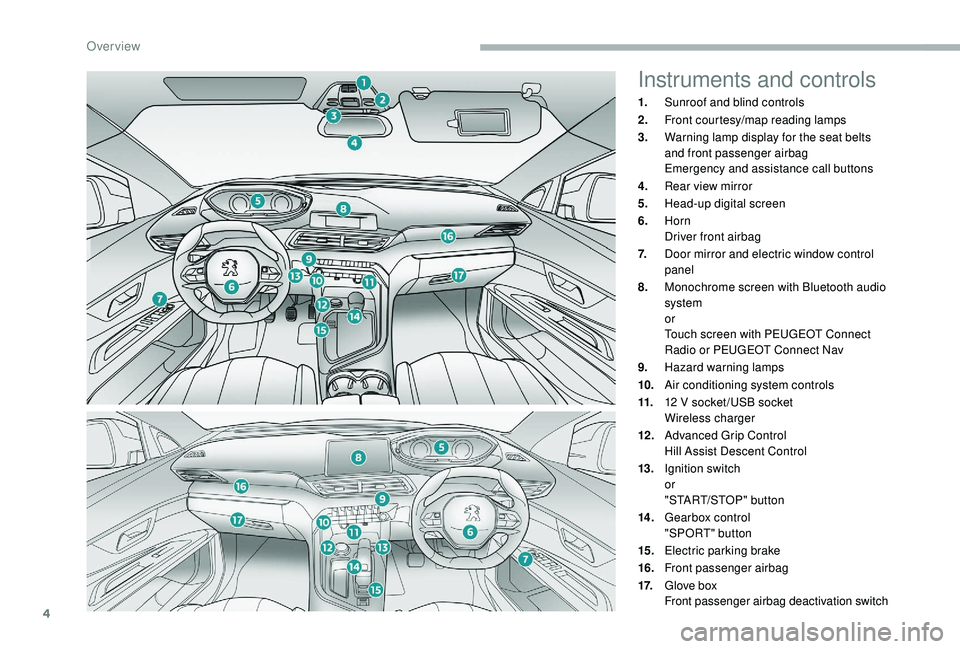
Instruments and controls
1.Sunroof and blind controls
2. Front courtesy/map reading lamps
3. Warning lamp display for the seat belts
and front passenger airbag
Emergency and assistance call buttons
4. Rear view mirror
5. Head-up digital screen
6. Horn
Driver front airbag
7. Door mirror and electric window control
panel
8. Monochrome screen with Bluetooth audio
system
or
Touch screen with PEUGEOT Connect
Radio or PEUGEOT Connect Nav
9. Hazard warning lamps
10. Air conditioning system controls
11. 12
V socket /USB socket
Wireless charger
12 . Advanced Grip Control
Hill Assist Descent Control
13. Ignition switch
or
"START/STOP" button
14 . Gearbox control
"SPORT" button
15. Electric parking brake
16. Front passenger airbag
17. Glove box
Front passenger airbag deactivation switch
Over view
Page 101 of 364
99
Reinitialising the remote control
If the battery is disconnected or when changing
the battery, the remote control must be
reinitialised.
F
A
fter turning on the power, within the next
5
seconds, press button 4 for 1 second.
If the operation is successful, the message
" OK " will be displayed on the remote
control's screen.
If there is a
fault, the message " FA I L" will
appear.
F
St
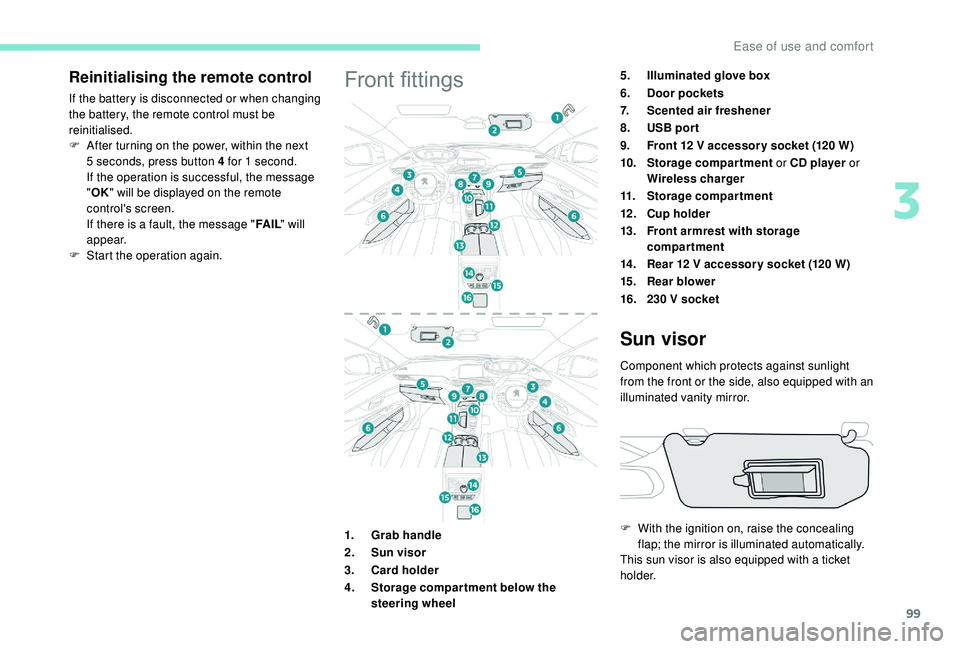
art the operation again.Front fittings5.Illuminated glove box
6. Door pockets
7. Scented air freshener
8. USB por t
9. Front 12
V accessor y socket (120 W)
10. Storage compartment or CD player or
Wireless charger
11. Storage compartment
12 . Cup holder
13. Front armrest with storage
compartment
14 . Rear 12
V accessor y socket (120 W)
15. Rear blower
16. 230
V socket
1. Grab handle
2. Sun visor
3. Card holder
4. Storage compar tment below the
steering wheel
Sun visor
Component which protects against sunlight
from the front or the side, also equipped with an
illuminated vanity mirror.
F
W
ith the ignition on, raise the concealing
flap; the mirror is illuminated automatically.
This sun visor is also equipped with a
ticket
h o l d e r.
3
Ease of use and comfort
Page 102 of 364

100
Glove box
F To open the glove box, raise the handle.
The glove box is lit when the lid is opened.
It houses the front passenger airbag
deactivation switch A .
It also gives access to the housing for scented
air freshener B cartridges.
Never drive with the glove box open when
a
passenger is at the front – it may cause
injury during sharp deceleration!
Cigarette lighter/12 V
a ccessory socket(s)
F To use the cigarette lighter, press it in
and wait a few seconds until it pops out
automatically.
F
T
o use a 12 V accessory (max power:
120
W), remove the cigarette lighter and
connect a
suitable adaptor.
You can use this socket to connect a
telephone
charger, a bottle warmer, etc.
After use, put the cigarette lighter back into
place straight away.
The connection of an electrical device
not approved by PEUGEOT, such as
a
USB charger, may adversely affect the
operation of vehicle electrical systems,
causing faults such as poor radio
reception or inter ference with displays in
the screens.
USB port
The USB port allows the connection of
a portable device, such as an iPod®-type digital
audio player, or a
USB memory stick.
The USB reader reads your audio files which
are then transferred to the audio system and
played via the vehicle's loudspeakers.
These files are managed via the steering wheel
controls or from the audio system.
When connected to the USB port,
the portable device can be charged
automatically.
While charging, a message is displayed
if the power consumption of the portable
device exceeds the amperage supplied by
the vehicle.
For more details on the Audio equipment and
telematics, and particularly the USB port,
consult the corresponding section.
Ease of use and comfort
Page 103 of 364
101
The USB port also allows a smartphone to be
c onnected by MirrorLinkTM, Android Auto® or
CarPlay®, so that certain applications on the
smartphone can be used on the touch screen.
FOCAL® premium Hi-Fi
system
- TNF tweeters: Inverted dome aluminium
technology giving optimum sound
dispersion and very detailed treble.
-
S
ub-woofer: 200 mm triple coil Power
Flower™ technology for defined and
dynamic reproduction of low frequencies.
-
1
2-way active amplification – 515 Watts:
Hybrid Class AB/Class D technology
providing breadth and finesse in the high
frequency signals, as well as real power in
the bass.
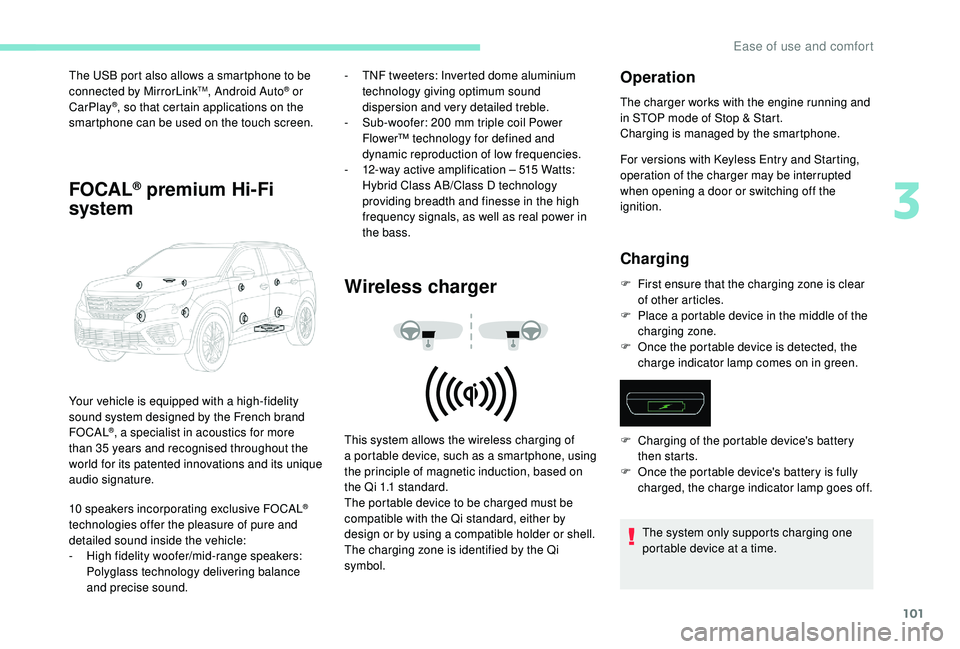
Wireless charger
Your vehicle is equipped with a high-fidelity
s ound system designed by the French brand
FOCAL
®, a specialist in acoustics for more
than 35
years and recognised throughout the
world for its patented innovations and its unique
audio signature.
10
speakers incorporating exclusive FOCAL
®
technologies offer the pleasure of pure and
detailed sound inside the vehicle:
-
H
igh fidelity woofer/mid-range speakers:
Polyglass technology delivering balance
and precise sound. This system allows the wireless charging of
a
portable device, such as a smartphone, using
the principle of magnetic induction, based on
the Qi 1.1 standard.
The portable device to be charged must be
compatible with the Qi standard, either by
design or by using a
compatible holder or shell.
The charging zone is identified by the Qi
symbol.
Operation
The charger works with the engine running and
in STOP mode of Stop & Start.
Charging is managed by the smartphone.
For versions with
K
eyless Entry and Starting,
operation of the charger may be interrupted
when opening a
door or switching off the
ignition.
Charging
F First ensure that the charging zone is clear of other articles.
F
P
lace a portable device in the middle of the
charging zone.
F
O
nce the portable device is detected, the
charge indicator lamp comes on in green.
The system only supports charging one
portable device at a
time.
F
C
harging of the portable device's battery
then starts.
F
O
nce the portable device's battery is fully
charged, the charge indicator lamp goes off.
3
Ease of use and comfort
Page 109 of 364
107
Connect only one device at a time to the
s ocket (no extension lead or multi-socket
connector).
Connect only devices with class II
insulation (shown on the device).
Do not use a
device with a metal case
(electric shaver, etc.).
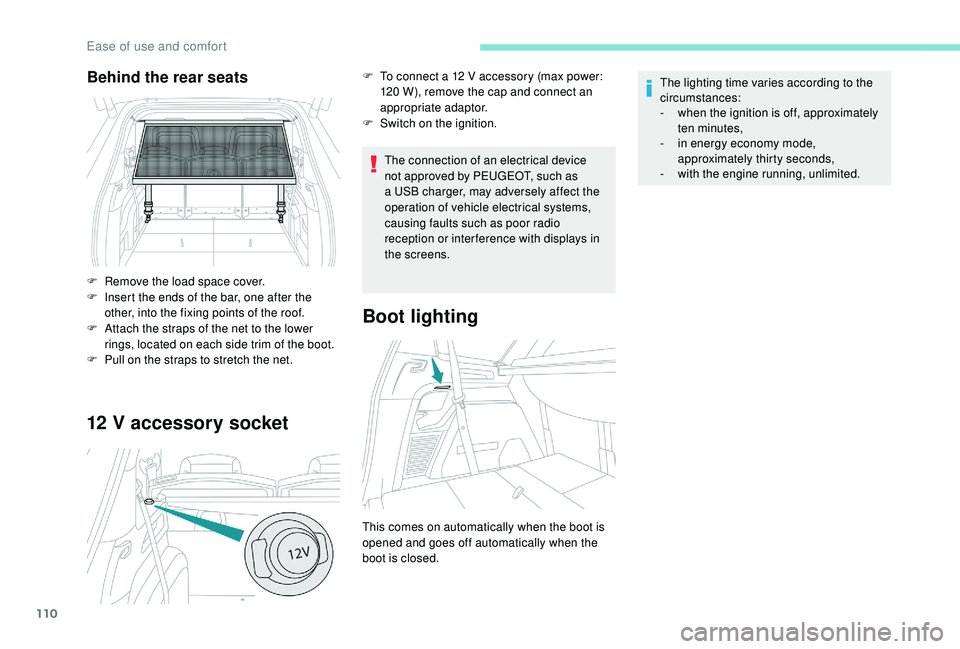
12 V accessory socket
The connection of an electrical device
not approved by PEUGEOT, such as
a
USB charger, may adversely affect the
operation of vehicle electrical systems,
causing faults such as poor radio
reception or inter ference with displays in
the screens.
As a safety measure, when electrical
c onsumption is high and when required by
the vehicle's electrical system (particular
weather conditions, electrical overload,
etc.), the current supply to the socket will be
cut off; the green indicator lamp goes off.
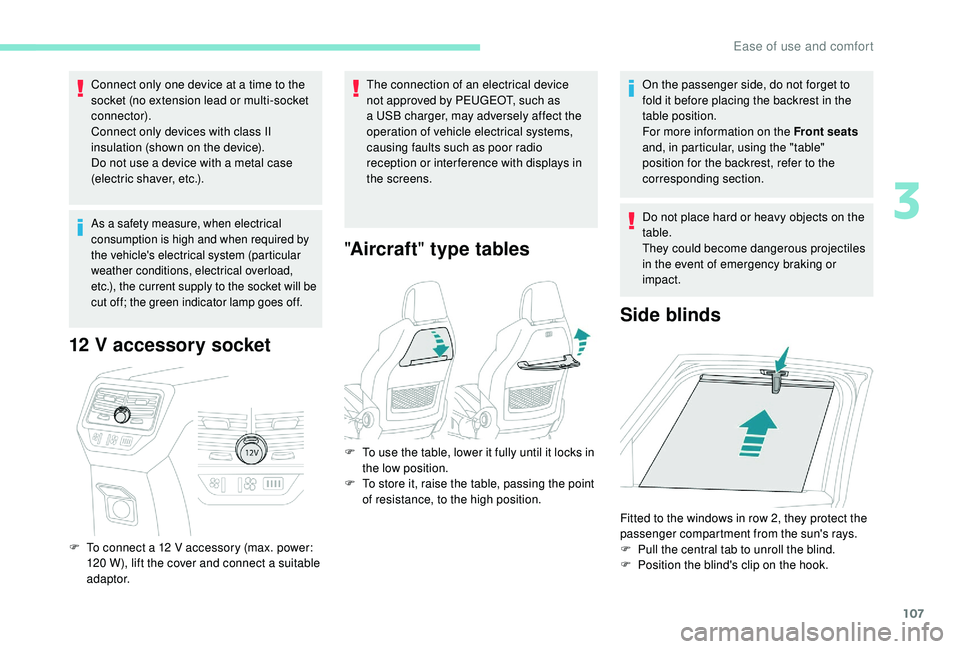
F To connect a 12 V accessory (max. power:
120 W), lift the cover and connect a suitable
adaptor.
" Aircraft " type tables
On the passenger side, do not forget to
fold it before placing the backrest in the
table position.
For more information on the Front seats
and, in particular, using the "table"
position for the backrest, refer to the
corresponding section.
Do not place hard or heavy objects on the
table.
They could become dangerous projectiles
in the event of emergency braking or
impact.
Side blinds
F To use the table, lower it fully until it locks in the low position.
F
T
o store it, raise the table, passing the point
of resistance, to the high position.
Fitted to the windows in row 2, they protect the
passenger compartment from the sun's rays.
F
P
ull the central tab to unroll the blind.
F
P
osition the blind's clip on the hook.
3
Ease of use and comfort
Page 112 of 364
110
12 V accessory socket
The connection of an electrical device
not approved by PEUGEOT, such as
a
USB charger, may adversely affect the
operation of vehicle electrical systems,
causing faults such as poor radio
reception or inter ference with displays in
the screens.
Boot lighting
This comes on automatically when the boot is
opened and goes off automatically when the
boot is closed. The lighting time varies according to the
circumstances:
-
w
hen the ignition is off, approximately
ten minutes,
-
i
n energy economy mode,
approximately thirty seconds,
-
w
ith the engine running, unlimited.
Behind the rear seats
F Remove the load space cover.
F
I nsert the ends of the bar, one after the
other, into the fixing points of the roof.
F
A
ttach the straps of the net to the lower
rings, located on each side trim of the boot.
F
P
ull on the straps to stretch the net. F
T
o connect a 12 V accessory (max power:
120 W), remove the cap and connect an
appropriate adaptor.
F
S
witch on the ignition.
Ease of use and comfort
Page 284 of 364
8
These commands can be made from any
screen page after pressing the " Voice
command" or "Telephone" button located
on the steering wheel, as long as there is
no telephone call in progress.Voice commands
Help messages
Tune to channel <…> You can pick a
radio station by saying "tune
to" and the station name or frequency. For
example "tune to channel Talksport" or "tune to
98.5
FM". To listen to a preset radio station, say
"tune to preset number". For example "tune to
preset number five".
What's playing To display the details of the current "track",
"artist" and "album", you can say " What's
playing".
Play song <…> Use the command "play" or "listen to" to select
the type of music you'd like to hear. You can
pick by "song", "artist", or "album". Just say ,
for example, "play artist, Madonna", "play song,
Hey Jude", or "play album, Thriller".
Play ar tist <…>
Play album <…>
Media voice commands are available only
for a
USB connection.
"Radio Media " voice
commands
PEUGEOT Connect Nav
Page 290 of 364
14
Network connection provided by
the user
Connect a USB cable.
T he smartphone charges when
connected by a
USB cable.
Bluetooth connection
Wi-Fi connection Restrictions of use:
-
W
ith CarPlay
®, connection sharing is
only with a
Wi-Fi connection.
-
W
ith MirrorLink
TM, connection sharing
is only with a
USB connection.
The quality of ser vices depends on the
quality of the network connection.
Network connection provided by
the vehicle
The system is automatically
connected to the modem included
for the "Emergency or assistance
calls" ser vices and does not require
a
connection provided by the user
via their smartphone.
With the arrival of "TOMTOM
TR AFFIC", the ser vices are
available.
The ser vices offered with connected
navigation are as follows.
A Connected Services pack:
-
Weather,
-
F
illing stations,
-
C
ar park,
-
Tr a f f i c ,
-
P
OI local search.
A Danger zone pack (option). The processes and standards are
constantly changing; for the communication
process between the smartphone and the
system to work correctly, we recommend
that you update the operating system of
the smar tphone as well as the date and
time of the smar tphone and the system.
Settings specific to
connected navigation
In the "Settings" menu you can create
a
profile for just one person or a group
of people with shared interests, with
the possibility of entering a
multitude of
settings (radio presets, audio settings,
navigation history, contact favourites,
etc.); these settings are taken into account
automatically.
or Press Navigation
to display the
primary page.
Press the " MENU" button to go to the
secondary page.
USB connection
Activate the Bluetooth function on
the telephone and ensure that it is
visible to all (see the "Applications"
section).
Select a
Wi-Fi network found by the
system and connect to it (see the
"Applications" section).
PEUGEOT Connect Nav