2018 PEUGEOT 5008 instrument panel
[x] Cancel search: instrument panelPage 209 of 364
207
- Certain materials (fabrics) absorb sound waves: pedestrians may not be detected.
-
A
ccumulated snow or dead leaves on the
road sur face can inter fere with the vehicle's
sensors.
-
A f
ront or rear impact to the vehicle can
distort the settings of the sensors, which is
not always detected by the system: distance
measurements may be incorrect.
-
T
he tilting of the vehicle if the boot is
very loaded can affect the distance
measurements.
-
T
he sensors may be affected by poor
weather conditions (heavy rain, thick fog,
snowfall, etc.).
Recommendations on care
In bad or wintry weather, ensure that the
sensors are not covered with mud, ice or
snow. When reverse gear is engaged, an
audible signal (long beep) indicates that
the sensors may be dirty. High pressure washing
When washing your vehicle, direct the
lance at least 30
cm away from the
sensors.
Operating fault
If a fault occurs when shifting
t o reverse, this warning lamp
comes on in the instrument panel,
accompanied by a
message and an
audible signal (short beep).
Contact a
PEUGEOT dealer or a qualified
workshop to have the system checked.
Visiopark 1 – Visiopark 2
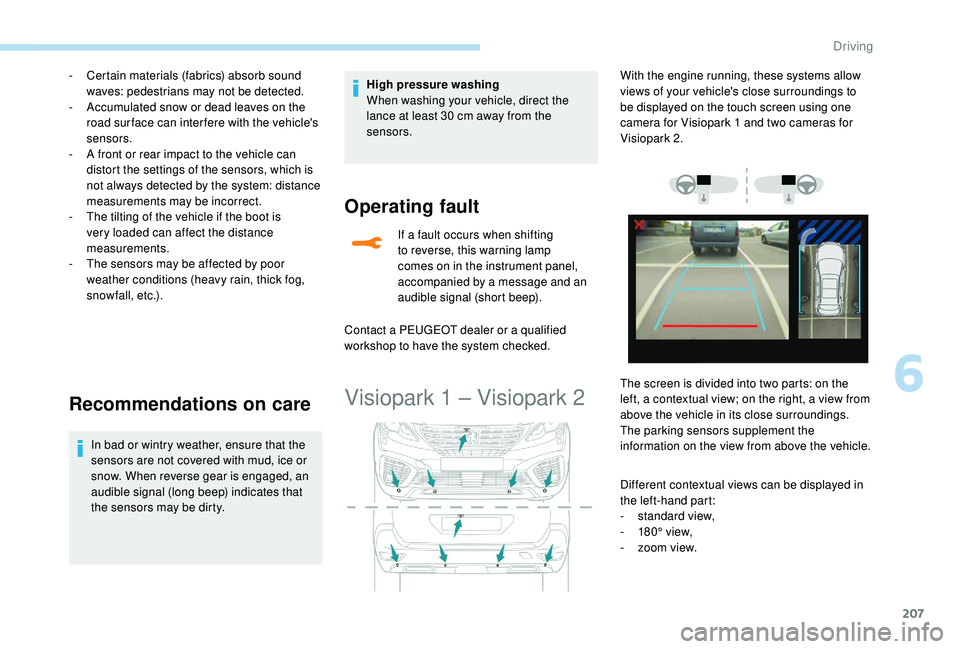
Different contextual views can be displayed in
the left-hand part:
-
s
tandard view,
-
1
80° view,
-
z
oom view.
With the engine running, these systems allow
views of your vehicle's close surroundings to
be displayed on the touch screen using one
camera for Visiopark 1
and two cameras for
Visiopark 2.
The screen is divided into two parts: on the
left, a contextual view; on the right, a view from
above the vehicle in its close surroundings.
The parking sensors supplement the
information on the view from above the vehicle.
6
Driving
Page 215 of 364
213
The Park Assist system takes control
of the assistance for a maximum of
4
manoeuvre cycles. The function is
deactivated after these 4
cycles. If you
think that your vehicle is not positioned
correctly, you should then take control of
the steering to carry out the manoeuvre.
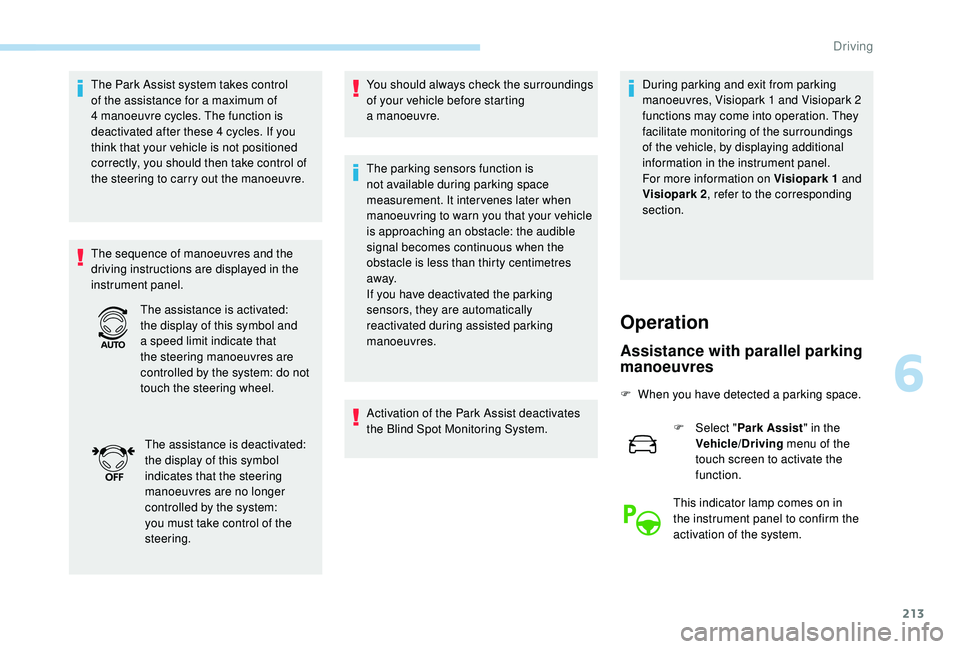
The sequence of manoeuvres and the
driving instructions are displayed in the
instrument panel. You should always check the surroundings
of your vehicle before starting
a
manoeuvre.
The parking sensors function is
not available during parking space
measurement. It intervenes later when
manoeuvring to warn you that your vehicle
is approaching an obstacle: the audible
signal becomes continuous when the
obstacle is less than thirty centimetres
away.
If you have deactivated the parking
sensors, they are automatically
reactivated during assisted parking
manoeuvres.
Activation of the Park Assist deactivates
the Blind Spot Monitoring System. During parking and exit from parking
manoeuvres, Visiopark 1
and Visiopark 2
functions may come into operation. They
facilitate monitoring of the surroundings
of the vehicle, by displaying additional
information in the instrument panel.
For more information on Visiopark 1
and
Visiopark 2 , refer to the corresponding
section.
The assistance is activated:
the display of this symbol and
a
speed limit indicate that
the steering manoeuvres are
controlled by the system: do not
touch the steering wheel.
The assistance is deactivated:
the display of this symbol
indicates that the steering
manoeuvres are no longer
controlled by the system:
you must take control of the
steering.
Operation
Assistance with parallel parking
manoeuvres
F When you have detected a parking space.
F
Sel
ect "Park Assist " in the
Vehicle/Driving menu of the
touch screen to activate the
function.
This indicator lamp comes on in
the instrument panel to confirm the
activation of the system.
6
Driving
Page 217 of 364
215
Assistance in exiting from
a parallel parking space
F When you want to leave a parallel parking
space, start the engine. F
Sel
ect "
Park Assist " in the
Vehicle/Driving menu of the
touch screen to activate the
function.
This indicator lamp comes on in
the instrument panel to confirm the
activation of the system. F
P
ress "
Exit parallel parking
space " on the touch screen.
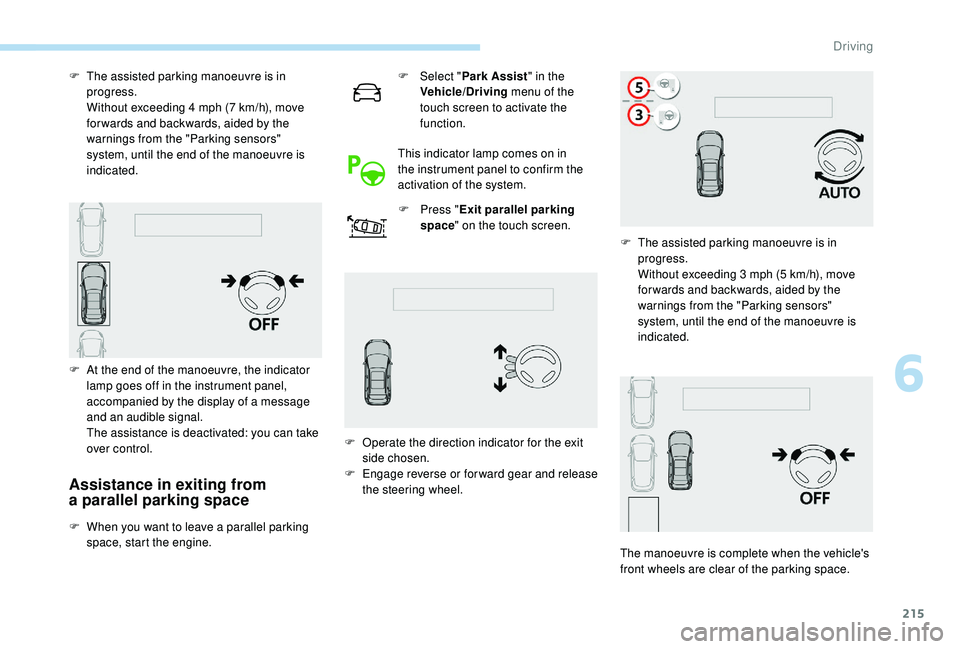
F
T
he assisted parking manoeuvre is in
progress.
W
ithout exceeding 4 mph (7 km/h), move
for wards and backwards, aided by the
warnings from the "Parking sensors"
system, until the end of the manoeuvre is
indicated.
F
A
t the end of the manoeuvre, the indicator
lamp goes off in the instrument panel,
accompanied by the display of a message
and an audible signal.
T
he assistance is deactivated: you can take
over control. F
O
perate the direction indicator for the exit
side chosen.
F
E
ngage reverse or forward gear and release
the steering wheel. F
T
he assisted parking manoeuvre is in
progress.
W
ithout exceeding 3 mph (5 km/h), move
for wards and backwards, aided by the
warnings from the "Parking sensors"
system, until the end of the manoeuvre is
indicated.
The manoeuvre is complete when the vehicle's
front wheels are clear of the parking space.
6
Driving
Page 218 of 364
216
Assistance with bay parking
manoeuvres
F When you have detected a parking space.
F
Sel
ect "Park Assist " in the
Vehicle/Driving menu of the
touch screen to activate the
function.
This indicator lamp comes on in
the instrument panel to confirm the
activation of the system.
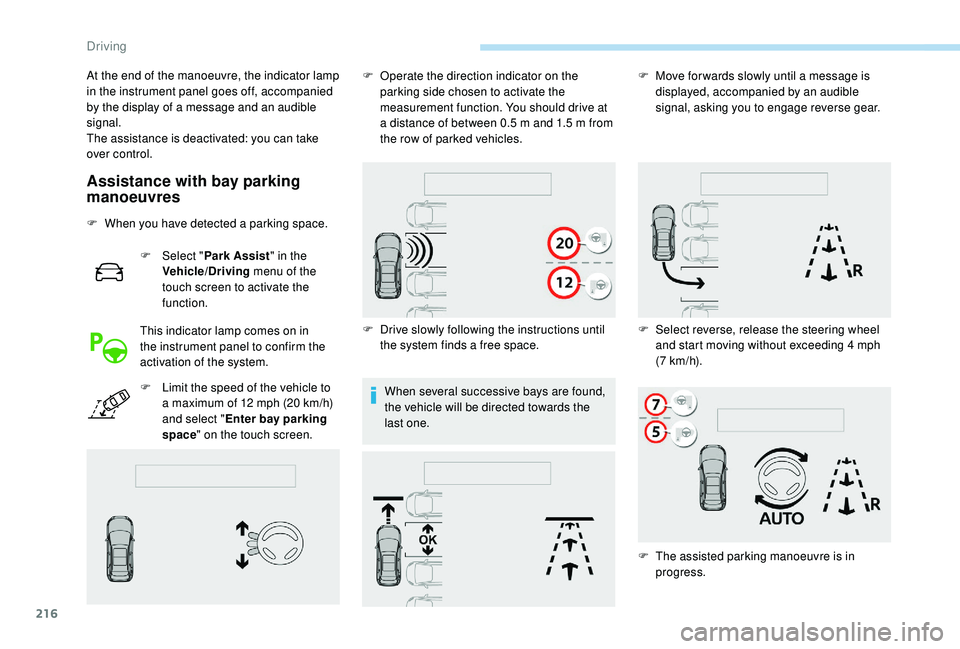
F
L
imit the speed of the vehicle to
a
maximum of 12 mph (20 km/h)
and select " Enter bay parking
space " on the touch screen. When several successive bays are found,
the vehicle will be directed towards the
last one.
At the end of the manoeuvre, the indicator lamp
in the instrument panel goes off, accompanied
by the display of a
message and an audible
signal.
The assistance is deactivated: you can take
over control. F
O
perate the direction indicator on the
parking side chosen to activate the
measurement function. You should drive at
a distance of between 0.5 m and 1.5 m from
the row of parked vehicles.
F
D
rive slowly following the instructions until
the system finds a
free space.F
M
ove for wards slowly until a message is
displayed, accompanied by an audible
signal, asking you to engage reverse gear.
F
S
elect reverse, release the steering wheel
and start moving without exceeding 4
mph
(7
km/h).
F
T
he assisted parking manoeuvre is in
progress.
Driving
Page 219 of 364
217
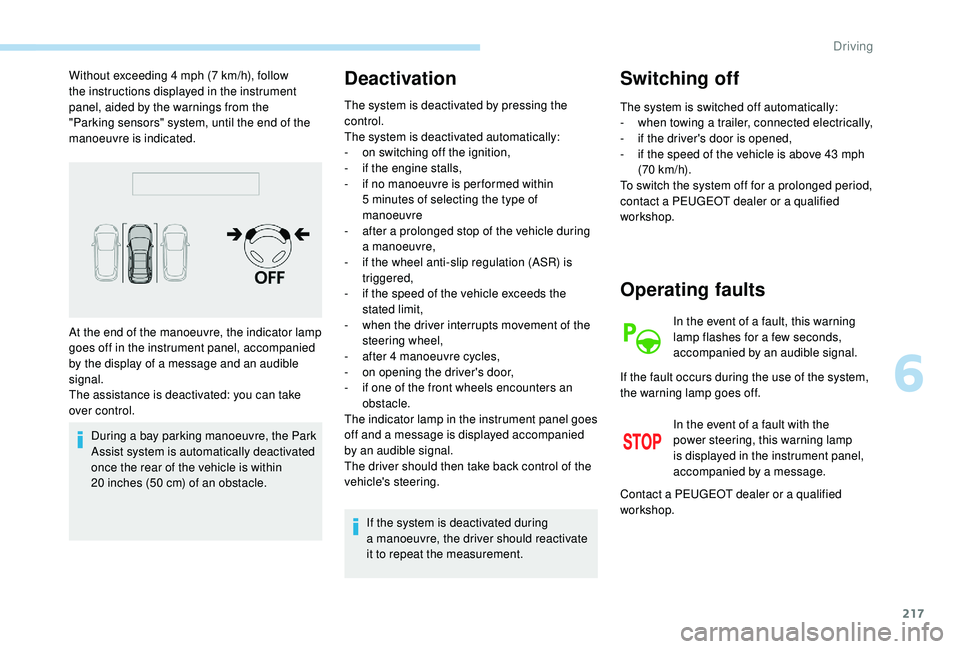
Without exceeding 4 mph (7 km/h), follow
t he instructions displayed in the instrument
panel, aided by the warnings from the
"Parking sensors" system, until the end of the
manoeuvre is indicated.
During a
bay parking manoeuvre, the Park
Assist system is automatically deactivated
once the rear of the vehicle is within
20
inches (50 cm) of an obstacle.Deactivation
The system is deactivated by pressing the
control.
The system is deactivated automatically:
-
o
n switching off the ignition,
-
i
f the engine stalls,
-
i
f no manoeuvre is per formed within
5
minutes of selecting the type of
manoeuvre
-
a
fter a prolonged stop of the vehicle during
a
manoeuvre,
-
i
f the wheel anti-slip regulation (ASR) is
triggered,
-
i
f the speed of the vehicle exceeds the
stated limit,
-
w
hen the driver interrupts movement of the
steering wheel,
-
a
fter 4 manoeuvre cycles,
-
o
n opening the driver's door,
-
i
f one of the front wheels encounters an
obstacle.
The indicator lamp in the instrument panel goes
off and a
message is displayed accompanied
by an audible signal.
The driver should then take back control of the
vehicle's steering.
If the system is deactivated during
a
manoeuvre, the driver should reactivate
it to repeat the measurement.
Switching off
The system is switched off automatically:
- w hen towing a trailer, connected electrically,
-
i
f the driver's door is opened,
-
i
f the speed of the vehicle is above 43 mph
(70
km/h).
To switch the system off for a
prolonged period,
contact a
PEUGEOT dealer or a qualified
workshop.
At the end of the manoeuvre, the indicator lamp
goes off in the instrument panel, accompanied
by the display of a
message and an audible
signal.
The assistance is deactivated: you can take
over control.
Operating faults
In the event of a fault, this warning
l amp flashes for a few seconds,
accompanied by an audible signal.
In the event of a
fault with the
power steering, this warning lamp
is displayed in the instrument panel,
accompanied by a
message.
If the fault occurs during the use of the system,
the warning lamp goes off.
Contact a
PEUGEOT dealer or a qualified
workshop.
6
Driving
Page 222 of 364
220
Fuel
Fuel tank capacity: approximately 56 litres.
R eser ve level: 6 litres.
Low fuel level
If your vehicle is fitted with Stop & Start,
never refuel with the engine in STOP
mode; you must switch off the ignition
using the key, or the START/STOP button
if your vehicle has
K
eyless Entry and
Starting.
Refuelling
If you have put in the wrong fuel for your
vehicle, you must have the fuel tank
drained and filled with the correct fuel
before starting the engine.
When the low fuel level is reached
in the fuel tank, this warning lamp
comes on in the instrument panel,
accompanied by the display of
a
message and an audible signal.
When it first comes on, about
6
litres of fuel is left in the tank.
Until sufficient fuel is added, this warning lamp
appears every time the ignition is switched on,
accompanied by the display of a
message and
an audible signal. When driving, this message
and audible signal are repeated with increasing
frequency as the fuel level drops towards 0 .
Refuel as soon as possible to avoid running out
of fuel.
For more information on Running out of fuel
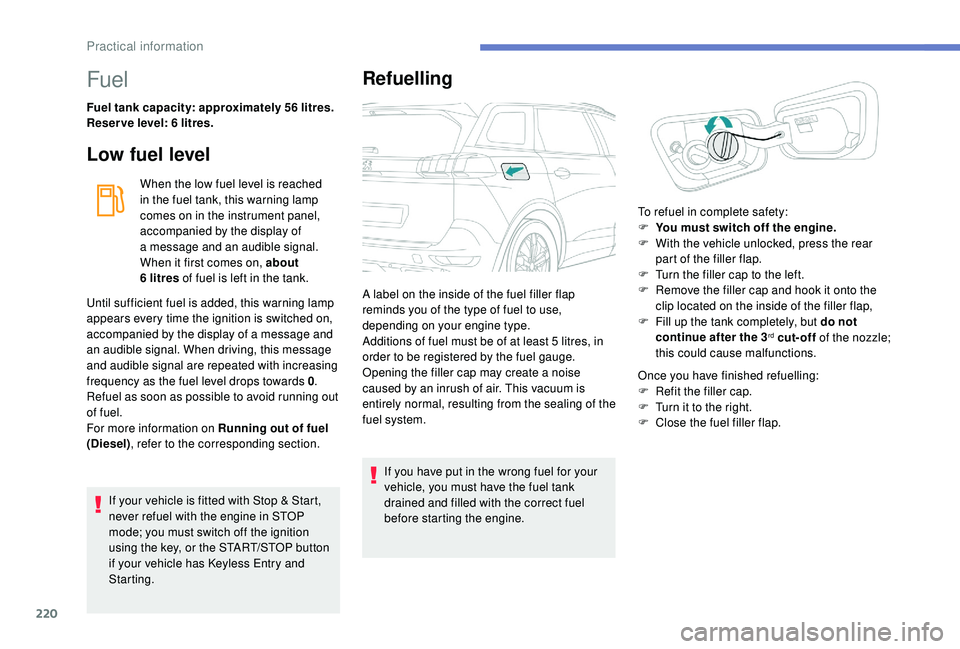
(Diesel) , refer to the corresponding section. A label on the inside of the fuel filler flap
reminds you of the type of fuel to use,
depending on your engine type.
Additions of fuel must be of at least 5
litres, in
order to be registered by the fuel gauge.
Opening the filler cap may create a noise
caused by an inrush of air. This vacuum is
entirely normal, resulting from the sealing of the
fuel system. Once you have finished refuelling:
F
R
efit the filler cap.
F
T
urn it to the right.
F
C
lose the fuel filler flap.
To refuel in complete safety:
F
Y
ou must switch off the engine.
F
W
ith the vehicle unlocked, press the rear
part of the filler flap.
F
T
urn the filler cap to the left.
F
R
emove the filler cap and hook it onto the
clip located on the inside of the filler flap,
F
F
ill up the tank completely, but do not
continue after the 3
rd cut-off of the nozzle;
this could cause malfunctions.
Practical information
Page 229 of 364
227
Maintenance
Correct operation is only possible if the towball
and its carrier are kept clean.
Before cleaning the vehicle with a high-
pressure jet wash, the towball must be removed
and the protective plug fitted to the carrier.
Apply the label provided to a
clearly visible
area, close to the carrier or in the boot.
Go to a
PEUGEOT dealer or a qualified
workshop for any work on the towbar
system.
Load reduction mode
System which manages the use of certain
functions according to the level of charge
remaining in the battery.
When the vehicle is being driven, the load
reduction function temporarily deactivates
certain functions, such as air conditioning,
heated rear screen, etc.
The deactivated functions are reactivated
automatically as soon as conditions permit.
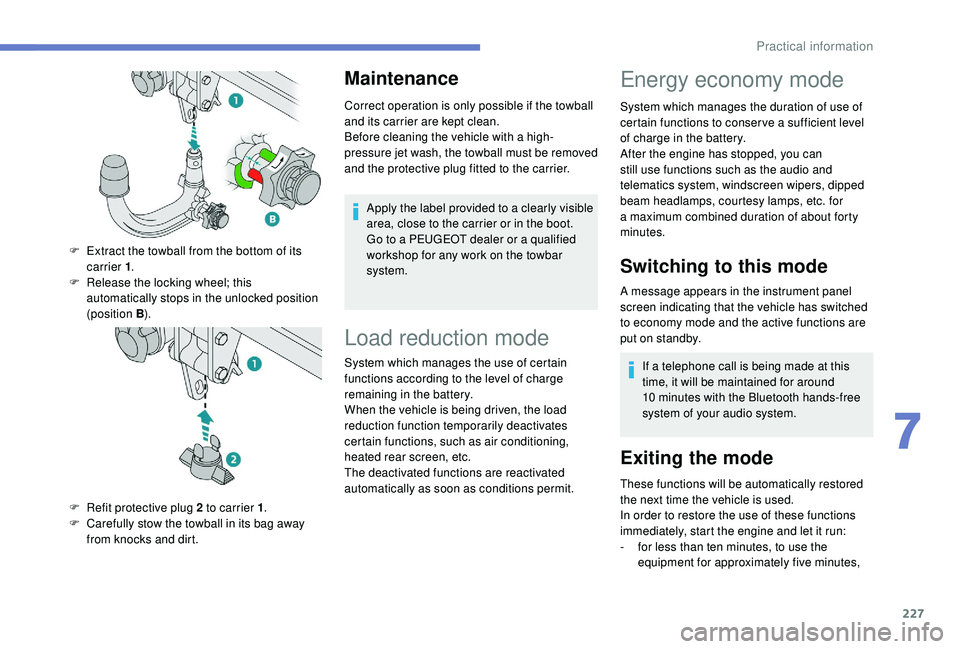
F
E
xtract the towball from the bottom of its
carrier 1 .
F
R
elease the locking wheel; this
automatically stops in the unlocked position
(position B ).
F
R
efit protective plug 2
to carrier 1 .
F
C
arefully stow the towball in its bag away
from knocks and dirt.
Energy economy mode
System which manages the duration of use of
certain functions to conser ve a sufficient level
of charge in the battery.
After the engine has stopped, you can
still use functions such as the audio and
telematics system, windscreen wipers, dipped
beam headlamps, courtesy lamps, etc. for
a
maximum combined duration of about forty
minutes.
Switching to this mode
A message appears in the instrument panel
screen indicating that the vehicle has switched
to economy mode and the active functions are
put on standby.
If a
telephone call is being made at this
time, it will be maintained for around
10
minutes with the Bluetooth hands-free
system of your audio system.
Exiting the mode
These functions will be automatically restored
the next time the vehicle is used.
In order to restore the use of these functions
immediately, start the engine and let it run:
-
f
or less than ten minutes, to use the
equipment for approximately five minutes,
7
Practical information
Page 235 of 364

233
Do not discard used oil or fluids into
sewers or onto the ground.
Take used oil to a PEUGEOT dealer or
a
qualified workshop and dispose of it in
the containers reser ved for this purpose.
Engine oil level
The check is carried out either when
the ignition is switched on using the
oil level indicator in the instrument
panel for vehicles equipped with an
electric gauge, or using the dipstick.
To ensure that the reading is correct, your
vehicle must be parked on a
level sur face
with the engine stopped for more than
30
minutes.
It is normal to top up the oil level between
two ser vices (or oil changes). PEUGEOT
recommends that you check the level, and top
up if necessary, every 3,000
miles (5,000 km).
Checking using the dipstick
F Take the dipstick by its coloured grip and pull it out completely.
F
W
ipe the end of the dipstick using a clean
non-fluffy cloth.
F
R
efit the dipstick and push fully down, then
pull it out again to make the visual check:
the correct level is between marks A and B .
A = MA X
B = MIN
If you find that the level is above the A mark or
below the B mark, do not star t the engine.
-
I
f the level is above the MAX mark (risk of
damage to the engine), contact a
PEUGEOT
dealer or a
qualified workshop.
-
I
f the level is below the MIN mark, you must
top up the engine oil.Oil grade
Before topping up the oil or changing the oil,
check that the oil is the correct grade for your
engine and conforms to the manufacturer's
recommendations.
Topping up the engine oil level
The location of the oil filler cap is shown in the
corresponding underbonnet layout view.
F
U
nscrew the oil filler cap to access the filler
opening.
F
A
dd oil in small quantities, avoiding any
spills on engine components (risk of fire).
F
W
ait a few minutes before checking the
level again using the dipstick.
F
A
dd more oil if necessary.
F
A
fter checking the level, carefully refit the oil
filler cap and the dipstick in its tube.
After topping up the oil, the check
when switching on the ignition with the
oil level indicator in the instrument panel
is not valid during the 30
minutes after
topping up.
The location of the dipstick is shown in the
corresponding underbonnet layout view.
7
Practical information