2018 PEUGEOT 5008 brake
[x] Cancel search: brakePage 25 of 364
23
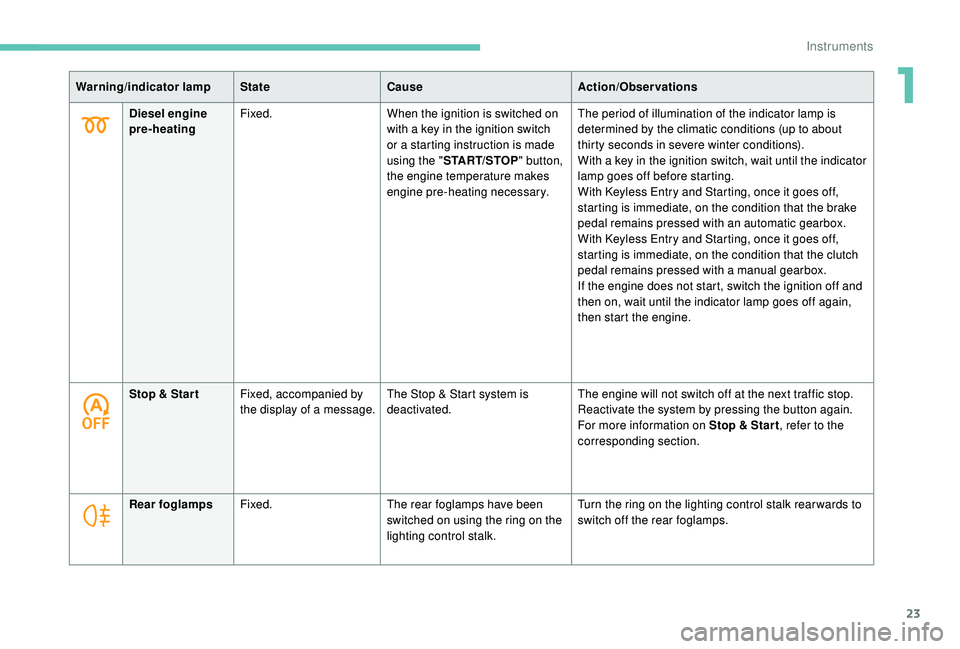
Warning/indicator lampStateCause Action/Observations
Diesel engine
pre-heating Fixed.
When the ignition is switched on
with a
key in the ignition switch
or a
starting instruction is made
using the " START/STOP " button,
the engine temperature makes
engine pre-heating necessary. The period of illumination of the indicator lamp is
determined by the climatic conditions (up to about
thirty seconds in severe winter conditions).
With a
key in the ignition switch, wait until the indicator
lamp goes off before starting.
With
K
eyless Entry and Starting, once it goes off,
starting is immediate, on the condition that the brake
pedal remains pressed with an automatic gearbox.
With
K
eyless Entry and Starting, once it goes off,
starting is immediate, on the condition that the clutch
pedal remains pressed with a
manual gearbox.
If the engine does not start, switch the ignition off and
then on, wait until the indicator lamp goes off again,
then start the engine.
Stop & Star t Fixed, accompanied by
the display of a
message.The Stop & Start system is
deactivated. The engine will not switch off at the next traffic stop.
Reactivate the system by pressing the button again.
For more information on Stop & Star t
, refer to the
corresponding section.
Rear foglamps Fixed. The rear foglamps have been
switched on using the ring on the
lighting control stalk. Turn the ring on the lighting control stalk rear wards to
switch off the rear foglamps.
1
Instruments
Page 26 of 364
24
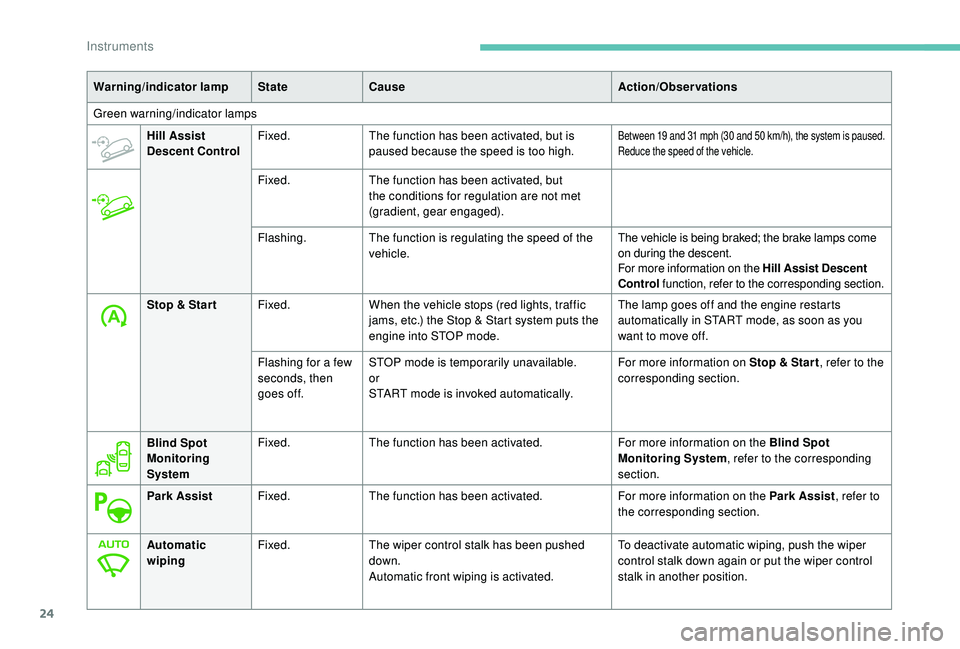
Warning/indicator lampStateCause Action/Observations
Green warning/indicator lamps Hill Assist
Descent Control Fixed.
The function has been activated, but is
paused because the speed is too high.
Between 19 and 31 mph (30 and 50 km/h), the system is paused.
R educe the speed of the vehicle.
Fixed. The function has been activated, but
the conditions for regulation are not met
(gradient, gear engaged).
Flashing. The function is regulating the speed of the
vehicle. The vehicle is being braked; the brake lamps come
on during the descent.
For more information on the Hill Assist Descent
Control
function, refer to the corresponding section.
Stop & Star t Fixed.When the vehicle stops (red lights, traffic
jams, etc.) the Stop & Start system puts the
engine into STOP mode. The lamp goes off and the engine restarts
automatically in START mode, as soon as you
want to move off.
Flashing for a
few
seconds, then
goes off. STOP mode is temporarily unavailable.
or
START mode is invoked automatically. For more information on Stop & Star t
, refer to the
corresponding section.
Blind Spot
Monitoring
System Fixed.
The function has been activated. For more information on the Blind Spot
Monitoring System, refer to the corresponding
section.
Park Assist Fixed.The function has been activated. For more information on the Park Assist, refer to
the corresponding section.
Automatic
wiping Fixed.
The wiper control stalk has been pushed
down.
Automatic front wiping is activated. To deactivate automatic wiping, push the wiper
control stalk down again or put the wiper control
stalk in another position.
Instruments
Page 29 of 364
27
Electric parking brakeContact a PEUGEOT dealer or a qualified
w orkshop as soon as possible.
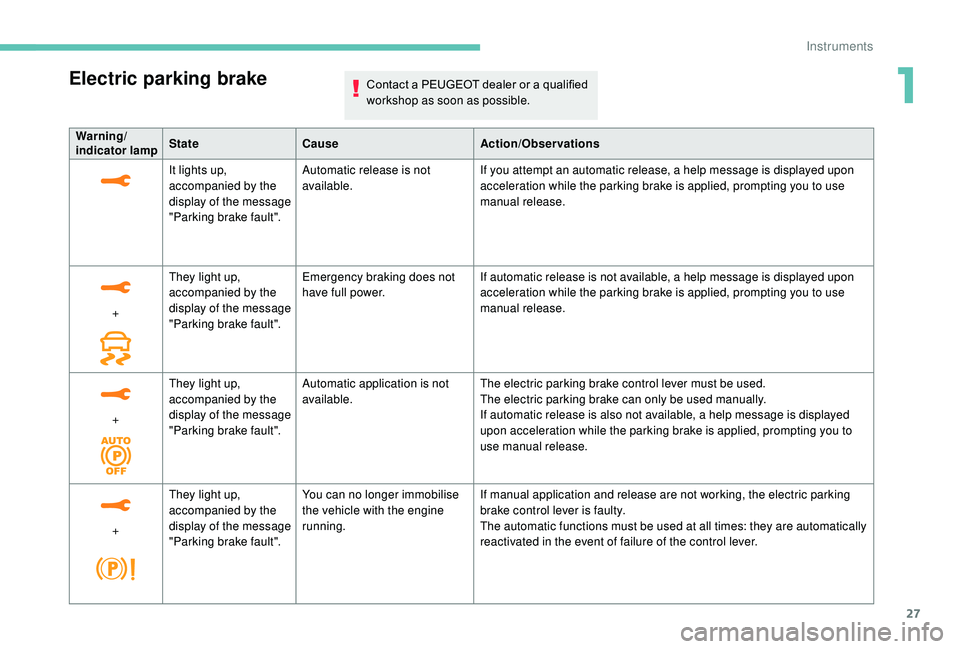
Warning/
indicator lampState Cause Action/Observations
It lights up,
accompanied by the
display of the message
"Parking brake fault". Automatic release is not
available.
If you attempt an automatic release, a help message is displayed upon
acceleration while the parking brake is applied, prompting you to use
manual release.
+ They light up,
accompanied by the
display of the message
"Parking brake fault". Emergency braking does not
have full power.
If automatic release is not available, a help message is displayed upon
acceleration while the parking brake is applied, prompting you to use
manual release.
+ They light up,
accompanied by the
display of the message
"Parking brake fault". Automatic application is not
available.
The electric parking brake control lever must be used.
The electric parking brake can only be used manually.
If automatic release is also not available, a help message is displayed
upon acceleration while the parking brake is applied, prompting you to
use manual release.
+ They light up,
accompanied by the
display of the message
"Parking brake fault". You can no longer immobilise
the vehicle with the engine
running.
If manual application and release are not working, the electric parking
brake control lever is faulty.
The automatic functions must be used at all times: they are automatically
reactivated in the event of failure of the control lever.
1
Instruments
Page 30 of 364
28
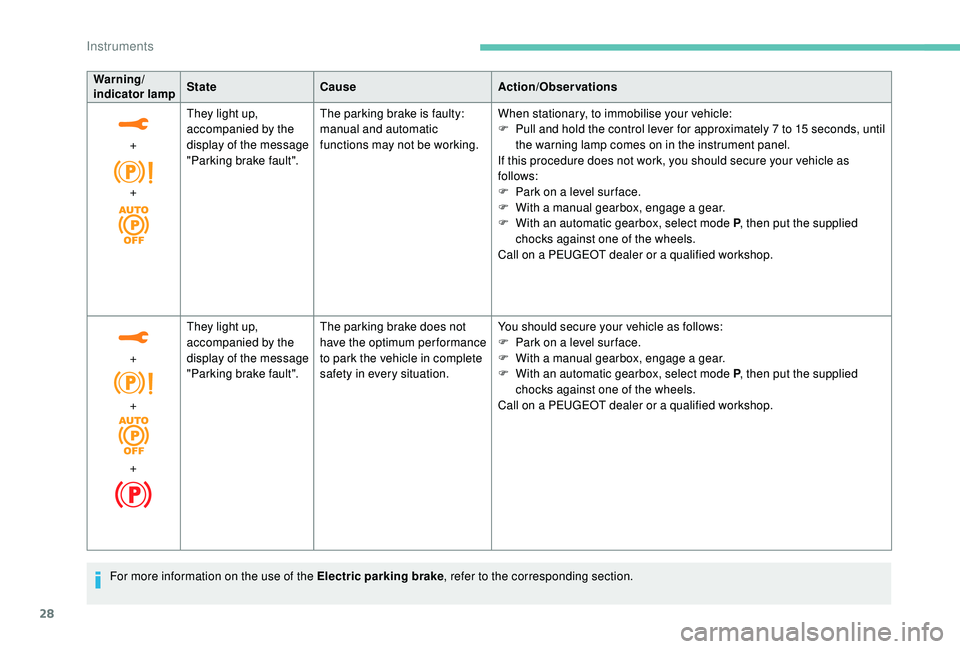
Warning/
indicator lampStateCause Action/Observations
+
+ They light up,
accompanied by the
display of the message
"Parking brake fault".
The parking brake is faulty:
manual and automatic
functions may not be working.
When stationary, to immobilise your vehicle:
F
P
ull and hold the control lever for approximately 7 to 15 seconds, until
the warning lamp comes on in the instrument panel.
If this procedure does not work, you should secure your vehicle as
follows:
F
P
ark on a level sur face.
F
W
ith a
manual gearbox, engage a
gear.
F
W
ith an automatic gearbox, select mode P, then put the supplied
chocks against one of the wheels.
Call on a
PEUGEOT dealer or a qualified workshop.
+
+
+ They light up,
accompanied by the
display of the message
"Parking brake fault".
The parking brake does not
have the optimum performance
to park the vehicle in complete
safety in every situation. You should secure your vehicle as follows:
F
P
ark on a level sur face.
F
W
ith a
manual gearbox, engage a
gear.
F
W
ith an automatic gearbox, select mode P, then put the supplied
chocks against one of the wheels.
Call on a
PEUGEOT dealer or a qualified workshop.
For more information on the use of the Electric parking brake , refer to the corresponding section.
Instruments
Page 42 of 364

40
Touch screen
As a safety measure, the driver must
o nly carry out operations that require
sustained attention with the vehicle
stationary.
Some functions are not accessible when
driving.
General operation
Recommendations
This screen is of the capacitive type.
Use is possible in all temperatures.
Do not use pointed objects on the touch
screen.
Do not touch the touch screen with wet hands.
Use a
soft clean cloth to clean the touch
screen.
•
"
Fatigue Detection System".
For more information on the Fatigue
detection system , refer to the "Driving"
section.
-
"
Driving assistance ":
•
"
Auto. emergency braking".
For more information on the Active
Safety Brake , refer to the "Driving"
section.
•
"
Speed recommendation".
For more information on Speed limit
recognition , refer to the "Driving"
section.
•
"
Tyre inflation".
For more information on Under-
inflation detection and reinitialisation in
particular, refer to the "Driving" section.
Choice of language
This menu allows selection of the language
used by the screen and the instrument panel.
Display configuration
This menu gives access to the following
settings:
-
"
Choice of units",
-
"
Date and time adjustment",
-
"
Display parameters",
-
"Brightness". Adjusting the date and time
F
P
ress the "
7" or " 8" button to display the
"Display configuration" menu, then press
OK.
F
P
ress the "
5" or " 6" button to select the
"Date and time adjustment" button, then
press OK.
F
P
ress the "
7" or " 8" button to select the
setting to modify. Confirm by pressing OK,
then modify the setting and confirm again to
save the modification.
F
A
djust the settings one by one, confirming
with the OK button.
F
P
ress the "
5" or " 6" button, then the OK
button to select the OK box and confirm or
the Back button to cancel.
As a safety measure, the driver must only
carry out operations that require sustained
attention with the vehicle stationary. This system gives access to:
-
t
he permanent display of the time and
the exterior temperature (a blue symbol
appears when there is a risk of ice),
-
t
he heating/air conditioning controls,
-
m
enus for adjusting settings for vehicle
functions and systems,
-
a
udio system and telephone controls and
the display of associated information,
-
t
he display of visual parking aids (visual
parking sensor information, Park Assist,
e t c .),
-
I
nternet ser vices and the display of
associated information.
and, depending on equipment, allows:
-
a
ccess to the navigation system controls
and the display of associated information.
Instruments
Page 57 of 364
55
Version with Keyless Entry and
Starting
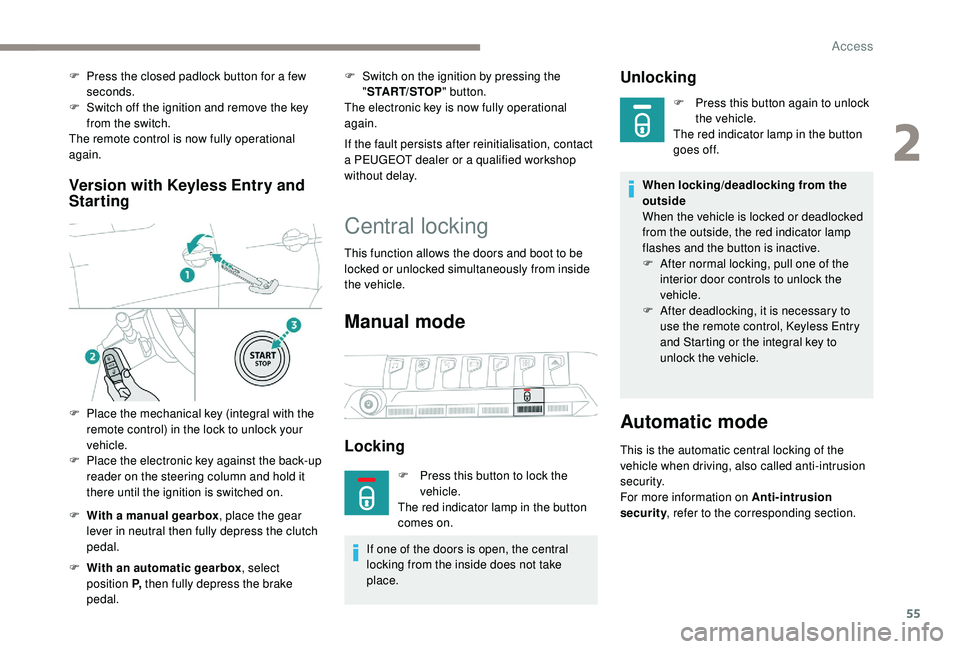
F With a manual gearbox , place the gear
lever in neutral then fully depress the clutch
pedal.
F
W
ith an automatic gearbox , select
position P, then fully depress the brake
pedal. F
S
witch on the ignition by pressing the
" START/STOP " button.
The electronic key is now fully operational
again.
If the fault persists after reinitialisation, contact
a PEUGEOT dealer or a qualified workshop
without delay.
Central locking
This function allows the doors and boot to be
locked or unlocked simultaneously from inside
the vehicle.
Manual mode
Locking
F Press this button to lock the vehicle.
The red indicator lamp in the button
comes on.
If one of the doors is open, the central
locking from the inside does not take
place.
Unlocking
F Press this button again to unlock the vehicle.
The red indicator lamp in the button
goes off.
When locking/deadlocking from the
outside
When the vehicle is locked or deadlocked
from the outside, the red indicator lamp
flashes and the button is inactive.
F
A
fter normal locking, pull one of the
interior door controls to unlock the
vehicle.
F
A
fter deadlocking, it is necessary to
use the remote control,
K
eyless Entry
and Starting or the integral key to
unlock the vehicle.
Automatic mode
This is the automatic central locking of the
vehicle when driving, also called anti-intrusion
s e c u r i t y.
For more information on Anti-intrusion
security , refer to the corresponding section.
F
P
ress the closed padlock button for a
few
seconds.
F
S
witch off the ignition and remove the key
from the switch.
The remote control is now fully operational
again.
F
P
lace the mechanical key (integral with the
remote control) in the lock to unlock your
vehicle.
F
P
lace the electronic key against the back-up
reader on the steering column and hold it
there until the ignition is switched on.
2
Access
Page 127 of 364
125
For technical reasons and, in particular,
to improve the quality of PEUGEOT
CONNECT ser vices to customers, the
manufacturer reser ves the right to carry
out updates to the vehicle's on-board
telematic system.
Electronic stability control
(ESC)
A set of the following Electronic Stability
systems:
-
a
nti-lock braking system (ABS) and
electronic brake force distribution (EBFD),
-
em
ergency braking assistance (EBA),
-
w
heel anti-slip regulation (ASR) or traction
control,
-
d
ynamic stability control (DSC).
-
t
railer stability assist (TSA).
Definitions
Anti-lock braking system (ABS)
and electronic brake force
distribution (EBFD)
The ABS prevents wheel lock in the event of
emergency braking.
The electronic brake force distribution system
manages the braking pressure wheel by wheel.
Emergency braking assistance
In an emergency, this system enables you to
reach the optimum braking pressure more
quickly and therefore reduce the stopping
distance.
It is triggered in relation to the speed at which
the brake pedal is pressed. This is felt by
a reduction in the resistance of the pedal and
an increase in braking efficiency.
Anti-slip regulation (ASR)
This system optimises traction in order to
avoid wheel slip by acting on the brakes of
the driving wheels and on the engine. It also
improves the directional stability of the vehicle
on acceleration.
Dynamic stability control (DSC)
If there is a difference between the path
f ollowed by the vehicle and that required by the
driver, this system monitors each wheel and
automatically acts on the brake of one or more
wheels and on the engine to return the vehicle
to the required path, within the limits of the laws
of physics.
Trailer stability assist (TSA)
These systems improve the stability and
manoeuvrability of your vehicle when braking
and contribute towards improved control in
corners, in particular on poor or slippery road
surfaces. This system allows control of the vehicle to be
retained when towing a
trailer, so as to avoid
the risk of snaking.
Anti-lock braking system
(ABS) and electronic brake
force distribution (EBFD)
The fixed illumination of this warning
lamp signals that there is a fault with
the ABS.
Illumination of this warning lamp,
linked with the STOP and ABS
warning lamps, accompanied by the
display of a
message and an audible
signal, signals that there is a
fault
with the electronic brake force
distribution (EBFD).
The vehicle retains conventional braking. Drive
carefully at moderate speed.
Contact a
PEUGEOT dealer or a qualified
workshop as soon as possible.
You must stop as soon as it is safe to do so.
Call on a
PEUGEOT dealer or a qualified
workshop.
5
Safety
Page 128 of 364
126
Normal operation of the ABS may make
itself felt by slight vibrations of the brake
pedal.
In emergency braking, press ver y
firmly and maintain this pressure.
When changing wheels (tyres and rims),
ensure that these are approved for your
vehicle.
After an impact, have these systems
checked by a PEUGEOT dealer or
a
qualified workshop.
Intelligent traction control
system
Depending on version, your vehicle has
a system to help driving on snow: intelligent
traction control.
This system detects situations of poor sur face
grip that could make it difficult to move off
or make progress on deep fresh snow or
compacted snow.
In these situations, the intelligent traction
control limits the amount of wheel spin to
provide the best traction and trajectory control
for your vehicle. The use of snow tyres is strongly
recommended on sur faces offering low
levels of adhesion.
Anti-slip regulation (ASR)/
Dynamic stability control
(DSC)
Operation
These systems are activated automatically
every time the vehicle is started.
They come into operation in the event of
a
problem with grip or trajectory.
Deactivation
In exceptional conditions (starting a vehicle
w hich is bogged down, stuck in snow, on soft
ground, etc.), it may be advisable to deactivate
the ASR system, so that the wheels can turn
freely and regain grip.
Reactivate the system when grip conditions
allow. Deactivation of the function is done
in the Vehicle/Driving
menu of the
touch screen.
The ASR system no longer acts on the
operation of the engine.
Reactivation
The ASR system is reactivated automatically
every time the ignition is switched back on or
from 31 mph (50 km/h).
Below 31
mph (50 km/h), you can reactivate it
manually:
Reactivation of the function is done
from the Vehicle/Driving menu of
the touch screen.
It is confirmed by the display of a
message.
Operating fault
This is indicated by flashing of this
warning lamp in the instrument
panel. It is confirmed by the display of a
message.
Illumination of this warning lamp,
accompanied by the display of
a message and an audible signal,
indicates a
fault with the system.
Contact a
PEUGEOT dealer or a qualified
workshop to have the systems checked.
Safety