2018 PEUGEOT 5008 ECO mode
[x] Cancel search: ECO modePage 38 of 364
36
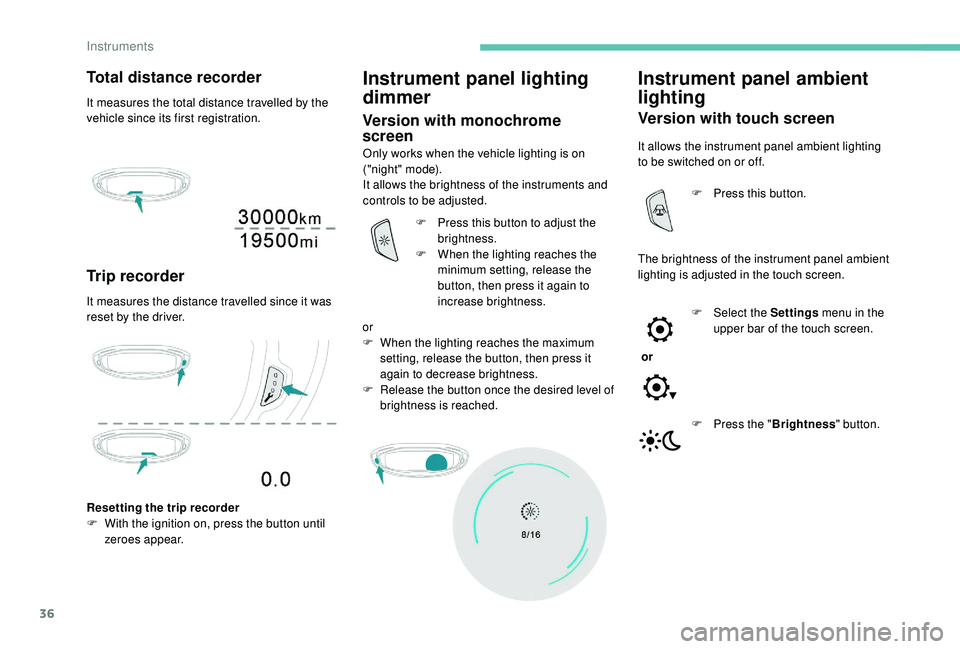
Total distance recorder
It measures the total distance travelled by the
vehicle since its first registration.
Trip recorder
It measures the distance travelled since it was
reset by the driver.
Instrument panel lighting
dimmer
Version with monochrome
screen
Only works when the vehicle lighting is on
("night" mode).
It allows the brightness of the instruments and
controls to be adjusted.
Resetting the trip recorder
F
W
ith the ignition on, press the button until
zeroes appear. F
P
ress this button to adjust the
brightness.
F
W
hen the lighting reaches the
minimum setting, release the
button, then press it again to
increase brightness.
or
F
W
hen the lighting reaches the maximum
setting, release the button, then press it
again to decrease brightness.
F
R
elease the button once the desired level of
brightness is reached.
Instrument panel ambient
lighting
Version with touch screen
It allows the instrument panel ambient lighting
to be switched on or off.
The brightness of the instrument panel ambient
lighting is adjusted in the touch screen. F
P
ress this button.
or F
Sel
ect the Settings menu in the
upper bar of the touch screen.
F
P
ress the "Brightness " button.
Instruments
Page 39 of 364
37
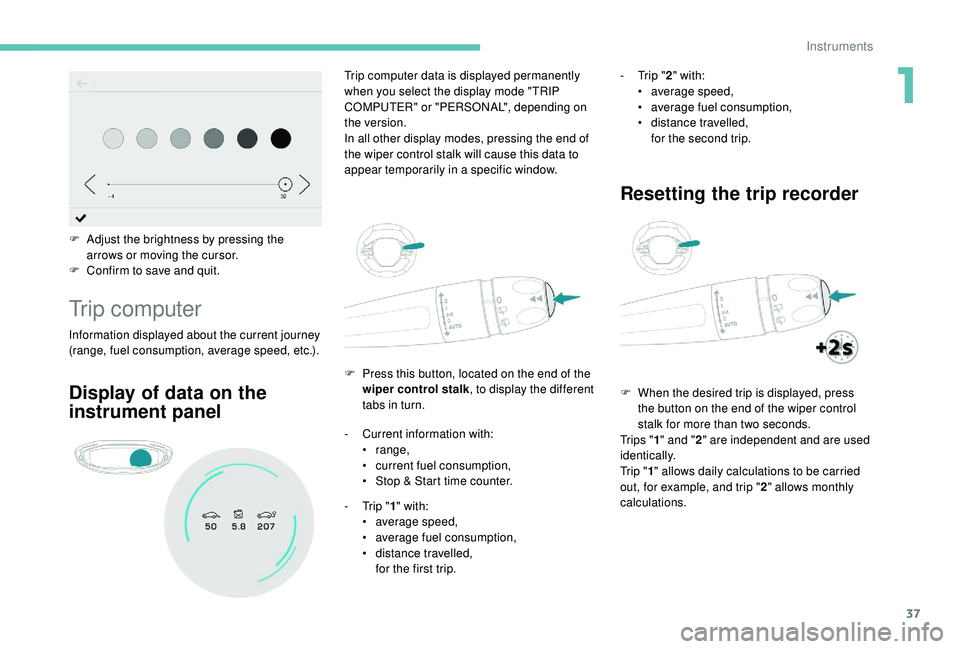
F Adjust the brightness by pressing the arrows or moving the cursor.
F
C
onfirm to save and quit.
Trip computer
Information displayed about the current journey
(range, fuel consumption, average speed, etc.). F
P
ress this button, located on the end of the
wiper control stalk , to display the different
tabs in turn.
Trip computer data is displayed permanently
when you select the display mode "TRIP
COMPUTER" or "PERSONAL", depending on
the version.
In all other display modes, pressing the end of
the wiper control stalk will cause this data to
appear temporarily in a specific window.
Display of data on the
instrument panel
- Current information with:
• range,
•
c
urrent fuel consumption,
•
S
top & Start time counter.
-
T
rip "1" with:
•
a
verage speed,
•
a
verage fuel consumption,
•
d
istance travelled,
for the first trip. -
T
rip "
2" with:
•
a
verage speed,
•
a
verage fuel consumption,
•
d
istance travelled,
for the second trip.
Resetting the trip recorder
F When the desired trip is displayed, press the button on the end of the wiper control
stalk for more than two seconds.
Tr i p s " 1" and " 2" are independent and are used
identically.
Tr i p " 1" allows daily calculations to be carried
out, for example, and trip " 2" allows monthly
calculations.
1
Instruments
Page 40 of 364

38
Monochrome screen C
Displays
Depending on the context, it displays:
- time,
-
date,
-
e
xterior temperature (this flashes if there is
a
risk of ice),
-
v
isual parking sensor information,
-
a
udio source being listened to,
-
t
elephone or hands-free kit information,
-
s
ettings menus for the screen and the
vehicle equipment.
A few definitions…
Range
(miles or km)
If dashes are displayed continuously
while driving in place of the digits, contact
a
PEUGEOT dealer or a qualified workshop.
Current fuel consumption
(mpg or l/100 km or km/l) T his function is only displayed from
19 mph (30 km/h).
This value may vary following a change in
the style of driving or the terrain, resulting
in a significant change in the current fuel
consumption. The distance which can still be
travelled with the fuel remaining
in the tank (at the average fuel
consumption seen over the last few
miles (kilometres) travelled).
When the range falls below 19 miles (30 km),
dashes are displayed.
After filling with at least 5 litres of fuel, the
range is recalculated and is displayed if it
exceeds 62 miles (100 km).
Calculated over the last few
seconds.
Average fuel consumption
(mpg or l/100 km or km/l)
C alculated since the last trip
computer reset.
Average speed
(mph or km/h)
Calculated since the last trip
computer reset.
Distance travelled
(miles or km)Calculated since the last trip
computer reset.
Stop & Start time counter
(minutes/seconds or hours/minutes) If your vehicle is fitted with Stop & Start, a time
counter calculates the time spent in STOP
mode during a
journey.
It resets to zero every time the ignition is
switched on.
Instruments
Page 57 of 364
55
Version with Keyless Entry and
Starting
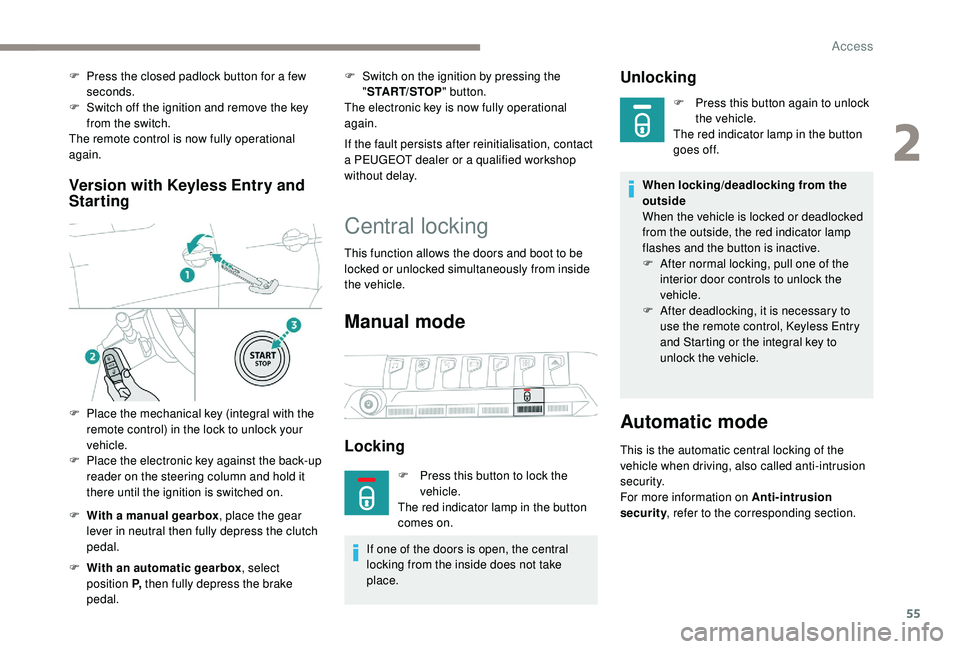
F With a manual gearbox , place the gear
lever in neutral then fully depress the clutch
pedal.
F
W
ith an automatic gearbox , select
position P, then fully depress the brake
pedal. F
S
witch on the ignition by pressing the
" START/STOP " button.
The electronic key is now fully operational
again.
If the fault persists after reinitialisation, contact
a PEUGEOT dealer or a qualified workshop
without delay.
Central locking
This function allows the doors and boot to be
locked or unlocked simultaneously from inside
the vehicle.
Manual mode
Locking
F Press this button to lock the vehicle.
The red indicator lamp in the button
comes on.
If one of the doors is open, the central
locking from the inside does not take
place.
Unlocking
F Press this button again to unlock the vehicle.
The red indicator lamp in the button
goes off.
When locking/deadlocking from the
outside
When the vehicle is locked or deadlocked
from the outside, the red indicator lamp
flashes and the button is inactive.
F
A
fter normal locking, pull one of the
interior door controls to unlock the
vehicle.
F
A
fter deadlocking, it is necessary to
use the remote control,
K
eyless Entry
and Starting or the integral key to
unlock the vehicle.
Automatic mode
This is the automatic central locking of the
vehicle when driving, also called anti-intrusion
s e c u r i t y.
For more information on Anti-intrusion
security , refer to the corresponding section.
F
P
ress the closed padlock button for a
few
seconds.
F
S
witch off the ignition and remove the key
from the switch.
The remote control is now fully operational
again.
F
P
lace the mechanical key (integral with the
remote control) in the lock to unlock your
vehicle.
F
P
lace the electronic key against the back-up
reader on the steering column and hold it
there until the ignition is switched on.
2
Access
Page 67 of 364
65
The control buttons for the sunroof and blind
can be used:
-
w
ith the ignition on, if the state of charge of
the battery is adequate,
-
w
ith the engine running,
-
i
n STOP mode with Stop & Start,
-
d
uring the 45 seconds after switching off
the ignition,
-
d
uring the 45 seconds after locking the
vehicle.
Before operating the sunroof or blind
control buttons, ensure that no object or
person might prevent the movement.
Operating the sunroof
Opening
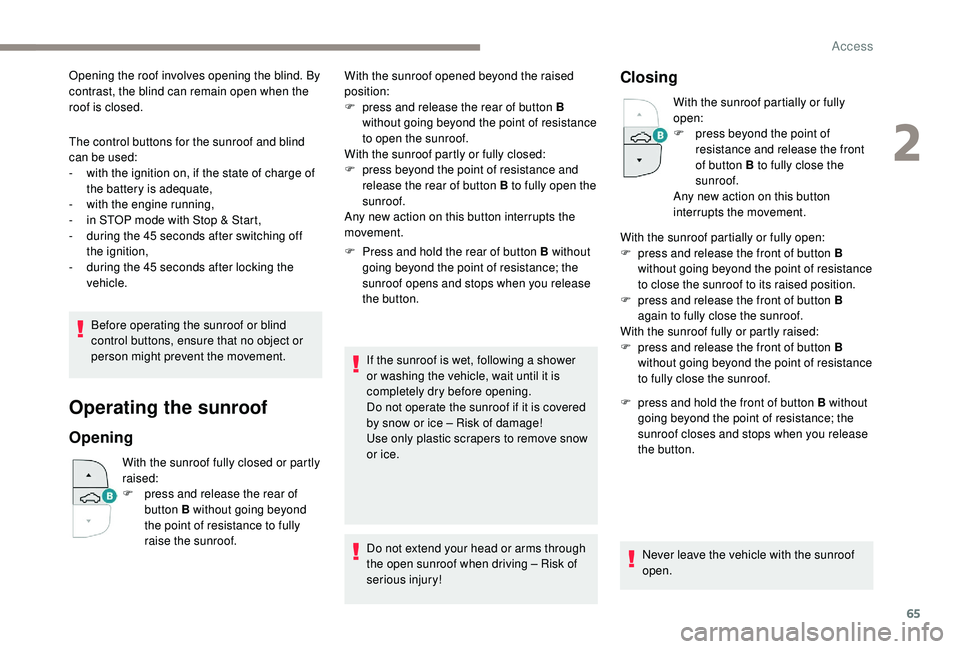
With the sunroof fully closed or partly
raised:
F
p
ress and release the rear of
button B without going beyond
the point of resistance to fully
raise the sunroof. F
P
ress and hold the rear of button B without
going beyond the point of resistance; the
sunroof opens and stops when you release
the button.
If the sunroof is wet, following a shower
or washing the vehicle, wait until it is
completely dry before opening.
Do not operate the sunroof if it is covered
by snow or ice – Risk of damage!
Use only plastic scrapers to remove snow
or ice.
Do not extend your head or arms through
the open sunroof when driving – Risk of
serious injury!
Closing
With the sunroof partially or fully
open:
F
p
ress beyond the point of
resistance and release the front
of button B to fully close the
sunroof.
Any new action on this button
interrupts the movement.
F
p
ress and hold the front of button B without
going beyond the point of resistance; the
sunroof closes and stops when you release
the button.
Never leave the vehicle with the sunroof
open.
With the sunroof opened beyond the raised
position:
F
p
ress and release the rear of button B
without going beyond the point of resistance
to open the sunroof.
With the sunroof partly or fully closed:
F
p
ress beyond the point of resistance and
release the rear of button B to fully open the
sunroof.
Any new action on this button interrupts the
movement. With the sunroof partially or fully open:
F
p
ress and release the front of button B
without going beyond the point of resistance
to close the sunroof to its raised position.
F
p
ress and release the front of button B
again to fully close the sunroof.
With the sunroof fully or partly raised:
F
p
ress and release the front of button B
without going beyond the point of resistance
to fully close the sunroof.
Opening the roof involves opening the blind. By
contrast, the blind can remain open when the
roof is closed.
2
Access
Page 73 of 364
71
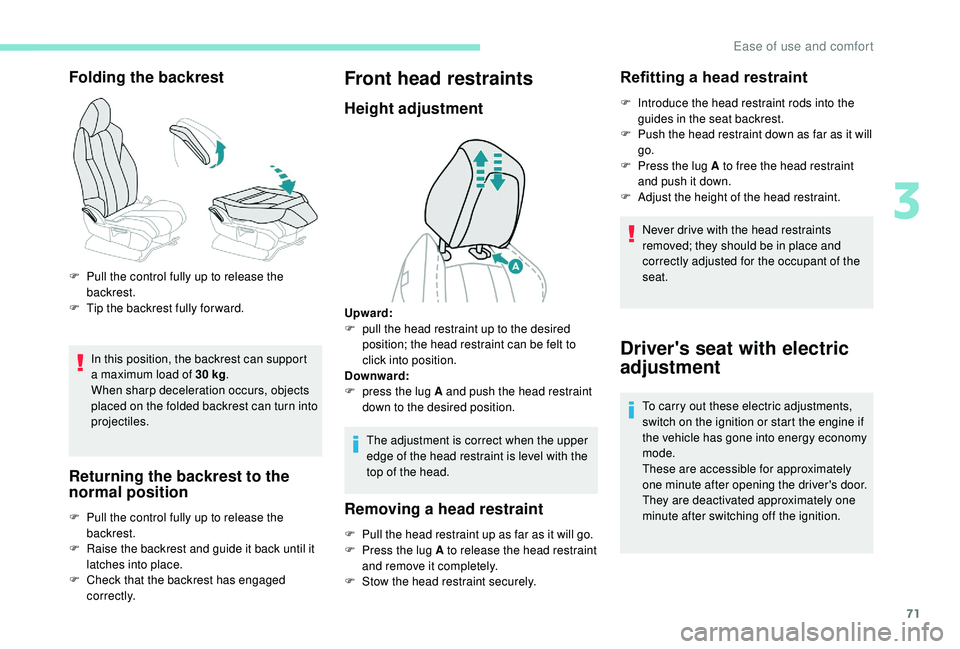
Folding the backrest
In this position, the backrest can support
a maximum load of 30 kg.
When sharp deceleration occurs, objects
placed on the folded backrest can turn into
projectiles.
Returning the backrest to the
normal position
F Pull the control fully up to release the backrest.
F
T
ip the backrest fully for ward.
F
P
ull the control fully up to release the
backrest.
F
R
aise the backrest and guide it back until it
latches into place.
F
C
heck that the backrest has engaged
c o r r e c t l y.
Front head restraints
Height adjustment
The adjustment is correct when the upper
edge of the head restraint is level with the
top of the head.
Removing a head restraint
F Pull the head restraint up as far as it will go.
F P ress the lug A to release the head restraint
and remove it completely.
F
S
tow the head restraint securely.
Refitting a head restraint
F Introduce the head restraint rods into the guides in the seat backrest.
F
P
ush the head restraint down as far as it will
go.
F
P
ress the lug A to free the head restraint
and push it down.
F
A
djust the height of the head restraint.
Never drive with the head restraints
removed; they should be in place and
correctly adjusted for the occupant of the
seat.
Driver's seat with electric
adjustment
To carry out these electric adjustments,
switch on the ignition or start the engine if
the vehicle has gone into energy economy
mode.
These are accessible for approximately
one minute after opening the driver's door.
They are deactivated approximately one
minute after switching off the ignition.
Upward:
F
p
ull the head restraint up to the desired
position; the head restraint can be felt to
click into position.
Downward:
F
p
ress the lug A and push the head restraint
down to the desired position.
3
Ease of use and comfort
Page 78 of 364
76
Manual model
Adjustment
F A djust the mirror so that the glass is
directed correctly in the "day" position.
Day/night position
F
P
ull the lever to change to the "night" anti-
dazzle position.
F
P
ush the lever to change to the normal
"day" position.
Automatic "electrochrome " model
In order to ensure optimum visibility during
your manoeuvres, the mirror lightens
automatically when reverse gear is
engaged.
This system automatically and progressively
changes between day and night use by means
of a
s
ensor measuring the light coming from the
rear of the vehicle.
Second row seats
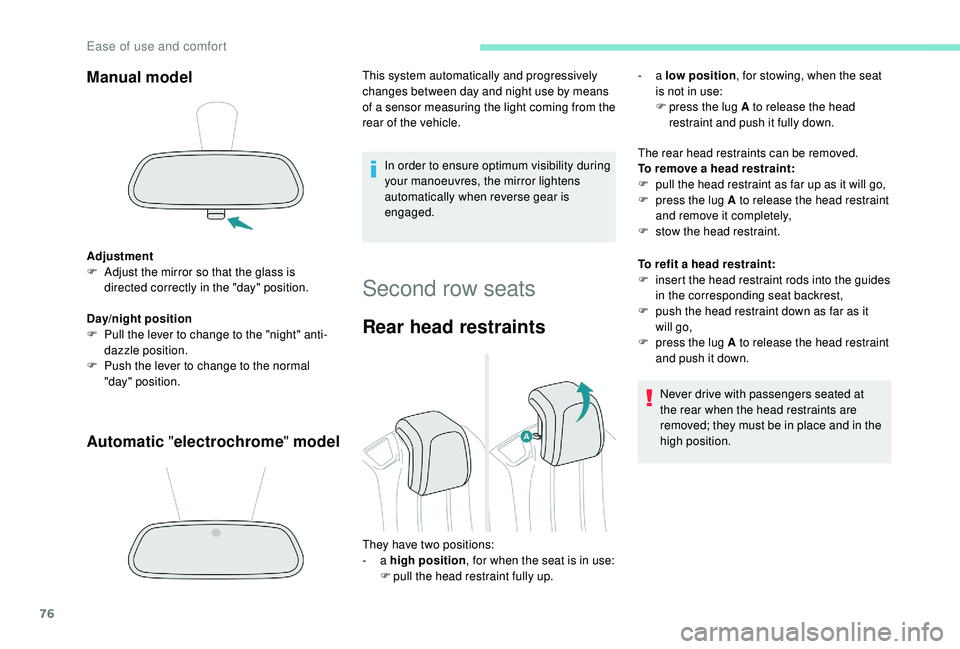
Rear head restraints
The rear head restraints can be removed.
To remove a head restraint:
F
p
ull the head restraint as far up as it will go,
F
p
ress the lug A to release the head restraint
and remove it completely,
F
s
tow the head restraint.
To refit a
head restraint:
F
i
nsert the head restraint rods into the guides
in the corresponding seat backrest,
F
p
ush the head restraint down as far as it
will go,
F
p
ress the lug A to release the head restraint
and push it down.
Never drive with passengers seated at
the rear when the head restraints are
removed; they must be in place and in the
high position.
They have two positions:
-
a high position , for when the seat is in use:
F
p
ull the head restraint fully up. -
a
low position , for stowing, when the seat
is not in use:
F
p
ress the lug A to release the head
restraint and push it fully down.
Ease of use and comfort
Page 91 of 364

89
Automatic dual-zone air
conditioning
Press the Air conditioning menu
button to display the system controls
page. 1.
Automatic visibility programme.
2. Recirculation of interior air.
3. Temperature adjustment on the left side.
4. Temperature adjustment on the right side.
5. Air distribution adjustment.
6. Air flow adjustment.
7. System of f.
8. Air conditioning On/Off.
9. Automatic comfort programme On/Off.
10. Maximum air conditioning.
11. Access to the secondary page.
12 . Selection of settings for the automatic
comfort programme (Soft/Normal/Fast).
13. "AQS" (Air Quality System) function (with
pollution sensor).
14 . Mono-zone/Dual-zone.
15. "REAR" function (depending on version).
The air conditioning system operates with
the engine running, but the ventilation and its
controls are available with the ignition on.
Operation of the air conditioning and regulation
of temperature, air flow and air distribution in
the passenger compartment are automatic.
Temperature adjustment Automatic comfort
programme
F Press this button to activate or
deactivate the automatic mode
of the air conditioning system.
The driver and front passenger can each
choose their own temperature setting. The value indicated corresponds to a
level of
comfort and not to a precise temperature.
F
P
ress one of these buttons to
increase the value.
F
P
ress one of these buttons to
decrease the value.
It is recommended that you avoid a difference
of more than 3°C in the settings for left and
right.
When the indicator lamp in the button is on, the
air conditioning system operates automatically:
the system manages the temperature, air
flow and air distribution in the passenger
compartment in an optimum way according to
the comfort level you have selected.
It is possible to modulate the intensity of the
automatic comfort programme by choosing one
of three settings offered in the secondary page,
accessible from the " OPTIONS" button.
3
Ease of use and comfort