2018 PEUGEOT 108 fuse
[x] Cancel search: fusePage 121 of 180
119
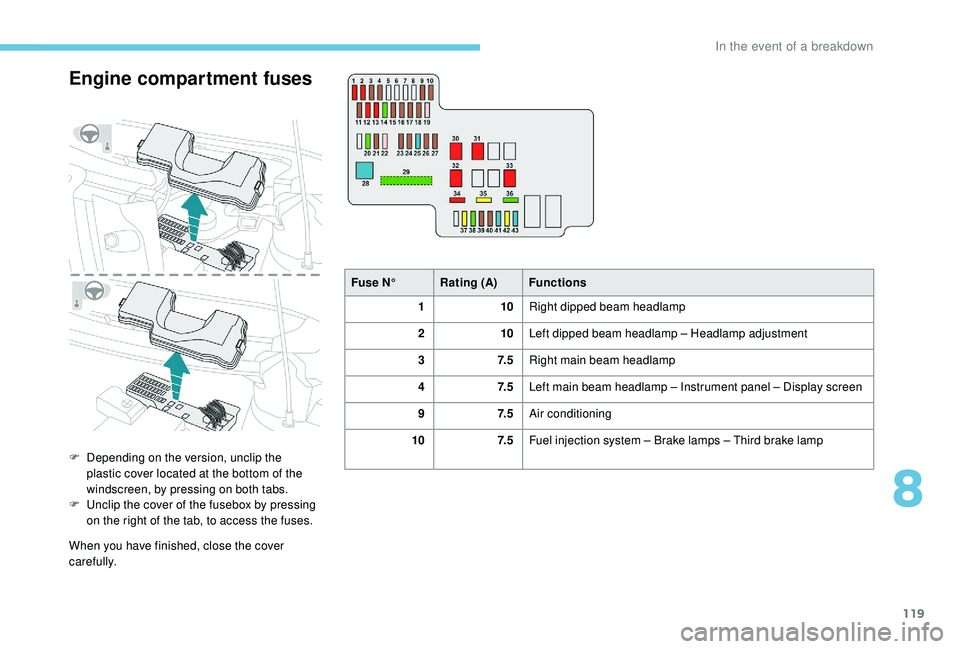
Engine compartment fuses
F Depending on the version, unclip the plastic cover located at the bottom of the
windscreen, by pressing on both tabs.
F
U
nclip the cover of the fusebox by pressing
on the right of the tab, to access the fuses.
When you have finished, close the cover
carefully. Fuse N°
Rating (A) Functions
1 10Right dipped beam headlamp
2 10Left dipped beam headlamp – Headlamp adjustment
3 7. 5Right main beam headlamp
4 7. 5Left main beam headlamp – Instrument panel – Display screen
9 7. 5Air conditioning
10 7. 5Fuel injection system – Brake lamps – Third brake lamp
8
In the event of a breakdown
Page 122 of 180
120
Fuse N°Rating (A) Functions
11 5Courtesy lamp – Boot lighting
12 10Flashing indicators – Hazard warning lamps – Instrument panel – Display screen
13 10Horn
14 30Supply units
15 7. 5ETG gearbox
16 7. 5Fuel injection system
17 7. 5"Keyless Entry and Starting" system
18 7. 5Battery
19 25Fuel injection system – Fan assembly
20 30Starter
21 7. 5Steering lock
22 25Front lamps
23 7. 5Fuel injection system
24 7. 5Fuel injection system – Starter – ETG Gearbox – Stop & Start
25 15Audio system – "Keyless Entry and Starting" system
26 7. 5Instrument panel – Display screen
27 7. 5VSC system
28 60Fusebox, passenger compartment
In the event of a breakdown
Page 123 of 180
121
Fuse N°Rating (A) Functions
29 125* Demisting of the rear screen and door mirrors – Heated seats
– Electric roof – ABS system – VSC system – Fan assembly –
Front foglamps – LED Daytime running lamps
30 50ETG gearbox
40 Stop & Start
31 50Power steering
32 30Fan assembly
40
33 50ABS System – VSC system
37 20Demisting of the rear screen and door mirrors
38 30ABS System – VSC system
39 7. 5Front foglamps – Instrument panel – Display screen
40 7. 5LED daytime running lamps
41 15Right heated seat
42 20Electric fabric roof
43 15Left heated seat
*
T
his fuse must be replaced only by
a
PEUGEOT dealer or by a qualified
workshop.12 V battery
Procedure for starting the engine using another
battery or charging a
discharged battery.
General points
Lead-acid starter batteries
Batteries contain harmful substances
such as sulphuric acid and lead.
They must be disposed of in
accordance with regulations and must
not, in any circumstances, be discarded
with household waste.
Take used remote control batteries and
vehicle batteries to a
special collection
point.
Protect your eyes and face before
handling the battery.
All operations on the battery must be
carried out in a
well ventilated area and
away from naked flames and sources of
sparks, so as to avoid the risk of explosion
or fire.
Wash your hands afterwards.
8
In the event of a breakdown
Page 135 of 180
5
MODE
MODE
First steps
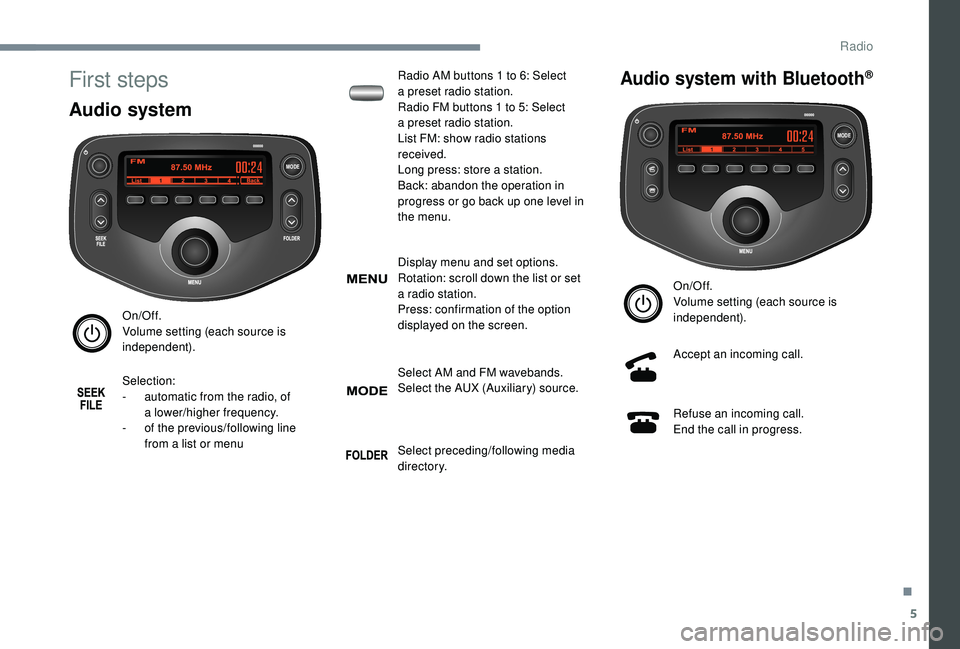
Audio system
On/Off.
Volume setting (each source is
independent).
Selection:
-
a
utomatic from the radio, of
a
lower/higher frequency.
-
o
f the previous/following line
from a
list or menu Radio AM buttons 1
to 6: Select
a
preset radio station.
Radio FM buttons 1 to 5: Select
a
preset radio station.
List FM: show radio stations
received.
Long press: store a station.
Back: abandon the operation in
progress or go back up one level in
the menu.
Display menu and set options.
Rotation: scroll down the list or set
a
radio station.
Press: confirmation of the option
displayed on the screen.
Select AM and FM wavebands.
Select the AUX (Auxiliary) source.
Select preceding/following media
di r e c to r y.
Audio system with Bluetooth®
On/Off.
Volume setting (each source is
independent).
Accept an incoming call.
Refuse an incoming call.
End the call in progress.
.
Radio
Page 136 of 180
6
Display menu and set options.
Rotation: scroll down the list or set
a
radio station.
Press: confirmation of the option
displayed on the screen.
Select AM, FM and DAB wavebands
(depending on equipment).
Select BTA (Bluetooth Audio) and
AUX (Auxiliary) source
Selection:
-
a
utomatic from the radio, of
a
higher frequency.
-
o
f the next line of a list or menu.
-
o
f the next media directory. Selection:
-
a
utomatic from the radio, of
a
lower frequency.
-
o
f the previous line of a list or
menu.
-
o
f the previous media directory.
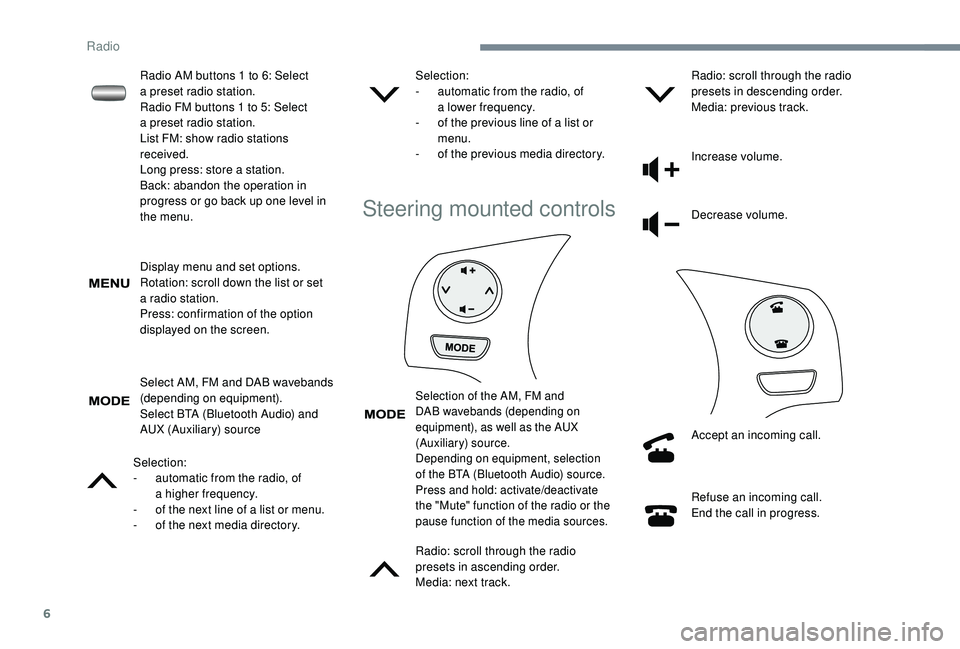
Steering mounted controls
Selection of the AM, FM and
DAB wavebands (depending on
equipment), as well as the AUX
(Auxiliary) source.
Depending on equipment, selection
of the BTA (Bluetooth Audio) source.
Press and hold: activate/deactivate
the "Mute" function of the radio or the
pause function of the media sources.
Radio: scroll through the radio
presets in ascending order.
Media: next track.Radio: scroll through the radio
presets in descending order.
Media: previous track.
Increase volume.
Decrease volume.
Accept an incoming call.
Refuse an incoming call.
End the call in progress.
Radio AM buttons 1
to 6: Select
a
preset radio station.
Radio FM buttons 1
to 5: Select
a
preset radio station.
List FM: show radio stations
received.
Long press: store a
station.
Back: abandon the operation in
progress or go back up one level in
the menu.
Radio
Page 141 of 180
11
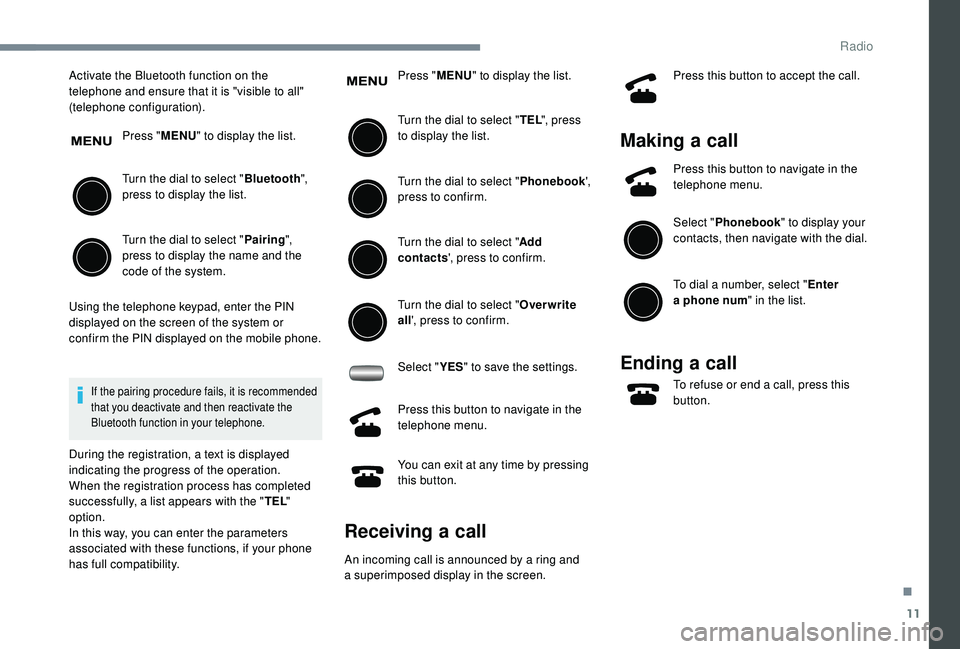
Activate the Bluetooth function on the
telephone and ensure that it is "visible to all"
(telephone configuration).Press "MENU" to display the list.
Turn the dial to select " Bluetooth",
press to display the list.
Turn the dial to select " Pairing",
press to display the name and the
code of the system.
Using the telephone keypad, enter the PIN
displayed on the screen of the system or
confirm the PIN displayed on the mobile phone.
If the pairing procedure fails, it is recommended
that you deactivate and then reactivate the
Bluetooth function in your telephone.
During the registration, a text is displayed
indicating the progress of the operation.
When the registration process has completed
successfully, a list appears with the " TEL"
option.
In this way, you can enter the parameters
associated with these functions, if your phone
has full compatibility. Press "
MENU" to display the list.
Turn the dial to select " TEL", press
to display the list.
Turn the dial to select " Phonebook',
press to confirm.
Turn the dial to select " Add
contacts ', press to confirm.
Turn the dial to select " Overwrite
all ', press to confirm.
Select " YES" to save the settings.
Press this button to navigate in the
telephone menu.
You can exit at any time by pressing
this button.
Receiving a call
An incoming call is announced by a ring and
a superimposed display in the screen. Press this button to accept the call.
Making a
call
Press this button to navigate in the
telephone menu.
Select "Phonebook " to display your
contacts, then navigate with the dial.
To dial a
number, select " Enter
a
phone num " in the list.
Ending a call
To refuse or end a call, press this
b utton.
.
Radio
Page 151 of 180

3
Steering mounted controls
Radio: scroll through the radio
presets in ascending order.
Media: next track.
Radio: scroll through the radio
presets in descending order.
Media: previous track.
Increase volume.
Decrease volume.Refuse an incoming call.
End the call in progress.
Outside of a call: press to return to
the radio screen or to the clock if the
radio is not on.
Change the multimedia source.
Press and hold: activate/deactivate
the "Mute" function of the radio or
the pause function of the media
sources.
Accept an incoming call.
Outside of a call: press to go into the
list of contacts, a second press to
scroll through the history.
Menus
Audio source
Select an audio source, a radio
station, view photos or videos.
Telephone
Connect a mobile phone via
Bl uetooth®.
.
7-inch touch screen tablet
Page 172 of 180
170
ABS .................................................................52
Accessories .................................................... 51
Access to rear seats (3 -door)
.........................33
Active City Brake
...............................
..15, 8 6 - 89
Adjusting seat
........................................... 32, 34
Adjusting the air distribution
...........................37
Adjusting the air flow
....................................... 37
A
djusting the temperature
........................37- 4 0
Adjusting the time
..................................... 20 -21
Advice on care and maintenance
...................99
Advice on driving
............................................ 72
Airbags
...............................
...........14, 56 -58, 60
Airbags, curtain
............................................... 58
Airbags, front ....................................... 57- 5 8 , 61
Airbags, lateral
.......................................... 57- 5 8
Air conditioning
........................................... 6, 38
Air conditioning, automatic
.......................38-40
Air conditioning, manual
........................... 3
7, 4 0
Air intake
................................................... 38-40
Air vents
.......................................................... 36
Anti-lock braking system (ABS)
......................52
Apple CarPlay connection
................................4
Audible warning
.............................................. 51
A
udio streaming (Bluetooth)
................10, 10 -11
Audio system
..................................................... 1Boot
.................................................................27
Brake discs
....................................................103
Brake lamps
...............................
...................113
Brakes
.....................................................11, 1 0 3
Bulbs (changing)
.....................................111 -112
Battery
............................................ 102, 121-123
Battery, charging
........................................... 123
Battery, electronic key
....................................26
Battery, remote control
...................................23
Bluetooth (hands-free)
......................... 1
0 , 11 -12
Bluetooth (telephone)
........................... 1
0 , 11 -12
Bonnet
....................................................... 98-99 Control stalk, lighting
......................................46
Control stalk, wipers
.......................................49
C
ourtesy lamp .................................................41
Cup holder
.......................................................42
DAB (Digital Audio Broadcasting) – Digital radio
..................8, 8 -9
Daytime running lamps
...................................46
Deactivating the passenger airbag
.....5 7, 6 0 - 6 1
Defrosting
.......................................36-37, 40-41
Defrosting, front
..............................................40
Demisting
..................................................36-40
Demisting, front
............................................... 40
D
emisting, rear
................................................41
Demisting, rear screen
...................................41
Dimensions
..............................
.....................126
Dipstick
................
...................................10 0 -101
Direction indicators
..........................4 8 , 112 -113
Display screen
................................................18
Display screen, instrument panel
.................8-9
Door pockets
...............................
....................42
Doors
.........................................................26-27
Driving economically ......................................... 6
DSC
.................................................................14
Dynamic stability control (DSC)
.....13 -14, 52- 5 3
Cable, audio
......................................................9
Cable, Jack
.......................................................9
Capacity, fuel tank
..........................................96
CD
...................................................................10
CD, MP3
..........................................................10
Central locking
.......................................... 2
2-24
Changing a
bulb
......................................111
-112
Changing a
fuse
..............................11
4 -11 6 , 11 9
Changing a
wheel
...................1
0 7-1 0 8 , 11 0 -111
Changing a
wiper blade
..................................50
C
hanging the electronic key battery
...............26
C
hanging the remote control battery
..............23
Checking the levels
.................................9 9 -10 2
Checking tyre pressures (using the kit) ...104, 10 6
Checks
............................................. 99, 102-103
Checks, routine
...................................... 102-103
Children
.......................................... 66-68, 70-71
Children (safety)
.............................................. 71
Child seats
................. 5
5 -56, 59 - 60, 64- 65, 70
Child seats, conventional
................................ 64
Child seats, i-Size
........................................... 70
Child seats, ISOFIX
.................................. 66 -70
Closing the boot
.............................................. 27
Closing the doors
............................................ 24
Clutch
...................................................... 12, 102
Connection, MirrorLink
..................................... 5
Control, emergency boot release
................... 28
Control, heated seats
...................................... 33
A
B
DC
Alphabetical index