2018 NISSAN VERSA engine
[x] Cancel search: enginePage 149 of 354
∙If the engine coolant temperature
gauge indicates engine coolant tem-
perature over the normal range, turn
the air conditioner off. For additional
information, refer to “If your vehicle
overheats” in the “In case of emer-
gency ” section of this manual.
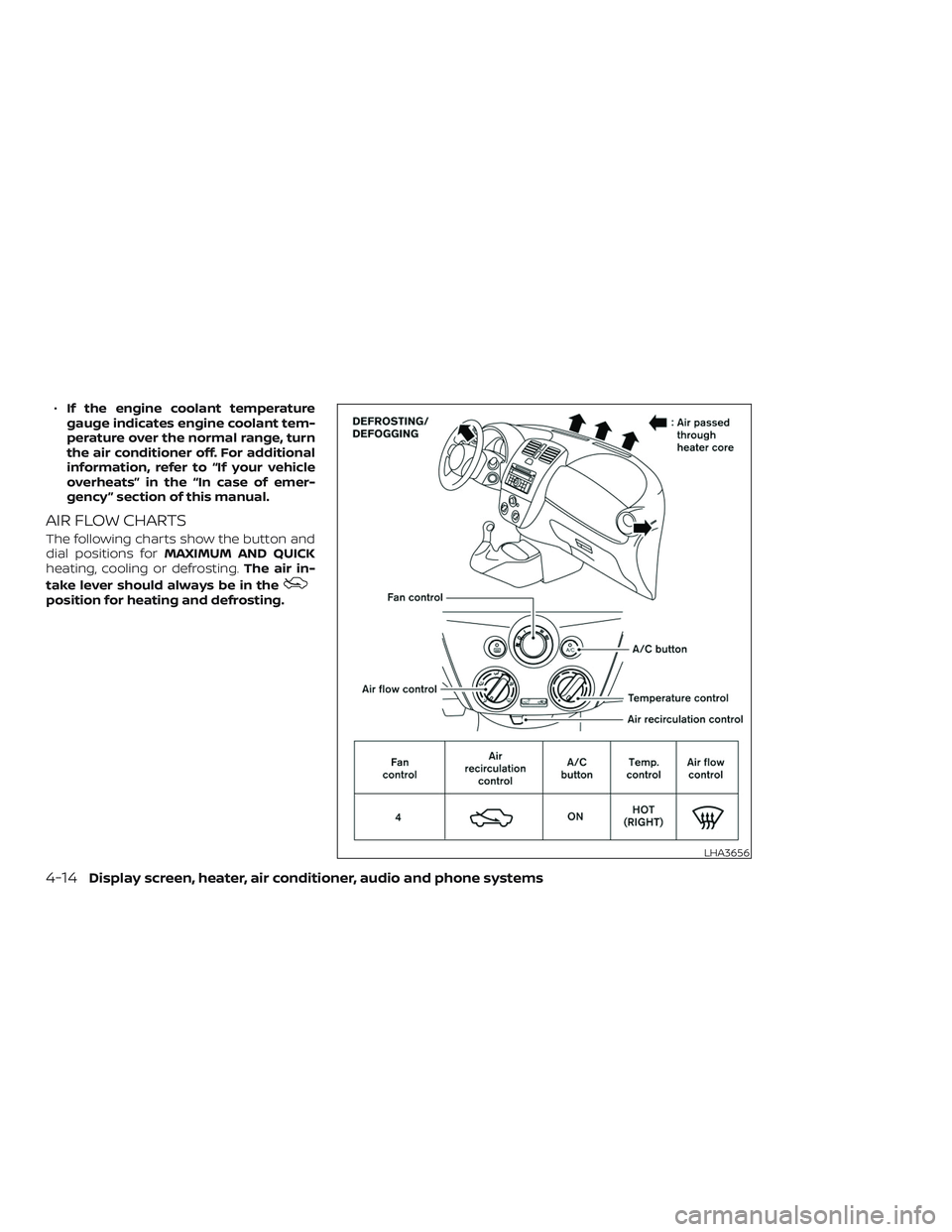
AIR FLOW CHARTS
The following charts show the button and
dial positions forMAXIMUM AND QUICK
heating, cooling or defrosting.The air in-
take lever should always be in the
position for heating and defrosting.
LHA3656
4-14Display screen, heater, air conditioner, audio and phone systems
Page 152 of 354
The air conditioner system in your NISSAN
vehicle is charged with a refrigerant de-
signed with the environment in mind.
This refrigerant does not harm the
earth’s ozone layer.
Special charging equipment and lubricant
is required when servicing your NISSAN air
conditioner. Using improper refrigerants or
lubricants will cause severe damage to
your air conditioner system. For additional
information, refer to “Air conditioner sys-
tem refrigerant and oil recommendations”
in the “Technical and consumer informa-
tion” section of this manual.
It is recommended that you visit a NISSAN
dealer to service your “environmentally
friendly ” air conditioning system.
WARNING
The air conditioner system contains re-
frigerant under high pressure. To avoid
personal injury, any air conditioner ser-
vice should be done only by an experi-
enced technician with proper
equipment.
RADIO
Place the ignition switch in the ACC or ON
position and press the ON•OFF or
(power) button to turn the radio on. If you
listen to the radio with the engine not run-
ning, the ignition switch should be placed in
the ACC position.
Radio reception is affected by station sig-
nal strength, distance from radio transmit-
ter, buildings, bridges, mountains and other
external influences. Intermittent changes
in reception quality normally are caused by
these external influences.
Using a cellular phone in or near the ve-
hicle may influence radio reception qual-
ity.
Radio reception
Your NISSAN radio system is equipped with
state-of-the-art electronic circuits to en-
hance radio reception. These circuits are
designed to extend reception range, and to
enhance the quality of that reception.
However, there are some general charac-
teristics of both FM and AM radio signals
that can affect radio reception quality in a
moving vehicle, even when the finest
equipment is used. These characteristics
are completely normal in a given receptionarea and do not indicate any malfunction
in your NISSAN radio system.
Reception conditions will constantly
change because of vehicle movement.
Buildings, terrain, signal distance and inter-
ference from other vehicles can work
against ideal reception. Described below
are some of the factors that can affect your
radio reception.
Some cellular phones or other devices may
cause interference or a buzzing noise to
come from the audio system speakers.
Storing the device in a different location
may reduce or eliminate the noise.
FM RADIO RECEPTION
Range: FM range is normally limited to 25 –
30 mi (40 – 48 km), with monaural (single
channel) FM having slightly more range
than stereo FM. External influences may
sometimes interfere with FM station re-
ception even if the FM station is within 25
mi (40 km). The strength of the FM signal is
directly related to the distance between
the transmitter and receiver. FM signals fol-
low a line-of-sight path, exhibiting many of
the same characteristics as light. For ex-
ample, they will reflect off objects.
SERVICING AIR CONDITIONER AUDIO SYSTEM
Display screen, heater, air conditioner, audio and phone systems4-17
Page 162 of 354

FM/AM RADIO WITH COMPACT
DISC (CD) PLAYER (Type A) (if so
equipped)
For additional information, refer to “Audio
operation precautions” in this section.1.
CD eject button
2. CD insert slot
3. SCAN button
4. DISP (display) button5. RPT (repeat )/ RDM (random) button
6. TUNE/FOLDER knob / MENU button
7. AUX IN jack
8. AUX button
9. CD button
10. AM button
11. FM button
12. VOL (volume) control knob
/
(power) button
13. Station select (1 - 6) buttons
14. TRACK
button
15.
SEEK button
Audio main operation
VOL (volume) control knob/(power)
button
Place the ignition switch in the ACC or ON
position, then press the
(power) but-
ton. If you listen to the radio with the engine
not running, place the ignition in the ACC
position. The mode (radio or CD) that was
playing immediately before the system
was turned off resumes playing.
LHA8804
Display screen, heater, air conditioner, audio and phone systems4-27
Page 167 of 354
Audio main operation
(power) button/ VOL (volume)
control knob
Place the ignition switch in the ACC or ON
position, then press the
(power) but-
ton. If you listen to the radio with the engine
not running, place the ignition in the ACC
position. The mode (radio or CD) that was
playing immediately before the system
was turned off resumes playing.
When no CD is loaded, the radio comes on.
Pressing the
(power) button again
turns the system off.
Turn the VOL (volume) control knob to the
right to increase volume or to the lef t to
decrease volume.AUX button
The AUX IN audio input jack accepts any
standard analog audio input such as from
a portable cassette tape/CD player, MP3
player or a laptop computer. Press the AUX
button to play a compatible device
plugged into the AUX IN jack. Pressing the
AUX button repeatedly will cycle through
available input sources:
AUX line in→USB (if so equipped)→AUX
line in
NOTE:
Sources only shown in menu if they are
connected and/or detected.DISP (display) button
Pressing the DISP button displays song in-
formation, if available, such as artist, album,
track name, folder name, and source.
NOTE:
The DISP button only provides this infor-
mation in non-radio modes.
4-32Display screen, heater, air conditioner, audio and phone systems
Page 184 of 354
USB (if so equipped):
∙ Push the
switch for less than
1.5 seconds to increase or decrease the
track number.
∙ Push the
switch for more than
1.5 seconds to increase or decrease the
folder number.
Bluetooth®Audio (if so equipped):
∙ Push the
switch for less than
1.5 seconds to skip ahead or back to the
next song.
∙ Push the
switch for more than
1.5 seconds to reverse or fast forward
the current song.
ANTENNA
The antenna cannot be shortened, but can
be removed. When you need to remove the
antenna, turn the antenna rod counter-
clockwise.
To install the antenna rod, turn the antenna
rod clockwise and hand tighten.
CAUTION
∙ Always properly tighten the antenna
rod during installation or the antenna
rod may break during vehicle
operation.
∙ Be sure that the antenna is removed
before the vehicle enters an auto-
matic car wash.
∙ Be sure to fold down the antenna be-
fore the vehicle enters a garage with a
low ceiling.When installing a CB, ham radio or car
phone in your vehicle, be sure to observe
the following precautions; otherwise, the
new equipment may adversely affect the
engine control system and other electronic
parts.
WARNING
∙ A cellular phone should not be used
for any purpose while driving so full
attention may be given to vehicle op-
eration. Some jurisdictions prohibit
the use of cellular phones while
driving.
∙ If you must make a call while your ve-
hicle is in motion, the hands free cellu-
lar phone operational mode (if so
equipped) is highly recommended.
Exercise extreme caution at all times
so full attention may be given to ve-
hicle operation.
∙ If you are unable to devote full atten-
tion to vehicle operation while talking
on the phone, pull off the road to a
safe location and stop your vehicle.
CAR PHONE OR CB RADIO
Display screen, heater, air conditioner, audio and phone systems4-49
Page 185 of 354
CAUTION
∙ Keep the antenna as far away as pos-
sible from the electronic control
modules.
∙ Keep the antenna wire more than 8 in
(20 cm) away from the electronic con-
trol system harnesses. Do not route
the antenna wire next to any harness.
∙ Adjust the antenna standing-wave
ratio as recommended by the
manufacturer.
∙ Connect the ground wire from the CB
radio chassis to the body.
∙ For additional information, it is rec-
ommended that you visit a NISSAN
dealer for this service.
WARNING
∙ Use a phone af ter stopping your ve-
hicle in a safe location. If you have to
use a phone while driving, exercise ex-
treme caution at all times so full at-
tention may be given to vehicle
operation.
∙ If you are unable to devote full atten-
tion to vehicle operation while talking
on the phone, pull off the road to a
safe location and stop your vehicle.
CAUTION
To avoid discharging the vehicle bat-
tery, use a phone af ter starting the
engine.
BLUETOOTH® HANDS-FREE PHONE
SYSTEM (Type A) (if so equipped)
4-50Display screen, heater, air conditioner, audio and phone systems
Page 197 of 354

VOICE ADAPTATION (VA) MODE
Voice Adaptation (VA) allows up to two out-
of-dialect users to train the system to im-
prove recognition accuracy. By repeating a
number of commands, the users can cre-
ate a voice model of their own voice that is
stored in the system. The system is ca-
pable of storing a different Voice Adapta-
tion model for each connected phone.
Training procedure
The procedure for training a voice is as fol-
lows.
1. Position the vehicle in a reasonably
quiet outdoor location.
2. Sit in the driver’s seat with the engine
running, the parking brake on, and the
transmission in P (Park).
3. Press and hold the
button for
more than 5 seconds.
4. The system announces: “Press the
PHONE/SEND
button for the
hands-free phone system to enter the
voice adaptation mode or press the
PHONE/END
button to select a
different language.”5. Press the
button.
For additional information on selecting
a different language, refer to “Choosing
a language” in this section.
6. Voice memory A or memory B is se-
lected automatically. If both memory
locations are already in use, the system
will prompt you to overwrite one. Fol-
low the instructions provided by the
system.
7. When preparation is complete and you
are ready to begin, press the
but-
ton.
8. The VA mode will be explained. Follow
the instructions provided by the sys-
tem.
9. When training is finished, the system
will tell you an adequate number of
phrases have been recorded.
10. The system will announce that voice
adaptation has been completed and
the system is ready.
The VA mode will stop if:
∙ The
button is pressed for more
than 5 seconds in VA mode.∙ The vehicle begins moving during VA
mode.
∙ The ignition switch is placed in the OFF
or LOCK position.
Training phrases
During the Voice Adaptation mode, the sys-
tem instructs the trainer to say the follow-
ing phrases. The system will prompt you for
each phrase.
∙ phonebook transfer entry
∙ dial three oh four two nine
∙ delete call back number
∙ incoming
∙ transfer entry
∙ eight pause nine three two pause seven
∙ delete all entries
∙ call seven two four zero nine
∙ phonebook delete entry
∙ next entry
∙ dial star two one seven oh
∙yes
∙no
4-62Display screen, heater, air conditioner, audio and phone systems
Page 200 of 354
WARNING
∙ Use a phone af ter stopping your ve-
hicle in a safe location. If you have to
use a phone while driving, exercise ex-
treme caution at all times so full at-
tention may be given to vehicle
operation.
∙ If you are unable to devote full atten-
tion to vehicle operation while talking
on the phone, pull off the road to a
safe location and stop your vehicle.
CAUTION
To avoid discharging the vehicle bat-
tery, use a phone af ter starting the
engine.
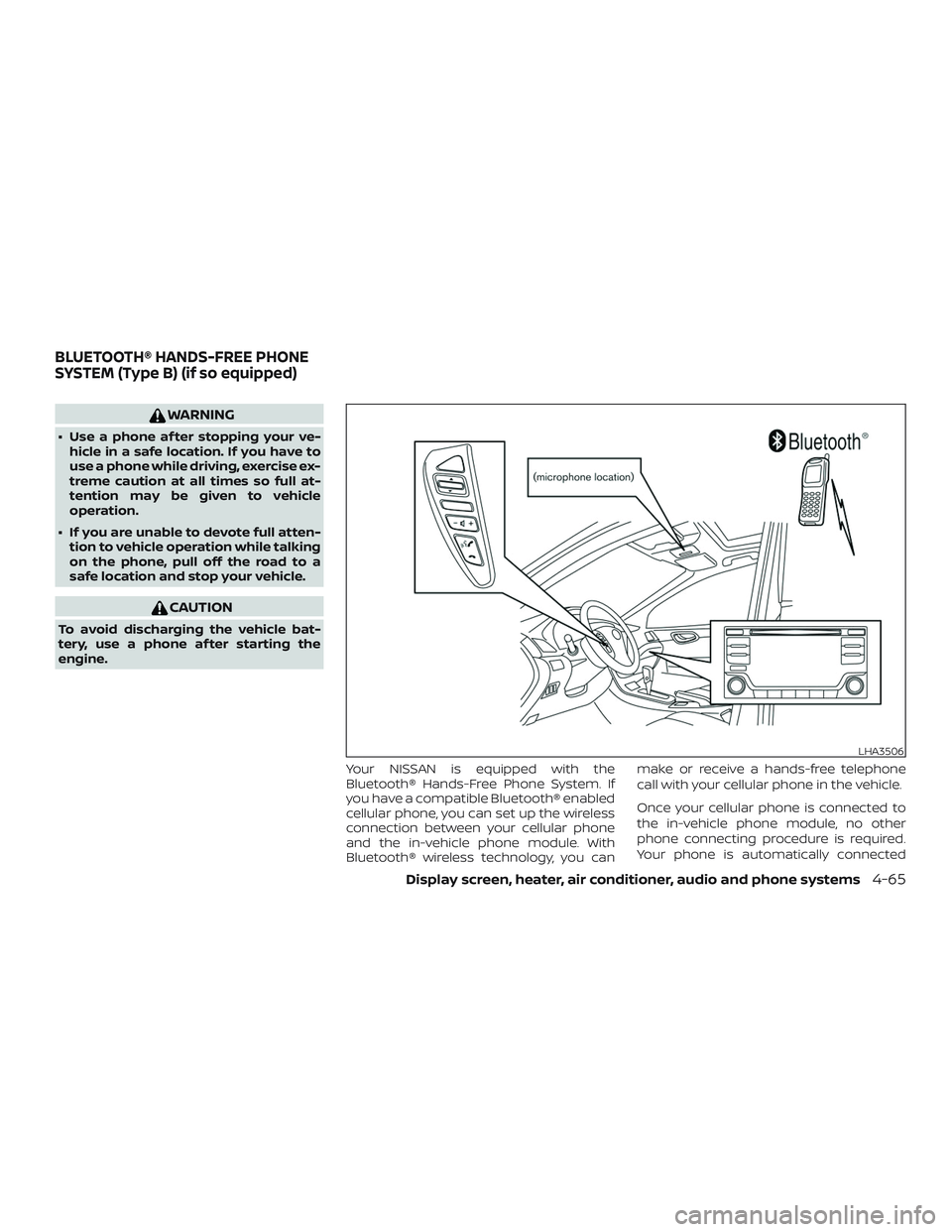
Your NISSAN is equipped with the
Bluetooth® Hands-Free Phone System. If
you have a compatible Bluetooth® enabled
cellular phone, you can set up the wireless
connection between your cellular phone
and the in-vehicle phone module. With
Bluetooth® wireless technology, you canmake or receive a hands-free telephone
call with your cellular phone in the vehicle.
Once your cellular phone is connected to
the in-vehicle phone module, no other
phone connecting procedure is required.
Your phone is automatically connected
LHA3506
BLUETOOTH® HANDS-FREE PHONE
SYSTEM (Type B) (if so equipped)
Display screen, heater, air conditioner, audio and phone systems4-65