Page 301 of 547

Driving aid selection in vehicle infor-
mation displayEngine started
ProPILOT Assist switch pressed to the
ON position and the icon illuminates ProPILOT Assist set (Blue Cruise indi-
cator illuminated)
Lane Departure
Warning Intelligent Lane
Intervention Lane Departure
WarningIntelligent Lane
InterventionLane Departure
WarningIntelligent Lane
InterventionLane Departure
WarningIntelligent Lane
Intervention
No lane warnings No lane interven- tionNo lane warnings No lane interven-
tionLane warnings
activeLane intervention
active
x No lane warnings No lane interven-
tionLane warnings
activeLane intervention
activeLane warnings
activeLane intervention
active
x Lane warnings
activeNo lane interven-
tionLane warnings
activeNo lane interven-
tionLane warnings
activeLane intervention
active
x x Lane warnings
activeNo lane interven-
tionLane warnings
activeLane intervention
activeLane warnings
activeLane intervention
active
HOW TO ENABLE/DISABLE THE I-LI
SYSTEM
Perform the following steps to enable or
disable the I-LI system.
1. Press the
button until “Settings”
displays in the vehicle information dis-
play. Use the
button to select
“Driver Assistance.” Then press the OK
button.
2. Select “Driving Aids” and press the OK button.
3. To set the I-LI system to on or off, use the
buttons to navigate in the
menu and use the OK button to select
or change an item: ∙ Select “Lane” and press the OK but-
ton.
– To turn on the warning system, use the OK button to check the box for
“Prevention (LDP).”
NOTE:
Turning on the ProPILOT Assist system (if
so equipped) will turn on the I-LI system
at the same time. For additional infor-
mation, refer to “ProPILOT Assist” in this
section.
I-LI SYSTEM LIMITATIONS
WARNING
Listed below are the system limitations
for the I-LI system. Failure to follow the
warnings and instructions for proper
use of the I-LI system could result in
serious injury or death.
∙ The I-LI system may activate if you change lanes without first activating
your turn signal or, for example, if a
construction zone directs traffic to
cross an existing lane marker. If this
occurs you may need to apply correc-
tive steering to complete your lane
change.
Starting and driving5-41
Page 467 of 547
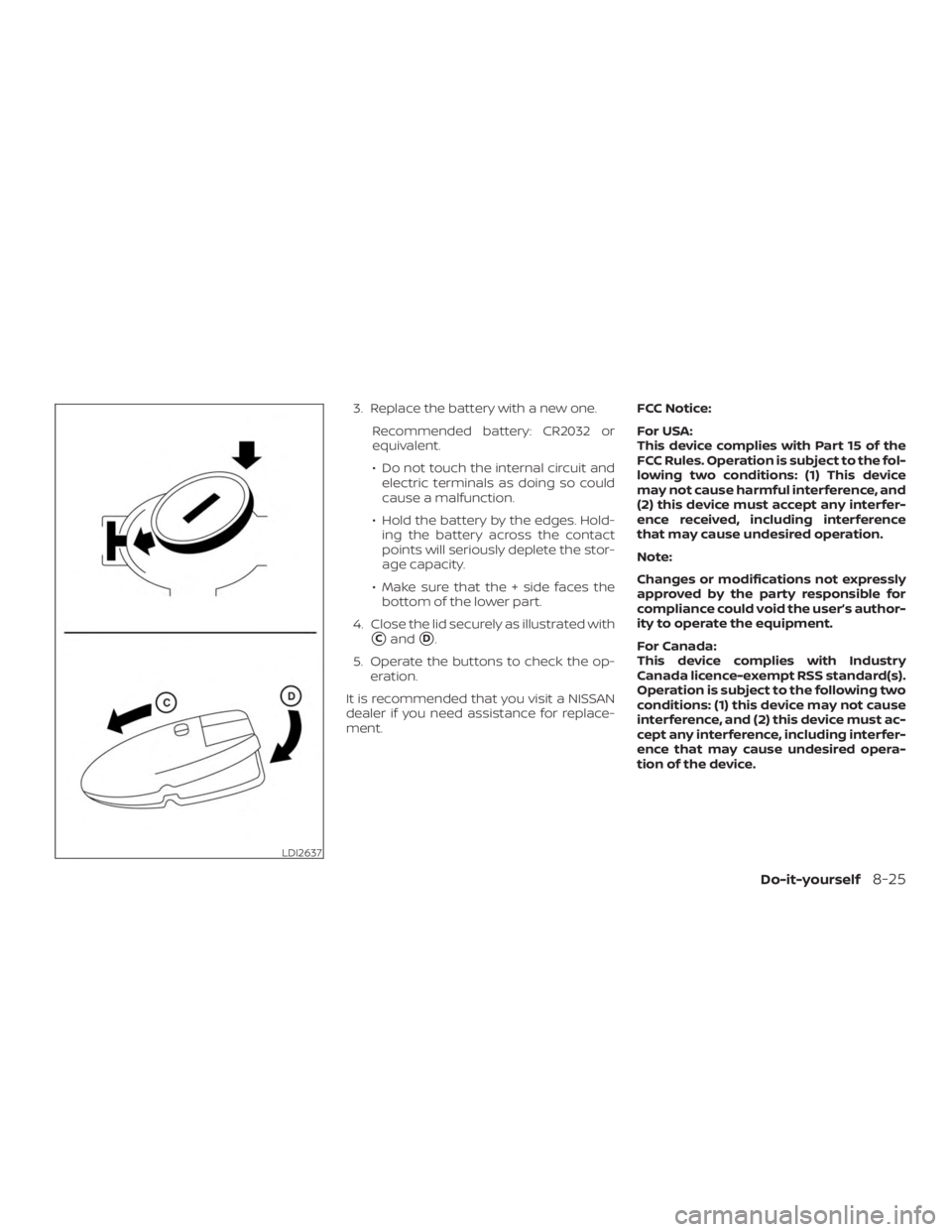
3. Replace the battery with a new one.Recommended battery: CR2032 or
equivalent.
∙ Do not touch the internal circuit andelectric terminals as doing so could
cause a malfunction.
∙ Hold the battery by the edges. Hold- ing the battery across the contact
points will seriously deplete the stor-
age capacity.
∙ Make sure that the + side faces the bottom of the lower part.
4. Close the lid securely as illustrated with
�Cand�D.
5. Operate the buttons to check the op- eration.
It is recommended that you visit a NISSAN
dealer if you need assistance for replace-
ment. FCC Notice:
For USA:
This device complies with Part 15 of the
FCC Rules. Operation is subject to the fol-
lowing two conditions: (1) This device
may not cause harmful interference, and
(2) this device must accept any interfer-
ence received, including interference
that may cause undesired operation.
Note:
Changes or modifications not expressly
approved by the party responsible for
compliance could void the user’s author-
ity to operate the equipment.
For Canada:
This device complies with Industry
Canada licence-exempt RSS standard(s).
Operation is subject to the following two
conditions: (1) this device may not cause
interference, and (2) this device must ac-
cept any interference, including interfer-
ence that may cause undesired opera-
tion of the device.
LDI2637
Do-it-yourself8-25
Page 468 of 547
NISSAN JACKKNIFE KEY (if so
equipped)
Replace the battery in the jackknife key as
follows:
�1Hold jackknife key button side up. In-
sert a small screwdriver into the slit of
the corner and twist it to separate the
upper part from the lower part. Use a
cloth to protect the casing.
�2Remove old battery.
�3Replace the battery with a new one.
Recommended battery: CR2032 or
equivalent.
∙ Do not touch the internal circuit and electric terminals as doing so could
cause a malfunction.
∙ Hold the battery by the edges. Hold- ing the battery across the contact
points will seriously deplete the stor-
age capacity.
�4Close lid securely as illustrated.
Operate the buttons to check the opera-
tion.
It is recommended that you visit a NISSAN
dealer if you need assistance for replace-
ment.
NOTE:
Changes or modifications not expressly
approved by the party responsible for
compliance could void the user’s author-
ity to operate the equipment.
LDI2354
8-26Do-it-yourself
Page:
< prev 1-8 9-16 17-24
